All Features
Network Observability
Network Management System
Routers, switches, firewalls, wireless access points: on most networks, each of them reports back to one central server called a network management system (NMS). Motadata ObserveOps puts that server's work in a single console, where a fault alert and the latest configuration backup are only a click apart.
What Is a Network Management System (NMS)?
NMS, written out in full, is a network management system. With it, administrators keep watch over servers, routers, switches and the rest of a computer network, and step in when something needs fixing. Usually they work from one central computer.
Whether it covers one site or a cluster of networks spread over several locations, an NMS keeps track of overall network health. To do that, it needs an inventory of the connected network devices plus a steady feed of data on what each one is doing. Some platforms stretch that oversight to cloud services and to the links tying them back to the data center.
The main job of an NMS is keeping the network up and performing the way users expect. For network administrators, it becomes the one place to handle:
Fault management
Performance management
Configuration management
Security management
Reporting and analysis
NMS Full Form in Networking
In networking, NMS carries two expansions. Most vendors and IT teams use it for network management system, the full software platform that runs every management function. In SNMP documents, though, you'll also see NMS used for the network management station, which is simply the host running the manager software.
Network Management System vs Network Management Station
They overlap enough to confuse people, and the comparison below sorts them out.
Aspect | Network management system | Network management station |
What it is | The software platform that discovers, monitors, configures and reports on the network | The computer or server where the manager software runs |
Scope | Covers fault, configuration, accounting, performance and security functions, plus dashboards and reports | Hosts the SNMP manager that polls device agents and receives traps |
Where you see the term | Vendor product pages, IT operations planning, buying guides | SNMP standards and protocol documentation |
Today, one NMS often spans several management stations. Larger networks add remote collectors at branch sites as well.
How Does a Network Management System Work?
An NMS works in six stages, starting with finding devices and ending with reporting on them.
You decide where that server runs. On premises works, and so does a private or public cloud. Status checks happen in a web console either way.
Discovery: The NMS scans IP ranges, subnets or CIDR blocks with stored credentials and builds an inventory of every reachable device.
Data collection: It polls each device on a set interval, most often over SNMP, and uses SSH, PowerShell or HTTP where SNMP does not expose the data.
Event intake: Between polls, devices push SNMP traps, syslog messages and flow records such as NetFlow to the NMS.
Analysis: The platform compares each metric with a fixed threshold or a learned baseline and correlates related events.
Alerting and action: Breaches raise alerts by severity, notify the right people and can trigger scripts or service desk tickets.
Visualization and reporting: Dashboards, topology maps and scheduled reports show current health and long-term trends.
Through all six stages it keeps an eye on packet loss, latency and bandwidth use. Per-device CPU and memory get recorded as well. A few things can't wait for the next poll, though, like a sudden traffic spike or a run of firewall log entries, so the NMS watches those live.
Network Management System Architecture
Look inside almost any NMS and you'll find the SNMP manager and agent model. Five parts make it work:
Component | Role in the NMS |
SNMP manager | Software on the management station that polls devices and receives traps |
SNMP agent | Process on each router, switch or server that answers the manager's requests |
MIB (Management Information Base) | Structured definitions of every object a device can report, such as interface counters |
OID (Object Identifier) | Unique dotted number that identifies one object in the MIB tree, such as inbound traffic on a single interface |
SNMP trap | Unsolicited message a device sends to the manager when an event occurs, such as a link going down |
Polling happens on UDP port 161 by default. SNMP traps travel in the opposite direction, from agent to manager, on UDP port 162. Plenty of tools also send an ICMP ping first, just to check the device is reachable before they ask it for SNMP data.
Bigger deployments go further. Remote collectors handle polling at branch sites and pass results back to the central server. History lands in a database, which is what trend analysis and reports draw on.
What Are the Core Functions of an NMS?
Ask a network engineer about the core functions of an NMS, and you'll probably hear five letters: FCAPS. The ISO came up with the model, and the ITU-T later folded it into its M.3400 recommendation. Fault, configuration, accounting, performance and security management, in that order.
1. Fault Management
When an interface goes down or a router stops answering, fault management is what notices. It records the event and helps you work back to where the trouble started. In ObserveOps, availability polling and threshold alerts do much of this work, with SNMP monitoring catching traps as they arrive.
2. Configuration Management
Devices get set up once, then changed again and again. Configuration management keeps a record of both. In practice, configuration management for networks comes down to automated backups and version comparison, with a fast way back to a known-good file.
3. Accounting Management
Who's using the bandwidth, and on what? Accounting management answers that per user, per application or per department. ObserveOps gets that answer from flow analytics, reading NetFlow, sFlow, jFlow and IPFIX records.
4. Performance Management
Performance management looks at the longer picture. Latency, packet loss, throughput and utilization all shift over weeks and months, and device health drifts too. Using network performance monitoring, ObserveOps works out what normal looks like for each metric and alerts you when a reading wanders off it.
5. Security Management
Someone has to decide who gets into the devices and who gets into the NMS itself. Security management controls both and logs who changed what. ObserveOps relies on role-based access control and LDAP integration here, while its compliance audit trails hold the history.
Why Do IT Teams Need a Network Management System?
Past a few hundred devices, manual checks stop keeping up, which is usually when IT teams bring in a network management system. Going device by device stops being practical. A single shared view, updated continuously, takes its place.
Centralized network control: One platform manages and monitors devices, configurations and services, so administrators control and troubleshoot components from a single interface.
Proactive issue detection: Continuous monitoring of devices, interfaces and services raises alerts on faults, performance degradation or security threats before they spread to users.
Improved network performance: Tracking bandwidth utilization, latency and response times reveals bottlenecks and shows where capacity needs to grow.
Faster troubleshooting: Historical data, performance trends and correlated events point to the root cause, which shortens network downtime.
Stronger security posture: Monitoring flags unauthorized access attempts and abnormal traffic patterns, so administrators can respond to security incidents promptly.
Better resource planning: Usage and capacity trends expose underused and overloaded network segments and inform future upgrades.
Reporting and analysis: Performance reports, trend analysis and usage statistics support capacity planning, audits and compliance reviews.
Without an NMS, the cost shows up in the business. A shaky component tends to get worse before anyone notices. Misconfigurations leave security gaps, and when an outage hits, administrators lose time pulling information together from separate tools.
Frequent or lengthy outages also hold back revenue and production. Service-level commitments to customers start slipping too.
How Motadata ObserveOps Works as Your NMS
Motadata ObserveOps takes on the NMS role for networks with devices from many vendors. Metrics, logs, flows and traps arrive in one platform, where AI-driven baselines, alerting and automation get to work.
1. Discover and Provision Devices Automatically
ObserveOps finds devices through two profiles. One, the credential profile, holds the login details. The other, a discovery profile, sets which IP ranges, subnets or CIDR blocks get scanned.
Anything found shows up on a provisioning screen. From that screen you confirm each device as a monitor, setting its polling interval and alert thresholds. ObserveOps can log in over SNMP v1, v2c or v3, SSH, PowerShell, HTTP/HTTPS or JDBC, with custom metric plugins for anything the templates miss.
2. Monitor Metrics, Traffic and Logs in One View
After provisioning, metric data keeps flowing in from each device. You can read it right next to that device's flow and log data, which helps when a switch, router or server in the data center slows down and you need to see packet loss or CPU and memory use.
For traffic, ObserveOps reads NetFlow, sFlow, jFlow and IPFIX. That lets you split bandwidth by user or application, down to individual conversations.
3. Catch Events Between Polls with Traps and Syslog
Polls run on a schedule, so an event that happens between two of them needs a passive channel to get noticed. Point your devices' traps at UDP port 1620 for v1 and v2c, or UDP port 1630 for v3, since those are the ports the ObserveOps listener uses.
In the trap explorer, you can filter incoming traps or send them on to another destination. Device log messages join in through syslog monitoring.
4. Map Network Topology and Dependencies
Using CDP and LLDP, automated discovery works out which device connects to which, and ObserveOps draws Layer 2 and Layer 3 maps from it. As the network changes, so do the maps. That's what keeps dynamic topology mapping accurate, and nobody has to redraw anything.
Next comes the Dependency Mapper, which notes parent and child links between devices. So if an upstream router goes down, you see one root cause in place of dozens of alerts that look unrelated.
5. Back Up and Manage Device Configurations
Across thousands of devices, servers and machines, configurations drift. With Motadata NCCM, each backup happens automatically and every version is kept. So when a change fails, or a breach or data loss strikes, a known-good configuration is ready to restore.
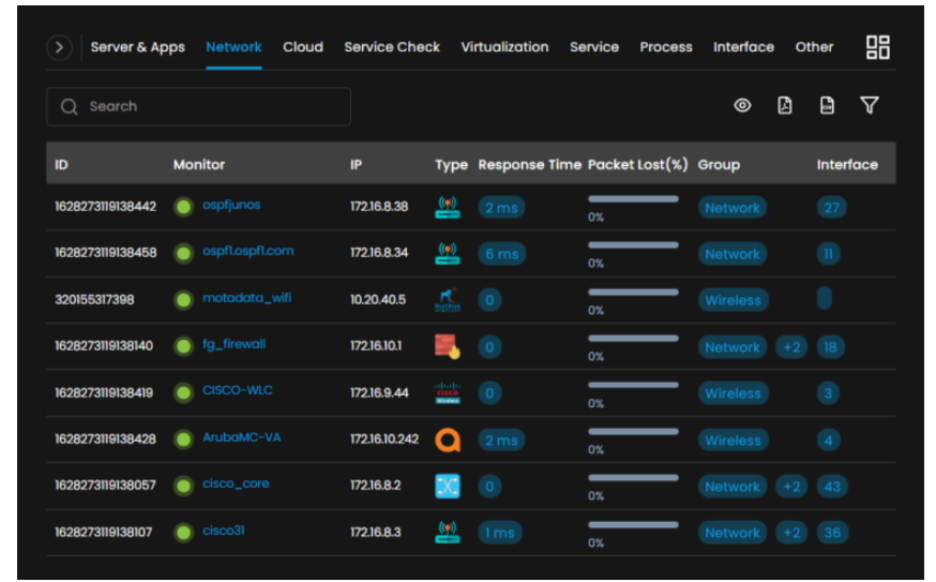
Syslog messages or scheduled comparisons reveal when something changed, and one bulk operation can push an update to many devices. Routine maintenance can go to scripts, templates or runbooks. Below, the Device Monitoring screen shows how monitored devices appear in ObserveOps.
6. Detect Anomalies and Forecast Capacity
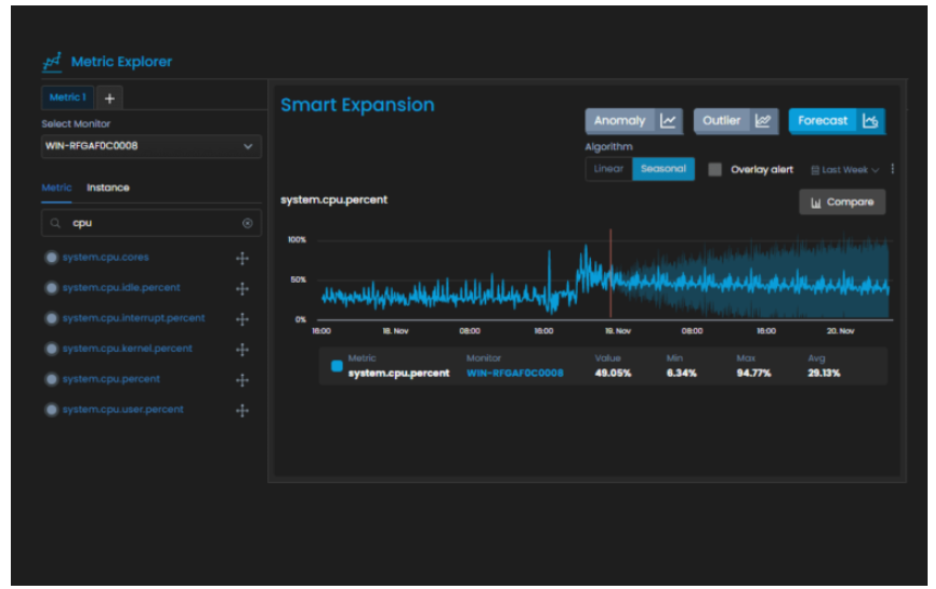
Some downtime comes with running a network. What you can control is how fast it gets spotted and fixed. To help, ObserveOps AI policies learn a baseline per metric and use anomaly detection to flag drift; related events get grouped by alert correlation, which makes the cause easier to find.
Forecasts come from the same history. With those, you can plan capacity and get ahead of likely issues before users feel them. The forecast view below plots expected metric behavior from historical data.
7. Alert, Automate and Open Tickets
A basic policy fires when a value crosses its fixed threshold. Each alert is then sorted by severity, host and monitor group. Routine responses are covered by built-in runbooks, with ping and traceroute runbooks attached to new monitors wherever ping checks are on.
Alerts can travel further than the NMS. Through the ServiceOps integration, each one can open an incident in Motadata ServiceOps by itself, carrying the metric, log and topology context with it.
8. Build Dashboards and Reports
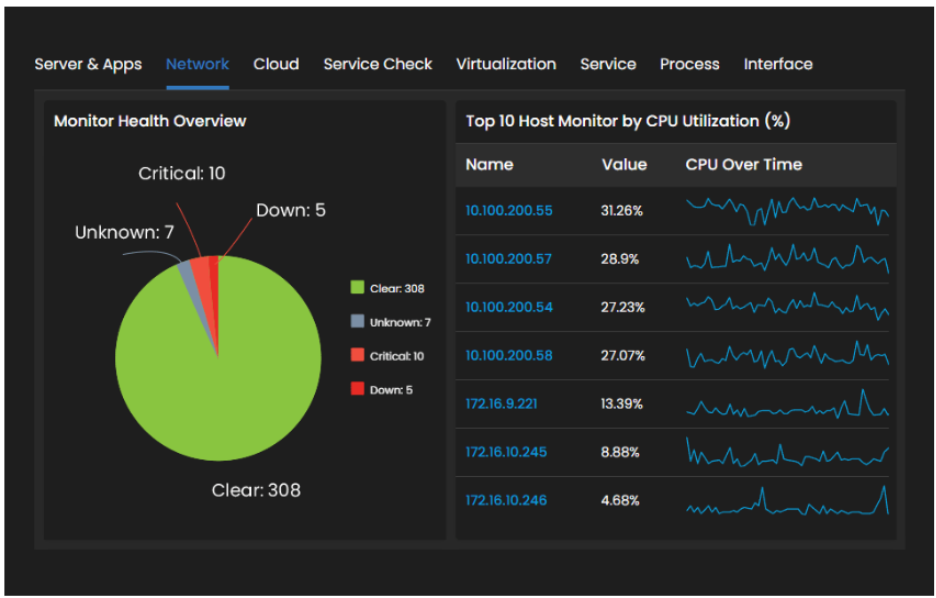
What goes into a report is your call: downtime, CPU and memory, bandwidth or whatever else drives performance for you. Ready-made dashboards handle the common views. Custom widgets handle everything beyond them, with pie and bar charts, lists, time-series graphs and tables to choose from.
Dashboards go out to stakeholders by email. Reports can also run on a schedule, and one common dashboard ranks the ten most utilized devices in the whole network architecture. The dashboard below shows that top ten view.
Best Practices for Running a Network Management System
As the network grows, five habits keep a network management system useful. Three happen during planning. The other two are about day-to-day control.
1. Map Your Network Architecture First
Before configuring any monitoring, get to know the core infrastructure: what it needs and which operations run across it. Only then decide what the NMS has to cover.
Regulated organizations should also list the standards they must meet. For US healthcare data, HIPAA is a legal requirement. PCI DSS, the card industry's security standard, applies to payment card data.
2. Prioritize Critical Network Components
Then put the components in order of business impact. Security devices, core switches and WAN links usually come first. Start monitoring at the top of that list, since failures and lost connectivity cost the most there.
3. Choose an NMS That Fits Your Environment
Look for an NMS that can discover devices and analyze traffic flows across every vendor you use, with configuration control and risk management included. Before you commit, check protocol support, deployment options and how far the platform scales.
4. Tune Thresholds and Baselines to Cut Alert Noise
No default threshold fits every device. Let a few weeks of alerts build up, then retune the thresholds that keep misfiring. Where a metric climbs and dips with the time of day, use a baseline in its place.
5. Back Up Configurations and Track Every Change
Every managed device should be on a backup schedule, with alerts set for changes nobody planned. Then, if a change fails, you just restore the last good file.
Manage Every Layer of Your Network with Motadata Network Observability
Through continuous data collection and AI-driven correlation, Motadata Network Observability shows you how your network is put together. Data flows in from on-premises, cloud, SD-WAN and hybrid networks alike. From there, ObserveOps ties logs, events, traffic and metrics together and maps the result to business objectives.
An NMS will point to where design, capacity or configuration needs work. Fixing it still takes planning and budget. You can run ObserveOps on premises or in a private or public cloud, choosing from six deployment modes that go from a single server up to high availability over WAN.
Ready to implement Network Management System?
Discover how Motadata ObserveOps can help you monitor your infrastructure in real-time and respond to issues instantly.