What Is ITSM? A Complete Guide to IT Service Management
Motadata Team
Every IT team has a service problem — ITSM fixes it
Here's a scenario most IT leaders know too well: a critical application goes down at 2 AM, three different teams start troubleshooting independently, nobody updates the status page, and the CEO finds out from Twitter. That's not a technology failure — it's a service management failure.
IT Service Management exists to prevent exactly this kind of chaos. More than 90% of businesses now depend on technology to hit their goals, yet many still treat IT support as a break-fix operation. ITSM flips that model. Instead of reacting to fires, it gives your team a structured way to plan, deliver, and continuously improve IT services.
The result? Fewer war rooms, faster resolution times, and end users who don't dread calling the help desk.
Key Takeaways
ITSM is not just help desk software. It's a discipline that covers how IT services are designed, delivered, managed, and improved across the organization.
Business alignment is the whole point. ITSM connects IT activities directly to business outcomes — revenue, customer satisfaction, operational efficiency.
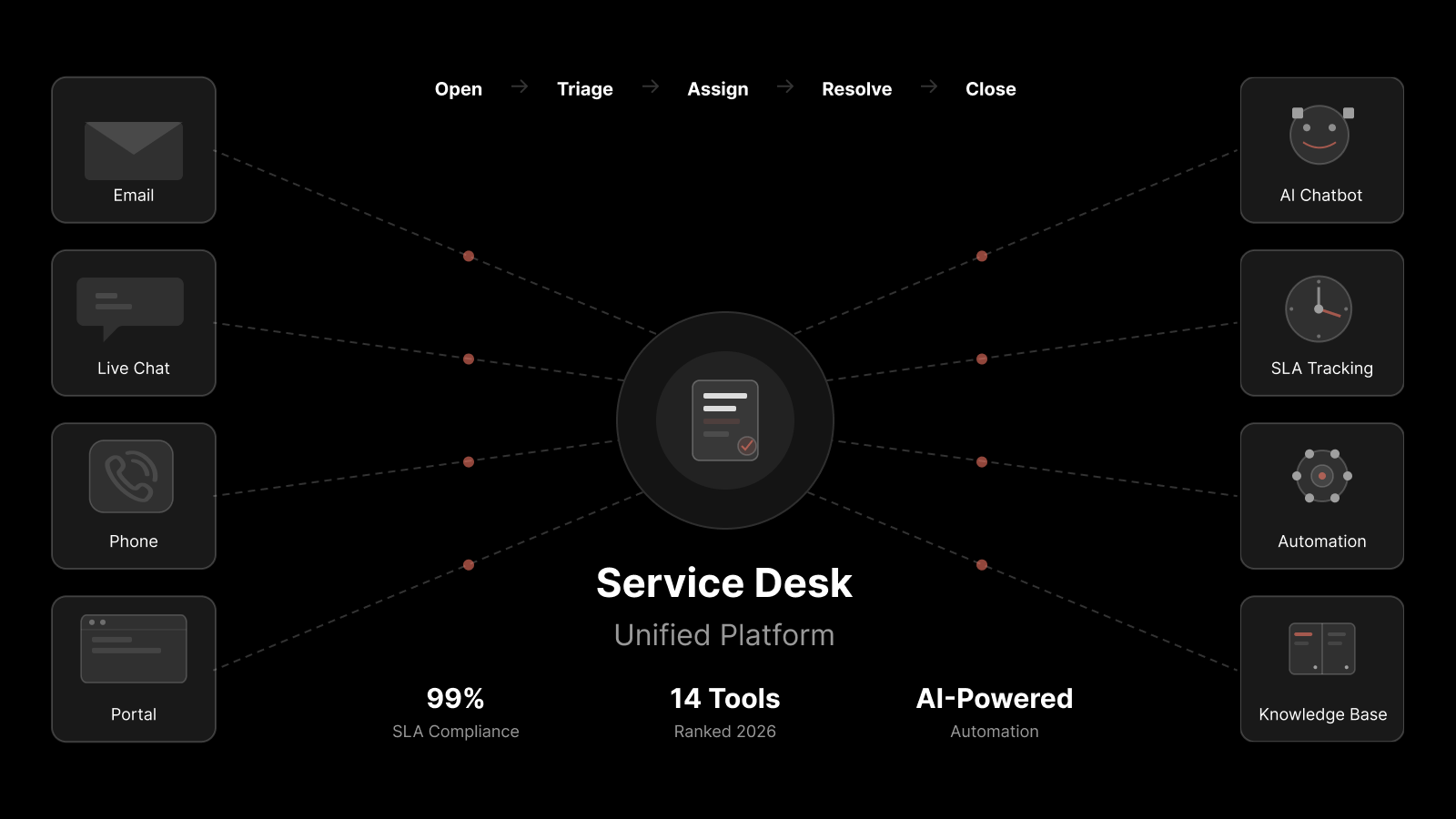
Core workflows include incident management, change management, problem management, service request management, asset management, and knowledge management.
Modern ITSM runs on AI and automation — think auto-routing tickets, predictive analytics, and self-service portals that actually get used.
ITSM is not ITIL. ITIL is one framework for implementing ITSM. Others include COBIT and ISO/IEC 20000.
You don't need perfection to start. Begin with incident and service request management, then expand as your team matures.
What Is ITSM, Exactly?
ITSM stands for IT Service Management. It's how your IT department plans, delivers, operates, and controls the technology services that the rest of the organization relies on daily.
Think of it this way: if IT is a restaurant, ITSM is everything from the menu design and kitchen workflow to how waitstaff handle complaints and how the manager tracks customer satisfaction. Without it, you've got talented cooks making random dishes with no coordination.
The core objective is straightforward — align IT services with what the business actually needs. That means connecting people, processes, and technology so IT generates measurable value, not just uptime.
How to Build an ITSM Strategy
You can't just install a tool and call it ITSM. Building a real strategy takes deliberate planning. Here's a practical approach:
1. Start with business goals, not IT goals
Before you touch a single tool, sit down with business leaders and document what the organization needs from IT. Are you supporting rapid growth? Reducing operational costs? Improving customer-facing digital experiences? Your ITSM strategy should serve these outcomes.
2. Map your IT processes
Identify the core processes you need: incident management, change management, problem management, service request management. For each, define clear roles, responsibilities, and success metrics.
3. Audit your current IT infrastructure
Assess what you've got today. Where are the gaps? Which processes are manual that should be automated? Where do tickets get stuck? This audit becomes your improvement roadmap. Tools like IT infrastructure monitoring can give you visibility into what's working and what isn't.
4. Choose the right ITSM platform
Pick a platform that fits your scale and maturity. Look for AI-powered ticket routing, built-in SLA tracking, a self-service portal, and strong integration capabilities. Don't over-buy — start with what you'll actually use.
5. Apply best practices from day one
Adopt frameworks like ITIL as a guide, not a rulebook. Implement SLAs, set up automation for repetitive tasks, and build a knowledge base from the start.
6. Monitor, measure, and iterate
ITSM isn't a one-time project. Track KPIs like mean time to resolution (MTTR), first-contact resolution rate, and customer satisfaction scores. Use that data to keep improving.
Why ITSM Matters for Business Operations
ITSM isn't something IT does for IT's sake. It directly impacts the business in ways that executives care about.
Reduces digital disruption
Even a minor, poorly communicated change can cascade into a major outage. ITSM brings formalized change management, so every modification gets assessed, approved, and communicated before it touches production. The result: fewer surprise outages and a lot less fire-fighting.
Improves accountability and visibility
When every incident, request, and change is logged and tracked, nobody can claim "I didn't know about that." IT managers get real-time dashboards showing what's happening across the service environment — who's handling what, what's stuck, and where SLAs are at risk.
Controls costs during growth
Scaling IT operations usually means hiring more staff. ITSM with automation changes that equation. Auto-routing, self-service portals, and AI-powered categorization let your existing team handle a growing workload without burning out. IT service management platforms make this scalable.
Traditional ITSM vs. Modern ITSM
The ITSM your organization ran five years ago probably won't cut it today. Here's how the old and new models compare:
Dimension | Traditional ITSM | Modern ITSM |
|---|---|---|
Approach | Rigid, hierarchical, process-heavy | Agile, flexible, outcome-focused |
Automation | Minimal — mostly manual routing and escalation | AI-powered ticket classification, auto-assignment, workflow automation |
User experience | Portal built for IT, not end users | Consumer-grade self-service with intuitive search and chatbots |
Technology | On-premises, siloed tools | Cloud-native, integrated platforms with APIs |
Knowledge management | Static KB articles that nobody updates | Living knowledge base with AI-suggested articles and community input |
Focus | Internal IT efficiency | Business outcomes and end-user satisfaction |
Modern ITSM leans heavily on AI and automation. Think problem management that spots recurring incident patterns before they become outages, or knowledge management that surfaces the right article before a user even finishes typing their question.
Core ITSM Processes and Workflows
Most people confuse ITSM with basic IT support. In reality, ITSM covers a much broader set of processes:
Incident management
When something breaks — a server goes down, an app crashes, a user can't log in — incident management kicks in. The goal is simple: restore normal service as fast as possible. Good incident management means clear escalation paths, real-time communication, and post-incident reviews that prevent repeats.
Change management
Every change to your IT environment carries risk. Change management ensures modifications are planned, assessed, approved, and tracked. Whether it's a minor patch or a major infrastructure migration, this process keeps surprises to a minimum.
Problem management
While incident management fixes symptoms, problem management hunts root causes. When the same IT incident keeps recurring, problem management investigates why and eliminates the underlying issue.
Service request management
Not every contact is an incident. Password resets, software access requests, hardware orders — these are service requests. A well-designed service request workflow sets clear expectations, automates approvals, and gets users what they need without the back-and-forth.
IT asset management
IT asset management tracks every piece of hardware and software in your environment. It answers questions like: What do we own? Where is it? Is the license current? When should we replace it? Good asset management saves money and reduces security risk.
Knowledge management
A solid knowledge base reduces ticket volume and speeds up resolution. When technicians document solutions and end users can search them, everyone wins. The best knowledge management systems integrate directly into the service desk so relevant articles surface automatically.
---
ITSM vs. ITIL: What's the Difference?
This is one of the most common points of confusion. Here's the short version:
ITSM is the practice — how you manage IT services.
ITIL is a framework — a set of guidelines for implementing ITSM.
ITIL (Information Technology Infrastructure Library) is the most widely adopted ITSM framework, but it's not the only one. COBIT focuses more on governance and risk. ISO/IEC 20000 provides a certifiable standard. You can even blend approaches based on what fits your organization.
The point is: ITSM is what you're doing. ITIL is one way to do it.
---
Challenges in ITSM Implementation
ITSM adoption isn't always smooth. Here are the most common roadblocks:
Resistance to change
People like their routines. When you introduce new processes, ticketing systems, and approval workflows, expect pushback. The fix? Involve teams early, communicate the "why" clearly, and show quick wins.
Resource constraints
Good ITSM takes investment — in tools, training, and time. Organizations often underestimate what's needed and try to do too much too fast. Start with a focused scope and expand as you prove value.
Integration complexity
Most organizations run a patchwork of tools and systems. Getting your ITSM platform to play nicely with existing monitoring tools, CMDB, HR systems, and communication platforms takes planning and sometimes custom integration work.
Security and compliance
Handling sensitive data through ITSM processes means you need proper access controls, encryption, audit trails, and compliance with regulations like GDPR or HIPAA. Don't treat security as an afterthought.
Training gaps
Even the best ITSM platform fails if people don't know how to use it. Invest in proper training — not just on the tool, but on the processes and the reasoning behind them.
ITSM Best Practices for 2026
Define and enforce SLAs
Service Level Agreements set expectations for response times, resolution times, and availability. Without them, "fast" and "good enough" mean different things to everyone. Put measurable targets in writing and track them.
Automate the repetitive stuff
Ticket routing, status updates, password resets, standard change approvals — if a task follows the same steps every time, automate it. Free your team to work on problems that actually need a human brain.
Build a living knowledge base
A knowledge base that nobody updates is worse than no knowledge base at all. Make article creation part of your incident resolution workflow. When a technician solves a new problem, they document the fix before closing the ticket.
Monitor performance with the right KPIs
Track metrics that matter: MTTR, first-contact resolution rate, customer satisfaction (CSAT), SLA compliance, and ticket backlog. Review them regularly and use them to drive improvement.
Plan for risk
Every IT environment faces risks — from security threats to failed deployments. Build risk assessment into your change management process and maintain up-to-date disaster recovery plans.
How Motadata ServiceOps Fits In
If you're evaluating ITSM platforms, Motadata ServiceOps is worth a look. It's built with AI-native capabilities — from intelligent ticket routing that eliminates ticket tennis to a self-service portal that deflects common requests before they ever reach your queue. You get built-in SLA management, automated workflows, and a service desk designed for how IT teams actually work, not how a textbook says they should. Start with a free trial and see the difference a modern ITSM platform makes.
FAQs
How many modules are there in ITSM?
ITSM is typically organized around five core modules: incident management, change management, problem management, configuration management, and release management. Each module focuses on a specific domain — resolving service disruptions, controlling changes, finding root causes, tracking configuration items, or managing releases.
How can businesses benefit from implementing ITSM?
ITSM aligns IT services with business goals, which directly improves operational efficiency and reduces costs. Specific benefits include faster incident resolution, better visibility into IT operations, improved compliance, higher customer satisfaction, and more productive IT teams.
Which are the most common ITSM frameworks, and how do they differ?
The three most common are ITIL, COBIT, and ISO/IEC 20000. ITIL focuses on the service lifecycle and is the most widely adopted. COBIT emphasizes governance, risk management, and compliance. ISO/IEC 20000 provides a certifiable international standard for IT service management quality.
What is the difference between ITSM and ESM?
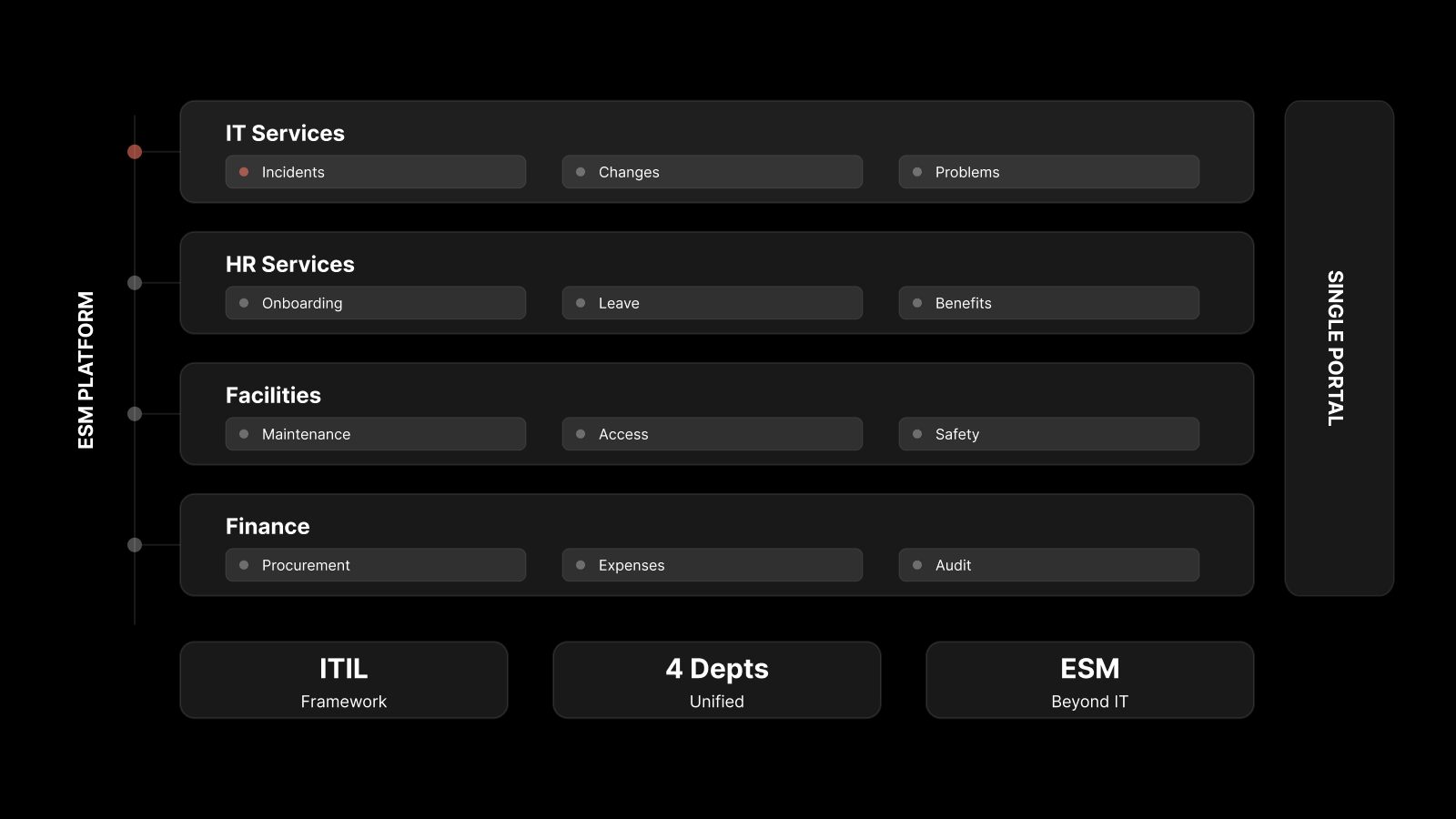
ITSM focuses on managing IT services. Enterprise Service Management (ESM) extends ITSM principles to non-IT departments like HR, finance, and facilities. ESM uses the same tools and workflows but applies them organization-wide.
How do you measure ITSM success?
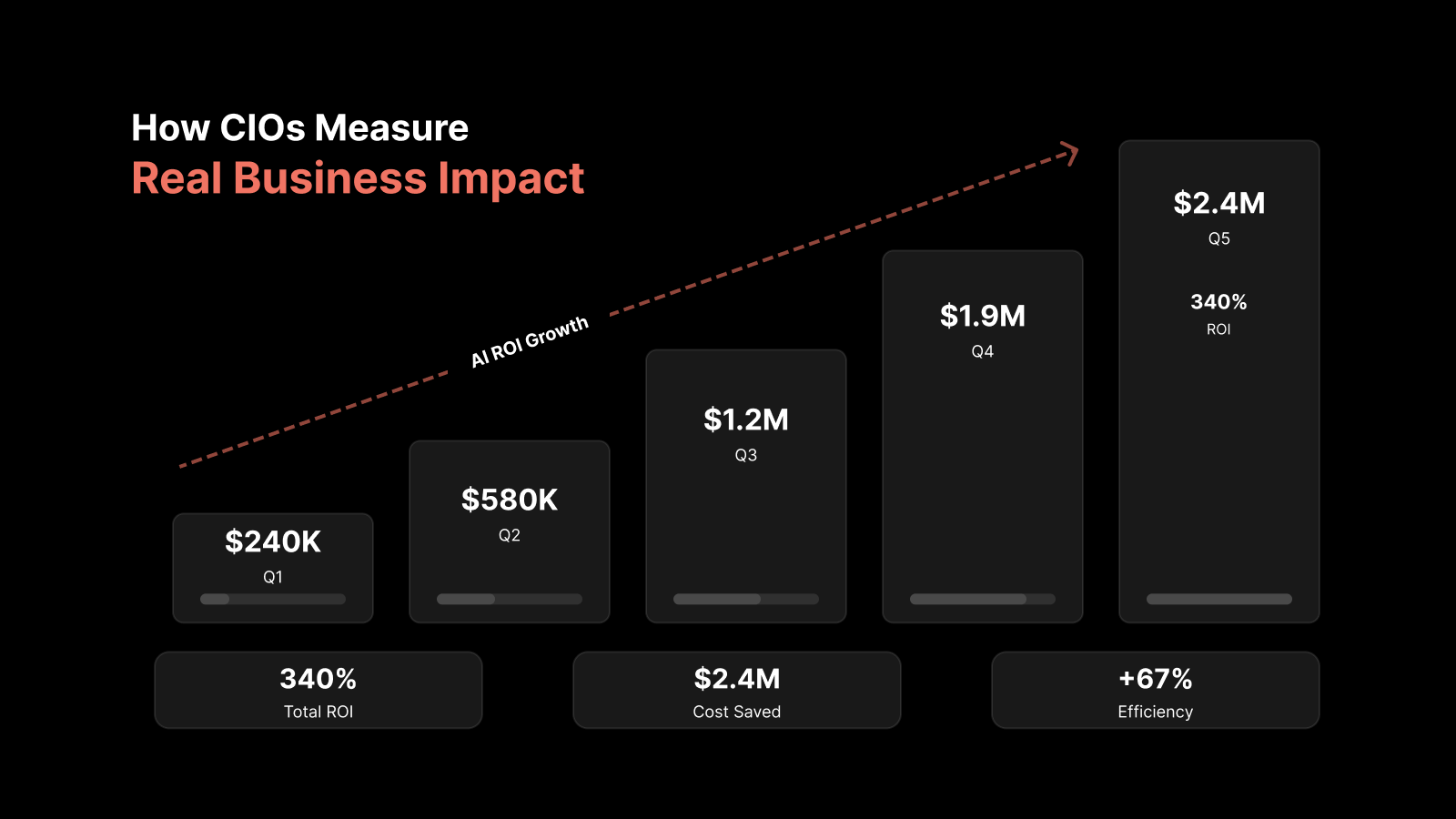
Track KPIs like mean time to resolution (MTTR), first-contact resolution rate, SLA compliance, customer satisfaction scores (CSAT), and ticket volume trends. Regular review of these metrics helps you identify bottlenecks and improvement opportunities.
Author
Motadata Team
Content Team
Articles produced collaboratively by our engineering and editorial teams bear the collective authorship of Motadata Team.