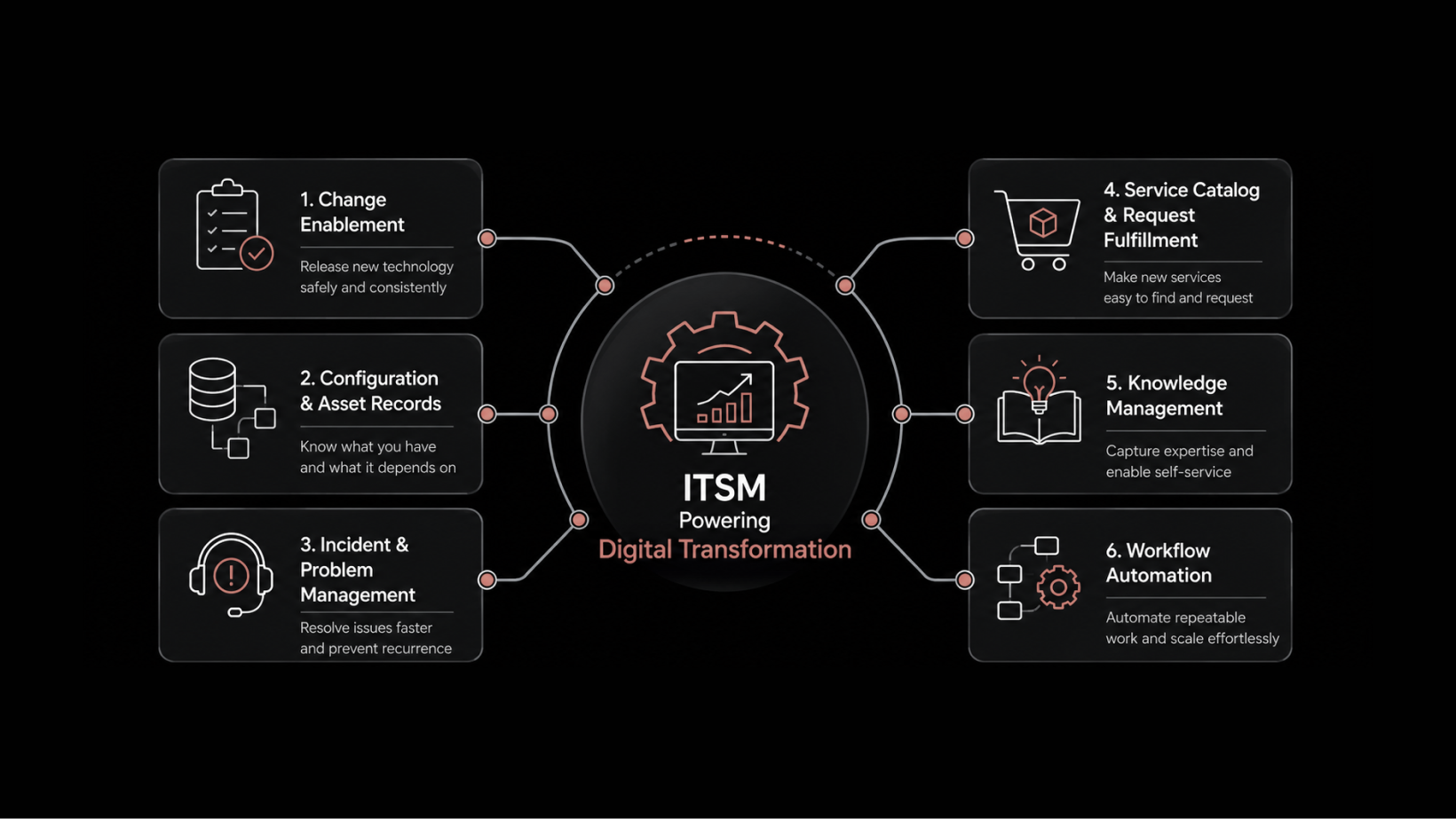
Ways To Align Service Desk To Business Operations
Service desk alignment isn't a one-time project — it's an ongoing discipline that separates high-performing IT organizations from reactive ones. When your service desk operates in lockstep with business objectives, every ticket resolved, every workflow automated, and every self-service interaction strengthened contributes directly to revenue protection and operational efficiency.
Research consistently shows that organizations with tightly aligned IT services invest more aggressively in transformative technologies like AI and machine learning. Yet many service desks still operate as ticket factories — processing requests without connecting their work to business outcomes.
This guide covers seven proven strategies to close that gap, with practical steps you can implement using modern, AI-native ITSM platforms.
Automate Repetitive Service Desk Workflows
Automation remains the single highest-impact lever for service desk alignment. IT automation interest has grown steadily for over two decades, and the reason is straightforward: organizations need to handle increasing ticket volumes without proportionally increasing headcount.
Modern ITSM platforms go beyond basic workflow rules. AI-native automation can handle complex decision trees that previously required human judgment.
Here are the five areas where automation delivers the fastest returns:
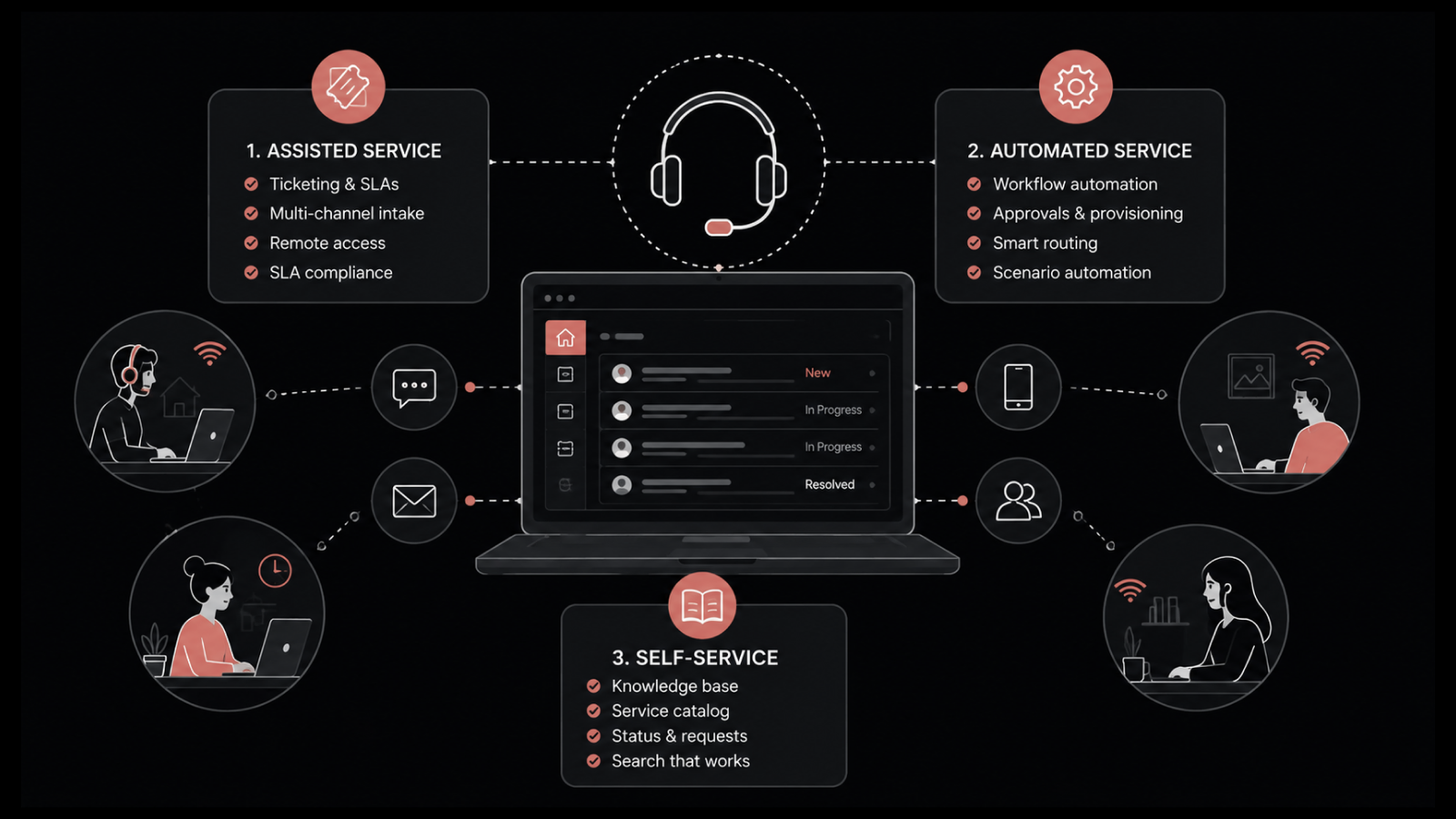
Ticket categorization: Workflow rules automatically classify incoming tickets based on keywords, requester department, and historical patterns. AI-powered categorization learns from past resolutions to improve accuracy over time.
Intelligent ticket assignment: Smart routing algorithms assign tickets to the right technician based on skill set, current workload, and availability — not just round-robin distribution.
Approval chains: Sequential and parallel approval workflows eliminate bottlenecks in change requests and service provisioning.
Automated notifications: Condition-based email and messaging alerts keep requesters informed at every stage without technicians manually sending updates.
Auto-closure of resolved tickets: Time-based workflows automatically close tickets that have remained in "resolved" status without requester objection, keeping your queue clean.
Successful automation isn't only about saving time and money. It enforces consistent ITSM processes, reduces human error, and directly improves customer experience by delivering faster, more predictable outcomes.
Implement a Shift-Left Strategy
Shift-left is an ITSM strategy that moves problem-solving capabilities closer to the end user. Instead of every issue requiring a Level 1 or Level 2 technician, requesters resolve common problems themselves through self-service tools and knowledge resources.
Why Shift-Left Matters for Business Alignment
The cost advantage is significant. When requesters handle routine issues — password resets, software installation requests, FAQ lookups — your technicians focus on complex problems that actually require their expertise. This reallocation directly impacts the service desk's contribution to business productivity.
Organizations that implement shift-left effectively report measurable reductions in cost-per-ticket and mean time to resolution (MTTR).
How To Execute Shift-Left Successfully
A shift-left strategy depends on two foundational components:
A well-designed self-service portal: Modern ITSM platforms provide branded, intuitive portals where requesters can browse services, submit requests, and track ticket status without contacting the service desk.
A comprehensive knowledge base: Articles, how-to guides, and troubleshooting walkthroughs enable requesters to find answers independently. AI-powered search and recommendation engines surface the most relevant articles based on the requester's query.
When you achieve a successful shift, you empower your requesters and the broader workforce. Everyone focuses on the work they're meant to do — and that alignment is what drives business value.
Optimize SLA Management for Business Outcomes
Service Level Agreements are more than compliance checkboxes. When properly configured, SLAs connect service desk performance to the metrics that business stakeholders actually care about: uptime, resolution speed, and user satisfaction.
Align SLAs With Business Priorities
Not every ticket carries the same business weight. A revenue-impacting system outage demands a different response time than a cosmetic UI request. Tiered SLA structures ensure that your service desk allocates resources proportionally to business impact.
Consider structuring SLAs around these tiers:
Critical (P1): Revenue or customer-facing system down — 15-minute response, 1-hour resolution target
High (P2): Major functionality degraded — 30-minute response, 4-hour resolution target
Medium (P3): Non-critical service request — 2-hour response, 1-business-day resolution target
Low (P4): Informational or cosmetic — next-business-day response
Monitor SLA Performance Proactively
AI-native ITSM platforms provide real-time SLA dashboards that predict potential breaches before they happen. Instead of reacting to SLA violations after the fact, your team gets early warnings and can redistribute workload to stay on target.
Tackle Aged Tickets Before They Become Backlogs
Aged tickets — those lingering unresolved requests — are silent killers of service desk performance. They inflate SLA breach rates, frustrate requesters, and consume technician bandwidth when they surface unexpectedly during audits.
Build an Aged Ticket Management Plan
Every service desk will encounter tickets that are genuinely difficult to resolve. The difference between a well-aligned desk and a chaotic one is whether those tickets get managed proactively.
Here's a practical approach:
Set aging thresholds: Define what "aged" means for your organization (e.g., 7 days, 14 days) and trigger automated escalation notifications when tickets cross those thresholds.
Maintain requester communication: Even when resolution takes time, regular updates prevent requesters from feeling forgotten. Time-based email notifications keep them informed of the reason for any delays.
Track aged ticket volume monthly: Add aged ticket counts to your monthly performance reports. This metric creates accountability and makes patterns visible — like specific technicians or categories that consistently generate backlogs.
Generate grouped reports: Modern ITSM platforms let you create reports showing pending tickets grouped by technician, category, or department — making it easy to identify where bottlenecks concentrate.
Deliver Consistent User Experience Through Service Design
A service desk that delivers different experiences depending on who handles the request or how the requester contacts you isn't aligned with business operations — it's a source of unpredictability.
Standardize With a Service Catalog
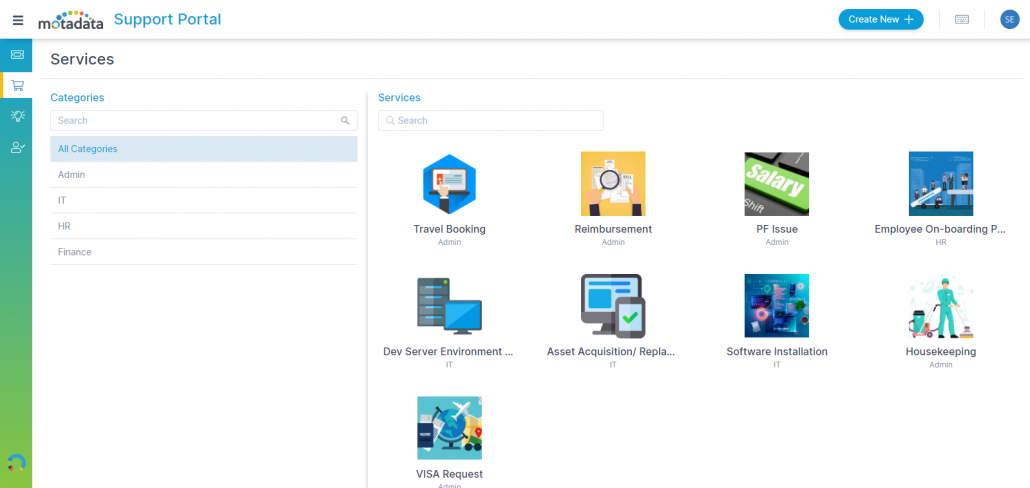
Modern ITSM solutions provide frameworks for service design that transform ad-hoc request handling into structured, repeatable processes. Services are organized in a catalog and made visible through a self-service portal.
Each service in the catalog is built from a template that includes:
Custom forms: Standardized input fields ensure technicians receive all necessary information upfront, eliminating back-and-forth clarification.
Dedicated automation: Each service template can have its own workflow rules, SLA targets, approval chains, and scenario-based routing.
Task breakdowns: Complex service requests are automatically decomposed into subtasks assigned to the appropriate teams or individuals.
When services are delivered through a designed framework, IT administrators maintain control over quality and consistency while requesters receive predictable, reliable experiences every time.
Leverage AI-Powered Analytics for Continuous Alignment
Alignment isn't a static achievement — it requires continuous measurement and adjustment. AI-powered analytics transform raw service desk data into actionable business intelligence.
Track Business-Relevant KPIs
Move beyond basic operational metrics (tickets opened, tickets closed) to KPIs that demonstrate business impact:
Cost per ticket: Measures efficiency and directly ties to budget conversations
First-contact resolution rate: Indicates how effectively your knowledge base and L1 team handle requests
User satisfaction score (CSAT): Connects service desk performance to requester experience
Mean time to resolution (MTTR): Tracks speed of issue resolution across priority tiers
Self-service adoption rate: Measures shift-left success and user empowerment
Use Predictive Insights to Stay Ahead
AI-native platforms don't just report on what happened — they predict what's coming. Trend analysis identifies seasonal spikes, recurring issue patterns, and capacity gaps before they impact service delivery.
This predictive capability lets you reallocate resources proactively, update knowledge base articles for emerging issues, and adjust SLA targets based on real demand patterns.
Foster Cross-Departmental Collaboration
A service desk that operates in an IT silo can't fully align with business operations. True alignment requires visibility across departments and collaborative workflows that span organizational boundaries.
Break Down Silos With Shared Workflows
Modern ITSM platforms support cross-departmental workflows where a single request can trigger tasks across IT, HR, facilities, and finance. For example, a new employee onboarding request can automatically provision hardware (IT), create system accounts (IT), initiate benefits enrollment (HR), and assign workspace (Facilities) — all from one ticket.
Establish Feedback Loops With Business Stakeholders
Regular alignment reviews with department heads ensure that service desk priorities match evolving business needs. Quarterly reviews of SLA performance, top request categories, and automation ROI help maintain that connection.
Align Your Service Desk With Motadata ServiceOps
Motadata ServiceOps is an AI-native ITSM platform built to align service desk operations with business goals from day one. With intelligent automation, smart ticket routing, a comprehensive self-service portal, and predictive analytics, ServiceOps gives you the tools to move beyond reactive ticket handling.
Whether you're implementing shift-left strategies, optimizing SLA management, or building cross-departmental workflows, ServiceOps provides the foundation for a service desk that delivers measurable business value.
Explore Motadata ServiceOps | Request a Demo
FAQs
What's the fastest way to align a service desk with business operations?
Start with automation. Automating ticket categorization, assignment, and notifications delivers immediate efficiency gains while enforcing consistent processes. From there, build out a self-service portal and knowledge base to implement shift-left strategies.
How often should service desk alignment be reviewed?
Conduct quarterly alignment reviews with business stakeholders to assess SLA performance, automation ROI, and emerging service needs. Monthly performance reports should track operational KPIs like aged ticket volume, MTTR, and CSAT scores.
What's the difference between a service desk and a help desk?
A help desk is primarily reactive — it handles incident resolution and break-fix requests. A service desk is broader, encompassing service request management, change management, problem management, and proactive service delivery aligned with business objectives.
Can small IT teams benefit from service desk alignment strategies?
Absolutely. Smaller teams benefit the most from automation and shift-left strategies because they have the least capacity to absorb manual, repetitive work. AI-native ITSM platforms scale these capabilities without requiring large support staffs.
How does a service catalog improve service desk alignment?
A service catalog standardizes how services are requested, approved, and delivered. It ensures every requester receives a consistent experience, every request follows defined workflows, and IT administrators maintain visibility into service demand and performance.