Network Monitoring: Expectation vs. Reality
The network monitoring market is projected to exceed $5 billion by 2028. With that growth comes a flood of vendors, each promising comprehensive visibility, instant alerting, and effortless management. But anyone who's actually deployed a monitoring tool knows there's a gap between the sales pitch and the daily reality.
This isn't about calling out bad products. It's about setting accurate expectations so you can choose the right tool, configure it properly, and get actual value from your investment. Here are five common expectations — and what really happens when you put a network monitoring tool to work.
Network monitoring is the practice of continuously observing, collecting, and analyzing data from network devices, servers, and applications to maintain optimal performance, detect issues, and ensure security. An effective monitoring tool doesn't just alert you to problems — it shows performance trends and helps you meet SLAs.
Key Takeaways
Network monitoring tools require meaningful configuration and customization — they don't work optimally out of the box.
Multi-vendor device support exists, but filtering useful alerts from noise takes deliberate threshold tuning.
Real-time monitoring and historical analysis are both achievable, but you'll need to decide which elements are mission-critical.
Dashboards need role-specific customization to deliver actionable insights for different stakeholders.
AI-native platforms like Motadata close the expectation-reality gap by automating the configuration and tuning that traditional tools leave to you.
Expectation: Plug-and-Play Actionable Insights
What vendors promise: Install the tool, connect it to your network, and immediately get clean, actionable reports that tell you exactly what's wrong and what to do about it.
What actually happens: Most network monitoring tools ship with default templates and basic reporting. They'll collect data from day one, but the reports won't be tailored to your network architecture, your IT processes, or your business priorities. Out of the box, you'll see generic dashboards with too much data and not enough context.
What Actually Works
Your IT team needs to invest time in configuring the tool for your specific environment. That means:
Mapping the tool to your network topology so it understands the relationships between devices, segments, and services.
Customizing alert thresholds based on your performance baselines, not vendor defaults.
Building role-specific dashboards — your CIO needs an SLA overview, your network engineers need granular performance metrics, and your security team needs threat indicators.
Learning the tool's integration capabilities so you understand how devices from different vendors and different applications connect to the monitoring platform.
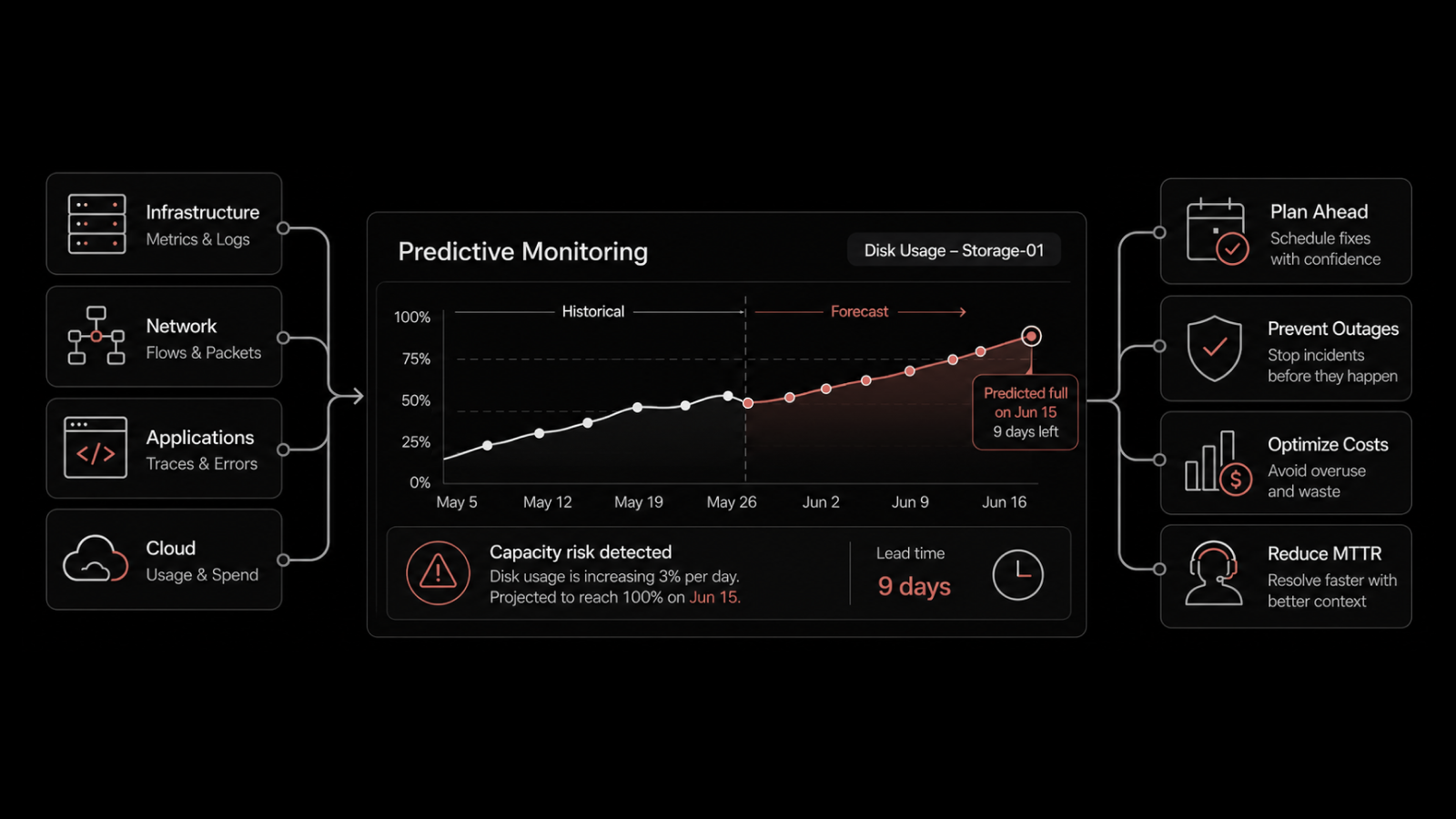
The tools that deliver genuine plug-and-play value are the ones with AI-driven auto-discovery and auto-configuration — but even those benefit from human tuning.
Expectation: Universal Device Support Across All Vendors
What vendors promise: The tool will monitor any device from any vendor on your network, giving you complete visibility regardless of your hardware ecosystem.
What actually happens: Technically, this is mostly true. Most monitoring tools use SNMP to collect performance data from switches, routers, firewalls, and other network devices — and SNMP is vendor-agnostic. But "supporting" a device and "providing meaningful insights about" a device are two different things.
What Actually Works
The real challenge isn't device discovery — it's signal quality. Every monitored device generates potential SNMP traps, syslog messages, and performance counters. In a large network, the volume of raw data can be overwhelming. Important alerts get buried in a stream of low-priority notifications.
To get real value from multi-vendor monitoring, you need to:
Prioritize which devices and metrics are mission-critical and configure higher alert sensitivity for those.
Tune notification thresholds to reduce noise without missing genuine issues.
Choose a tool that supports multiple protocols beyond just SNMP — including WMI, SSH, API-based monitoring, and flow analysis — for deeper visibility into diverse device ecosystems.
Use correlation engines that group related alerts into incidents instead of flooding your team with individual notifications.
Expectation: Real-Time Monitoring and Historical Analysis in One Tool
What vendors promise: Full real-time visibility into every device on your network, plus deep historical analytics for trend analysis and capacity planning — all in a single platform.
What actually happens: Many tools can do both, but there are trade-offs. Real-time monitoring of every element at high polling frequencies consumes significant resources. Historical data retention requires storage capacity and can affect query performance. In practice, you'll need to make decisions about which elements get real-time attention and how much historical data you retain.
What Actually Works
The key is prioritization:
Identify mission-critical elements that need real-time, high-frequency monitoring — core switches, internet gateways, production servers, critical application endpoints.
Set appropriate polling intervals for non-critical devices — monitoring a printer every 30 seconds isn't useful, but checking it every 15 minutes is.
Define retention policies that balance storage costs with analytical value — you might keep detailed data for 90 days and aggregated summaries for a year.
Work with your vendor to understand what's included in your package. Some tools limit real-time monitoring to a subset of devices, or charge extra for extended historical retention.
The best tools in 2026 handle this automatically. AI-native platforms dynamically adjust polling frequency based on device importance and current conditions, and they compress historical data intelligently without losing analytical value.
Expectation: One Dashboard for Every Stakeholder
What vendors promise: A beautiful, comprehensive dashboard that gives everyone — from the CIO to the network technician — exactly the information they need.
What actually happens: A single dashboard can't serve everyone effectively. Your CIO wants a high-level view of SLA compliance, uptime percentages, and business impact. Your network engineers want packet loss rates, interface utilization, and error counters. Your security team wants anomaly detection, threat indicators, and access logs. Cramming all of that onto one screen creates information overload and serves nobody well.
What Actually Works
Build role-specific dashboards from day one:
Executive dashboards showing SLA status, uptime trends, and business impact metrics.
Engineering dashboards with granular device performance, topology maps, and drill-down diagnostics.
Security dashboards highlighting anomalous traffic, unauthorized access attempts, and vulnerability indicators.
Operations dashboards focused on ticket volumes, MTTR trends, and capacity utilization.
Most modern monitoring tools support custom dashboards. The investment in setting them up properly pays off immediately in faster decision-making and fewer "can you pull that report for me?" requests.
Expectation: Set It and Forget It
What vendors promise: Once configured, the monitoring tool runs autonomously, alerting you only when something needs attention.
What actually happens: Networks change. You add devices, migrate workloads, change routing policies, adopt new cloud services. A monitoring configuration that was perfect six months ago might be missing critical new assets or generating false positives based on outdated baselines.
What Actually Works
Treat your monitoring configuration as a living system:
Review and update baselines quarterly — or whenever you make significant infrastructure changes.
Audit alert rules regularly to ensure they're still relevant and properly tuned.
Incorporate new devices and services into monitoring as they're deployed, not weeks later.
Track false positive rates and adjust thresholds when noise increases.
Use AI-driven platforms that automatically discover new devices, adjust baselines, and adapt alerting rules as your network evolves.
FAQs
What is network monitoring?
Network monitoring is the continuous observation and analysis of network components — routers, switches, servers, firewalls, and endpoints — to track performance, detect problems, and maintain availability and security.
Why do network monitoring tools underperform expectations?
They don't inherently underperform — they underperform when deployed without proper configuration. Most gaps between expectation and reality come from using default settings, not tuning alert thresholds, and not building role-specific dashboards.
What features should I prioritize in a network monitoring tool?
Prioritize auto-discovery, multi-vendor protocol support, AI-driven baselining and alerting, role-specific dashboards, historical data retention, and high availability. These features close the gap between marketing promises and operational reality.
How often should I review my network monitoring setup?
At minimum, review quarterly. Additionally, review after any significant network change — new device deployments, cloud migrations, routing changes, or organizational restructuring.
What's the difference between network monitoring and network management?
Network monitoring is observation — detecting what's happening. Network management is action — configuring, optimizing, and controlling network resources. Monitoring informs management decisions. The best platforms integrate both.
Close the Gap with Motadata
Motadata's AI-native platform is built to close the gap between network monitoring expectations and reality. With intelligent auto-discovery, AI-driven baselining, smart alert correlation, and customizable role-specific dashboards, Motadata reduces the manual configuration burden that trips up traditional tools.
Instead of spending weeks tuning thresholds and building reports, your team gets accurate, actionable monitoring from day one — with an AI engine that continuously adapts as your network evolves.
Start your free trial or schedule a demo to see how Motadata turns monitoring expectations into monitoring reality.