Tips for SLA Setting, Measuring, and Reporting
Missed SLAs don't just inflate ticket backlogs — they erode customer trust, trigger penalty clauses, and signal deeper operational dysfunction. Yet most IT organizations still treat SLA management as a one-time setup task rather than a continuous optimization discipline. The result? SLAs that were configured years ago sit unchanged while service expectations, team capacity, and business priorities have shifted entirely.
Getting SLA management right requires a structured approach that spans three phases: setting the right targets, measuring them with precision, and reporting on outcomes in a way that drives accountability. This guide walks through each phase with actionable tips drawn from real-world ITSM operations.
What Is an SLA?
A Service Level Agreement (SLA) is a formal agreement — written in plain, unambiguous language — between a service provider and a customer that defines the expected level of service delivery. The customer can be internal (business units requesting IT support) or external (clients under a managed services contract).
SLAs typically specify:
Response time — how quickly the service team acknowledges a ticket
Resolution time — the maximum allowed window to resolve the issue
Availability targets — uptime commitments for critical services
Escalation procedures — what happens when targets are breached
These agreements can carry legal weight, especially in external contracts, and they serve as the backbone of service delivery accountability.
SLAs vs. KPIs: Understanding the Difference
SLAs and KPIs are often conflated, but they serve fundamentally different purposes:
Dimension | SLA | KPI |
|---|---|---|
Nature | A contractual agreement between two or more parties | A performance metric measuring individual, team, or organizational output |
Business Alignment | May or may not align directly to business objectives | Always tied to strategic business goals |
Relationship | Establishes expectations between provider and consumer | Provides a monitoring and measurement mechanism |
Legal Implications | Can carry legal or financial penalties | No legal implications |
Scope | Focused on service delivery commitments | Broad; applies to any measurable business activity |
The key distinction: SLAs define what you've promised, while KPIs measure how well you're performing. A mature ITSM organization uses both — SLAs to set the bar and KPIs to track whether you're clearing it.
Auditing Your Existing SLAs Before Making Changes
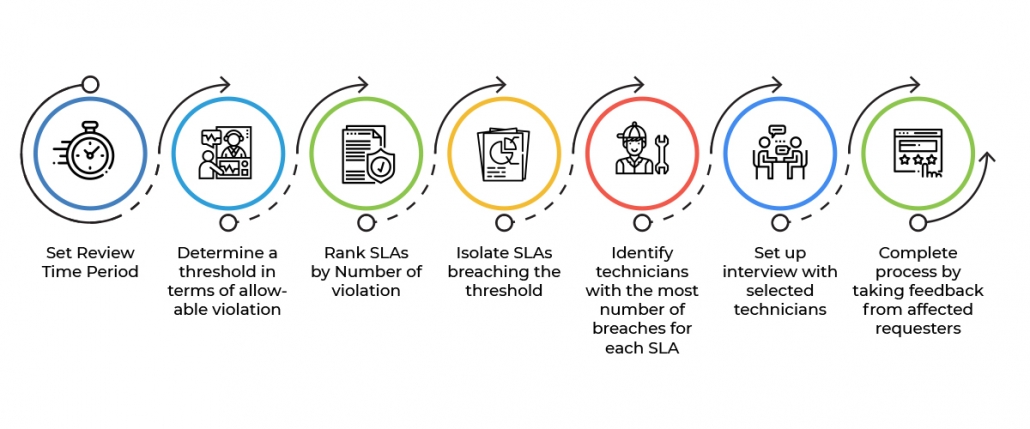
Before creating new SLAs or modifying existing ones, you need a clear picture of current performance. Skipping this step is the most common reason SLA initiatives fail — teams set aspirational targets without understanding their actual baseline.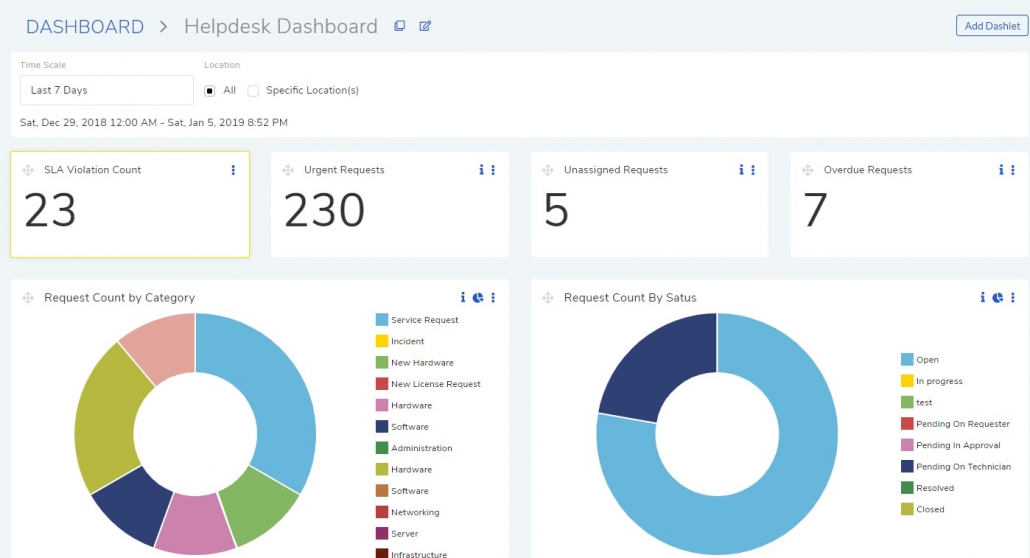
Step 1: Pull Performance Data
Generate reports on every active SLA in your system. Focus on:
Violation rates by SLA, category, and technician group
Average resolution times compared to SLA targets
Ticket volume trends that may explain seasonal violation spikes
Step 2: Gather Qualitative Feedback
Data tells you what's happening; interviews tell you why. Talk to:
Technicians handling the tickets — are targets realistic given their workload?
End users submitting requests — do response times match their expectations?
Team leads managing escalations — are escalation paths clear and effective?
Step 3: Build a Formal Action Plan
Document your findings in a structured format that includes:
The methodology used to identify underperforming SLAs and establish baselines
Key findings from performance data and stakeholder interviews
Recommendations for SLAs that need revision, consolidation, or retirement
Treat this as a recurring exercise — quarterly reviews keep SLAs aligned with operational reality.
Tip 1: Assign Different SLA Goals to Different Service Categories
Not every ticket carries the same urgency. A server outage affecting the entire business demands a fundamentally different response than a workstation issue impacting one user. Applying a single SLA across all categories creates a false sense of coverage while leaving critical services underprotected.
How to implement this:
Build a comprehensive category list that covers all incoming ticket types — incidents, service requests, and changes
Score each category based on business impact, user population affected, and revenue sensitivity
Rank categories by criticality and assign custom SLA targets to the highest-impact ones
Use historical resolution time data to set realistic targets — pulling the average resolution time report for each category over a 90-day window provides a solid baseline
With Motadata's AI-native ServiceOps platform, category-based SLA assignment is built into the workflow engine. The platform can automatically classify incoming tickets and apply the appropriate SLA based on predefined rules, eliminating manual triage errors.
Tip 2: Establish Default SLAs Based on Priority Levels
Every ticket that doesn't fall under a custom category SLA still needs a safety net. Default SLAs based on priority levels — Critical, High, Medium, Low — ensure that no ticket enters the system without a target attached.
This priority-based fallback model works because:
Priority is universal — every ITSM tool assigns priority to tickets, either automatically or through triage
It prevents gaps — new or uncategorized ticket types are still governed by a baseline SLA
It simplifies onboarding — new technicians don't need to memorize category-specific SLAs for every service
Motadata ServiceOps ships with default priority-based SLAs out of the box, and its AI engine can auto-assign priority based on ticket content, historical patterns, and real-time impact assessment.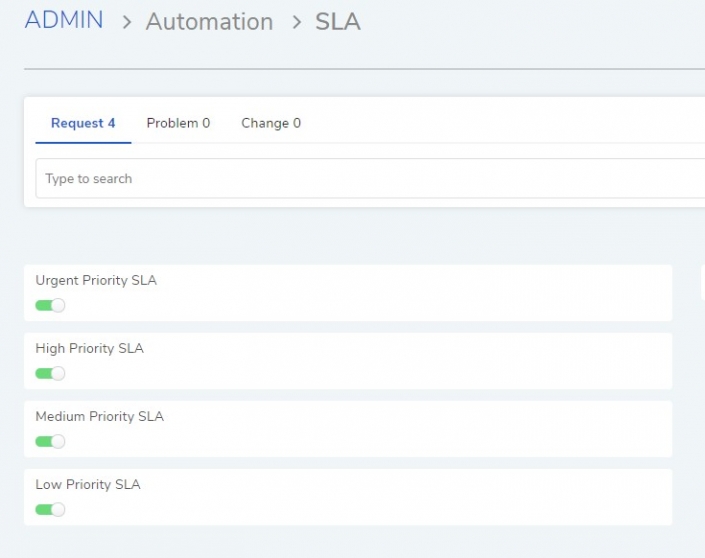
Tip 3: Define Escalation Rules for Every SLA
An SLA without an escalation rule is a suggestion, not an agreement. Escalation rules define what happens when a target is about to be breached or has already been violated — and they're the mechanism that turns SLAs from passive metrics into active governance.
Design your escalation matrix by mapping:
SLA | Response Violation Escalation | Resolution Violation Escalation |
|---|---|---|
Priority Critical | Escalation 1: Senior Engineer → Escalation 2: Team Lead → Escalation 3: Service Manager | Escalation 1: Team Lead → Escalation 2: Service Manager → Escalation 3: IT Director |
Priority High | Escalation 1: Assigned Tech → Escalation 2: Senior Engineer → Escalation 3: Team Lead | Escalation 1: Senior Engineer → Escalation 2: Team Lead → Escalation 3: Service Manager |
Priority Low | Escalation 1: Queue Reassignment → Escalation 2: Assigned Tech | Escalation 1: Assigned Tech → Escalation 2: Team Lead |
Beyond reassignment, modern ITSM platforms allow escalation rules to trigger automated actions — modifying ticket priority, sending email alerts, updating custom fields, or even executing remediation scripts.
Motadata ServiceOps supports multi-tier escalation rules for both response and resolution SLAs, with AI-driven recommendations that suggest optimal escalation paths based on technician availability and historical resolution patterns.
Tip 4: Configure Business Hours Accurately
SLA timers that run 24/7 when your support team works 9-to-5 produce misleading violation data. Accurate business hour configuration is foundational to trustworthy SLA measurement.
Get this right by addressing:
Multiple locations — if your organization operates across time zones, create separate business hour profiles for each region
Weekends and holidays — exclude non-working days from SLA calculations and add exceptions for regional holidays
SLA pausing — certain ticket stages, like pending customer approval or awaiting vendor response, should pause the SLA clock to prevent unfair violations
Motadata ServiceOps allows granular business hour configuration with support for multiple profiles, holiday calendars, and automatic SLA pausing at configurable workflow stages.
Tip 5: Build a Monitoring and Reporting Framework
Setting SLAs without monitoring them is like installing smoke detectors without batteries. You need both periodic reporting for trend analysis and real-time monitoring for day-to-day service delivery oversight.
Periodic Reporting
Schedule regular reviews (monthly or quarterly) that cover:
SLA violation counts broken down by SLA name, category, and time period
Average resolution time vs. target to identify SLAs with unrealistic goals
Technician-level performance to spot workload imbalances or training gaps
Trend analysis showing whether violation rates are improving, stable, or degrading
Real-Time Monitoring
Your service desk dashboard should include:
Live SLA violation counter that flags tickets approaching or exceeding their targets
Technician distribution chart showing how violations are spread across the team
At-risk ticket queue highlighting tickets that are within a defined percentage of their SLA deadline
AI-Driven Predictive SLA Management
Modern platforms go beyond reactive monitoring. Motadata ServiceOps uses machine learning to analyze ticket patterns, technician workloads, and historical resolution data to predict SLA breaches before they happen. This gives team leads the window to reassign tickets, adjust priorities, or deploy additional resources before a violation occurs.
Conclusion
SLA management isn't a set-and-forget exercise. It's a continuous cycle of setting data-informed targets, measuring performance with precision, and reporting outcomes in a way that drives operational improvement. The five tips outlined here — category-specific goals, priority-based defaults, escalation rules, accurate business hours, and a monitoring framework — form the foundation of a mature SLA practice.
The difference between organizations that struggle with SLAs and those that master them often comes down to tooling. Manual SLA management doesn't scale, and legacy platforms lack the intelligence to predict issues before they surface.
Motadata ServiceOps is an AI-native ITSM platform that brings intelligent SLA management, predictive breach detection, and automated escalation to IT service teams. Start a free trial and see how AI-driven SLA management transforms your service delivery.
FAQs
What is the most important SLA metric to track?
Resolution time compliance is the single most impactful metric because it directly reflects the end-user experience. However, response time compliance matters nearly as much — users who receive fast acknowledgment report higher satisfaction even when resolution takes longer.
How do you set realistic SLA targets for a new service?
Start with a 90-day baseline period where you track actual performance without enforcing SLA penalties. Use the median resolution time (not the average, which is skewed by outliers) as your initial target, then tighten it incrementally as the team optimizes.
Should SLAs differ between internal and external customers?
Yes. External SLAs typically carry contractual obligations and financial penalties, requiring more conservative targets. Internal SLAs can be more aggressive because they're governed by organizational policy rather than legal contracts, but they still need enforcement through escalation rules.
How does AI improve SLA management?
AI-native platforms like Motadata ServiceOps use machine learning to auto-classify tickets, predict breach risk, recommend optimal escalation paths, and surface patterns in violation data that manual analysis would miss. This shifts SLA management from reactive reporting to proactive prevention.
What's the best way to report SLA performance to leadership?
Focus on business impact, not raw numbers. Instead of "47 SLA violations this month," present "SLA violations in the billing category increased 23%, correlating with a 15% rise in customer complaints." Tie SLA data to outcomes leadership cares about — customer satisfaction, revenue risk, and operational efficiency.