How IT Infrastructure Management Keeps Services Reliable and Costs Predictable
When a business application slows down, how fast can your organization trace the cause to a server, a network link, storage or a cloud instance? Often it comes down to who's on call that day, since asset, observability and change data are scattered across separate systems. Engineers then check each tool one at a time while customers wait and the cost of the outage grows.
IT infrastructure management solves this by keeping asset records, health data and change history in order before an incident starts. It gives every component an owner, a current record, a health signal and a controlled way to change. Get all four right, and you'll see shorter outages and safer upgrades, with spending that follows actual usage.
It overlaps with IT operations management, though the two differ in scope and ownership. In this blog, you'll see what IT infrastructure management covers and why the business should care. After that, we look at who owns which part, the tools involved and the metrics that show whether it's working.
What is IT Infrastructure Management?
IT infrastructure management covers the full life of the technology a business runs on, from servers and networks to facilities and cloud services, starting when each item is planned and ending when it's retired. Its job is to keep services available and responsive at a cost finance can forecast, and to leave a record of every change along the way.
That includes physical and virtual assets in the main data center, at branch offices and in public cloud accounts. In practice, the work falls into three layers:
Assets and configuration: What exists, where it runs, who owns it and how components depend on each other, the ground covered by IT asset management
Health and performance: Whether each component is available, fast enough and within its capacity limits
Change and lifecycle: How components are added, patched, reconfigured, upgraded and decommissioned without disrupting services
Mature programs tie these layers together. When a performance alert fires, the engineer can see the asset behind it and the last change made to it without opening another tool. The same connected data also gives leadership reliable reports on availability, risk and cost.
Why Does IT Infrastructure Management Matter to the Business?
IT infrastructure management matters to the business because revenue depends on it. Online orders, payroll and customer portals all need infrastructure that stays up and secure and has enough capacity for peak load. The benefits of IT infrastructure management show up as five business outcomes:
Protected revenue and reputation: Fewer and shorter outages on customer-facing services
Predictable spending: Hardware refreshes, licenses and cloud costs planned against actual usage and budget cycles
Lower security and compliance risk: Patched systems, controlled access and records that are ready for audit
Faster delivery of new services: Standard builds and automation that shorten the time to launch a new application or site
Better investment decisions: Capacity, cost and reliability data that leaders can use when approving spend
The business case usually starts with the cost of downtime. An outage hits fast: sales stop, contract penalties apply and staff hours go into recovery. Delivering these outcomes depends on accurate health data, which comes from monitoring and observability.
How does IT Infrastructure Management Relate to Monitoring and Observability?
IT infrastructure management is the overall discipline, and monitoring and observability are the tools that supply its health data. Monitoring checks known conditions, such as whether a server is up or a disk is nearly full. Observability combines metrics, logs, traces and network flows so engineers can explain why a service is slow, including failures that no existing alert was set up to catch.
Aspect | Monitoring | Observability | IT infrastructure management |
Core question | Is this component up and within limits? | Why is this service behaving this way? | Is the infrastructure fit to run the business? |
Data used | Metrics and thresholds | Metrics, logs, traces, flows and topology | Inventory, standards, changes and budgets, plus observability data |
Time horizon | Real time | Real time and history | Full lifecycle, from purchase to retirement |
Typical owner | Operations engineers | Operations and site reliability engineers | Infrastructure manager and platform leads |
In short, observability explains what is happening, and infrastructure management uses that information to decide ownership, changes and spending. For a closer comparison, see observability vs monitoring, and our infrastructure monitoring guide covers methods and tool selection.
What are the Components of IT Infrastructure?
IT infrastructure components are the building blocks that IT infrastructure management keeps healthy, and a common way to group them is into seven categories. Each category is measured with different health metrics and follows its own replacement cycle:
Compute: Physical servers, virtual machines, containers and the hypervisors that host them, together forming your server infrastructure
Storage: Shared storage arrays (SAN and NAS), object storage and the backup targets that hold business data
Network: Routers, switches, firewalls, load balancers, wireless controllers and the WAN links that connect users to services
Operating systems and platform software: Windows and Linux servers, databases, middleware and directory services
Facilities: Data center space, power, cooling, racks and uninterruptible power supply (UPS) units
Cloud services: Infrastructure, platform and software services (IaaS, PaaS and SaaS) running in public or private cloud accounts
Security and identity controls: Access management, certificates, encryption keys and the policies that govern them
A gap in one category often shows up as an incident in another. A failing UPS, for instance, looks like a server outage until someone checks the power readings.
What are the Seven Domains of IT Infrastructure?
The seven domains of IT infrastructure are a security framework that splits the environment into seven zones, from the user's device to the servers that run applications. Infrastructure and security leads use them to assign an owner and a set of security controls to each zone.
Domain | What it includes | Management focus |
User domain | People who access systems and data | Access rights, training, acceptable use |
Workstation domain | Desktops, laptops and mobile devices | Patching, endpoint protection, asset records |
LAN domain | Local switches, wireless and cabling | Availability, segmentation, port security |
LAN-to-WAN domain | Firewalls, proxies and edge routers | Traffic filtering, intrusion detection |
WAN domain | Carrier links, SD-WAN and internet circuits | Latency, link capacity, carrier service levels |
Remote access domain | VPN, remote desktop and zero trust access | Authentication, session control |
System and application domain | Servers, databases and applications | Hardening, backups, performance |
The seven components describe what you manage, and the seven domains describe where controls apply. Once the components and domains are clear, the next question is which areas of work the infrastructure function is responsible for.
What does IT Infrastructure Management Cover?
IT infrastructure management covers six operating areas, each with its own specialists, data and business risks. Together, these six areas make up the full scope of the infrastructure function.
Systems and Server Management
Systems management keeps compute and operating systems healthy, patched and correctly sized. It includes OS builds, patch cycles, service accounts, performance baselines and hardware warranty tracking.
Typical health signals include CPU and memory use, disk activity, process availability and hardware sensor readings, and continuous server monitoring turns them into early alerts. For the business, well-run servers mean predictable application performance and fewer emergency hardware purchases.
Network Management
Network management keeps connectivity available, fast and consistently configured across every site. Configuration backups, firmware updates, IP address planning and traffic analysis all belong to this area.
Unapproved or undocumented edits create configuration drift, a frequent source of network incidents that are hard to trace. Every site, user and cloud service depends on the network, so faults here tend to have the widest business impact.
Storage and Data Management
Storage management tracks capacity, performance and protection for every volume that holds business data. Backups, replication, retention and restore testing all fall under this area.
A backup only counts as protection once a restore from it has been tested. Scheduled restore drills give the storage owner evidence that recovery targets can be met, and business continuity plans rely on that evidence.
Cloud and Virtualization Management
Cloud and virtualization management covers hypervisor clusters, virtual machines, containers and public cloud infrastructure. The work includes right-sizing instances, removing unused resources, tagging resources by owner and watching the managed services that applications depend on.
Unmanaged cloud resources are a common source of budget overruns. Tagging and right-sizing therefore affect the monthly bill as much as they affect performance.
Facilities and Data Center Management
Facilities management covers the physical environment, including power, cooling, rack space and cabling. Data center infrastructure management (DCIM) tools track these assets and their capacity, so compute growth stays within the power and floor space available. Our data center management page shows how racks, devices and physical capacity can be tracked in one view.
Security and Compliance Management
Security management applies hardening standards, access controls, certificate renewals and vulnerability fixes across every layer. Compliance work proves those controls exist through configuration audits and reports mapped to frameworks such as CIS, HIPAA and SOX.
A well-documented control set shortens audits and lowers the effort of proving compliance each year. All six areas rely on the same day-to-day processes, covered in the next section.
Which Processes Keep IT Infrastructure under Control?
IT infrastructure management runs on a small set of repeatable processes that apply to every component, whatever its layer. They define who does what, in which order and with whose approval, so they affect outcomes as much as any tool. Seven processes form the core:
Discovery and inventory: Find every device, virtual machine and cloud resource through automated discovery and record it with an owner and its dependencies
Observability and alerting: Collect metrics, logs, traces and flows, then alert on thresholds and unusual behavior
Configuration management: Keep approved baselines, back up device configurations and detect unplanned edits
Change management: Assess risk, approve, schedule and record every production change through a formal change management workflow
Capacity planning: Use trend-based capacity forecasts to buy or scale ahead of demand
Patch and lifecycle management: Apply updates on a schedule and replace hardware before vendor support ends
Incident, problem and recovery management: Restore service quickly, remove root causes and test backup and disaster recovery plans
Written procedures matter as much as tools. Uptime Institute's 2025 outage analysis found that nearly 40% of organizations suffered a major outage caused by human error over the past three years. In 85% of those incidents, staff failed to follow procedures or the procedures themselves were flawed.
Each process applies at a specific point in an asset's life, and some run from purchase to retirement. The timeline below maps each process to the lifecycle stages it covers.
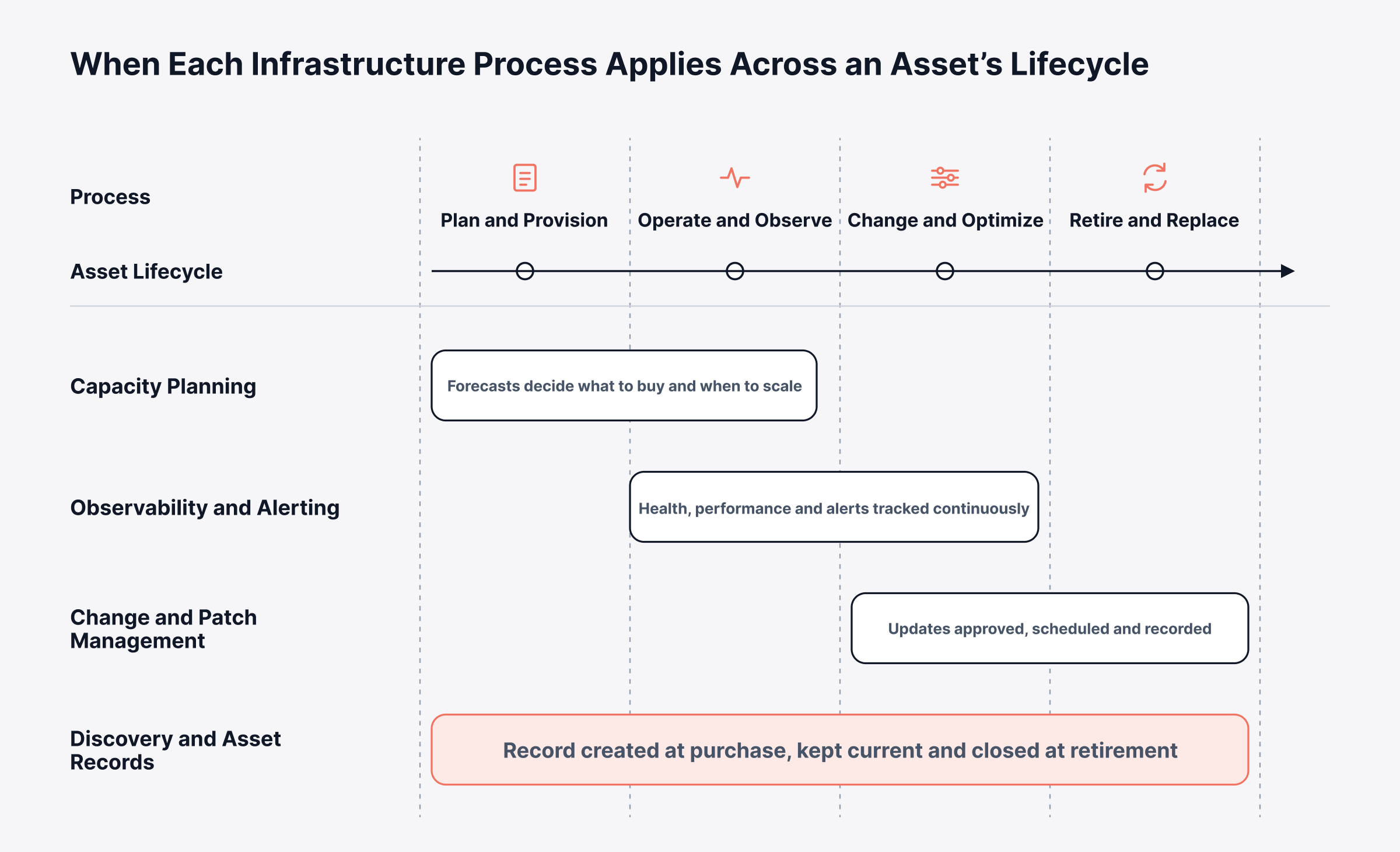
Every stage on that timeline needs a named owner, and gaps usually appear when work passes from one stage to the next. The next section covers who typically owns each part.
Who is Responsible for IT Infrastructure Management?
IT infrastructure management is owned by an infrastructure function led by an IT infrastructure manager, with specialists responsible for each layer. In a smaller organization one engineer may hold several of these roles, while a large enterprise may staff each role as a separate group.
What does an IT Infrastructure Manager Do?
An IT infrastructure manager is accountable for the availability, security, cost and roadmap of the whole infrastructure. The role translates business plans into capacity, standards and budgets, then holds each specialist area to agreed service levels.
Typical responsibilities include:
Setting architecture standards and approved configurations
Owning the infrastructure budget, vendor contracts and refresh cycles
Approving high-risk changes and chairing post-incident reviews
Reporting availability, capacity, cost and risk to business and IT leadership
Planning skills, staffing and on-call coverage
Which Roles Make Up an IT Infrastructure Function?
In an IT infrastructure function, each specialist looks after one layer of the scope above and is judged by how healthy that layer stays. Here's how the most common roles break down.
Role | Primary responsibility | Measured by |
Systems administrator | Server builds, OS patching, backups | Patch compliance, server availability |
Network engineer | Routing, switching, firewalls, WAN links | Link availability, latency, configuration compliance |
Cloud or platform engineer | Cloud accounts, virtualization, automation | Provisioning time, cloud cost per service |
Storage and backup administrator | Capacity, replication, restores | Restore success rate, capacity headroom |
Network operations center (NOC) analyst | Round-the-clock observation and first response | Time to detect, time to escalate |
Service reliability targets and automation | Service level objective attainment | |
Configuration and asset manager | Asset records and asset lifecycle | Record accuracy, audit findings |
How Should Infrastructure Responsibilities be Split?
Infrastructure responsibilities are easiest to split with a RACI matrix. Because it's agreed in advance, nobody has to debate ownership in the middle of an incident. R is the person doing the work, A is the one answerable for the result, and C covers anyone who must be consulted first.
Activity | Accountable | Responsible | Consulted |
Capacity plan | Infrastructure manager | Platform and storage engineers | Application owners, finance |
High-risk change | Change manager | Engineer making the change | Service owner, security |
Major incident | Incident manager | On-call engineers | Infrastructure manager, vendors |
Patch cycle | Infrastructure manager | Systems administrators | Security, application owners |
Asset records | Configuration manager | Engineers who add or retire assets | Procurement, finance |
Say a mid-sized retailer puts a new payment gateway server into production and nobody records it in the asset inventory. The next patch cycle skips that server, and the gap stays hidden until a compliance audit flags it months later. A named owner for asset records would have caught the missing server within days, long before the audit.
What Tools are Used for IT Infrastructure Management?
IT infrastructure management tools fall into eight categories, and most organizations run several of them side by side. The table maps each category to the question it answers for the business and the infrastructure function.
Tool category | What it does | Question it answers |
Observability platform | Collects and correlates metrics, logs, flows and traces, then alerts on issues | Is everything healthy, and if not, why? |
Network configuration and compliance management | Backs up configurations, detects changes, audits against policy | Did anything change, and is it compliant? |
IT asset management and configuration management database (CMDB) | Tracks assets, owners, contracts and dependencies | What do we have, and what depends on it? |
IT service management (ITSM) | Handles incidents, problems, changes and requests | Who is working on it, and was it approved? |
Configuration and automation | Applies builds and changes through code and runbooks | Can this change be repeated safely? |
Data center infrastructure management | Tracks power, cooling, space and rack assets | Is there room and power for growth? |
Backup and disaster recovery | Protects and restores data and systems | Can we recover, and how fast? |
Cloud management and cost | Governs cloud accounts, tags and spend | What does each service cost to run? |
Each category is useful on its own, and connecting them saves the most time, because an alert that arrives with its asset record and recent changes is faster to diagnose. Cost matters as well. Each extra product means another license to renew, another integration to maintain and more training, which is why it's worth asking how many categories one platform covers.
How do You Choose IT Infrastructure Management Software?
When you compare IT infrastructure management software, look first at how well it connects data across these categories. Then check whether its reports make sense to people outside IT. Use these checks when comparing IT infrastructure management solutions:
Coverage: Does it observe servers, network devices, virtualization, storage and cloud accounts from one platform?
Discovery: Does it find new devices and resources automatically and keep topology maps current as the environment changes?
Correlation: Can it group related alerts so one fault produces one incident?
ITSM connection: Can an alert open a ticket or change record linked to the affected asset?
Deployment fit: Does it run on premises, in private cloud and in public cloud, matching where your data must stay?
Leadership reporting: Can it produce availability, capacity and service-level reports that non-technical stakeholders can read?
Total cost: Does the license model stay predictable as device counts grow, and what do integration and training add?
Fewer products also means less tool sprawl and fewer integrations to keep running. That's especially true in hybrid setups, where on-premises systems and cloud providers both feed data into the same view.
How is Hybrid IT Infrastructure Management Different?
Hybrid IT infrastructure management is the same job spread across on-premises systems and one or more public clouds. Data, ownership and cost behave differently on each side. A Gartner forecast expects 90% of organizations to adopt a hybrid cloud approach through 2027, so this is quickly becoming how most infrastructure runs.
Hybrid infrastructure management adds four specific challenges:
Split telemetry: Cloud metrics arrive through provider interfaces, while on-premises devices report through standard protocols such as SNMP or through installed agents, so data lands in different tools
Identity boundaries: Cloud accounts, directory services and local administrator accounts each follow their own access model
Cost visibility: Cloud spend moves with hourly usage, while on-premises costs follow purchase and depreciation cycles
Dependency blind spots: An application can run in the cloud while its database, authentication or file shares stay on premises
Consider a logistics company that moves its order-tracking portal to a public cloud while the order database stays in its own data center. Cloud dashboards show the portal as healthy, yet customers see timeouts because the slowdown is on the private link to the database. A view that spans both sides shows the full path in one place.
A dashboard that sees only one side of a hybrid dependency can report healthy while customers wait. The diagram below shows where the delay occurs and what each view can see.
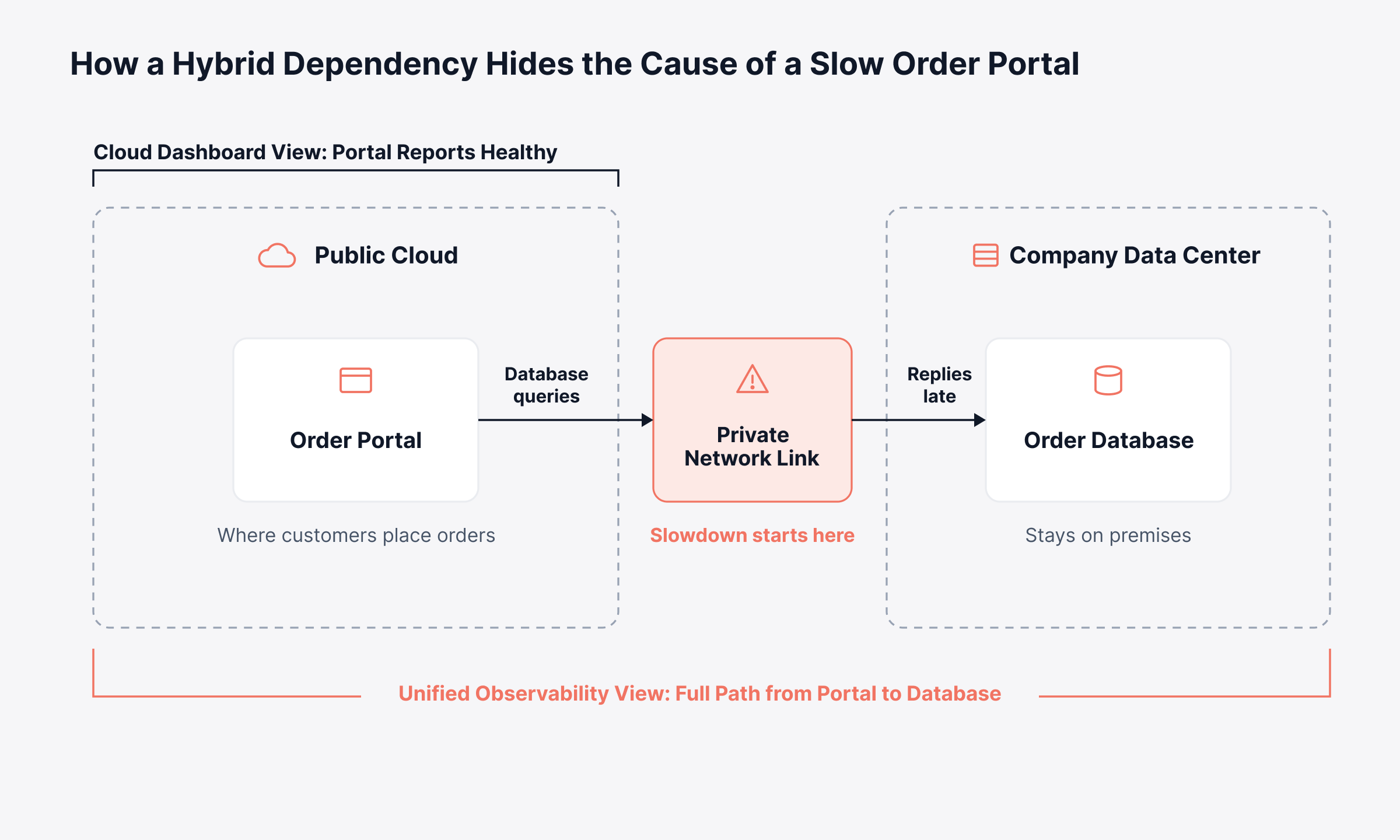
When engineers can see the whole path, they can go straight to the slow link and fix it. Our guide to hybrid cloud monitoring covers how to build that view.
What is Remote Infrastructure Management?
Remote infrastructure management extends the same practices to branch offices, retail stores, plants and edge sites with little or no local IT staff. The priorities are collectors that gather data on site, secure remote access, alerting that keeps working when the main link fails, and standard site builds that can be replaced quickly.
Should You Use IT Infrastructure Management Services?
IT infrastructure management services are offered by managed service providers and IT infrastructure management companies that run some or all of these processes under contract. The choice usually depends on skills, coverage hours and how much control the organization wants over change and data.
Factor | In-house management | Managed services |
Control over changes | Full control | Shared, governed by the contract |
Round-the-clock coverage | Needs a staffed NOC or on-call rotation | Usually included in service tiers |
Specialist skills | Built and retained internally | Drawn from the provider's engineers |
Cost model | Salaries, tools and training | Typically a monthly fee per device, user or service |
Knowledge retention | Stays inside the organization | Depends on documentation and handover terms |
Many organizations run a mixed model, where the provider handles observation and first response and internal engineers keep architecture, change approval and vendor strategy. Either way, the organization should own the tooling and the asset records. Switching providers later is much easier when that history stays in-house.
Which Metrics Show IT Infrastructure Management is Working?
IT infrastructure management is working when a handful of metrics improve together. Services stay up, problems get caught early, changes rarely break anything, and there's enough capacity ahead of demand. Downtime is usually the costliest miss: in Uptime Institute's 2026 outage analysis, 57% of respondents said their latest major outage cost over $100,000.
Metric | What it measures | Why leadership cares |
Service availability | Share of time a business service is usable | Ties directly to revenue and contractual service levels |
Mean time to detect (MTTD) | Time from fault to first alert | Shows how complete observability coverage is |
Mean time to resolve (MTTR) | Time from alert to restored service | Shows how well processes and skills work under pressure |
Change failure rate | Share of changes that cause an incident | Shows the quality of change control |
Capacity headroom | Spare CPU, memory, storage and bandwidth | Warns of unplanned spend or outages ahead |
Patch compliance | Share of systems on approved patch levels | Shows exposure to known vulnerabilities |
Asset record accuracy | Share of records that match what discovery finds | Supports the accuracy of every other metric |
Set targets for each business service, because customers and leadership judge IT by the services they use, such as online ordering or payroll. Tie each target to an agreed service level objective, so every metric has a threshold both IT and the business accept.
What are the Common Challenges in IT Infrastructure Management?
IT infrastructure management challenges usually trace back to fragmentation, with data, ownership and tools spread across too many places. The most frequent ones are:
Stale inventory: Assets are added faster than records are updated, so the asset inventory drifts away from what is running
Alert noise: Duplicate and low-value alerts bury the few that signal a service problem
Disconnected tools: Observability, asset and ticketing data live in separate products with separate owners
Aging hardware: Systems past vendor support carry security and failure risk that is hard to budget for
Skills gaps: Cloud, automation and network engineering skills are hard to hire and harder to keep
Shadow IT: Cloud accounts and software subscriptions bought outside IT create assets without an owner
Most of these challenges become easier to manage when discovery, observability and service records use one shared source of data. Grouping related alerts together also makes alert noise reduction practical. The remaining work is organizational, such as naming owners and keeping procedures current.
How do You Build an IT Infrastructure Management Program?
An IT infrastructure management program works best when it is built in a fixed order, because each step depends on data from the one before. Here's a practical order to follow.
1. Discover and Record Every Infrastructure Asset
Run automated discovery across networks, hypervisors and cloud accounts first. Everything it finds goes into a CMDB with a named owner. Reconcile discovered data against purchase records to find assets that were bought and never deployed, or deployed and never recorded.
2. Define Infrastructure Standards and Service Maps
Document approved builds, naming conventions and configuration baselines. Then use service dependency mapping to show which components support each business service, so alerts can be ranked by business impact.
3. Bring Every Infrastructure Layer into One Observability Platform
One observability platform should receive telemetry from every layer, from servers and storage to network devices, virtual machines and cloud accounts. Set thresholds per service, and use anomaly detection where normal behavior changes with the time of day or the season.
4. Connect Observability Data to Service Management
Route alerts into incident and change workflows with asset context attached. Require a change record for every production change, so any incident can be checked against what changed recently.
5. Review Infrastructure Metrics with Business Owners
Review the metrics above each month with service owners, and close every post-incident review with named actions and dates. Feed capacity trends into the annual budget cycle, so spending decisions rest on measured demand.
Once these five steps are in place, the program runs on regular day-to-day practices. For IT infrastructure management best practices in more depth, see our infrastructure best practices checklist covering asset records, patching, change enablement and recovery design.
What Trends are Shaping IT Infrastructure Management?
IT infrastructure management is becoming more automated and more focused on business services, with results reported in terms such as cost and availability. Five trends stand out for infrastructure leaders planning the next budget cycle:
AI-assisted operations: Observability platforms apply machine learning to spot anomalies, group related alerts and forecast capacity, which can shorten investigation time
Infrastructure as code: Builds and changes are defined in version-controlled files, which makes environments repeatable and easier to audit
Cost governance: Cloud spend is reviewed per service with finance, a practice known as FinOps
Edge and branch growth: More compute runs in stores, plants and remote sites, which raises the need for central visibility
Power and cooling limits: Facility capacity now factors into infrastructure plans alongside compute and storage
Our overview of infrastructure trends covers each shift in more detail. Each trend increases the amount of data that infrastructure owners need to connect, which is the problem Motadata's platforms are designed to solve.
How does Motadata Support IT Infrastructure Management?
Motadata supports IT infrastructure management through two connected platforms: ObserveOps for observability and ServiceOps for service and asset management. Many capable tools cover one or two of the categories above well, and Motadata's approach is to connect them so engineers, service owners and leadership work from the same asset, alert and change data.
Motadata ObserveOps provides:
Unified observability: Metrics, logs, flows and traces for servers, network devices, virtualization, hyperconverged systems and cloud services such as AWS and Azure
Live topology: Network, cloud and virtualization topology maps that refresh automatically as the infrastructure changes
Configuration control: Configuration backup, change detection and compliance checks against standards such as CIS, HIPAA and SOX
Machine learning policies: Anomaly detection, alert correlation and capacity forecasting, plus runbooks for routine remediation
Flexible deployment: On premises, private cloud or public cloud, with collectors that gather data from branch and remote sites
Motadata ServiceOps adds:
CMDB and asset management: Automated discovery, configuration item management with relationships, impact analysis and full asset lifecycle tracking
ITIL 4 processes: Incident, problem, change and release management in one service desk, with practices certified through PeopleCert
Patch management: Scheduled patching across Windows, macOS and Linux endpoints
This is what one of our users says about Motadata ObserveOps on G2:
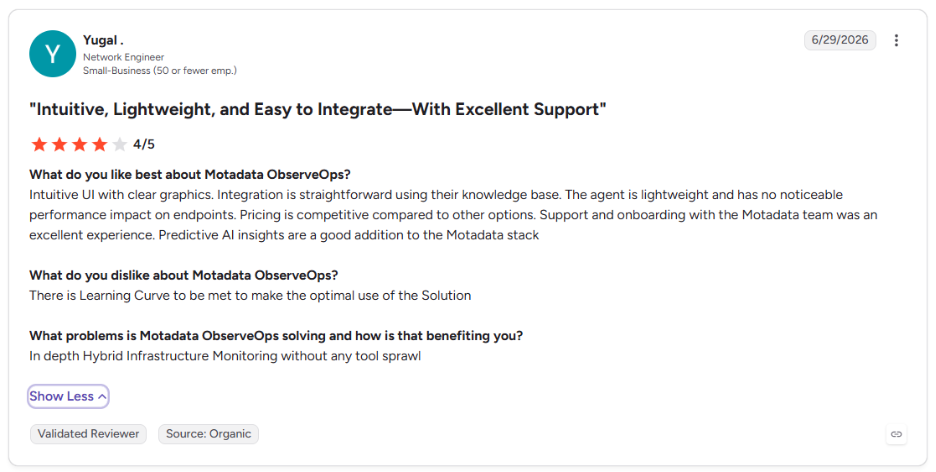
Connecting detection to service records shortens recovery, because the engineer starts the fix with context already attached. The flow below shows which Motadata platform handles each step when a fault appears.
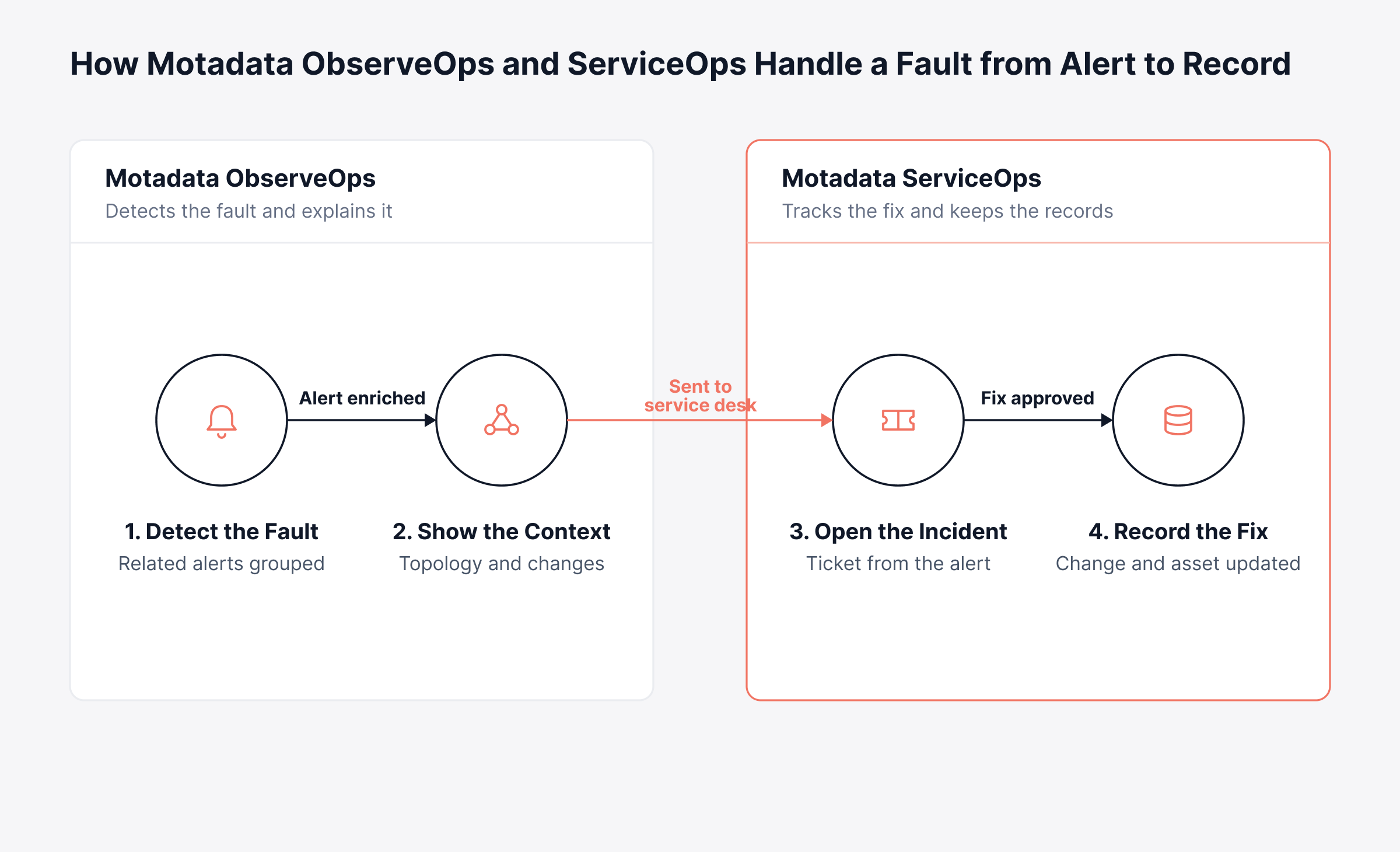
When detection, context and records stay connected, recovery is faster and every fix leaves an audit trail behind it. Faster recovery protects service quality, and accurate records help keep infrastructure spending under control.
Replace Fragmented Infrastructure Tools with One Observability View in Motadata ObserveOps
IT infrastructure management works when every component has an owner, a current record, a health signal and a controlled path to change. Separate tools make each of those harder to maintain, because the information needed to fix an incident is stored in different places. Motadata ObserveOps brings servers, networks, virtualization and cloud services into one correlated view, and ServiceOps connects that view to CMDB, change and incident records.
No platform replaces clear ownership, written procedures or the judgment of experienced engineers. A unified platform gives those people and the leaders they report to the same accurate picture, so decisions about capacity, change and spending rest on current data.
FAQs
What is the role of IT infrastructure management?
Its role is to keep the technology a business runs on available, secure and cost-effective. That means tracking every asset, observing health, controlling changes and planning capacity, so services stay reliable as the organization grows and new systems come online.
What is the difference between IT infrastructure management and ITSM?
IT infrastructure management looks after the technology components themselves, from servers to cloud accounts. IT service management governs how IT delivers services to users through incident, request, change and problem processes. The two meet in the CMDB and the change process, which is why many organizations run them on connected platforms.
What do IT infrastructure management services include?
Managed services usually cover round-the-clock monitoring, incident response, patching, backup management and capacity reporting, and many providers also handle network and cloud administration. The contract should state which changes the provider can make alone, how records are handed back and which service levels apply.
What are the most important IT infrastructure management tools?
Most organizations rely on an observability platform, a CMDB with asset management, an ITSM tool and configuration automation. Platforms such as Motadata ObserveOps and ServiceOps combine several of these categories, which reduces integration work and gives every engineer the same data to work from.
How often should IT infrastructure be reviewed?
Operational metrics such as availability, incident counts and capacity headroom are best reviewed monthly with service owners. Architecture, lifecycle and security standards need a full review at least once a year, and again after any major incident, acquisition or cloud migration.
Author
Poonam Lalani
Content Strategist
Poonam Lalani is a B2B content strategist and writer with a background in computer engineering and experience across enterprise technology domains, including AI, cloud, DevOps, data engineering, and IT operations. She specializes in creating research-driven content that simplifies complex ideas and supports product education, thought leadership, and business growth.