All Features
Service Management
Change Management
Make organizational changes less chaotic with our ITIL-aligned change management software that focuses on collaboration, transparency, and robust automation.
A Structured Change Process That Keeps Everyone Aligned
Every change to a production environment carries risk, and the difference between a smooth rollout and an outage often comes down to process. Motadata ServiceOps Change Management gives your team a governed path for every change, from a routine pre-approved update to an urgent fix that cannot wait for a full review cycle.
The module is built on the discipline of ITIL 4 change enablement. It captures what is changing, who signs off, how the work rolls out, and how you recover if something goes wrong. Because change records link directly to the incidents, problems, releases, and assets they touch, the people reviewing a request see the full context rather than an isolated form.
The result is a change practice that moves at the speed the business needs while keeping the checks and balances that protect service stability.
Three Change Types for Every Level of Risk
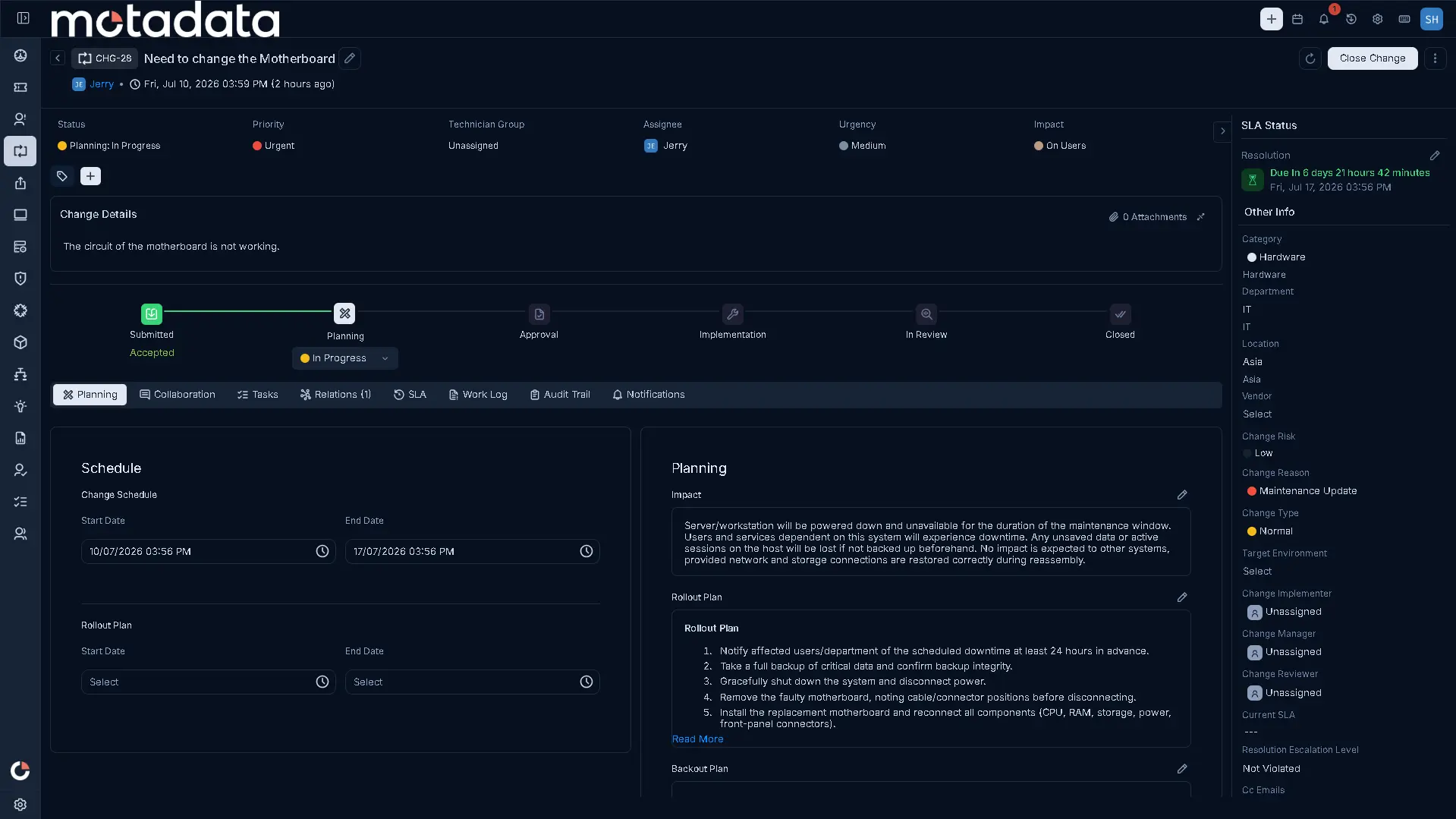
Not all changes deserve the same scrutiny, and treating them identically slows down low-risk work while under-governing high-risk work. ServiceOps ships with three out-of-the-box change types: Standard, Normal, and Emergency.
Standard changes cover pre-approved, repeatable work that carries known and accepted risk. Normal changes follow the full assessment and approval path for planned work that needs review. Emergency changes give you an expedited route for urgent fixes where waiting would extend an outage or expose the business to harm. Each type carries its own configuration, so the process fits the risk instead of forcing every request through one rigid flow.
Approval Governance With CAB and ECAB
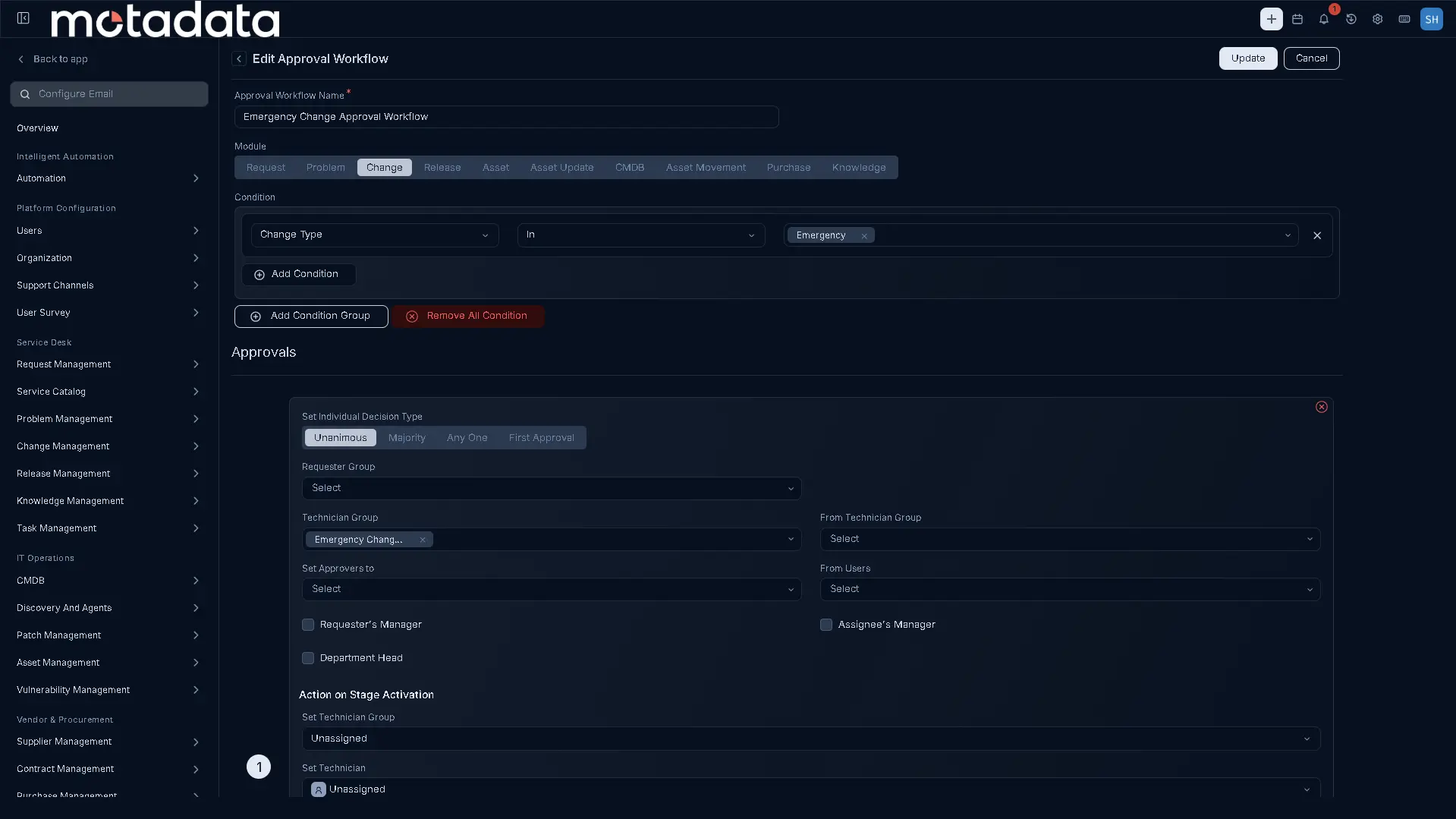
Approvals are where change governance either holds or breaks down. ServiceOps provides out-of-the-box approval workflows that route each change type to the right authority. Normal changes notify the Change Advisory Board (CAB) on creation, and Emergency changes notify the Emergency Change Advisory Board (ECAB), so urgent work reaches the people empowered to authorize it quickly.
Alongside these, a configurable Change Approval Workflow and fully custom approval workflows let you match your own governance model, whether that means a single sign-off or a multi-stage, condition-based chain of approvers. The board reviewing a request sees the plans, the impact assessment, and the linked records in one place, which turns approval into an informed decision rather than a rubber stamp.
This condition-based, multi-stage approval configuration is not something Change reinvents on its own. The same approver-chain mechanics carry over to Release approvals and to the per-service approval workflow inside Service Request Management, so your organization builds an approval pattern once and reuses it wherever a record needs multi-step sign-off, rather than configuring governance logic three separate times.
Implementation, Rollout, and Backout Plans
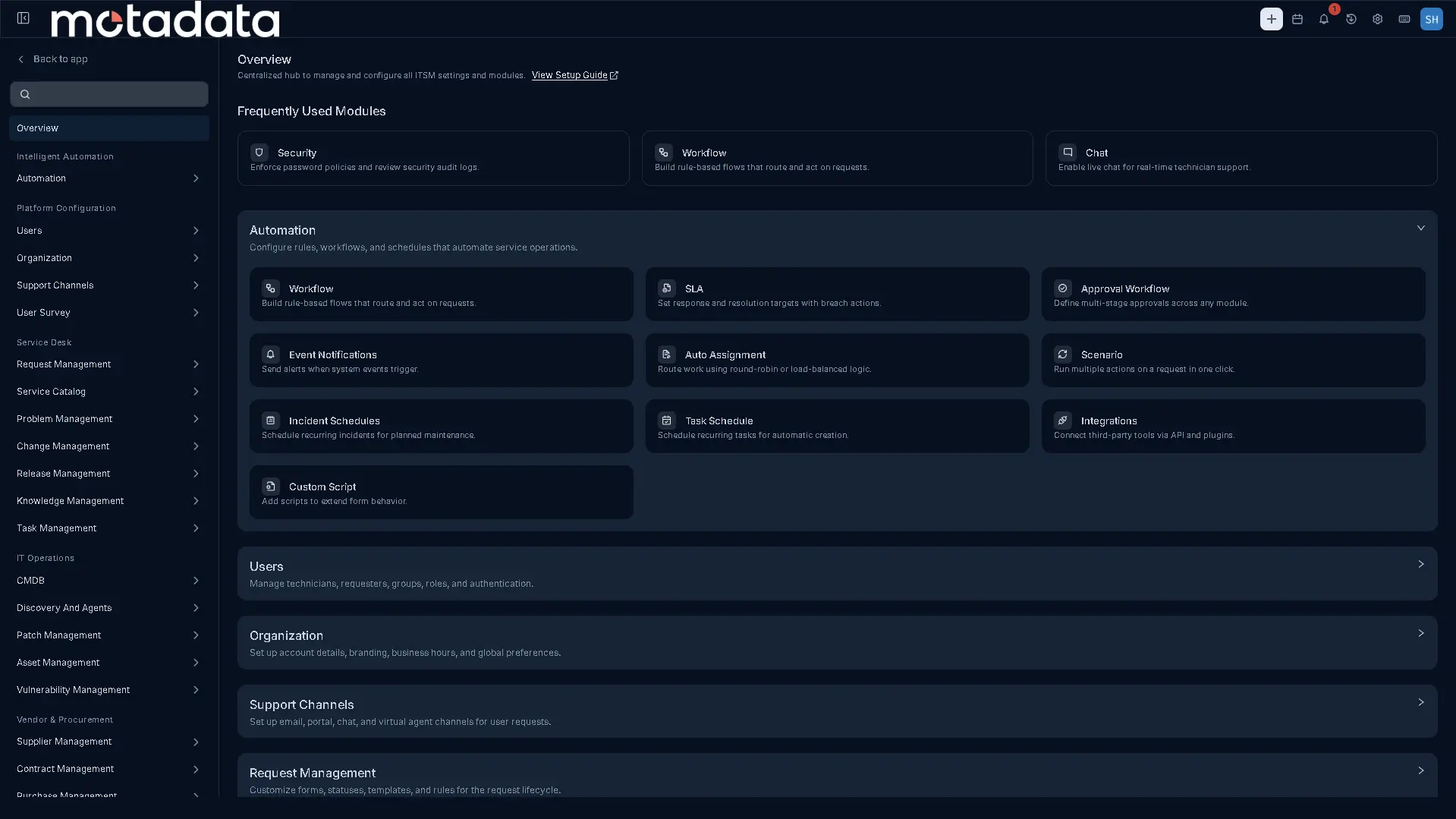
A well-governed change is only as good as the plan behind it. Every change record captures an Implementation Plan, a Rollout Plan, and a Backout Plan, so the team knows exactly how the work will be delivered and how to reverse it if the rollout does not go as intended. Impact analysis fields sit alongside the plans, prompting the requester to assess and document what the change affects before it reaches the board.
Change Model transition automation enforces the process itself, moving a change through its lifecycle stages according to defined logic so records cannot skip required steps. Together these controls make sure that scheduling, planning, and recovery are documented decisions rather than afterthoughts.
Planning Rules can push this further by making Rollout Plan Dates a mandatory field before a change is allowed to proceed. When an administrator turns that rule on, a change record cannot move ahead without a scheduled rollout window already defined, closing the gap where a rollout date gets treated as a detail to fill in later rather than a required part of the plan.
Custom Rules, Forms, and Configuration Built Around Your Change Process
No two organizations run change the same way, and ServiceOps lets the process bend to fit yours instead of forcing yours to fit a generic template. Change custom rules and form rules apply data validation, field control, and mandatory-field enforcement as a record is created, edited, or submitted, so a change cannot move forward missing information your process requires. Custom change forms and templates let a team standardize how a particular kind of change, a network firmware update or a database schema migration, gets captured the same way every time, instead of stretching one generic form to cover every case.
Change risk, change reason, and change category are each independently configurable, giving every record a clear classification for reporting and for routing to the right reviewers. Target-environment definition records exactly where a change is headed, whether that is a staging environment or a production system, so that detail stays visible to reviewers rather than buried in free text.
Change also carries its own identity inside the system. A custom numbering prefix, starting number, and minimum-digit setting can be configured for Change, bringing it to the same parity that Request already had and that Problem and Release now share, so change records are recognizable at a glance in a list, a report, or an email subject line. And when a bulk or merge action runs into a rule that needs attention, a Note Mandatory rule for example, a side panel opens to capture the missing note; other custom rules such as Assignee Mandatory, Resolved, and Closed produce a clear message identifying exactly which records in the batch are affected, so a bulk operation never fails silently on a request it could not process.
Assigning and Tracking the Work Behind Every Change
A well-planned change still needs the right person driving it, and ServiceOps routes change records the same way it routes every other type of work: through Round Robin or Smart Balance auto-assignment. Round Robin cycles new changes evenly across a technician group, while Smart Balance accounts for existing workload, so a change lands with whoever has room to take it on rather than piling onto whoever is already busiest.
Once a change is assigned, the work inside it breaks down into tasks, whether that is a pre-change validation step, the rollout activity itself, or a post-change verification check. Tasks can stand alone or associate with the parent change record, carry custom statuses that match how your team actually tracks progress, and support bulk actions across a multi-select list: Update, Archive, or Close a set of active tasks in one action, or Restore and Delete archived ones. A task list sorted by Start Date, End Date, Status, or Priority turns a change with many moving parts into a schedule the whole team can follow.
A Visual Change Calendar and Connected Records
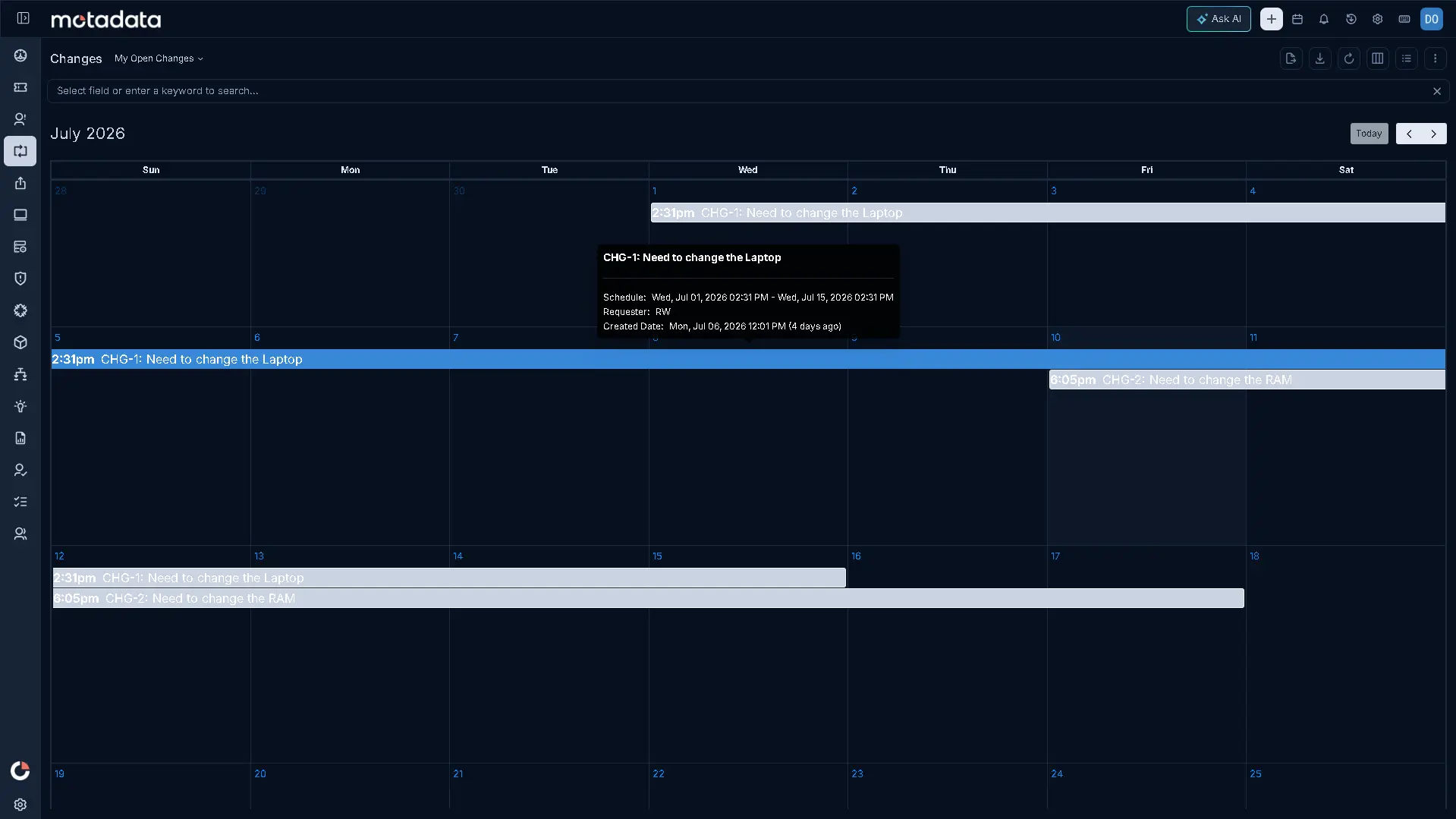
The Change Calendar gives you a visual representation of scheduled changes, so planners can see what is booked and when across the environment at a glance. It is a clear window onto the change schedule that supports coordination and communication around planned work.
Change records also connect to the wider service management practice. A change links to the incidents and problems that prompted it, to the releases that carry it forward, and to the assets it modifies, and it integrates with Release Management so changes relate to their release plans. This web of relations means anyone opening a change understands not just the task in front of them but everything it touches.
Notifications, Reporting, and Audit Visibility
Keeping people informed and keeping a record of what happened are both part of running change well. Event notifications use predefined templates across Email, SMS, Microsoft Teams, WhatsApp, and Google Chat, so a change moving through approval, scheduling, or closure reaches the people who need to know on the channel they actually watch, instead of relying on someone remembering to send a manual update.
Custom reports and dashboards turn that activity into something a change manager can act on: how many changes are open by type, how approvals are trending, or how a particular category of change is performing over time. Audit trails sit underneath all of it, recording who did what and when across a change's life, from the first form submission through every approval, edit, and status transition.
Print output gets the same attention to detail. A print template for a change record can include a Task Details placeholder that renders configurable task columns, Task ID, Subject, Assignee, Status, Priority, and start and end dates, directly in the exported document, so a printed change record carries the same task-level detail visible on screen. And because nested Archive permissions put Delete and Restore under the Archive permission for a technician role, becoming configurable only once Archive itself is enabled, administrators keep tight control over who can remove or bring back a change record, consistent with how that same nesting works for Request, Problem, Release, Asset, Contract, Project, and CMDB.
Why This Feature Matters
Change is constant, and ungoverned change is one of the most common causes of unplanned downtime. Motadata ServiceOps Change Management gives your organization a repeatable, auditable process that sorts work by risk, routes it to the right approvers, and documents both how to deliver it and how to recover from it. Teams move faster on low-risk work, apply real scrutiny to high-risk work, and keep a full record of every decision, all while staying connected to the incidents, problems, releases, and assets that give each change its meaning.
That same discipline extends past the approval stage. Custom rules, forms, and risk, reason, and category configuration make sure every change carries the right information before it starts moving. Auto-assignment and task tracking make sure the work reaches the right person and stays visible while it is in progress. Notification templates, custom reports, audit trails, and nested Archive permissions make sure nothing about a change disappears once it closes, whether that is who approved it, who reversed it, or who was told about it along the way. The result is a change practice that moves fast where speed is safe, applies scrutiny where it counts, and stays fully accounted for from the first form field to the final closure.
Ready to implement Change Management?
Discover how Motadata ObserveOps can help you monitor your infrastructure in real-time and respond to issues instantly.