How to Run a Post-Incident Review That Prevents Repeat Outages
When the same outage returns a quarter later, what did the last review actually change? After a major incident, nearly every IT organization runs a review of some sort. A meeting is held and a document gets filed, yet the action items slip into a backlog where project deadlines usually win.
When those fixes never ship, the business pays for the same failure twice. Customers tolerate a second outage far less readily than the first. Leadership, meanwhile, asks why a problem everyone already knew about is still draining revenue and staff hours.
Run well, a post-incident review converts the lessons of a bad day into fixes that last, whether that means a sturdier system, a clearer procedure or an alert that fires sooner. It is also how your wider incident management practices get better after every major event. Here is what this blog covers:
What a post-incident review covers and why it matters to the business
Which incidents need a full review and which need a lighter one
How to conduct a post-incident review in six steps, with a meeting agenda and a free post incident review template
How to track fixes to closure, report findings to leadership, and measure whether reviews are working
What is a Post-Incident Review?
A post-incident review is a structured, blameless look back at a resolved IT incident. Many IT and SRE organizations call the same exercise an incident postmortem. The review establishes what happened and why, then decides what will stop it from happening again.
A complete review produces four outputs:
Timeline: A factual sequence from the first sign of trouble to full recovery
Impact statement: Who was affected, for how long, and what it cost the business
Contributing factors: The technical, process and organizational conditions that made the incident possible
Action items: Specific changes, each with an owner and a due date, that reduce the chance or impact of a repeat
What is the Purpose of a Post-Incident Review?
The purpose of a post-incident review is to capture what an incident taught the organization while the facts are still fresh. Those lessons then become fixes, each one checked to confirm it worked. People forget details within days and response messages get buried across chat channels, so an early review captures the full picture.
In ITIL incident management, the widely used framework for IT service management, the review is also the point where the incident process hands the underlying cause to problem management for a permanent fix. That handoff is covered later in this blog.
What is a Post-Incident Review Not Used For?
A post-incident review should never double as a performance appraisal or a disciplinary hearing, and it is no place to assign personal fault. When people expect a review to affect their standing, they start holding back. The organization then loses exactly the detail it needs to repair the system.
Why do Post-Incident Reviews Matter to the Business?
Post-incident reviews matter to the business for a simple reason: they are how an organization avoids paying for the same outage over and over. Their value shows up well beyond the IT department:
Revenue and productivity: Every hour of disruption carries a cost of downtime in lost transactions and idle staff, and fixing the cause removes that cost from every future repeat
Customer trust and contracts: Fewer repeat failures mean fewer service level agreement (SLA) credits, escalations and difficult renewal conversations
Audit and compliance evidence: A documented trail from failure to fix answers auditor and regulator questions without a scramble
Better investment decisions: Findings across many reviews show leadership where spending on people, tooling or architecture reduces the most risk
Lower operating cost: Engineers spend less time firefighting known problems and more time on planned work
An hour spent on a review costs little next to the outage it may prevent. First, though, it is worth untangling a few terms that often get used as if they meant the same thing.
Is a Post-Incident Review the Same as an Incident Postmortem?
A post-incident review and an incident postmortem are the same practice under two names. The other related terms each cover one part of the review, such as the post-incident analysis, the root cause analysis or the incident report. The table below separates them.
Term | What it is | Who usually uses the term | Output |
Post-incident review (PIR) | The end-to-end process of analyzing an incident and driving follow-up | IT service management and ITIL-aligned operations | Published review with tracked actions |
Incident postmortem | The same practice under the name common in software and site reliability engineering (SRE) groups | Engineering and SRE | Postmortem document and action list |
Post incident analysis | The investigative work inside the review: evidence, timeline, contributing factors | Security, operations and risk functions | Findings that feed the review |
Root cause analysis (RCA) | A technique for tracing a failure to its underlying causes | Problem management | One or more causes with supporting evidence |
Post incident report | The written document summarizing the incident for stakeholders | Service owners, customers, auditors | Summary of impact, cause and fixes |
Incident review | A general label for any look back at an incident, formal or informal | Used loosely across functions | Varies by organization |
In practice, root cause analysis is one step within the review, and the post incident report is what the review publishes. Whichever term you choose, use it everywhere, so nobody is unsure which meeting a calendar invite refers to. That settled, the more practical question is which incidents deserve a review in the first place.
Which Incidents Need a Post-Incident Review?
Post-incident reviews are needed when an incident hurt the business in a meaningful way. The same applies when it slipped past detection or looks likely to happen again. Reviewing every minor ticket wastes goodwill and hours, which is why clear triggers help: a small incident gets a short written review, and a large one gets a full meeting.
Condition | Review depth | Why it qualifies |
Severity 1 or 2 incident | Full review with a meeting | Customer, revenue or safety impact |
SLA breach on a business service | Full review with a meeting | Contractual and reputational exposure |
Same symptom recurring within a month | Full review, linked to a problem record | The earlier fix did not hold |
Users reported the issue before any alert fired | Full review focused on detection | Observability data did not catch the problem |
Any data loss or corruption | Full review with a meeting | Recovery and data accuracy must be confirmed |
Security incident | Full review under security handling rules | Evidence, disclosure and legal duties apply |
Near miss caught before impact | Short written review | Cheap lessons before they become expensive ones |
Severity 3 or 4 with a known fix | Note in the incident record | Trends are reviewed across many tickets |
Tie the triggers to your severity model and your service level objectives, the internal reliability targets set for each service. With written triggers, a review starts automatically when an incident qualifies, and nobody has to make the case for one after a long night. How the review is run then matters as much as whether it happens.
What does a Blameless Postmortem Mean in Practice?
A blameless postmortem starts from the assumption that everyone acted sensibly given what they knew, the tools at hand and the time available, then searches for the conditions that allowed the failure. Its roots are in site reliability engineering and aviation safety, two fields where investigators noticed that people who fear blame stay quiet about the very facts that could prevent the next accident.
Accountability stays in place in a blameless review, since people are still expected to complete the actions they own. What changes is the language used to describe the incident:
Blame-focused wording | Blameless wording |
The engineer ignored the alert | The alert fired alongside dozens of low-priority alerts, and nothing marked it as urgent |
The operator pushed a bad config | The configuration change passed review without a check on the connection limit |
Why didn't you follow the runbook? | What made the runbook hard to find or follow during the incident? |
Human error caused the outage | The procedure allowed a single manual step to take production down |
The first row describes alert fatigue, where so many alerts fire that the important one gets lost, which is a system design problem. Industry data points the same way: Uptime Institute's 2025 outage analysis found that 85% of human error-related major outages stem from staff failing to follow procedures or from flaws in the processes and procedures themselves.
So whether a step was skipped or was flawed from the start, the remedy lies in the procedure itself, in the tools, or in how people are trained. A facilitator can set that expectation in the first minute of each post-incident review meeting. One or two sentences are enough to say the discussion is about the system and nobody is under evaluation.
How do You Conduct a Post-Incident Review?
To conduct a post-incident review, work through six steps. Assign an owner, gather the evidence and rebuild the timeline together in a meeting; then identify contributing factors, write action items that can be verified, and publish the review while tracking those actions to closure. Each step in the post-incident review process needs someone responsible for it and a deadline counted in days.
Ownership comes first for a practical reason: without a named owner, reviews tend to slide off the calendar.
1. Assign a Review Owner and a Deadline
The review owner drafts the document, schedules the meeting and follows up on action items until they are done. The owner is often the incident commander, the person who coordinated the response, while a neutral facilitator from outside the response runs the meeting itself.
Common timing targets look like this:
Draft started: Within one to two business days of resolution
Meeting held: Within five business days, while memories are fresh
Review published: Within ten business days, with action items already in the tracker
2. Build an Evidence Pack Before the Review Meeting
The evidence pack is the set of facts the group reviews, collected before the meeting starts. It includes alert history, metric graphs, log excerpts, traces, recent change records, deployment events and the incident call or chat transcript, gathered in one place.
This step goes fastest when the data is already connected. When metrics, logs, traces and service dependency maps live in one observability platform, log correlation lets the owner line up the first error, the first alert and the first user complaint without stitching screenshots together. Lining these up also shows your time to detect, which is how long the problem ran before anyone noticed and one of the most useful numbers in any review.
3. Reconstruct the Incident Timeline in the Review Meeting
Every post-incident review meeting opens with the incident timeline. Go through it in order, pausing so responders can describe what they noticed and what they assumed. Just as useful is hearing why a given decision looked sensible in the moment.
Invite a small group:
Facilitator: Runs the agenda and keeps the discussion blameless
Incident commander: Explains how the response was coordinated
Responders: Add context the logs do not show
Service owner: Speaks to business impact and priorities
Scribe: Captures findings and draft actions in the document
A 60-minute agenda keeps the discussion focused:
Segment | Time | Focus |
Ground rules and scope | 5 minutes | Blameless norms and what the review covers |
Timeline walkthrough | 15 minutes | Confirm facts and fill gaps |
Contributing factors | 20 minutes | Technical, process and organizational conditions |
Action items | 15 minutes | Owners, due dates and verification |
Wrap-up | 5 minutes | Publication date and distribution list |
4. Identify the Contributing Factors Behind the Incident
Contributing factors are the conditions that, in combination, let the incident occur and kept it going for as long as it lasted. The Five Whys is a useful technique here. You ask "why" again and again until the underlying cause surfaces, and it works best when the group follows every thread and resists settling on the first answer.
Take a hypothetical case in which an order-processing failure halted online sales for an hour. A Five Whys chain might run like this:
Orders failed because the order database stopped saving new records
The database stopped because its disk filled
The disk filled because a logging change made the application record more detail and keep it longer
The growth went unnoticed because the disk alert fired at 95% full, leaving only minutes to react
The logging change went ahead because the change review form had no capacity check
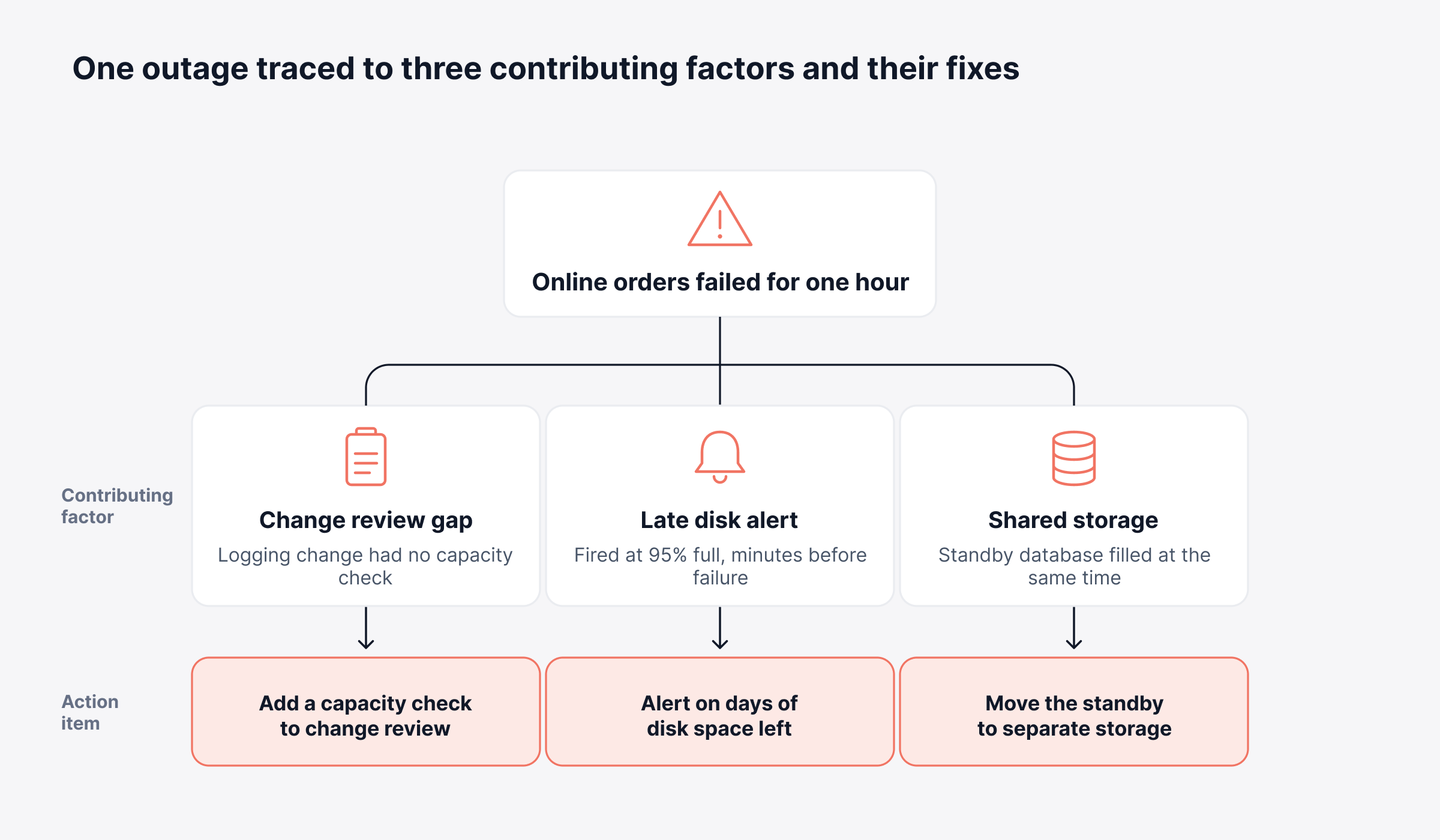
Following only this one chain, the group would focus on the logging change and stop there. Looking at every branch reveals two more conditions: the disk alert fired too late to help, and the standby copy of the database shared the same storage, so it filled up too and recovery took a full hour.
Map every branch before agreeing on actions, since each branch usually needs its own fix. The diagram below shows the three conditions behind the order-processing outage and the fix for each one.
5. Write Action Items That Can Be Verified
Of everything a review produces, only the action items change the system. Each therefore needs one owner and a due date, along with some way to confirm that it worked. An item like "improve alerting" can stay open for months, whereas "alert when the disk has under three days of space left" is something you can test.
Balance actions across four types, shown here against the order-processing example:
Prevent: Add a capacity check to the change review form
Detect: Alert on how fast the disk is filling and how many days of space remain
Mitigate: Move the standby database to separate storage and document the failover steps
Learn: Publish a knowledge article describing the symptom and the workaround
Once the list exists, put the fixes that cut the most business risk for the least effort at the top. And when the same manual fix shows up in incident after incident, runbook automation can turn it into a tested routine that behaves identically each time it runs.
6. Publish the Review and Track Actions to Closure
Share the finished review widely, since nobody outside the room can learn from a document they never see. Link it to the incident record, notify affected service owners, and include a short summary in your regular operations meeting.
Tracking matters as much as publishing. Put every action item into the same system that holds day-to-day work, set a target completion date for high-priority actions, and review overdue items in a standing meeting until they are done. A standard template makes all six steps easier to repeat.
What Should a Post-Incident Review Template Include?
A post-incident review template should cover eight sections, starting with a summary and the business impact. It then moves through the timeline, detection, response, contributing factors and action items, and closes with lessons learned. Using the same postmortem template every time speeds up writing and gives executives a format they recognize, and it makes one incident easy to compare with the next.
The free post incident review template below can go straight into your ITSM tool or a shared document, with fields adjusted to match your severity levels:
Section | Fields to fill in | What good looks like |
Review details | Incident ID, severity, review owner, facilitator, meeting date, published date | Completed before the meeting starts |
1. Summary | What happened, in plain language | Two or three sentences a non-technical reader can follow |
2. Impact | Services affected, users or customers affected, duration, SLA breached (yes or no), estimated business cost | Business terms first, technical detail second |
3. Timeline | Timestamps for first sign of trouble, first alert, incident declared, mitigation applied, full recovery confirmed | Facts only, taken from the evidence pack |
4. Detection | How the incident was detected, time from first impact to first alert | Shows whether observability caught the problem early |
5. Response | What helped recovery, what slowed recovery | Handoffs and escalations included |
6. Contributing factors | Root cause if a single one is clear, then technical, process and organizational factors | More than one branch explored |
7. Action items | Type, action, owner, due date, how you will verify, linked record | One owner and one due date per item |
8. Lessons learned | Who else needs to know, and what they should check | Shared beyond the people in the meeting |
A completed template only pays off when its findings reach the people who can act on them, which is where problem and change management come in.
How do Post-Incident Reviews Connect to Problem and Change Management?
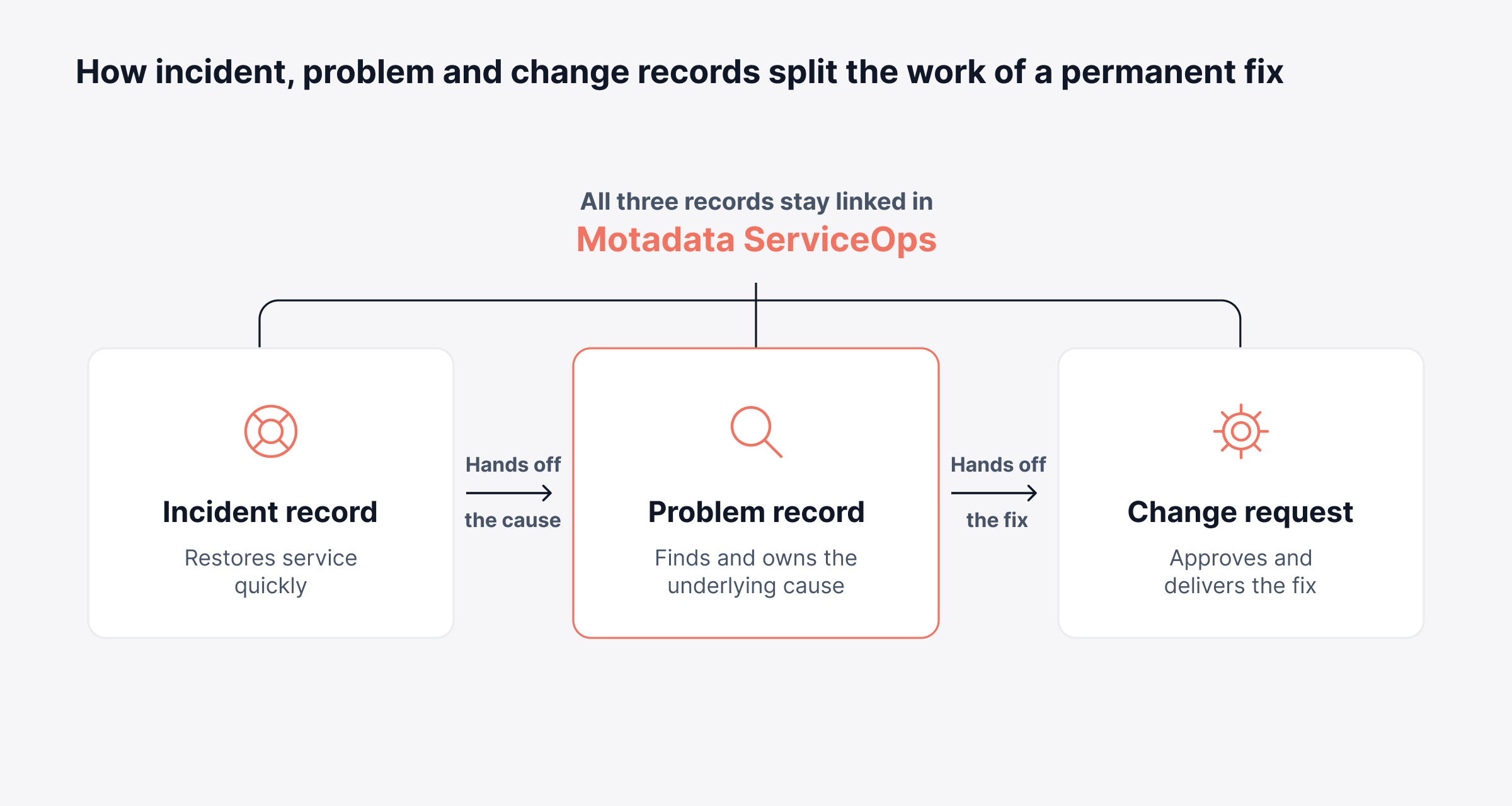
Post-incident reviews connect to problem and change management through a handoff, since those two processes own the permanent fix. ITIL divides the work cleanly. Incident management gets service back, problem management tracks down and removes the cause, and change management delivers the fix once it has been approved.
Send each finding to the process designed to handle it:
Cause needs investigation: Open a problem record, which is where problem management takes over from incident work
Fix touches production: Raise a change request so change management can assess the risk before it goes live
Fix is small and self-contained: Create a task with one owner and a due date, linked to the incident
Lesson helps future responders: Publish a knowledge article with the symptom and the workaround
Keep the incident, problem and change records linked, so an auditor or service owner can follow one chain from outage to permanent fix. The diagram separates what each of the three records is responsible for and where one hands off to the next.
Motadata ServiceOps brings incident, problem, change, release and knowledge management together on a single ITIL-aligned platform. Tasks linked to problems or changes carry their own audit history. Because review findings remain attached to the original incident, and resolved tickets can become knowledge base articles, the next responder can find the workaround without starting from scratch.
Where Does AI Help in a Post-Incident Review?
AI helps in a post-incident review by taking on the reading, summarizing and searching that slow the owner down, while people keep responsibility for the conclusions. Gathering information from scattered sources takes up a large share of any review, so that is where AI tends to save the most time:
Draft summaries: Condense long ticket threads and chat history into a first-pass timeline
Similar incidents: Surface past tickets with the same symptoms, which often reveals a repeat pattern
Knowledge drafts: Turn a resolved ticket into a draft knowledge article for an expert to check
Theme spotting: Group contributing factors across many reviews to show where risk concentrates
Several ITSM platforms now build these features in; Motadata ServiceOps, for instance, can summarize tickets, suggest similar ones and generate knowledge articles. Whatever the tool produces is a first draft for the owner and facilitator to verify before anything is published. With reviews running smoothly, attention can turn to whether they are paying off.
How do You Measure Whether Post-Incident Reviews are Working?
You measure whether post-incident reviews are working by tracking whether action items close on time and whether the same contributing factors stop reappearing. The number of meetings held shows effort, and closed actions and fewer repeat incidents show results.
Track these measures each quarter:
Action-item closure rate: Share of review actions closed by their due date
Overdue priority actions: Count and age of high-priority items still open
Repeat-incident rate: Incidents that share a contributing factor with an earlier review
Time to publish: Business days from resolution to a published review
Detection gap: Time between first user impact and first alert, trended across reviews
Review coverage: Share of qualifying incidents that received a review
Read these alongside your wider incident management metrics. For example, if incidents are resolved faster but the same ones keep coming back, reviews are improving the response while the causes stay in place. That usually means too many action items focus on faster recovery and too few on prevention.
How Should Post-Incident Review Findings be Reported to Leadership?
Post-incident review findings should reach leadership as a short summary that explains the business impact and states the cause in plain language. It should also list each fix with its owner and date. That gives executives enough to weigh risk and approve spending, and anyone who wants the technical detail can follow a link to the full review.
Suppose, hypothetically, that a retailer's checkout went down for 40 minutes in the middle of a seasonal promotion. A useful one-page readout for the leadership group would cover:
What happened: Checkout was unavailable for 40 minutes during peak trading
Business impact: Estimated lost orders, customer complaints and any SLA exposure with payment partners
Why it happened: A configuration change reached production without a load check
What is changing: Three fixes, each with an owner and a date, including which one needs budget approval
Residual risk: What could still fail until the fixes land, and how it is being tracked in the meantime
Using the same format every time lets leadership compare incidents across several quarters. Combined with the service metrics leadership already tracks, recurring themes then make a clear case for investment.
How Should a Post-Incident Review Handle Security Incidents?
A post-incident review for a security incident follows the same blameless structure, with added controls for evidence, confidentiality and disclosure. NIST's updated incident response guidance, SP 800-61 Revision 3, published in April 2025, treats lessons learned as an ongoing activity throughout incident response, and maps it to the improvement practices in NIST's Cybersecurity Framework 2.0.
Adjust the standard review in five ways:
Evidence handling: Preserve logs and system images with a documented record of who handled them and when
Restricted distribution: Share full findings with a need-to-know group and publish a redacted summary more widely
Legal and regulatory input: Involve legal and compliance early, since disclosure deadlines may apply
Attacker path mapping: Trace each stage of the intrusion to the control that should have detected or stopped it
Detection updates: Convert findings into new detection rules and alert policies with named owners
Why do Post-Incident Reviews Fail to Change Anything?
Post-incident reviews fail to change anything when the process around them lets findings stall after the meeting. The usual causes lie in how the process is set up, and each one can be fixed:
Actions live outside the work system: Items recorded only in a document get no reminders, no priority and no manager follow-up
Analysis stops at one cause: A single root cause leaves the other contributing conditions in place
Reviews run weeks late: Detail fades, chat history scatters, and the group reconstructs events from memory
Findings stay with attendees: Other services repeat the same failure because nobody outside the room saw the review
The meeting becomes a status update: Time goes to retelling the incident and runs out before actions are agreed
The fixes are procedural. Write the triggers, deadlines and completion targets into the process itself, and reviews will keep producing results even when individual effort varies.
Move from Recurring Incidents to Verified Fixes with Motadata ServiceOps
A post-incident review is worth the effort when every fix it produces is owned, scheduled and checked, and when those fixes stop the next outage. Most of that depends on groundwork: clear triggers, evidence gathered ahead of the meeting, one template used every time, and action items that someone tracks. Whether reviews stay blameless is a separate matter, because it depends on how leaders respond to uncomfortable findings, and no software can decide that for them.
Software can, however, keep each step connected from the first incident record to the final fix. Motadata ServiceOps holds incidents, problem records, change requests, tasks and knowledge articles in one place and links them together. As a result, each finding has someone responsible for it, each fix goes through approval, and the lesson is easy to find when the symptom returns.
FAQs
What does post incident mean?
Post incident refers to the period and activities after an incident is resolved and normal service is restored. It covers the review, documentation, follow-up actions and knowledge sharing that happen once the pressure of response is over. The goal is to learn from the event and reduce the chance of a repeat.
Is a postmortem the same as a post-incident review?
A postmortem and a post-incident review describe the same practice under different names. Software and SRE groups tend to say postmortem, while ITSM and ITIL-aligned operations more often say post-incident review. Both cover the timeline, contributing factors, impact and action items, so choose one term and use it consistently.
What are P1, P2, P3, and P4 incidents?
P1 to P4 are priority levels that rank incidents by impact and urgency. A P1 is a critical outage affecting core services or many users, a P2 is a major degradation, a P3 has limited impact, and a P4 is minor. Many organizations require a full post-incident review for P1 and P2 incidents.
What are MTTA and MTTR?
MTTA, or mean time to acknowledge, measures how long it takes a responder to accept an alert or incident. MTTR, usually mean time to resolve, measures the time from detection to full recovery. ITSM platforms such as Motadata ServiceOps track response and resolution times against SLAs, which gives reviews an accurate baseline.
How long should a post-incident review meeting take?
A post-incident review meeting for a single major incident typically runs 45 to 60 minutes. Complex or multi-service incidents may need 90 minutes or a second session. Preparing the evidence pack and a draft timeline beforehand keeps the meeting focused on contributing factors and action items.
Author
Poonam Lalani
Content Strategist
Poonam Lalani is a B2B content strategist and writer with a background in computer engineering and experience across enterprise technology domains, including AI, cloud, DevOps, data engineering, and IT operations. She specializes in creating research-driven content that simplifies complex ideas and supports product education, thought leadership, and business growth.