Top 10 IT Asset Management Best Practices to Cut Costs and Audit Risk
Do you know how many laptops, licenses and cloud subscriptions you're paying for this month? Then try a harder question: how many of them does anyone use? Invoices answer the first question; nobody has a clean answer to the second, and that gap is where money and audit time go.
Usually the records are what let people down. Purchasing keeps one list. Discovery produces another, the service desk has a third, and before any renewal or audit someone has to merge them manually.
Fixing it takes discipline more than budget, and that holds at 300 devices or 30,000. We've broken IT asset management into ten practices here, and for each one you get the business reason plus three things to do. We also cover where to start and what to measure, then ownership and tool choice.
What are IT Asset Management Best Practices?
IT asset management best practices are the rules and routines that keep every hardware, software and cloud asset on record, with an owner and a known cost, from the day it's bought until it's disposed of. Put them in place and a static inventory becomes something you can budget, secure and audit from.
So what is IT asset management best practices, in plain terms? It comes down to four outcomes:
Visibility: Know what you have, wherever it runs
Accountability: Know who owns each asset and who pays for it
Cost control: Know what each asset costs across its life
Timely retirement: Know when an asset should be replaced or removed
None of this belongs to a single vendor. ITIL 4 gives IT asset management its own practice. If you want formal requirements, ISO/IEC 19770 is the standard to read; it covers software and hardware assets in detail.
Why do ITAM Best Practices Matter to the Business?
ITAM best practices matter because so many IT costs, audit findings and security gaps start with an asset decision. Your finance lead and your CISO will open the same asset register for very different reasons. Both need it to be right.
Lower software spend: Unused and duplicate licenses are found and reclaimed before renewal
Fewer surprise purchases: Spare hardware in storage gets reissued before new stock is ordered
Shorter audits: Vendor and internal audits draw on records that already match reality
Smaller attack surface: Unknown or unpatched devices are found and brought under control
Faster support: Technicians see device history and warranty status inside the ticket
Fewer lost devices: Assets assigned to named users are easier to recover when someone leaves or a device goes missing
Security deserves its own mention here. A device nobody has recorded is one nobody patches, and each one widens your attack surface. So the case for good asset data is as much about risk as it is about cost.
What are the Key Requirements for IT Asset Management?
The key requirements for IT asset management fit into four components of IT asset management. Each is listed below with what it means day to day.
Inventory and discovery: Every device, application and cloud resource, found automatically and kept current
Software and license records: Entitlements, installations and actual usage for each product
Financial and contract data: Purchase cost, depreciation, warranties, support contracts and renewal dates
Lifecycle and governance: Policies that define how assets are requested, approved, assigned, maintained and retired
Lose any one of them and the other three suffer. A perfect inventory with no contract data still lets renewals slip through unnoticed. And a strong policy without discovery still misses devices.
With all four running, you find savings again at every renewal; that's how mature programs reduce IT costs year on year. The practices below build them one at a time.
What are the 10 IT Asset Management Best Practices?
The 10 IT asset management best practices below follow an asset from the policy that governs it to the day it is retired and audited. Each starts with a principle. Three practical actions follow it.
The table below summarizes the main business outcome of each practice.
Best practice | Main business outcome |
1. Governance and ownership | Clear accountability for every asset and its cost |
2. Automated discovery | No unknown devices or untracked spend |
3. One source of truth | Faster, better decisions from data everyone trusts |
4. Procurement control | Fewer unnecessary purchases and simpler support |
5. License management | Lower software spend and fewer audit penalties |
6. Hardware lifecycle planning | Predictable refresh budgets and less downtime |
7. Security and patching link | Smaller attack surface and faster remediation |
8. Service desk integration | Quicker incident resolution and safer changes |
9. Secure disposal | Protected data and no charges for retired equipment |
10. Audits and KPIs | Audit readiness and measurable program value |
1. Set Governance, Ownership and a Written ITAM Policy
Every asset needs a named owner. The program needs a written policy that people can actually find.
Without a policy, each request gets decided on the spot. Once it's written, procurement and finance work from the same definitions as security and the service desk.
Define asset classes: Decide what counts as a tracked asset, including the cost or risk threshold for tracking
Assign accountability: Name an executive sponsor, an IT asset manager and an owner for each asset class
Publish the lifecycle rules: Document how assets are requested, approved, tagged, assigned, moved and retired
Ten minutes of reading is about right for the first version. Brief each function on it before go-live. Our ITAM strategy guide covers policy and governance for audit readiness in more depth.
Owners are only half of it, though. You also need to know what exists.
2. Automate Discovery Across Every Network and Cloud
Automated discovery means scanning the network and endpoints on a schedule, so new and changed assets reach the inventory without manual entry.
Spreadsheets fall behind fast. Hire ten people in a month, add a test environment and approve two SaaS tools, and unless someone types each of them in, the inventory won't show them.
Scan on a schedule: Use agent-based discovery, where a small program on each laptop or server reports its details, and agentless scans that read devices over the network without installing anything
Cover every segment: Include branch offices, remote workers, mobile devices, data centers and cloud accounts in scope
Reconcile new finds: Route unknown devices to a review queue so each one is either registered or removed
Our guide to asset discovery explains scanning methods in detail. With automated discovery, scan results go straight into the asset register, and nobody has to raise a ticket for a new device. For remote staff, agents are what make this work, because a laptop that rarely connects to the office network still reports in.
Discovery will often contradict your purchase records. When it does, which one wins?
3. Keep One Source of Truth in the CMDB
One record per asset, and everyone uses that record.
Your asset register holds the commercial facts, such as cost, owner and contract. A configuration management database (CMDB) holds the technical ones: what each asset connects to, and which services rely on it. Our comparison of CMDB vs ITAM explains where each fits.
Pick one system of record: Make it the reference for finance, security and the service desk
Link assets to services: Map servers, applications and network devices to the services that depend on them
Set data quality rules: Make owner, location, status and cost center mandatory fields for every record
That link matters most during outages and changes. Once assets exist as configuration items with relationships, you can check which business services a failure or a planned change would affect, before anyone logs in.
Make the asset record the place other processes read from and update. Below, inputs are on the left and the work that uses them is on the right.
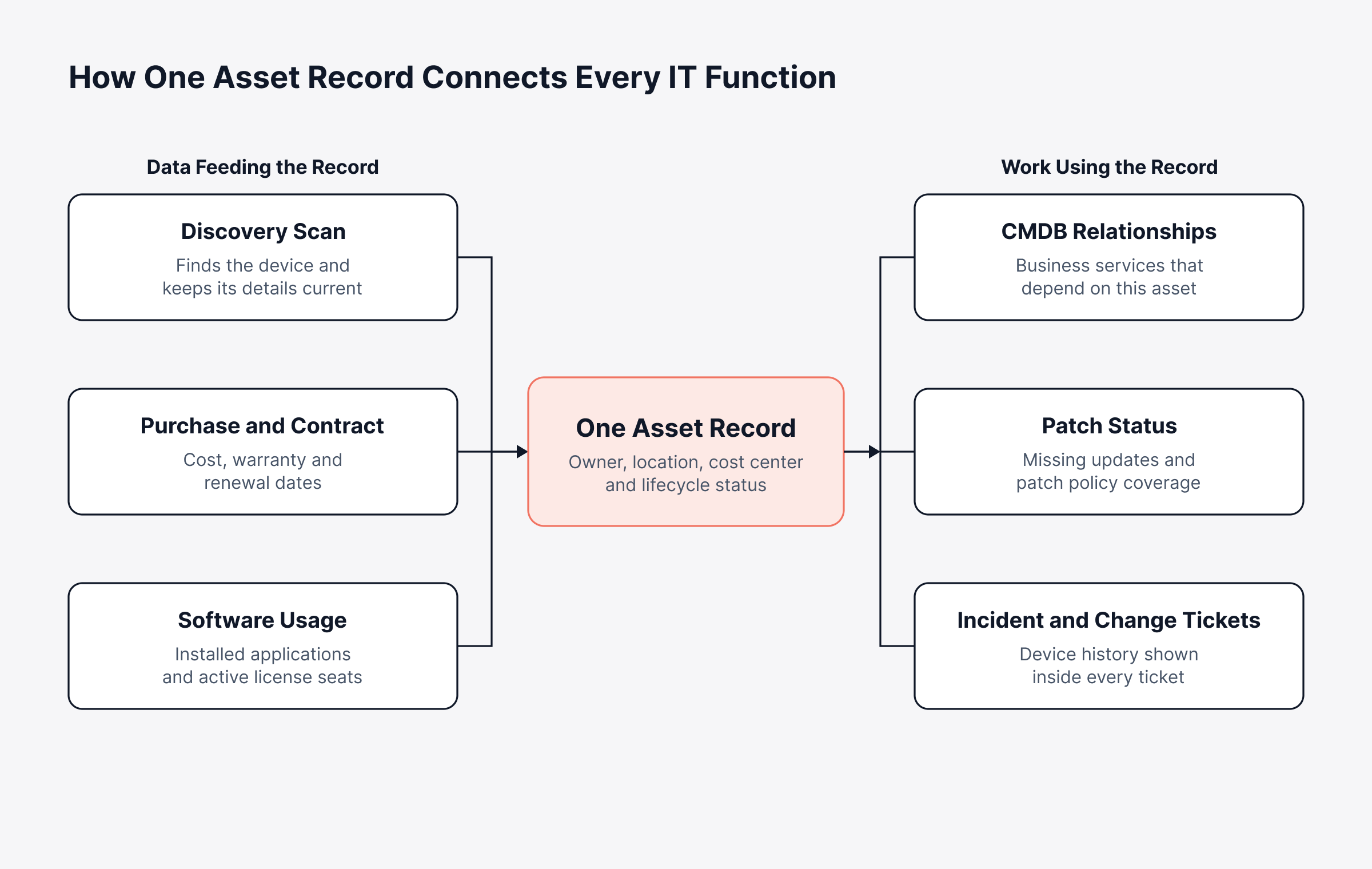
Trusted data changes how you buy. That begins at the point of purchase.
4. Control Procurement and Standardize What You Buy
Procurement control puts asset management at the request stage, before a purchase order exists.
When each department chooses its own hardware, IT ends up supporting dozens of laptop models, all with different spares, drivers and support contracts. A standard catalog plus an approval step keeps the environment simpler and the spend in view.
Publish standard configurations: Offer a small set of approved laptops, monitors and software bundles through the service catalog
Check stock before buying: Require a search of spare and returned assets before a new purchase order is raised
Track every contract: Record warranty terms, support levels and renewal dates against the assets they cover
Here's how that plays out. A regional office asks for ten laptops for new joiners. A quick stock check at head office turns up eight returned units with two years of warranty left, so only two new laptops get ordered.
Renewals deserve the same attention. Contract tracking reminds you before each one comes due, so you can renegotiate or cancel in time; hardware is only part of the bill, though. Software is usually where the bigger savings hide.
5. Manage Software Licenses Against Actual Usage
Software asset management best practices come down to one question: are we paying for exactly what people use, and are we licensed for everything installed?
For most IT departments, software is the biggest budget line they can still negotiate. Overbuy, and you pay for seats nobody opens. Underbuy, and a vendor audit can produce a true-up bill (a charge for the extra usage) along with penalties.
Compare entitlements to installs: Reconcile purchased licenses and SaaS subscriptions against discovered installations and active accounts for every major vendor
Measure usage: Track how often each installed application is opened, and reclaim seats with no activity over an agreed period
Control unapproved software: Maintain a list of approved and prohibited applications, and route new requests through the catalog
On top of that, perpetual, subscription, volume and concurrent licenses all count usage in different ways. Then there's risk. IBM's 2025 breach research found that organizations with high levels of shadow AI saw an average of $670,000 in higher breach costs, so every application belongs in the asset record.
Doing this by spreadsheet doesn't scale; software metering does. For renewal tactics, vendor negotiation and true-up planning, see our guide to license management.
Run the review in two passes: purchased seats against installs first, then installs against recent use. The example below adds up both gaps for one application.
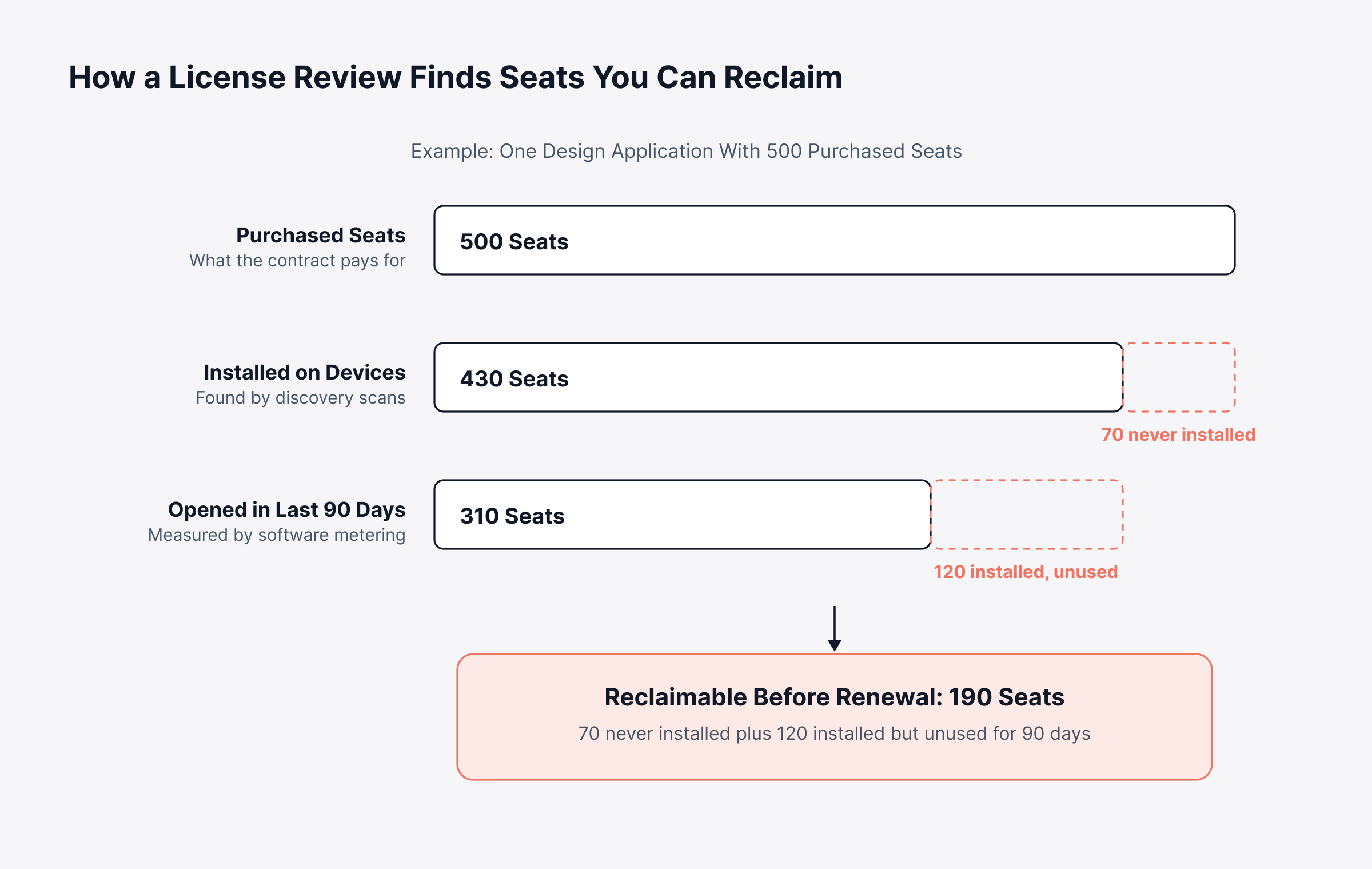
Repeat that review before each major renewal. It is often the quickest way to show what the program is worth.
6. Plan the Hardware Lifecycle and Refresh Cycles
Hardware asset management best practices set a replacement date for each device based on age, support cost and vendor support status. The aim is to swap it out before it fails.
Every device moves through the same IT asset lifecycle: it is planned, bought and deployed, then used and maintained until retirement. After a few years, repairs start to cost more. Older devices also slow people down, and many stop receiving vendor security updates.
Record lifecycle dates: Capture purchase, warranty expiry and planned refresh dates for every device
Set refresh policies by class: Define replacement intervals for laptops, servers and network gear based on cost of support and business risk
Budget ahead: Use refresh dates to build a rolling hardware forecast that finance can plan around
Switches, firewalls and servers raise the stakes, since one failure there can halt a site; apply these IT hardware asset management best practices to them first. Calculate total cost of ownership too. That is the purchase price plus support, repairs, energy and disposal, and a hardware lifecycle platform keeps purchase, warranty and depreciation data on each record so the calculation is straightforward.
Asset lifecycle management best practices add one more habit, which is reviewing each stage for waste (a device left unassigned for months is the classic case). Under IT asset lifecycle management best practices, every stage has a named owner, and a device can't move between departments without its record moving too. We go through each stage in our guide to the asset lifecycle, and because older devices also raise security risk, that leads to the next practice.
7. Tie Asset Records to Security and Patching
If a device isn't in your records, nobody is patching, securing or isolating it.
Security tools work from lists of known endpoints. Anything outside the asset register falls outside patch schedules, vulnerability scans and access reviews too. That makes it an easy way in.
Feed patching from the inventory: Use the asset register to define which endpoints each patch policy covers
Flag end-of-support systems: Mark operating systems and applications that no longer receive vendor updates, and plan their replacement
Review access by asset: Confirm who can reach each critical system under role-based access rules, and remove access when an asset changes hands
Bring asset and patch data together and patch compliance can be reported against the same records finance and the service desk already use. Security leaders then see exposure directly, with no exports between tools.
8. Connect ITAM to Incident, Problem and Change Management
Asset data earns its keep when it appears at the moment someone needs it: inside a ticket, or inside a change request.
Think about the technician working an incident. With the device's model, warranty and change history on screen, they skip the detective work; a change manager who sees what depends on a server is less likely to approve something that takes down another service. Our guide to service desk integration covers the setup.
Link assets to users and tickets: Map each device to its user, and attach the affected asset to every incident and request so history builds automatically
Spot repeat offenders: Use incident history per model or vendor to find hardware that fails more often than it should
Check impact before changes: Run a change impact analysis against CMDB relationships before approving work on shared infrastructure
Say a storage controller fails three times in one quarter, each time at a different site. Linked tickets surface the pattern within days, and the problem record turns into a warranty claim before a fourth outage. Observability data benefits as well; an alert on a server is easier to act on once the record shows which service and owner it belongs to.
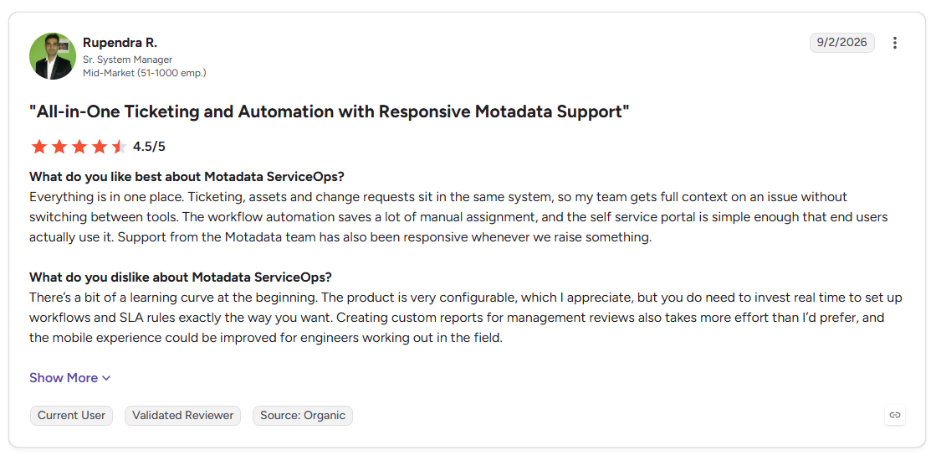
This is what one of the users of Motadata ServiceOps points to on G2:
9. Retire and Dispose of Assets Securely
The final stage carries some of the highest risk. Retired devices often still hold company data.
Laptops get left in storerooms, drives go to recyclers unwiped and leased equipment goes back with data on it. Each one is exposure. And unless someone cancels them, the licenses and support contracts on that equipment carry on billing.
Use a retirement checklist: Revoke access, reclaim licenses, cancel support contracts and update the record before an asset leaves service
Sanitize and certify: Wipe or destroy storage to a recognized standard such as NIST SP 800-88, the US federal guideline for media sanitization, and keep the certificate against the asset record
Choose disposal routes deliberately: Decide between resale, donation, recycling or destruction based on data sensitivity and residual value
Several functions take part in retirement, and steps get dropped at the handoffs. The swimlane below puts each step with its owner.
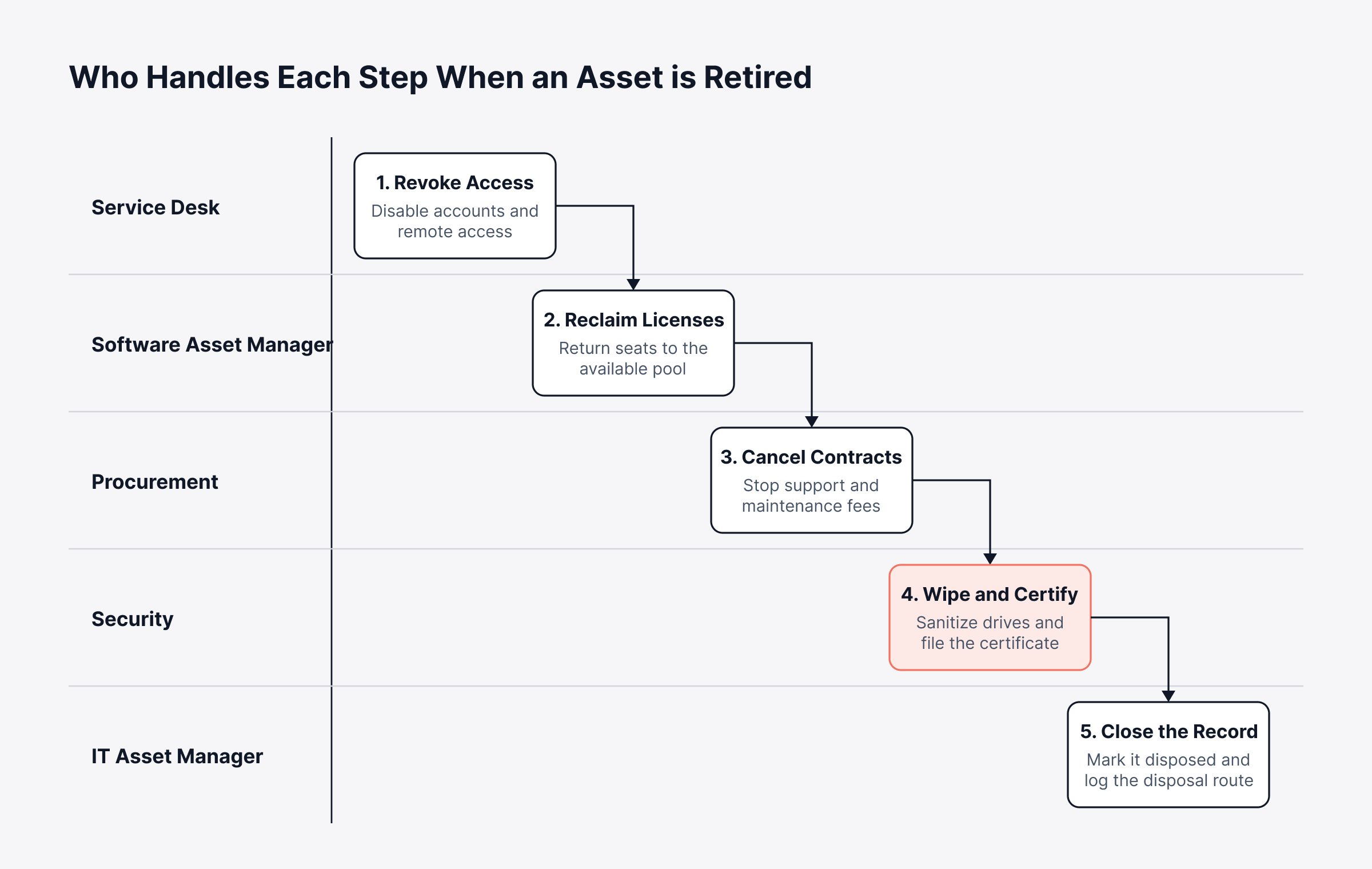
Put a named function against each step, and retirement stays consistent even when an asset leaves in a hurry.
For the environmental and data protection side of this stage, see our guide to asset disposal.
10. Audit Regularly and Report on KPIs
Audits keep the records accurate in practice, and a short set of KPIs shows leadership what the program returns.
Records drift, even with automated discovery. Devices move without a ticket. Users swap equipment, and contracts get renewed outside the process.
Schedule reconciliations: Compare discovered assets, financial records and barcode-based physical spot checks at least quarterly
Prepare for vendor audits early: Start with the vendors most likely to audit you, keep license positions current and agree a remediation plan for any gap
Report to the business: Share cost savings, compliance status and risk reduction in terms finance and leadership use
Audits also cover regulatory obligations, which our guide to ITAM compliance takes framework by framework. The KPI table further down shows what to report. That raises a practical point: you won't introduce ten practices in one go.
Which ITAM Best Practices Should You Start With?
ITAM best practices should go in by phase, with visibility first and optimization last. Launching all ten in one quarter usually stalls. Begin by merging the spreadsheets and tools you already have into a single register.
Phasing keeps early wins visible. It also means data gets checked before big decisions rely on it. Within a phase, servers, core network gear and costly software come first; peripherals can wait.
Phase | Practices to apply | What success looks like |
1. Visibility | Governance and policy, automated discovery | Every active device and application is in one register with an owner |
2. Control | Single source of truth, procurement standards | New assets enter the register at purchase, and records match across teams |
3. Optimization | License usage, hardware lifecycle, security linkage | Unused seats are reclaimed and refresh budgets are forecast a year ahead |
4. Assurance | Service desk integration, secure disposal, audits and KPIs | Audits run from existing reports and leadership sees results each quarter |
Savings from phase three often fund the work in phase four. To prove that, though, you need numbers. Pick them before phase one starts.
Which KPIs Show Whether ITAM Best Practices are Working?
The KPIs that show whether ITAM best practices are working cover data accuracy, cost, risk and lifecycle health. You don't need many. The seven below fit into a quarterly review with finance.
Each one answers a question a budget holder would ask.
KPI | What it measures | Why it matters to the business |
Inventory accuracy | Share of discovered assets that match the register | Shows whether decisions rest on reliable data |
License utilization | Seats in active use compared with seats purchased | Points to reclaimable spend before renewal |
Unowned assets | Assets with no named owner or cost center | Highlights accountability gaps and audit risk |
Assets past refresh date | Devices running beyond their planned replacement point | Predicts support cost and failure risk |
Patch coverage | Registered endpoints within patch policy scope | Indicates exposure from unmanaged devices |
Time to reconcile | Days needed to complete an audit reconciliation | Shows how audit-ready the program is |
Disposal certification rate | Retired assets with a sanitization certificate on file | Confirms data protection at end of life |
Set a baseline in month one, then watch which way each number moves. Rising inventory accuracy and license utilization over two quarters is a good sign.
What are the Responsibilities of an IT Asset Manager?
The responsibilities of an IT asset manager start with the policy and the accuracy of the records. Beyond that, the job is coordination: with the people who buy and use assets, and with leadership on cost and risk.
Policy ownership: Maintain the ITAM policy and update it as the environment changes
Data stewardship: Oversee discovery, reconciliation and data quality in the asset register
Vendor and license management: Track entitlements, prepare for vendor audits and support renewal negotiations
Lifecycle planning: Forecast refresh cycles and coordinate secure disposal
Reporting: Share KPIs, savings and risk findings with leadership, and credit the functions that keep the data accurate
One person can't carry all of it. Asset and service management have to share the load, as our guide to ITAM and ITSM explains. Here is one common split.
Function | Main ITAM responsibility |
IT asset manager | Owns policy, data quality, audits and reporting |
Procurement | Enforces standard catalog and records purchase data |
Finance | Tracks depreciation, cost centers and budget forecasts |
Security | Uses asset data for patching, vulnerability and access reviews |
Service desk | Updates assignments and links assets to tickets |
What Common Mistakes Undo IT Asset Management Best Practices?
The most common mistakes that undo IT asset management best practices are easy to spot. Discovery runs once and stops, asset data ends up in several tools, and retirement gets forgotten. Each one wears down trust in the data, slowly.
Common mistake | What to do about it |
Running discovery once and stopping | Schedule recurring scans and review new finds every week |
Keeping asset, contract and ticket data in separate tools | Consolidate them on one platform with shared records |
Tracking hardware and forgetting SaaS and cloud | Include cloud accounts and subscriptions in discovery and license reviews |
Recording assets without owners | Make owner and cost center mandatory before an asset goes live |
Skipping data wiping at retirement | Require a sanitization certificate before an asset record is closed |
Almost all of them come from tooling and process gaps. That's good news, because automation and clear ownership rules fix them; our guide to ITAM challenges covers the organizational side.
How do Asset Management Best Practices Apply Beyond IT?
Asset management best practices also work outside IT, for anything an organization needs to locate, cost and eventually replace. A lab microscope or a company van has a purchase date, an owner, maintenance and an end of life, just like a laptop.
Enterprise asset management best practices carry the same principles across departments:
One register for all asset types: IT, non-IT and consumable assets tracked with consistent fields
Shared approval workflows: Facilities, HR and finance requests follow the same structured process
Common reporting: Leadership sees total asset cost across the organization in one view
If your platform tracks non-IT assets in the same register, facilities and operations can follow the same best practices for asset management as IT does.
What Should You Look for in an IT Asset Management Tool?
An IT asset management tool should let you run every practice in this guide from one set of records. Feature lists vary a lot. What counts is whether it handles your discovery, licensing and service desk work without exports in between.
Discovery coverage: Agent-based and agentless scanning across offices, remote endpoints and cloud accounts
License intelligence: Usage tracking for installed software and SaaS, with reclaim workflows
Financial records: Purchase orders, contracts, depreciation and total cost of ownership on each asset
Service desk connection: Assets linked to incidents, requests and changes without a separate integration project
Deployment choice: Cloud or on-premises options that match data residency and security requirements
Room to grow: Modules that can be added as the program matures, from inventory to licensing, contracts and the CMDB
Then ask each vendor to show it working on your own data during a trial. For a longer checklist, see our guide on how to choose ITAM software.
Replace Scattered Asset Records With One Connected View in Motadata ServiceOps
Every practice above relies on asset, license, contract and service data matching up. Storing those records is easy. Keeping discovery and procurement in step with the CMDB and the service desk, week after week, is where spreadsheets and standalone tools struggle.
Motadata ServiceOps brings those functions together on shared records:
Discovery to register: Agent-based and agentless scans keep the asset register current
Register to CMDB: Assets link to configuration items, relationships and the services they support
Commercial records: Purchase orders, contracts, depreciation and total cost of ownership stay attached to each asset
Usage and security: Software metering and patch management run on the same platform as the service desk, where assets link directly to tickets
Lifecycle and scope: A defined lifecycle from planning and acquisition through to disposal, covering hardware, software, non-IT and consumable assets
PeopleCert has certified ServiceOps against ITIL 4 practices. Deployment is your choice of on-premises, private cloud or SaaS, which matters when data residency rules apply.
One caveat applies to any tool in this category: software won't write your policy or replace the occasional physical check, and someone still has to make the calls. What a connected platform changes is how much effort each decision takes. Audits, renewals and refresh plans start from data that is already current.
FAQs
What are the most important IT asset management best practices?
The most important IT asset management best practices are automated discovery, a single source of truth, license management based on actual usage, and regular audits. Together they keep records accurate and spending under control. Governance and named ownership support all of them.
How often should an IT asset audit be performed?
Most organizations reconcile discovered assets against financial records quarterly and run a full audit once a year. High-risk or regulated environments may audit more often. Continuous discovery reduces the effort, since most discrepancies are caught between formal audits.
What is the difference between ITAM and a CMDB?
ITAM tracks the financial, contractual and lifecycle details of each asset, such as cost, owner and warranty. A CMDB records how assets and services connect, which supports incident and change decisions. Platforms like Motadata ServiceOps keep both on shared records so they stay consistent.
What are the best tools for managing IT assets?
The best tools for managing IT assets combine automated discovery, license tracking, contract management and service desk integration in one platform. Look for agent-based and agentless scanning, CMDB relationships and reporting your finance and security leaders can use. Motadata ServiceOps covers these within one ITSM suite.
How do software asset management best practices reduce costs?
Software asset management best practices reduce costs by matching licenses to actual usage and reclaiming seats that go unused. They also prevent penalties by keeping the organization compliant ahead of vendor audits. Regular reviews before renewal dates create the most room to negotiate.
Author
Poonam Lalani
Content Strategist
Poonam Lalani is a B2B content strategist and writer with a background in computer engineering and experience across enterprise technology domains, including AI, cloud, DevOps, data engineering, and IT operations. She specializes in creating research-driven content that simplifies complex ideas and supports product education, thought leadership, and business growth.