IT Asset Lifecycle Management: Stages, Best Practices & Tools
Every IT asset has a lifespan. Laptops wear out, software licenses expire, servers hit their performance ceiling, and cloud subscriptions need regular review. The question isn't whether your assets will reach end-of-life — it's whether you'll manage each stage well enough to get maximum value before they do.
That's what IT Asset Lifecycle Management (ITALM) is all about. It's the strategic approach to managing every stage of an asset's journey — from the moment you plan a purchase through deployment, active use, maintenance, and eventual retirement. Done right, lifecycle management helps you spend less, avoid compliance surprises, and keep your IT environment healthy.
According to industry surveys, over 70% of organizations are now prioritizing tighter integration between ITAM and their service desk. The reason is simple: when asset data and service operations share a single source of truth, everything runs smoother.
IT Asset Lifecycle Management is a structured approach to tracking, managing, and optimizing IT assets across every stage of their life — from planning and acquisition through deployment, maintenance, and disposal — to maximize value and minimize cost and risk.
What Is IT Asset Management?
IT asset management (ITAM) is the combination of processes, frameworks, and practices that gives organizations a complete picture of their IT assets — hardware, software, and cloud resources — along with the physical, financial, and contractual details for each one.
ITAM helps businesses control the lifecycle of their assets, manage costs, ensure compliance, and reduce risk. It's not just an IT function — it connects IT, finance, and procurement around shared data and shared goals.
The best practices below are the operational backbone of effective lifecycle management.
ITAM Best Practices for Lifecycle Management
1. Choose Comprehensive IT Asset Management Software
The first step is selecting ITAM software that manages both hardware and software assets from a single, centralized platform. Consolidating asset data in one place gives you a complete picture — no more hunting across spreadsheets, email threads, and disconnected tools.
Your IT service desk should support the entire asset lifecycle: acquisition, deployment, maintenance, and disposal. Centralized management improves accuracy, enhances visibility, and simplifies compliance tracking and reporting.
The payoff is better decision-making, reduced costs, and optimized asset utilization across every department.
2. Prioritize Customization and Flexibility
No two organizations manage assets the same way. Choose ITAM software that can be tailored to your workflows — custom fields, forms, dashboards, and automated workflows that match how your teams actually work.
Customizable reporting lets you focus on the metrics that matter most to your goals. Role-based permissions ensure the right people see the right data. And as your business evolves, a flexible ITAM system adapts with you instead of holding you back.
3. Insist on a User-Friendly Interface
The best ITAM software means nothing if your team doesn't use it. A clean, intuitive interface reduces the learning curve, encourages regular engagement, and keeps asset data accurate. Clear navigation, straightforward workflows, and minimal training requirements drive adoption across IT and non-IT teams alike.
When the tool is easy to use, people actually follow the processes — and that's what keeps your data reliable.
4. Automate Lifecycle Processes
Automation is where lifecycle management goes from "manageable" to "efficient." Set up workflows that automatically update asset properties based on events — deployment, warranty expiration, license renewal, or retirement triggers.
Automated alerts notify the right people about maintenance schedules, compliance deadlines, and security events. Automated reports deliver accurate data on demand. The result: fewer manual errors, less downtime, and IT staff who can focus on work that requires human judgment.
5. Run Regular Lifecycle Status Checks
Don't wait for an audit to find out what's happening with your assets. Schedule regular reviews across every lifecycle stage — procurement, deployment, maintenance, and retirement. Consistent monitoring catches issues early, prevents operational disruptions, and ensures assets are being used effectively.
Regular checks also support compliance with regulatory standards and industry best practices, reducing the risk of financial or legal penalties.
6. Centralize Your Asset Repository
A central repository brings all IT asset data — hardware, software, licenses, contracts — into a single, unified database. This eliminates data silos, reduces inconsistencies, and makes audits and report generation significantly faster.
When everyone works from the same data, decisions are more informed and operations are more efficient. A centralized repository is the backbone of any serious ITAM program.
7. Use Reporting and Analytics Actively
Don't just collect asset data — use it. Built-in reporting and analytics features help you track utilization, monitor lifecycle status, predict maintenance needs, and understand total cost of ownership.
Financial metrics help you budget for future purchases and justify IT investments to leadership. Usage analytics expose underused assets that can be redeployed or retired. Compliance reporting keeps you audit-ready at all times.
IT Asset Lifecycle Stages
The lifecycle has distinct stages, and each one needs a different management focus.
1. Planning and Acquisition
Every asset lifecycle starts with planning. Before procurement, conduct a thorough needs assessment: What does the organization need? How will this asset be used? Is it compatible with existing systems? Will it scale?
Establish clear procurement policies, evaluate vendors, and negotiate terms that protect your interests. Good vendor relationships lead to better pricing, faster delivery, and more flexible contract terms over time.
2. Deployment and Configuration
Once acquired, assets need to be properly integrated into your IT environment. Create a detailed deployment plan with timelines, roles, and responsibilities. Make sure new assets are compatible with existing infrastructure, and train staff on anything new.
Effective deployment gets assets into productive use quickly and correctly — reducing the time between purchase and value delivery.
3. Maintenance and Optimization
This is the longest stage and often the most neglected. Regular monitoring, patching, updates, and repairs keep assets performing well and extend their useful life. Proactive maintenance prevents the kind of unexpected failures that lead to costly downtime.
Establish maintenance schedules, track performance metrics, and use the data to optimize when and how you service your assets.
4. Retirement and Disposal
When an asset reaches end-of-life, handle its retirement responsibly. This means secure data wiping, thorough documentation, compliance verification, and environmentally responsible disposal.
Partner with certified e-waste recyclers for hardware. For software, ensure license deactivation and contract closure. Good retirement practices protect your data, your reputation, and the environment.
5. Continuous Improvement
Lifecycle management isn't a "set it and forget it" exercise. Track KPIs, gather feedback from stakeholders, run periodic audits, and continuously refine your processes. Analyze performance data to identify trends and make informed adjustments.
Organizations that build continuous improvement into their ITAM program stay agile and respond effectively to changing business needs.
How to Calculate IT Asset Lifecycle Costs
Understanding total cost of ownership (TCO) is fundamental to smart lifecycle management. Here's what goes into the calculation:
Cost Category | What It Includes |
|---|---|
Acquisition | Purchase price, shipping, taxes, procurement overhead |
Deployment | Installation, configuration, integration, user training |
Operations | Power, cooling, space, connectivity, day-to-day usage |
Maintenance | Updates, patches, repairs, replacement parts, support contracts |
Licensing | Software licenses, SaaS subscriptions, renewal fees |
Depreciation | Annual value reduction based on useful life and method |
Retirement | Data wiping, decommissioning, recycling, disposal fees |
When you track TCO across your entire asset portfolio, you can identify which assets deliver real value and which ones are just consuming budget.
How Motadata Simplifies IT Asset Lifecycle Management
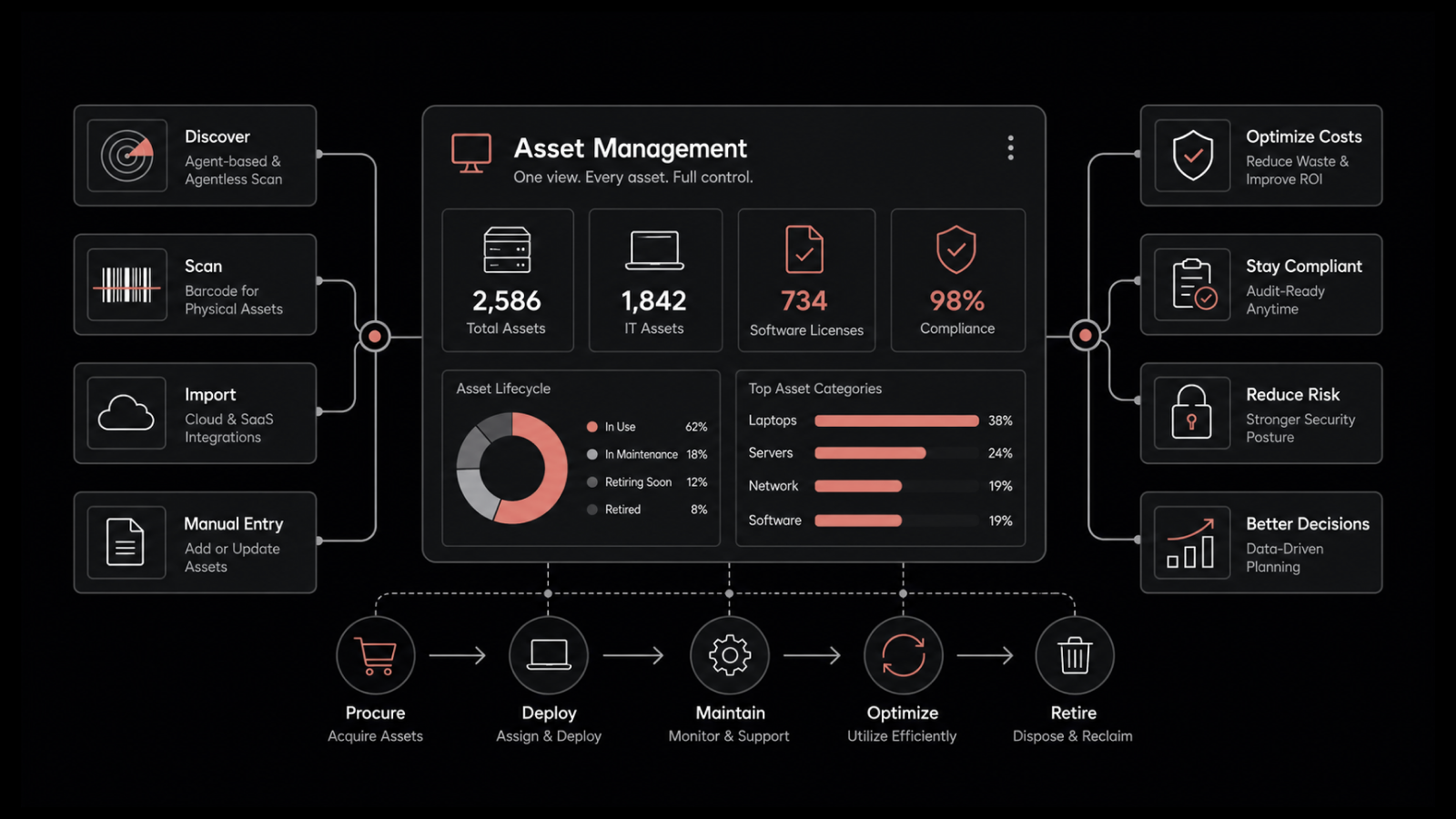
Managing IT assets across their full lifecycle shouldn't require a patchwork of spreadsheets, disconnected tools, and manual processes. Motadata's ServiceOps platform brings the entire lifecycle into a single view — from the moment you plan a purchase through active use, maintenance, and retirement.
With automated asset discovery, real-time tracking, software metering, and built-in reporting, Motadata helps organizations make informed decisions at every lifecycle stage. Warranties nearing expiration, licenses approaching renewal, and assets reaching end-of-life are surfaced automatically — so nothing falls through the cracks. The result is lower costs, fewer compliance surprises, and IT teams that spend their time on strategy instead of firefighting.
Explore Motadata's ITAM solution and see how it fits your lifecycle management needs.
FAQs
What's the difference between ITAM and IT asset lifecycle management?
ITAM is the broader discipline that covers all aspects of managing IT assets — inventory, compliance, financial tracking, and governance. IT asset lifecycle management is a subset of ITAM that specifically focuses on managing assets through each stage of their life, from acquisition to disposal.
How long should IT hardware assets last?
Typical lifecycles vary: laptops and desktops last 3–5 years, servers 5–7 years, and networking equipment 5–10 years. Actual lifespan depends on usage patterns, maintenance quality, and whether the manufacturer continues to provide security updates and support.
How does automation improve lifecycle management?
Automation handles repetitive tasks — asset discovery, status updates, renewal alerts, compliance checks, and reporting — with greater accuracy and speed than manual processes. This reduces errors, keeps data current, and lets IT teams focus on higher-value work.
What KPIs should I track for IT asset lifecycle management?
Key metrics include asset utilization rate, mean time between failures, total cost of ownership per asset, license compliance rate, average asset lifespan, and time from procurement to deployment. These KPIs help you measure whether your lifecycle management is actually delivering results.
Author
Rosy Cordeiro
Content Writer
Rosy Cordeiro is a seasoned documentation expert with over a decade of experience spanning ITSM, Telecom, and Security domains. Throughout her career, she has worked with diverse teams, collaborating with SMEs, engineers, and developers to create technical documents for several projects in the sectors like banking, education, security etc.