How to Choose the Right ITAM Software: An 8-Point Evaluation Guide
Picking the right IT asset management (ITAM) software is one of those decisions that affects your IT team every single day — for years. Choose well, and you get full visibility into your assets, automated lifecycle tracking, and compliance peace of mind. Choose poorly, and you're stuck with shelfware that nobody uses, manual workarounds that eat up time, and blind spots that cost money.
The challenge is real: an estimated 30% of organizations don't have a clear picture of what IT assets they own, where those assets are, or who's using them. When you're managing hundreds or thousands of assets spread across multiple locations, that lack of visibility turns into missed compliance deadlines, wasted budget, and operational bottlenecks.
This guide walks through the eight factors that matter most when evaluating ITAM software — so you can make a confident, informed choice.
IT Asset Management (ITAM) Software is a platform that helps organizations track, manage, and optimize IT assets — hardware, software, and cloud resources — throughout their lifecycle, from procurement to disposal.
Why ITAM Software Matters
Modern organizations depend on their digital infrastructure for nearly every operation and service. The IT assets behind that infrastructure — servers, workstations, networking gear, software licenses, cloud subscriptions — keep growing in number and complexity.
Without an ITAM tool in place, you're dealing with:
Limited asset visibility — You don't know what you have or where it is.
Painful compliance audits — Scrambling to gather data when a vendor or regulator comes knocking.
Long fulfillment cycles — Requests for new assets take too long because there's no clear picture of what's available.
Wasted spend — Paying for assets that are underused, duplicated, or forgotten.
Unmanaged risk — Unpatched devices, expired licenses, and shadow IT creating security gaps.
The right ITAM software solves these problems by bringing every asset into a single platform with automated tracking, lifecycle management, and reporting.
How ITAM Software Changes the Way Teams Work
When ITAM software is implemented well, the impact goes beyond just having a list of assets. Here's what actually changes:
Decision-making gets faster. When asset data — location, status, cost, compliance — is available in real time, IT leaders stop guessing and start making data-driven decisions about purchases, renewals, and retirements.
Processes run on automation, not memory. Asset status updates, warranty alerts, license renewal reminders, and compliance checks happen automatically instead of depending on someone remembering to update a spreadsheet.
Cross-team collaboration improves. IT, finance, and procurement teams all work from the same data source. No more conflicting asset counts, duplicate purchase orders, or surprise expenses.
Audit readiness becomes the default. When assets are continuously tracked with complete documentation, audits are a confirmation exercise — not a crisis.
8 Factors for Choosing the Right ITAM Software
1. Ease of Use
The most powerful ITAM software is worthless if your team won't use it. Look for:
Clean, intuitive interface that doesn't require weeks of training
Simple navigation that lets users find asset information in a few clicks
Low learning curve so adoption happens across departments, not just IT
Always request a trial or demo before purchasing. Have actual end users — not just managers — test the tool during the evaluation period. Their experience will tell you whether the software will get adopted or abandoned.
2. Mobile Access
IT teams don't sit at desks all day. Your ITAM software needs a mobile app that lets technicians:
Scan barcodes and QR codes during physical audits
Update asset records on-site in real time
Look up asset details, warranty status, and location from anywhere
Mobile access eliminates the need to carry a laptop on-site and makes field work significantly more efficient.
3. Feature Depth
Match the tool's capabilities to your actual requirements. At minimum, your ITAM software should cover:
Feature Category | What to Look For |
|---|---|
Inventory Management | Centralized asset register with search, filters, and custom fields |
Auto-Discovery | Automated scanning of hardware and software across your network |
CMDB Integration | Mapping of assets to configuration items and service dependencies via CMDB |
License Management | Software license tracking, compliance monitoring, and renewal alerts |
Vulnerability Assessment | Security scanning and patch update alerts |
Reporting & Analytics | Built-in dashboards, custom reports, and export capabilities |
Workflow Automation | Automated processes for procurement, deployment, maintenance, and retirement |
Also evaluate the vendor's product roadmap. Does it align with where your organization is headed? A tool that meets today's needs but can't grow with you isn't a good long-term investment.
4. End-to-End Lifecycle Management
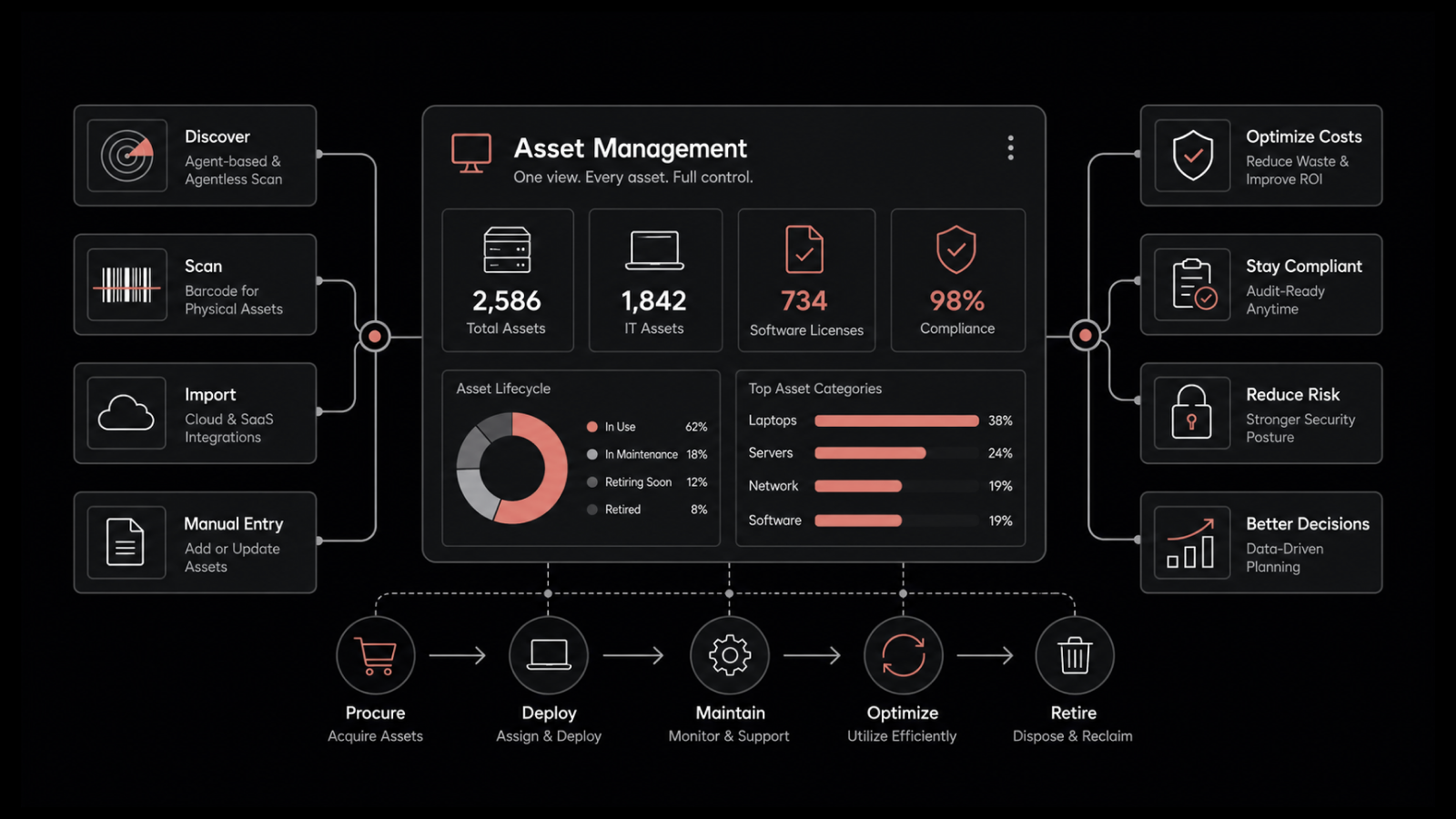
Your ITAM tool should cover every stage of the asset lifecycle:
Planning — Demand forecasting and procurement workflows
Procurement — Purchase order management and vendor coordination
Deployment — Configuration tracking and user assignment
Maintenance — Warranty tracking, patch management, and service records
Retirement — Decommissioning workflows, data wiping verification, and disposal documentation
A tool that only handles inventory but not lifecycle management forces you to build manual processes for everything else — defeating the purpose.
5. Scalability
Your ITAM needs today won't be your ITAM needs in three years. Evaluate whether the software can handle:
Growing asset volumes as your organization expands
New asset types (IoT devices, sensors, cloud-native resources)
Additional locations and distributed teams
Increasing numbers of users across departments
Ask vendors about performance benchmarks at scale. What happens when you're managing 50,000 assets instead of 5,000?
6. Integration Capabilities
ITAM software doesn't operate in isolation. It needs to connect with your existing systems:
ITSM / Service Desk — Link assets to incidents, problems, and change tickets
CMDB — Map configuration items and dependencies
Procurement systems — Automate purchase orders and vendor management
ERP / Finance systems — Sync asset costs, depreciation, and budgets
Monitoring tools — Pull performance data from IT infrastructure monitoring
Look for open APIs and pre-built integrations. The goal is consistent data flow across systems — not duplicate data entry.
7. Pricing and Value
ITAM software pricing models vary widely. Before comparing price tags, understand the full cost:
Cost Component | Questions to Ask |
|---|---|
License fees | Per user, per asset, or flat rate? What's included in each tier? |
Implementation | What does setup, data migration, and configuration cost? |
Training | Is training included? What formats are available? |
Support | What support level is included? What costs extra? |
Customization | Are workflow and report customizations included or billed separately? |
Scaling costs | What happens when you add more assets or users? |
Cost-saving tip: If your organization also needs ITSM (most do), look for a service desk platform with a built-in asset management module. Bundled solutions are typically more cost-effective than standalone ITAM tools.
8. After-Sales Support
Post-purchase support makes or breaks your ITAM implementation. Evaluate:
Support channels — Ticketing, email, phone, live chat — what's available?
Response times — What are the SLA commitments for different issue priorities?
Documentation — Is there a comprehensive knowledge base, video library, or community forum?
Customer success — Does the vendor assign a dedicated contact or customer success manager?
Update cadence — How often does the vendor release product updates and improvements?
Don't just take the vendor's word for it — talk to existing customers and read independent reviews.
ITAM Software Evaluation Checklist
Use this checklist during your evaluation process:
Criteria | Weight (1-5) | Vendor A | Vendor B | Vendor C |
|---|---|---|---|---|
Ease of Use | ||||
Mobile Access | ||||
Feature Depth | ||||
Lifecycle Coverage | ||||
Scalability | ||||
Integration Capabilities | ||||
Pricing / TCO | ||||
Support Quality | ||||
Total Score |
Customize the weights based on what matters most to your organization.
Implementation Best Practices
Buying the right tool is only half the job. Here's how to make your ITAM implementation successful:
Plan Strategically and Roll Out in Phases
Don't try to go live with everything at once. Start with your most pressing need — usually asset discovery and inventory — then expand to lifecycle management, compliance tracking, and automation in phases. Each phase gives you time to learn, adjust, and build internal confidence.
Invest in Training and Change Management
Change management is as important as the technology itself. Train every user group — IT admins, help desk staff, procurement, finance — on their specific workflows. Document processes clearly and assign champions in each department to drive adoption.
Audit and Improve Continuously
After go-live, schedule regular audits to assess how well the ITAM tool is being used. Are teams following the processes? Is data accurate? Are there gaps? Use findings to refine workflows and fill in missing pieces. An ITAM program that stops evolving starts losing value.
Why Motadata Is the Right Choice for ITAM
Choosing ITAM software comes down to finding a platform that covers the full lifecycle, integrates with your existing tools, and is actually usable by your team. Motadata's ServiceOps platform checks every box.
From automated asset discovery and real-time tracking to software metering, lifecycle management, and integrated reporting — Motadata brings everything into one platform. It's built to work alongside your service desk, so asset data feeds directly into incident and change management workflows. The interface is clean and intuitive, mobile access is built in, and the platform scales from hundreds to tens of thousands of assets without slowing down.
Whether you're replacing a legacy ITAM tool or building your asset management practice from scratch, Motadata gives your IT team the visibility, automation, and control they need — without the complexity.
Start a free trial of Motadata ServiceOps and see the difference for yourself.
FAQs
Why is ITAM important for organizations?
ITAM gives organizations visibility into every IT asset they own, where it's located, and how it's being used. This visibility drives better resource allocation, ensures compliance with licensing agreements, reduces costs from waste and redundancy, and strengthens security by identifying unmanaged or end-of-life assets.
How does ITAM software help with compliance?
ITAM software tracks software licenses against actual usage, monitors hardware maintenance and warranty status, and maintains audit trails for every asset action. This keeps organizations compliant with vendor agreements, regulatory requirements, and internal governance policies — and makes audits manageable.
How does ITAM software help with asset lifecycle management?
ITAM software tracks assets from procurement through deployment, active use, maintenance, and eventual disposal. It automates status updates, sends alerts for warranties and renewals, manages depreciation schedules, and documents decommissioning — ensuring nothing falls through the cracks at any stage.
What's the most common mistake when choosing ITAM software?
The most common mistake is buying based on feature lists without testing for actual usability. A tool with hundreds of features means nothing if your team finds it too complex to use daily. Always prioritize ease of use, run a hands-on trial, and involve the people who'll actually use the software in the evaluation.
How does AI fit into modern ITAM software?
AI-powered ITAM tools bring automated discovery that adapts to environment changes, predictive analytics for hardware failures and capacity planning, anomaly detection for license compliance, and intelligent recommendations for asset optimization. As IT environments grow more complex, AI capabilities are becoming a baseline expectation rather than a premium feature.