IT Offboarding and How to Revoke Access Without Leaving Security Gaps
When someone leaves your organization, how sure are you that every account they could reach was closed? Most IT offboarding starts by disabling the employee's main login account, and that step usually works. The risk comes from the other accounts, tools and devices the person used that the main account does not control.
These include personal API tokens, shared vendor portal logins, laptops still with a courier and SaaS tools bought on a department card. None of them appear on the HR exit form, and none of them close when the main account is disabled. Each one stays active until someone takes responsibility for removing it, and until then it can lead to a data leak, wasted spend or an audit finding.
IT offboarding works best when it runs with the same discipline as employee onboarding: one trigger, named owners and a record of every step. In this blog, you will see how to sequence the IT offboarding process, which access to revoke first, what gaps in the process cost the business, how contractors and privileged users differ, and how to prove afterward that nothing was left behind.
What is IT Offboarding?
IT offboarding is the process of removing a departing employee's or contractor's access to systems, data and devices, and handing anything the business still needs to a new owner. In this article, the directory means the central system that stores user accounts and controls who can sign in, such as Active Directory or a cloud identity provider. The process starts when HR confirms a departure and ends when IT can show that every account, license and asset tied to that person has been closed, reassigned or recovered.
It covers five areas:
Identity: The directory account, single sign-on (SSO), email, VPN and multi-factor authentication (MFA)
Application access: SaaS tools, internal apps, admin consoles and API keys
Data: Mailboxes, shared drives, file ownership and retention holds
Devices and licenses: Laptops, phones, security keys and paid seats
Evidence: A record of what was removed, by whom and when
Offboarding also covers more than terminations. It applies to resignations, retirements, contract end dates and internal transfers, where access from the old role should be removed once the handover is complete, following the zero trust principle that people should only have the access their current role needs. Getting it right affects the whole business.
Why does IT Offboarding Matter to the Business?
IT offboarding matters to the business because every account, device and license left behind after an exit carries a cost, whether as security exposure, wasted spend or an audit finding. The main business risks are:
Data exposure: A former employee, or anyone holding their credentials, can still reach customer records, pricing or source code
Wasted spend: Paid SaaS seats and unreturned laptops keep costing money after the person has gone
Audit findings: Frameworks such as SOC 2, ISO 27001 and NIST SP 800-53 expect timely access removal, and auditors ask for proof of it
Lost work: Files, mailboxes and automations owned by one person can disappear if the account is deleted too early
Customer trust: If a former employee is found using company systems after leaving, the organization has to explain it to customers and regulators
Because offboarding happens every time someone leaves, a small weakness in the process repeats with every exit. On the positive side, a well-run process is easy to prove to an auditor or a board, because each exit leaves its own record. Most of the risk comes from a few predictable gaps, covered next.
Why does Access Revocation Leave Gaps During Offboarding?
Access revocation leaves gaps because offboarding often stops at the directory account, while employees gain access to many systems the directory does not control. The usual weak points look like this:
Delayed handoff: IT learns about the exit late, sometimes days after HR recorded it or only on the employee's last day
Live sessions: Disabling an account does not always end browser sessions, mobile app sessions or OAuth tokens, the credentials that let connected apps keep acting for a user
Apps outside SSO: Tools a department signed up for directly, often called shadow IT, keep their own usernames and passwords
Shared and service credentials: Logins for vendor portals, social accounts and network devices keep working, as do scripts that run under the person's account and service accounts that applications use
Contractors outside the HR system: People who were never entered in the HR information system (HRIS) never get an exit request from HR
Devices returned late: Remote staff can hold laptops with saved credentials and local files for weeks after their final day, often reaching the network through remote access tools
Consider a regional sales lead who resigns on good terms. Their directory account is disabled on the last day, yet a CRM integration they connected with a personal token keeps copying sales pipeline data into a spreadsheet tool the company never approved. No one intended any harm, but company data still left the organization.
Before the next exit, sort your access into two groups: what the directory controls and what it does not. The diagram below shows which access closes with the main account and which stays open until someone removes it.
Each item on the dashed side needs a named person responsible for removing it, so ownership is the next thing to settle.
Who Owns Each Part of the IT Offboarding Process?
The IT offboarding process has six owners, and gaps appear when one owner assumes another has already done the work. Naming every owner at the start prevents that.
Owner | Responsible for | Hands off to |
HR | Confirming exit type, final day and any legal hold | IT service desk |
Line manager | Listing apps, shared accounts and handover needs | IT service desk and app owners |
IT service desk | Opening the offboarding request and tracking every task | All task owners |
Identity or security lead | Disabling identity, ending sessions, rotating shared credentials | IT service desk |
IT asset manager | Recovering devices, wiping data, reclaiming licenses | IT service desk |
Application owners | Removing access in apps outside SSO | IT service desk |
The service desk is the natural coordinator because it already tracks work against deadlines, and many organizations already route HR requests through it as part of enterprise service management. When the offboarding request lives there, each owner gets a task, and the request stays open until the last task closes. Once owners are named, the next question is the order of the work.
What are the Steps in the IT Offboarding Process?
The IT offboarding process runs in six steps, and the full sequence matters. Doing one step quickly helps little if a later step is missed.
Manage all six steps under one request so none of them is handled in isolation. The timeline below shows when each step should happen during the exit.
1. Trigger the Offboarding Request from HR
Offboarding should start the moment HR confirms a departure, with a single service request that gives IT everything it needs to plan. For a resignation with notice, that gives IT the full notice period to prepare. For an involuntary exit, the request should arrive before the conversation with the employee takes place.
The request should capture four details:
Exit type: Voluntary, involuntary, contract end or internal transfer
Timing: Final day and the agreed cutoff point for access
Handover: Who receives the mailbox, files and open work
Holds: Any legal or compliance retention requirement
2. Disable the Primary Identity and End Active Sessions
Disabling the primary identity is the first technical action, because it blocks new sign-ins to every app connected through SSO at once. Organizations running Active Directory or a cloud identity provider should complete these actions at the same time:
Disable the account and hold off on deletion, so mailboxes, files and sign-in history stay available for later questions
Sign the user out of all sessions and revoke the tokens apps use to stay signed in
Remove MFA methods and registered devices
Remove mail forwarding rules, along with any mailbox access the person gave to others or received from them
Reset the password, in case some connected systems only check account status periodically
3. Sweep Access Outside the Identity Provider
This step covers every system the directory does not control, which is where leftover access is usually found. Use the manager's list of apps and accounts to check each category:
Non-SSO applications: Accounts with local usernames, especially department-bought SaaS
Privileged accounts: Cloud consoles, firewalls, domain admin groups and database logins
Keys and tokens: Personal API keys, SSH keys used to reach servers, code repository access, secrets stored in build pipelines and credentials given to AI assistants or automations the person set up
Shared credentials: Vendor portals, social media, Wi-Fi and device admin passwords the person knew
Physical access: Badges, keys and building systems
Organizations that grant permissions through role-based access finish this sweep faster, since removing a role removes the bundle of permissions attached to it. Change shared passwords even when you trust the departing person, so there is no doubt about who can still use them.
4. Transfer Data Ownership and Reclaim Licenses
Data transfer protects the work a person leaves behind, and license reclamation stops the business paying for seats nobody uses. Complete these before any account is deleted:
Transfer file and drive ownership to the manager or successor
Convert the mailbox to a shared mailbox, or set an auto-reply and forward to the successor for a defined period
Apply retention or legal holds
Reassign scheduled reports, automation jobs and recurring meetings the person owned
Release paid seats back to the pool in line with your license management policy
5. Recover and Sanitize Devices
Device recovery covers the physical side of offboarding, and it matters most for remote staff whose laptops come back by courier. The answer to how to recover IT assets during offboarding starts when devices are first issued. If every device is recorded against a named user throughout its asset lifecycle, recovery is simply a matter of checking that list.
Match every device assigned to the person against the asset record
Collect security keys, badges, phones and peripherals
Lock or remotely wipe any device not returned by the agreed date
Sanitize storage before reissue or retirement, following your asset disposal process
Update the asset record with condition, location and new status
6. Verify Revocation and Close with Evidence
Verification confirms that access is gone, and the record proves it to anyone who asks later. Close the request only after these checks pass:
Run an access review against the person's identity across major systems
Check sign-in activity for anything after the cutoff
Confirm every task on the request is closed with a named owner and timestamp
Store the record where auditors can retrieve it
If sign-in and system logs are already collected in one place, a quick search with centralized log analytics can show any activity after the cutoff, and log compliance reporting turns the same data into evidence for auditors.
Auditors often ask for exactly this evidence. NIST SP 800-53 control PS-4, for example, calls for disabling system access within an organization-defined period, revoking credentials and retrieving organizational property when employment ends. A timestamped audit log of each action gives auditors that proof quickly.
When Should Each Type of Access be Revoked?
Each type of access should be revoked based on its risk, with the highest-impact access removed first. Use the timing below as a baseline to revoke access in a predictable order.
Access type | Examples | When to revoke |
Privileged and admin access | Domain admin, cloud console, firewall | Before or during the exit conversation for involuntary exits; at the cutoff for voluntary exits |
Primary identity and sessions | Directory, SSO, email, VPN | At the agreed cutoff on the final day |
Apps outside SSO | Department SaaS, local logins | Same day as the identity cutoff |
Shared credentials | Vendor portals, social accounts, device admin | Within one business day of the cutoff |
Devices and licenses | Laptop, phone, security key, paid seats | By the return date agreed at exit |
Data and mailbox | Files, mailbox, retention holds | Transferred first; deleted only after the retention period |
Verification | Access review, sign-in check | After the final day and again after 30 days |
Voluntary exits give IT the notice period to prepare, and most access can stay open until the final day so handover work continues. Involuntary exits reverse that order, with privileged access removed first and the rest following immediately. Some groups need extra steps on top of this schedule.
How does Offboarding Differ for Contractors, Privileged Users and Involuntary Exits?
Offboarding differs for these three groups because each carries a risk that the standard employee process can miss, so each needs a few extra steps.
Offboarding Contractors and Vendor Staff
Contractors are often not recorded in the HR system, so an offboarding request that starts from HR is never created for them. Give every contractor account an end date at creation, tie it to a named internal sponsor, and review sponsored accounts on a fixed schedule.
Consider an implementation partner whose project wraps up early. The sponsor moves to other work, nobody raises an exit request, and the partner's VPN account stays active for months. An end date set at account creation would have closed it automatically, with no request needed.
Offboarding Privileged and Admin Users
Administrators often have access that keeps working after their own account is disabled, such as service accounts they created, scripts running under their name and passwords only they knew. Add these steps for anyone with admin rights:
Inventory service accounts and scheduled jobs the person owns
Transfer ownership of automation before disabling the account, so jobs keep running
Rotate every credential the person could have seen
Handling Involuntary Exits Safely
Involuntary exits need the tightest sequence, since insider threat risk is highest when a departure is unexpected. Agree the timing with HR and legal ahead of the meeting, prepare the full request in advance, and start privileged access removal the moment HR confirms. Handling all of these cases the same way every time is much easier with automation.
How do You Automate Employee Offboarding Across IT?
You automate employee offboarding across IT by turning each exit into a templated service request that assigns tasks to every owner, with deadlines and one shared record. For anyone working out how to handle employee offboarding IT tasks at scale, a good request template works like this:
Single trigger: HR raises one offboarding request from the service catalog, or an HR system opens it through an integration
Templated tasks: The request creates tasks for identity, apps, data, assets and verification, each routed to its owner through workflow automation
Parallel deadlines: Tasks run at the same time, each with its own service level agreement (SLA) and escalation path
Linked assets: Devices and licenses assigned to the person appear on the request and are tracked individually
Recorded exceptions: Requests such as extended mailbox access go through an approval that stays on file
Closure rule: The request closes only when every task is complete
Most ITSM workflows already support this pattern. Automation takes care of routing tasks and sending reminders. People still need to decide things such as which shared credentials someone knows and which scripts depend on their account.
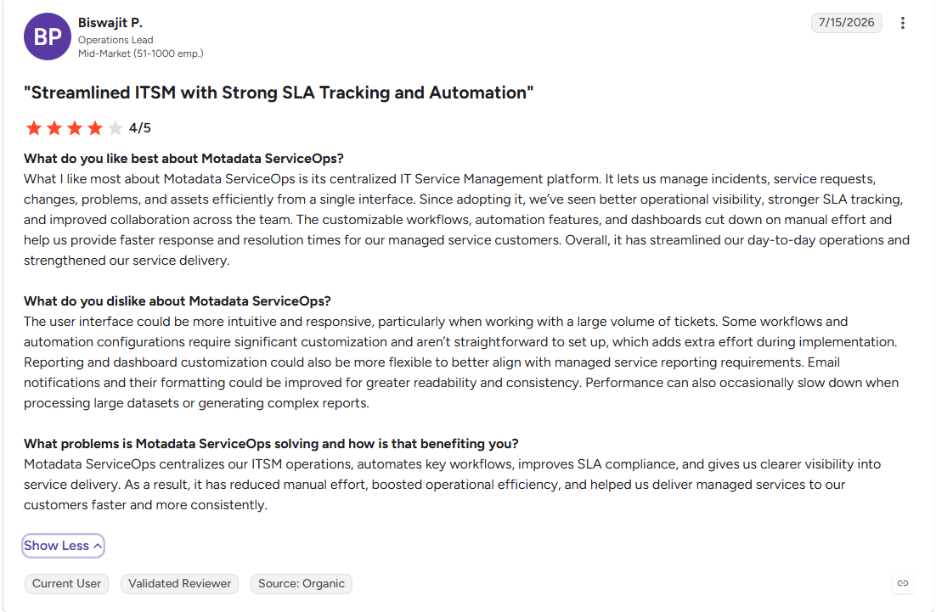
This is what one of our clients says about Motadata ServiceOps on G2:
What Should an IT Offboarding Checklist Template Include?
An IT offboarding checklist template should list every task by phase, with an owner and a completion check, so it can be copied straight into a service request. Use the IT offboarding checklist below as a starting point.
Before the final day:
Confirm exit type, final day and holds with HR
Use the exit interview to confirm devices, accounts and data the person still holds
List apps, shared accounts and handover needs with the manager
Identify privileged access, service accounts and scheduled jobs
Pull assigned devices and licenses from the asset record
At the cutoff:
Disable the primary identity and end all sessions
Remove MFA methods, mail forwarding and delegated access
Remove admin rights and privileged group memberships
Disable accounts in apps outside SSO
Within one business day:
Rotate shared and service credentials
Transfer file ownership and convert the mailbox
Reassign scheduled jobs and integrations
Deactivate badges and physical access
Within the return window:
Recover and log every device and security key
Lock or wipe unreturned devices
Reclaim unused software licenses
After the final day:
Review access and sign-in activity for anything after the cutoff
Close the request with evidence attached
Repeat the access review after 30 days
HR usually owns the wider employee offboarding checklist, which covers final pay and benefits. This IT list can be added to that offboarding checklist or to any employee offboarding template HR already uses, and keeping an IT onboarding and offboarding checklist together means every access item granted at onboarding has a matching removal item at exit.
How do You Measure Whether IT Offboarding is Working?
You measure IT offboarding by tracking how fast access is removed, how complete each exit is and how much leftover access turns up in later reviews. Five measures give a clear picture:
Time to disable: Time from HR confirmation to the primary identity cutoff
On-time task completion: Share of offboarding tasks closed within their deadline
Asset recovery rate: Devices recovered by the return date against devices assigned
Orphaned accounts found: Accounts belonging to departed users that turn up in periodic reviews
Licenses reclaimed: Paid seats returned to the pool after exits
Orphaned accounts are the most useful of the five, because each one points to a step the process missed and shows what to add to the template. For leadership, these five figures show whether offboarding is reducing risk and saving money.
Offboard Every Employee Completely with Motadata ServiceOps
IT offboarding leaves gaps when the work is scattered across emails, spreadsheets and what individual people remember. Motadata ServiceOps manages each exit as one service request: every exit type gets its own catalog template, every task has an owner and a deadline, assigned devices and licenses are tracked through asset management, and every action is recorded.
ServiceOps coordinates and records the offboarding work, while your identity provider still makes the account changes, so the two work best when connected. With both in place, every exit follows the same steps, and any later question about it can be answered from the record.
FAQs
What does access revocation mean?
Access revocation means removing a person's rights to use a system, application, dataset or physical space. In offboarding, it covers disabling accounts, ending active sessions, removing MFA methods and rotating shared credentials the person knew, so nothing they held still works after the cutoff.
Is offboarding the same as termination?
Termination is the HR and legal event that ends employment, while offboarding is the set of tasks that follows any departure, including resignations, retirements and contract end dates. IT offboarding is the part of that process that removes access and recovers company assets.
How soon should IT revoke access when an employee leaves?
Privileged access should end first, before or during the exit conversation for involuntary departures. For voluntary exits, most access can stay open until the agreed cutoff on the final day, with shared credentials rotated within one business day and a follow-up access review after the person has gone.
What software handles automated IT offboarding?
Automated IT offboarding usually combines an identity provider, which disables accounts, with an ITSM platform that runs the process around it. Platforms such as Motadata ServiceOps turn each exit into a templated request with tasks, deadlines, linked assets and a complete record of who did what.
What are common offboarding mistakes?
The most common mistakes are starting late, treating the directory account as the only access and skipping verification. Others include missing contractor accounts, leaving shared passwords unchanged and deleting accounts before data ownership is transferred, which can erase mailboxes and files the business still needs.
Author
Poonam Lalani
Content Strategist
Poonam Lalani is a B2B content strategist and writer with a background in computer engineering and experience across enterprise technology domains, including AI, cloud, DevOps, data engineering, and IT operations. She specializes in creating research-driven content that simplifies complex ideas and supports product education, thought leadership, and business growth.