How to Design an On-Call Rotation and Escalation Policy That Keeps Incidents Moving
Who is supposed to answer when a customer-facing service fails overnight? In many IT organizations, nobody can say for sure. A ten-minute fix then drags into an hour of downtime while people work out who owns it.
An on-call rotation settles who responds. The escalation policy deals with what comes after, when the responder is asleep, say, or the fault is outside their area. Plan the two together, because alerts that stall at level one waste a well-staffed schedule, and no escalation chain will save a rotation where the same few engineers cover every night.
Our approach treats on-call design as a piece of everyday incident management, and we've included the sizing math and templates to go with it. In this blog, you will see:
What an on-call rotation is: How coverage, roles and handoffs fit together
Which rotation model fits: Weekly, daily, split, follow-the-sun and round-robin patterns
How to size and schedule the rotation: A six-step method with a ready-to-use template
How to build an escalation policy: Levels, timeouts and a worked example tied to response targets
How to keep on-call sustainable: Best practices and the metrics that show strain early
What is an On-Call Rotation?
An on-call rotation is a recurring schedule that moves incident duty from one named person to the next on a set cycle. Check it at any hour and you'll know who owns the next alert or IT incident.
Anyone searching what is on call rotation is usually after the components. A working rotation has five of them:
Coverage window: The hours that need a responder, such as 24/7 or out-of-hours only
Cadence: How often the duty changes hands, commonly daily, weekly or every few days
Roles: A primary responder who takes the first alert and a secondary who backs them up
Escalation policy: The rules for moving an unacknowledged or stuck alert to the next person
Handoffs and overrides: How context passes between shifts and how swaps, leave and sick days are covered
They depend on one another. Say you pick a weekly cycle with only three people: each of them is back on call every third week, which wears thin fast. Size the group first, then write the schedule.
How does an On-Call Schedule Work Day to Day?
On shift, the primary has a phone or laptop within reach and acknowledges alerts inside the agreed window. Bigger problems may call for a specialist, or for someone senior enough to make a decision, and that's when the secondary or an expert gets pulled in. If the primary misses the window, the escalation policy pages the next person on its own.
Many shifts go by without a single page. What matters is the first few minutes after something breaks, when people either know who's up or start asking around. An escalation policy is what removes that guesswork.
Why Does Every On-Call Rotation Need an Escalation Policy?
An escalation policy is a written set of rules for what happens to an alert or incident that nobody has picked up or fixed in time. Who gets it next? It could be a second responder, a specialist group or a manager, and the policy says how many minutes each one has.
Without that, people under pressure fall back on habit, and they often:
Hesitate to wake a senior engineer
Assume a colleague has already picked up the alert
Keep troubleshooting long after they should have asked for help
That kind of process failure is common. Uptime Institute research backs this up. Its 2025 outage analysis found close to 40% of organizations had suffered a major outage caused by human error in the previous three years.
And 85% of those came down to a procedure that was ignored or badly written in the first place. Written escalation rules make a difference in three ways:
It removes hesitation: Responders know exactly when to escalate and to whom
It catches silence: Unacknowledged alerts move on automatically after a set timeout
It protects commitments: Escalation fires before a response target expires, which is the point where SLA breach costs begin
What Does Poor On-Call Design Cost the Business?
Poor on-call design costs the business in longer outages and slipped service commitments, and over time in engineers who walk away. Strong infrastructure and observability tools won't stop that on their own. Because the damage is split across several budgets, leadership seldom sees the full bill.
Longer outages: Every minute an alert waits for an owner adds downtime, lost transactions and customer complaints
Breached commitments: Missed response targets can trigger SLA penalties, service credits and harder renewal conversations
Engineer attrition: Frequent out-of-hours duty is a common reason experienced engineers leave, and replacing that knowledge takes time
Key-person risk: When only two or three people can fix a critical service, every holiday or resignation becomes an operational risk
Think about an online retailer in the middle of an overnight sale. Checkout gets slow, someone sees the alert five minutes later, restarts the service and that's it. If nobody answers for forty minutes instead, the same fault means abandoned carts and a support queue, and the head of IT has to explain it the next morning.
Most of these costs trace back to design. Start with the rotation model.
What are the Common On-Call Rotation Models?
The on-call rotation models you'll see most often are weekly, daily, a weekday and weekend split, follow-the-sun and round-robin. Mostly they differ in how often the duty moves, and moving it too rarely or too often both tire people out. Headcount, time zones and alert load should make the call, though round-robin is more of a service desk pattern than an overnight paging one.
This table compares them.
Model | How it works | Best fit | Watch for |
Weekly | One primary holds duty for seven days, then hands off | Groups of six or more with moderate alert volume | Fatigue building late in the week when nights are busy |
Daily | Duty changes every 24 hours | Services with heavy alert volume | Frequent handoffs, so written context matters more |
Weekday and weekend split | One person covers weekdays, another covers the weekend | Smaller groups that want weekends shared fairly | Weekend slots need careful fairness tracking |
Follow-the-sun | Regions in different time zones each cover their own daytime | Organizations with staff in three or more regions | Handoff quality between regions |
Round-robin | Duty passes in a fixed sequence, often per shift or per ticket | Service desks spreading incoming work evenly | Uneven difficulty from one turn to the next |
Many organizations combine models. The usual mix is a weekly primary rotation alongside its own weekend rotation, which keeps anyone from covering seven nights straight. Once that's decided, there are six steps to building the rotation itself.
How do You Design an On-Call Rotation Step by Step?
Every on-call rotation design starts from two inputs, coverage and response targets, and the rest (group size, shifts, roles, overrides, publishing) depends on them. Order matters here. Get those wrong and each later step repeats the error, which is why the steps below run in this sequence.
1. Define Coverage Hours and Response Targets
Write down each service that needs cover and the response time it actually needs. Customers notice a broken payment API immediately, which can justify having someone on it within minutes at any hour. A reporting tool used internally can likely wait for morning, unless service dependency mapping shows that a revenue-critical application depends on the database behind it.
Group them into tiers and note down three things for each one:
Coverage window: 24/7, extended hours or business hours only
Acknowledgment target: How quickly a responder must confirm they have the alert
Engagement target: How quickly someone must be actively working the issue
Check these against the service level agreements already promised to customers. If they don't match, responders end up working to one clock while the business reports against another.
2. Size the Rotation Before Writing the Schedule
How many people share the rotation decides how often each one is back on duty. More than anything else, that frequency is what wears people out. Six to eight people is where most 24/7 weekly rotations try to land.
Working it out takes one division. Divide 52 weeks by the number of people and you have each person's primary weeks per year:
People in the rotation | Weeks on primary per year | Weeks on duty per year including secondary |
3 | About 17 | About 35 |
4 | 13 | 26 |
5 | About 10 | About 21 |
6 | About 9 | About 17 |
8 | About 6.5 | 13 |
The third column matters most. When everyone also serves as secondary, a four-person group spends half the year carrying a phone, which few people can sustain.
Managers can use the same table when making a case for headcount. Six people instead of four, for example, means about 17 weeks of duty each instead of 26.
3. Choose On-Call Shift Length and Handoff Points
Shift length is mostly about two things you can't fully avoid: handoffs and fatigue. Context can get lost at every handoff. Very long shifts have the opposite problem: by the end of the week, the person on call may be worn out just when something serious breaks.
Twelve-hour shifts: A sensible default when two regions split day and night cover
Eight-hour shifts: Better for heavy alert volume or strict response targets
Multi-day turns: Common for small groups covering quiet services out of hours
Schedule handoffs for working hours whenever you can, when both people are awake and can talk through what's open. Details slip far more often in a handoff done late in the evening.
4. Assign Primary and Secondary On-Call Responders
Each slot in the on-call rotation schedule gets a primary and a secondary, both named. The primary owns acknowledgment and first response. The secondary covers missed alerts, joins large incidents and takes over if the primary becomes unavailable.
Pair people deliberately. Let newer engineers shadow for a few shifts, then give them primary with a senior colleague behind them as secondary. They learn without the service being exposed, and you stop relying on the few people who originally built the system.
5. Plan for Overrides, Leave and Swaps
Sooner or later someone gets sick or goes on vacation, and the schedule has to bend. So decide early how a swap gets requested and approved, and where the change is recorded.
Planned leave: Collected before the schedule is published, so gaps are filled in advance
Swaps: Arranged between responders and reflected in the schedule the same day
Unplanned absence: Covered by the secondary first, then by a named fallback list
Check the override history every few months. One name turning up again and again on extra shifts means the rotation is smaller than it looks.
6. Publish the On-Call Schedule and Expectations
Put the schedule where people already look, a shared calendar or the service desk, for example. Hidden in a spreadsheet or vague about duties, a schedule helps nobody, so add these expectations next to it:
Acknowledgment time for each service tier
Where to find runbooks, the short step-by-step guides for handling each alert
When to escalate and how to reach the secondary and specialists
How on-call time is compensated or returned as time off
Run the first version as a pilot for a few weeks. Then look at which alerts actually came in, listen to what responders say, adjust, and save the result as a template.
What Should an On-Call Rotation Schedule Template Include?
An on-call rotation schedule template lists four things per period: primary, secondary, escalation contact and overrides. Here is a four-week block for a weekly rotation of six people.
Week | Primary | Secondary | Escalation contact | Overrides |
Week 1 | Engineer A | Engineer B | Infrastructure lead | None |
Week 2 | Engineer C | Engineer D | Infrastructure lead | Engineer E covers one night for Engineer C |
Week 3 | Engineer E | Engineer F | Applications lead | None |
Week 4 | Engineer B | Engineer C | Applications lead | Engineer F on planned leave |
If someone's secondary week falls right next to their primary week, they stay closer to what's been happening. Before you share it, add the handoff time and a link to the runbook index at the top. The schedule tells people who is on duty and nothing more, so the next question is what happens when that person doesn't answer.
How do You Build an Escalation Policy That Works Under Pressure?
You build an escalation policy by answering a handful of questions. Which levels can an alert pass through, and what pushes it up? How long does each level get, and do you call, text or message them? Keep the answers short enough that nobody is decoding policy language halfway through an incident.
What are the Three Types of IT Escalation?
IT escalation comes in three forms. Two of them come straight from ITIL incident management, and a mature policy normally uses all three:
Hierarchical escalation: Moves an issue up the seniority chain when a decision needs more authority, such as approving an emergency change or contacting customers
Functional escalation: Moves an issue sideways to a group with the right skills, such as from the service desk to network engineering
Automatic escalation: Moves an alert to the next level when a timeout passes without acknowledgment or a priority threshold is crossed
In practice, functional escalation is where the minutes go, mostly when one internal group hands work to another without an agreed target. SLAs and OLAs put those targets in writing. It also helps to send the ticket to the right technician group at intake, as smart routing suggests, so the issue reaches an expert in fewer hops.
How Many Levels Should an Escalation Policy Have?
Three or four levels suit most escalation policies. With fewer, an alert can die with one person who can't be reached. Add more, and you get delay plus confusion over who's in charge.
Here's a typical four-level setup:
Level 1: Primary on-call responder
Level 2: Secondary on-call responder
Level 3: Subject-matter expert or service owner
Level 4: IT operations or engineering manager, for decisions and communication
How do You Set Escalation Timeouts Against Response Targets?
Escalation timeouts should be set backward from the response target, so the whole chain can run before a commitment is missed. The check is simple. Add the timeouts for every level except the last, and make sure the total comes in under the engagement target for that tier.
Take a priority 1 service as a worked example:
Engagement target: Someone actively working the issue within 15 minutes
Timeout at Levels 1 and 2: Five minutes each to acknowledge
Level 3 notified: At the ten-minute mark, with five minutes left to engage
Map every timeout against the response target before the policy goes live. Below, you can follow a priority 1 alert as five-minute timeouts carry it up three levels within 15 minutes.
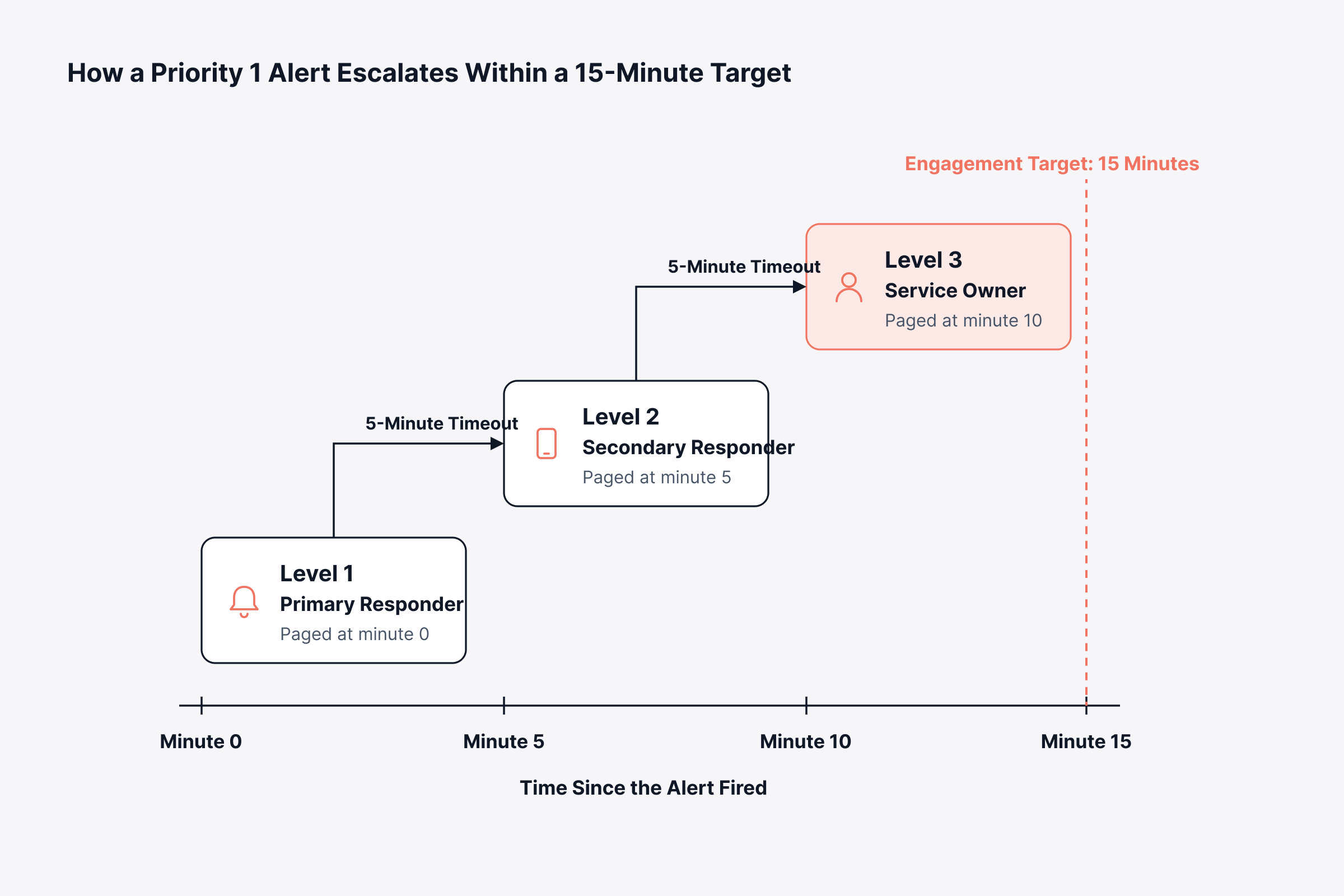
Now stretch those timeouts to ten minutes each. Level 3 wouldn't hear about the incident until minute 20, five minutes after the target. Lower tiers have more room, so their timeouts can be longer.
What Does an Escalation Policy Example Look Like?
An escalation policy example is easiest to follow as a table listing who is notified at each level, the timeout and the channel for every priority. The example below suits a mid-sized IT operations group.
Priority | Level 1 | Level 2 | Level 3 | Timeout per level | Channels |
P1 Critical | Primary on call | Secondary on call | Service owner and IT operations manager | 5 minutes | Phone call, SMS, mobile push |
P2 High | Primary on call | Secondary on call | Service owner | 15 minutes | SMS, mobile push, chat |
P3 Medium | Assigned group queue | Group lead | None | 1 business hour | Email, ticket |
P4 Low | Assigned group queue | None | None | 1 business day | Ticket |
Notice two things in this example. Low-priority alerts don't page anyone at night, but every P1 goes out on at least one channel that will get someone out of bed. Once responders are spread across time zones, though, the policy needs a follow-the-sun model to support it.
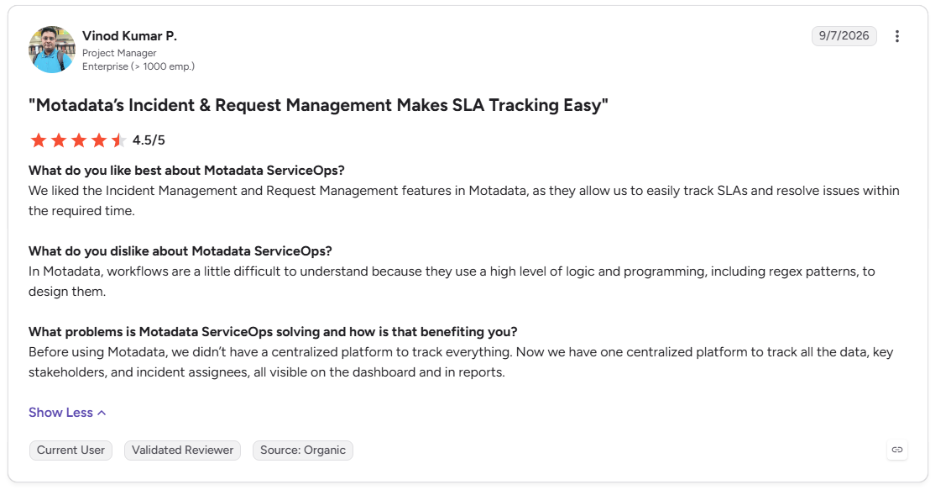
This is what a client says about Motadata ServiceOps on G2.
How Does Follow-the-Sun Support Work for Distributed Rotations?
Follow the sun support is a rotation model in which on-call duty moves with the clock from one region to another, so each region covers incidents in its own daytime. Three regions with roughly eight hours each is the usual split.
Nobody has to work nights on a regular basis, and that's the big gain. In exchange, you take on three handoffs a day and three regional groups that each need the same access and runbooks. Four conditions usually make the difference:
Enough people per region: Each region can staff its window without borrowing from another
Shared tooling and access: Every region sees the same alerts, tickets and runbooks
One escalation policy: Levels and timeouts mean the same thing in every region
Disciplined handoffs: Open incidents and watch items pass across with written context
Schedule every regional handoff for a fixed time and back it with a written note. In the 24-hour ring below, you can see where duty changes hands and what goes with it each time.
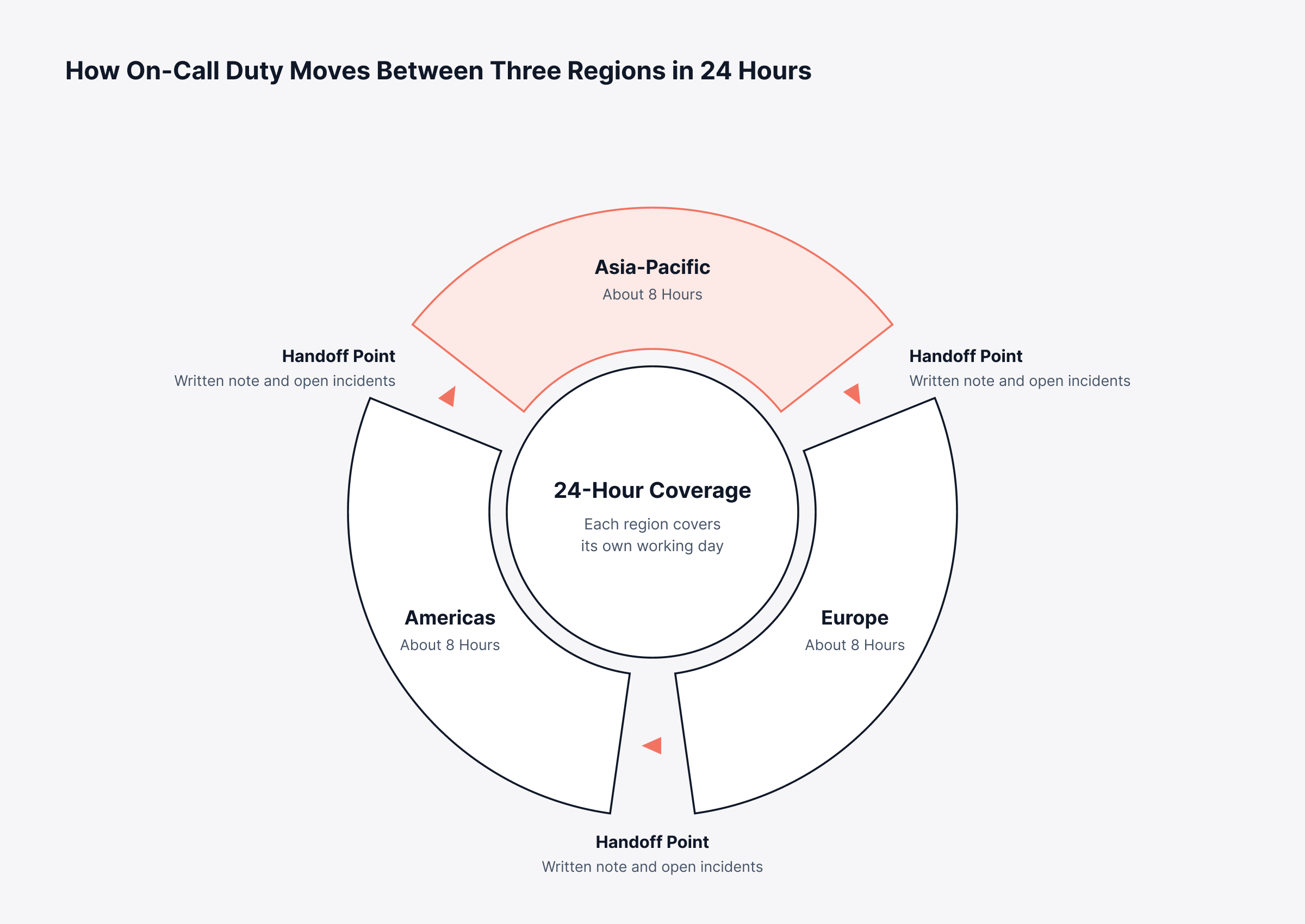
A good handoff means the next region starts with full context. That's why the note deserves a set structure.
What Should a Follow-the-Sun Handoff Note Contain?
A handoff note should let the incoming region act without calling the outgoing one. A short format covering four points does the job:
Open incidents: Status, current owner and next action for each one
Watch items: Alerts that fired and cleared, or trends that need another look
Changes in flight: Deployments or maintenance that could trigger new alerts
Pending escalations: Anything waiting on a specialist, vendor or manager
Save the note to the incident record. That way the history stays with the incident, which saves a lot of digging when the post-incident review comes around.
When Does a Follow-the-Sun Model Not Fit?
If you already have staff in several regions, follow-the-sun is a natural fit. A small group that tries to build it from scratch ends up with two or three people per region, and the fatigue problem returns.
For a lot of mid-sized organizations, a hybrid is the practical answer. Usually two regions split the working day between them, with a small out-of-hours group handling critical services and nothing else. The model is only half of it; the practices below decide whether it lasts.
What are the On-Call Best Practices That Prevent Burnout?
On call best practices cut unnecessary pages and get responders prepared before something breaks. They also protect recovery time after a hard shift. These five go after the usual causes of on-call fatigue.
1. Fix Alert Quality Before Adding On-Call Staff
A rotation buried in noise needs better alerts before it needs more staff.
Page only for conditions that need human action right away
Route informational alerts to dashboards or tickets
Review every alert that fired during a shift at the handoff
Our guide to alert fatigue goes further into prioritizing alerts.
2. Write a Runbook for Every Paging Alert
Every alert that can wake someone up needs a short runbook attached.
State what the alert means and its likely causes
List the first checks and safe remediation steps
Name who to escalate to if those steps do not work
If the same fix comes up over and over, give it to runbook automation so the night shift doesn't have to do it.
3. Protect Recovery Time After Hard On-Call Shifts
After a major incident overnight, the responder needs the next day to recover.
Offer a late start or time off after significant out-of-hours work
Move project work off the on-call person's plate during their shift
Ask managers to join the rotation and adjust the schedule when alert load spikes
4. Compensate On-Call Work Fairly
Being on call is extra work. People stay willing to do it when that work is recognized.
Agree on a stipend, hourly rate or time off in lieu before the rotation starts
Spread weekends and public holidays evenly and track them
Check local labor rules, which vary by country and region
5. Review Escalations as Well as Incidents
Each escalation is a small test of the policy.
Ask whether each escalation happened at the right moment
Look for alerts that always escalate, which signals a routing or skills gap
Update timeouts and contacts whenever services or people change
Cutting repeat escalations is also one of the quickest routes to reduce MTTR. How do you know any of this is working? Six on-call metrics answer that question.
Which Metrics Show Whether an On-Call Rotation is Healthy?
On-call health comes down to a few numbers, mostly alerts per shift, out-of-hours interruptions, time to acknowledge, escalation rate and how many alerts needed action. Watch them together and strain shows up early, long before anyone asks to leave the rotation.
A monthly review is a good place to start.
Metric | What it measures | Warning sign |
Alerts per shift | Total interruptions a responder handled | A steady rise with no matching rise in incidents |
Out-of-hours pages | Alerts that arrived outside working hours | The same services waking people repeatedly |
Mean time to acknowledge (MTTA) | How fast responders confirm an alert | Slowing acknowledgment, often a fatigue signal |
Escalation rate | Share of alerts that moved past Level 1 | Specific alert types that always escalate |
Actionable alert ratio | Share of alerts that required human action | A low ratio, which points to noisy alerting |
Shifts per person | How often each responder is on duty | One or two people carrying far more than others |
Bring broader incident metrics into that review as well, especially resolution time and MTTD, meaning the average time to detect a problem. And if a service has service level objectives, its error budgets show how much reliability each incident used.
These numbers also make sense in business terms. Fewer pages after hours means less overtime and lower attrition risk. Quicker acknowledgment cuts the length of outages customers see, so pick tooling that captures these numbers automatically.
What Should You Look for in On-Call Rotation Software and Alerting Tools?
On-call rotation software needs to handle the schedule and get every alert to the right person. It also needs to escalate without anyone stepping in, and to keep one record per alert open until the issue is resolved.
Rarely does one product cover all of that, so most organizations combine an observability platform, an IT service management (ITSM) platform and a scheduling or paging tool. When comparing enterprise SRE alerting tools, meaning alerting products built around site reliability engineering practices, judge how well the parts work together on these criteria:
Alert quality controls: Thresholds that adapt to normal behavior, plus correlation that merges repeated alerts about the same fault
Scheduling and overrides: Rotations, swaps and leave handled without spreadsheets
Multi-level escalation: Per-priority levels, timeouts and channels that can wake people when needed
Ticket linkage: Every alert creates or joins an incident record with a priority and an owner
Service targets: Response and resolution clocks that trigger escalation before a breach
Reporting: On-call load, acknowledgment times and escalation patterns by service and person
Total cost: Licensing, integration effort and the time staff spend moving details between separate tools
For a look at how leading options handle these points, see our comparison of incident management tools. With Motadata, ObserveOps spots the problem and raises real-time alerts that open tickets in ServiceOps. From there, ServiceOps takes the incident through priority, assignment and escalation to closure as part of its incident resolution workflow.
Link detection to escalation and every alert gets an owner. The flow below splits the work between Motadata ObserveOps and Motadata ServiceOps once an alert fires.
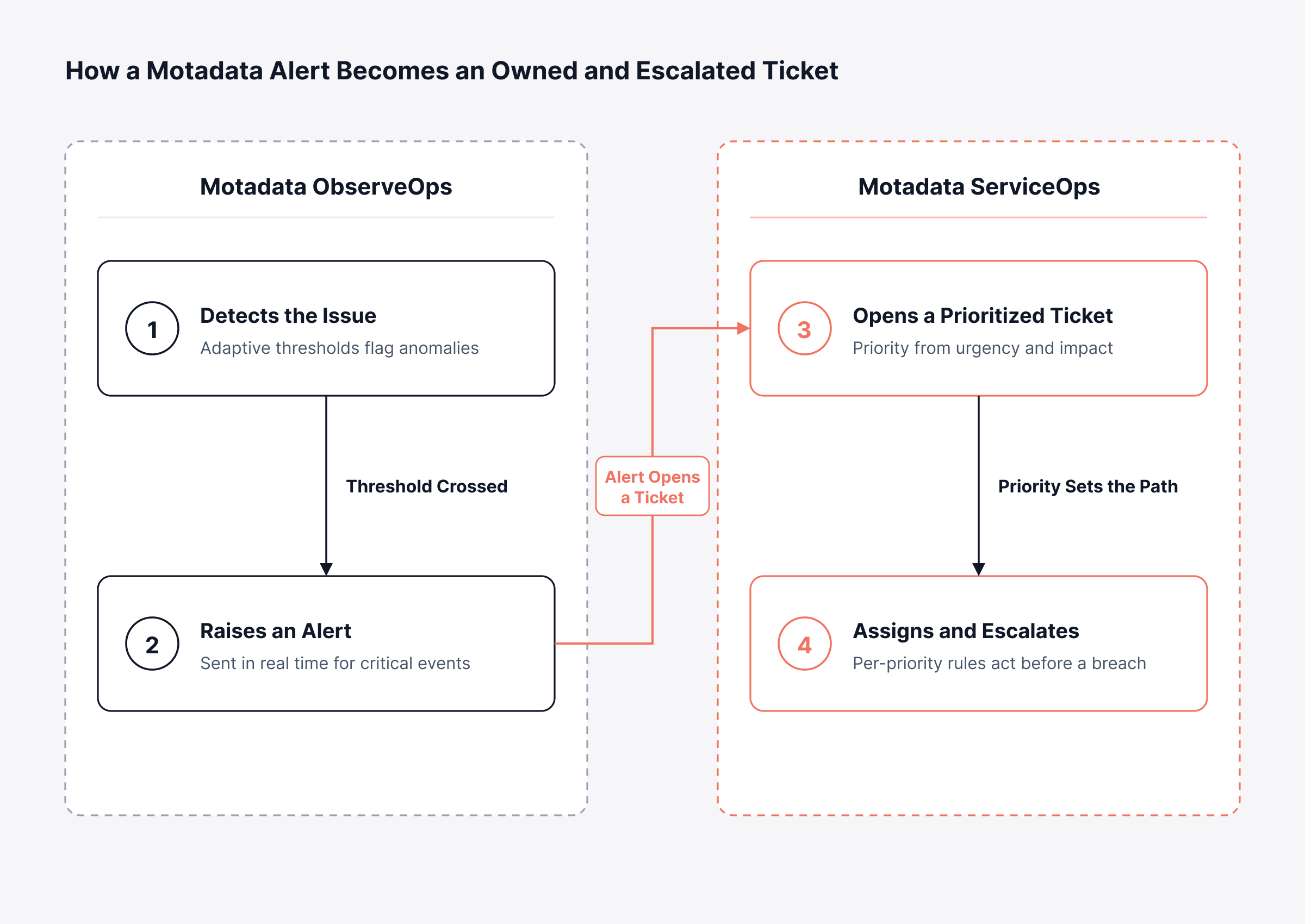
Responders then work from the ticket the alert created. Managers can look at the ticket for status, and nobody spends the night answering "any update?" messages.
Move from Missed Pages to Accountable Escalation with Motadata ObserveOps and ServiceOps
An on-call rotation and escalation policy that holds up is the product of a few decisions taken in sequence. Coverage and targets come before anything else; after that you work out group size, shifts and roles, and you finish with escalation levels and timeouts. Once those are settled, alerts stop waiting on whoever happens to be awake.
Some fixes have to come before any tool: a rotation that’s too small needs more people, and alerts nobody needs to act on need tuning, which no software can do on its own, ours included. With the design in place, Motadata ObserveOps gathers observability data, raises alerts with adaptive thresholds and opens tickets in Motadata ServiceOps. From there, ServiceOps applies escalation rules by priority, tracks service targets during business hours and warns before a breach, so each incident keeps moving toward someone who can fix it.
FAQs
What is an on-call rotation and how does it work?
An on-call rotation is a schedule that hands responsibility for incidents from one person to the next on a fixed cadence, such as weekly. The person on duty acknowledges alerts within an agreed time, and an escalation policy moves the alert to a backup if they cannot respond.
How many people should be in an on-call rotation?
Six to eight people is a common target for 24/7 weekly coverage, because each person then holds primary duty roughly once every six to eight weeks. Smaller groups can still cover out-of-hours work, but they usually share the rotation with another function or limit paging to critical services.
What are the four stages of escalation?
Many escalation policies use four levels: the primary on-call responder, the secondary responder, a subject-matter expert or service owner, and a manager who makes decisions and handles communication. Each level has a timeout, and the total of those timeouts should fit inside the response target for the service.
What is the difference between an escalation policy and an escalation plan?
An escalation policy sets the standing rules: levels, timeouts, channels and who is notified for each priority. An escalation plan, often called an escalation procedure, applies those rules to a specific service or incident type, naming the people, contacts and steps to follow when that service fails.
Can an ITSM platform handle escalation for on-call alerts?
Yes, when observability and ITSM are connected. In Motadata, for example, ObserveOps alerts can open tickets in ServiceOps, where escalation rules, priority-based targets and pre-breach notifications move each incident to the next level before a service commitment slips.
Author
Poonam Lalani
Content Strategist
Poonam Lalani is a B2B content strategist and writer with a background in computer engineering and experience across enterprise technology domains, including AI, cloud, DevOps, data engineering, and IT operations. She specializes in creating research-driven content that simplifies complex ideas and supports product education, thought leadership, and business growth.