What a Patch Management Policy Should Contain to Keep Systems Secure and Audit-Ready
Who decides how fast a critical patch goes out, and who signs off when a production server can't be restarted? For many IT groups, the answer is a mix of one senior admin's judgment, an old ticket and a shared spreadsheet. It holds up fine right until an auditor asks for proof, or that admin leaves.
A written policy replaces that guesswork with rules people have agreed to. Owners are named, deadlines are fixed, and there's a plan for the system that can't be patched on time. Auditors tend to start their questions right there.
We've written about the basics of patch management before. From here on, we'll stick to the policy document itself and take it one section at a time. In this blog, you will see:
What a patch management policy is: How it differs from a process, a procedure and a plan
The 12 sections a policy needs: From scope and roles to exceptions and audit evidence
Remediation timelines by severity: Starting baselines you can adjust to your own risk and capacity
How to create a patch management policy: Eight steps from asset inventory to executive sign-off
A sample patch management policy: Copy-ready template wording, plus Windows and vulnerability variants
Compliance mapping and enforcement: How the policy answers common frameworks and how tools keep it applied
What is a Patch Management Policy?
In plain terms, a patch management policy is the signed document that settles who patches what, and how fast, before anyone has to argue about it. It also says what proof you'll keep. That signature is what gives its deadlines weight outside the IT department.
You'll also see it called a security patching policy or a patching standard. In practice, it covers security fixes and everyday software updates like bug fixes, and the security fixes get stricter deadlines. Either way, look for answers to five questions:
Scope: Which assets and software are covered, and which are excluded
Ownership: Who identifies, tests, approves, deploys and verifies patches
Speed: How many days each severity level has before a patch is overdue
Exceptions: What happens when a system cannot be patched on time
Proof: Which records show auditors that the policy was followed
How is a Patch Management Policy Different from a Process or Procedure?
People often call several different documents the patching policy. Lump them together and the result gets too long for anyone to finish. It's cleaner to keep rules in the policy and leave the how-to for the documents underneath:
Document | What it answers | Typical owner | How often it changes |
Policy | What must happen, by when, and who is accountable | CISO or head of IT | Yearly, or after a major change |
Standard | Specific values the policy refers to, such as the severity scale and approved tools | Security lead | When tools or scales change |
Procedure | Step-by-step instructions for one task, such as deploying a server patch | IT operations | Whenever the method changes |
Plan | The schedule for one cycle: which patches, which systems, which windows | Patch coordinator | Every cycle |
Put the operational detail in procedures. That way, swapping a tool or changing a method won't mean getting the policy signed again.
Why does an Organization Need a Written Patching Policy?
With a written patching policy, everyone works to the same deadlines, the same owners and the same approval rules. That matters most under pressure. Without it, how fast a fix goes out depends on who happens to be on shift and how full the change calendar is that week.
Clear accountability: Each step has a named role, so an overdue patch always has an owner to escalate to
Predictable deadlines: Severity levels map to fixed windows, which removes case-by-case debate
Fewer change-related outages: Testing and rollback rules still apply when a fix is urgent
Audit-ready evidence: Required records are defined in advance, so audits draw on data that already exists
Controlled exceptions: Systems that can't be patched are documented, protected and reviewed on a schedule
There is a security argument as well. Plenty of attacks rely on flaws that were fixed weeks earlier; the danger is in the days before the patch goes in. A policy caps those days and makes one role answer for them.
Business leaders get something too. They can treat patching as an IT risk management call and sign off on the trade: how much downtime for maintenance, against how long a known flaw stays open. And when a cyber insurer or a large customer asks how quickly you patch critical issues, there's a written answer ready.
What Should a Patch Management Policy Contain?
A patch management policy usually needs twelve sections. Think of them as answers to questions an auditor, an engineer or a business owner will ask sooner or later. We've put them in the order most policies follow.
1. Purpose, Policy Statement and Ownership
The first section answers two questions: why does this policy exist, and who owns it? A paragraph is plenty, provided it mentions the risks you're guarding against, for example known vulnerabilities and unplanned downtime. Then add three control details:
Policy owner: The role accountable for keeping the document current, usually the CISO or head of IT
Approver: The executive or committee that signs it off
Effective and review dates: When the rules apply and when they will next be checked
2. Policy Scope and Asset Coverage
Scope says what's in and what's out, and every exclusion needs a reason next to it. Most gaps start here. Mention only Windows laptops, and servers, network gear and business apps end up with no rules at all, so spell out each category:
Endpoints: Desktops, laptops and virtual desktops on Windows, macOS and Linux
Servers: Physical, virtual and cloud instances, including hypervisors
Applications: Business software, browsers, runtimes and third-party applications
Network and security devices: Firmware for firewalls, routers, switches and wireless controllers
Cloud workloads and containers: Base images, managed services and the shared responsibility split agreed with each cloud provider
Specialist systems: Medical, industrial or lab equipment that needs vendor approval before any change
Of course, scope can't be better than the asset list behind it. Hook this section up to automated asset discovery and new devices fall under the policy as soon as they appear.
3. Patching Roles and Responsibilities
Next up is who does what. Use a responsibility matrix for this and write role titles in it; if you list people by name, every resignation means editing the policy. Start from the matrix below:
Activity | Responsible | Accountable | Consulted |
Monitor vendor advisories and threat feeds | Security analyst | Security lead | IT operations |
Assess severity and business risk | Security analyst | Security lead | Application owner |
Test patches | IT operations | IT operations manager | Application owner |
Approve standard patches | Change manager | IT operations manager | Security lead |
Approve emergency patches | Emergency change authority | CISO or head of IT | Application owner |
Deploy and verify | IT operations | IT operations manager | Service desk |
Approve exceptions | Application owner | CISO or head of IT | Security lead |
Report compliance | Security lead | CISO or head of IT | Internal audit |
If a service provider runs some of your systems, add them to the matrix too. And write their patching duties into the contract, so nobody has to argue about them later.
4. Patch Identification and Trusted Sources
This part covers where patches come from and how often you look for missing ones. Stick to vendor repositories or your own mirror of them and check every file's integrity before it's pushed anywhere. Name the inputs the security function must monitor:
Vendor advisories: Security bulletins and release notes from every vendor in scope
Vulnerability data: New CVE entries and scanner findings matched to your assets
Exploit intelligence: Government and industry lists of vulnerabilities known to be exploited
Scan cadence: How often patch discovery scans check endpoints and servers for missing updates, such as daily
5. Risk-Based Prioritization
Some weeks, every patch looks urgent. That's when you need written rules for what goes first: start with the vendor's severity rating, then adjust it for your own environment. Four factors usually set the final priority:
Severity: The vendor rating or CVSS score, which measures how damaging a flaw could be
Exploit status: Whether attackers are already using the flaw, which should raise priority immediately
Exposure: Whether the asset faces the internet or holds sensitive data
Business criticality: How much revenue, safety or service depends on that system
Don't leave the combination to judgment on the day; write it down. Here's how that plays out. A medium-severity flaw on an internet-facing payment server could easily become critical, while a high-severity flaw on an isolated test machine can be left for the usual cycle.
6. Patch Remediation Timelines by Severity
This table sets how many days each priority level has before a patch counts as late. It'll get quoted more than any other page of the policy, so your testing and maintenance windows have to be able to keep up with it. Start with the values below, then test them against your risk appetite and regulatory obligations:
Priority | Typical trigger | Starting target | Who can extend it |
Critical or emergency | Actively exploited flaw, or a severe remotely exploitable flaw on an exposed system | 48 to 72 hours | CISO or head of IT only |
High | Serious flaw with no known exploitation yet | 7 days | Security lead |
Medium | Moderate flaw or limited exposure | 30 days | Security lead |
Low | Minor flaw or routine bug fix | 90 days, or the next scheduled cycle | IT operations manager |
Non-security updates | Feature releases and optional fixes | As scheduled, after testing | Change manager |
Also, say when the clock starts. Auditors ask about this all the time. Either the vendor's release date or the day you confirmed the flaw in-house is fine; just choose one and put it in writing.
Take a regional retailer that promises 72 hours for critical patches on hundreds of store terminals. Its stores only take updates after closing. So, the policy either opens an overnight window for emergencies, or it documents a compensating control, for instance blocking the affected service until the patch lands.
7. Patch Testing and Staged Rollout
Testing rules decide which patches get tested, where that happens and for how long. If a patch breaks something, you'd much prefer to see it on a few test machines than across the whole company. Most rollouts use three rings:
Test group: Representative machines that mirror production builds and key applications
Pilot group: A small set of users or non-critical servers that confirms behavior under normal load
Broad deployment: Every remaining device, released once the pilot meets the success criteria
Rings grow in size as the rollout moves forward. The next one starts only after the last one passes, which the diagram below lays out step by step.
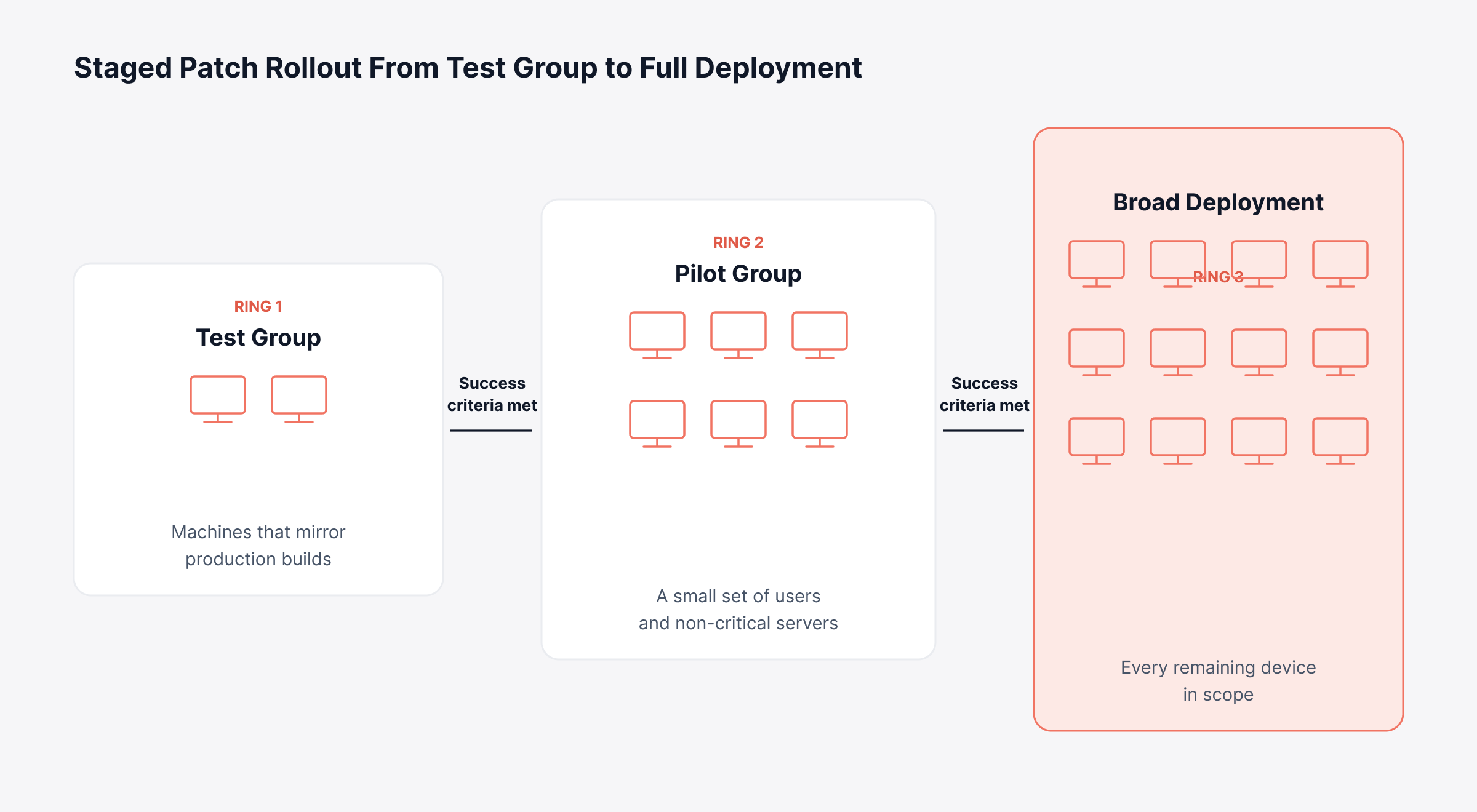
What counts as passing? Use checks you can measure. Zero failed installs is one, no new application errors in your observability data is another, and a flat count of related service desk tickets is a third.
Emergency patches are different. For those, a quick check on the test group is enough, as long as you can roll back.
8. Approval, Change Control and Emergency Patching
Every deployment should go through change management, with an approval that suits how risky it is. Pre-approve the routine, low-risk patches as standard changes and send the larger ones to normal review. Set out three approval paths:
Pre-approved: Definition updates and routine patches that passed testing deploy without further sign-off
Normal approval: Patches for critical business systems are reviewed by the change manager or the change advisory board
Emergency approval: A short path for actively exploited flaws, with sign-off from a named authority and a review after the fact
The emergency path needs its own clause. If attackers are already using a zero-day vulnerability or a newly found flaw, staff shouldn't have to wait for a meeting before they disable a service or add a firewall rule. The patch can be tested and approved once it's available.
9. Deployment Windows, Reboots and User Notice
This part is about timing: when installs are allowed and how much control users have over restarts. Too strict, and updates interrupt people in the middle of their work. Too loose, and a patch can wait for weeks while someone keeps hitting postpone.
Maintenance windows: Approved days and hours, set separately for servers and for user devices
Reboot rules: Whether a device restarts, shuts down or waits, and whether the restart is skipped when a patch doesn't need one
User notice and deferral: How much warning users get and how many times they can postpone
Forced installation date: The point at which a deferred patch installs regardless, so deferrals have a limit
Remote and off-network devices: How laptops that rarely connect to the office network receive patches, for example through cloud delivery or local relay servers at branch sites
10. Patch Rollback and Failed Deployment Handling
Here you describe how to remove a bad patch and what happens when an install fails. Get this written before the first deployment; plans thrown together during an outage almost always miss something. Each rollback clause should cover:
Backup: A snapshot or backup of critical servers taken before deployment, so recovery doesn't depend on the patch uninstalling cleanly
Triggers: The symptoms that justify rolling back, such as a failed core service or a spike in application errors
Method: Uninstalling the patch, restoring a snapshot or rebuilding from a known-good image
Authority: Who can order a rollback without waiting for a change meeting
Follow-up: A ticket for every failed install, with a new target date and interim protection
Run the rollback at least once a year on a non-critical system. A procedure nobody has tried is still a guess, and an outage is the worst time to learn it doesn't work.
11. Patching Exceptions, Risk Acceptance and End-of-Life Systems
Some systems will miss their deadline. Those cases stay on record here until they're fixed, and each one needs a business reason, a named risk owner and an end date. Require each exception record to include:
Asset and patch: The affected systems and the specific update being deferred
Justification: Why the patch can't be applied, such as vendor certification or a production freeze
Risk assessment: What could happen if the flaw is exploited, and how likely that is
Compensating controls: Network isolation, restricted access or extra monitoring applied in the meantime
Approval and expiry: Who accepted the risk, and the date the exception ends or must be renewed
An end date matters because it forces someone to decide. The timeline below follows an exception from approval to expiry, along with the two ways it can close.
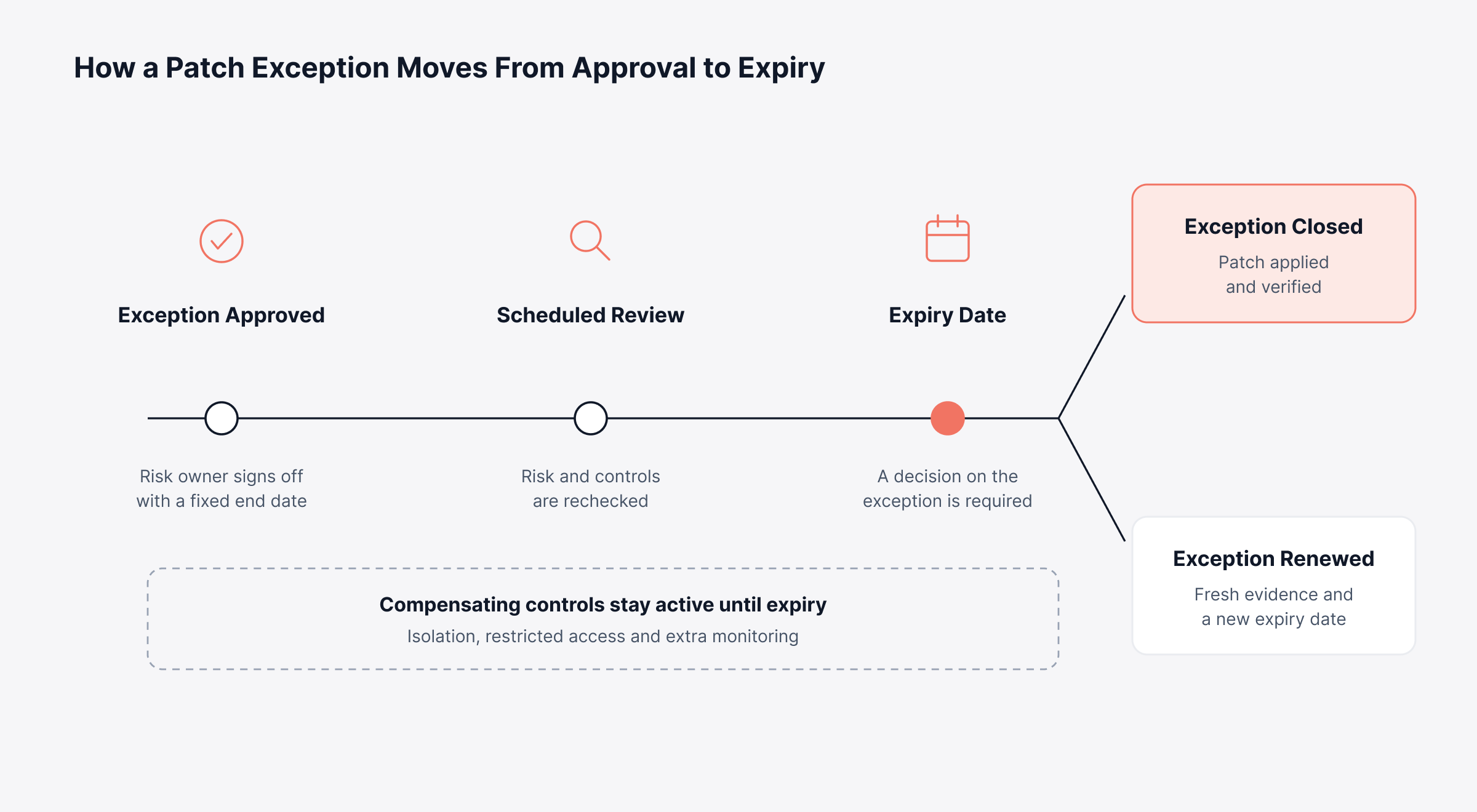
Some systems can't follow this cycle at all. Software past its end of life won't ever get another patch, so give it a rule of its own. Any unsupported system still in service should have an owner, a retirement or upgrade date and isolation in place.
A laboratory analyzer whose control PC runs an operating system the instrument vendor won't let you upgrade is a typical case. With a dated exception and its own network segment, cut off from the internet, it can stay in use until the replacement shows up.
12. Metrics, Reporting and Audit Evidence
Measurement comes last: what you track, who sees the numbers and which records you keep. Without reporting, leadership has a document. With it, they have numbers to check every month, so pick a few measures that show both speed and coverage:
Patch compliance rate: Share of in-scope assets fully patched within their deadline
Overdue critical and high patches: Count and age of items past their target
Mean time to patch: Average days from release or detection to verified installation
Failed deployments: Installs that failed, with time to resolution
Open exceptions: Number, age and how many are past expiry
Our guide to patch management KPIs walks through formulas and targets for each measure. As for evidence, most organizations keep approvals, test results, deployment logs and exception decisions. Write down how long each record is held and who's allowed to edit it.
How do You Create a Patch Management Policy Step by Step?
You create a patch management policy by looking at two things first: what you run today, and how quickly you can patch it. Everything in the twelve sections should rest on those facts, and the rules should get a trial run on a pilot group before anyone signs. Here are the eight steps, which apply to a brand-new policy or a rewrite:
Inventory what you run: Confirm every asset class in scope and who owns it through an up-to-date asset inventory, since the policy can only govern what it can see
Measure current performance: Record how long critical and high patches take today, which gives you a baseline for realistic deadlines
Agree on risk tiers: Decide with security and business owners how severity, exploit status, exposure and criticality combine into priority levels
Confirm the resources: Check that tooling, staff hours and maintenance windows can support the deadlines, and agree the budget with leadership before committing to them
Draft the twelve sections: Use the template below and keep operational detail in procedures
Pilot the rules for one cycle: Run a full patch cycle in one business unit and note where deadlines, approvals or windows break down
Get formal approval: Have the policy owner and executive sponsor sign off, then publish the policy where every affected group can find it
Set the review cycle: Schedule an annual review and list the events that trigger an earlier one
Step two gets skipped a lot. If critical patches take about three weeks today, a 72-hour promise on paper becomes an audit finding the day the policy is published. Pick targets you can meet now and tighten them as your tools get better.
When Should a Patch Management Policy be Reviewed?
Review a patch management policy at least once a year, or earlier if something big changes. A major incident can trigger it. An audit finding, a cloud migration or an acquisition should too.
At the back of the document, keep a version history. Each entry needs a date, a note on what changed and the approver's name, and auditors will usually ask to see it alongside the current copy.
What does a Sample Patch Management Policy Look Like?
Here's a sample patch management policy built on the same twelve sections. Every clause is short and has placeholders for your own values. Copy it into a document, fill in the brackets, then save it as a Word file or export a patch management policy template PDF to send for sign-off.
Patch Policy Document Control Block
Begin with a control block. That way, anyone opening the file knows who owns it and whether they're reading the latest version:
Field | Example entry |
Document title | Patch Management Policy |
Classification | Internal |
Policy owner | [Chief Information Security Officer] |
Approved by | [Chief Information Officer or IT steering committee] |
Version and effective date | [1.0, DD Month YYYY] |
Next review date | [12 months after the effective date] |
Related documents | [Change Management Policy, Vulnerability Management Standard, Patch Deployment Procedure] |
Don't send it for approval while any brackets are still empty.
Patch Management Policy Template Wording
In the table below, each row has sample wording for one clause; together they cover the twelve sections plus enforcement and review:
Section | Sample wording |
Purpose | This policy sets requirements for identifying, prioritizing, testing, approving, deploying and verifying software and firmware patches, to reduce the risk of known vulnerabilities and unplanned downtime. |
Scope | This policy applies to all [Organization]-owned or managed endpoints, servers, network devices, applications and cloud workloads, including systems run by service providers on our behalf. Exclusions are listed in Appendix A with a documented reason. |
Roles | Responsibilities are assigned in the matrix in Appendix B. Current role holders are listed in the IT contact register. |
Patch sources | Patches are obtained only from vendor repositories or the approved internal repository and are integrity-checked before deployment. In-scope assets are scanned for missing patches at least [daily]. |
Prioritization | Priority is set using vendor severity, exploit status, asset exposure and business criticality, as defined in the Vulnerability Management Standard. |
Timelines | Patches are deployed within the following periods from [vendor release or confirmation in our environment]: Critical, [72 hours]; High, [7 days]; Medium, [30 days]; Low, [90 days]. |
Testing | Patches are deployed to a test group and a pilot group before broad release. Emergency patches may follow a shortened test approved by [role]. |
Approval | Pre-approved patch categories are listed in the change catalog. All other patches follow the change management process, and emergency patches follow the emergency change procedure with a retrospective review. |
Deployment | Deployments take place within approved maintenance windows. Users may defer installation up to [3] times, after which installation is enforced. |
Rollback | Each deployment has a documented rollback method. Failed installs generate a ticket and are remediated or rolled back within [2 business days]. |
Exceptions | Exceptions require a business justification, risk assessment, compensating controls, approval by [role] and an expiry date no more than [90 days] out. Unsupported systems require an approved isolation and retirement plan. |
Reporting | Patch compliance, overdue items, failed deployments and open exceptions are reported to [role] every [month]. Records are retained for [period] and protected from alteration. |
Enforcement | Non-compliance is escalated to [role] and may result in restricted network access for affected devices. |
Review | This policy is reviewed at least annually and after any significant change in threats, technology or regulation. |
Try not to add much beyond this. A policy is enforceable when a reviewer can check every sentence in it.
How to Extend the Template into a Vulnerability and Patch Management Policy
A vulnerability and patch management policy template handles finding flaws and fixing them in the same document. That works well when one group owns both jobs. Patching is only one fix among several, as our comparison of vulnerability management and patching explains, so add these clauses:
Scanning cadence: How often authenticated scans, which log in to each system to read installed software, run and which assets they cover
Non-patch remediation: When a configuration change or control is acceptable in place of a patch
Verification scans: A rescan after remediation that confirms the vulnerability is closed
Risk acceptance: How unfixable findings are approved and reviewed, using the same exception rules
Already have a separate vulnerability management policy? Then cross-reference the two and make sure their severity scales and deadlines line up.
How to Adapt the Template for a Windows Patch Management Policy
A Windows patch management policy is the same template, fitted to Microsoft's update cycle. Since regular security updates come out on a fixed monthly schedule, a lot of organizations count their Windows deadlines from that day. Add Windows-specific clauses for:
Cumulative updates: How monthly rollups are tested, given that each one bundles many fixes into a single package
Out-of-band releases: Which emergency fixes outside the monthly cycle move straight to the emergency path
Drivers and firmware: Whether hardware updates follow the same timelines or a separate schedule
Feature updates: How long new Windows versions are deferred before broad rollout
Our Windows patching guide covers the operational side. The structure works for Linux patch management too, with extra clauses for package repositories and kernel restarts.
How does a Patch Management Policy Map to Compliance Frameworks?
A patch management policy maps to compliance frameworks once you can point an auditor to the clause behind each control and the place its evidence is stored. Most frameworks ask for timely patching, and only a handful set a firm deadline. Do the mapping once; after that, each audit takes less effort:
Framework | What it expects from patching | Policy sections that answer it |
PCI DSS v4.0 | Critical and high-security patches installed within one month of release, under Requirement 6.3.3 | Prioritization, timelines, reporting |
ISO/IEC 27001:2022 | Timely management of technical vulnerabilities, under Annex A control 8.8 | Identification, prioritization, exceptions |
NIST SP 800-40 Rev. 4 | Patching planned as preventive maintenance, with risk-based priorities and maintenance groups | Scope, prioritization, testing, windows |
CIS Controls v8 | Automated operating system and application patching, under Control 7 | Identification, deployment, metrics |
HIPAA Security Rule | No fixed deadline, though risk analysis and safeguards must address known vulnerabilities | Prioritization, exceptions, evidence |
Essential Eight | Patching deadlines for applications and operating systems that tighten at each maturity level | Timelines, scope, reporting |
SOC 2 | Identification and remediation of vulnerabilities, tested against your own documented controls | Timelines and evidence |
One point applies across every framework: auditors measure you against the deadlines your own policy states. Realistic targets protect you, while aggressive ones you can't meet turn straight into findings.
For specific evidence examples, see our guides to the Essential Eight and Annex A controls. NIST's patch planning guide is worth reading too, especially on maintenance groups and risk-based planning.
What Mistakes Make a Patch Management Policy Fail in Practice?
A patch management policy fails in practice when what's written drifts away from what people and systems can deliver. It happens even to policies that tick every framework box. Watch for these patterns:
Copied deadlines: Timelines taken from a template or framework without checking testing capacity, which produces overdue items from the first cycle
Narrow scope: Rules that cover operating systems but leave browsers, runtimes and network firmware unassigned
Open-ended exceptions: Exceptions approved without an expiry date, which turn into untracked risk
No verification owner: Deployments marked complete without a rescan or version check confirming the install
Tool settings that disagree with the policy: Approval modes, windows or deferral limits configured differently from the written rules
Coverage measured by deployments: Reports that count patches pushed while devices outside the tool's reach go unnoticed
The last two are tricky because the reports still look fine. That's what a quarterly compliance check is for: put tool settings next to the policy, and managed device counts next to the asset inventory.
How do You Keep a Patch Management Policy Enforced Across Every Device?
You keep a patch management policy enforced by turning its clauses into settings in your patching tool. Once that's done, the rules run on their own and each action leaves a record. The policy and the tool also stop drifting apart, which the mapping below makes clear:
Policy clause | Setting that enforces it | Evidence it produces |
Scan cadence | Scheduled missing-patch scans on every managed device | Scan history per device |
Testing before release | A test group that must succeed before patches are approved for everyone | Dated test results |
Approval paths | Approval modes such as pre-approved, manual and test-then-approve | Approval record per patch |
Maintenance windows | Deployment policies limited to approved days and hours | Deployment timestamps |
Deferral limit | User postponement with a forced installation date | Deferral and install logs |
Exclusions | Decline rules for patches that must not install on specific groups | Declined patch list with an owner |
Reporting | Scheduled compliance and audit reports | Report archive for auditors |
Automation helps with volume, too. Our article on patch automation explains how infrastructure tooling extends this, while automated patch testing keeps the test-then-approve rule consistent across every cycle.
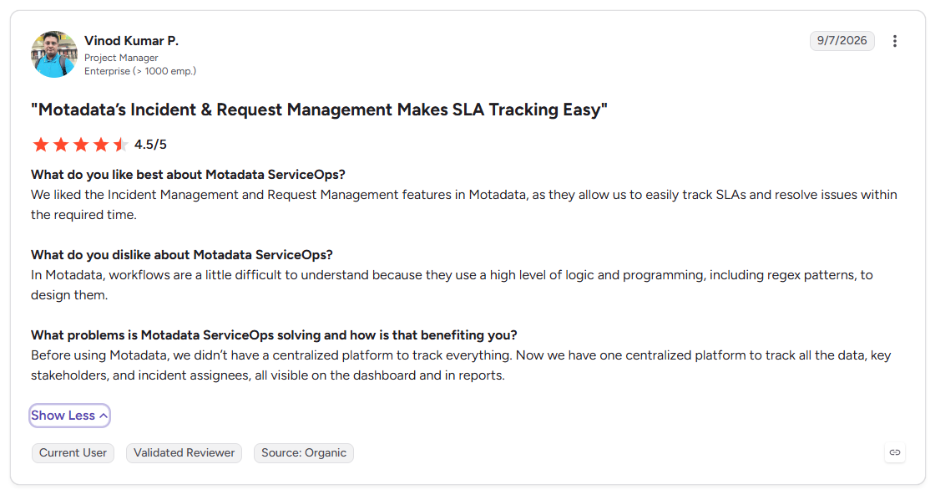
This is what one of our clients says about Motadata ServiceOps on G2:
Put Your Patch Management Policy into Daily Practice with Motadata ServiceOps
A policy stays on paper until the systems around it put it into action. If approvals happen over email, deadlines are tracked in spreadsheets and evidence gets gathered the week before an audit, the gap between policy and practice grows quietly.
No tool will set your risk appetite or write this policy for you, since those calls belong to your security and business leaders. A good tool just applies the rules you agreed, the same way, every cycle. Motadata ServiceOps maps its patch controls to the sections covered above:
Discovery and prioritization: Scheduled scans across Windows, macOS and Linux, with missing patches classed by vendor severity and ranked using CVE data
Approval paths: Pre-approved and manual approval modes, test-then-approve for Windows patches, and decline rules for patches that must not install
Deployment control: Patch deployment policies for business hours or round-the-clock windows, reboot rules, and user deferral with a forced installation date
Recovery: Patch uninstall for updates that cause problems, with failed patches raised as service desk tickets
Evidence: Patch compliance scoring by severity threshold, plus scheduled patch audit reports
Patching runs on the same platform as change, incident and asset management. So each approval, deployment and exception links back to the records auditors ask for.
FAQs
How often should a patch management policy be reviewed?
Review a patch management policy at least once a year, and earlier after a major incident, an audit finding, a new regulation or a significant change to your environment. Each review should confirm that deadlines are still achievable and that scope matches the current asset inventory.
What is the difference between a patch management policy and a patch management procedure?
A policy states what must happen, by when, and who is accountable, and it changes rarely. A procedure gives step-by-step instructions for one task, such as deploying server patches, and it changes whenever tools or methods change. Keeping them separate keeps the policy short and stable.
How do I create a patch management policy from scratch?
Start with an accurate asset inventory and a measure of how long patches take today. Then define risk tiers, draft sections covering scope, roles, timelines, testing, approvals, exceptions and reporting, and pilot the rules for one cycle before leadership signs off.
Should vulnerability management and patch management share one policy?
They can, and a combined vulnerability and patch management policy suits organizations where one group owns both. If they stay separate, the two documents should use the same severity scale and deadlines, so a finding raised by a scan maps directly to a patching target.
Can a patching tool enforce a patch management policy automatically?
A patching tool can enforce most of the rules, including scan schedules, approval modes, maintenance windows, deferral limits and reporting. Motadata ServiceOps supports these controls for managed Windows, macOS and Linux endpoints, with some options varying by operating system, while decisions on risk appetite and exceptions stay with people.
Author
Poonam Lalani
Content Strategist
Poonam Lalani is a B2B content strategist and writer with a background in computer engineering and experience across enterprise technology domains, including AI, cloud, DevOps, data engineering, and IT operations. She specializes in creating research-driven content that simplifies complex ideas and supports product education, thought leadership, and business growth.