Server Security: 12 Best Practices to Harden Your Servers
How many of your servers still match their approved build configuration? Most teams would have to log in and look, because drift happens one reasonable change at a time: a firewall exception for a vendor's remote support, a local admin account someone creates during an outage, a patch cycle that slips when the change window runs out.
Each change has a ticket and a reason, so nobody thinks of it as risk. Attackers do. They scan for exactly this kind of leftover: the open management port, the password nobody rotates, the package two versions behind.
We wrote this for the engineers who run Windows and Linux servers and for the leaders who carry the risk. In this blog, you will see what server security covers, which threats matter most, the 12 server hardening practices we recommend and a server security checklist you can audit against; at the end, we look at how observability, starting with server monitoring, stops a hardened baseline from drifting again.
What is Server Security?
Server security is everything that keeps a server's hardware, operating system, services and data out of reach of people who shouldn't touch them. That covers break-ins and tampering, and it covers outages too, since an attacker who takes a server offline has done damage without stealing a thing. We start every server review with three questions:
Who can log in?
What can reach it?
Would anyone notice if either changes?
The answers matter as much for a rack server in your own data center as for a VM on VMware or Hyper-V or an EC2 instance, since all of them are part of your server infrastructure. Security teams usually split the protection into five layers, and the weakest one decides how protected the server is:
Physical: Who can walk up to the rack, and who can reach the management port
Network: What traffic reaches the server at all, decided by firewalls, VPNs and segmentation
Host: The operating system build, its accounts, services, patches and local firewall
Application: Web servers, databases and the code they run, including their own authentication
Data: Encryption, backups and retention rules
You'll also see seven-layer models, which split out people and the network perimeter. The controls are the same; they're just counted differently.
Cloud server security follows the same model with one shift. On AWS, Azure or Google Cloud, the provider runs the hardware and part of the network. The guest operating system and everything installed on it remain your job.
Why Does Server Security Matter to the Business?
Server security matters well beyond IT. One breached server can stop order processing, put breach notices in customers' inboxes and hand auditors a finding, often in the same month. The entry point is usually ordinary.
According to Verizon's 2026 DBIR, 31% of breaches began with an exploited software vulnerability; that now outranks stolen passwords. According to IBM's 2026 breach report, the average breach costs $4.99 million; it's the highest figure IBM has recorded, and the money goes to four places:
Downtime: An online checkout or a billing run that stops until the restore finishes
Data exposure: Breach notices to customers, followed by legal review and regulator questions
Audit findings: A PCI DSS, HIPAA or ISO 27001 auditor writes up the gap, and regulatory compliance sign-off waits
Engineering time: Forensics and rebuilds that pull senior engineers off planned projects
Hardening stops the automated attempts outright and makes a determined attacker slower and noisier. That alone changes the odds.
What are the Most Common Server Security Threats?
Server security threats get a lot of press, but the attacks themselves repeat. In practice, most incidents start in one of six ways, and the practice numbers in brackets point to the fixes later in this guide:
Threat | How it usually gets in |
Exploited vulnerabilities | A public exploit for an unpatched Apache server, Exchange host or VPN appliance (practices 3, 9 and 11) |
Brute-force and credential attacks | Password spraying against RDP or SSH exposed to the internet (practices 4, 5 and 6) |
Ransomware and malware | A phishing email on one laptop, then lateral movement to file and database servers (practices 6, 7, 10 and 12) |
Misconfiguration | A test account nobody removed, or a default admin password (practices 1, 2 and 11) |
Insider misuse | A contractor whose access outlived the contract (practices 5 and 10) |
Denial of service | A traffic flood against a public web server (practices 7 and 9) |
Most attacks on servers are opportunistic. Scanners work through entire IP ranges looking for open RDP ports and old Apache versions. The insider threat is the exception, and it usually starts with an account that can do more than its owner's job needs.
What is Server Hardening, and How is it Different From Server Security?
Server hardening is the process of shrinking a server's attack surface. A fresh OS install ships with services, ports and accounts meant to suit as many customers as possible, and hardening strips that back to what this particular server needs.
It's one part of server security. Hardening sets the starting point, and patching, full-stack observability and access reviews keep the server there; here's how the two compare:
Aspect | Server hardening | Server security |
Scope | Configuration of one server or image | Every control around the server, including people and process |
When it happens | At build time and after major changes | For the server's whole working life |
Typical output | Produces a hardened image and a baseline document | Produces policies, alerts, audit evidence and incident records |
Who owns it | Usually the platform or systems engineers | IT operations, security and compliance, working together |
With hardening alone, the server is secure on its first day and drifts from there. If you only watch, you observe a weak configuration very closely. Both are needed, and the hardening half starts with a baseline.
Which Frameworks Define a Secure Server Baseline?
Server hardening baselines rarely need writing from scratch. Four public sources cover most needs:
Framework | What it gives you | Best fit |
Gives free, consensus-built settings per OS and application, at Level 1 and Level 2 | Most Windows Server and Linux builds | |
Walks through planning, securing and maintaining a server and its software | Policy writers | |
Microsoft security baselines | Microsoft's recommended Group Policy settings for each Windows Server release | Windows server security in Active Directory domains |
DISA STIGs | Lists line-by-line technical controls, each rated by severity | US federal and defense workloads |
Regulated industries have extra rules on top of these baselines. Under the HIPAA Security Rule, for instance, any system holding electronic health records needs access controls, audit controls and transmission security. That is what HIPAA Security Rule server hardening comes down to in practice, a CIS or STIG baseline on those servers plus evidence that it still holds.
Our default for general-purpose servers is CIS Level 1. Level 2 is stricter and can break applications in ways nobody predicted, so try it on a staging copy first. For the audit and evidence side, see our guide to CIS compliance.
What are the 12 Server Security Best Practices?
Server security best practices are the practical answer to how to secure a server. We've grouped the 12 below into four stages, in the order we'd tackle them: a clean baseline, tight access, protected data and traffic, then a close watch for change.
1. Start Every Server From an Approved Baseline Image
Build every new server from a golden image: a preconfigured master copy of the OS with your baseline already applied.
Apply CIS Level 1 settings to the image, and record each exception with a reason and an owner
Keep the template in version control so every baseline change gets reviewed
Re-image servers that have drifted far; patching rarely brings them all the way back
There's an audit benefit too. The auditor reviews one template, then spot-checks servers against it.
2. Remove Unused Services, Ports and Software
Every running service is something an attacker can probe, and database servers often carry leftovers: a print spooler, an FTP service, even a browser someone used once. List what's listening and running first:
Platform | Command | What it tells you |
Linux | ss -tulpn | Open TCP and UDP ports, each with the process holding it |
Linux | systemctl list-unit-files --state=enabled | Everything set to start at boot |
Windows | Get-NetTCPConnection -State Listen | Listening ports and the process ID behind each |
Windows | Get-Service | Lists every service and whether it is running |
Any service nobody can explain gets switched off. Fewer services also means fewer patches in practice 3.
3. Patch Servers on a Fixed, Risk-Based Cadence
Patch on a calendar, since exploited vulnerabilities now lead the breach statistics. A fixed schedule keeps going through holidays, staff changes and busy quarters.
Scan for missing OS and third-party patches every week, using patch discovery tooling
Work the list by risk, severe and actively exploited first (CISA's Known Exploited Vulnerabilities catalog helps here)
Roll out to a pilot group, then everyone else, inside an agreed reboot window with a rollback ready
Our primer on patch management covers the full cycle, from the first scan to confirming the fix, if your patch tracking still lives in a spreadsheet.
4. Lock Down SSH and RDP Remote Access
Remote administration protocols give full control of a server, so SSH on Linux and RDP on Windows need tighter rules than any other service. On Linux, these settings in the SSH configuration file, sshd_config, cover most of the exposure:
Setting | What it does |
PermitRootLogin no | Stops anyone logging in directly as root |
PasswordAuthentication no | Forces SSH keys instead of passwords |
MaxAuthTries 3 | Drops the connection after three failed tries |
AllowGroups ssh-admins | Lets in only members of the ssh-admins group |
We check every sshd_config change with sshd -T; it prints the settings the service will actually use. For Windows servers, RDP needs the same discipline. That means a VPN or remote desktop gateway in front of it, Network Level Authentication (NLA) switched on, and no route to port 3389 from the internet.
Out-of-band controllers belong on this list as well. Anyone holding an iDRAC or iLO login can reboot or reinstall the server from a browser, so treat those logins like domain admin credentials: unique passwords, current firmware and a management VLAN of their own.
5. Enforce Least Privilege and Separate Admin Accounts
Build access up from nothing: each person or service account gets the rights its job requires, and that's all. Email and browsing should never happen on an account that can change a domain controller.
Sudo and local admin rights handed out through role-based access groups, never to individuals directly
A separate privileged account for each administrator, checked out through a vault or privileged access management tool
A quarterly review of group membership that removes anyone who has moved on
Service accounts are the ones people forget. Plenty were set up years ago with broad rights and a password nobody has touched since. One leaked credential then opens every server the account can reach.
6. Require MFA and Strong Credentials for Every Admin Login
MFA (multi-factor authentication) is cheap to roll out, and with it a stolen password alone won't get anyone in. Require it on every administrative login, with no exceptions for "just this one jump host".
Built-in accounts like Administrator renamed or disabled; vendor test users deleted
A 14-character minimum for interactive passwords
Service-account secrets in a vault, rotated on a set schedule
Go one step further for domain admins and issue hardware security keys, which a phishing page can't capture.
7. Restrict Server Traffic With Host Firewalls and Segmentation
Every server needs its host firewall on and blocking inbound traffic by default. If a port is open, someone should be able to say which role needs it.
The edge firewall still matters. Inside the network, though, the host firewall is the last control between an attacker and the server, which is why segmenting by role matters too:
Web servers accept traffic from the internet and talk only to the application tier
Application servers reach their own databases and shared services, and nothing else
Database servers accept connections from approved application hosts alone
Segmentation limits lateral movement, the attacker's habit of hopping from one compromised machine to the next. For the business, it keeps a breach of one web server contained to that server.
8. Encrypt Server Data at Rest and in Transit
Encryption is what makes a stolen disk, a copied backup or an intercepted session close to worthless to the person who takes it.
Allow TLS 1.2 and 1.3 only; SSL, TLS 1.0, TLS 1.1, RC4 and 3DES all go
Turn on BitLocker for Windows Server volumes and LUKS for Linux disks
Every certificate's expiry date on a watch list; a lapsed one can take a customer-facing service offline
Backups need encrypting too, with the keys kept well away from the server they protect.
9. Harden the Web Server Layer
Web server security gets its own attention because a public web server takes traffic from anyone on the internet. Its code also changes every few weeks, so we give the web layer a separate hardening pass.
Version banners switched off in Apache, Nginx and IIS (ServerTokens Prod on Apache, server_tokens off on Nginx)
Strict-Transport-Security and X-Content-Type-Options headers on every response, with a frame rule in Content-Security-Policy
Code checked against the OWASP Top 10 before release, and the web service run under a low-privilege account
We also like a reverse proxy in front of the origin. It accepts requests on the application's behalf, ends the TLS session and drops malformed requests before they reach the app. Because it hides the origin's address as well, this is how a proxy server improves security day to day.
10. Centralize Server Logs and Alert on Security Events
Anyone with admin rights can wipe a server's local logs, so copies need to leave the server as they're written. On Windows, we'd alert on these Security log events from the day a server goes live:
Event ID | What it records |
4625 | A failed logon attempt |
4720 | Creation of a new user account |
4732 | A user added to a local security group, such as Administrators |
4672 | Special privileges assigned to a new logon |
1102 | Clearing of the audit log |
Linux writes the equivalent records to /var/log/auth.log on Ubuntu and /var/log/secure on RHEL. We look for bursts of SSH failures and for sudo from accounts that rarely need it. All of it should go to a central log platform or a SIEM (security information and event management) system, kept for at least your audit period.
Some organizations also run a host-based intrusion detection system for a local view of known attack patterns.
11. Watch for Configuration Drift and File Changes
Configuration drift means the server you run today no longer matches the baseline you approved. It usually builds up slowly, through a firewall exception one month and a quick fix the next.
Watches on the files attackers edit first: sshd_config, sudoers, the hosts file and web roots
A scheduled comparison of each server against its baseline, with a ticket for every unapproved difference
An alert the moment Microsoft Defender Antivirus or the host firewall stops, or gets switched to manual startup
When an auditor asks about a change, file integrity monitoring shows the change and the account behind it.
12. Back Up Servers, Test Restores and Rehearse the Response
When every other control has failed, the backup is what's left. So it only counts once someone has proven the restore works.
Three copies of the data on two kinds of media, one of them offsite and at least one offline or immutable (the 3-2-1 rule)
One critical server restored in full each quarter, with the restore time recorded
A short compromise runbook naming who isolates the server, who preserves evidence and who signs off the rebuild
People who have rehearsed a compromise make calmer calls when one happens. And like the other 11 practices, the plan stays useful only while someone keeps testing it.
How Do You Perform a Server Security Audit?
A server security audit compares each server with its approved baseline. It's also the simplest proof, for an auditor or a board, that the 12 practices are still in force. We'd plan one per quarter, and another after a migration or an incident.
We split ours into five steps:
Pull a fresh inventory with asset discovery, since cloud instances and old project VMs rarely make it onto a spreadsheet
Run a CIS-aligned scanner against each server and note every setting that has moved from the baseline
Check for missing patches and known CVEs with a vulnerability assessment, worst exploitable first
Go through accounts and permissions, where dormant users and shared admin logins are the usual finds
Trigger one failed login on purpose and confirm the alert reaches the right person
Think of a retailer whose quarterly scan turns up a test web server from last season's promotion. Password logins over SSH are still enabled, and its logs stay on the local disk. With no assigned owner it misses every patch cycle, though fixing it takes about an hour.
Each finding gets a change request, an owner and a due date. Keep the raw scan output for the next auditor; scheduled compliance reporting can package it as evidence.
What Should a Server Security Checklist Include?
A server security checklist turns the 12 practices into recurring checks, each with a set frequency. We'd start with the frequencies below and tighten them for anything in PCI or HIPAA scope.
Area | What to check | How often |
Build | Does the server still match its approved image or CIS baseline? | Quarterly |
Software | Is anything running that nobody approved? | Monthly |
Patching | Are critical and actively exploited CVEs fixed inside your policy window? | Weekly |
Remote access | Can anyone log in over SSH as root or with a password, or reach RDP without the VPN? | Quarterly |
Accounts | Do admin rights still match each person's job, with MFA on every admin login? | Quarterly |
Firewall | Does every open port map to a documented need, with inbound denied by default? | Quarterly |
Encryption | Are TLS 1.0 and 1.1 disabled everywhere, and are disks and backups encrypted? | Quarterly |
Certificates | Any certificate expiring within 30 days? | Continuous |
Logging and files | Are security events reaching the log platform, and has any critical file changed outside a change window? | Continuous |
Recovery | Is there a recent, timed full restore on record? | Quarterly |
How Should IT Leaders Prioritize Server Hardening?
Server hardening should start with the servers a breach would hurt most. For most organizations that means the internet-facing ones and anything holding regulated data. We sort the rest into tiers as well, which gives leadership a one-page view of risk.
Here's the three-tier split we use:
Tier | What goes in it | How far to harden | How often we review |
Tier 1 | Public web servers, domain controllers, payment systems and anything with patient records | All of CIS Level 1, the Level 2 items the application can tolerate, MFA, central logs and file integrity checks | Live observability plus a quarterly audit |
Tier 2 | Internal apps and their databases | CIS Level 1, central logging and monthly patches | Quarterly |
Tier 3 | Test, dev and anything short-lived | The approved image and normal patching, with no production data | Twice a year, though rebuilding is often quicker |
Take a regional healthcare provider with about 200 servers. Perhaps 20 hold patient records or face the internet, so those go in Tier 1 and get hardened first.
Auditors will ask about those 20 first, and so will anyone scanning from outside. The other 180 move through the normal patch and audit cycle.
How Does Server Security Differ on Windows, Linux and Cloud Servers?
The principles behind server security hold on every platform. Windows, Linux and cloud servers differ mainly in tooling and defaults. Here's how the main controls map across Windows server security, Linux server security and cloud server security:
Control | Windows Server | Linux | Cloud instance |
Baseline | Microsoft security baselines or CIS | CIS benchmark for the distribution | CIS image plus the provider's CIS benchmark |
Remote access | RDP with NLA, reached through a VPN or gateway | SSH with keys only and root login turned off | Provider bastion host, no admin port open to the internet |
Firewall | Windows Defender Firewall on all three profiles | nftables, ufw or firewalld | Security groups, plus the host firewall |
Security logs | Windows Security event log | auth.log or secure, plus journald | OS logs plus the provider's audit trail |
Patching | Windows Update and WSUS, or central Windows patching | apt and dnf, or central Linux patching | Patch the instance or redeploy from a rebuilt image |
Cloud providers split the work. AWS, Azure and Google Cloud look after the hardware and hypervisor, while the guest operating system, its accounts and its data stay with you. This split is the shared responsibility model.
How Does Observability Keep a Hardened Server Secure?
Server observability keeps a hardened server secure by joining up its logs, metrics and configuration changes, so any move away from the baseline shows up with its cause. Hardening fixes the configuration on day one. After that, observability is how you hear about each change.
An audit every quarter still leaves weeks in which a risky change can go unseen. Continuous signals cover those weeks, and the timeline below shows the difference for three common changes.
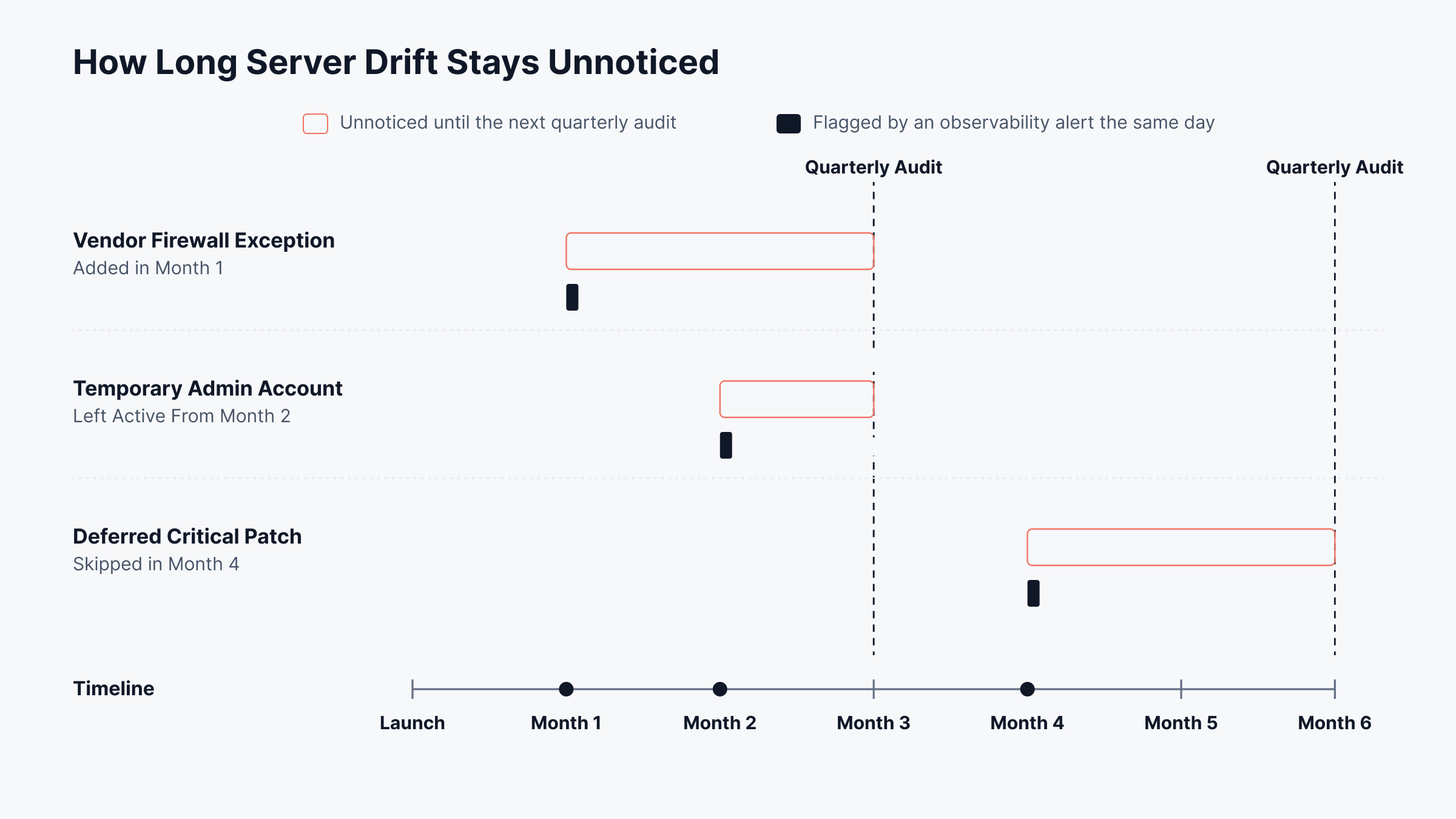
We'd put these signals on every server dashboard:
Repeated failed logins, or a login at an unusual hour for that account
A new local admin, or an account created without a change ticket
Antivirus real-time protection or the host firewall turned off
Edits to monitored files or scheduled tasks
A certificate inside its last 30 days, an unexpected reboot or a port that wasn't listening yesterday
Antivirus, endpoint detection and response (EDR) and vulnerability scanners are all server security software, and each one reports on its own. Observability links those reports to the server involved and sends each to someone who can fix it.
For the health side, see our server monitoring checklist. With health and security signals on one screen, both follow the same alert path.
How Does Motadata Help You Keep Servers Hardened?
Motadata helps keep servers hardened by pairing ObserveOps, which gives you observability into security signals and drift, with ServiceOps, which closes the patch and vulnerability gaps those signals reveal. Both work alongside our hybrid infrastructure monitoring, so security and performance data come from one server inventory.
1. Security Signals From Every Server in One ObserveOps View
ObserveOps can collect a server's metrics and logs through agent-based monitoring or by polling it agentlessly. File, directory and process monitors run on Windows and Linux, and also on IBM AIX, HP-UX and Solaris.
Service state: If someone sets a security service to manual, the Windows service status and startup type KPIs show it
File changes: You choose the paths to watch, and on Windows a KPI also records who last modified each file
Defender events: Our Windows log reference lists which Defender event IDs to forward, including 1116 for detected malware
Certificates: Each certificate's remaining days, expiry date and issuer appear in the SSL monitor
Audit evidence: Log data feeds PCI, HIPAA and ISO report templates, which can go to auditors on a schedule
2. ObserveOps Log Policies That Turn Log Patterns Into Alerts and Actions
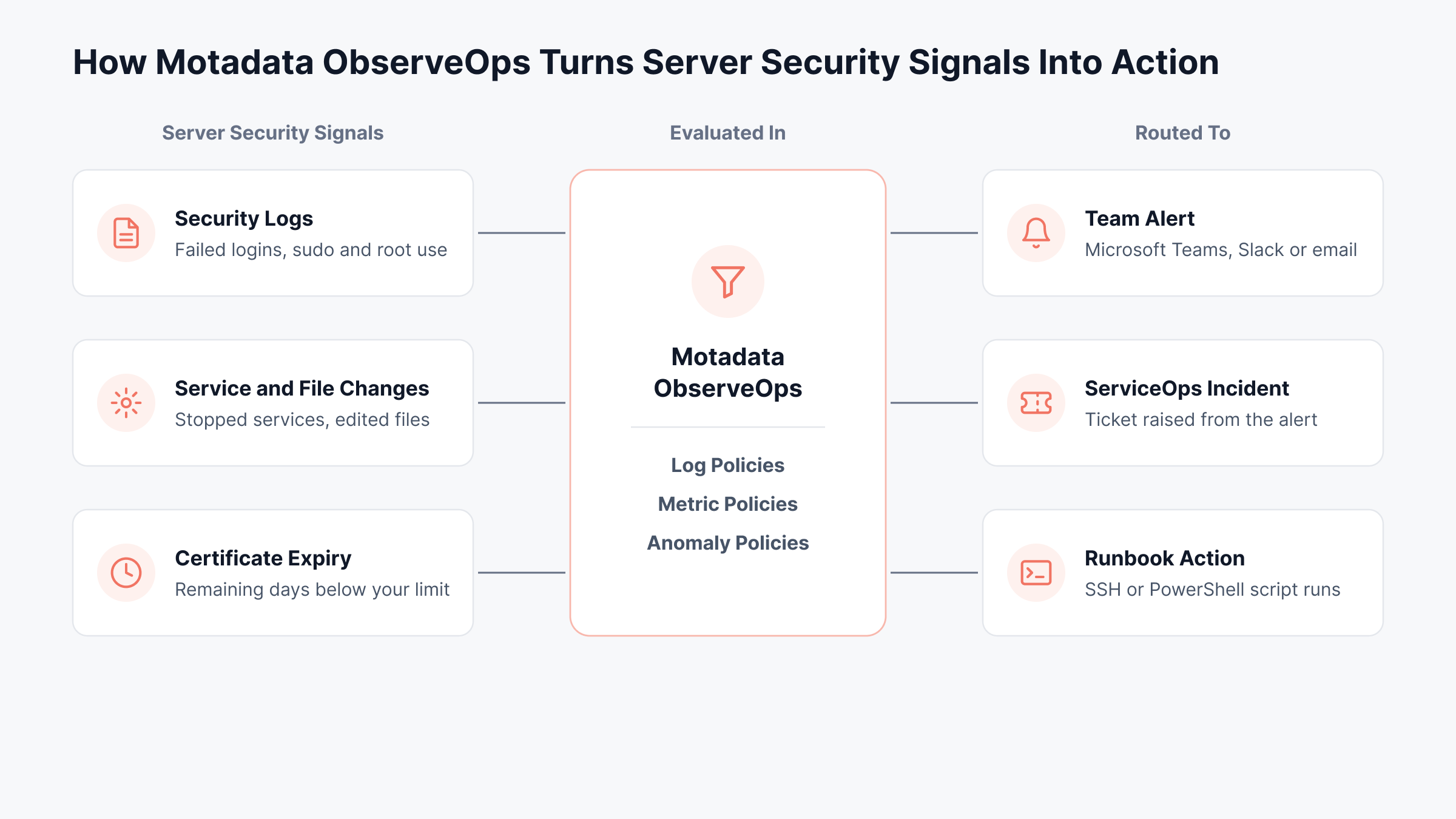
A log policy raises an alert once messages matching a pattern pass a threshold you set. The example in our documentation matches "sudo", "su" and "root", which is a quick way to catch privilege use on Linux. Our log intelligence capability goes further, with pattern detection and correlation across sources.
When a policy triggers, it can:
Message Microsoft Teams or Slack
Open a ServiceOps incident through an integration profile
Start an SSH or PowerShell runbook
Some metrics have no sensible fixed threshold, and for those an anomaly policy first learns the normal range from at least eight hours of data.
With every signal going through one policy layer, each alert reaches an owner with a clear next step, as the diagram below shows.
Here's how one ObserveOps user describes it on G2:
3. ServiceOps Patch and Vulnerability Management for Servers
ServiceOps handles the fixing. Its patch management finds missing OS and third-party patches across Windows, macOS and Linux. Nothing goes out until someone has tested and approved it, and rollouts follow your schedule and reboot settings.
If a patch causes trouble, roll it back. The patch compliance view keeps machines labeled Highly Vulnerable or Vulnerable until they catch up.
Windows vulnerabilities: Vulnerability management compares installed software with CVE data, shows severity and exploit status, and can filter down to Fixable Vulnerabilities
Prohibited software: Once an application is marked as banned, auto-uninstall removes it after the grace period you set
Hardware baselines: Scheduled variance detection emails technicians when a server's discovered hardware differs from its baseline
Air-gapped servers: A documented offline workflow brings patches in on removable media
4. Motadata Applies the Same Hardening Checklist to Its Own Platform
Here is how that looks in our own products:
ServiceOps guide: The ServiceOps security guide covers TLS 1.2 and 1.3, SSH without root or password logins, default-deny inbound rules, two-factor authentication and a 12-character password minimum
ObserveOps SSH settings: ObserveOps labels each SSH algorithm it can use (key exchange, host key, cipher and HMAC) as Secure, Legacy or Weak, and you choose which stay enabled
ObserveOps sign-in and audit: Two-factor sign-in uses an authenticator app or email OTP, while the Audit Trail records the user, source IP and before-and-after values for every change, with CSV or PDF export
ObserveOps Infinity: A hardening guide for replacing the console's SSL certificate, with backup and rollback steps
Move From One-Time Hardening to Continuous Server Observability with Motadata ObserveOps
Server security rests on a known-good baseline and on keeping each server there. The 12 practices define that baseline. Quarterly audits will find drift eventually, and observability flags it soon after the change lands.
No tool, ours included, hardens a server by itself. A named owner for each server, solid endpoint protection and a change process people follow still matter more than any dashboard. What ObserveOps and ServiceOps add is visibility and follow-through, so drift gets seen and findings become patched, tracked work.
FAQs
What does server security mean?
Server security means protecting a server's hardware, operating system, applications and data from unauthorized access, tampering and outages. It combines hardening at build time with patching, access control, encryption, logging and backups, so the server stays in a known-good state for its whole working life.
What is the difference between server security and server hardening?
Server hardening is one part of server security. It reduces the attack surface by removing unused services and locking down configuration at build time. Server security is the wider program that keeps the server protected afterward through patching, observability, access reviews and incident response.
Which three security levels apply to server security?
Most guides group server security into physical, network and host levels. Physical security controls access to the hardware, network security controls which systems can reach the server, and host security covers the operating system, accounts and installed software. Application and data controls are often added as further layers.
Does Windows Server need antivirus?
Yes. Windows Server 2016 and later include Microsoft Defender Antivirus, and it should stay enabled unless another endpoint protection product replaces it. With Defender events forwarded, Motadata ObserveOps can alert when malware is detected or real-time protection stops, so a disabled scanner does not go unnoticed.
How often should you perform a server security audit?
Run a full server security audit at least once a quarter, and again after major changes, migrations or a security incident. Continuous observability covers the time between audits by flagging drift, failed logins and stopped security services as they happen, which Motadata ObserveOps handles through log, metric and anomaly policies.
Author
Poonam Lalani
Content Strategist
Poonam Lalani is a B2B content strategist and writer with a background in computer engineering and experience across enterprise technology domains, including AI, cloud, DevOps, data engineering, and IT operations. She specializes in creating research-driven content that simplifies complex ideas and supports product education, thought leadership, and business growth.