All Features
Endpoint Management
Vulnerability Management
Detect CVEs across managed endpoints, prioritize them by severity and exploit status, and patch them without leaving ServiceOps. No separate scanning tool, no swivel-chair between systems.
Find Every Vulnerability. Fix It Before It's Exploited.
A CVE sitting unpatched on an endpoint isn't a finding, it's an exposure that your team doesn't know it's carrying. Motadata ServiceOps Vulnerability Management gives IT and security teams a continuous, centralized way to detect, assess, and track security weaknesses across managed endpoints, inside the same ITSM platform already running your service desk with no separate scanning tool, no swivel-chair between systems to close a single finding.
The module continuously compares installed OS and software on enrolled endpoints against a maintained CVE database and surfaces each finding with a severity rating, exploit status, and patch availability. Teams prioritize the highest-risk CVEs immediately, remediate through the integrated Patch Management module, and verify the fix, all without leaving ServiceOps.
Automated CVE Detection Across Managed Endpoints
Detection doesn't wait on a technician to remember to run it, but it doesn't lock them out of running it either. ServiceOps updates its Vulnerability Database from the Motadata Central Vulnerability Repository on a daily schedule, and scans affected endpoints automatically the moment that database updates, a new endpoint enrolls, or discovery data changes. Technicians can also trigger a scan on demand, running an on-request database sync or clicking Scan Now on a specific endpoint, for cases that can't wait for the next cycle. Each match against installed OS and software produces a vulnerability record with the CVE ID, severity, exploit status, and every impacted endpoint, so new exposure surfaces within a day of becoming known, whether or not anyone thinks to go looking for it.
Detection is agent-based: an endpoint must appear in the Endpoint List, with its OS and software inventory already collected, before it can be scanned. Vulnerability Management currently covers Windows endpoints.
CVE Prioritization by Severity and Exploit Status
Not every CVE deserves the same response, and treating them all the same buries the ones that matter under noise. Every finding carries a severity rating (Critical, High, Medium, or Low) alongside an exploit status flag showing whether the vulnerability is being actively exploited in the wild. A high-severity CVE under active exploitation demands attention before a critical one with no known attacks, and the Fixable Vulnerabilities filter puts patchable CVEs at the top of the list, so technicians start with work they can resolve right away.
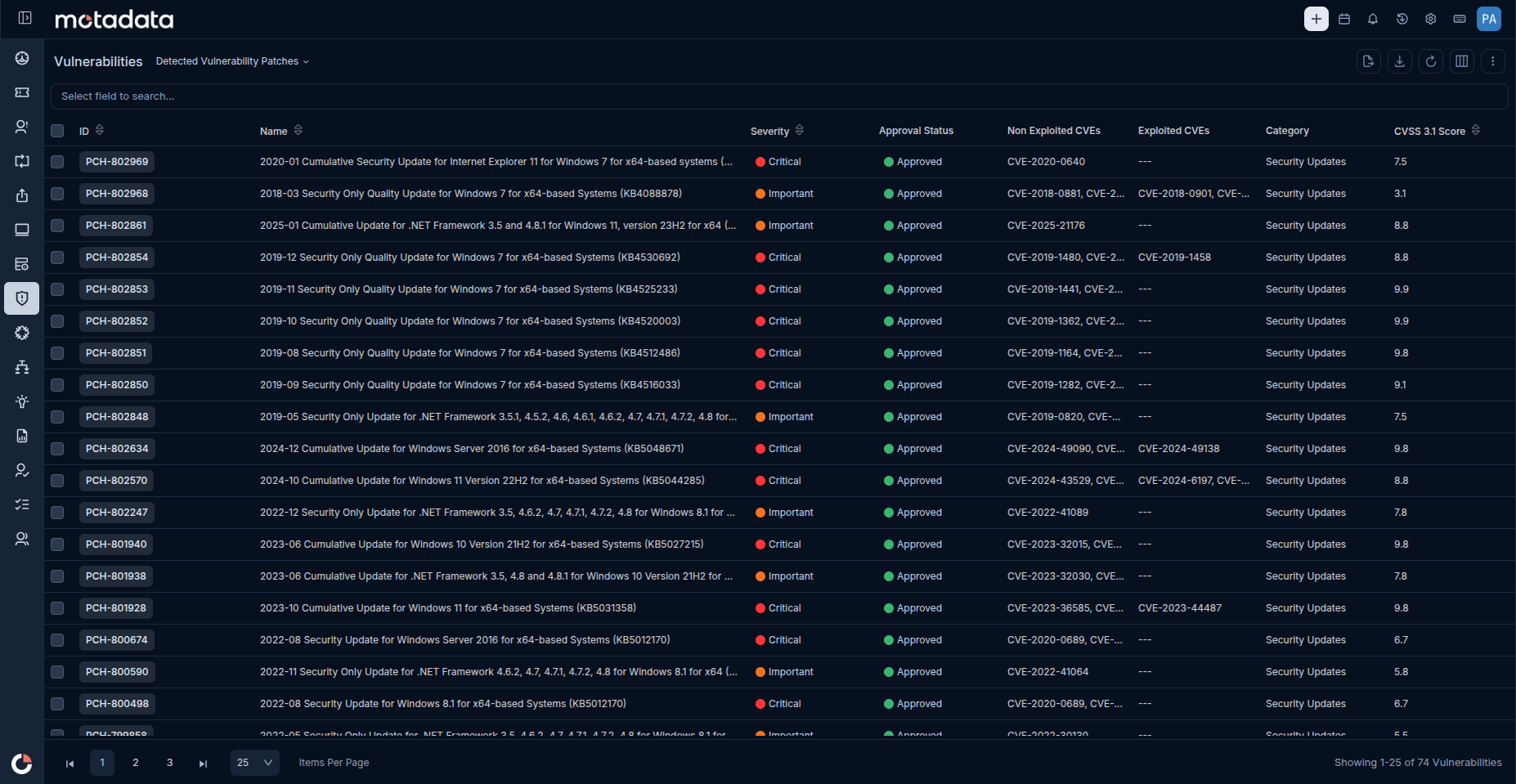
Detected Vulnerability Patches list
Multi-View Vulnerability Assessment and Investigation
A single way of looking at vulnerability data isn't enough for every question a team needs to answer. Vulnerabilities groups CVEs by patch, so approving one patch resolves every finding it fixes at once. Detected CVEs breaks the same data down to the individual CVE, with its CVSS score, exploit status, and impacted-endpoint count, for investigating one specific vulnerability end to end. Vulnerability Endpoints flips the view to the device: per-endpoint vulnerability counts alongside on-demand scan and agent-restart controls, for managing exposure machine by machine.
For anyone already working on an asset record, the same findings show up there too: opening a Windows asset in Asset Management and selecting its Vulnerabilities tab lists every detected CVE for that device in place, with no separate lookup required.
Drill Into a Single Endpoint's Full Exposure
The Vulnerability Endpoints list tells a technician how many findings a device carries; the Endpoint Details page tells them everything about each one. Opening a single endpoint surfaces every CVE detected on that machine in one table: exploit status, severity, current status, vulnerability type, patch availability, and whether a reboot is required, with Approved and Declined views so a technician can accept or dismiss individual findings instead of acting on the endpoint as a whole.
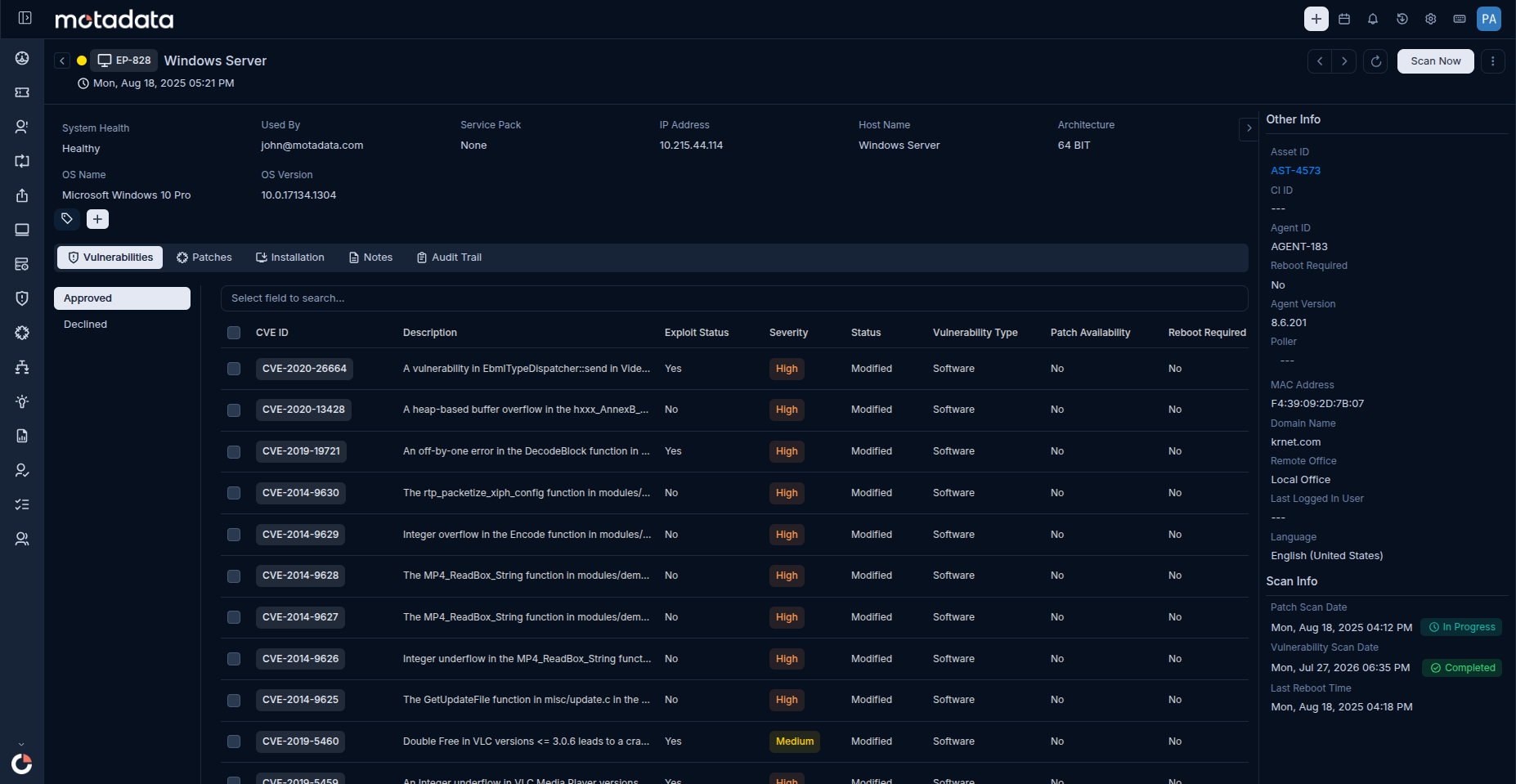 Endpoint Details page
Integrated Patch Remediation Without Leaving the Platform
Finding a vulnerability only matters if fixing it is just as fast. The Vulnerabilities page triggers patch remediation directly, handing the deployment to the integrated Patch Management module without a technician re-keying the finding into a separate tool. Bulk patch approval means one action can clear every CVE tied to that patch, instead of resolving them one by one.
Verification closes the loop the same way it started: on demand. Running Scan Now on a patched endpoint confirms the CVE count has actually dropped, so remediation is proven, not assumed, before the ticket is called done.
Real-Time Security Posture Monitoring
The Vulnerability Dashboard turns individual findings into a standing view of exposure across the environment: out-of-the-box KPI cards and chart widgets covering endpoints scanned, open Critical and High findings, and exploit activity, live rather than as a periodic export. Custom dashboards extend that view for teams that track additional metrics day to day.
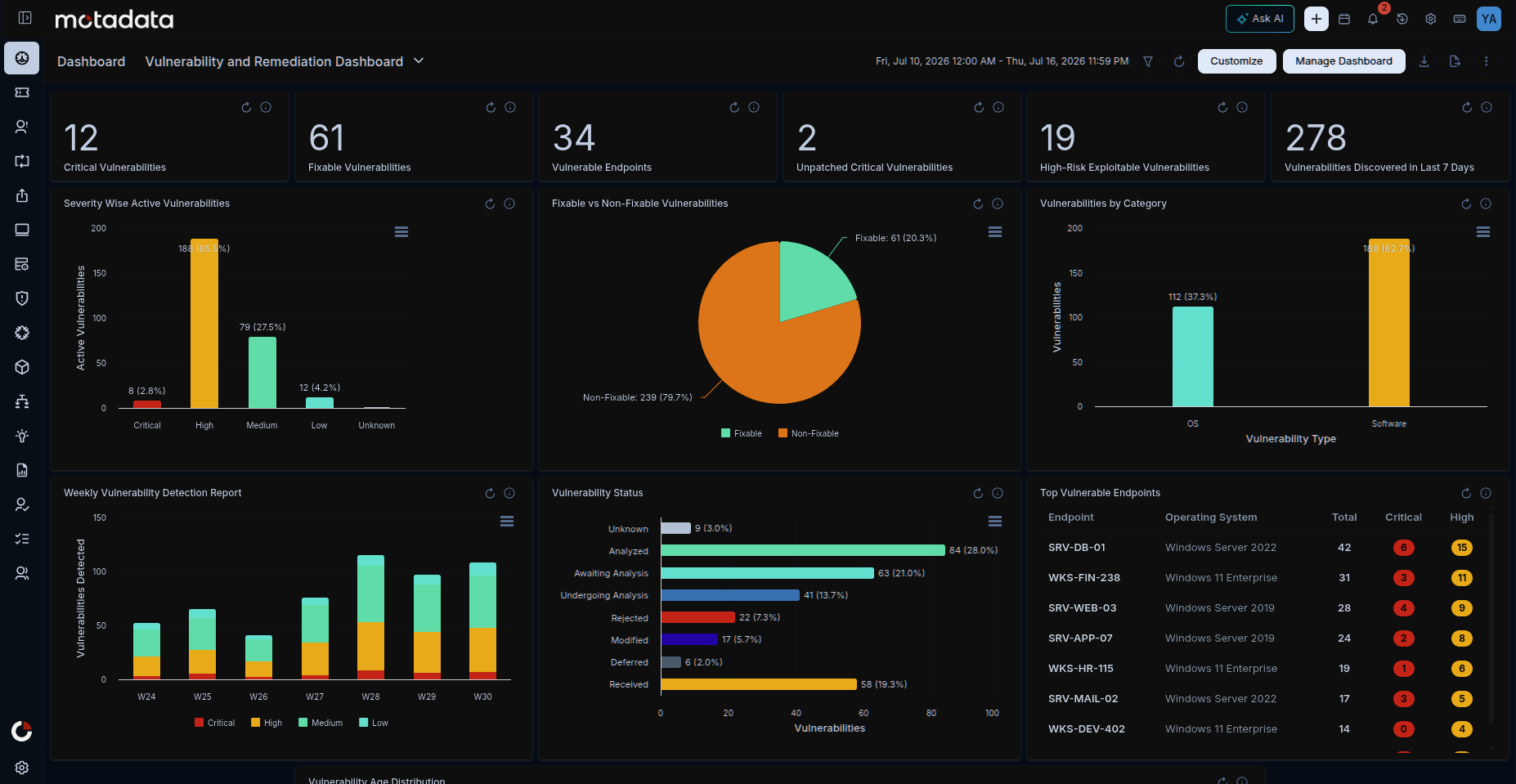 Vulnerability and Remediation Dashboard
Vulnerability Reporting and Compliance Audit Trail
Security work eventually has to be demonstrated, not just done. Vulnerability Reports generate tabular, summary, and matrix views of CVE and endpoint exposure data on demand or on a schedule, exportable in the formats an audit package needs. The Vulnerability Audit log records every database update with its timestamp, user, and change summary, so the evidence package can be assembled before the audit request arrives rather than scrambled together after.
Vulnerability Database Configuration and Endpoint Scope Management
On an on-premise instance, an administrator maintains the database from Admin > Vulnerability Management, setting the update schedule, routing traffic through a proxy if needed, and configuring notifications. On a SaaS instance, none of this applies: the database syncs automatically in the background. Either way, every update is logged to the Vulnerability Audit page with its timestamp, user, and change summary. The same admin section defines endpoint scope, so only actively managed machines get enrolled and scanned.
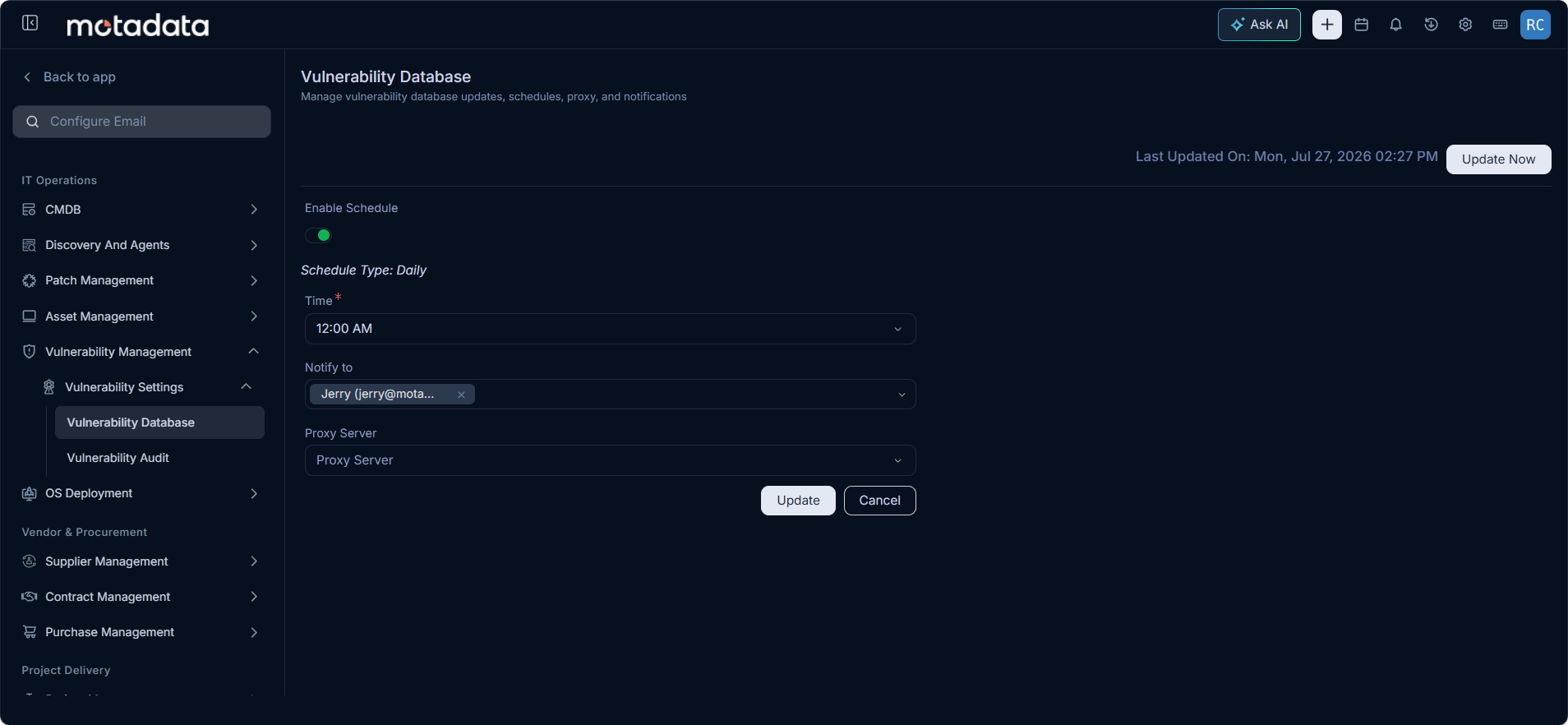 Vulnerability Database settings
The Full Vulnerability Management Lifecycle: Detect, Prioritize, Remediate, Verify
Vulnerability Management is the first stage of a longer lifecycle, not a standalone report. The flow moves in one direction: detect, prioritize, remediate, verify. Vulnerability Management scans endpoints and ranks findings by severity and exploit status, technicians hand off fixable CVEs to Patch Management for deployment through configured policies, and a follow-up scan confirms the count has dropped.
Kept together, detection and remediation never separate into two systems with a manual step between them. A finding surfaced this morning can be patched and verified in the same day, with an audit trail that covers the whole path from CVE to confirmed fix.
Why This Feature Matters
Security exposure is only actionable if a team can see it clearly and act on it quickly. Automatic detection and severity-and-exploit prioritization mean nothing sits undiscovered for long, and nothing gets the same treatment as a genuine emergency by default. Multiple investigation views, by patch, by CVE, by endpoint, or in the context of an asset already being worked, mean whichever question a technician is asking, the data is already organized to answer it.
Remediation, verification, reporting, and role-based access all live in the same platform as detection, so nothing about closing a finding requires a second tool or a manual handoff. Tied directly into Patch Management, Vulnerability Management turns a list of CVEs into a completed, provable remediation cycle, the kind of evidence a compliance audit asks for and a security team can actually stand behind.
Ready to implement Vulnerability Management?
Discover how Motadata ObserveOps can help you monitor your infrastructure in real-time and respond to issues instantly.