What is Patch Management and Why is It Important? A Complete Guide
Patch management is one of the cheapest security steps you can take, and one of the most often ignored.
Most IT teams know they are behind on patching. They just disagree on how far behind they actually are.
Here is the simple truth:
Software vendors release fixes for known security holes every month.
Attackers know about those same holes the day they are made public.
The longer you wait to apply the fix, the more time an attacker has to walk through the open door.
That waiting period is the problem patch management exists to solve.
This guide covers what patch management actually is, how the full process runs from start to finish, where most teams quietly fall behind, and what to look for in a tool that holds up today.
If you are checking how your patching practice is doing, or asking leadership for a budget to improve it, this should give you the words and the structure to do both.
What is Patch Management?
Patch management is how you find, test, approve, and roll out vendor fixes (the patches) across operating systems, applications, firmware, and network gear.
The point is simple enough: close known security holes, kill bugs, and improve performance without breaking the systems people actually use.
A patch is just a small piece of code that changes an existing program. Vendors put them out for a handful of reasons. Someone found a flaw.
A security issue got a CVE number and went public. Or a customer hit a bug serious enough that it couldn't wait for the next scheduled release.
When patch management is working, three things are quietly running in the background:
You know what software is installed across your estate.
You know which versions have known issues.
You're applying fixes before someone outside the company finds the same hole and uses it.
Sounds easy when you write it down. Reality is messier. Most companies run hundreds of applications across thousands of devices.
Each vendor patches on its own schedule, in its own format, with its own reboot quirks.
Patch management is the practice that turns that chaos into something you can actually run.
What is the Difference Between Patch vs Update vs Hotfix vs Service Pack?
These four terms get thrown around interchangeably, and they shouldn't be. The differences matter when you're writing a policy, talking to an auditor, or deciding whether to test something for a week or push it tonight.
A patch is a small, targeted fix for one specific bug or security issue. Usually released between scheduled updates. These patches are often urgent.
An update is a planned release that rolls several patches, bug fixes, and small improvements into one package. These type of patches are usually monthly.
A hotfix is a rapid fix for something critical, often shipped between updates with the vendor's own testing cut short.
A service pack is the big one. It bundles months of patches, updates, and sometimes new features together. You see these quarterly or once a year.
Hotfixes are the riskiest, because the vendor didn't have time to test them properly.
Service packs are the heaviest, because they touch a lot at once. Patches sit in the middle. They're what most of the day-to-day work looks like.
Why Patch Management Matters in 2026
Three reasons, and any one of them holds up in a budget conversation.
1. Security: Unpatched software is still the easiest way into a network. The list of known security holes that attackers are actively using keeps getting longer every month, and most of those holes have had fixes available for ages.
Patching them is the lowest-cost security work you can do. It's also the work that least often gets a thank-you.
2. Compliance: Patch timing isn't just a "best practice" anymore. Auditors actively look for it. The frameworks all care:
PCI DSS wants critical patches within a month, high-severity in three.
HIPAA asks for written procedures for handling malicious software.
CIS Controls expect automated patch management on operating systems and applications.
SOX auditors will pull change records to confirm patches got tested before they went live.
If you can't produce a patch report when someone asks, you've got an audit finding sitting on a shelf, waiting.
3. Operations: Unpatched systems crash more, run slower, and build up technical debt that compounds quietly.
Devices three or four months behind on updates start showing weird driver conflicts and unplanned reboots that nobody connects back to the actual cause.
The work piles up until something breaks loudly.
The truth is, patch management is unglamorous. It doesn't get demoed at all-hands. But skipping it is exactly what puts companies on the news.
What Happens When Systems Stay Unpatched
One major data breach happened because attackers exploited a single unpatched application server.
The fix was already available for two months before the attack.
Attackers stole data from 147 million people.
The total cost of the breach, including settlements and recovery, crossed 1.4 billion dollars.
In another case, a global ransomware attack disrupted hospitals, factories, and public services in over 150 countries.
The vulnerability already had a Microsoft patch available for two months before the attack.
In both cases, patches existed but were not applied in time.
Attackers actively look for these gaps and use them quickly.
The time between a patch release and real-world exploitation is now shrinking to days, and sometimes even hours.
What are the Different Types of Patches?
Most teams talk about three kinds of patches. In real life you deal with five.
Security patches fix a specific weakness, usually tied to a CVE. These get priority because the clock starts ticking the moment the CVE goes public.
Bug fix patches are for functional problems that aren't security issues. The spreadsheet that crashes on save, the print spooler that hangs, the memory leak nobody's chased down yet. None are urgent, but they pile up.
Feature updates change how a product behaves. Microsoft's annual Windows feature updates and Apple's point releases live here. These carry the most regression risk and deserve the most testing.
Service packs and cumulative updates roll months of patches into one package. Common on Windows Server and Linux. They're heavy, they're important, and they need their own change window.
Firmware and driver patches are the ones everyone forgets, because they live outside the OS. BIOS updates, network card drivers, storage firmware, switch and router operating systems. They break things when you ignore them, and they break things differently when you push them carelessly.
A complete patch management practice covers all five from one place. Most standalone patch tools only handle the first three.
A Complete 7 Step Patch Management Process You Should Know
This is the part most readers actually came here for. So here's the lifecycle that holds up in production.
Step 1: Discovery and Inventory
You can't patch what you don't know about. That's the whole game.
Start by building a live picture of every device, server, network box, and application across the environment.
Three pieces matter:
Agent-based scanning for devices your team already manages.
Agentless discovery for everything else.
A connection to your CMDB so the picture stays current.
A patch program built on a stale inventory misses 10 to 20 percent of the estate. That 20 percent is where breaches start.
Step 2: Vulnerability Scanning and Prioritisation
Once you know what's there, scan for missing patches and known issues. Pull from vendor feeds, public catalogs of actively-exploited issues, and CVSS scores. Then put everything in order.
Here's the part most teams get wrong. CVSS scores on their own aren't enough. A CVSS 9.8 on a Windows VM nobody can reach from the internet matters less than a CVSS 7.5 on your VPN gateway.
The right way to prioritize combines three things: the CVSS score, how important the system actually is to the business, and whether attackers are using the vulnerability right now.
That last filter, "actively exploited," is what cuts the noise.
Step 3: Patch Acquisition
Patches come from vendor sources. Always. Third-party patch repositories have been used as supply chain attack vectors more than once, and it's not worth the risk. Pull straight from Microsoft, Apple, Red Hat, Adobe, and whoever else you depend on. Verify the signature. Store them in a controlled internal location.
Step 4: Testing in a Staging Environment
This is the step most patch programs skip, and it's where they end up paying. A real test cycle has four pieces:
A test group that looks like production: similar devices, servers, network gear.
The patch applied.
Functional, regression, and compatibility checks run.
At least one full business cycle of observation, usually 24 to 72 hours, before anything goes to production.
In 2024, a faulty security update from one of the largest vendors in the world was pushed to every customer at the same time, without phased testing.
It knocked 8.5 million Windows machines offline globally. Airlines stopped flying. Hospitals went into manual mode. If that vendor can break this rule and get caught, so can you.
Step 5: Phased Deployment
Don't push everyone at once.
Deploy in waves. A pilot group of around 5 percent. Then an early adopter group at about 20 percent. Then general rollout.
Each wave is a checkpoint, a chance to catch problems before they reach your CEO's laptop on a Monday morning.
Schedule deployments inside maintenance windows. Let users defer non-critical patches. Force reboots for critical ones, but give people a warning window first.
Step 6: Verification and Rollback Readiness
The installer finishing isn't the same as the patch working. You still have to verify three things:
The patch actually applied.
The system rebooted cleanly.
The vulnerability is closed.
Automated post-deployment scans handle this best. And whatever you do, have rollback steps written down and tested before you deploy, not after a patch breaks something.
For Windows, that's usually uninstalling the patch or restoring from the snapshot. For Linux, it's downgrading and pinning the package version.
Step 7: Reporting, Audit Trail, and Compliance Evidence
Every patch event needs a record. That record should capture which CVE you addressed, which patch you deployed, which devices were affected, who ran the deployment, when it ran, and what happened.
This is your audit trail and your forensic record. PCI DSS, HIPAA, SOX, internal audit, they'll all ask.
And building this after the fact is basically impossible. Good patch management tools produce this report on their own.
What Are the Examples of Patch Management?
Let’s understand the different examples of patch management.
Manufacturing: A 600-Person Plant With a Mixed Estate
This manufacturer runs around 1,200 devices across factory floors and corporate offices, a mix of Windows and Linux. The challenge here isn't the office gear. It's the machines on the production line that can't just reboot whenever a patch lands.
Here's how they handle it:
Windows endpoints follow the monthly Microsoft schedule, patched in waves after a short test cycle.
Emergency patches for actively-exploited issues go out inside 14 days, no exceptions.
Factory floor systems patch only during scheduled production stops, and always with vendor sign-off first.
Failed patches open a ticket automatically in the same service desk the IT team already uses, so nothing slips through the cracks.
The lesson: when downtime is expensive, you patch around the business, not against it.
Banking: A Regional Bank Under Heavy Regulation
This bank manages about 4,000 devices, and every patch decision sits under banking regulations. Auditors are a permanent part of the picture, which means the process has to be tight and the paper trail has to be complete.
Their cadence is strict and written down:
Critical patches go out within 7 days.
High-severity patches within 30 days.
Medium-severity patches within 60 days.
Every patch gets reviewed by the change advisory board before it touches production.
They also run a full test environment that mirrors production, so nothing reaches a live system untested. Compliance reports go to the CISO every month, and to outside auditors every quarter. The whole setup is built to answer one question on demand: can you prove it?
Software: A 200-Person Company, Mostly Linux
This software company is mostly Linux on the server side, with Windows laptops for the non-engineering teams. The two halves of the estate get patched in completely different ways, which is normal once engineering owns the servers.
Their split looks like this:
Servers get patched weekly through an automated pipeline, folded into the normal deployment flow.
Laptops get patched monthly through a patch management tool.
Zero-day handling starts with a Slack alert from a vulnerability feed, which kicks off an emergency change ticket carrying a 24-hour deadline for anything internet-facing.
The point here: you don't need one workflow for everything. You need the right workflow for each part of the estate.
What Are the Patch Management Differences Across Windows, macOS, and Linux?
Every OS family patches differently, and most companies run all three. A tool that only handles one of them leaves you with two gaps to fill by hand.
Here's how the three compare on the things that actually affect your workflow:
Factor | Windows | macOS | Linux |
Release schedule | Second Tuesday monthly (Patch Tuesday), plus out-of-band releases for critical zero-days | Uneven. Major releases roughly yearly, with rapid security responses in between | Depends on the distro. Each one publishes its own security advisories |
Update behaviour | Cumulative. Missing one month means missing everything after it | Full point releases plus smaller security updates | Package-based, handled per distro |
Native tooling | WSUS (deprecated in 2024, still works), now moving to Intune, Windows Autopatch, and Azure Update Manager | No real enterprise patch tooling natively | Built-in package managers: apt (Ubuntu, Debian), dnf (RHEL, AlmaLinux, Rocky, Fedora) |
Common approach | Third-party patch managers for better third-party app coverage and unified reporting | MDM platforms and third-party tools fill the gap | Distro security feeds (USN, RHSA, DSA) plus tools like Ansible or Satellite for fleets |
Main risk | Falling behind on cumulative updates | Slides down the priority list in mixed environments, so attackers target it | Distro fragmentation across a mixed fleet |
What is Patch Management in Cloud and Hybrid Environments?
Cloud changed two things about patching, and neither change made life simpler.
First, the line between patching an OS and managing an image blurred. In a properly run cloud environment, you don't patch running instances. You patch the base image, then redeploy. That works beautifully for stateless workloads. It works badly for databases and anything else that holds state and still needs traditional patching.
Second, the shared responsibility model added confusion about who patches what. The cloud provider patches their hypervisors and managed services. You patch what you put on top:
The OS inside your virtual machines.
The runtime inside your containers.
The libraries inside your code.
PaaS and SaaS shift more responsibility to the provider, but never all of it. Read the fine print on whatever you're running.
In practice, a working hybrid patching setup looks something like this. Cloud-native workloads patch through image refreshes and CI/CD pipelines.
Lift-and-shift VMs in cloud patch the same way as on-prem servers, just managed from the same console. On-prem stays on-prem. One tool, three patterns, one reporting view.
What is Third-Party Application Patching? (Most Teams Ignore This!)
If you're only patching the OS, you're patching maybe 30 percent of your real attack surface.
The other 70 percent? Adobe Reader. Java. Chrome. Firefox. Zoom. WinRAR. 7-Zip. Notepad++. A hundred others. These apps run with user permissions or higher, they connect to the internet, and they get exploited constantly because they're everywhere.
A patch management tool worth using treats third-party patching as a built-in feature, not an extra you have to bolt on.
ServiceOps Patch Manager handles it through a central package repository, which means the same workflow that pushes Windows patches can also roll out the latest Chrome version across every device.
How to Handle Zero-Day Patches Without Disrupting Production
A zero-day is a security hole being exploited before there's a patch available, or before most companies have applied the patch. It's the hardest patching situation you'll deal with, and the one most likely to land badly if you handle it wrong.
The workflow that actually works has six steps:
Detection: Subscribe to vendor advisories, public catalogs of actively-exploited issues, and a commercial vulnerability feed. The first signal usually comes within hours of disclosure.
Triage within four hours: Three questions: Is the software in your environment? Is it reachable from the internet? Does it support a critical business service? If "yes" to any, this is now an emergency change.
Mitigate before you patch: Turn off the vulnerable feature, block the attack path at the firewall, or isolate the affected systems. Buying yourself time to test the patch properly is always worth it.
Test the emergency patch: Even under pressure. A four to eight hour test cycle on a representative system. Skip this step, and you become the cautionary tale.
Phased deployment on a compressed clock: Pilot, then production, but on 24 to 72 hours instead of two weeks.
Document everything: Auditors and regulators ask about zero-day response specifically, every time.
The integration that matters here is automatic ticket creation. A zero-day alert should open a ticket in your service desk with the affected devices already pulled in from the CMDB. Creating tickets by hand under pressure is exactly where mistakes happen.
What are the Challenges in Patch Management?
The marketing version of patch management leaves out the parts every IT lead actually knows.
Patch fatigue is real. When security sends over 400 issues to patch this month, IT picks the top 40 and moves on. The other 360 sit there. Security researchers have been pointing this out for years, and no tool fully solves it. It's a people problem with a tool component, not the other way around.
Reboot order breaks more than the patch itself. A patch installs fine. The forced reboot kicks off in the wrong order. The SQL server comes up before the domain controller, and Monday morning is a mess. Reviews of every major patching tool include a complaint like this somewhere.
Third-party app patching is messier than OS patching. Vendors release in different formats, on different schedules, with different rules. Some need silent installer flags. Some need the user to log out. Some break on the second install if you didn't uninstall the previous version first. There's no shortcut here, just experience and patience.
Maintenance windows are getting harder to find. Retail runs 24/7. Hospitals can't reboot the radiology server during business hours. Banks can't patch the core platform during market hours. The window is shrinking, the volume of patches is growing, and nobody on the business side wants to hear about it.
Some patches break things. The bad updates of the last few years have taken down airlines, hospitals, and emergency services. Patching is risk reduction, not risk elimination. Anyone selling you the latter is selling you something else.
A patching tool that pretends none of this exists isn't worth your time. A tool that gives you phased deployment, test groups, rollback options, and a real connection to your service desk is the one you want.
8 Top Best Practices for Patch Management
Eight practices, ranked roughly by what actually works.
Automate Discovery and Inventory. Without a current inventory, everything else is guesswork. Agent-based discovery for managed devices, agentless for the rest. Sync to a CMDB. Look at the inventory every week.
Prioritise by Exploitation Plus Business Importance. CVSS scores on their own over-count low-impact stuff. "Is this being actively exploited" plus "how important is this system" gives you the patching queue that actually matters.
Define Timing in Writing. Critical within 7 days. High within 30. Medium within 60. Low within 90. Write it down. Get sign-off from security and IT leads. Then stick to it. Exceptions get documented and reviewed.
Test in a Representative Environment. A test group of 20 to 50 systems that mirrors production is the difference between catching a problem and finding out about it from an angry user.
Deploy in Waves. Pilot at 5 percent. Early adopter at 20 percent. Everyone else after that. Each wave is a gate. Not a step.
Cover Third-Party Apps, Not Just the OS. That 70 percent of your attack surface isn't going to patch itself. A tool that only does Windows is doing about a third of the job.
Connect Patch Management to the Service Desk. When a patch fails, a ticket should open automatically with the device, the patch, and the error code already filled in. This is the closed-loop workflow that ITSM-native patch managers like ServiceOps Patch Manager give you. Standalone tools don't.
Report to Leadership Monthly. Four numbers, one slide. Patch coverage percentage. Average time to patch by severity. Actively-exploited issues still outstanding. Compliance status. If you can't generate that from your patching tool in under five minutes, you've got the wrong tool.
How to Build a Patch Management Policy
A patch management policy is the written document that defines who patches what, when, how, and with what evidence.
A working policy covers eight areas:
Scope. Which systems, devices, and applications are covered, and which are explicitly excluded and why.
Roles and Responsibilities. Who owns identification, testing, approval, deployment, verification, and reporting. Usually spread across security, IT operations, and application owners.
Timing by Severity. Critical, high, medium, and low, each with a specific window. Tied to PCI DSS, HIPAA, or whatever else applies.
Testing Requirements. What gets tested, by whom, in which environment, for how long, before it goes to production.
Approval Workflow. Who signs off on standard patches, who signs off on emergency patches, what happens when an approver is out.
Exception Handling. When a system can't be patched, what gets documented: the risk, the workaround, the review date. Exceptions expire. They don't become permanent.
Rollback Procedures. Written down before deployment. Tested at least once a year.
Audit and Reporting. What reports go out, on what schedule, to whom.
Three to ten pages is the right length. Longer than that and nobody reads it. Shorter and it misses the operational detail an auditor will dig into.
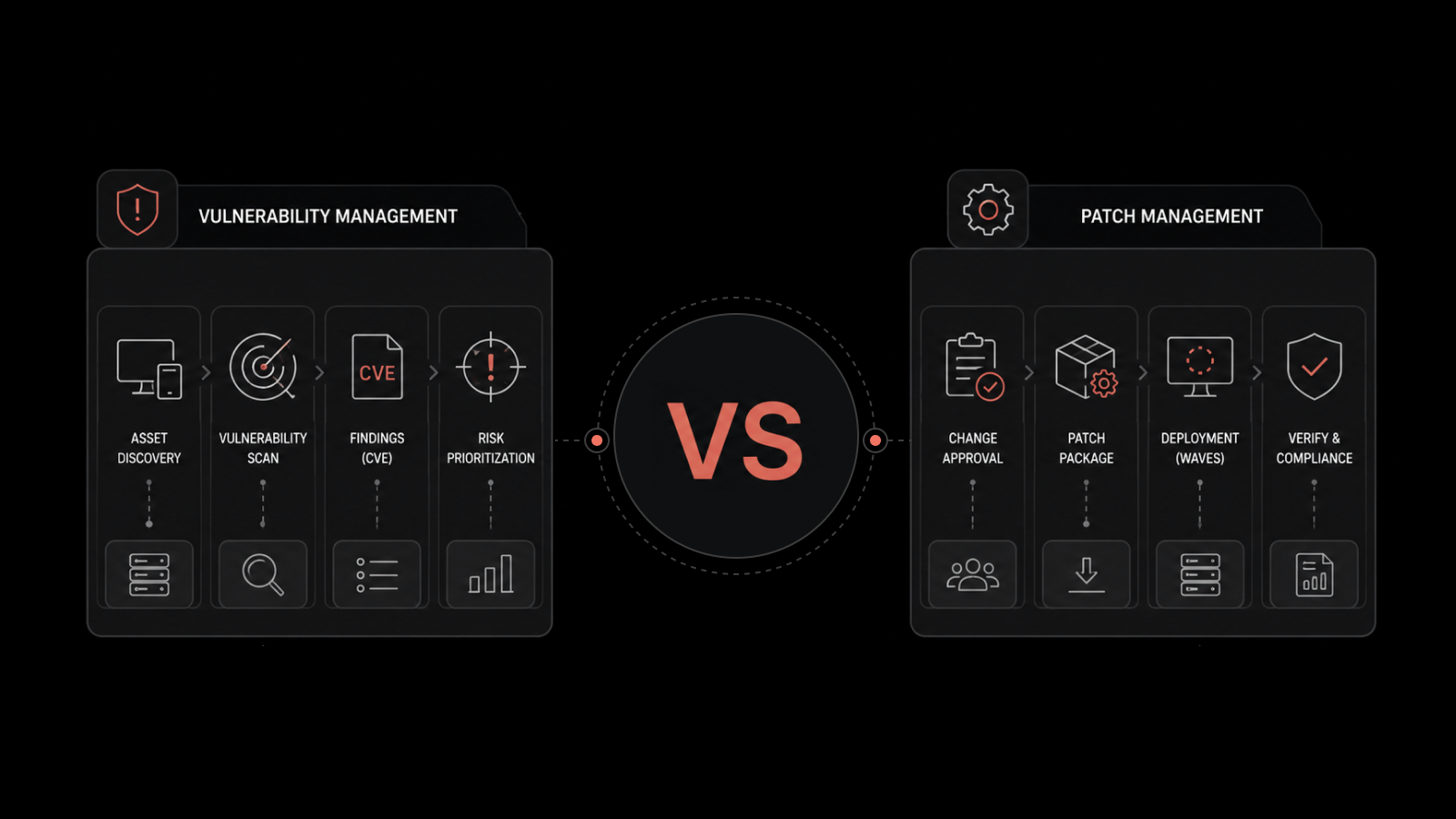
What is the Difference Between Patch Management vs. Vulnerability Management?
These two get mixed up regularly. They aren't the same thing.
Vulnerability management is the wider practice. You find weaknesses, assess them, prioritise them, and fix them. The fix might be a patch. Or it might be a configuration change. Or a firewall rule. Or a workaround. Or just a documented decision to accept the risk.
Patch management is one specific way to fix vulnerabilities. It's the operational mechanism for getting vendor fixes out the door.
The way to think about it: vulnerability management tells you what to fix and why. Patch management is one of the ways you do it. You need both. A scanner without a patching tool is a complaint generator. A patching tool without a scanner is patching blind.
The mature programs link the two. Scan results feed into the patch priority queue automatically. Patch deployment status feeds back into the vulnerability dashboard. That's the closed loop you're aiming for.
What to Look For in a Patch Management Tool?
A buyer's checklist, written from the buyer's side of the table.
Multi-OS Coverage: Windows, macOS, and Linux distributions (Ubuntu, RHEL/CentOS, Debian) from one console. A tool that only handles Windows is half a tool.
Third-Party Application Patching: A built-in catalogue of common apps with vendor-sourced packages. The bigger the catalogue, the less manual packaging you do.
Automated Discovery: Agent-based for managed devices, agentless for the rest. The agent should be lightweight and survive devices that change IP addresses.
Test Groups and Phased Deployment: Not just "deploy everywhere" or "deploy nowhere." Wave-based rollout with gates in between.
User Deferment and Forced Reboot Controls: Configurable per patch and per group. Critical patches force the reboot. Non-critical patches let the user defer up to a defined limit.
Rollback Support: A built-in way to uninstall patches. Not a vague promise.
Compliance Reporting. Out-of-the-box reports for PCI DSS, HIPAA, SOX, and CIS. Custom reports for internal audit.
ITSM Integration: Patch failures auto-create tickets. Patch approvals flow through change management. The closed loop matters more than people realise.
Cloud and Hybrid Coverage: Cloud images, container images, and cloud VMs in the same workflow.
REST APIs: If you can't script it, you can't scale it.
How Motadata ServiceOps Handles Patch Management
ServiceOps treats patch management as part of an ITSM platform. That's the structural difference worth understanding before anything else.
When a patch fails in ServiceOps, it doesn't just log an error. It opens an incident ticket in the same service desk your team already uses. The affected device, the patch details, the error code, and the assigned technician are all pulled in automatically.
The workflow engine that handles change approvals also handles patch approvals.
The reporting engine that builds SLA reports also builds patch compliance reports. It's one platform, not three integrations.
What the practice actually covers:
Windows, macOS, and Linux (Ubuntu, CentOS/RHEL, Debian) from one console.
Automated patch discovery across the network for OS and third-party applications.
Central package repository for controlled, signature-verified distribution.
Test groups, approval workflows, and phased rollout built directly into the deployment engine.
User deferment and forced reboot controls, configurable per patch.
Registry deployment for Windows-specific changes.
Compliance reporting for PCI DSS, HIPAA, and SOX out of the box.
Native integration with ObserveOps for closed-loop monitoring, ticketing, and resolution.
The honest trade-off: if your environment is Linux-heavy with a strong automation pipeline that already handles server patching through image refreshes, ServiceOps Patch Manager is most useful on the endpoint and third-party app side. The server side may already be solved by what you've got.
ServiceOps is available as SaaS or on-premises, with a 30-day free trial and modular licensing.
You can start a free trial of ServiceOps Patch Manager or book a 30-minute demo and we can walk through the integrated workflow with your environment in mind.
How to Begin Patch Management the Right Way
Most breaches happen because teams delay patches for months, not because of zero-day attacks.
Treat patch management as a core IT process, not a side task. Assign ownership and run it with clear structure and regular cycles.
In 2026, integrate patching into your ITSM and monitoring tools. This keeps it part of daily operations instead of a separate, manual effort.
FAQs
How does patch management change in cloud and hybrid environments?
In cloud and hybrid setups, patch management is no longer limited to just updating servers. In cloud environments, many systems are updated through image-based deployments or managed services, while in hybrid setups, organizations need to manage both cloud and on-prem systems together. The main change is that patching becomes more distributed, and teams need a unified approach to track updates across different environments without losing visibility or control.
Who is responsible for patching in SaaS, PaaS, and IaaS models?
Patch responsibility depends on the service model. In SaaS, the provider handles almost all patching, so customers mainly focus on configuration and access control. In PaaS, the provider manages the platform, but customers are responsible for applications and data running on it. In IaaS, customers are responsible for patching the operating system, applications, and anything they install, while the cloud provider only maintains the underlying infrastructure.
What features should a modern patch management tool have?
A modern patch management tool should support automated discovery, testing, and deployment across Windows, Linux, and macOS from a single platform. It should include third-party application patching, phased rollouts, rollback options, and real-time compliance reporting. Integration with ITSM tools, CMDB, and vulnerability management is also important so patching becomes part of a connected and automated workflow instead of a standalone task.
What is the right way to handle patch rollbacks when something breaks in production?
If a patch causes issues in production, the first step is to quickly isolate the affected systems to prevent wider impact. Then, roll back the patch using built-in uninstall options or system snapshots, depending on the environment. After rollback, teams should investigate the root cause in a test environment before reapplying a fixed or updated version of the patch in a controlled and phased manner to avoid repeating the issue.
Author
Jagdish Sajnani
Senior Content Strategist
Jagdish Sajnani is a B2B SaaS content strategist and writer. He has experience across different B2B verticals, including enterprise technology domains such as IT Service Management, AI-driven automation, observability, and IT operations. He specializes in translating complex technical systems into structured, engaging, and search-optimized content. His work improves product understanding, strengthens organic visibility, and supports B2B demand generation.