What the Change Control Process Involves and How It Prevents Unplanned Outages
How many of last quarter's outages began with a change someone was sure would be fine? Usually it's something small: a firewall rule goes in on a quiet evening. By morning there are forty tickets nobody can explain, and the trail ends at a skipped review or a backout plan nobody ever tried.
Change control is there to catch that sooner. Every change takes the same route. Someone writes it down and weighs the risk, someone with the authority approves it, and afterward there's a record of what happened.
You'll find it at the heart of IT change management, though project managers and quality leads use it every bit as much. We'll start with what change control actually involves, then go through its seven steps and who approves what. Then we look at QA and regulated settings, and finish with the records and metrics that let you prove control without slowing anyone down.
What Is Change Control?
Change control is the formal process you use to request, assess, approve, carry out and record changes to something that's already been signed off. What's being changed matters less than you'd think, whether it's a server config or next quarter's project plan. The rule doesn't bend: write down why, check what might break, get the right person's approval, and only then touch the controlled environment.
The scope covers anything the organization has agreed to protect. In most organizations, that includes:
Infrastructure and network configuration: Servers, firewalls, routers, switches and cloud resources
Applications and code: Releases, software patches, integrations and database schema changes
Documents and procedures: Standard operating procedures, runbooks and validated test methods
Project baselines: Agreed scope, schedule and budget
ITIL files change control under a bigger practice. Project managers and quality leads each have their own take on it as well. Line them up, though, and you'd struggle to spot much difference in how they actually work.
What Does a Baseline Mean in Change Control?
Think of a baseline as the signed-off version of a system or project, written down as it stood on a given date. Change control exists to protect it, and every approved change nudges it forward. Skip approval and you've got a deviation.
So the process has to end with a baseline update. Leave that step out and the next reviewer is assessing risk against a version of the system that hasn't existed for weeks.
Why Does Change Control Matter to the Business?
Change control matters because a large share of serious outages could have been avoided with better process. The Uptime Institute looked at this in its 2025 outage analysis. Of the major outages caused by human error, 85% came down to procedures people didn't follow, or procedures that were flawed to begin with.
A working change control process pays off in four areas:
Service stability: Fewer failed changes, fewer surprise outages and faster recovery when a change does go wrong, because a tested backout plan already exists
Audit evidence: Frameworks such as SOX ITGC controls and ISO 27001 controls expect documented, authorized changes, and change records are where auditors look first
Cost and scope discipline: Every request is weighed against its effect on budget, schedule and resources before work starts
Delivery predictability: A shared change schedule stops two groups from changing the same system on the same night
For a business leader, that's the whole case. When someone asks who changed what and why, you open a record instead of starting an investigation.
How Is Change Control Different from Change Management?
Change control is the procedure each individual change goes through. Change management is the layer above, where policy, risk thresholds and governance get decided (ITIL 4 calls this broader practice change enablement).
The change control vs change management confusion is understandable, since the terms overlap so much. Search for "change management control" or "change control management" and you'll land on the same handful of pages. There's also a third meaning, organizational change management, which deals with how people adjust to new ways of working; the table separates all three.
Aspect | Change control | IT change management | Organizational change management |
Focus | A single proposed change | The policy and practice behind every change | How people adapt to a business transformation |
Typical owner | Change owner and change control board | Change manager or process owner | HR, leadership and project sponsors |
Main output | An approved, implemented and recorded change | Change policy, models and risk criteria | Adoption, training and communication plans |
Time horizon | Days to weeks | Ongoing | Months to years |
Success measure | Change implemented without incident | Change success rate across the portfolio | Adoption and productivity after the transition |
Put simply, change control is how change management practices show up in daily work. The policy decides what needs approval. Change control is what makes sure approval actually happens.
When Should a Change Go Through Change Control?
Put any change through change control if it could affect a live service, a controlled baseline or a compliance obligation. In most organizations, that's nearly everything heading to production, plus any request that moves an agreed plan.
Common triggers include:
Production systems: Any change to servers, networks, applications or databases that customers or employees rely on
Security and access: Firewall rules, privileged access, encryption settings and identity configuration
Shared infrastructure: Components that several services depend on, where one change can affect many users
Regulated or validated systems: Anything covered by audit, quality or regulatory requirements
Project baselines: Requests that would move scope, schedule or budget
Routine, low-risk work still counts. It just runs as a pre-approved standard change, so the review is light. Development and test environments that are kept apart from the controlled baseline are a different story, and the change policy usually gives them looser rules.
What Are the Steps in the Change Control Process?
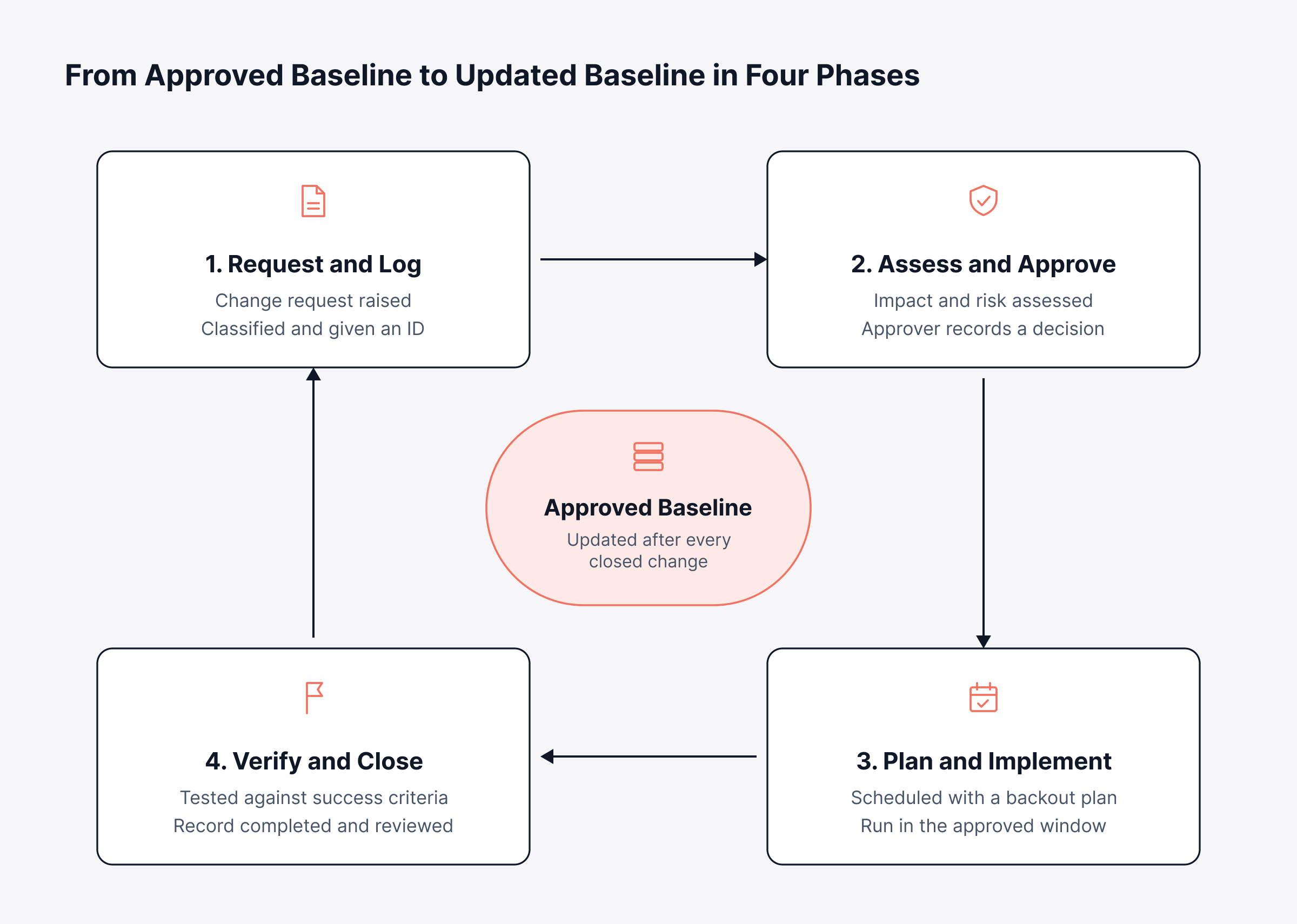
The change control process has seven steps, and it runs from a change request to an updated baseline. In between, a change is classified and assessed, decided on, planned and then carried out and checked. Each of these change control process steps has an exit condition, and until that's met, the change waits.
When you're updating stakeholders, talk in four phases, because approvers mostly want to know where a change is and what it's stuck on. You can see the loop below, where each phase hands off to the next and everything ends back at the approved baseline.
1. Raise a Change Request
Everything kicks off with a change request. Some people call it a request for change, others just say RFC, and in it the requester lays out what's changing and why. Add a line on what happens if nobody acts, because that's usually what tells a reviewer how fast to move.
A complete change request answers these questions:
Scope: Which systems, services or documents will change
Reason: The business or technical driver, such as a fix, a security patch or a new requirement
Urgency: The deadline or risk window, with the reason behind it
Ready to move on when: The request names a change owner and contains enough detail for someone else to assess it
2. Classify and Log the Change
Next comes classification, which picks the approval path. You'd normally tag the change with a type (standard, normal or emergency) and a category such as network or application. An early guess at risk goes on too.
Logging gives the change a unique ID. From then on, every comment, task and approval lands on that same record, and that's the record an auditor asks for.
Ready to move on when: The change has a type, category, priority and ID, and the right reviewers are assigned
3. Assess Impact and Risk
Impact assessment asks a blunt question. Suppose it fails; what goes down with it, and who notices first? A structured change impact analysis traces the affected services, what leans on them and who's using them, then tallies up cost and compliance exposure as well.
Here's where good configuration data pays off. With current CI relationships mapped between configuration items in your configuration management database, or CMDB, you can see which applications depend on that switch before anyone reconfigures it. The engineer doing the work might never have known.
Blast radius: How many services and users the change touches
Reversibility: Whether a tested backout exists and how long it takes
History: How similar changes have performed before
Timing: Overlap with business peaks, freezes or other scheduled changes
Ready to move on when: The risk level is agreed and the impact on services, cost and schedule is written into the record
4. Review and Approve the Change
Now someone decides. Whoever approves, one person or a whole board, reads the request with the risk assessment and plan beside it. For low-risk work a single manager's sign-off is usually enough, while anything high-risk lands with a change control board.
Typical decisions include:
Approved: The change can be scheduled as planned
Approved with conditions: Work proceeds once named conditions are met, such as an extra test or a narrower window
Deferred: The request returns for more information or a better time slot
Rejected: The change does not proceed, and the reason is recorded
Ready to move on when: A named approver has recorded a decision and any conditions attached to it
5. Plan and Schedule the Implementation
Once it's approved, someone has to turn the idea into steps that can be run. A decent implementation plan covers who's doing each part, the order they'll do it in and the test that tells you it worked. It also holds the backout plan, which is your way back to the previous state if it doesn't.
Then the change goes on a shared calendar, clear of business peaks and of anyone else working on those systems. When a few changes ship together, release management picks up from there, testing and deploying them as one bundle.
Ready to move on when: The plan, backout steps, window and communications are confirmed, and affected users have been notified
6. Implement and Verify the Change
The implementer then works through the plan, staying inside the approved window and jotting down each step. Then comes verification. Does the service meet the success criteria agreed during planning?
If verification fails, you run the backout plan and record the change as failed. That's nothing to hide. The next reviewer will use it to make a better call.
Ready to move on when: Success criteria are met and observability data confirms the service is stable, or the backout is complete and documented
7. Close, Review and Update the Baseline
At closure you're confirming two things: the change did what it promised, and nothing else broke along the way. Significant changes get a post-implementation review. Failed ones always do, so the change model can be tweaked before next time.
Finally, the baseline gets updated. Configuration records, docs and diagrams are revised to match what's actually running now, so the next assessment isn't working from stale information.
Ready to move on when: The record is complete, linked incidents are resolved and the baseline reflects the new state
What Are the Six Steps in a Regulated Change Control Process?
Many quality and pharmaceutical procedures describe six steps in the change control process:
Initiate the change request: Record the proposed change, its reason and its owner
Assess the impact: Evaluate the effect on product quality, validation status and regulatory filings
Approve, defer or reject: The quality unit or change control board records its decision
Implement the approved change: Carry out the work under the agreed plan and controls
Verify effectiveness and train staff: Confirm the change worked as intended and update training on revised procedures
Close the change: Complete the record and archive the supporting evidence
In practice, these six line up well with the seven IT stages above. Regulated procedures just lean harder on a formal effectiveness check and staff training. IT procedures tend to pull classification and scheduling out as separate steps, mostly because so many changes are fighting for the same maintenance windows.
A Change Control Example: Updating a Core Firewall Rule
Here's how that plays out. A security analyst wants a port opened on the data center firewall so a new payment integration can talk to an outside provider, and her request spells out the port, both addresses, the business owner and when it needs to go live.
It's logged as a normal change, medium risk. Impact analysis finds three customer-facing services behind that firewall, so the change control board approves it on one condition, which is that the rule gets proven in staging first. It's applied in an approved overnight window, the connectivity test comes back clean, and the baseline picks up the new rule plus its ticket number.
Who Is Involved in Change Control?
Change control usually involves a requester, a change owner, technical reviewers and an approver, along with whoever does the work and checks it. Smaller organizations often have one person covering several of those jobs, which is fine provided each responsibility has someone's name on it.
Role | Responsibility in change control |
Requester | Raises the change request and explains the business need |
Change owner | Owns the change from request to closure and keeps the record complete |
Change manager | Runs the process, checks classification and chairs reviews |
Technical reviewers | Assess feasibility, dependencies and risk in their area |
Change control board | Approves, defers or rejects normal and high-risk changes |
Implementer | Carries out the plan and records each step |
Quality or compliance reviewer | Confirms regulatory, security and validation requirements are met |
Service desk | Prepares for user impact and links related incidents |
What Is a Change Control Board?
A change control board, or CCB, is the group that has authority to approve or reject changes to a controlled baseline. You'll typically find the change manager on it, along with technical leads for the systems in question and a business or product owner. In regulated industries, add someone from quality.
"CCB" is mainly project, engineering and quality vocabulary. IT service management tends to hand that same job to a change advisory board that advises the change manager on normal and high-risk changes. Whatever you call it, the idea is simple enough: one person shouldn't be signing off a change whose effects spill well past their own area.
Which Approval Path Should Each Change Follow in Change Control?
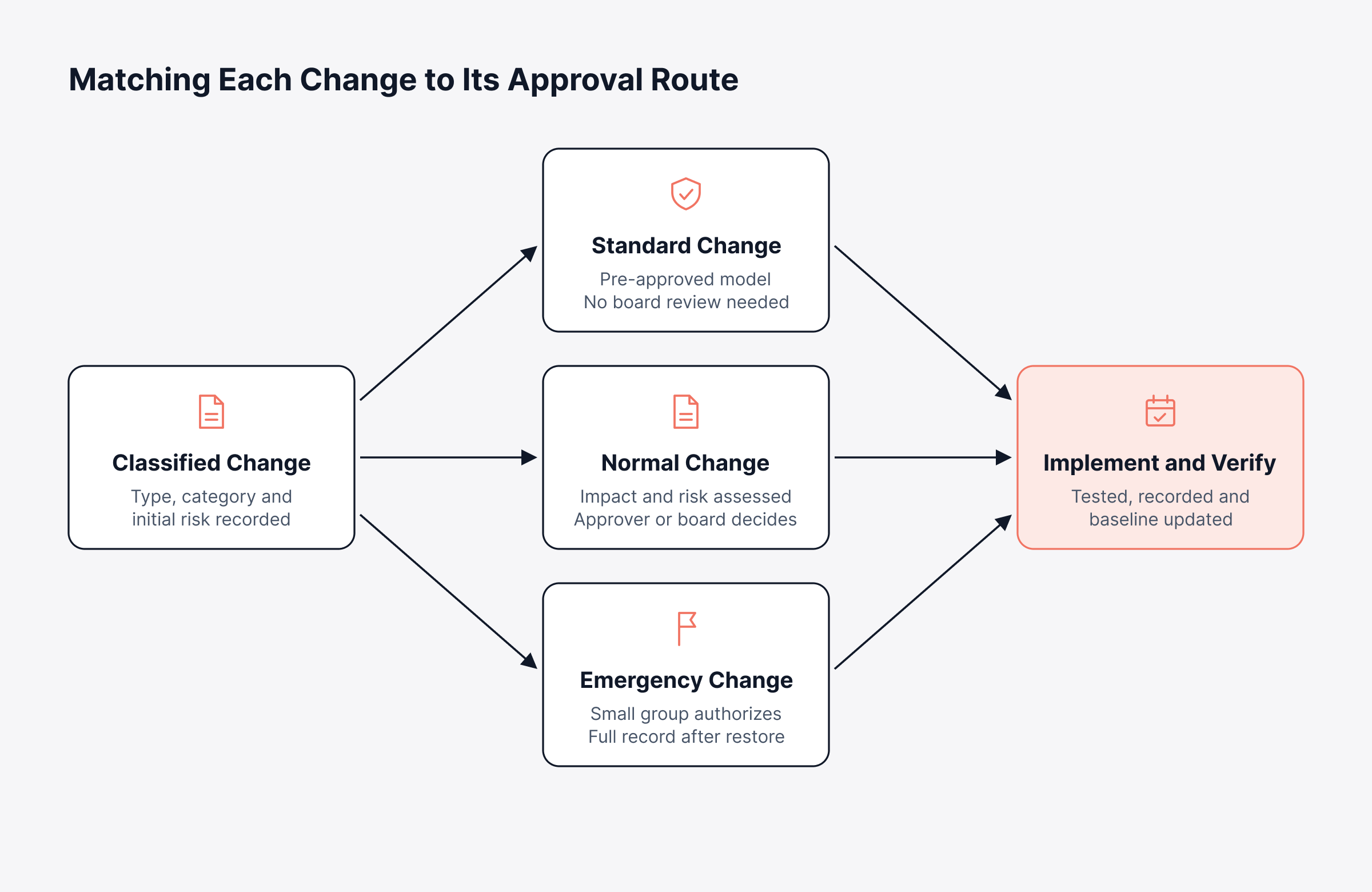
Each change should follow the approval path that matches its risk and urgency, and most organizations use three:
Standard changes: Low-risk, repeatable changes, such as adding a user to a group or applying a tested patch, are pre-approved through a documented model and skip board review
Normal changes: Changes with assessed risk go through impact analysis and a decision by an approver or the change control board
Emergency changes: Changes needed to restore a failed service or close an active security exposure are approved by a smaller emergency group and documented in full after the service is restored
Choose the route at classification, because that's the moment that sets how much review the change gets. The flow below splits out the three approval routes and shows where they come back together.
How Does Emergency Change Control Work?
Emergency change control cuts the approval path short, but the paperwork doesn't go away. Usually it's the change manager, the service owner and one technical lead who authorize the fix. They finish the full record, risk assessment and outcome included, once the service is back up.
Many emergency changes come out of a major incident. Link the two records and take the change into the post-incident review. And if emergency changes keep piling up, go looking for the planning gap that's pushing work off the normal path.
What Does Change Control Look Like Outside IT Operations?
Change control doesn't look very different in project management, quality assurance or pharmaceutical manufacturing. The baseline you're guarding is different in each, and so are the rules. Reviewers and paperwork shift around, but the steps themselves barely move.
How Does Change Control Work in Project Management?
Change control in project management mostly comes down to guarding scope, schedule and budget. If a request would move any of those, it needs a change request and an assessment of what it'll cost in money, time and people. Then the sponsor, or a change control board, decides.
Example: A sponsor wants a reporting module added eight weeks before launch. According to the change request, that's six more weeks of work and more budget. So the board approves it for phase two, and launch keeps its date.
Approved requests go into the project plan. The rejected ones go into the change control log as well, and if you keep that log next to the project management plan, you've got a brake on scope creep and a straight answer for any stakeholder asking why the date or budget moved.
What Is Change Control in QA?
Change control in QA covers the documented review and approval of anything that could touch product quality. That might be a new piece of equipment, a switch of supplier, a revised test method or an update to a validated system. The quality unit reviews the effect on the product, and on any regulatory filings, before work begins.
QA change control adds steps that IT processes often treat as optional:
Validation impact: Whether the change requires revalidation of a process, method or computerized system
Regulatory impact: Whether regulators must be notified or approve the change before implementation
Effectiveness check: A documented confirmation, after implementation, that the change achieved its purpose without harming quality
How Do CAPA and Change Control Work Together?
CAPA, short for corrective and preventive action, works out what has to change to fix a quality problem or stop it from happening. Change control then carries out that fix safely. That's why CAPA and change control are so closely tied: a CAPA often opens the change request, and once the change is done, its record is what closes the CAPA.
Even so, keep them as two systems that point to each other. CAPA asks why something went wrong and what should change. Change control's job is to make that change without introducing a new problem.
What Do ICH Guidelines Say About Change Control?
Among the ICH guidelines for change control, Q10 covers pharmaceutical quality systems and counts a change management system among its four core elements. The other three are the process performance and product quality monitoring system, CAPA and management review. And it asks that every change be judged on scientific knowledge and quality risk management, from the first evaluation right through to the final review.
Q12 picks up where Q10 leaves off, dealing with changes after a product's been approved. Its established conditions and post-approval change management protocols let a manufacturer settle with regulators, ahead of time, how future changes get planned and classified.
What Should a Change Control Record Contain?
A change control record should let someone who wasn't there understand the whole story: what changed, why, who said yes and how it turned out. That's what the change control form is for. Keep the same layout every time, and list each affected configuration item by name.
Field | Why it matters |
Change ID and title | Links every comment, approval and task to one record |
Requester and change owner | Shows accountability from request to closure |
Description and reason | Explains the business or technical driver |
Affected services and configuration items | Defines the scope for impact assessment and audit |
Risk level and impact assessment | Justifies the approval route that was used |
Implementation and backout plans | Proves the change could be reversed if it failed |
Approvals and conditions | Records who authorized the change and on what terms |
Schedule and actual dates | Shows the change happened inside an approved window |
Test results and outcome | Confirms whether the change succeeded or was backed out |
Linked incidents, problems and releases | Connects the change to its cause and its effects |
The change control log is simply all those records in one list. Filter it by date, service or outcome and most audit questions get answered on the spot, with no digging through old email.
Here's what one of our users says about Motadata ServiceOps on G2.
How Do You Catch Changes That Bypass Change Control?
You catch changes that bypass change control by comparing what's actually running with the approved baseline and chasing down every mismatch. It's easy to treat this as housekeeping, yet one undocumented change quietly throws off every risk assessment that follows.
Most unauthorized changes come from urgent fixes made during an incident, vendor engineers working on a device or a small tweak that someone considered too minor to log. Detection needs three things:
A stored baseline: The approved configuration for each device or system, kept outside the device itself
Continuous comparison: Polling or event-based checks that flag differences as they appear
Reconciliation: A rule that every detected difference either links to an approved change record or triggers a new one
For networks, this is what configuration drift detection does: it holds each device's running configuration up against the approved baseline and alerts when the two part ways. You can then turn each drift event into a change record, so somebody owns it.
Which Metrics Show Whether Change Control Is Working?
The metrics that show whether change control is working need to weigh outcomes, speed and compliance together. If all you measure is how fast approvals happen, expect rubber stamps. Track only failures and they learn to block everything.
Metric | What it tells you | Warning sign |
Change success rate | Share of changes completed without incident or backout | A steady decline over several months |
Changes causing incidents | How often an implemented change leads to a service disruption | Repeat incidents from the same change category |
Emergency change ratio | Share of all changes that used the emergency path | A rising share, which suggests weak planning |
Approval lead time | Time from request to decision | Long waits for low-risk changes |
Unauthorized changes detected | Differences found that link to no approved record | Any recurring source of untracked changes |
Standard change share | Share of changes running through pre-approved models | A low share despite many repeatable changes |
Go over the numbers with the change control board once a month. Any change that triggered an incident deserves a root cause analysis. Give every metric an owner, too, someone who'll actually do something about it.
How Do You Keep Change Control from Slowing Delivery?
You keep change control from slowing delivery by scaling review to risk, and letting automation handle anything that doesn't need a person's judgment. That way, low-risk changes move quickly. And reviewers can spend their time on the changes that could do the business harm.
Grow the standard change catalog: Move repeatable, proven changes to pre-approved models.
Review normal changes each quarter for patterns that qualify as standard
Retire a standard model if it causes an incident, until it is reassessed
Document the exact steps, scope and test for each model
Score risk consistently: Use the same criteria for every request.
Weigh blast radius, reversibility, change history and timing
Route by score, so approvers spend time only where risk is high
Recalibrate the scoring after failed changes
Connect change control to delivery pipelines: Let automation supply the evidence.
Attach build, test and deployment results from automated CI/CD pipelines to the change record
Trigger change records automatically for production deployments
Keep human approval for changes that alter architecture, security posture or customer-facing behavior
Set approval time limits: Keep decisions moving.
Define a target decision time for each risk level
Escalate overdue approvals to a named deputy
Publish the change calendar so requesters plan around freezes
What Should You Look for in Change Control Software?
Change control software has three jobs: enforce the process, keep the full record in one place and tie each change to the services, assets and incidents around it. A spreadsheet and some email approvals will get you by at a few changes a month. Past that, or the first time an auditor asks for evidence, they start letting you down.
Capability | Why it matters |
Configurable change types and models | Applies the right approval path to each change automatically |
Multi-level approvals with board support | Routes decisions to the right people and records each one |
Risk and impact fields linked to the CMDB | Grounds assessments in current configuration data |
Implementation, rollout and backout plans | Makes every change reversible and reviewable |
Change calendar | Shows conflicts, freezes and maintenance windows at a glance |
Rules that gate each stage | Stops a change from advancing until required fields are complete |
Links to incidents, problems, releases and assets | Connects cause, change and effect in one record |
Immutable audit trail | Records who did what and when for every change |
That's what dedicated change management software is built for. Pair it with workflow automation and the routing, notifications and status updates happen without anyone having to chase them.
Run Every Change from Request to Updated Baseline with Motadata ServiceOps
Most change control breakdowns look alike. Requests come in by email, approvals happen in chat, and the baseline is a spreadsheet nobody's opened in months, so context leaks out at every handoff. Come audit season, someone ends up reconstructing the past from fragments.
Motadata ServiceOps keeps the full change lifecycle in one record:
Three change types: Standard, normal and emergency changes, each with its own lifecycle
Board approvals: CAB and ECAB authorization, with predefined and custom risk levels
Impact analysis: Captures the services, assets and configuration items each change affects
Planning fields: Rollout plan, change schedule, implementation plan and backout plan
Stage gates: Custom rules that control what must be complete at each stage
Change calendar: A visual view of scheduled changes across target environments
Linked records: Connections to the incidents, problems, releases and assets behind each change
Audit trail: Every request, approval, decision and status change captured as an immutable record
To be fair, one limitation applies to every tool in this category. Software can enforce stages and record decisions, yet it can't make a board think hard about risk, and it can't make an engineer log the quick fix they applied during an outage. The organizations that get the most out of change control combine a clear policy and visible metrics with a platform that makes the correct path the easy one.
FAQs
What is a change control in QA?
Change control in QA is the documented procedure for reviewing and approving any change that could affect product quality, such as equipment, materials, methods or validated systems. The quality unit assesses validation and regulatory impact before approval and confirms effectiveness after implementation.
What are the six steps in the change control process?
The six steps commonly used are initiating the change request, assessing its impact, approving or rejecting it, implementing it, verifying effectiveness and training staff, and closing the record. IT procedures often split classification and scheduling into separate steps, which gives seven.
What is the difference between change control and change management?
Change control governs individual changes from request to closure. Change management, called change enablement in ITIL 4, sets the policy, risk criteria and governance that every change control decision follows across the organization.
Who approves a change control request?
Approval depends on risk. Standard changes are pre-approved through a documented model, normal changes go to a named approver or change control board, and emergency changes are authorized by a small emergency group, with full documentation completed after the service is restored.
What is change control software used for?
Change control software records each change request, routes it through the right approvals and keeps the plans, decisions and outcomes in one auditable record. Platforms such as Motadata ServiceOps also link changes to related incidents, releases and configuration items.
Author
Poonam Lalani
Content Strategist
Poonam Lalani is a B2B content strategist and writer with a background in computer engineering and experience across enterprise technology domains, including AI, cloud, DevOps, data engineering, and IT operations. She specializes in creating research-driven content that simplifies complex ideas and supports product education, thought leadership, and business growth.