SOX ITGC Controls Checklist for IT Service Management and Year-Round Audit Readiness
How much of your SOX audit season goes into rebuilding proof of work that was already done? Access was approved, the change went through review, the backup ran, yet the evidence lives in email threads, chat messages and a spreadsheet someone updated last quarter. When an auditor asks for a complete list of production changes, IT staff have to pull records from several places against a deadline.
The pressure falls on IT because financial reporting now runs on systems IT operates. Every ERP permission, database patch and scheduled job can affect a number in the financial statements, and auditors test the IT general controls around those systems before they rely on anything automated. When those controls produce scattered records, testing slows down, audit costs rise and findings reach the audit committee.
This guide builds on our SOX compliance guide and focuses on the individual SOX ITGC controls. In this blog, you will see:
Scope: What SOX ITGCs are, why they matter to the business and which systems fall in scope
Checklist: A control-by-control list mapped to IT service management records
Testing: How auditors test each domain and what happens when a control fails
Readiness: How to keep evidence complete throughout the year
What Is SOX ITGC?
SOX ITGC refers to the IT general controls that protect the systems, applications and data used to produce a company's financial statements. These controls govern who can access those systems, how changes reach production, how new systems are built and how daily operations such as jobs and backups run. Auditors and finance leaders often use ITGC SOX and SOX ITGC interchangeably.
The term combines two ideas. SOX refers to the Sarbanes-Oxley Act of 2002, a US law that requires public companies to maintain and assess internal control over financial reporting as part of their regulatory compliance obligations. ITGC refers to the general controls that apply across the IT environment and give auditors confidence that system-generated numbers can be trusted.
What Is ITGC in Audit?
In an ITGC audit, the auditor checks whether the controls around a financial system were designed correctly and operated consistently across the year. The answer determines how much the auditor can rely on automated controls inside the application.
IT general controls: Apply across systems, such as user provisioning, change approval and backup monitoring
IT application controls: Operate inside one application, such as matching a purchase order, goods receipt and invoice before payment
The dependency: Application controls are only reliable when the ITGCs around that application are effective
This dependency is why SOX IT work starts with ITGCs. An invoice matching rule inside the ERP cannot be trusted if anyone with database access could change the underlying records without an approved request.
How Does SOX Relate to Cybersecurity?
SOX relates to cybersecurity through its access, change and logging controls, although the Act itself does not prescribe specific security tools. Separately, SEC rules adopted in 2023 require public companies to disclose material cybersecurity incidents and describe how they manage cybersecurity risk.
In practice, the same records support both obligations. An access review built for SOX also shows the board that privileged access to financial systems is under control.
Why Do SOX ITGCs Matter to Business Leaders?
SOX ITGCs matter to business leaders because they determine how far auditors can rely on system-generated data, and that affects audit cost, disclosure risk and executive certifications. The impact shows up in four areas:
Audit effort and fees: When auditors can rely on ITGCs, they can also rely on automated controls and system reports, which reduces manual testing
Disclosure exposure: An ITGC failure that contributes to a material weakness must be reported publicly, which draws attention from investors, lenders and the board
Executive certification: CEOs and CFOs sign certifications every quarter and year, and weak IT controls make those signatures harder to support
Operating cost: Evidence gathered after the fact pulls engineers and system owners away from planned work every quarter
CIOs can report ITGC status to the board alongside the board-level metrics they already share, such as availability and service quality. The legal requirement behind these controls comes from two sections of the Act, covered next.
Which SOX Sections Make IT General Controls an Audit Requirement?
SOX ITGC obligations come mainly from Sections 302 and 404, which require executives to certify financial reports and management to assess internal control over financial reporting. SOX remains in force, and these requirements apply every fiscal year to companies that file periodic reports with the SEC.
Requirement | What It Asks For | What It Means for IT |
Section 302 | CEO and CFO certify each periodic report and the effectiveness of disclosure controls | Executives need confidence that system data feeding reports is accurate and protected |
Section 404(a) | Management assesses and reports on internal control over financial reporting each year | ITGCs over in-scope systems are documented, tested and included in the assessment |
Section 404(b) | The external auditor attests to management's assessment for larger filers | Auditors independently test ITGC design and operating effectiveness |
PCAOB AS 2201 | Sets the standard auditors follow when auditing internal control | Auditors evaluate IT general controls as part of a top-down, risk-based audit |
Management's reporting duties are set out in the SEC final rule, and the PCAOB describes how auditors test those controls in AS 2201. Together, they explain why SOX 404 controls over IT are tested every year and why the evidence must cover the full period.
How Does the SOX Control Environment Connect to ITGCs?
The SOX control environment is the set of standards, structures and oversight that shape how internal control works across the company, and ITGCs are the part of it that applies to technology. Most US public companies use the COSO 2013 Internal Control Integrated Framework to describe that environment.
COSO defines five components, which many people refer to as the five main internal controls:
Control environment: Tone at the top, board oversight, ethics and accountability for control owners
Risk assessment: Identifying risks that could cause a material misstatement, including technology risks
Control activities: The specific actions that reduce those risks, including general controls over technology
Information and communication: Accurate, timely information flowing to the people who need it
Monitoring activities: Ongoing and periodic evaluations that confirm controls still work
ITGCs fall under control activities, where COSO Principle 11 asks organizations to select and develop general control activities over technology. They also depend on risk assessment, so ITGC planning usually starts with the company's IT risk management process, which identifies the technology risks that could affect financial reporting. Those risks then decide which systems are in scope.
How Do You Decide Which Systems Fall Under SOX ITGC Scope?
SOX ITGC scope covers the applications, databases, operating systems and network layers that support financially significant accounts and the reports used during financial close. Scoping usually follows four steps:
Identify significant accounts: Revenue, payroll, inventory and other balances large enough to affect the financial statements
Map the business processes: The processes and key controls that produce those balances
List the systems and reports: The applications and system reports those key controls rely on
Add the supporting layers: Databases, operating systems, network devices and any hosting provider underneath each application
Accurate scope keeps audit costs in check, because each system in scope adds testing work. An up-to-date asset inventory makes scoping faster, and the practices used for ITAM compliance help keep the in-scope list current as systems are added or retired.
When a cloud or hosting provider runs part of an in-scope system, auditors typically ask for its SOC 1 Type 2 report, an independent assessment of the provider's controls over a period. They also check that the complementary user entity controls listed in that report, meaning the controls the provider expects its customers to run, are operating on your side.
What Are the Four SOX ITGC Domains Auditors Test?
The four SOX ITGC domains auditors test are access to programs and data, program changes, program development and computer operations. Some audit firms split these into five or six categories, but the underlying scope stays the same.
Access to programs and data: Only authorized people can view or change financial systems and data
Program changes: Changes to applications, databases and configurations are authorized, tested and approved
Program development: New systems and major upgrades are built, tested and migrated under control
Computer operations: Jobs, interfaces, backups and incidents are monitored and resolved
Each domain maps to a service management process that already creates records. Access maps to request management, changes map to change and release management, development maps to project and release governance, and operations map to incident, problem and event management.
Once the systems are scoped, every control needs a record that proves it ran. The diagram below separates the four domains around an in-scope financial system and the record each one produces.
What Should a SOX ITGC Controls Checklist Include for IT Service Management?
A SOX ITGC controls checklist should list each control, the test an auditor will run and the IT service management record that proves the control operated. The sox itgc controls list below breaks each of the four domains into testable controls, with IDs you can adapt to your own risk and control matrix.
Each control is either preventive, stopping an error before it happens, or detective, finding it afterward. Automated controls generally need smaller test samples than manual ones. Your external auditor and internal audit function decide which controls are key, so treat this SOX ITGC checklist as a starting point.
1. Access to Programs and Data Controls Checklist
Access controls answer one question for every in-scope system: could an unauthorized person have changed financial data during the period? Access is also where auditors often find exceptions, so these ITGC SOX controls need the most complete evidence.
Control | What the Auditor Tests | Evidence From ITSM Records |
AC-01 New access approved before it is granted | Sample new users and confirm approval came before provisioning | Access request with approver, approval time and fulfillment time |
AC-02 Access removed promptly for leavers | Match HR termination dates to account disablement dates | Offboarding request linked to the HR notice and closure time |
AC-03 Access changes for role moves approved | Sample transfers and confirm old rights were removed | Change-of-role request with approvals and task history |
AC-04 Periodic user access review completed | Check review completeness, reviewer independence and follow-up | Review task per system owner with sign-off and removal tickets |
AC-05 Privileged and administrator access restricted | List admin accounts and confirm each has a business justification | Approved privileged access requests and an owner list from the configuration management database |
AC-06 Authentication settings enforced | Inspect password, lockout and single sign-on settings | Configuration snapshot or setting export attached to a control task |
AC-07 Shared and service accounts controlled | Confirm each generic account has an owner and restricted use | Account register with named owner and review history |
AC-08 Physical access to server rooms restricted | Review who holds access to rooms hosting in-scope systems | Approved access requests and periodic badge list reviews |
Two practical steps make these controls easier to evidence. Build access requests as service catalog items with defined approval steps, so every grant follows the same path, and apply role-based access inside the ITSM tool itself so approvers cannot approve their own requests.
Program Change Controls Checklist
Change controls confirm that every modification to a financial application, database or configuration was authorized, tested and approved before it reached production. The business risk is direct, because an unapproved change to a pricing or payroll calculation can alter reported numbers without anyone in finance noticing.
Control | What the Auditor Tests | Evidence From ITSM Records |
CM-01 Changes are requested and authorized | Sample changes and confirm a documented request exists | Change record with requester, description and risk rating |
CM-02 Changes are tested before deployment | Confirm test evidence and business acceptance where needed | Test results or sign-off attached to the change |
CM-03 Changes are approved before production | Compare approval time with deployment time | Approval history from the change advisory board or a delegate |
CM-04 Developers cannot deploy their own changes | Compare who built the change with who moved it | Assignee and implementer details plus the deployment log |
CM-05 Emergency changes reviewed after the fact | Sample emergency changes and check retrospective approval | Emergency change type with a post-implementation review task |
CM-06 All production changes traced to a ticket | Reconcile system change logs against the change register | Change detection report matched to change records |
CM-04 is where segregation of duties matters most for IT, since no single person should control a change from build to production. A structured IT change management workflow records who requested, approved and worked on each change, which gives the auditor a clear way to confirm that separation.
CM-06 is the control many organizations struggle to evidence, because it asks for proof that nothing changed outside the process. The approach that works best has three parts:
Change register: Every approved change from the ITSM platform for the period
Detected changes: Configuration, database and system change events captured independently through observability data from the systems themselves
Reconciliation: A periodic comparison where every detected change maps to an approved record, with exceptions investigated and documented
For network devices that support financial systems, network compliance management provides the list of detected changes for that reconciliation by saving each configuration version and flagging unexpected configuration drift.
Program Development Controls Checklist
Program development controls cover new systems, major upgrades and data migrations that affect financial reporting. They apply less often than change controls, but one poorly controlled implementation can put a full year of reported numbers at risk.
Control | What the Auditor Tests | Evidence From ITSM Records |
PD-01 Projects approved and governed | Confirm business and IT approval before build starts | Project record with approval and assigned owner |
PD-02 Data migration validated | Check that record counts and balances match after migration | Migration task with reconciliation results attached |
PD-03 User acceptance testing signed off | Confirm business owners approved test results before go-live | Acceptance sign-off attached to the release |
PD-04 Go-live approved | Confirm formal approval to move into production | Release record with approval history |
Many organizations run these controls through release management, which keeps planning, testing, approvals and deployment tasks in one record. Consider a hypothetical company that moves from one billing platform to another mid-year: auditors will ask for the migration reconciliation and the go-live approval, and both are far easier to produce when they are attached to the same release.
Computer Operations Controls Checklist
Computer operations controls confirm that the systems supporting financial reporting run as intended every day. If a nightly interface fails without anyone noticing, revenue or payroll data can arrive incomplete at month-end close.
Control | What the Auditor Tests | Evidence From ITSM Records |
OP-01 Job scheduling access restricted | Confirm only authorized users can create or change jobs | Access list and approved change records for job changes |
OP-02 Job failures detected and resolved | Sample failed jobs and confirm follow-up | Incident ticket per failure with resolution notes |
OP-03 Backups completed as scheduled | Review backup success and failure records | Backup alerts linked to incident tickets for failures |
OP-04 Restores tested periodically | Confirm a restore test happened and succeeded | Restore test task with results and sign-off |
OP-05 Incidents and problems managed | Sample incidents affecting financial systems | Incident and problem records with root cause and closure |
OP-06 Security patches assessed and applied | Check patch status against policy timelines | Patch deployment reports and approval records |
Backup controls should state a recovery point objective for each in-scope system, meaning the maximum data loss the business has agreed to accept. For OP-06, patch compliance reporting gives a point-in-time view of which systems meet policy and which carry approved exceptions.
How Do Auditors Test SOX ITGCs Across the Audit Year?
Auditors test SOX ITGCs by confirming each control is designed to address its risk and then sampling evidence to show it operated throughout the period. The stages follow a set order, so preparing evidence for each stage in advance spreads the work across the year.
How Auditors Check ITGC Design Through Walkthroughs
Design testing asks whether the control, if it runs as described, would prevent or detect the risk. Auditors typically perform a walkthrough, following one transaction or change from start to finish with the control owner.
Control narrative: A short description of who performs the control, how often and in which system
Walkthrough evidence: One complete example, such as a single change from request to deployment
Risk link: The financial reporting risk the control addresses
How Auditors Sample ITGC Operating Effectiveness
Operating testing checks whether the control worked consistently across the year. Auditors draw samples from the population, meaning the full list of events in the period, such as every change or every new user.
The auditor also checks the population itself. When that list comes from a system report, the auditor treats it as information produced by the entity, meaning data the company generated from its own systems, and tests that the report is complete and accurate before sampling from it.
How Interim ITGC Testing Rolls Forward to Year-End
Many audits test controls at an interim date and then roll forward to year-end. The rollforward confirms nothing changed in the control design and that the control kept operating in the remaining months.
An audit log that records who changed a workflow, an approval rule or a user role makes rollforward faster, because it shows whether the control itself was modified during the period. When a control does fail testing, the rating the auditor gives that failure decides its business impact.
What Happens When a SOX ITGC Fails?
When a SOX ITGC fails, the auditor rates the severity of the deficiency and decides how much it affects reliance on automated controls and system reports. Because other controls depend on it, one failure can widen testing well beyond the control that failed.
Auditors classify control failures into three levels:
Control deficiency: A control does not prevent or detect misstatements on a timely basis, but the risk is limited
Significant deficiency: A deficiency, or combination of deficiencies, serious enough to merit attention from those overseeing financial reporting
Material weakness: A reasonable possibility exists that a material misstatement will not be prevented or detected on a timely basis
A material weakness must be disclosed in management's annual report on internal control. Compensating controls, such as a detailed management review of journal entries, can sometimes reduce severity, but they add work and must be tested too.
Before remediating a failed control, check which automated controls depend on it. The diagram below traces how one access gap widens the audit and where it can end.
Where Do SOX ITGC Audits Usually Find Gaps?
SOX ITGC audits usually find gaps where a control depends on memory, manual handoffs or evidence gathered after the fact. The failure shown in the diagram usually starts with one of the patterns below. They appear in most industries, so they can be found and fixed before testing starts.
Late access removal: HR notices reach IT by email, and disablement depends on someone acting on it
Incomplete change populations: Changes made directly in a database or console never enter the change register
Self-approved changes: The same person requests, approves and deploys, with no record showing otherwise
Rubber-stamp access reviews: Reviewers approve full user lists with no evidence of removals or follow-up
Unlinked job failures: Backup and batch alerts go to an inbox and never become tracked incidents
Unsupported system reports: Population reports cannot be shown to be complete and accurate
Consider a hypothetical mid-sized distributor whose finance application staff fix a pricing table directly in the database during month-end close. The fix is correct, yet it never appears in the change register, and the auditor finds it only when comparing database logs to approved changes.
One unlogged change like this is enough for the auditor to report a deficiency in change controls. The fix for this gap, and for every gap above, follows standard change management practices: route each in-scope activity through a record that captures approval, timing and ownership when the work happens.
How Does IT Service Management Produce SOX ITGC Evidence During Daily Work?
IT service management produces SOX ITGC evidence when access requests, changes, releases and incidents all run through workflows that record approvals and timestamps automatically. Because the records are created as the work happens, control owners only need to export them when the auditor asks.
Motadata ServiceOps supports this model through documented capabilities that map to the checklist above:
Approval workflows: Multi-level approvals for service catalog items, changes and releases, with pending, approved and rejected states recorded on each request
Change and release history: Records that show who raised, approved and worked on each change, with timestamps and related tasks
Asset and configuration context: Configuration item management connects in-scope systems to their owners and relationships, with impact analysis before a change is approved
Platform access controls: SAML single sign-on, role-based access control and audit logs within the platform itself
Patch evidence: Test-group deployment, approval before production rollout and reports that support SOX compliance evidence
Scheduled reporting: Reports that can be scheduled and emailed to control owners and internal audit on a fixed cadence
Motadata ObserveOps provides the independent evidence that CM-06 and the operations controls need, using configuration data and logs collected directly from the systems. It captures network device configuration versions, detects configuration changes and checks configurations against SOX policies, while log compliance reporting keeps log evidence ready for review.
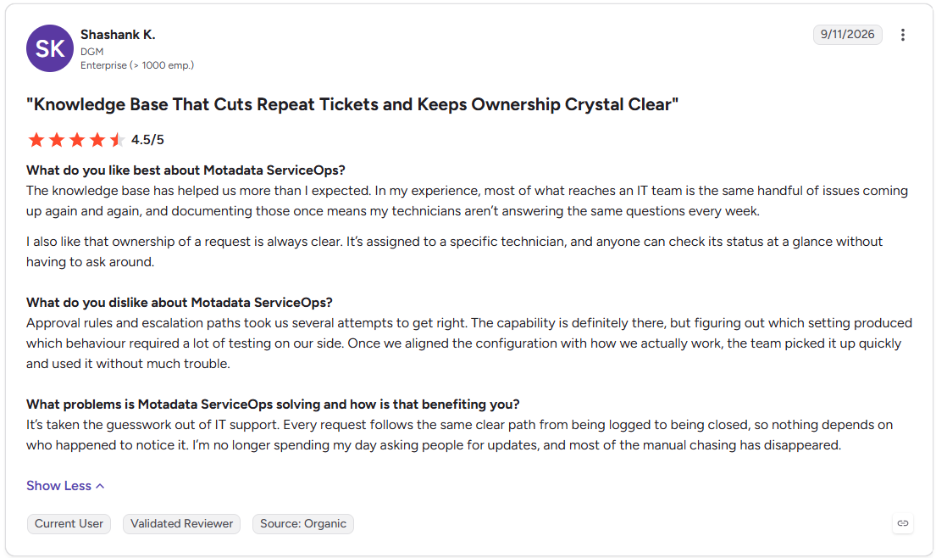
This is what one of our clients says about Motadata ServiceOps on G2:
Which Other Compliance Frameworks Reuse SOX ITGC Evidence?
Several security and compliance frameworks reuse the same SOX ITGC evidence, because ITGC controls for access, change and operations appear in almost all of them. Mapping controls once and reusing records reduces duplicate testing and the cost of running several audits a year.
Framework | Overlapping Control Areas | Where the Same ITSM Records Help |
SOC 1 and SOC 2 | Logical access, change management, system operations | Access requests, change records, incident tickets |
ISO 27001 | Access control, change management, backup, logging | Access reviews, change approvals, restore tests |
NIST CSF | Identity management, protective technology, detection | Account records, configuration baselines, alert tickets |
If you already maintain evidence for NIST compliance or ISO 27001 controls, start by tagging each existing control with the SOX ITGC domain it supports. A broader view of cybersecurity compliance then helps you decide which control owner keeps the main copy of the evidence when frameworks overlap.
Replace Quarter-End Evidence Hunts with Audit-Ready Records in Motadata ServiceOps
SOX ITGC testing goes most smoothly when every control runs the same way each time. When access, change, development and operations work follows the same workflows, the records auditors ask for already exist with approvals and timestamps, and less time and money goes into each audit cycle.
No ITSM platform decides which controls are key or how a deficiency is rated, and organizations with complex identity governance needs may still run a dedicated tool for access certification. Motadata ServiceOps gives access, change and release work an approval-driven record, with ObserveOps adding independent change detection and log evidence, so control owners can answer auditor requests from one place throughout the year.
FAQs
What are ITGC controls?
ITGC controls are IT general controls that protect the systems and data used in financial reporting. They cover access to programs and data, program changes, program development and computer operations. Auditors test them first because automated application controls are only reliable when these general controls work consistently.
What are SOX 404 controls?
SOX 404 controls are the internal controls over financial reporting that management must assess each year under Section 404 of the Sarbanes-Oxley Act. They include business process controls and IT general controls. For larger filers, the external auditor also tests these controls and issues an attestation on their effectiveness.
What is a SOX control environment?
A SOX control environment is the foundation of standards, structures and oversight that shape internal control across a company. It includes board oversight, management's tone, ethical values and clear accountability for control owners. A weak control environment can undermine even well-designed IT general controls, so auditors evaluate it early.
What are the five main internal controls?
The five main internal controls usually refer to the five COSO components: control environment, risk assessment, control activities, information and communication, and monitoring activities. IT general controls fall mainly under control activities. They also support monitoring through records such as access reviews, change logs and job alerts.
Can an ITSM platform support SOX ITGC evidence collection?
Yes, an ITSM platform can hold much of the evidence for access, change, release and operations controls, because each request or change carries its own approvals and timestamps. Platforms such as Motadata ServiceOps keep these records together, while auditors and control owners still decide which controls are key and how results are judged.
Author
Poonam Lalani
Content Strategist
Poonam Lalani is a B2B content strategist and writer with a background in computer engineering and experience across enterprise technology domains, including AI, cloud, DevOps, data engineering, and IT operations. She specializes in creating research-driven content that simplifies complex ideas and supports product education, thought leadership, and business growth.