SSL Handshake Guide Covering Each Step and the Fixes That Prevent Outages
Why would a website that passes every uptime check still show customers a security warning? In most cases, the server is running and the network is healthy. The failure happens earlier, during the brief exchange in which the browser and the server agree on how to communicate securely.
That moment is the SSL handshake. If it goes wrong, users get an error page while your dashboards stay green. Maybe a certificate expired; maybe a routine change left both sides on different protocol versions.
Fixing it fast means knowing what the handshake does at each step, and good website monitoring should check exactly that. In this blog, you'll see how the SSL handshake process works and why it fails. We'll also cover what a failure costs, how to fix one, and the signals that warn you early.
What is an SSL Handshake?
An SSL handshake is the negotiation a client and a server complete before they exchange encrypted data. First they pick a protocol version and cipher suite. Then the client checks the server's SSL certificate and both sides create session keys, something your browser does for every HTTPS page it loads from a web server.
On a healthy connection it's over in a fraction of a second. Nobody notices it. That is exactly why it gets so little attention until the day it fails.
Why the Name SSL Handshake Stuck
Why SSL, when nobody runs it anymore? Netscape built Secure Sockets Layer in the mid-1990s, and Transport Layer Security (TLS) took over in 1999. The old name stuck, so SSL handshake, SSL certificate and SSL/TLS are still everyday terms.
So what is an SSL handshake today? A TLS handshake with an old name, and searches for an SSL handshake, a TLS handshake or a TLS SSL handshake all point to it. Only TLS 1.2 and 1.3 belong on a server now; the IETF retired 1.0 and 1.1 in 2021, and PCI DSS and other regulatory compliance frameworks agree.
What an SSL Handshake Accomplishes
There are four jobs to get through first:
Agree on a protocol version: The highest TLS version both sides support
Choose a cipher suite: The set of algorithms used for key exchange, bulk encryption and message integrity
Authenticate the server: The client checks the server's certificate against a trusted certificate authority (CA)
Create session keys: Both sides derive the same symmetric keys without ever sending those keys across the network
With those done, the connection moves to fast symmetric encryption. The heavier asymmetric math runs only during the handshake. And all of it depends on a connection that TCP opened first.
Is It a TCP Handshake or a TLS Handshake?
It's both, and TCP always goes first. The 3-way handshake in TCP, made of SYN, SYN-ACK and ACK, connects the two machines. Only then does TLS start securing the line.
Here is the TCP handshake vs TLS handshake comparison side by side:
Aspect | TCP handshake | TLS handshake |
Layer | Transport | Session security, on top of TCP |
Purpose | Opens a reliable connection | Encrypts and authenticates that connection |
Messages | SYN, SYN-ACK, ACK | ClientHello, ServerHello, certificate, key exchange, Finished |
Round trips | One | Two in TLS 1.2, one in TLS 1.3 |
What a failure looks like | Timeout or connection refused | Certificate, protocol or cipher error |
That split tells you where to look. Seeing a timeout? Check the network or a firewall, because a certificate or protocol error would mean TCP worked and TLS didn't.
A packet capture settles it quickly, since the TCP flags show which handshake stopped. With TCP confirmed, attention moves to the TLS messages themselves.
How does the SSL Handshake Process Work Step by Step?
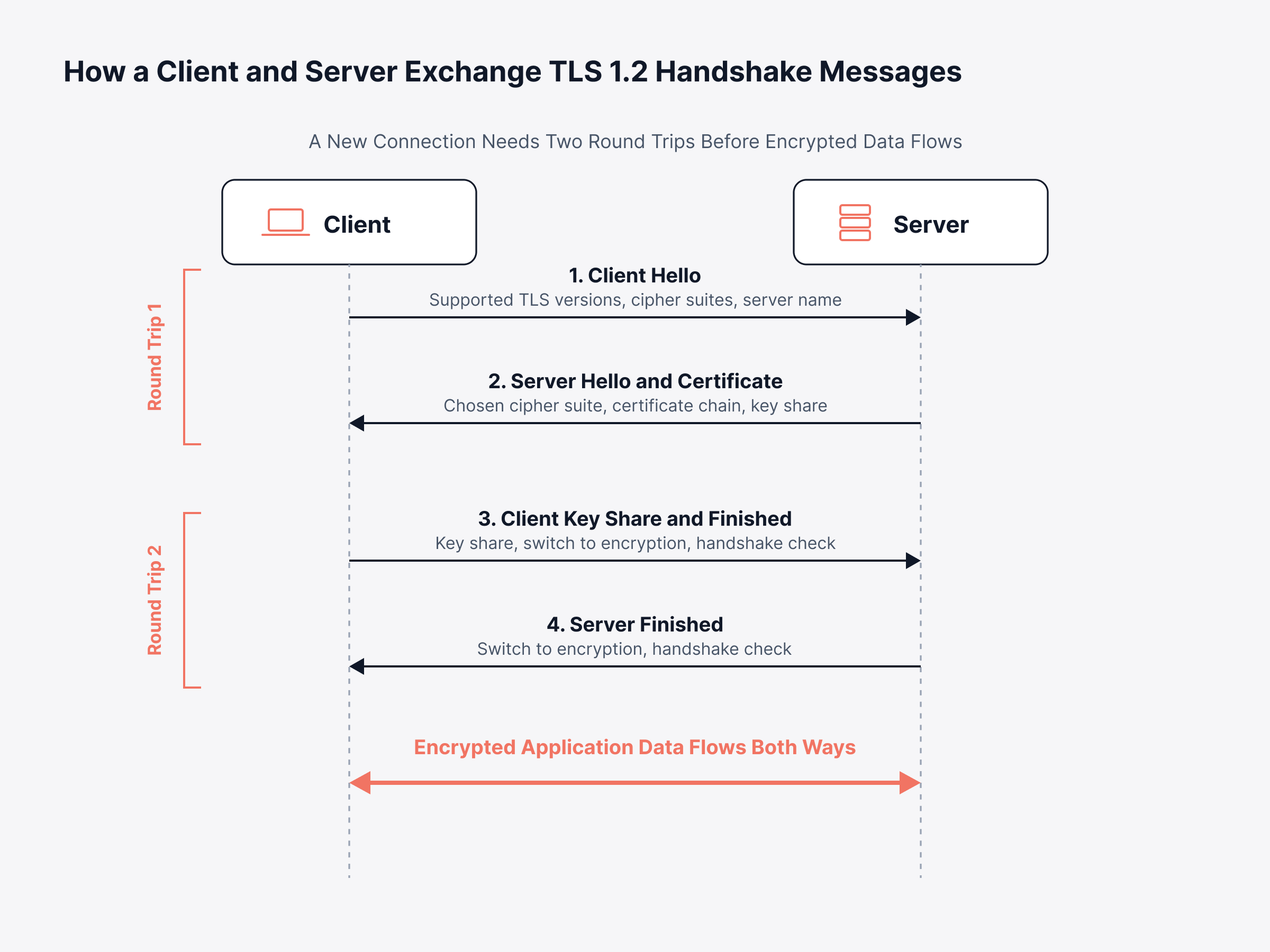
The SSL handshake process works in five steps, from the first hello message to proof that both sides hold the same session keys. In TLS 1.2, which plenty of older systems still run, those SSL handshake steps take two round trips:
ClientHello: The client opens by listing the TLS versions and cipher suites it supports, plus the site it wants to reach, sent as Server Name Indication (SNI)
ServerHello and certificate: The server picks one version and one cipher suite, then sends its certificate to prove its identity, along with its share of the key material
Certificate verification: The client confirms the certificate comes from a trusted certificate authority, matches the site name, and hasn't expired or been revoked
Key exchange: The client sends its share of the key material, and both sides combine the two shares into the same session keys without ever sending the keys themselves
Finished messages: Each side switches to encryption and sends a short summary of everything exchanged, which proves nobody altered the conversation in transit
Put simply, the server proves who it is and both sides end up with a secret nobody else holds. After that, every byte is encrypted.
It's easier to follow the two round trips when you can see who speaks when. The sequence below shows which side sends what, and when.
But how strong is the connection? That depends on the algorithms picked in steps one and two.
Which Algorithms Does the SSL Handshake Negotiate?
The SSL handshake negotiates a cipher suite, meaning the set of algorithms the connection will use. A typical TLS 1.2 example is TLS_ECDHE_RSA_WITH_AES_128_GCM_SHA256, and each part has its own job:
ECDHE: How the session keys are exchanged
RSA: How the server proves its identity with its certificate
AES_128_GCM: How the data itself is encrypted and checked for tampering
SHA256: Which hash function supports the handshake
Which suites are on offer is up to whoever configures the server. That choice sets the minimum security level for every connection. People call the ability to swap weak suites out quickly crypto agility.
What if the client and server share no suite at all? Then the handshake fails with a cipher mismatch, covered later in this guide.
Why the Key Exchange Method Decides Long-Term Data Safety
The key exchange method decides whether recorded traffic stays private if a server's private key leaks later. Take RSA key exchange, still allowed in TLS 1.2, where the client encrypts a secret with the server's public key. Whoever gets that private key later can read every session recorded before, which is the harvest now, decrypt later risk.
ECDHE, the elliptic curve form of ephemeral Diffie-Hellman, makes a new key pair for every session; that's forward secrecy. So one leaked server key can't expose old customer sessions. In TLS 1.3, RSA key exchange is gone and only ephemeral Diffie-Hellman remains.
What Changed Between TLS 1.2 and TLS 1.3?
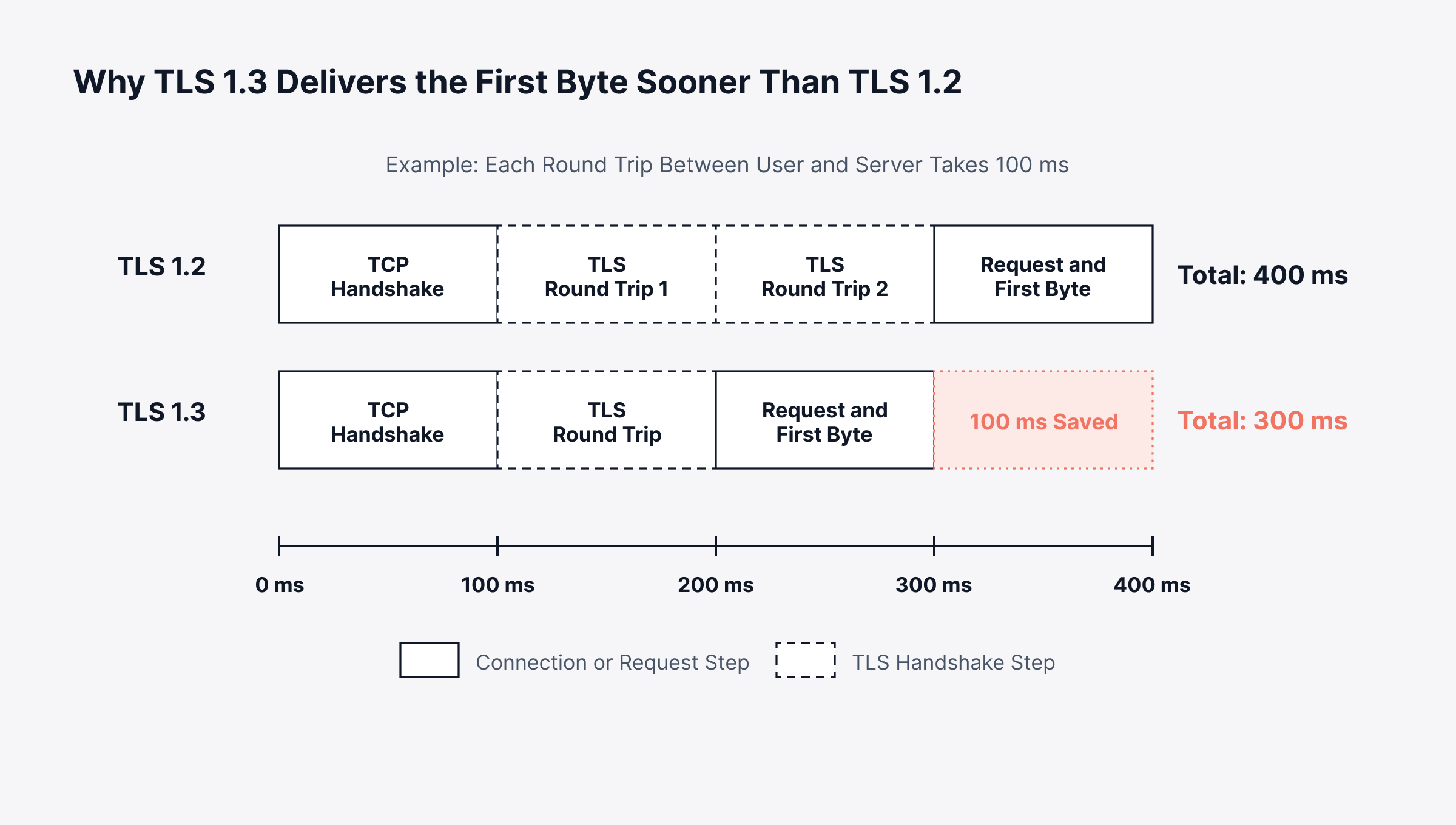
TLS 1.3 completes the SSL handshake in a single round trip, where TLS 1.2 needs two. Weak algorithms are gone and more of the exchange is encrypted. For users, pages load sooner; for operations, there's less to misconfigure.
How do TLS 1.2 vs 1.3 compare on performance, security and troubleshooting? The table lays it out:
Aspect | TLS 1.2 | TLS 1.3 |
Round trips for a new connection | Two | One |
Round trips for a resumed connection | One | One, or zero with 0-RTT |
Key exchange options | RSA, DHE, ECDHE | DHE and ECDHE only |
Forward secrecy | Optional | Always on |
Cipher suites | Dozens, including weak ones | Five, all AEAD |
Server certificate on the wire | Readable | Encrypted |
Downgrade protection | Limited | Built into the protocol |
Three of those rows need a bit more explanation:
One round trip: The client guesses the key exchange method and sends its key share inside the ClientHello, so the server can reply with its certificate and its Finished message in a single response
Encrypted certificate: Everything after ServerHello is encrypted, so observers on the network can no longer read the server certificate
0-RTT resumption: Returning clients can send data in their very first message, though an attacker who captures that message could resend it, so most deployments allow it only for safe, repeatable requests such as page loads
The safe setup for most environments? Support both versions, prefer TLS 1.3, and switch everything older off. NIST guidance for US federal systems says much the same, with TLS 1.2 as the minimum and TLS 1.3 support required, and many regulated industries follow it.
There's a speed payoff as well. The single round trip trims setup time, most visibly in tail metrics such as P99 latency. Security matters just as much, though.
How Secure is the SSL Handshake?
The SSL handshake is secure as long as both sides use TLS 1.2 or 1.3, current cipher suites and a trusted CA's certificate. Attackers usually go after what surrounds it. Old protocol versions and unwatched certificates are the usual targets.
The weaknesses worth knowing about are:
Downgrade attacks: An attacker pushes both sides onto an older, breakable protocol, which is why SSL 3.0 and early TLS versions should be switched off entirely
Weak cipher suites: Old suites with short keys or broken algorithms, still enabled on some legacy servers
Man-in-the-middle interception: Possible when a client accepts any certificate, so validation must never be disabled in code
0-RTT replay: The trade-off covered above, limited by allowing early data only for safe requests
For a security leader, the takeaway is simple. The weak link is rarely the protocol. It's configuration and certificate hygiene, and you can check both continuously with security monitoring.
In some setups, the client has to prove who it is too.
What is Mutual TLS and When does the Handshake Verify the Client?
Mutual TLS (mTLS) is an SSL handshake in which the client also presents a certificate, so both sides prove their identity. The server requests that certificate during the handshake. The client returns it with a signature that shows it holds the matching private key.
mTLS turns up in a few common places:
Service-to-service traffic: Service meshes that authenticate every call between microservices
Partner and banking APIs: Integrations where only known, registered clients may connect
Access control: Zero trust architectures where network location alone grants nothing
Each of those adds another certificate that can expire or lose trust. Once a client certificate lapses, the calling service fails. You'll see it in application performance data as a jump in failed outbound requests.
Extra certificates and extra handshakes both carry a cost, in time and in risk. And cost is where the business comes in.
Why does the SSL Handshake Matter to the Business?
The SSL handshake matters to the business because no content loads until it finishes, and a failed one takes a working service offline. Near the server, nobody notices the wait. Far from it, on a mobile network, each extra round trip adds delay that users feel at login and checkout.
Take a retailer with origin servers in Europe and a growing number of shoppers in Australia. A round trip between them can take 250 ms or more, and TLS 1.2 needs three of them, one for TCP and two for TLS, before the browser sends anything. Every new connection on the page pays that latency again.
Cutting a round trip shortens the wait before anything shows on screen. The timeline below adds up where that wait goes on a new connection.
Speed is only part of it. The handshake also shows up in business terms:
Revenue: Slower first loads on login and checkout pages, where patience is lowest
Customer trust: Browser certificate warnings tell visitors the site may be unsafe, and that impression outlasts the fix
Availability: A failed handshake makes a healthy service unreachable, so it counts against uptime and SLA commitments
Operational workload: Certificate renewals are becoming far more frequent
What Shorter Certificate Lifetimes Mean for IT Planning
Under a CA/Browser Forum ballot passed in 2025, public TLS certificates could last no more than 200 days from March 2026. By March 2029, that limit falls to 47 days.
Now think about an organization with hundreds of certificates. Some will need renewing every few weeks, every renewal can go wrong, and a spreadsheet won't keep up. Planning that holds up includes:
A complete certificate inventory: Every public and internal endpoint, including partner and mTLS certificates
A named owner for each certificate: So renewals and incidents have a clear decision-maker
Automated renewal: ACME-based issuance wherever the CA and platform support it
Continuous expiry checks: Independent of the renewal tooling, so a failed renewal is caught before customers see it
Then there are the hops in between. When a CDN or load balancer terminates TLS, users see one certificate and the origin holds another. Each hop needs its own owner and its own expiry check.
When planning slips, handshakes fail. Read the error message closely, because it usually says why.
What does SSL Handshake Failed Mean?
SSL handshake failed means a client and server tried to set up a secure connection and couldn't agree on terms or trust each other. One side gave up before any data moved. Before quitting, that side normally sends a TLS alert like handshake_failure, unknown_ca or protocol_version.
Ask what is SSL handshake failed in practice, and the answer is short. A secure connection attempt that stopped halfway. Each client words it differently:
Chrome and Edge: ERR_SSL_PROTOCOL_ERROR, ERR_SSL_VERSION_OR_CIPHER_MISMATCH or NET::ERR_CERT_DATE_INVALID
Firefox: SSL_ERROR_NO_CYPHER_OVERLAP or SEC_ERROR_UNKNOWN_ISSUER
Java applications: javax.net.ssl.SSLHandshakeException, often followed by PKIX path building failed
Command-line tools: curl and OpenSSL print the TLS alert name and the stage where the exchange stopped
Sites behind Cloudflare: Error 525
What does SSL handshake failed mean when you're the one fixing it? Start with the wording. Certificate errors usually mean trust; protocol and cipher errors usually mean configuration.
It also helps to collect those errors centrally, through logs and error tracking. That shows at a glance whether it's one user or everyone.
What Causes an SSL Handshake to Fail?
An SSL handshake fails for one of five broad reasons. Each leaves its own trace in the error message. They're covered one by one below, followed by who owns each fix and which error points to which cause.
1. Expired, Mismatched or Untrusted Certificates
Certificate trouble is among the most frequent causes, and most of it can be prevented:
Expired certificate: The validity end date has passed
Hostname mismatch: The certificate doesn't cover the exact domain the client requested
Untrusted issuer: A self-signed or private CA certificate the client's trust store doesn't recognize
Incomplete chain: The server sends its own certificate without the intermediate certificates
Revoked certificate: The CA has withdrawn it
The incomplete chain trips people up most. Desktop browsers often fill in missing intermediates by themselves. So the site works fine for staff but fails for mobile apps, scripts and partner systems.
2. Protocol and Cipher Suite Mismatch
Here, client and server have no protocol version or cipher suite in common. Security hardening is a common trigger.
Say a manufacturer disables TLS 1.0 on its ERP gateway after a security review, and by the next morning an older fleet of warehouse scanners can't submit orders. The server is right by current standards. The fix is a planned upgrade path for those older scanners, agreed through change management before anything goes live.
3. TLS Misconfiguration on the Server
These mistakes usually appear right after a change:
Wrong default certificate: The server hosts several domains and serves the wrong certificate when SNI is missing or unmatched
Mismatched private key: The installed key doesn't belong to the installed certificate
Wrong listener: Plain HTTP answering on port 443, or TLS enabled on the wrong port
4. Firewalls, Proxies and TLS Inspection in the Path
A firewall, proxy or load balancer can break a handshake that would work fine without it. TLS inspection devices, for example, re-sign traffic with an internal CA. Any client that doesn't trust that CA will drop the connection.
Packet size has become a newer culprit. Browsers that add post-quantum key exchange send a larger ClientHello, sometimes too big for one packet, and some older middleboxes simply drop it. Users just see a timeout, so the next step is standard network troubleshooting along the path.
5. Client Clock, Trust Store and Library Issues
Other times the client is the problem:
Wrong system clock: A device clock set in the past or future makes valid certificates look expired or not yet valid
Outdated trust store: Old operating systems lack newer root certificates
HTTPS scanning software: Antivirus or endpoint tools that intercept TLS traffic
Old TLS libraries: Embedded devices and legacy runtimes that only support retired protocols
Who Owns the Fix for Each SSL Handshake Failure
Each cause tends to land with a different owner. Bring the right people in early and incidents end sooner:
Cause | Who usually owns the fix | What the business sees |
Certificate problems | Security or certificate owner | Browser warnings and blocked logins |
Protocol or cipher mismatch | Platform or application owner | Older devices and partners cut off |
Server misconfiguration | Web or platform administrator | Errors right after a change or release |
Network devices in the path | Network and security operations | Failures for some users or regions only |
Client-side issues | End-user support | Isolated complaints from specific devices |
In an outage, this table works as an escalation list. Nobody has to stop and ask who can act.
Which Error Message Points to Which Cause
Common error messages map to causes like this, with a first fix for each:
Error you see | Most likely cause | First fix to try |
NET::ERR_CERT_DATE_INVALID | Expired certificate or wrong client clock | Renew the certificate, then check the device time |
NET::ERR_CERT_COMMON_NAME_INVALID | Hostname not on the certificate | Reissue with the correct domain names |
NET::ERR_CERT_AUTHORITY_INVALID | Untrusted issuer or missing intermediate | Install the full certificate chain |
ERR_SSL_VERSION_OR_CIPHER_MISMATCH | No shared protocol or cipher suite | Enable TLS 1.2 and 1.3 with modern suites |
ERR_SSL_PROTOCOL_ERROR | Malformed response or wrong listener | Confirm TLS is enabled on port 443 |
PKIX path building failed | Java trust store lacks the issuing CA | Add the CA or install the full chain |
Alert: unknown_ca | Server or client doesn't trust the other's CA | Align trust stores on both sides |
Error 525 | Handshake failed between Cloudflare and origin | Test the origin directly, then check firewall rules |
Start with the first fix in the matching row. Error 525 needs more context, because the handshake that fails is one the user never sees.
What is SSL Handshake Failed Error Code 525?
SSL handshake failed error code 525 is Cloudflare's way of saying it reached your origin server but couldn't finish an SSL handshake with it. The visitor's connection to Cloudflare is fine. It's the second leg, between Cloudflare's edge and your server, that breaks.
Most 525s trace back to one of these:
No valid certificate on the origin: Or the origin isn't listening for TLS on port 443
SNI or hostname mismatch: The origin certificate doesn't match the hostname Cloudflare requests
No shared cipher suite: The origin offers only suites Cloudflare doesn't accept
Blocked connections: A firewall or security plugin rejects Cloudflare's IP ranges
Skip the proxy and test the origin itself, using the OpenSSL command in the next section with the origin IP and the public hostname. Fails again? If so, the fault is on your server.
If it works, look at firewall logs, firewall rules and the proxy's SSL mode next. Seeing 526 instead? That code means the origin certificate itself is invalid.
How to Fix the SSL/TLS Handshake Failed Error?
How to fix the SSL/TLS handshake failed error depends mostly on doing the checks in the right order. Start with the network, move to the certificate, and leave protocol settings for last. Otherwise you might renew a perfectly good certificate when a firewall rule caused the outage.
Find the failing layer and the fix usually follows. The flow below separates the five places a handshake usually breaks.
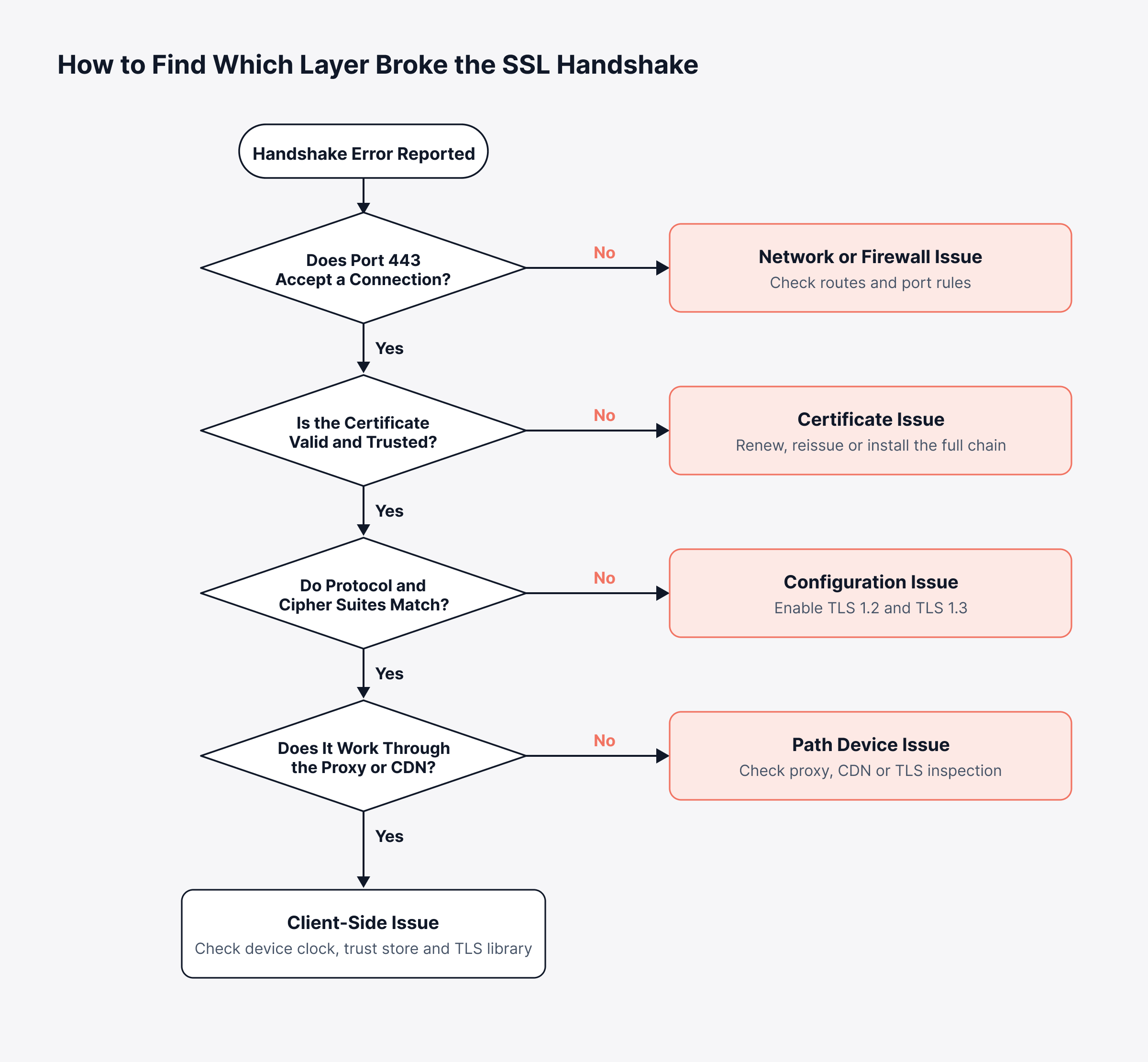
With that flow in mind, work through six checks in order:
Confirm TCP connectivity on port 443: If the port won't open, the issue is the network or a firewall, and traceroute shows where packets stop
Check the certificate: Validity dates, hostname coverage and the full chain
Test protocol versions one at a time: Force TLS 1.2, then TLS 1.3, to see which the server accepts
Compare cipher suites: Make sure the server offers at least one suite the client supports
Verify SNI: Connect with and without the server name to catch a wrong default certificate
Read the server and proxy logs: Web server error logs record the TLS alert and client address for each failed handshake
For the engineers running these checks, the commands below cover most of them from a terminal:
Platform | Command | What it tells you |
Linux, macOS | openssl s_client -connect example.com:443 -servername example.com | Certificate chain, negotiated protocol and any TLS alert |
Linux, macOS | openssl s_client -connect example.com:443 -tls1_2 | Whether the server accepts TLS 1.2 |
Linux, macOS | openssl s_client -connect example.com:443 -tls1_3 | Whether the server accepts TLS 1.3 |
Linux, macOS | openssl s_client -connect 10.0.0.10:443 -servername example.com | Tests the origin directly, bypassing a CDN or proxy |
Linux, macOS, Windows | curl -v example.com | Each handshake step and the exact failure point |
Linux, macOS | curl -o /dev/null -s -w "%{time_appconnect}" example.com | Seconds from start until the TLS handshake finished |
Windows | Test-NetConnection example.com -Port 443 | Whether port 443 is reachable before testing TLS |
Any, with Nmap installed | nmap --script ssl-enum-ciphers -p 443 example.com | Every protocol and cipher suite the server accepts |
Most Linux distributions and macOS include OpenSSL. Windows needs it installed separately, same as Nmap, though curl.exe is built into Windows 10 and 11. If OpenSSL returns the full chain and a verify return code of 0, the certificate is fine and the problem lies in protocol, cipher or client settings.
Most fixes fall into one of these groups:
Renew or reissue the certificate: Then automate renewal with an ACME client so it doesn't lapse again
Install the full chain: Serve every intermediate certificate along with the server certificate
Align protocols and ciphers: Enable TLS 1.2 and TLS 1.3 with modern suites, and plan upgrades for legacy clients
Fix SNI and hostname mapping: Bind each domain to its correct certificate
Handle inspection devices: Add the internal CA to client trust stores, or exempt sensitive services from inspection
Correct client clocks and trust stores: Sync time with NTP and keep operating systems updated
A fast fix helps. Catching it before users do is better. That's what observability is for.
How Can Observability Catch SSL Handshake Problems Early?
Observability catches SSL handshake problems early by putting warning signs like certificate expiry next to the errors and user impact that prove something broke. Done right, operations hears about it before customers do.
Four signals cover most of the risk:
Certificate expiry and status: Days remaining, issuer and validity for every public and internal endpoint
Connection timing: DNS, connect and response times from synthetic monitoring, where a sudden change can point to a handshake problem
Handshake errors in logs: TLS alerts and handshake exceptions in web server, proxy and application logs
User impact: Error rates and slow first loads by region and device, as captured by real user monitoring
Motadata ObserveOps puts these signals in one view, so a certificate problem shows up next to the services it could take down. Public sites and internal services get the same coverage, which is what uptime assurance depends on:
Certificate tracking: Expiry date, remaining days, issuer and status for each endpoint, with metric policies that can alert on remaining days
Connection timing: DNS, connection and response times from URL monitoring, so a slow or failing connection shows up as soon as it starts
Log search: Web server and application logs collected centrally, with log analysis and log policies to flag TLS alerts by host, endpoint or time window
Here's a scenario. An internal payments API has an mTLS client certificate set to expire over a long weekend; with expiry tracked and a remaining-days alert, someone renews it days early. Without that, the first sign is a rise in failed transactions and a long incident call.
Catch Expiring Certificates and Handshake Errors Early with Motadata ObserveOps
A service nobody can reach is down, whatever its dashboards say, and the SSL handshake decides reachability. Shorter certificate lifetimes, mTLS and multi-hop TLS termination all add new ways for it to break. With the steps, the failure signatures and the owner of each fix in hand, incidents get shorter.
One limit applies to every observability platform. It warns you; your CA and automation tooling still issue and renew the certificates. What Motadata ObserveOps adds is that warning, with certificate expiry, connection timing and log errors side by side, so most certificate failures turn into planned work and MTTR stays lower.
FAQs
How long does an SSL handshake take?
On a healthy connection, an SSL handshake usually takes one or two round trips between client and server. That is often a few dozen milliseconds on nearby servers and several hundred milliseconds for distant users. TLS 1.3 and session resumption shorten it noticeably.
What is the most common cause of an SSL handshake failure?
Certificate problems are among the most common causes, especially expired certificates, hostname mismatches and missing intermediate certificates. Protocol or cipher mismatches are another frequent cause, often after a server is hardened while older clients still depend on retired protocols. The error message usually points to which group applies.
Does an SSL handshake happen on every request?
A full handshake happens only when a new connection opens. Keep-alive connections carry many requests over one secure session, and session resumption lets returning clients skip most of the handshake. Pages that open many new connections still pay the handshake cost repeatedly.
Is SSL still used, or has TLS replaced it completely?
TLS has replaced SSL completely, and every SSL version is deprecated because of known security weaknesses. The SSL name survives in everyday terms such as SSL certificate and SSL handshake. Servers today should accept only TLS 1.2 and TLS 1.3.
How can I get alerted before an SSL handshake fails?
Track certificate expiry and remaining days for every endpoint, run synthetic checks against critical URLs, and alert on TLS errors in server logs. An observability platform such as Motadata ObserveOps combines these signals, so expiring certificates and failing connections surface before users report them.
Author
Poonam Lalani
Content Strategist
Poonam Lalani is a B2B content strategist and writer with a background in computer engineering and experience across enterprise technology domains, including AI, cloud, DevOps, data engineering, and IT operations. She specializes in creating research-driven content that simplifies complex ideas and supports product education, thought leadership, and business growth.