All Features
Hybrid Infrastructure Monitoring
URL Monitoring
Ensure a smooth user experience and get alerts when your website goes down with Motadata ObserveOps. Get actionable insights from detailed and rich reports and troubleshoot website issues efficiently.
URL monitoring regularly requests a web address over HTTP or HTTPS and records whether it responds, which status code it returns and how long DNS lookup, connection and first byte take, so teams know when a site or internal app is down or slow. In Motadata ObserveOps it's a service check you can aim at a public site, a login page or an intranet app that never touches the internet.
What Does the ObserveOps URL Monitor Check?
Every poll, ObserveOps sends a GET or POST to the URL and records what came back. That covers more than "is it up":
Availability and status code: Whether the URL answered, and with what (a 200, a 302, a 503).
Content found: A string you choose has to appear in the response. A page can return 200 and still be the wrong page, such as a maintenance notice or an empty template, and this catches it.
Timing: DNS lookup, connection and first byte time, plus total latency, all in milliseconds.
Page size: In bytes. A sudden drop usually means half the page didn't render.
Protected pages work too. Add a username and password in a credential profile, and pass query parameters or custom headers when the URL needs them (there's a JSON toggle for URLs that return JSON rather than HTML).
The difference from website monitoring is mostly scope. A URL monitor watches one address closely. Website monitoring tends to mean the whole site and how real users experience it.
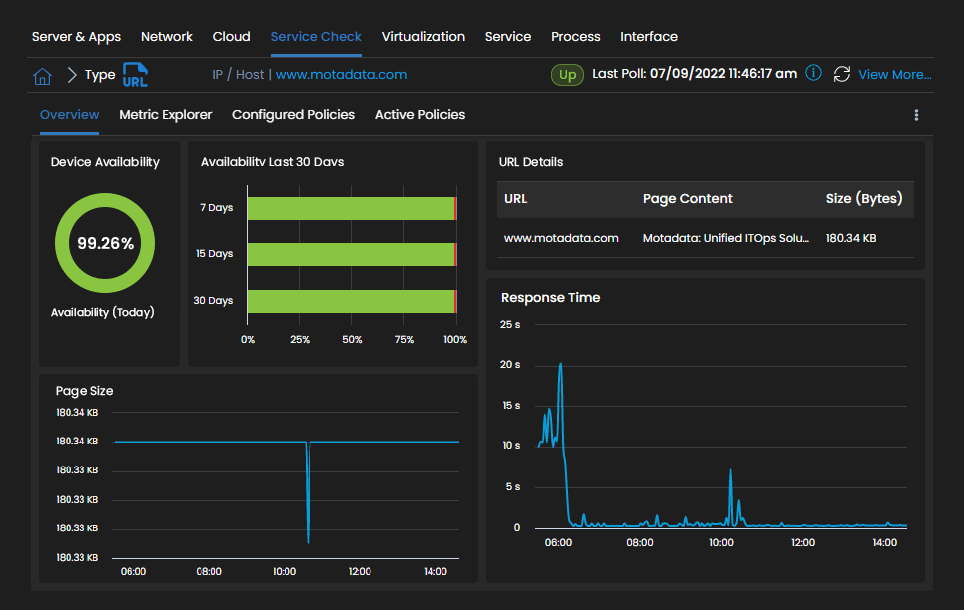
The URL overview below shows today's availability, the 30-day record, the page content and size, and response time over the day.
Break Down URL Response Time into DNS, Connect and First Byte
A slow URL isn't one problem. ObserveOps splits the request into its timed stages, so the stage that's slow points you at the team that owns it.
DNS lookup time: Slow here, and it's your resolver or the DNS provider, not the web server.
Connection time: The TCP handshake. A spike while DNS stays flat often means the network path or a load balancer that's struggling.
First byte time: How long the server took to start answering once connected. This is the one that climbs when the app or its database slows down.
Latency: The full request, end to end.
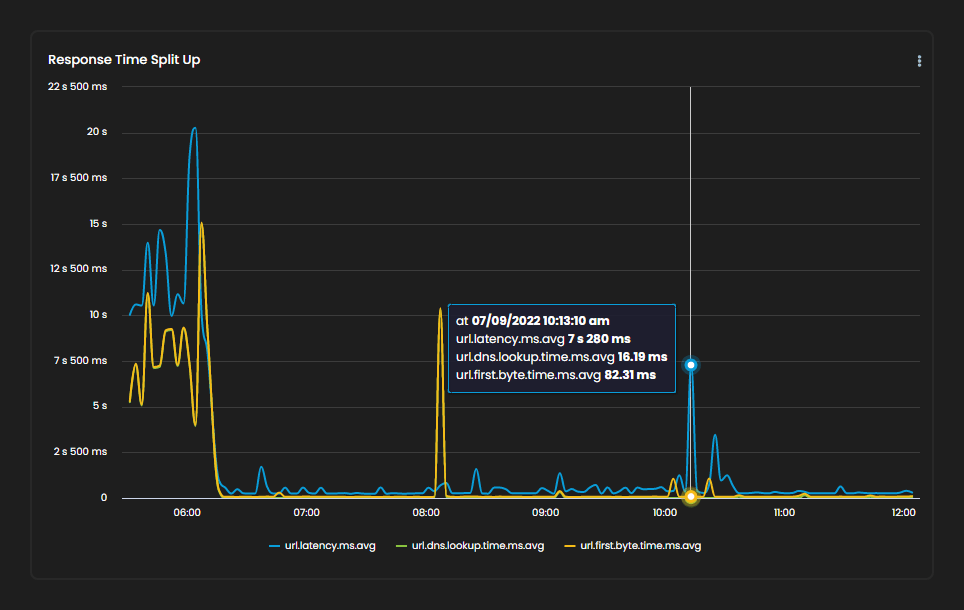
Say total latency jumps to 7 seconds and DNS and first byte are both still in double-digit milliseconds. Then the time went somewhere else, and you can rule out the resolver and the app server before anyone opens a ticket.
The response time split below plots latency, DNS lookup and first byte time on one chart.
Monitor Internal Web Apps and Public URLs from Your Own Collectors
Checks run from the Motadata Collector you pick, or through a MotaAgent installed on a host you choose. So an HR portal, a Jenkins dashboard or anything else that lives behind the firewall gets the same checks as your public homepage, with nothing exposed to the internet to make it work.
For a branch office, run the check from that site's collector and the response time you see is what users there actually get. ObserveOps doesn't run a hosted network of global probe locations, though. If outside-in checks from many countries are what you're after, our roundup of UptimeRobot alternatives compares the hosted tools.
Alert on URL Downtime, Error Codes and Slow Responses
Any URL metric can carry its own thresholds at Warning, Major and Critical. A common setup alerts when the status code isn't 200, when the content string goes missing, or when first byte time crosses a limit you set (2 seconds, for example).
Notify: By email, SMS, Microsoft Teams or Slack, with different teams for different severities.
Open tickets: Critical alerts can raise an incident in Motadata ServiceOps, Jira or ServiceNow.
Look ahead: Anomaly policies flag response times that break from their usual pattern, and forecast policies (after 24 hours of history) project where a metric is heading.
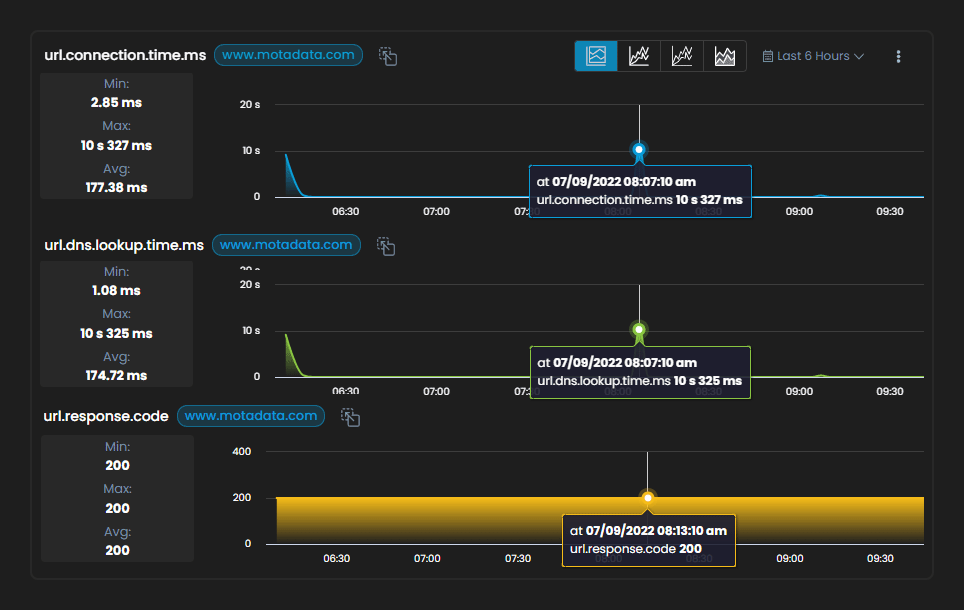
The charts below show connection time, DNS lookup time and response code for one URL over six hours, with min, max and average beside each.
Correlate URL Failures with Servers, APIs and Applications
When a URL check fails, the server behind it is usually already a monitor in ObserveOps. You can even set a URL check's target to that existing monitor, so the check and the host's CPU, memory and service status sit next to each other.
Web servers: Pair the URL with web server monitoring for IIS, Apache or Nginx, and a slow first byte can be checked against request load in a click.
APIs: For endpoints that need response validation beyond a content string, use API endpoint monitoring.
Certificates and domains: SSL certificate and domain checks run alongside, so an expiring certificate shows up before the URL starts failing.
Keep Every Critical URL Up with Motadata ObserveOps
Motadata ObserveOps checks your internal and public URLs over HTTP or HTTPS, confirms the right content came back, and splits every response into DNS, connection and first byte time. Alerts go out by severity and can open ServiceOps tickets.
URL checks sit in the same console as your servers, networks, logs and application performance monitoring. When a login page slows down, the server and the app behind it are a click away.
Run ObserveOps on premises or in your own cloud, on a single server or in distributed, high availability and disaster recovery setups. Collectors can run checks from each site, and your monitoring data stays on infrastructure you control.
Ready to implement URL Monitoring?
Discover how Motadata ObserveOps can help you monitor your infrastructure in real-time and respond to issues instantly.