What Is RMM (Remote Monitoring and Management)?
RMM lets one small team look after thousands of machines nobody will ever physically touch. It grew up inside managed service providers.
The whole category runs on agent-based monitoring, which means a small program sits on every endpoint and phones home on a schedule.
That agent is also why attackers have taken such an interest lately.
In this blog, you'll see:
What RMM stands for, and what the software does once it is installed.
How RMM differs from MDM and UEM, which get confused with it constantly.
Why RMM abuse became one of the fastest-growing attack paths around.
Whether your team needs an RMM at all, or something narrower.
By the end you'll know what the category covers and where it stops.
What Does RMM Stand For?
RMM stands for remote monitoring and management. The software watches endpoints and lets you act on them from somewhere else.
Both halves of the name matter. The monitoring half collects health data off every machine. The management half is where you act on what it found.
A patch goes out to 500 desktops at once. Scripts run against whichever group you point them at. And a technician can take over somebody's screen while they sit and watch it happen.
It began as an MSP tool, and the DNA still shows. Picture a provider looking after forty clients and eight thousand endpoints (mid-sized, give or take). That provider needs one console. Nobody should see anyone else's tickets, so the separation between customers has to be real instead of cosmetic. And a billing export has to land at the end of every month, because the retainer gets invoiced whether anything broke or not.
Internal IT teams adopted RMM later. That accounts for most of the confusion in this category.
Core RMM Features: Monitoring, Patching and Remote Control
Strip away the branding and most RMM products do the same six things.
Function | What it does | Why MSPs wanted it |
Monitoring and alerting | Collects CPU, memory, disk, service and event-log data, then fires alerts on thresholds | Catches the failing disk before the client calls |
Patch management | Scans for missing operating system and third-party patches, then deploys on a schedule | The single most billable recurring task |
Scripting and automation | Runs PowerShell, Bash or packaged scripts across groups of machines | One fix applied to 500 endpoints instead of 500 visits |
Remote control | Opens an interactive session on the desktop, often unattended | Support without a site visit or a scheduled call |
Asset inventory | Tracks hardware, installed software and warranty data | Renewal conversations and license true-ups |
Reporting | Per-client reports, SLA evidence, and usually a PSA or billing hook | Proving the retainer was worth paying |
Remote control separates RMM from everything near it. Plenty of tools monitor a server or handle patch management. An RMM also hands somebody a live desktop session on request (attended or not, depending how the policy was set up).
That capability earns its keep, and it's also the one an attacker wants most.
How an RMM Agent Connects to Your Endpoints
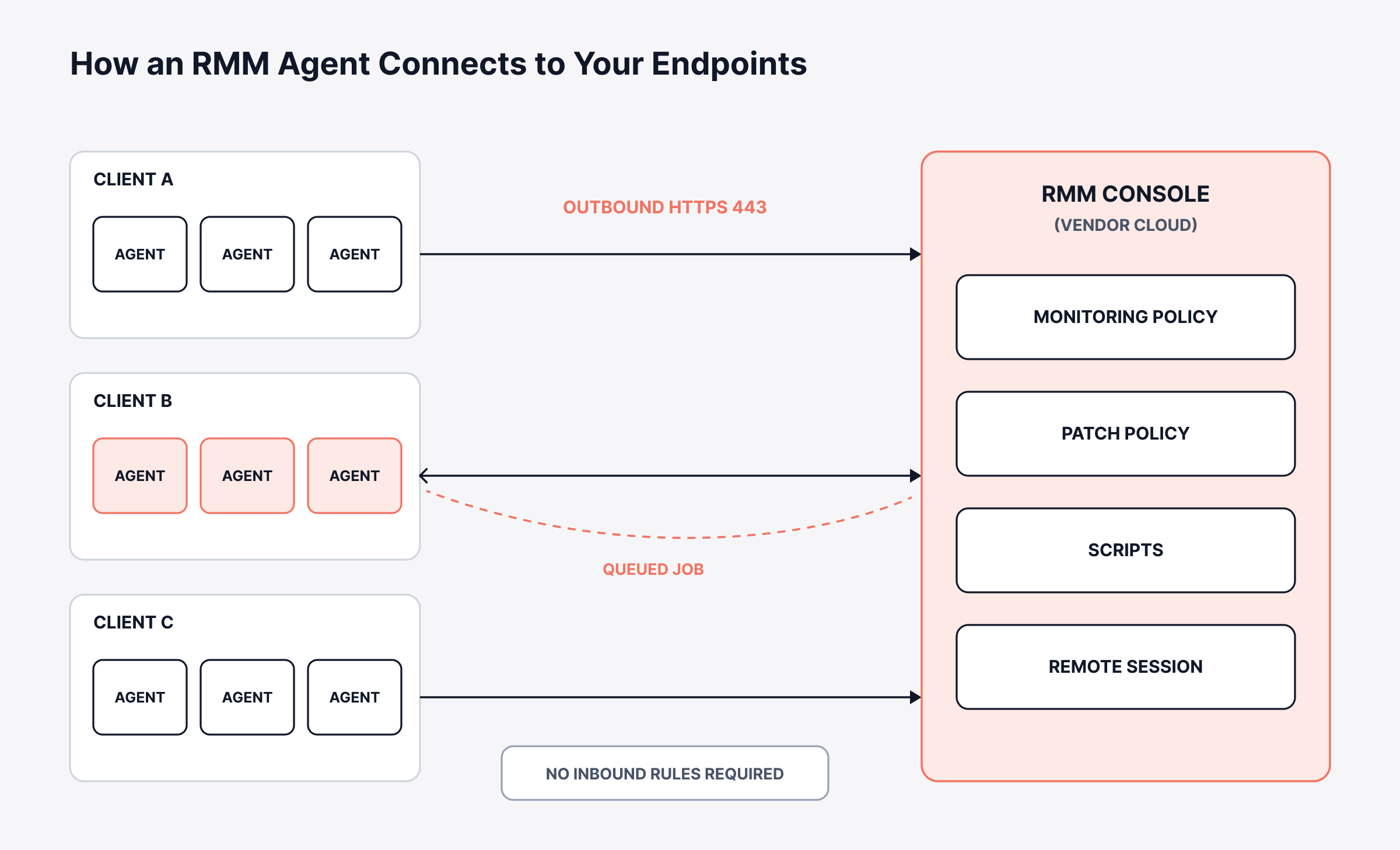
The agent installs on the endpoint. Then it dials out to the vendor's cloud over HTTPS, normally on port 443.
Outbound matters more than it sounds here. No inbound firewall rules get opened. Nothing gets published to the internet at all, which is how the model ended up running happily on machines sitting behind home broadband and hotel wifi.
Once connected, the agent polls for instructions. The console queues a job (install this patch, run this script, start a session). The agent picks it up and reports back when the work finishes.
Policies do the heavy lifting at scale. You group endpoints by client or by site, then hang a patch policy and a monitoring policy off the group. New machines inherit both the moment the agent checks in.
None of this looks exotic, and that's rather the point. The architecture is simple. It arrives signed by a reputable vendor, which is why most networks wave it straight through without anyone stopping to ask what it can do.
RMM vs MDM vs UEM: Which One Do You Need?
Sales conversations swap RMM, MDM and UEM around constantly. The differences are sharper than the pitch suggests.
RMM | MDM | UEM | |
Manages | Servers, desktops and laptops | Phones and tablets | Everything, ideally from one policy set |
How it gets control | An agent you install | OS-level enrollment through Apple or Android APIs | Agents plus enrollment, depending on the device |
Remote control | Yes, usually unattended | Rarely, and normally with consent | Varies by product |
Built for | Service providers billing by endpoint | Mobile fleets and BYOD | Internal IT standardizing on one console |
Multi-tenant by default | Yes | No | No |
Ask who the product was built to bill. The three separate quickly after that. An RMM assumes you're looking after somebody else's machines and have to prove it every month, which is why the billing export is never an afterthought. UEM assumes the machines are yours.
The endpoint management software market is where the enterprise side of that comparison belongs.
Keep one more distinction straight. Remote infrastructure management names the practice of running sites with no local staff. RMM names a product category you might use to do it (people use both terms about the same branch office).
RMM Security: Why Attackers Target These Tools
An RMM gives you signed, trusted, remote code execution on every endpoint you own. An intruder normally spends weeks building that exact capability from scratch.
So attackers stopped building it. According to Huntress research on RMM abuse, remote access tool abuse climbed 277 percent last year.
Their security operations team sees the tactic in almost 40 percent of everything it investigates, and Huntress now ranks it the number one threat across nearly five million endpoints.
Microsoft reported a live example at the end of September 2026. Its writeup on phishing that abuses RMM tools describes attackers installing a second remote-access product alongside the first, so losing one never costs them the foothold.
CISA has been warning about this since its 2023 advisory on malicious use of RMM software, so it isn't new (that one is AA23-025A, and it still reads current). Only the volume has changed, and it's changed sharply.
Why Borrowing an RMM Beats Writing Malware
The appeal comes down to economics. A borrowed RMM arrives finished. Write your own command-and-control and you own that infrastructure forever.
Then, you keep patching it and hiding it and keeping it alive between jobs. A vendor-hosted RMM shows up with all of it already done.
The traffic blends in too. It goes to a legitimate vendor's cloud, carrying a valid signature on a binary your own team might have installed last week.
And nobody questions a remote-access prompt. Users expect IT to ask, which is what makes the social engineering cost almost nothing. One Huntress case describes a user clicking a lure in February, and the attacker waiting until July to sign in, because nobody notices a remote-access tool that already looks like it belongs.
How to Spot a Rogue RMM on Your Network
This gets harder than it sounds, because the attacker uses real software exactly the way it was designed to be used.
Huntress lays out why the usual signals don't separate the two.
Where you'd normally look | Why it fails here |
The install itself | An approved install and a rogue one run the same installer and land in the same folder |
Process behavior | An RMM launched from a browser or Outlook looks wrong, until you remember your own team emails quick-connect links all day |
Network traffic | Rogue installs phone home to the vendor's own infrastructure, exactly like your legitimate ones |
Alert correlation | Stacking weak signals gets you closer without ever getting you certainty |
One question survives all of that, and telemetry cannot answer it. Should this RMM be here at all?
Answering it takes a written list instead of a detection rule. A handful of controls cover most of the ground.
Inventory what's actually installed: Scan the fleet for every remote-access product sitting on it, including the ones you never bought. One RMM is normal. A second or third is the finding that matters.
Write down which tools are approved: Name the products and the versions, say which endpoints may run them, and treat everything outside that list as suspect until somebody proves otherwise.
Block the rest: Application control aimed at remote-access tools beats trying to spot misuse of the ones you allow.
Put MFA everywhere, then check it: Configured and enforced aren't the same state, and only one of them stops anybody. A single gap in remote access is usually enough. Huntress puts the VPN at the top of that list.
Watch your own RMM's audit log: Sessions outside normal working patterns are cheap to alert on. So are new technician accounts and bulk script runs, and all three are painful to miss.
Teams skip that first control, and it's the one that would have caught every case above. IT asset discovery reporting installed software across the estate turns a judgment call into a query you can run.
Who Needs an RMM, and Who Needs Something Narrower
Plenty of teams buy one because the category is familiar. Whether the shape fits is a separate question, and it doesn't often get asked out loud.
If you're a service provider, the answer is almost always yes. Multi-tenancy and per-client reporting come first in that model. Unattended remote control and a monthly billing export finish the job description.
Internal IT teams sit differently. Strip out the multi-tenant and billing layers and the remaining list gets short. Monitoring and patching survive the cut. Asset inventory survives too, along with somewhere to raise the work that comes out of them.
That shopping list is narrower, and it maps onto what we sell. ObserveOps carries monitoring and the multi-site side. ServiceOps handles patching, assets and tickets.
What you need | Where it sits for us |
Endpoint and infrastructure monitoring | ObserveOps, across on-premises, private cloud and public cloud |
Patch deployment, including remote machines | ServiceOps patch management |
Hardware and software inventory | ServiceOps asset discovery and CMDB |
Tickets, SLAs and approvals | ServiceOps service management |
Separate portals per customer or business unit | ServiceOps MSP-ready multi-tenancy |
Remote sites with no local IT staff | ObserveOps multi-site collectors, polling locally and reporting into one console |
Remote control of a user's desktop | ServiceOps RDP module, launched from the asset record |
The remote-control piece is where we'd point you first, given everything above. Sessions record to video. Technicians can be made to type a reason before connecting (the user sees it, and it lands in the audit report). Department heads can be scoped to their own machines only.
Consent is configurable instead of assumed. You can prompt on every session, drop the prompt entirely, or keep it on everywhere except a named list of assets.
Three limits are worth knowing up front. Sessions cap at 90 minutes, the agent covers Windows and Ubuntu workstations, and remote control needs its own module license alongside asset management.
Running several customers off one instance points you at the MSP Edition. ObserveOps monitoring sits underneath it.
Five Questions to Ask Before You Buy an RMM
Feature lists in this category all look identical. What separates the products is duller than any datasheet.
1. How is it licensed?
Per endpoint, per technician and per site produce wildly different bills once you grow. Model each one at three times your current headcount. The cheap option at 200 endpoints is rarely still cheap at 2,000.
2. What happens when the link drops?
Ask whether the agent queues results locally or simply loses them. That one answer decides what your reporting looks like after every outage.
3. How tightly is remote control controlled?
Per-technician permissions, mandatory MFA and session recording are the baseline (ask to see all three running in the demo, not listed on the datasheet). An audit log you can export without opening a ticket is the part vendors tend to skip.
4. Does it cover third-party patching properly?
Operating system patching is table stakes. Browsers, runtimes and PDF readers are where the exposure actually lives, and that long tail is what thins out between products.
5. How does it leave?
Check that your asset history exports cleanly. Check that pulling the agent off a whole fleet is a supported operation with a button behind it, instead of a support ticket somebody has to action by hand.
The audit trail on a remote-control feature is a security control, and treating it as an admin convenience is roughly how every case above started.
Worth asking the vendor how they handle abuse of their own product, too. The serious ones run a fraud team and a takedown process, and they'll happily walk you through both.
Whichever way you go, put the monitoring and the service management on one unified observability and ITSM platform. The alert, the asset it came from and the ticket it raises then live on a single record.
Inventory Your Remote-Access Tools Before You Shortlist an RMM
Before you evaluate a single RMM, find out what remote-access software already runs across your estate. Most teams who look turn up something nobody authorized, and that one finding tends to reframe the whole purchase.
From there the decision gets simpler. Service providers need the full category. Internal teams usually need monitoring, patching and asset management, and the line between the two comes down to who you're billing at the end of the month.
Whatever you buy, treat remote control as the sensitive part. Lock it behind MFA. Record the sessions, and keep the audit log somewhere you'd actually go and look.
The same service desk and endpoint management pairing that speeds up everyday support is what makes that trail worth anything afterwards.
FAQs
What does RMM stand for?
RMM stands for remote monitoring and management. It covers software that watches endpoints and then acts on them from elsewhere, whether that means pushing a patch, running a script or taking over the desktop. An agent on each machine does the work.
Is RMM the same as remote desktop software?
No, though they overlap. Remote desktop tools give you a screen session and little else. An RMM adds monitoring, patching and scripting around that same session. Remote control ends up as one feature out of six.
Do internal IT teams need an RMM, or is it just for MSPs?
Internal teams can use one. They don't often need the multi-tenant and billing layers that make up much of the price. Monitoring, patch management and asset discovery usually cover the actual requirement on their own.
Why are RMM tools a security risk?
They hand out signed, trusted remote code execution on every endpoint. Attackers install a real one instead of writing malware, which costs less and hides better. Huntress recorded a 277 percent rise in remote access tool abuse last year.
How do you detect an unauthorized RMM?
Inventory the remote-access software installed across your fleet, then compare that against a written list of what you approved. Behavior-based detection struggles here, because a rogue install uses the same signed installer as a legitimate one.
Author
Ramya Shah
Technical Writer
Ramya Shah is a technical content writer with a computer engineering background and roots in automotive journalism. He covers IT Service Management, observability, IT operations, and AI-driven automation. An early adopter of AI-assisted writing workflows, he turns complex IT processes into clear, engaging content optimized for search and answer engines (AEO), lifting content output and organic visibility.