All Features
Network Configuration & Compliance Management
Network Compliance Management
Network compliance management is the continuous checking of network device configurations against security benchmarks and internal policies, with remediation and audit reporting. In Motadata ObserveOps, those checks run inside network configuration and compliance management (NCCM), against the configs it's already backing up from your routers, switches and firewalls.
What Is Network Compliance Management?
Most compliance work happens in a burst before an audit, and the months in between go unchecked. Picture a switch that passed its last review cleanly. A month later someone enables Telnet while troubleshooting a port and forgets to disable it, which is easy to do when your attention is on the port. Nothing breaks, so the setting stays until the next audit picks it up (if an attacker hasn't first).
Network configuration compliance closes that window by checking every config on a schedule, not once a year. It builds on network configuration management, since you can't audit a config you haven't collected.
Which Compliance Benchmarks Can You Check Against?
CIS comes ready to use. There are out-of-the-box CIS rules and benchmarks in ObserveOps already, including one for Cisco IOS XE, so a first assessment doesn't need any rules written by you.
CIS won't cover everything your auditors ask about. Custom rules cover your own standards, like a required login banner or an approved NTP server, and each rule has room for the framework behind it: its impact, references and the controls it maps to. That's how a rule written for PCI DSS or SOX carries its citation into the report. For how this runs day to day, see continuous configuration compliance.
How Compliance Policies Work in ObserveOps
The easiest way to follow it is with one real requirement: SSH on and Telnet off for every Cisco switch.
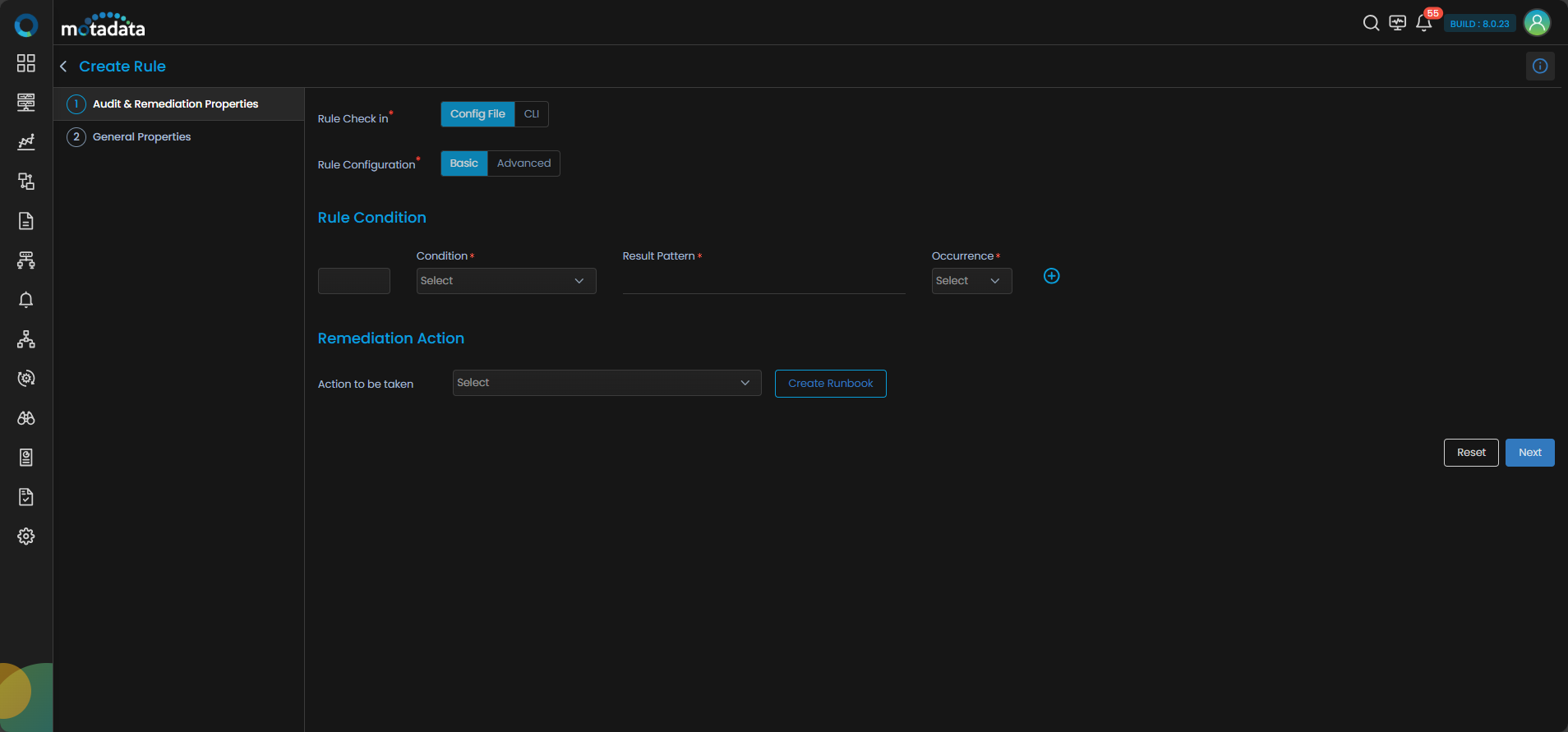
You'd start with a rule. It can read the saved config file or run a CLI command on the device and check the output, which matters for settings that never show up in the config. In Basic mode you tell it what the config should or shouldn't contain, and how many times. Advanced mode looks inside a block, such as one interface section, so a rule can say "every access port needs port security" rather than "port security appears somewhere". Give the rule a severity from Critical down to Info, and it's done.
Rules then go into a benchmark, which is just an ordered set of rules for one technology. A policy puts the benchmark to work:
Policy Setting | What It Controls |
Benchmark | The one set of rules this policy checks |
Config file type | Running or startup config (the two can disagree after an unsaved change) |
Device filter and devices | A category such as routers or switches, then the exact devices in scope |
Schedule | How often it runs, though you can also run it on demand |
Notify team | Who hears about the results, by email, SMS or Microsoft Teams |
The rule screen below shows both choices up front: where the rule checks (config file or CLI) and how deep it looks (Basic or Advanced).
Fix Violations with Runbook Remediation
Finding a violation is half the job. Each rule can carry a runbook, picked from your library or written on the spot, that applies the correct setting. So when the Telnet rule fails on 40 switches, the fix is already attached to the rule and you don't have to write it at 40 different prompts. Run it, and the next assessment should show those devices passing again.
Prove Compliance with Reports
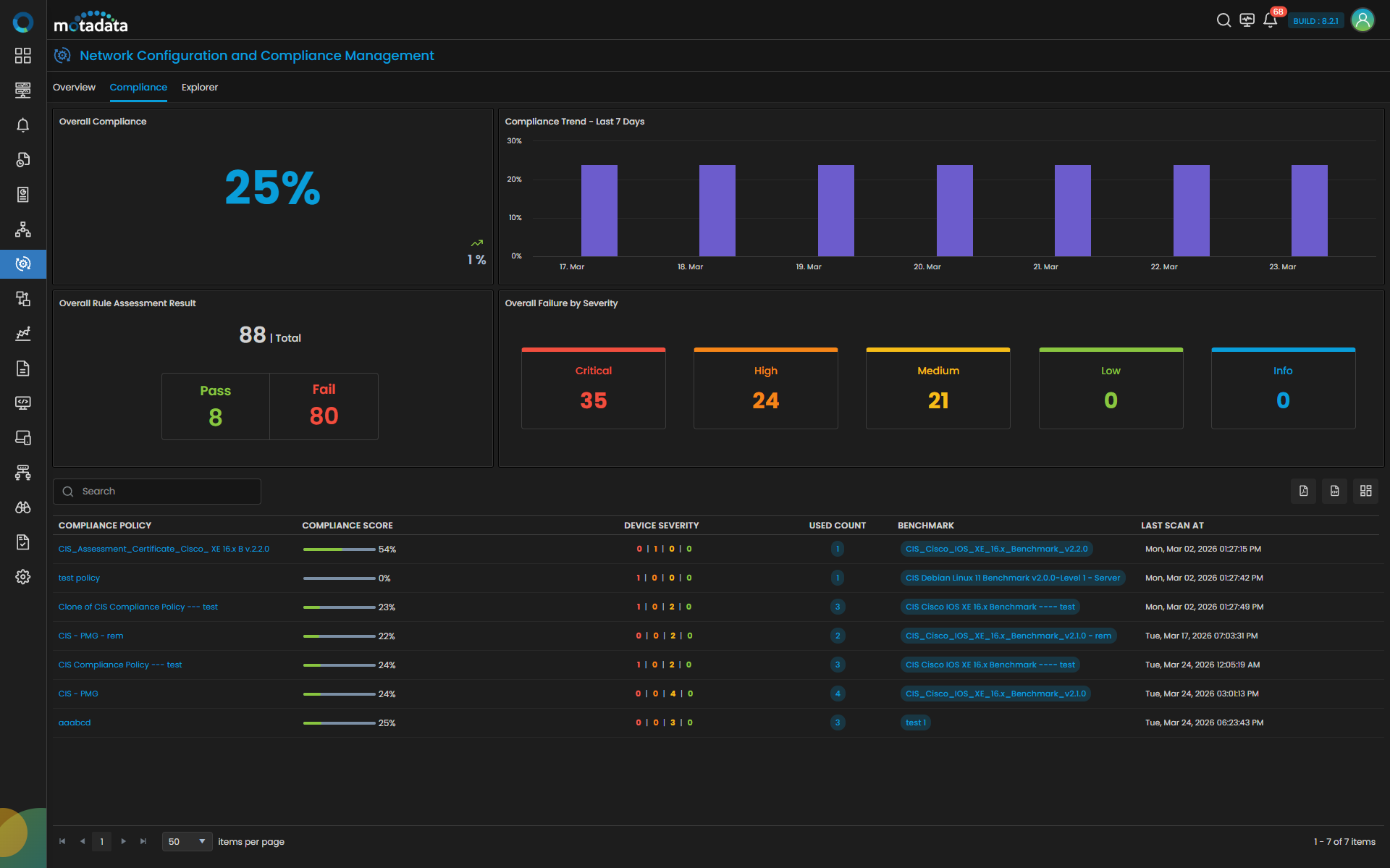
When an auditor asks for evidence, most of it comes from the Compliance tab in NCCM. Up top there's an overall compliance score and its seven-day trend. Below that are pass and fail counts for every rule, and the failures broken out by severity (clicking a severity lists the failing rules and how many devices each one hit). Each device also keeps its own rule results, which is handy when someone asks about one specific firewall.
For the paperwork, compliance reports can be built per policy, scheduled and exported, and the policy's notify list hears about each run. Changes to the configs themselves are tracked in compliance audit trails.
The Compliance tab below shows the overall score, the trend and failed rules by severity, with each policy's score and benchmark listed underneath.
Keep Every Device Compliant with Motadata ObserveOps
Motadata ObserveOps checks your device configs against CIS and your own rules on a schedule, ranks every failure by severity and keeps a runbook ready for each fix. The Compliance tab and its reports give auditors the evidence without a week of spreadsheet work.
Compliance sits in the same console as config backups, change tracking and device monitoring, as part of network observability. So when a rule fails, the config versions you'd compare to find the change behind it are already in the same place.
Run ObserveOps on premises or in your own cloud, on a single server or in distributed, high availability and disaster recovery setups. Your configs and compliance data stay on infrastructure you control.
Ready to implement Network Compliance Management?
Discover how Motadata ObserveOps can help you monitor your infrastructure in real-time and respond to issues instantly.