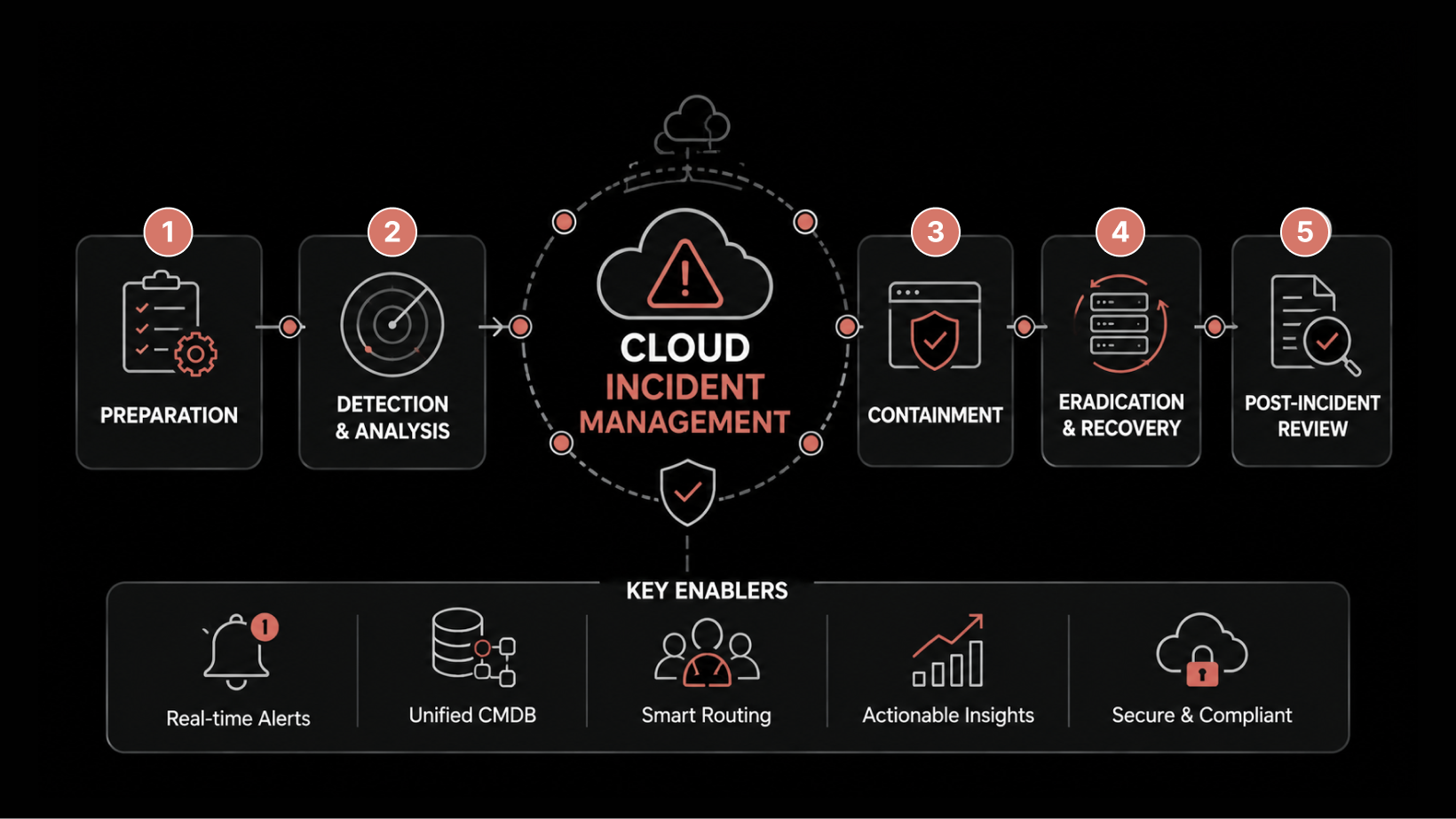
11 Incident Management Best Practices Every IT Team Should Follow
A well-defined incident management process can mean the difference between a minor disruption and a major business outage.
When critical services fail, every minute of downtime matters. Yet many IT teams still face challenges such as unclear ownership, poor prioritization, communication gaps, alert fatigue, and manual processes that delay resolution. The result is longer outages, missed SLAs, and frustrated users.
By following proven incident management best practices, organizations can improve response times, reduce mean time to resolution (MTTR), and deliver more reliable IT services.
In this guide, we'll cover 11 incident management best practices that help IT teams:
Identify and prioritize incidents effectively
Improve coordination during major incidents
Reduce alert fatigue and operational noise
Streamline stakeholder communication
Automate repetitive tasks and accelerate resolution
Prevent recurring incidents and improve service reliability
By the end, you'll have all the best practices for that incident management process.
What is Incident Management?
Incident management is how you get a service back to normal as quickly as possible after it breaks, while keeping the damage to the business contained.
An incident is any unplanned interruption or drop in quality of an IT service.
A payment gateway that times out is an incident. So is a login page that takes nine seconds to load instead of one, even when nothing is fully down.
The scope is narrow on purpose. Incident management cares about speed of recovery, not about chasing the deep cause. That line trips up plenty of teams, so it's worth being clear about.
Incident, Request, and Problem Are Three Different Jobs
These three terms get muddled constantly, and the confusion is costly. A service request is a routine ask with a known answer, such as a new laptop or access to a shared drive. An incident is something that broke and needs restoring. A problem is the root cause sitting behind one incident, or behind a run of them.
ITIL 4 describes the aim of problem management as cutting the likelihood and impact of incidents by finding their causes and handling workarounds.
So fixing a downed service is incident management. A service that has failed four times this quarter is a problem, and it needs its own track. For the full picture, this guide on incident management versus problem management shows where one stops and the other starts.
Blur the two and you get teams that are busy but stuck. They clear incidents all day, never reach the cause, and watch the same incidents come back.
11 Incident Management Best Practices in 2026
These run roughly in the order you'd build them. You don't need all of them in place on day one, though skipping the early ones makes the later ones harder.
1. Define and Categorize Incidents Before the Pressure Hits
You can't sort an incident well at 3 a.m. if you never agreed on the buckets. So agree on them now, while things are calm.
A category answers one question: what kind of incident is this? The common buckets are:
Hardware
Software
Network
Security
Access
Each one routes to a different team with different skills. When an incident is logged, its category sends it straight to the people most likely to fix it, instead of bouncing around the service desk for an hour.
This matters because misrouting is one of the quietest time-wasters in IT. A network incident sent to the app team gets looked at, dismissed, and passed on, and that's thirty minutes gone for nothing. Over a year, it adds up to days of senior engineer time.
The fix is small. Sit down with your team leads, list your categories, write a one-line definition for each, and add them to your ticket form as a required field. Only add sub-buckets where they change who responds.
2. Build a Severity and Priority Matrix You Actually Use
This is the single most useful thing you can build, and most teams either skip it or bury it in a document nobody opens.
Priority is not the same as severity, and it isn't a gut call. It comes from two things:
Impact: how much of the business is affected.
Urgency: how fast it needs a fix.
Put them together in a grid, and the grid tells you the priority. No arguing at 3 a.m. about whether something counts as urgent, because the grid already decided. Here is a working version you can adapt:
Priority | Impact and urgency | Example | Target response |
P1 Critical | Business-critical service down for many users | Checkout offline during peak hours | Within 15 minutes |
P2 High | Major service degraded or many users affected | Email delays across the company | Within 1 hour |
P3 Medium | Limited users or a non-critical service affected | One team's reporting tool slow | Within 4 hours |
P4 Low | Single user or minor issue, easy workaround | One laptop's VPN dropping | Within 1 business day |
When everyone uses the same grid, prioritizing stops being political. The loud requester no longer beats the quiet outage that's costing more, and the team responds in the right order on its own. Teams with no matrix tend to fix whatever was reported last or shouted loudest, so the expensive incidents wait while small ones get attention.
Impact is easier to judge when each incident maps to a configuration management database, because you can see which services sit downstream of the one that broke. Build your own version of the table with your services and your real response times, tie each priority to an SLA so the clock starts on its own, and make it the first thing a responder sees when they open an incident.
3. Assign Roles Before the Incident, Not During It
The middle of a major incident is the worst possible moment to work out who does what. Name the roles in advance so people step into them by reflex instead of negotiating them live, while the clock runs.
For anything above a P2, four roles carry the response:
Incident manager: coordinates and owns the timeline, and stays off the keyboard.
Technical lead: investigates the cause and applies the fix.
Communications lead: handles updates to stakeholders and the status page.
Scribe: records the timeline, the decisions, and the actions taken.
The reason this matters is the silent stretch at the start of most incidents, where everyone assumes someone else has the bridge and nobody actually has it. That gap costs minutes you never get back, on the incidents where minutes are most expensive.
Assign the incident manager role on a rota, so there's always a name attached before the pager goes off. A team that does this stands up a bridge in minutes, rather than losing ten of them to figuring out who's running the call.
4. Reduce Alert Noise So the Real One Gets Through
Most teams aren't short of alerts. They're buried in them, which means the alert that counts shows up inside a flood of ones that don't. Detection only helps while people still trust it, and volume is the first thing that erodes that trust.
The cleanup comes down to three moves:
Alert on what users actually feel, like checkout latency, rather than every underlying metric, like CPU on a single pod.
Correlate related alerts so one outage opens one incident, not twenty separate tickets.
Retire any alert that has never once led to an action, because it's training people to ignore the rest.
The cost of skipping this is a worn-down engineer who stops reading the screen, and that's exactly how a P1 slips past at 2 a.m. Alert fatigue isn't a personality flaw, it's a math problem: enough false alarms and the brain stops paying attention to all of them.
Treat alert tuning as ongoing work, not a one-time setup. Review what fired after every major incident and cut what added noise. This walkthrough on avoiding alert fatigue covers the tuning that gets you from noise back to signal.
5. Make Incident Communication a Defined Job
During a major incident, the technical fix is only half the work. The other half is keeping everyone informed, and if nobody owns that job, it doesn't happen.
The trick is to split your audience in two:
Stakeholders (leadership, affected teams) want the big picture: what's broken, who it affects, and when it will be back.
Responders want every technical detail as it unfolds.
Mix the two and executives drown in logs while engineers miss the one update that mattered. Run them on separate channels, with one person, usually the incident commander, owning the stakeholder updates.
Why does this matter so much? Because bad communication during an outage creates a second incident on top of the first: a flood of duplicate tickets, anxious managers interrupting the responders, and customers who hear nothing. Good communication keeps the panic contained so the technical team can work.
Decide your channels before the next incident, name who owns stakeholder updates during a major one, and keep a simple update template ready: what happened, who is affected, what we're doing, and the time of the next update.
Templates feel like red tape until the night you're glad you didn't have to write one from scratch.
6. Set Clear Escalation Paths, and Know When to Swarm Instead
When the assigned person can't fix an incident, what happens next should never be a guess. Escalation is the rule for who gets pulled in, when, and how.
The traditional way is tiered:
Tier 1 tries first.
If they can't solve it in a set time, it moves to Tier 2.
If Tier 2 is stuck, it goes to Tier 3.
This works well for routine incidents and badly for complex ones, because the incident gets re-explained at every handoff and time bleeds away.
For complex or major incidents, swarming often beats tiering. Instead of passing the ticket up a ladder, you bring the right people together at once and work it in parallel.
The swarm support model keeps everything in one place and cuts the handoff delay that tiers build in. The trade-off is real: swarming pulls several people off other work at the same time, so you save it for incidents where the cost of waiting is higher than the cost of the interruption.
Define both paths in advance. Write your tiered rules with clear time triggers, and write a separate rule for when an incident is big enough to swarm. Then your team never has to invent the response structure in the middle of the response.
7. Give Major Incidents Their Own Process
A P1 that takes the whole business offline shouldn't run on the same workflow as a single-user password reset. Major incidents need a heavier process, and they need it to engage fast, before the impact starts compounding.
A workable major incident process has a few fixed parts:
A clear, cheap, blame-free trigger for declaring one.
The full role set (manager, technical lead, comms, scribe) standing up automatically on declaration.
A dedicated bridge and a fixed update cadence for leadership.
The priciest incidents are usually the ones that start as a P2 at 9 p.m. and quietly become a P1 by midnight because nobody escalated. A low bar to declaration is what stops that slow drift into disaster.
Lower the bar on purpose. A team that declares early and stands down quickly loses a few minutes. A team that hesitates can lose customers, and that's the trade you're really making.
8. Automate Detection and Triage With AIOps
People are bad at looking at dashboards at 3 a.m. Machines are good at it, and this is where automation earns its place.
Automation helps at three points in an incident:
Detect: it watches your metrics and logs around the clock and flags anything odd.
Triage: it groups related alerts, so ten symptoms of one outage become one incident instead of ten tickets.
Act: it can trigger a set response, like restarting a service or paging the on-call engineer, without waiting for a human to notice.
AI-powered Observability platforms add machine learning on top, spotting patterns and predicting failures before they turn into outages.
The case for this is the strongest in the whole guide, because automation goes after the two biggest sources of delay: how long it takes to notice a problem, and alert noise. Cut both and your real mean time to resolution drops, not because people work faster, but because they stop chasing false alarms.
Our guide on the role of automation in incident management goes deeper on the tuning. If you want to see how alert grouping and automated triage hold up against your own alert volume, you can book a ServiceOps demo and walk through it with a real incident flow.
Start small. Automate one thing first: alert grouping, or auto-assignment by category, or a single runbook for your most common incident. Prove it works, then grow from there, rather than trying to automate the whole lifecycle at once.
9. Run Blameless Post-Incident Reviews
An incident is not truly over when the service is restored. It ends only when the team understands what happened and learns from it. A post-incident review (PIR), also called a post-mortem, is the process where this learning takes place. The goal is to understand the event clearly, without blame, so the team can prevent it from happening again.
In a typical review, the team looks back at a few basic questions:
What exactly happened
When did it happen
Why did it happen
What changes would prevent it in the future
The review should go deeper than symptoms. A root cause analysis helps identify the real reason behind the failure, not just what was visible during the outage. The discussion must stay on systems, processes, and decisions, not individuals. When people feel blamed, they stop sharing important details, and the review loses its value.
Repeat incidents are expensive because they waste time, effort, and trust. They show that the organization fixed the issue temporarily but did not fix the cause. Blameless reviews help teams focus on long-term fixes instead of quick patches. This approach, widely used in modern reliability practices, improves system stability over time.
The review should be scheduled within a few days of the incident while details are still fresh. Every finding should result in a clear action item with an owner and a timeline. Without follow-up actions, the review becomes just another meeting instead of a step toward improvement.
10. Track the Define Metrics That Change Behavior
You don't need a dashboard with 40 numbers on it. You need the few that tell you whether response is speeding up and whether the same incidents keep coming back, reported as a trend rather than a frozen snapshot.
Four metrics carry most of the signal:
Mean time to acknowledge (MTTA): how fast someone picks it up.
Mean time to detect (MTTD): how long the problem ran before anyone noticed.
Mean time to resolve (MTTR): how long from start to service restored.
Repeat-incident rate: how often the same thing comes back.
These matter because they're how you show the work to leadership, and how you catch a slipping process before it hardens into a habit. A rising repeat-incident rate, for instance, is a quiet signal that problem management isn't keeping pace with what the reviews are finding.
Pick these few, report the trend so one rough week doesn't read as a crisis, and act on what they show. This breakdown of incident management metrics covers which numbers matter at which maturity stage, so you're not measuring things nobody acts on.
11. Treat Documentation and Knowledge as Live Infrastructure
When an incident hits, the slowest possible start is hunting through scattered docs and old chat threads for the runbook. Documentation only helps if it's current and in one place.
What you want is a single, searchable knowledge base that holds:
Your incident records
Your runbooks
Your known-error fixes
When a responder opens a new incident, the system should surface the article that solved the last one like it. That turns every past incident into a shortcut for the next. The same records also cover your audit and compliance needs, which matters if you work in banking, healthcare, or any regulated field.
The payoff compounds. The first time you write down a fix, it costs you ten minutes. Every time someone reuses it, you save those ten minutes again, and again. A team that documents well gets faster over time, while a team that doesn't solves the same problem from scratch forever.
Pick one central system for records and knowledge, make writing down the fix part of closing an incident rather than an optional extra, and use templates so records stay consistent enough to search later.
What to Avoid During an Incident
A few habits quietly undo good process. Keep an eye out for these, because they surface even in mature teams under pressure.
Blaming a person instead of fixing the system, which only teaches people to hide the next incident.
Closing the ticket before you've confirmed the service is genuinely back to normal.
Letting every alert open its own ticket, so the real incident hides in the noise.
Running the incident through DMs and email, where the timeline scatters and the later review has nothing to rebuild from.
Skipping the post-incident review because you're busy, which all but guarantees a repeat.
Going quiet with stakeholders, since no update reads as no progress, even when you're deep in the fix.
None of these need a tool to fix. They need a process people will actually follow, which is the thread running through this whole guide.
Use These Best Practices for Better Incident Management
The teams that get incident management right aren't the ones with the most tools. They're the ones where every incident follows the same path, every role is known before the alert fires, and every review turns into a fix. That's a process choice first and a tooling choice second.
The honest trade-off is that none of it is free. Defining priorities, running reviews, and tuning alerts takes time your team won't feel it has during a busy quarter.
The ones that make the investment usually win back close to a full day of engineering time each week, and that time goes back into work that moves the business instead of firefighting.
If you want to see how much of the structure a platform can carry for you, you can start a free ServiceOps trial and run a real incident through it with your own team.
FAQ
What is the difference between incident management and problem management?
Incident management restores the service as fast as it can. Problem management finds and removes the underlying cause so the incident stops recurring. A single outage is an incident. The same outage four times in a quarter points to a problem, and that needs its own track. ServiceOps runs both on a shared CMDB, so root-cause findings from a review can move straight into the problem record.
What are itil 4 incident management best practices?
ITIL 4 treats incident management as a practice aimed at restoring normal service quickly while limiting impact. In practice that means consistent logging and categorization, priority based on impact and urgency, defined escalation paths, and a feedback loop into problem and knowledge management. If you're mapping your own stages, it helps to read the ITIL 4 framework in plain terms first. ServiceOps is PeopleCert ATV certified as ITIL 4 compliant across 12 practices, including incident management, so the workflow follows the framework by design.
Who are the key roles in an incident management team?
For anything above a P2, you want four roles: an incident manager who coordinates and owns the timeline, a technical lead who investigates and fixes, a communications lead who updates stakeholders, and a scribe who records the timeline and decisions. The incident manager should coordinate rather than debug, so oversight of the whole incident never slips.
How long does it take to see results from these practices?
The cheap wins (a shared definition, a priority matrix, one communication channel) usually show up within a few weeks because they clear confusion right away. Automation and metric gains take a quarter or two, since you need a baseline and a few cycles of tuning. Most teams feel the coordination improvement first and the MTTR improvement second.
Author
Jagdish Sajnani
Senior Content Strategist
Jagdish Sajnani is a B2B SaaS content strategist and writer. He has experience across different B2B verticals, including enterprise technology domains such as IT Service Management, AI-driven automation, observability, and IT operations. He specializes in translating complex technical systems into structured, engaging, and search-optimized content. His work improves product understanding, strengthens organic visibility, and supports B2B demand generation.