What Network Infrastructure Management Involves and How It Keeps Every Site Running
Why does the help desk still hear about network problems before the network engineers do, even with every router and switch under monitoring? In most cases the alert does its job, and the hours go into what comes after it. Tracking down who last touched the config takes time, and so does checking the switch's vendor support and how close that branch link is to capacity.
Networks also no longer behave like a single system. Firewalls, cloud networking and SD-WAN each have their own console, and the small gaps between them turn into outages and failed audits.
Network infrastructure management is what brings all of it back under one set of processes. Think of it as the network half of broader IT infrastructure management. Here's what this blog walks through:
What network infrastructure management covers: Scope, network types and OSI layers
The five core functions: FCAPS explained one function at a time, plus a sample Cisco IOS checklist
What the work looks like on a calendar: A task calendar running from daily alert checks to a yearly architecture review
How to build the program: Six steps in the order we would run them, plus the in-house or managed services question
Tools and metrics: The parts of a network infrastructure management system and the numbers that prove it is working
What is Network Infrastructure Management?
Network infrastructure management is the planning, setup, security and upkeep of every device, link and service an organization's data depends on.
People often mix the term up with network infrastructure itself. The infrastructure is the equipment. Management is the work done on it, across three groups of assets:
Physical infrastructure: Routers, switches, firewalls, access points, cabling, racks and power
Logical infrastructure: VLANs, subnets, routing, IP plans, access lists and VPN tunnels
Network services: DNS, DHCP, NTP, authentication and carrier circuits
The groups overlap in practice. A single deny line in an access list can look exactly like a cut cable from the user's chair.
What are Examples of Network Infrastructure?
Examples of network infrastructure start in the wiring closet on any floor of any office. The software that steers traffic over that hardware counts too, and most mid-sized companies run all of the following network devices and services:
Switching and routing: Core, distribution and access switches, plus branch routers
Security devices: Firewalls, VPN concentrators and 802.1X network access control
Wireless: Access points and their controllers
Transmission media: Copper, fiber and carrier circuits
Software and services: Network operating systems, DNS, DHCP and SD-WAN
Each item there comes with its own firmware, its own settings and a date when vendor support ends. That's why step one in any management program is an inventory you can actually trust.
Which Types of Networks does Network Infrastructure Management Cover?
A typical enterprise asks network infrastructure management to look after seven types of networks, each with different priorities:
Local area network (LAN): Wired switching in offices and on campus; trunk and VLAN mistakes cause most of the outages here
Wireless LAN (WLAN): Access points and controllers, judged on coverage and roaming
Wide area network (WAN): MPLS, broadband and 4G or 5G circuits between sites
SD-WAN: Policy-driven overlays across several links
Virtual private network (VPN): Remote-access and site-to-site tunnels
Data center network: Server and storage switching, usually built in pairs and only touched inside a planned change window
Cloud networks: Virtual networks, gateways and security groups, where you can see only as much as the provider's logs and metrics expose
Most companies run several at once. Every type you add means one more console and one more way of making changes. Run three or four of them and a single inventory, plus a single rulebook for changes, stops being a nice-to-have.
How is Network Infrastructure Management Different from Network Monitoring and Observability?
Network monitoring spots problems, network observability explains them, and network infrastructure management decides what happens next. Suppose a link hits saturation.
Monitoring flags it. Observability then works out why, lining up flows, logs and topology until one application at one site stands out. Management is the last step, choosing between rerouting, a new quality of service policy or buying more bandwidth.
Aspect | Network monitoring | Network observability | Network infrastructure management |
Main question | Is a device or link down? | Why is one branch slow? | Do we need new switches, and can we afford them? |
Data used | SNMP counters and ping | Flows, logs, metrics and topology | All of that, plus assets, standards, changes and budget |
Time horizon | This minute | This minute, and the weeks before it | Years, across each device's working life |
Output | A red status and an alert | A named cause and the services it hit | Signed-off changes, budget lines, standards and risk calls |
Typical owner | NOC shift | Network and operations engineers | Network manager and architects |
Monitoring supplies the signal and observability explains it. Without someone managing the response, the same alert comes back next month, and the month after that.
Why does Network Infrastructure Management Matter to the Business?
Network infrastructure management matters because the business runs on the network, and a good share of outages come down to how it's operated. Hardware breaks, of course. Process gaps cause plenty of the disruption too, and the cost of downtime climbs with each hour a site or service is offline.
In Uptime Institute's 2025 outage analysis, IT and networking issues accounted for 23% of impactful outages in 2024, a rise Uptime linked to change management problems and misconfigurations in more complex environments. Its 2026 report adds that staff skipping established procedures remains the top cause of outages blamed on human error. When the network is managed well, the business gets four things back:
Fewer and shorter outages: A bad change gets reversed quickly, since every change was reviewed and the previous configuration saved
Audit readiness: When an auditor asks for configuration standards or change records, they already exist
Predictable spending: Refresh dates and capacity trends go into the annual budget, and hardware purchases get planned ahead of failures
Lower security exposure: Unsupported firmware, open management ports and weak protocols are found and closed on a schedule
Take a retailer with 60 stores, each with one router and one switch. An overnight firmware upgrade goes through cleanly in 58 stores, but two open the next morning unable to take card payments. Where the old configurations were backed up and the change logged, an engineer restores both stores remotely.
Where they weren't, someone drives out to each site while sales are lost. Either way, the first job is finding which layer the fault is in, usually starting with the cable.
Which Network Layers does Network Infrastructure Management Cover?
Of the seven layers in the OSI model, network infrastructure management deals with the bottom four, known as L1 to L4. Anything higher is usually the application team's problem.
Layer | What you look after | What tends to go wrong |
L1, Physical | Keep cable records current, check optic light levels and label every port | A damaged cable throws interface errors, or a link keeps dropping |
L2, Data link | Keep trunks carrying only the VLANs they need and run spanning tree everywhere | A loop floods a floor with broadcast traffic within seconds |
L3, Network | Maintain the IP plan, review route policy and audit access lists | A flapping OSPF neighbor or a duplicate IP takes a subnet offline |
L4, Transport | Tune firewall rules and session limits, and mark voice and video traffic for priority | Retransmissions climb, the session table fills and calls start to break up |
Nobody calls the help desk about spanning tree. They call about a slow app or a login that hangs, and checking the four layers in order is how network troubleshooting finds the real cause. The five functions below are about stopping those faults before anyone notices.
What are the Five Core Functions of Network Infrastructure Management?
Network infrastructure management is usually split into five core functions. You'll see them written as FCAPS, for fault, configuration, accounting, performance and security management. The acronym comes from ISO and ITU-T network management standards.
1. Fault Management
Fault management starts the moment something breaks. The goal is a fix in place before users start opening tickets, and the job ends only when the cause is fixed and written down.
Detection: Polling devices with SNMP, the standard protocol for reading device health, and ICMP, the protocol behind ping, plus alerts and log messages that devices send on their own
Correlation: Fifty alerts from one failed uplink become one incident with one cause
Isolation: Topology separates the device that failed from the dozens that only lost their path through it
Resolution and record: The fix, plus a written cause and action for the post-incident review
Two signs tell you fault management is working. The right person hears about a problem fast, and the same fault doesn't keep coming back. For the business, that adds up to shorter outages and engineers who aren't fixing the same thing every month.
2. Configuration Management
Network configuration management is the record of what every device is set to, and of who changed what and when. One mistyped VLAN on a trunk port can cut off a whole floor, which is why so many outages start with configuration. A mature practice, covered in our guide to configuration management, includes:
Golden configurations: An approved template for each device role, such as branch router or core switch
Automated backups: A saved copy before and after each change, and another on a fixed schedule
Version comparison: Who changed what, and when, shown line by line
Drift detection: An alert as soon as a running configuration no longer matches its approved baseline
Rollback: A way back to the last known-good state that has actually been tested
Firmware falls under this function too. Old firmware brings crash bugs and published security holes with it. Give each upgrade the same approval and backup as a config change, and keep the records within reach for the auditors.
3. Accounting Management
Accounting management tracks who uses the network, what it costs to run, and the inventory and contracts behind it.
Usage tracking: Bandwidth by site, application or department, usually drawn from flow records that routers and switches export
Asset records: For every device, the model, serial number, location, owner and warranty
Contract and support dates: Carrier circuit terms, maintenance agreements and each vendor's end-of-support date
Cost allocation: Network costs shown or charged back to business units
Linking these records to hardware lifecycle tracking means refresh planning starts from facts. It also surfaces support contracts that have lapsed on devices still in service, before a failure does.
4. Performance Management
Performance management asks whether the network is fast enough for the applications that run across it, a narrower question than uptime. A link can stay up for weeks while dropping enough packets to make voice calls stutter.
Latency: How long traffic takes to cross a link or path, measured in milliseconds
Packet loss: Traffic that never arrives, as a percentage of what was sent
Jitter: Variation in delay; voice and video suffer first
Utilization: Interface and circuit load, watched most closely at peak hours
Errors and discards: Interface counters that often point to a failing cable or optic
Dedicated performance monitoring judges each number against what that particular link normally does, and slow drift shows up early. Slow links rarely produce an outage report. They do cost productivity, though, in every video call and cloud application that has to cross them.
5. Security Management
Security management has two halves, keeping the network devices themselves safe and deciding what traffic may pass through them. Network infrastructure security even has its own control in the CIS Controls. Control 12 lists eight safeguards:
Keep network infrastructure up to date
Establish and maintain a secure network architecture
Securely manage network infrastructure
Establish and maintain architecture diagrams
Centralize network authentication, authorization and auditing
Use secure network management and communication protocols
Ensure remote devices use a VPN and connect through the enterprise's authentication infrastructure
Establish and maintain dedicated computing resources for all administrative work
In practice, management traffic runs over SSH and SNMPv3, and every administrator signs in with a second factor. Admin sessions start from a hardened jump host or a separate management network instead of a laptop on the user VLAN. Segment the network as well; a compromised device then gives an attacker very little else to reach.
Here are six of those safeguards written as Cisco IOS checks, with placeholder addresses:
Check | What the running configuration should show | Why it matters |
SSH-only management | transport input ssh on the vty lines | Telnet sends the login in clear text |
SNMPv3 only | No snmp-server community lines | v1 and v2c community strings act as shared, unencrypted passwords |
Hashed enable password | enable secret present, enable password absent | Anyone with a copy of the backup can read a plain enable password |
Central logging | logging host 10.0.0.10 | Without syslog on a central server, there is nothing to detect changes from or show an auditor |
Time sync | ntp server 10.0.0.20 | When clocks drift, log entries from two devices can't be lined up during an incident |
Login banner | banner login present | Many audit policies ask for a legal notice before anyone signs in |
Because every check is a simple search for one line, software can run all six across every saved config overnight. Compare that effort with the cost of a breach through an unpatched firewall or a shared admin password. Next comes the question of timing.
What does Network Infrastructure Management Involve Day to Day?
Network infrastructure management involves work that repeats on five different cycles, from a daily look at alerts to a yearly architecture review. A shared calendar keeps any of it from resting on one engineer's memory.
Cadence | Core tasks | Usual owner | Output |
Daily | Check overnight alerts and last night's backup jobs, look at WAN and internet circuits, triage what came in | On-call engineer or NOC shift | Owners on every new incident, failed backups rerun |
Weekly | Scan the week's change log, failed changes too, check configs for drift and chase down any device that isn't in the inventory | Network engineers | Drift fixed, inventory current |
Monthly | Decide which patches and firmware go out, look at capacity trends, run the compliance report | The network lead | A patch plan, a short list of links to watch and this month's compliance score |
Quarterly | Run a failover test and a test restore, prune admin accounts, hold providers to their service levels, update diagrams and docs | The network manager | Proof that failover and restores work, fewer stale accounts, diagrams that match reality |
Annually | Step back and review the architecture, schedule refreshes for gear near end of support, send numbers to the budget process, revise policies | The network manager and IT leadership | A refresh roadmap, an agreed budget, updated standards |
Take a logistics company running 25 warehouses. On one morning's check, a warehouse circuit shows up as degraded. Monthly trend reports then show the head office internet link creeping toward capacity, while the annual review moves nine switches nearing end of support into next year's refresh budget.
Every finding arrives with time to plan, and the quarterly network documentation update keeps the diagrams current. No single task here is hard. Over a few years, though, the log of those tasks shows exactly how old and how healthy each device is.
How does the Network Infrastructure Lifecycle Work?
The network infrastructure lifecycle has four stages. What comes out of one stage is what the next one starts from. Network lifecycle management is there to stop devices from skipping a stage, especially the last:
Plan and design: Requirements and network design, including redundancy, security zones and room to grow
Deploy and baseline: Install, apply the golden configuration, add the device to inventory and monitoring, then capture a performance baseline
Operate and change: The longest stage, covering monitoring, incident response, patching and controlled changes for as long as the device is in service
Refresh and retire: Replacement before end of support, secure removal of stored configurations and credentials, and removal from inventory and contracts
Close the loop by feeding what you learn at retirement into the next design. In the timeline below, look at how much longer the operating stage runs than the others, and at what each stage passes on.
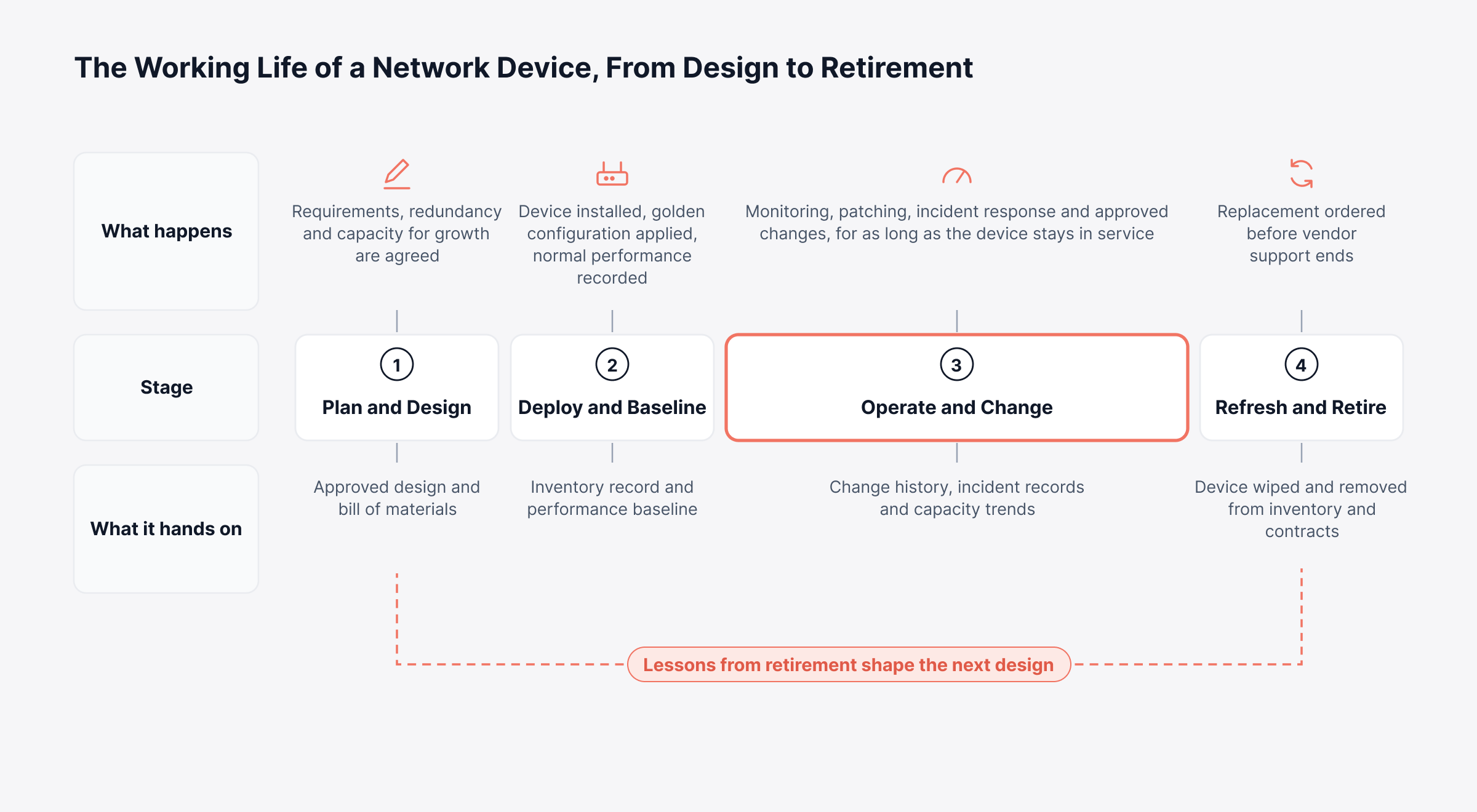
Retirement is a stage many programs skip. Switches past their support dates stay in service mostly because nobody is ever asked to decide. A structured program schedules that decision the same way it schedules everything else.
How do You Build a Network Infrastructure Management Program?
A network infrastructure management program is best built in sequence, since every step needs data from the one before. For anyone working out how to manage network infrastructure from scratch, here's the order that tends to work.
1. Discover and Inventory Every Device
Start with an automated discovery scan that covers every subnet and site. SNMP and ICMP turn up the devices, while neighbor protocols like CDP and LLDP get each one to report what it's plugged into. Note the model, serial number, firmware version, location and owner of each.
Manually maintained spreadsheets go stale fast. Schedule regular rediscovery and flag any device that turns up without a matching record.
2. Map Topology and Service Dependencies
Next, build Layer 2 and Layer 3 maps from the discovery results and mark the business services that depend on each path. Automated topology mapping keeps them current as the network changes. Once the map is accurate, you can group alerts from everything behind a failed link under that one link, which sends engineers straight to the cause.
3. Set Baselines and Service-Based Alert Rules
Collect a few weeks of performance data before setting any threshold. That way alerts reflect what normal looks like on each link. Then tie alert priority to the service each device supports:
Critical: Core, data center and internet edge devices, which page the on-call engineer at once
High: Branch routers and WAN links, which alert the on-call engineer during the shift
Standard: Access switches and wireless access points, which queue for business hours
Keeping urgent pages rare this way means engineers still treat each one as urgent.
4. Put Every Configuration Under Version Control
Every device should have its configuration backed up on a schedule, plus once more right before any change. Keep the older versions as well. When an overnight change fails, the on-call engineer can restore the last good copy from the automated configuration backups and close the incident.
Every change, from a single VLAN edit to a core router upgrade, should pass through the same checkpoints. Below, the steps inside the maintenance window are drawn apart from the two ways a change can end.
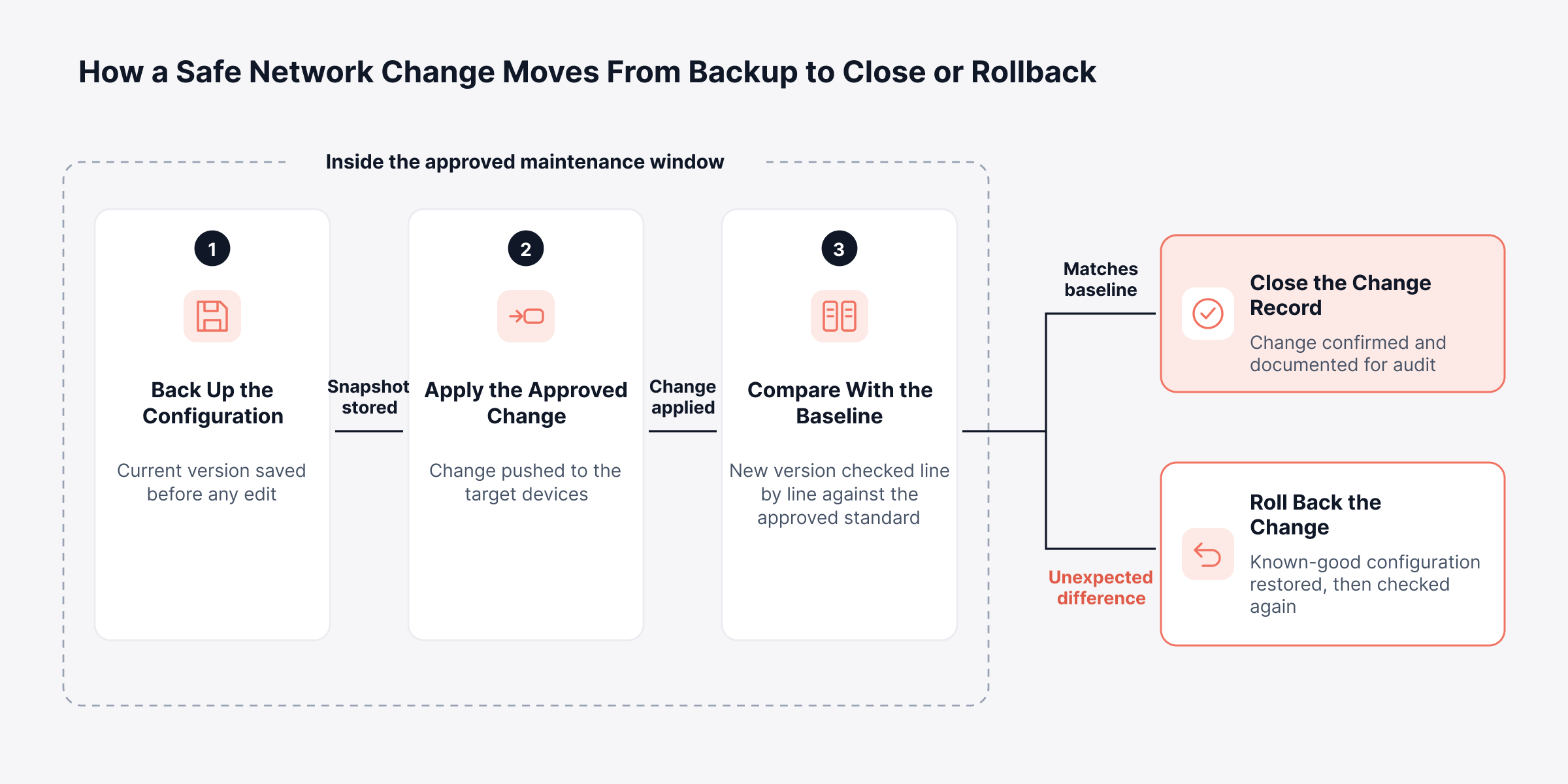
Uptime's misconfiguration finding is the reason this step comes so early. Changes you can compare and reverse quickly rarely grow into long outages.
5. Link Network Changes to Change Management
Run production network changes through the change process IT already uses, with a risk rating, an approver and a maintenance window. Small, routine jobs like moving an access port onto a VLAN can be pre-approved.
For help setting risk categories and approval paths, see our guide to change management practices. Once network changes go into the same log as server and app changes, any incident can be traced back to whatever changed just before it.
6. Review Capacity and Lifecycle Data with Budget Owners
Hold a review with finance and the service owners every quarter. Show them utilization trends, the devices close to losing vendor support and the sites where incidents keep coming back. Good capacity planning turns that review into purchase dates, so nobody orders a circuit in a panic.
Network capacity planning also hands you the answer before leadership even asks why the budget moved. Get these six steps working first. Compliance automation and most other network infrastructure management best practices depend on them.
Should You Manage Network Infrastructure In-House or Use Managed Services?
There is more than one way to staff network infrastructure management. Your own engineers, a managed service provider or a mix of the two can all work. Network size decides a lot of it, along with the skills on staff and how much control the business wants over changes.
Model | Fits best when | Points to settle first |
In-house | Large or regulated networks with senior network engineers on the payroll | Night cover, skill gaps, tool licenses |
Fully managed services | Small IT teams, or 30 branch sites with no local staff | Change approval rights, data ownership, exit terms |
Co-managed | Design and changes stay with you, monitoring and night calls go to the provider | Who owns what, shared tooling, escalation |
Get three answers written into any contract for IT infrastructure and network management services. They cover who holds the configuration backups, whose platform stores the monitoring history and how quickly the provider responds at each severity level. If you have many small sites, our guide to remote infrastructure management deals with locations that have no IT staff.
Should Network Management be Centralized or Distributed?
With centralized network management, every site runs on one platform and one rulebook. Patching, compliance and reporting all get easier (until the central platform or its WAN links fail and every site goes dark at once). Go regional and you avoid that single point of failure, but expect each region's standards to wander off on their own.
Lots of companies end up somewhere in the middle. Policy and data stay central, each region gets a local collector, and data keeps arriving even if a region's WAN link to headquarters drops. For that to work, every tool has to share one view of the network.
What Tools Make Up a Network Infrastructure Management System?
A network infrastructure management system is really a set of tools, bought separately or as modules of one platform. Each kind handles part of the FCAPS model.
Tool category | What it does | FCAPS area |
Network management system (NMS) | Polls devices, listens for SNMP traps and pages someone when a limit is crossed | Fault, performance |
Configuration and compliance management (NCCM) | Config versions and diffs, pushed updates, policy audits | Configuration, security |
Flow and traffic analysis | Bandwidth by user and application, from NetFlow, sFlow or IPFIX | Performance, accounting |
Discovery and topology mapping | Finds forgotten devices; maps how everything connects | Fault, configuration |
IP address management (IPAM) | Prevents duplicate addresses and keeps DNS and DHCP in line with the plan | Configuration, accounting |
Log management | Syslog and firewall logs, searchable during incidents and audits | Security, fault |
IT service and asset management | Runs incidents and changes and keeps each device's lifecycle record | Accounting, configuration |
When people ask for the top network monitoring tools, they usually mean the first row, and our comparison of network monitoring software reviews the leading options. Whatever mix you buy, your network infrastructure management tools should leave no row in that table empty.
How do You Choose Network Infrastructure Management Software?
Trial any network infrastructure management software on your own devices and through your own change process before you buy it. The questions below help tell a good fit apart from a long integration project:
Vendor coverage: Will it handle every router, switch, firewall and wireless model you own, older ones included?
Shared data: One inventory for monitoring, configuration and topology, or a separate one per module?
Change safety: Backup before the change, a diff afterward and rollback in one step: does it do all three?
Service context: Can alerts open tickets with device details attached, and can changes link to change records?
Deployment fit: On-premises, SaaS or both, and how does it reach a branch with one router and no server?
Licensing: Per device, per interface or per module. Ask for a quote at today's device count and at double it.
Which Metrics Show Network Infrastructure Management is Working?
To tell whether network infrastructure management is working, look at two kinds of metrics, the service users actually get and the health of the processes behind it. Track both.
Metric | What it shows | Healthy direction |
Availability by site and service | Whether users could reach their services | At or above the agreed level |
Mean time to detect (MTTD) | Time from fault to first alert | Falling, and ahead of user calls |
Mean time to resolve (MTTR) | Time from first alert to service restored | Lower each quarter |
Change failure rate | Changes that ended in a rollback or incident | Falling |
Configuration compliance score | Devices matching the approved standard | Rising |
Backup coverage | Devices with a current backup | Every device, every cycle |
Devices past end of support | Hardware the vendor no longer patches | Each with a replacement date |
Peak utilization on key links | Headroom at the busiest hour | Enough for planned growth |
Review network availability and the other service metrics with IT leadership every month. Inside the network function, look at backup coverage, change failure rate and the other process numbers every week. When they stall, the cause is usually one of the challenges below.
What are the Common Network Infrastructure Management Challenges?
Most network infrastructure management challenges come from growth, as networks pick up more sites, more vendors and more people making changes. Each one has a practical fix:
Tool sprawl: Separate consoles for monitoring, configuration and wireless hide the links between events. One shared inventory lets an engineer see a config change and the alert it caused on the same screen.
Undocumented changes: Changes made at speed during an outage are the ones most often left out of the change log. Configuration backups with automatic comparison expose every change, approved or not.
Multi-vendor complexity: Every vendor brings its own command syntax and its own firmware schedule. Templates per device role and a single policy library keep standards consistent.
Hybrid and cloud blind spots: Cloud networking and SaaS paths fall outside data center tools. Extending path and flow visibility through cloud network monitoring restores the full view.
Alert noise: One failed uplink can trigger hundreds of alerts from the devices behind it. Topology-aware correlation shows the root device first.
Aging hardware: Devices past end of support stay in service when nobody budgets their replacement. Tie the lifecycle review to the budget cycle.
Thin staffing: A small network function can't watch every hour of every day. Automating backups, compliance checks and routine changes frees engineers for design work.
How are Automation and AI Changing Network Infrastructure Management?
Network automation and AI help network infrastructure management most with the repeatable checks nobody enjoys running and with catching odd behavior before it becomes a ticket. Judgement calls stay with your engineers. The routine evidence gathering, though, is moving to software.
Configuration automation: Most change errors begin with a manual step. Templates, scheduled backups and bulk changes take many of those steps away.
Learned baselines: A fixed 80% threshold means little on a link that normally runs at 85%. Anomaly detection learns each metric's own history and flags drift from it.
Policy checks: Compliance rules run against every saved configuration, nightly if you like, and a violation turns up weeks before the auditor does
What decision-makers get out of this is capacity. A lean network function can cover more sites and devices while headcount grows more slowly.
How does Motadata Support Network Infrastructure Management?
We split network infrastructure management across two products. ObserveOps watches the network and controls configurations. ServiceOps holds the incident, change and asset records, and because both products share them, every FCAPS function works from the same inventory and history.
1. How Motadata Keeps the Network Inventory and Map Current
In ObserveOps, we start with a discovery profile for each device group, from routers and switches to firewalls, wireless devices and WAN links. Our topology scanner then runs once or every day, week or month. Each scan rebuilds the map in our network management system, using CDP and LLDP for Layer 2 and OSPF, BGP and IS-IS for Layer 3.
We designed the map for incidents. If a distribution switch goes red, you can see right away that the devices beneath it went down with it. Before a planned reboot, the same map shows which devices depend on the switch you're about to touch.
2. How Motadata Makes Configuration Changes Reversible
We back up running and startup configs on a schedule, and you can take one more just before any change. Point device syslog at ObserveOps as well, and any config edit it records triggers an immediate backup. The previous version or the approved baseline stays available to restore.
We built the NCCM Approval role so that restores, config syncs, runbook runs and firmware upgrades requested by other users wait for a senior engineer's sign-off, and we log every request. Firmware upgrades, including bulk changes across vendors, run from each device's template commands, now or on a schedule.
3. How Motadata Turns Compliance Policy into Scheduled Checks
Each of the six IOS checks from the security section can become an ObserveOps compliance rule, a text pattern that the running or startup config Should Contain or Should Not Contain. We also ship ready-made benchmarks for common platforms.
Most teams run the policy nightly, plus one extra run in the week before an audit, and our compliance reports go to auditors as they are. Our NCCM documentation covers each setup screen for backups, restores, rules and approvals step by step.
4. How Motadata Finds WAN and Path Problems Before Users Do
A branch office can lose call quality while its WAN link still reports as up. Many enterprise routers already run IP SLA operations to measure exactly this, and we discover them over SNMP or SSH. Each link then gets an ICMP Echo, ICMP Jitter or ICMP Path Echo probe for response time, jitter, loss, two-way latency or per-hop timing.
We built NetRoute to extend the view to the full path. Its route history records each change of route, and a slowdown can be matched to the configuration change made just before it.
Anomaly policies: Start after eight hours of polling data and re-evaluate every 15 minutes
Forecast policies: Need at least 24 hours of history before they predict anything
Flow analytics: Shows who used the bandwidth, by application, source and destination, from NetFlow, sFlow and similar exports
5. How Motadata Connects Network Faults to Service Records
An ObserveOps alert policy can raise an incident in Motadata ServiceOps on its own, with urgency taken from the alert's severity. In ServiceOps, network changes go through the same change management as any server or application change, with a risk rating and an approval. We also keep purchase cost and warranty dates on each asset record, ready for total cost of ownership calculations at refresh time.
An alert that never becomes a ticket gets fixed once and then forgotten. Follow one branch router fault below as it moves through ObserveOps and ServiceOps, from first alert to closed ticket.
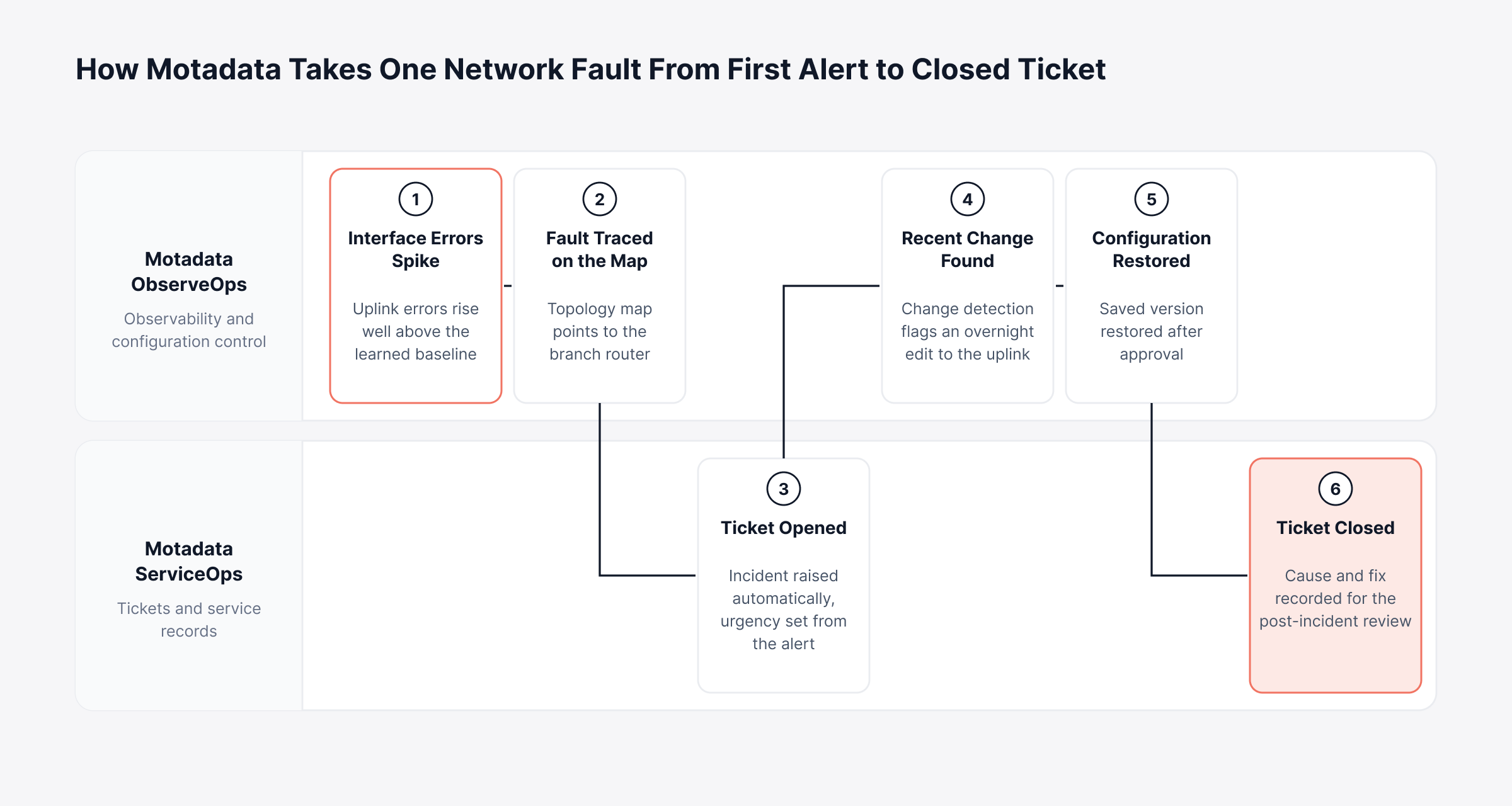
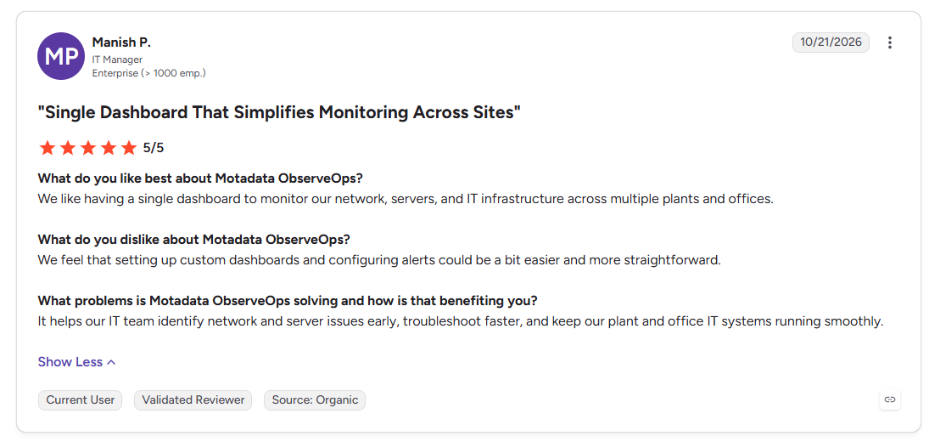
One view across every site matters most when a fault crosses several tools, and this is what one of our clients says about Motadata ObserveOps on G2:
Bring Scattered Network Tools Under One Managed View with Motadata ObserveOps
Plenty of good point tools exist for monitoring, backups or compliance on their own. Network infrastructure management works best when observability, configuration, security and lifecycle data share one inventory and one history.
Some work stays physical. Your engineers will still pull the cable, plan the next data center and make the judgment calls. With Motadata ObserveOps, we take the repeat work off their hands: discovery, baseline tracking, configuration backups, compliance checks and ServiceOps incidents opened straight from alerts.
FAQs
What is network infrastructure management in simple terms?
It's the day-to-day upkeep of the routers, switches, firewalls, access points and carrier circuits a business runs on every day. That means configuring every device, watching its health, approving changes, controlling admin access and replacing hardware before the vendor ends support for it.
What are the five functional areas of network management?
They are fault, configuration, accounting, performance and security management, together called FCAPS. The model comes from the ISO and ITU-T network management standards, and most network functions still divide their day-to-day work along those five lines, whatever they call them internally.
How is network infrastructure management different from IT infrastructure management?
IT infrastructure management looks after servers, storage, cloud, facilities and the network together. Network infrastructure management is the part focused on routers, switches, firewalls and links, each with its own protocols and lifecycle. Both rely on the same change management, asset records and capacity planning.
What do network infrastructure management services include?
Most network infrastructure management services contracts cover round-the-clock monitoring, incident response, configuration backups, patching and change execution. Many organizations keep design and change approval in-house and hand the provider only monitoring and after-hours response, which keeps control with their own engineers.
Which tools are used for network infrastructure management?
Expect to need network monitoring, configuration and compliance management, flow analysis, topology mapping, IP address management and a service desk. Motadata ObserveOps brings monitoring, topology and configuration control together, and Motadata ServiceOps runs the incidents, changes and asset records that go with them.
Author
Poonam Lalani
Content Strategist
Poonam Lalani is a B2B content strategist and writer with a background in computer engineering and experience across enterprise technology domains, including AI, cloud, DevOps, data engineering, and IT operations. She specializes in creating research-driven content that simplifies complex ideas and supports product education, thought leadership, and business growth.