Remote Infrastructure Management: How to Run Sites With No IT Staff
Most IT teams now look after more sites than they have people to visit. Remote infrastructure management covers that gap, and it works differently from the IT infrastructure management you run inside a building where somebody can walk over and look at whatever broke.
The technology rarely causes the trouble.
Trouble starts when a site goes quiet and there's nobody standing there to look at it.
In this blog, you will see:
What remote infrastructure management really covers, and where RMM and managed services fit.
Why a second way into each site matters more than the monitoring tool you pick.
How a collector at each site keeps monitoring alive when the main link drops.
Which numbers tell you it's working, and which ones just look busy.
By the end you'll know what belongs at each site, what stays at head office, and what's worth outsourcing.
What Is Remote Infrastructure Management?
Remote infrastructure management is the practice of monitoring, maintaining and recovering IT infrastructure at sites with no IT staff on site.
Distance from a pair of hands defines the practice. A branch office switch and a data center switch run the same firmware, carry the same bugs and fail in much the same ways. Only one of them has somebody who can walk over and look at the front panel.
Scale is what turns remote site management into a discipline. A retailer with 180 stores, each holding a switch, a firewall, a router with cellular backup, a back-office server and a pair of card terminals, runs close to 1,100 managed devices. These stores rarely employ anybody technical.
Warehouses, factory floors, clinics and edge cabinets land in the same bucket, and so does whatever's sitting on a home worker's desk.
The protocols involved aren't exotic. SNMP pulls device health off almost anything with an IP address, network gear answers over SSH, and Windows boxes want WMI or an agent. When all you need to know is whether something's still breathing, ICMP does fine.
Confusingly, the same term covers the outsourced version, where a provider runs some or all of it. You'll hear both meanings in one conversation, sometimes in one sentence. The work underneath doesn't change either way, so it matters less than people think.
Most programs end up covering the same ground, more or less. Monitoring, patching and configuration backup carry the day-to-day work. Access control, hardware replacement and somebody to call when it all goes wrong anyway cover the rest.
RIM, RMM and Managed Services: How the Terms Differ
Vendors swap the three terms around, which is harmless right up until you're comparing quotes and two of them turn out to mean different things.
Term | What it actually names | Who uses it most |
Remote infrastructure management (RIM) | The practice of running infrastructure at sites with no local staff | Enterprise IT teams, and the providers selling the service |
Remote monitoring and management (RMM) | A software category, usually agent-based, built to manage endpoints and servers at scale | Managed service providers above all |
Managed services | A commercial arrangement where a provider operates the work under contract | Buyers weighing in-house against outsourced |
RIM names the job itself. RMM covers a category of software you buy. Managed services means a contract you sign. One company will happily use all three about the same branch office, sometimes in the same meeting, and nobody stops to check.
An RMM agent installs on the endpoint and phones home over HTTPS on 443, then sits there waiting to be told to patch something, run a script, or open a screen share. That covers most of what an MSP needs, which is why the category grew up there.
None of it reaches a switch, a firewall or a UPS. Those won't run your agent (there's no operating system on them to run it), so they answer to SNMP, SSH and a serial console instead.
A retail site therefore needs both halves. The tills and the back-office server report through an agent, while the network and power gear behind them (the parts that actually fail) only answer to polling and a console.
Why Remote Sites Break Differently
A remote site fails in ways a data center doesn't, and nearly all of them trace back to one fact you can't design around.
The link carrying your monitoring data is the same link carrying the business traffic. When it drops, your monitoring drops with it.
The site stops reporting a failed switch or a dying UPS, and starts reporting nothing at all, which from head office looks exactly like a cut fiber.
Other differences pile up behind the shared link. Nobody's there to reseat a cable, and nobody's going to be.
Spares sit wherever you left them, power quality is worse than you'd tolerate in a data center, and physical security amounts to whatever the building already had.
Out-of-Band Access Comes First
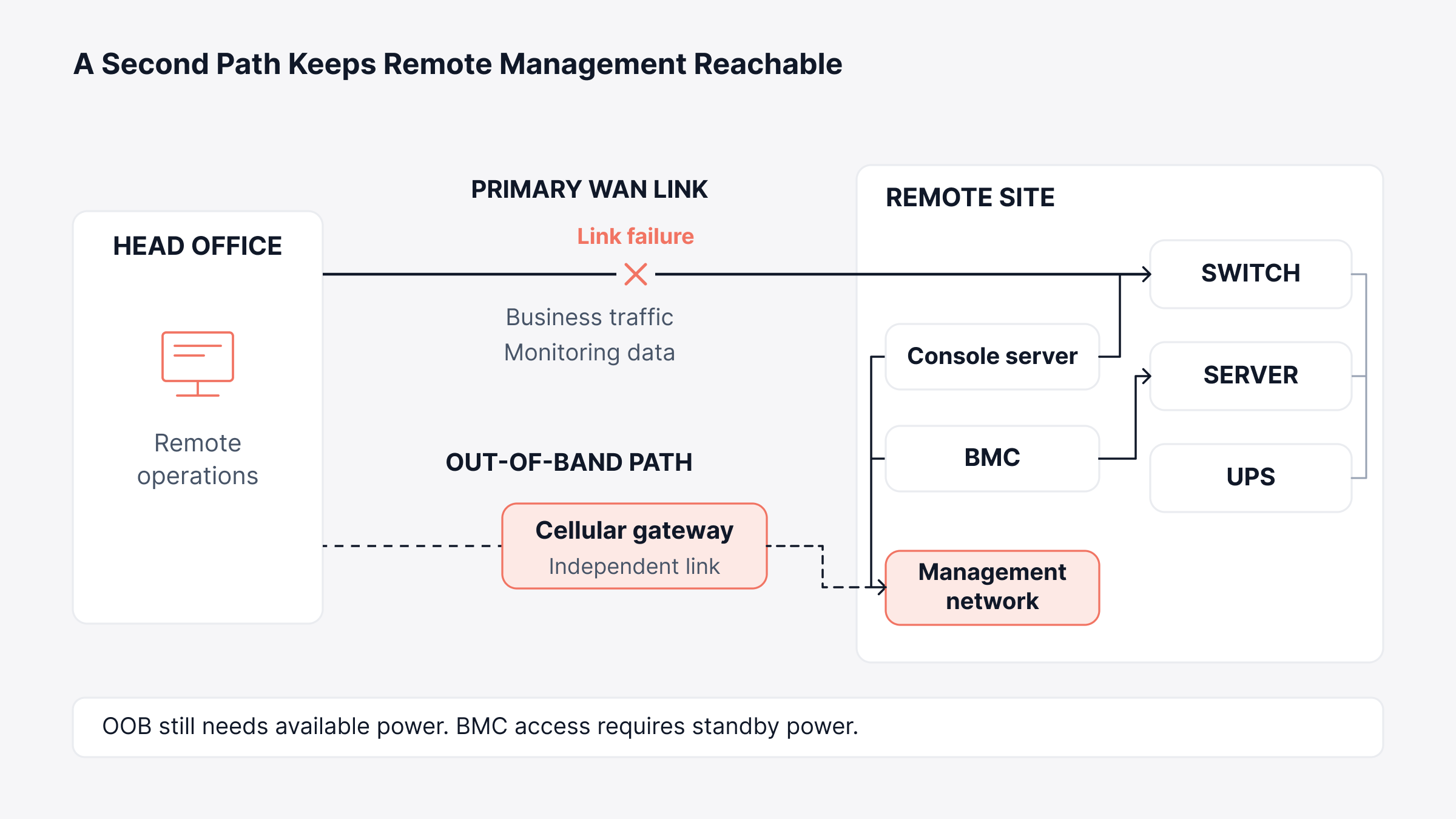
Out-of-band access means a second path to a site's management interfaces, separate from the primary network. The table below compares the paths worth a look and what each costs.
Out-of-band path | What it reaches | What it costs |
Cellular failover router | The site network at low bandwidth, enough for a console session | A modem plus a data plan, and a few hundred megabytes a month covers console work |
Console server wired to serial ports | Switch, router and firewall consoles, even when the device will not boot | One appliance per site, sized by how many serial ports you need |
Server baseboard controller, such as iDRAC, iLO or generic IPMI | Power control, console and hardware sensors, independent of the operating system | Already in the hardware, though several vendors license the remote console separately |
The serial option looks dated, and it keeps earning its place anyway. A switch that rejects a configuration commit will drop SSH while its console carries on printing the boot sequence at 9600 baud. You get to watch the failure instead of guessing at it afterwards.
Baseboard controllers answer on UDP 623 and run on their own little processor, which is why a server with its power off will still talk to you.
Give that controller a dedicated port if the hardware offers one, and budget for the license if your vendor charges extra for the remote console.
A shared-LOM interface borrows the operating system's NIC, so it dies alongside the thing you were hoping to recover (which is precisely when you wanted it).
Teams skip out-of-band access all the time. Skipping it turns a two-hour outage into a two-day issue. You can't diagnose a site you can't reach, so the second path comes in handy when the primary one dies.
Standard Builds Beat Clever Troubleshooting
You can't debug thirty sites one at a time with the staff you've got. If you build every site from the same hardware list and the same golden image, a broken site turns into a replacement job rather than an investigation. Variation is what drives the cost of remote support up.
At any site that drifts from the standard, your runbook stops working halfway down the page.
How Do You Monitor a Site With No IT Staff?
Put a collector at the site and let it do the polling locally. The WAN then carries summaries instead of every individual request.
Run the arithmetic on one site and the reason shows up fast. Fifty devices at twenty metrics each, polled every sixty seconds, throws a thousand SNMP requests a minute (and every one of them crosses your WAN link twice).
Each request carries a timeout and a retry as well. On a congested link they queue, time out, retry, and in the end call a device down when it was only slow to answer.
Stretching the interval to five minutes fixes the traffic and buys you a worse problem. A ninety-second outage now falls between two polls and never shows up at all.
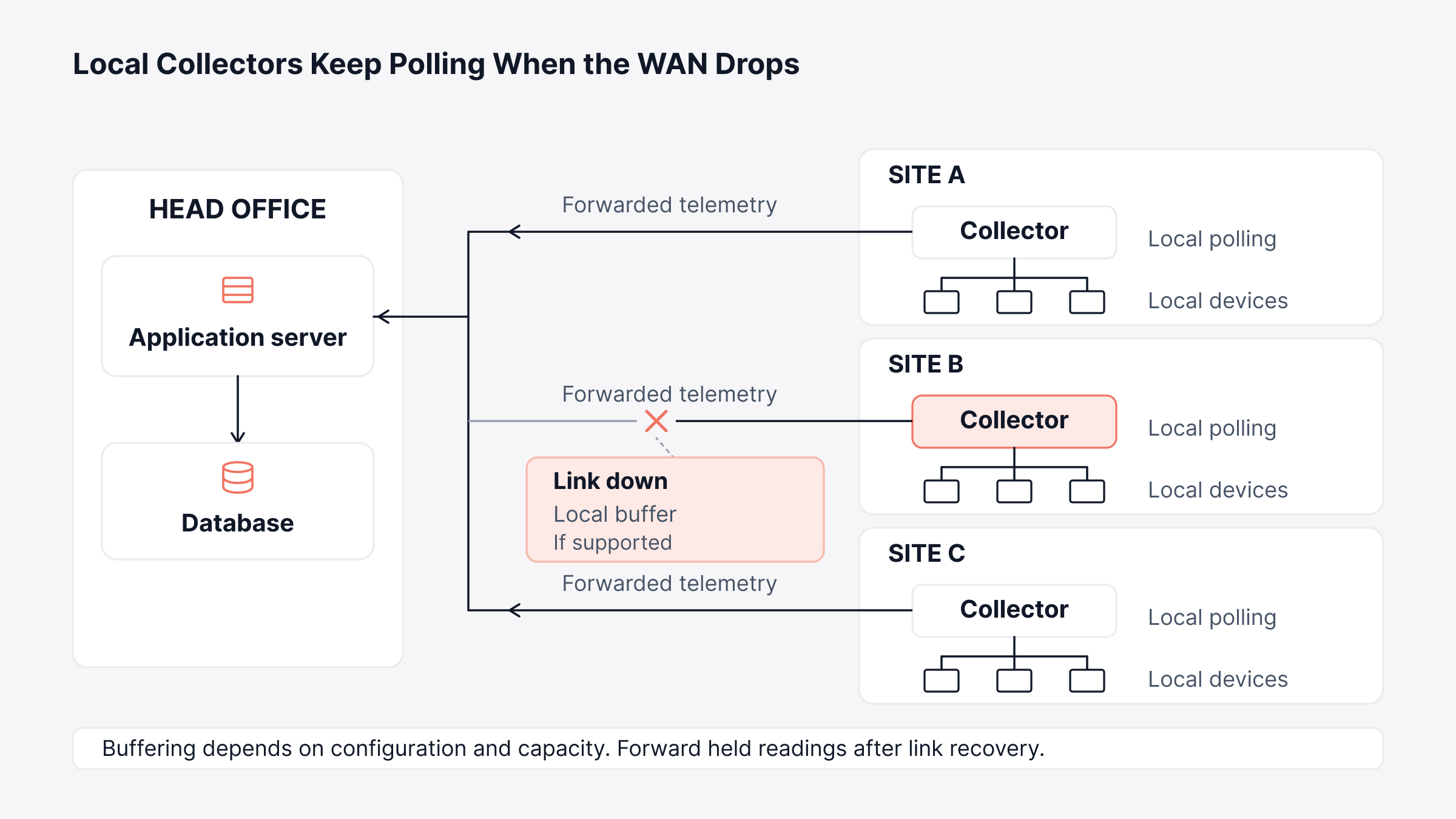
A collector on the site LAN avoids both problems. It polls at sixty seconds across the local network, buffers readings while the link's down, then forwards them once it's back. You end up with the history of the outage rather than a hole where the data should be.
We built ObserveOps around that collector shape. Its multi-site deployment mode keeps the application and database at head office.
Motadata Collectors sit out at the branch and remote sites, poll local resources, and forward what they find to the central server.
Head office can fail too, of course. ObserveOps also runs high availability over a WAN, with primary and secondary servers in different geographic locations and FQDN-based redirection on failover.
Collector placement makes remote monitoring behave like local monitoring. The polling interval you use for a data center rack becomes achievable at a retail store two states away.
What Site Count Does to the Bill
Site count multiplies everything, and that catches teams out. Every new site adds devices to poll, and most tools then charge you twice over, once for the devices and again for the data they send back.
ObserveOps Infinity, the current edition, meters the base platform per monitored device. Log and flow monitoring attach per log source and per flow source rather than per gigabyte per day.
On a large estate that distinction decides the bill. A retail chain opening fifty stores knows in advance what those stores will cost, and one chatty application at one of them does not move the number.
Collector efficiency sits in the same Infinity release. Motadata publishes the Infinity footprint as 30 to 40 percent less hardware on an equivalent deployment.
It flags that figure as indicative and dependent on device mix, retention policy and polling interval. Run one collector per site and a lighter footprint compounds with every site you add.
The price itself sets the honest limit. We publish the licensing model and not the numbers, so a real figure still needs a sizing conversation.
What Does a Remote Infrastructure Management Program Cover?
The work splits into six workstreams, and every one of them changes shape once you take away the option of walking over to the device.
1. Alerting That Survives a Link Failure
Central alerting tells you a site went dark, and nothing else. One unreachable-site alert covers every device behind that link, so it won't tell you which of the six actually died.
Give each collector the ability to hold what it saw and replay it later, so the first question after an outage has an answer waiting (which device went quiet first).
2. Patching Without a Site Visit
Patch windows at remote sites fail differently. A kernel update that panics on reboot needs somebody to power cycle the box, and at a remote site that somebody doesn't exist.
Keep the first ring small, two or three low-tier sites. Open the baseboard console before you start, not after a server's stopped answering. Running remote patch management from the same console as your monitoring saves the handover step, since the tool already knows what's installed where.
3. Configuration Backup and Drift Control
A configuration backup lets you ship a pre-loaded replacement instead of sending an engineer out with a laptop. Pull network configurations nightly and diff them against the standard build.
Somebody always makes a change during an emergency and forgets to write it to startup config. It works perfectly until the next power cut, and then it's gone.
4. Remote Access and Who Holds It
Every path into a remote site works just as well for somebody else. Put baseboard controllers and console servers on their own management VLAN, and give them credentials that aren't your domain credentials. And keep UDP 623 off the public internet.
Review who holds that access every quarter (leavers keep console credentials far longer than anybody expects).
5. Spares and Rebuild
Decide per site tier whether spares live on site, at a regional depot, or with a courier contract. A flagship store usually justifies a spare switch and a pair of SFPs in a cupboard somewhere (labeled, ideally). A back office can probably wait for next-day delivery.
Pair that with zero-touch provisioning, so the replacement configures itself when somebody non-technical plugs it in.
6. Escalation and the Local Pair of Hands
Every remote site needs one named person who can follow a phone instruction, and in a store that's usually the duty manager. Name them before the outage, not during one.
Write down the limit on what you'll ask that person to do. It normally stops at reseating a cable and power cycling a device, plus reading back whichever lights are showing (link, power, and whether anything is amber).
Which Metrics Show Remote Management Is Working?
The number that separates a working remote practice from a struggling one is how often you have to send somebody.
Metric | What it measures | Why it earns a place |
Remote resolution rate | Share of site incidents closed with no visit | The clearest single measure of whether the practice works |
Dispatches per site per quarter | How often somebody travels, and where | Travel is the largest avoidable cost in the model |
Time to restore, split by site tier | Recovery time for a flagship store against a back office | A flat average hides the sites the business cares about |
Monitoring coverage per site | Share of devices at each site actually being polled | An unwatched device stays invisible until a user calls |
Collector health | Whether each site's collector is reporting in | A dead collector looks exactly like a healthy, quiet site |
That last row carries the bill for this whole architecture, and it is worth saying plainly. A collector at every site means one more thing to maintain at every site, and one that fails quietly takes the site's visibility down with it.
So monitor the collectors as carefully as you monitor what they watch. A heartbeat check on each one costs nothing and closes the only real blind spot the design introduces.
Should You Outsource Remote Infrastructure Management?
Outsourcing earns its keep when coverage hours cost more than the work itself. Covering every hour of the week takes more than four full-time engineers before you allow for leave. That is a hard sell for an estate with a handful of incidents a week.
The contract comes down to four questions, and all four are specific to remote sites.
Who dispatches, and who pays for the trip? Settle whether a visit gets billed per incident, drawn from a monthly allowance, or capped. Dispatch is the biggest variable cost in the deal (by a wide margin), so it belongs in the contract, not a conversation six months later.
Who holds out-of-band access? Console and power control give the deepest access anyone has at that site. If the provider holds the only baseboard credentials, you can't recover a server without them (and they know it).
Where do spares live? On-site stock, a regional depot and a courier promise produce wildly different recovery times. Ask how far that depot actually sits from your furthest site, not from their head office.
Who owns the monitoring data and the asset records? Changing providers stays straightforward only while that history sits with you. A year of polling data and a current asset list makes the next provider cheap to onboard, and it's the thing people forget to ask for.
The decision gets easier when monitoring and the service desk already share one system, because the handover becomes a permissions change rather than a migration.
A unified observability and ITSM platform keeps the alerts, the asset records and the tickets together, whoever happens to be watching them.
Where to Start With Remote Infrastructure Management
Work in this order and the estate comes under control without a large project behind it.
Rank the sites. Sort them by what the business loses per hour of downtime, not by headcount or square footage. One flagship store can easily outrank a regional office holding thirty people.
Inventory what each one really holds. Run a discovery scan rather than trusting the spreadsheet, because the switch somebody shoved under a desk years ago (and never mentioned) is the one that'll fail.
Fix out-of-band access at the top tier first. Work down the ranking as budget allows, and stop pretending the lower tiers are covered when they aren't.
Put a collector at each site, then monitor the collector. Local polling plus a buffer gives you the outage history you'll need later.
Standardize the build, then measure remote resolution rate. Review it monthly beside dispatch count, since the two move together and either one on its own tells you very little.
None of it needs a big program behind it. The first three sites teach you most of what the remaining thirty will need.
Close the Out-of-Band Gap on Your Top Sites First
The long outages live at your top-tier sites, in the gap where out-of-band access should be. Start there, because that gap costs more than any other.
A remote estate rests on a second way into every site, a collector that keeps watching through a link failure, and a build standard that makes any site swappable for the next.
Teams that get those right stop measuring how fast somebody can drive. They start measuring how rarely anybody has to, and that shift is what keeps a growing estate affordable, because site count stops driving headcount.
The case for remote network monitoring gets easier to make once the first avoided dispatch is on the record.
FAQs
What is an RMM tool?
An RMM tool manages endpoints and servers remotely through an agent that phones home over port 443. MSPs use the category most. It won't reach a switch or a UPS, which is where remote infrastructure management picks up the slack.
Does every remote site need its own collector?
Sites sharing a reliable, uncongested link can report through one nearby collector. Give a site its own once you've stopped trusting that link, or once a gap in its outage data would actually cost you the answer.
Can you manage remote infrastructure without out-of-band access?
You can, right up until the primary link fails, and then you can't do anything at all. A failed switch and a cut fiber look identical from head office, so both end with somebody driving out there.
Who is responsible for remote infrastructure management?
Infrastructure operations usually owns it, with network and endpoint teams running their own layers. One named owner per site tier beats shared ownership, mostly because a remote incident crosses team boundaries within minutes.
What does remote infrastructure management cost?
Tooling, out-of-band hardware and either staff coverage or a provider contract make up the bulk of it. Budget the cellular plan and console hardware per site rather than once, since that line grows every time you open a branch.
Author
Ramya Shah
Technical Writer
Ramya Shah is a technical content writer with a computer engineering background and roots in automotive journalism. He covers IT Service Management, observability, IT operations, and AI-driven automation. An early adopter of AI-assisted writing workflows, he turns complex IT processes into clear, engaging content optimized for search and answer engines (AEO), lifting content output and organic visibility.