Third-Party Patch Management: How Application Patching Works and Where It Breaks
Most patch programs are built around the operating system. The vendor calendar is predictable and the tooling is mature. That is the smaller half of the job. Most of the software on a typical endpoint comes from somewhere else.
Third-party patch management covers that half, and most teams run it with far less structure. The gap is easy to miss in day-to-day reporting. Windows Update finishes on a laptop, and the machine reports as patched.
That report covers the operating system and nothing else. The browser is three versions behind. The Java runtime has not changed since the last hardware refresh. The PDF reader missed a critical fix six weeks ago.
The patch management process is the same for both. The operational work is not. We are often asked why a fleet at 96% patch compliance still failed its vulnerability scan. This is almost always the answer.
In this guide, you will learn:
What it covers: The definition, and which software counts
How it works: Detection, sourcing, packaging, verification
Why deployments break: The failure patterns in most fleets
Whether Intune or WSUS is enough: What each covers, and what you pay
How to judge a catalog: Six questions that separate vendors
What is Third-Party Patch Management?
Third-party patch management is the process of finding, testing, and deploying updates for software your operating system vendor does not supply. It covers browsers, runtimes, utilities, and business applications that sit on top of Windows, macOS, or Linux.
You will also see it called third-party patching, or third-party application patching.
One application shows the shape of the work. Chrome ships a security fix on a Tuesday. Windows Update will not touch it, because Google built it and Microsoft did not.
Someone has to spot the outdated version across 800 machines. Someone has to get the new build installed before the next audit. Multiply that by every application in the estate, and you have the job.
How Is It Different from Patching the Operating System?
The difference is not the number of updates. It is the number of vendors behind them. Operating system patching is a one-vendor problem. You get one publisher, one update format, and one set of reboot rules.
You can build a process around that rhythm, and it holds. Third-party patching is a several-hundred-vendor problem.
Each application sets its own release cadence.
Each packages its installer the way it prefers.
Each handles upgrades, reboots, and old versions by its own logic.
There is no shared calendar and no shared format to design around.
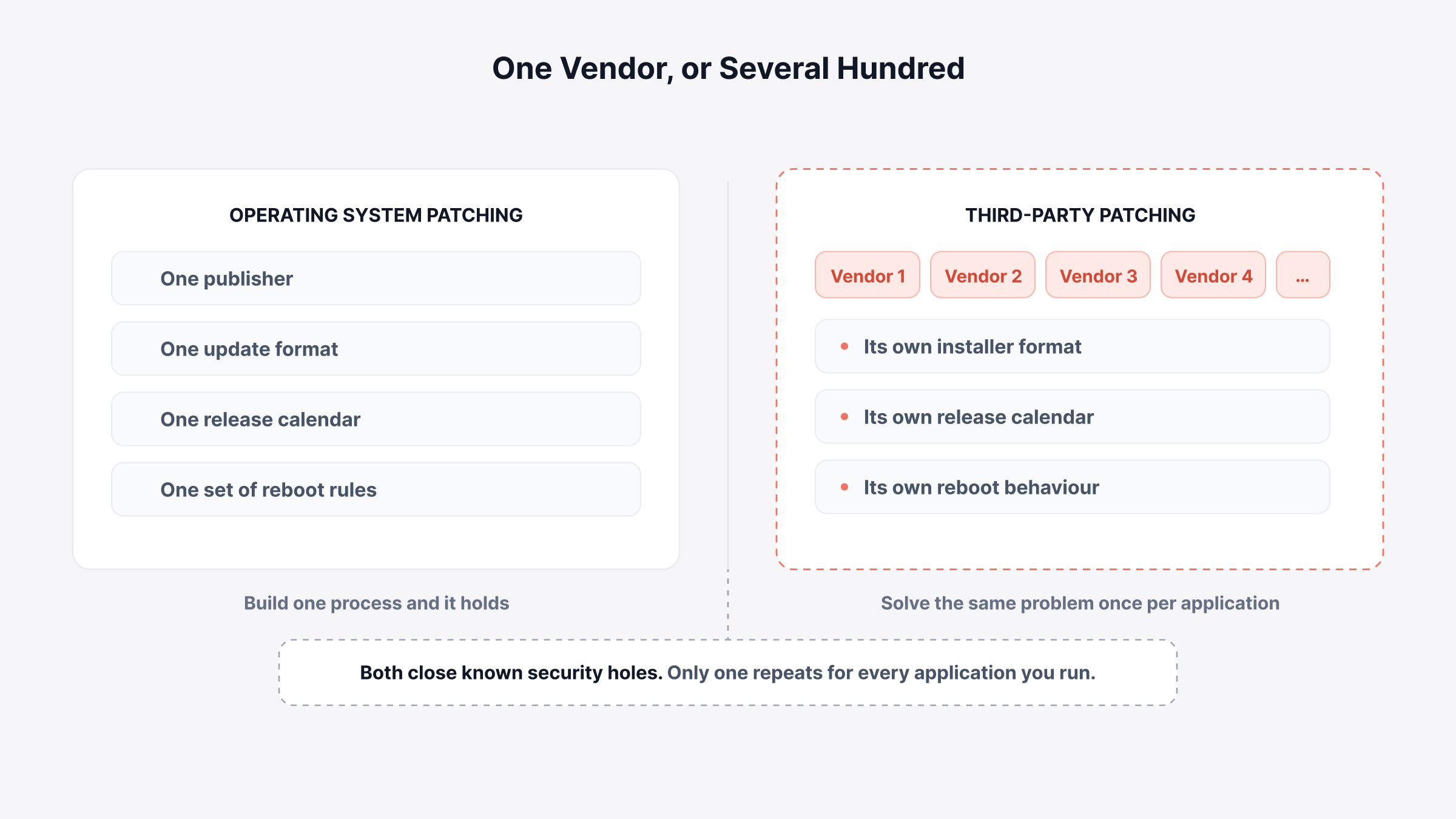
Both close known security holes. Both need testing and staged rollout. Only one makes you solve the same problem again for every application you run. That difference shows up in planning.
We usually see programs sized against the operating system cadence, and the application side then needs its own catalog, its own approvals, and its own owner.
Which Applications Count as Third-Party Software?
Third-party software is anything on a device that your operating system vendor does not update. Most environments run seven groups of it:
Browsers: Chrome, Firefox, and standalone Edge or Chromium builds
Runtimes and frameworks: Java, .NET, Python, and Node.js
Document and PDF tools: Acrobat Reader, Foxit, and similar viewers
Compression and system utilities: 7-Zip, WinRAR, and Notepad++
Collaboration clients: Zoom, Slack, and standalone Teams installations
Developer and admin tools: Git, PuTTY, WinSCP, and database clients
Vendor utilities and drivers: OEM update agents, printer software, and storage utilities
Six of those groups usually make it into someone's inventory. The seventh rarely does.
Vendor utilities arrive bundled with hardware. They install their own background update agents. They rarely appear on an approved software list, because nobody chose to install them.
That is the group we find missing from approved software lists more than any other, and good IT asset discovery is what pulls it into view.
Why Does OS-Only Patching Leave Most of the Risk Open?
Patching only the operating system leaves most of your exploitable software untouched. Most software on a typical endpoint does not come from the operating system vendor.
The volume shows it clearly. The CVE Program published 48,185 new vulnerabilities in 2025. That was a 20.6% rise on 2024, which had already jumped 38% the year before. These numbers cover all software, and operating systems are a small share of it.
Third-party counts are climbing as fast. Recast Software tracks vulnerabilities across a fixed catalog of common business applications. It recorded 249 unique vulnerabilities across 81 applications in March 2026.
That rose to 645 in May, then 1,302 across 83 applications in June. That is five times the volume in a single quarter, from the same catalog.
The window to act has closed at the same time. VulnCheck studied the vulnerabilities added to CISA's Known Exploited Vulnerabilities catalog in 2025. Attackers were already exploiting 28.96% of them on or before the day the CVE went public.
A monthly patch cycle cannot clear a queue that starts before disclosure. That is where the split between patch management and vulnerability management stops being academic.
How Does Third-Party Patch Management Actually Work?
Third-party patch management solves four problems for every application, one application at a time. Operating system updates handle all four for you. Third-party applications do not.
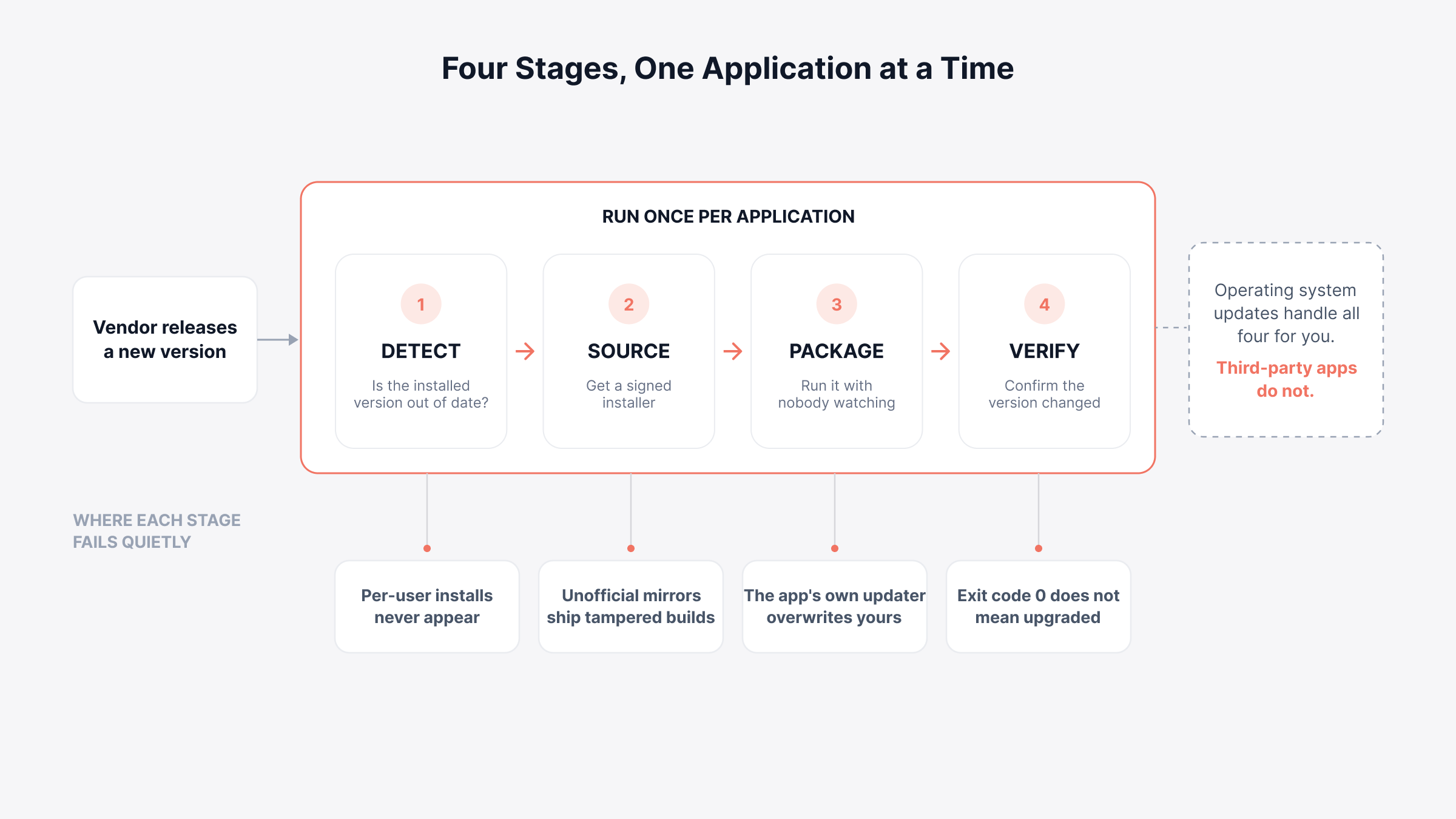
1. Detection: Knowing a Version Is Out of Date
Detection compares what is installed against what the vendor now ships. Windows reads uninstall registry keys or file version metadata. macOS reads bundle metadata and package receipts.
Linux queries the package manager directly, which makes Linux patch management the cleanest of the three.
Detection fails quietly in three places. Applications installed into a user profile never appear to a machine-context scan. Portable executables leave no registry trace at all.
Devices that rarely reach the corporate network go stale in the inventory. That is why remote patch management over the internet decides whether remote staff are covered.
When detection numbers look too clean, we check whether the scan runs in machine context only. A scan can report 100% compliance on an estate full of per-user installations. That number describes the scan, not the estate.
2. Sourcing: Getting a Trustworthy Installer
Sourcing decides where the installer comes from and whether you can trust it. Two models dominate. They differ in who stands between you and the publisher.
Vendor-sourced tools download straight from the publisher. They verify the digital signature before packaging. Repackaged tools build their own version instead. That turns packages around faster, but it adds a party in the middle.
Unofficial mirrors are a third route, and not one to take. These are download sites with no relationship to the publisher. Attackers have used them as a way in.
The controls we would insist on are the same either way. Verify the signature. Store the approved package internally. Deploy from there, rather than letting each endpoint reach the internet on its own.
3. Packaging: Running the Installer Silently
Packaging turns a downloaded installer into something that runs on a locked device with nobody watching. Every application answers the same four questions its own way:
Silent install syntax: MSI packages take standard switches. EXE installers use whatever the vendor chose, so the flag that works for one will not work for the next
Configuration at install time: Transform files or flags that set defaults, so no setup wizard opens on first launch
Existing version handling: Whether the installer upgrades in place, or needs the old version removed first
Built-in updater control: Whether the application's own update agent needs disabling, so it stops competing with your deployment
Teams discover the fourth question late. An application that updates itself will overwrite the version you deployed. Your compliance report then swings between pass and fail with no deployment running at all.
Staged update rings are the control that Windows patch management best practices rely on. With third-party software, you rebuild those rings one application at a time.
4. Verification: Confirming the New Version Took
Verification confirms the installed version really changed. An installer that returns exit code 0 has finished its process. That is not the same as a successful upgrade, and the two come apart often.
Re-scan after deployment and compare the detected version against the target. Where the install failed, capture the exit code and the log. Most installers name the reason: a file lock, a permissions issue, or a dependency.
Route those failures into a ticket queue rather than a report. That is what holds patch compliance steady between audits. The failures that never become tickets are the ones we find still open a quarter later.
Why Do Specific Applications Break Third-Party Patching?
Some applications break third-party patching by design. The same handful cause most of the failures in most fleets:
Application type | What breaks | How to handle it |
Browsers with built-in updaters | The vendor's agent overwrites or reverts your deployment | Disable the auto-updater by policy first |
Java and multi-version runtimes | Old versions stay installed beside the new one | Remove prior versions as part of the package |
Adobe and OEM update agents | A background agent reinstalls its own version | Manage the update agent, not just the app |
Per-user installations | A machine-context scan never sees them | Deploy in user context, or block the install path |
Applications open when the patch runs | Files are locked, and the install fails silently | Give users a deferment window, then retry |
Applications with active dependencies | Upgrading one component breaks another | Pin the version, document it, set a review date |
Five of those six are solved once and stay solved. The sixth quietly rots. A version pinned in 2024 for a compatibility problem is often still pinned two years later. Nobody is left who remembers why.
The exception list is the first thing we ask for when reviewing a program. It holds the oldest unpatched software in the estate. It also sits behind several of the more expensive patch management mistakes.
Can You Patch Third-Party Applications with Intune or WSUS Alone?
Neither Intune's base plans nor WSUS patches third-party applications on its own. Both need something extra, and what that extra costs changed in July 2026.
WSUS has never handled third-party applications natively. Publishing non-Microsoft updates through it always needed System Center Updates Publisher or a commercial tool alongside it.
That workaround is now a dead end. Microsoft deprecated WSUS in September 2024, then its driver synchronization in April 2025. It still runs, and it stays supported through the Windows Server 2025 lifecycle, but no new capability is coming. Usage fell from roughly 13% of organizations in 2024 to 5.5% in 2025.
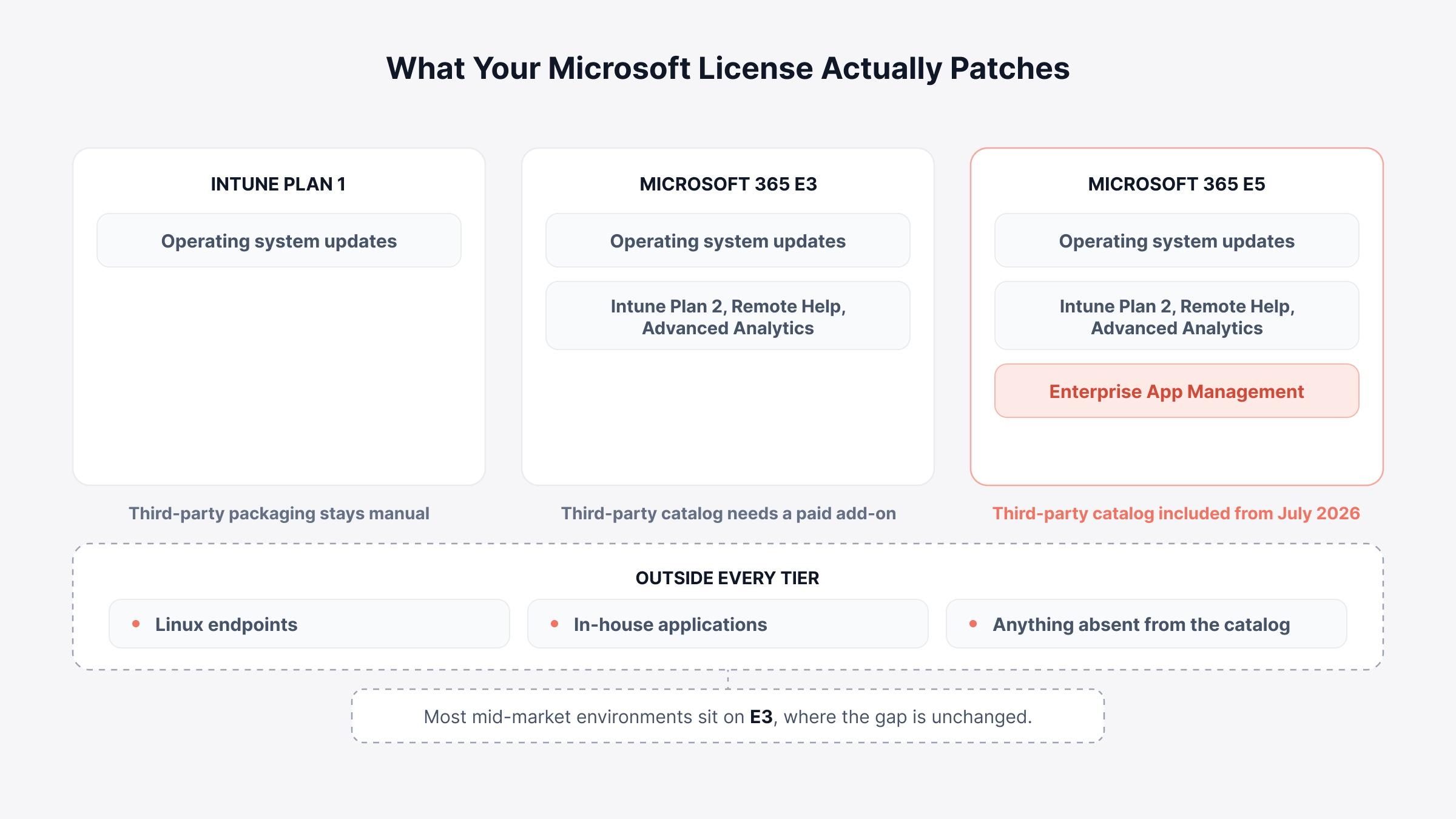
Intune's answer is Enterprise App Management. It gives you a Microsoft-maintained catalog of prepackaged applications with update support, and it works well for the applications it covers. The catch is licensing, and the July 2026 change lands differently by tier:
Microsoft 365 E5: You get Enterprise App Management from July 2026, with Endpoint Privilege Management and Cloud PKI. This replaces the Intune Suite add-on, which ran about $10 per user per month
Microsoft 365 E3 and EM+S E3: You get Intune Plan 2, Remote Help, and Advanced Analytics. Enterprise App Management is not included, so third-party patching still needs a paid add-on
Intune Plan 1 on its own: No catalog at all. Win32 packaging stays manual work, one application at a time
For an E5 organization, third-party patching inside Intune got much cheaper. Most mid-market environments sit on E3 instead. For them the gap is unchanged, and now more visible.
Do not assume the Microsoft-native route is cheaper. We would price the add-on against a dedicated catalog at your actual tier, because the answer flips between E3 and E5.
Two limits apply at every tier. The catalog covers a defined list of applications, so anything in-house or niche still needs manual packaging. Intune also covers Windows, macOS, iOS, and Android, but not Linux.
That leaves Linux endpoints to another tool, and makes platform coverage part of any broader unified endpoint management decision.
What Are the Approaches to Third-Party Patch Management?
There are five ways to patch third-party applications. They differ mainly in how much packaging work you keep:
Approach | Best for | Coverage | Main limitation |
Native OS tooling | Single-platform, OS-focused estates | Minimal | Almost no third-party reach without add-ons |
Package managers (winget, Chocolatey, Homebrew) | Technical teams, small estates | Wide but unmanaged | No approval flow, test rings, or audit trail |
RMM-bundled patching | MSPs and multi-tenant environments | Moderate | Catalog depth varies sharply by vendor |
UEM-bundled patching | Mixed desktop and mobile fleets | Good | Mobile-first tools are thin on desktop apps |
ITSM-native patching | Teams that need failures to become tickets | Good | Needs the service desk on the same platform |
Package managers are the row most often misapplied. They solve distribution well and governance not at all. That is fine for a twenty-person engineering team. It becomes a problem the moment an auditor asks who approved a version.
We would settle one question first. Do patch failures need to open tickets automatically? That narrows the field faster than any feature comparison.
If the answer is yes, your shortlist runs across endpoint management software and ITSM-native platforms. Our roundup of patch management software covers where each vendor lands.
How Do You Evaluate a Third-Party Patch Catalog?
Evaluate a third-party patch catalog on how fast it delivers the applications you actually run. The number of titles it advertises matters far less. Six questions separate vendors faster than any feature list:
Catalog size against your estate: Not how many titles exist, but how many of yours appear. Export your software asset management records and check the overlap before the demo
Update latency: How many days pass between a vendor's release and the package appearing. Ask for the median across the last quarter, not the best case
Sourcing model: Whether packages come from the vendor and are signature-verified, or repackaged by the tool provider
Custom application support: Whether in-house and niche software runs through the same approval and reporting workflow
Per-application control: Whether install switches, deferment limits, and reboot behavior can be set per application
Cross-platform parity: Whether macOS and Linux builds of the same application are covered, or only Windows
Update latency is the question we see buyers skip and later regret. Picture a 3,000-title catalog that publishes new versions three weeks after release.
A 400-title catalog that publishes in two days beats it in practice. The smaller one closes your exposure window sooner on every application you run.
How Do You Stop Catalog Coverage from Drifting?
Catalog coverage decays after you buy, so the mapping needs re-checking on a schedule. New applications arrive, and the catalog does not grow with them on its own.
Your compliance percentage stays flat while real coverage falls. Re-run the inventory-to-catalog comparison every quarter. Treat every newly discovered application as unpatched until proven otherwise.
Track catalog match rate alongside the severity-based targets in our breakdown of patch management KPI metrics.
Close the Application Patching Gap with Motadata ServiceOps
Third-party patching comes down to one question. When an application update fails on forty devices, does anyone find out before the next audit?
In ServiceOps, patch discovery covers operating systems and third-party applications together. Test groups, phased rollout, and per-patch deferment sit in one deployment engine.
ServiceOps Patch Manager reports compliance against PCI DSS, HIPAA, and SOX from live device state. The difference shows when a patch fails. It opens an incident in the service desk your team already uses.
The device, the patch details, and the error code come attached. Our unified observability and ITSM platform keeps device state, patch state, and ticket history in one record set.
This fits less well where Linux servers already patch through an automation pipeline, by image refresh. The value concentrates on endpoints and third-party applications. That is where we find most of the unmanaged risk.
FAQs
How often do third-party applications release updates compared with the operating system?
Far more often. Windows follows a monthly cycle. Browsers ship every two to four weeks, and utilities release whenever a fix is ready. A hundred-application estate can see several updates a week.
Do third-party patches need testing if the vendor already tested them?
Yes. Vendors test the application, not your configuration or your hardware images. A small test group catches integration failures that vendor QA cannot see. It costs a day rather than a week.
Who should own third-party patching, IT operations or the application owner?
IT operations owns deployment and reporting. Application owners approve versions for business-critical software. Only they know whether an upgrade breaks an integration. Split ownership with no named approver is how exceptions become permanent.
Can third-party patching reach devices that never connect to the VPN?
It depends on the agent. Cloud-managed agents check in over the internet and patch remote devices normally. Agents that need a direct link to an on-premises server leave remote users unpatched. That is where compliance fails quietly.
What happens to applications employees install themselves?
They show up in discovery but sit outside the approved catalog, so nothing patches them. Track them as unmanaged instances. Then either add them to the catalog or remove them, because they carry the same vulnerabilities as approved software.
Author
Ramya Shah
Technical Writer
Ramya Shah is a technical content writer with a computer engineering background and roots in automotive journalism. He covers IT Service Management, observability, IT operations, and AI-driven automation. An early adopter of AI-assisted writing workflows, he turns complex IT processes into clear, engaging content optimized for search and answer engines (AEO), lifting content output and organic visibility.