Network Optimization Guide With 10 Top Ways to Cut Slowdowns and Downtime
Why does everything crawl at peak hour, even though every switch looks fine? Calls break up and file copies stall. Then the tickets arrive, each one some version of "the network is slow."
It's rarely one broken device. A WAN link maxes out for an hour with voice packets queued behind a backup job. Last week's config change hasn't been linked to any of it yet.
Network optimization sorts this out one measured step at a time, starting with performance monitoring. In this blog, you will see where to look first and which 10 fixes work best.
What is Network Optimization?
Network optimization is how you get more speed and uptime from the network you already own.
In an enterprise, network performance optimization usually chases four outcomes:
Speed: Faster apps for the people who use them every day (lower latency, higher throughput)
Reliability: Fewer outages and brownouts, quicker recovery
Capacity: Headroom for growth, planned from trends instead of complaints
Cost: Bandwidth spend in line with usage
Every new site or cloud move changes what normal looks like, which is why it runs best as an observability practice with continuous network performance insight.
Telecom uses the term differently. Carriers use networking optimization to mean radio tuning: cell coverage, handovers, capacity per tower. This guide covers the enterprise side.
Why Does Network Optimization Matter to the Business?
Network optimization pays off in revenue, staff time and risk.
The payoff for leadership:
Revenue protection: Checkout pages and customer apps stay quick at peak hours
Staff time: Less time lost to frozen screens and dropped calls
Controlled spending: Upgrades bought for proven bottlenecks, with no guesswork
Lower risk: Less network downtime
Take a 60-store retailer whose card terminals share an internet circuit with security cameras. The cameras upload footage during the evening rush. Card approvals start timing out.
No device looks faulty, and the fix costs nothing in hardware: move the upload, prioritize payment traffic. The store router's flow data points straight at it.
Which Metrics Show Whether a Network Needs Optimization?
Network optimization comes down to seven metrics. The table gives a sensible starting range for each.
Track them per link and per site. An average across the whole network hides the branch that is struggling.
Metric | What It Measures | Healthy Range to Start From | What a Breach Usually Means |
Latency | Times a packet's round trip | Under 100 ms for real-time apps | Traffic is queuing or taking a long path |
Jitter | Tracks variation in arrival time | Under 30 ms | Queues fill and drain on a busy link |
Packet loss | Counts packets that never arrive | Under 1% | Congestion, bad media or carrier policing drops them |
Throughput | Shows data actually delivered per second | Near the expected rate for the link | TCP limits, errors or competing traffic hold it back |
Utilization | Shows how much of the link is in use | Judged against your own 95th percentile | Growth, a new application or one heavy user fills the link |
Errors and discards | Counts frames an interface corrupts or drops | Near zero and not rising | A duplex mismatch, faulty cable or full buffer is at work |
Availability | Tracks how often a device or service is reachable | Set by the service level you owe | Hardware, power, routing or a carrier circuit has failed |
The first three ranges come from Microsoft's Teams network requirements for real-time traffic, measured end to end over any 15-second window. Your own baseline replaces these numbers once it exists.
Each metric maps to something users notice: network latency as a slow app, jitter and loss as choppy calls.
Which Network Layers Does Network Optimization Touch?
Network optimization problems live in OSI layers 1 to 4, from cabling up to TCP.
Layer | What It Handles | Common Performance Problem | Optimization Lever |
L1 Physical | Cables, optics and radio signals | CRC errors from damaged cable, Wi-Fi interference | Replace faulty media, retune wireless channels |
L2 Data link | Switching, VLANs and frames | Duplex mismatch, broadcast storms, spanning tree loops | Fix port settings, split large VLANs |
L3 Network | IP routing between networks | Poor routes, asymmetric paths, flapping links | Adjust routing metrics, add or steer paths |
L4 Transport | TCP and UDP sessions | Small TCP windows, retransmissions, fragmentation | Enable window scaling, clamp MSS, apply QoS |
Plenty of "slow network" tickets end at L1 or L2 (a dirty optic, a bad patch cable). The rest usually come down to network congestion higher up.
How Do You Find the Network Bottleneck Before Changing Anything?
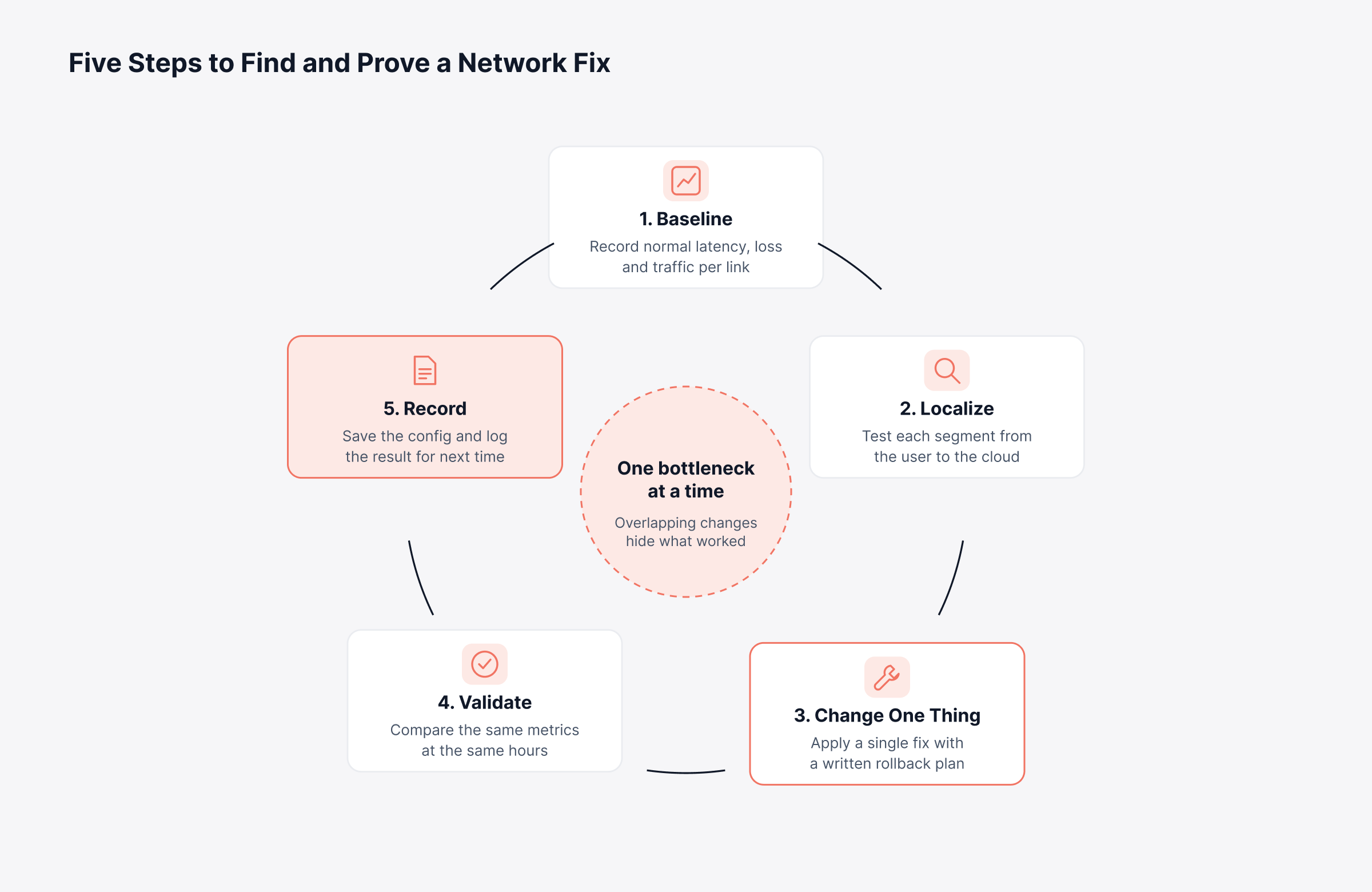
Network optimization begins with the bottleneck: if you want to know how to optimize network performance, find it before touching a config.
Baseline: Two weeks of latency, utilization, errors and flow data for each link
Localize: Test each segment in turn (access switch, site WAN, cloud edge)
Change one thing: One fix, a rollback plan, and the expected result written down
Validate: Same metrics, same hours, same weekdays
Record: Config saved, outcome logged, then on to the next bottleneck
Change one thing per cycle, or you won't know which change worked. The cycle below lays out the handoffs.
Before any tool is involved, a few standard commands confirm where delay or loss begins. They are also the first steps in most network troubleshooting runbooks.
Platform | Command | What It Tells You |
Windows | pathping 10.0.0.10 | Shows delay and loss at every hop |
Linux (install mtr first) | mtr -rw -c 50 example.com | Reports per-hop latency and loss across 50 probes |
Any OS (iperf3 on both ends) | iperf3 -c 10.0.0.10 -t 30 | Measures achievable throughput between two hosts |
Cisco IOS | show interfaces GigabitEthernet0/1 | Counts CRC errors, input errors and output drops |
Cisco IOS | show policy-map interface GigabitEthernet0/1 | Lists packets matched and dropped per QoS class |
Loss that starts at one hop and carries through to the destination points at that hop. If it shows at one middle hop and then vanishes, the router is probably just deprioritizing probe replies (safe to ignore).
What Are the 10 Most Effective Network Optimization Techniques?
The best network optimization techniques go after the biggest constraint first. There are 10 network optimization best practices here, roughly in the order most networks need them.
1. Build a Baseline With Continuous Network Observability
With a baseline per link, "it feels slow" becomes "latency doubled every afternoon."
Poll busy WAN and uplink ports at short intervals
Keep months of history, enough to catch seasonal peaks
Alert on deviation from normal as well as on fixed limits
The payoff comes later too. The next regression shows up on a chart before it shows up as a ticket.
2. Analyze Traffic Flows to See Who Uses the Bandwidth
Interface counters say a link is full. Flow records from NetFlow, sFlow or IPFIX name the source.
That difference changes the decision. A link full of offsite backups needs a new schedule, but one carrying a growing business app needs capacity. Look at the top talkers in traffic analysis before anyone signs a bandwidth order.
3. Prioritize Critical Applications With QoS
QoS (Quality of Service) lets voice and payment packets skip the queue on a busy link. Good designs tend to share these traits:
Edge classification: Mark traffic close to the source, then trust those markings across the core
Four to six classes: Voice, video, business critical, default and scavenger cover most needs
Standard markings: DSCP EF for voice and AF41 for interactive video
A capped priority queue: Voice gets a fixed slice of the link
With no queue, there is nothing to reorder. That is where shaping helps; QoS in networking covers the basics.
4. Use Traffic Shaping and Policing to Control Bursts
Traffic shaping delays the excess. Policing drops or re-marks it. One costs a little delay, the other costs loss.
This matters most on WAN circuits. Suppose the port runs at 1 Gbps but the contract is 200 Mbps. The carrier drops everything above 200 Mbps, and your QoS policy never gets to choose.
Shape outbound traffic slightly below the committed rate
Apply QoS inside the shaper, so your own policy decides what waits
Confirm the circuit delivers its contracted rate with WAN link monitoring
5. Tune TCP Window Size and MTU for Long-Distance Links
A long, fast link can run half idle. TCP can only have so much data unacknowledged at once. That amount is the TCP window size.
It has to cover the path's bandwidth-delay product. At 100 Mbps and 80 ms:
Window needed: About 1 MB
Window without scaling: Capped at 64 KB
Actual throughput: About 6.5 Mbps per transfer
Check this before you pay for a faster circuit. The chart below draws the same numbers to scale.
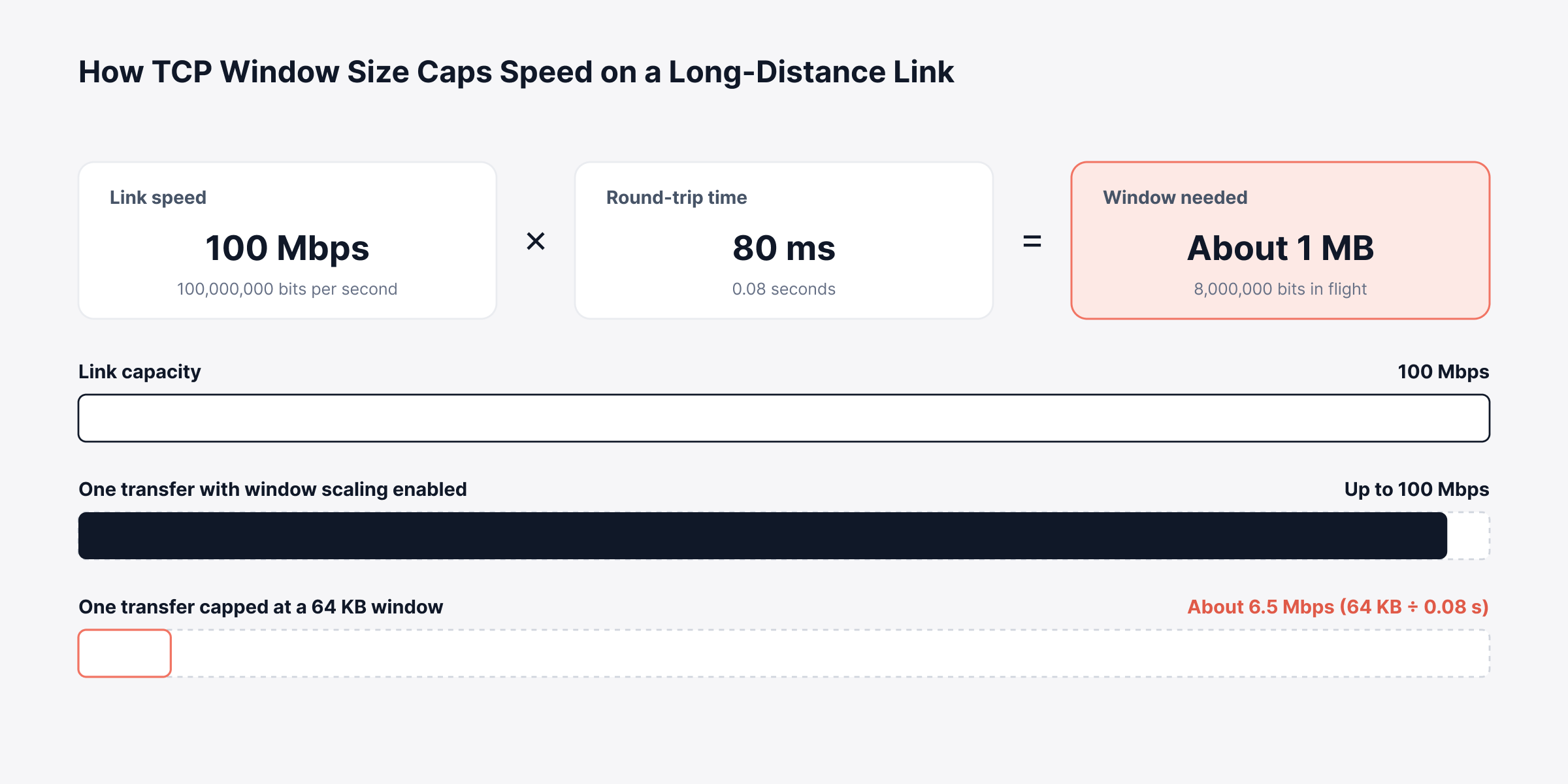
Modern systems scale the window on their own, unless a firewall or old appliance strips the option. On GRE or IPsec tunnels, clamp the MSS too.
6. Balance Load and Add Redundant Paths
Load balancing means no single path or server carries everything. If one fails, the others pick up its share.
Network layer: ECMP or SD-WAN, choosing a link per application
Application layer: A load balancer in front of the servers, dropping any that fail health checks
SD-WAN pays off most for multi-branch businesses. It moves calls off a link that starts dropping packets. It can also send SaaS traffic directly to the internet from the branch.
7. Cut Unnecessary Traffic With Caching, Compression and Scheduling
Traffic you never send costs nothing. Yet one OS update, downloaded by 400 laptops across 12 sites, can cross the WAN 400 times.
Local caching: A relay at each site for updates; a CDN for public content
Compression and deduplication: On WAN optimization or SD-WAN edges
Scheduling: Backups and replication moved outside business hours
Policy cleanup: Traffic with no business purpose placed in the scavenger class
These steps can delay a circuit upgrade. Our guide on how to reduce bandwidth consumption has more.
8. Keep Configurations Consistent and Changes Controlled
Plenty of slowdowns begin as config changes. Someone mistypes an ACL, or a port speed set during troubleshooting never gets restored.
Uptime Institute's 2025 outage analysis puts IT and networking issues behind 23% of impactful outages in 2024, and blames much of the rise on change management problems and misconfigurations. As for human error, 85% of those incidents came down to procedures that were skipped or flawed. Config control belongs in every performance review:
Back up every device configuration automatically and after each change
Compare running configurations against an approved baseline to catch configuration drift
Require review before changes that touch routing, QoS or firmware
Keep a fast rollback path to the last known-good version
9. Remove Hardware, Wi-Fi and Firewall Bottlenecks
Physical faults often pass for congestion. A failing optic throws CRC errors and retransmissions. On Wi-Fi, a crowded channel forces retries that users feel as a slow network.
Security devices deserve the same scrutiny, since a firewall running deep inspection near its throughput limit adds delay to every session. Check these before tuning anything higher up:
Error and discard counters on uplinks and busy access ports
Client signal strength and access point load from Wi-Fi monitoring
Firewall throughput and session counts against the device's rated capacity
A new cable or a quieter channel costs very little. Often, that alone fixes it.
10. Plan Capacity From Trends Before Users Feel the Limit
Capacity planning turns utilization history into a date. You forecast when each link will cross its threshold and budget for the upgrade in advance. Plan from the 95th percentile of utilization:
The average hides busy hours
A single peak overstates need
The 95th percentile reflects the sustained load many carriers also bill against
Review the forecast every quarter against business plans (new sites, new apps, a cloud move). Good capacity planning hands finance a number and a date, well before anything becomes an emergency purchase.
How Do You Match a Network Symptom to the Right Fix?
Network optimization is quicker if you start from what users report. The table maps each complaint to a check and a likely fix.
Symptom Users Report | Likely Cause | Check First | Fix to Try |
Calls break up at busy times | Jitter and queue drops on a congested WAN link | QoS class drops on the WAN interface | Give voice a priority queue, shape to the circuit rate |
Transfers to a distant site crawl on an idle link | TCP window too small for the round trip | Bandwidth-delay product against the window | Enable window scaling, consider WAN acceleration |
Slowdowns at the same hour every day | Backups, updates or replication filling a link | Top talkers and applications in that window | Reschedule, rate-limit or shape the bulk traffic |
Errors keep climbing on one port | Damaged cable, failing optic or duplex mismatch | CRC and input errors on the interface | Replace media, correct speed and duplex |
Problems began right after maintenance | Configuration change or drift | Diff against the last known-good config | Roll back, then reapply the change correctly |
Utilization rises month after month | Growth or a new application | 95th percentile trend and forecast | Add capacity, offload traffic or renegotiate the circuit |
Dedicated traffic analysis tools make the "check first" column much faster to answer.
What Should a Network Optimization Checklist Include?
Use this network optimization checklist every quarter. Run it again after a new site, a carrier switch or a cloud migration.
Measurement:
Baselines exist for every WAN link, uplink and internet circuit
Latency, jitter and loss are tested between each site and its main applications
Flow data comes from WAN edges and data center cores
Traffic control:
QoS classes match the current application list
WAN shapers stay slightly below the contracted rate
Backups run outside business hours or under a rate limit
Configuration and security:
Every device has a recent configuration backup
Running configurations match the approved baseline
Firewalls and inspection devices have throughput headroom
Capacity:
95th percentile utilization reviewed per link
Forecasts in place for links likely to hit their limit within two quarters
What Should You Look for in Network Optimization Tools?
Good network optimization tools answer two questions. Why is it slow, and did the fix work? Answering both takes observability across flows, paths, devices and configs, ideally in one place.
When evaluating network optimization solutions, check for these capabilities and the business cost each one avoids:
Flow analysis: Who consumes bandwidth, answered before any upgrade money is spent
Synthetic path testing: Rising latency, jitter and loss between sites, caught before users notice
Dynamic baselines and anomaly detection: Flags unusual behavior without hand-set thresholds on every port
Configuration backup and compliance: Risky changes stopped before they become outages
Forecasting and reporting: Upgrade dates that finance can plan around
Topology awareness: Shows which sites and services a single failure affects
Spread across separate tools, each incident opens with engineers piecing data together from several consoles. Our comparison of network performance software covers how leading options handle these needs.
How Does Motadata ObserveOps Support Network Optimization?
Motadata ObserveOps supports network optimization from one console. Flow, path, device and config data all land in the same observability platform, so the screen that finds a bottleneck also proves the fix.
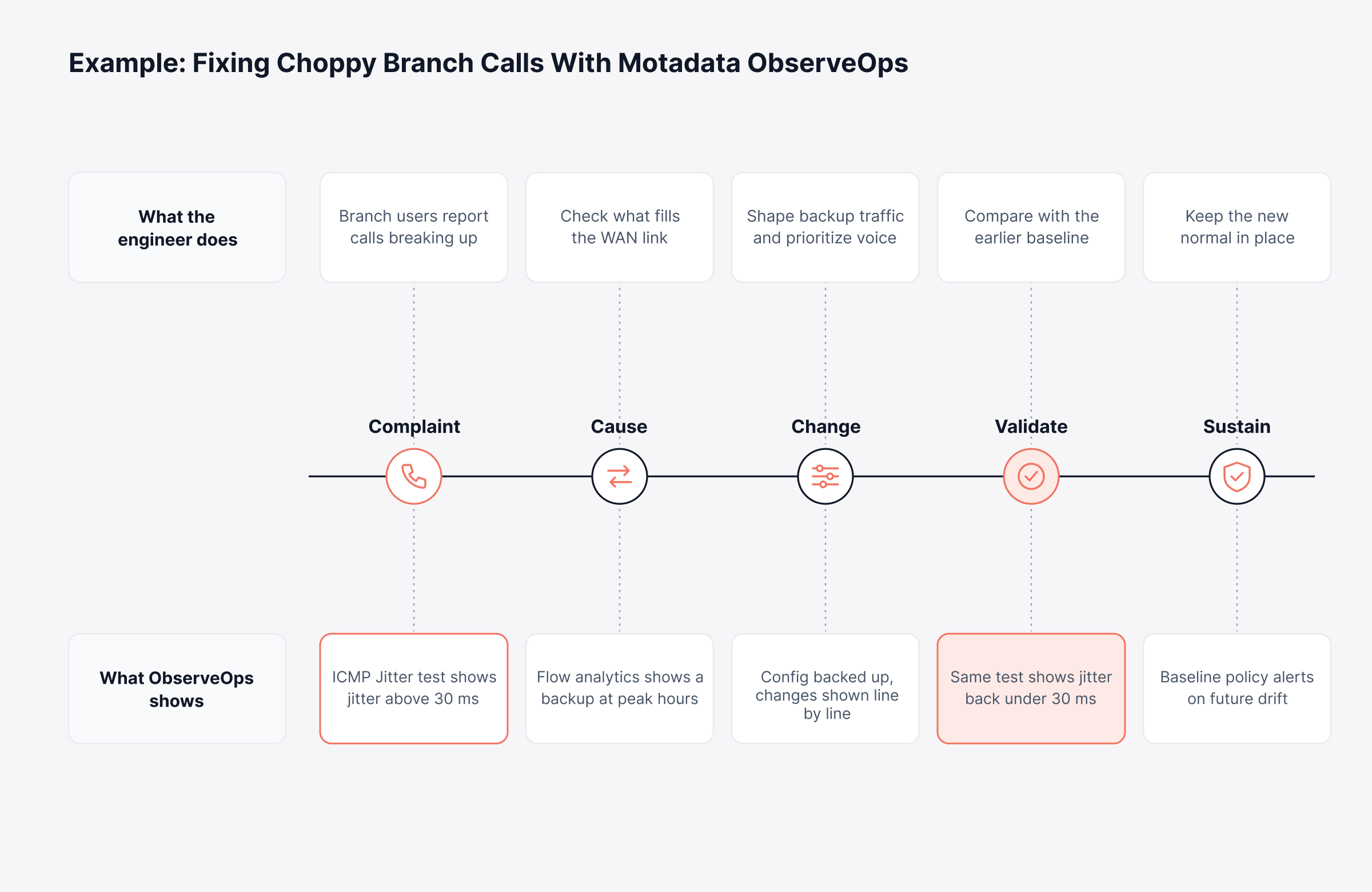
Follow one hypothetical branch office with choppy calls, from complaint to measured fix. The example below shows what the engineer does and what ObserveOps shows at each step.
1. See Which Applications and Users Fill a Link
We collect flow records in NetFlow, sFlow, jFlow, IPFIX and NBAR2 formats. Grouping traffic by source, destination, protocol, AS or DSCP marking shows fast whether QoS markings survive the trip.
In Flow Explorer, pick up to four fields to group by (for example, source IP and destination port). Flow policies alert on unusually high bit rates or a sudden drop in flow volume, and they can trigger a runbook. More detail is on our flow analytics page.
2. Measure Latency, Jitter and Loss Between Sites
WAN links are measured with Cisco IP SLA operations on the routers you already own. ICMP Echo gives round-trip time; ICMP Jitter adds jitter, loss and latency in each direction. ICMP Path Echo goes hop by hop.
So every site ends up with a measured record against the metric targets above. Our IP SLA monitoring turns those tests into the before-and-after evidence a validation step needs.
3. Catch Drift From Normal Before Users Call
Static thresholds miss slow degradation. Our metric policies come in four types:
Threshold: Alerts when a metric crosses a fixed value you set
Baseline: Alerts when a metric drifts from its learned range for that time of day and day of week
Anomaly: Starts after eight hours of polling data and evaluates every 15 minutes
Forecast: Uses at least 24 hours of history and alerts when the projected value crosses your limit
Baseline policies suit network load, since it rises and falls on a weekly rhythm. Runbooks attached to an alert severity run on their own, for example a trace route or an SSH command that gathers diagnostics before an engineer logs in. See how this works in our network anomaly detection feature.
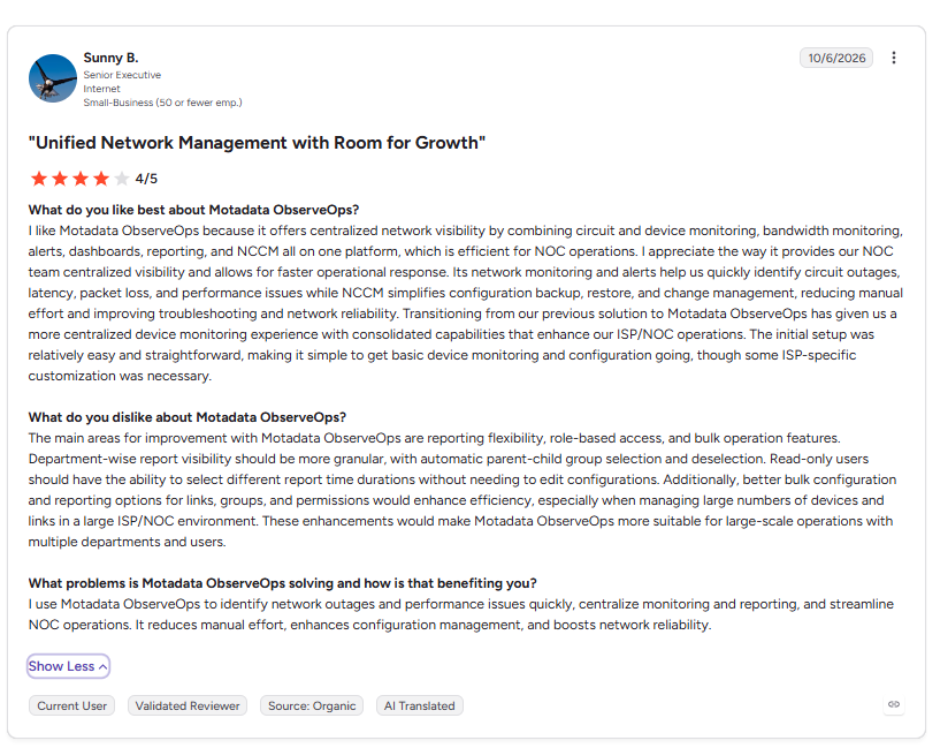
This is what one of our users says about Motadata ObserveOps on G2:
4. Make Every Configuration Change Reversible
Our network configuration management backs up running and startup configurations separately and keeps every version. Compare views highlight inserted, modified and deleted lines, and "Set as Baseline" marks the approved version that later changes are checked against.
When a change goes wrong, a restore rolls the device back to the baseline or the latest version. We also added safeguards for the riskiest actions:
Approval first: Restore, sync, runbook execution and firmware upgrades wait for an approver, with every decision logged
Conflict alerts: A mismatch between running and startup configurations raises an alert, as do failed backups
Compliance scoring: Rules and benchmarks return pass or fail results, and runbooks can fix violations
Our topology mapping covers Layer 2 and Layer 3 (built from CDP, LLDP, OSPF, BGP and IS-IS data), showing how the device you're changing connects to everything else. ObserveOps also covers Cisco Catalyst SD-WAN tunnels and wireless controllers from several vendors. You can see how these pieces fit together in our network monitoring tool.
Replace Network Guesswork With Measured Results Using Motadata ObserveOps
Network optimization often stalls between finding a problem and proving the fix, mostly because flows, path tests and config history live in separate tools. Motadata ObserveOps puts all three in one observability platform. You trace a slowdown to an app, a hop or a change, apply one fix, and check it against the same baseline.
No observability platform adds bandwidth or repairs a carrier's circuit; some fixes will always need new hardware or a better contract. What we provide is the evidence to know which fix is needed, where to apply it and whether it worked, so every network investment becomes a measured decision.
FAQs
What is network optimization in telecom?
In telecom, network optimization means tuning radio access networks, cell coverage, capacity and handovers so mobile subscribers get consistent call quality and data speeds. Enterprise network optimization applies the same principle to LAN, WAN, Wi-Fi and cloud connectivity inside an organization.
What are the two main types of network optimization?
The first is tuning the existing network through QoS, traffic shaping, TCP settings and configuration fixes. The second is changing capacity or design, such as adding bandwidth, redesigning topology or moving to SD-WAN, and it usually follows once tuning reaches its limit.
How do I optimize my network without buying new hardware?
Start by finding what consumes bandwidth during peak hours, then reschedule or shape bulk traffic and give voice and video priority with QoS. Fixing interface errors, enabling TCP window scaling and cleaning up configuration drift can restore lost performance without any hardware spending.
Is QoS the same as traffic shaping?
They work together but do different jobs. QoS decides which packets leave first when a link is congested, while traffic shaping controls the overall sending rate so traffic stays within a circuit's contracted bandwidth.
What tools do I need for network optimization?
You need visibility into interface metrics, traffic flows, path quality and device configurations, plus history for baselines and forecasts. Observability platforms such as Motadata ObserveOps bring these together, so engineers can find a bottleneck and confirm the fix without switching between separate tools.
Author
Poonam Lalani
Content Strategist
Poonam Lalani is a B2B content strategist and writer with a background in computer engineering and experience across enterprise technology domains, including AI, cloud, DevOps, data engineering, and IT operations. She specializes in creating research-driven content that simplifies complex ideas and supports product education, thought leadership, and business growth.