What Is Squid Proxy and How to Keep It Fast, Secure and Observable
How long does it take your service desk to rule the proxy in or out when a user says a site won't load? The proxy carries every outbound web request in most companies, and it still tends to be checked last. So service desks guess, even though the proxy has already logged what happened to that request.
For a lot of those companies, the proxy is Squid. It has cached pages and enforced web policy for close to three decades, and it logs every request it touches. Few systems on the network keep a more detailed record of web activity, provided someone actually reads it.
In this blog, you will see what a Squid proxy server is and how it treats each request. We'll get into setup, ports, health checks and the business case too. After that, it's the logs: how to read Squid proxy logs and feed them into your log monitoring setup, so you see a proxy fault on a dashboard well before the phone rings.
What is Squid Proxy?
Squid proxy is a free, open-source proxy server: your users' browsers send web requests to Squid, and Squid fetches the pages for them (from its cache, when it can).
Its code traces back to a 1990s research project on web caching (it still gets updates, and the docs are on the official Squid site). Whether someone asks "what is a Squid proxy" or "what is Squid proxy server", they usually mean the squid daemon running on a dedicated host, often called the Squid server, placed between users and the internet. In practice it does five jobs:
Caching: It keeps popular objects in the squid cache, in RAM or on disk, and serves repeat downloads locally like any cache server
Access control: You decide who gets out, to which sites, and at what times
Authentication: Sign-in through LDAP, Kerberos or another helper can be required before anyone browses
Protocol handling: HTTP and FTP are proxied as is; HTTPS is tunneled, or inspected if you enable that
Logging: Every request gets a line in access.log showing who asked, for what, the result and the size
Put those together and you have what a Squid proxy does day to day. It's also why so many companies still run it.
Auditors like this setup for a simple reason: the policy lives in one config file and every request lands in one audit log. Compare that with checking browser settings on hundreds of laptops.
Is Squid a Forward Proxy?
It is: Squid was built as a forward proxy, the kind that goes out to external sites for clients on your network. You can set the proxy address in each browser, or push a PAC file, which is just a short script that tells browsers where the proxy lives. There's also transparent mode, where the network intercepts web traffic and hands it to Squid with no browser setting at all.
Squid has an accelerator mode too, in which it fronts your own web servers as a reverse proxy. Few companies pick it for that job now. Outbound is where Squid does most of its work these days; inbound usually goes to other tools.
Is Squid Proxy Still Used?
Squid proxy is still widely used, and very much alive. It hasn't been deprecated; security patches keep landing, and almost any Linux repository, cloud marketplace or container catalog will have it.
What's changed is why companies install it. Encryption cut into caching's value, since Squid can't store what it can't read, so the business case now rests on access control, egress restriction and logging. To see how those work, follow one request through Squid.
How does a Squid Proxy Server Work?
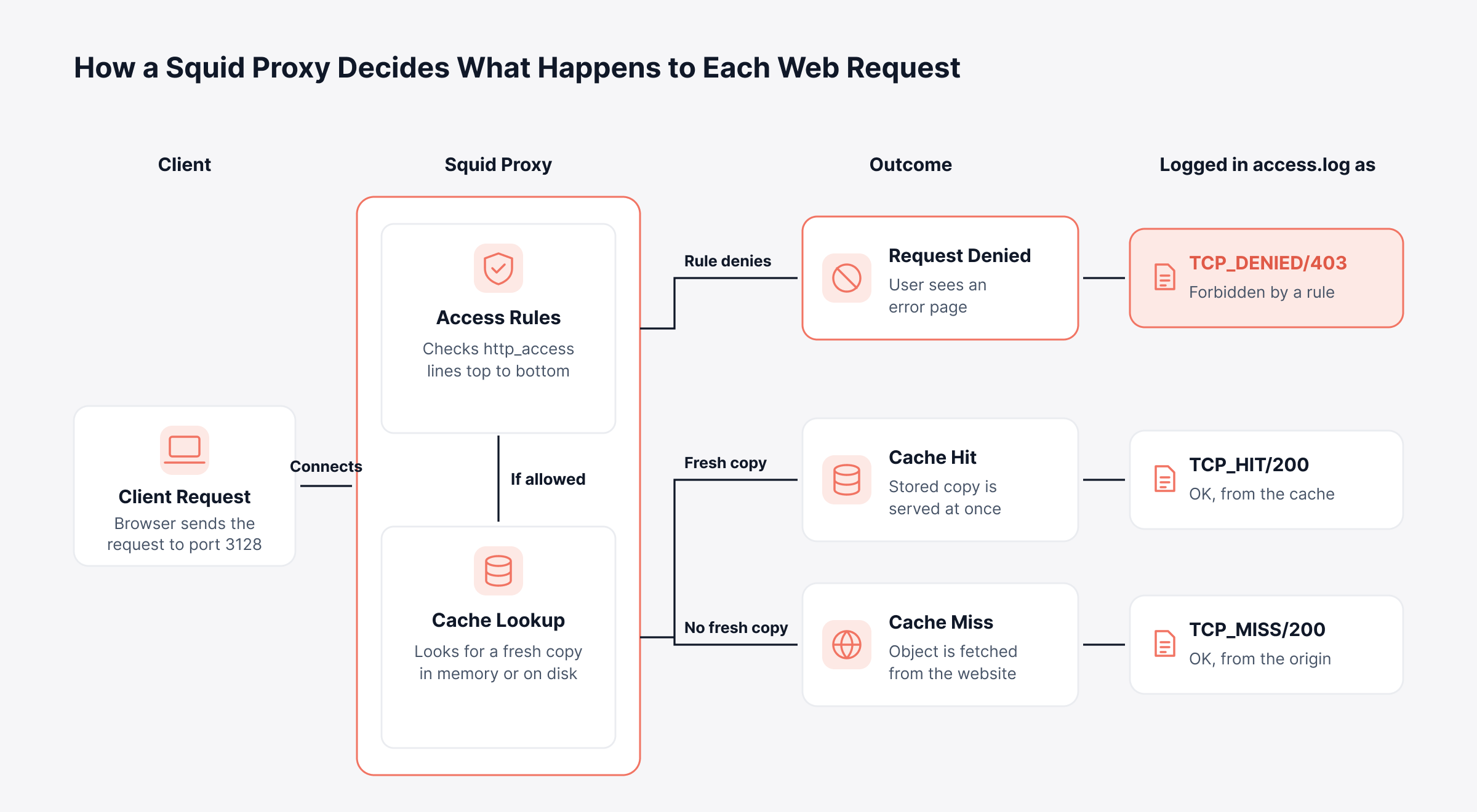
In a Squid proxy server, your rules get the first say on every request, the cache gets the second, and the destination website is contacted last.
Learn this path once and most user complaints become easy to decode. There are five stages:
Client connection: The browser reaches Squid on 3128, the default port, and sends what it wants
Access evaluation: The http_access rules get checked from the top; whichever matches first wins, allow or deny
Cache lookup: Past the rules, Squid checks RAM and then disk for a copy that hasn't expired
Origin fetch: No fresh copy means a trip out; it resolves the name through DNS, grabs the object and, rules permitting, stores a copy
Response and logging: Content goes back to the user, and access.log gains one line about the whole exchange
Trace a user complaint by checking which of three outcomes their request hit, because each one leaves its own result code. Each path, and the code it writes, is laid out below.
How does Squid Handle HTTPS Traffic?
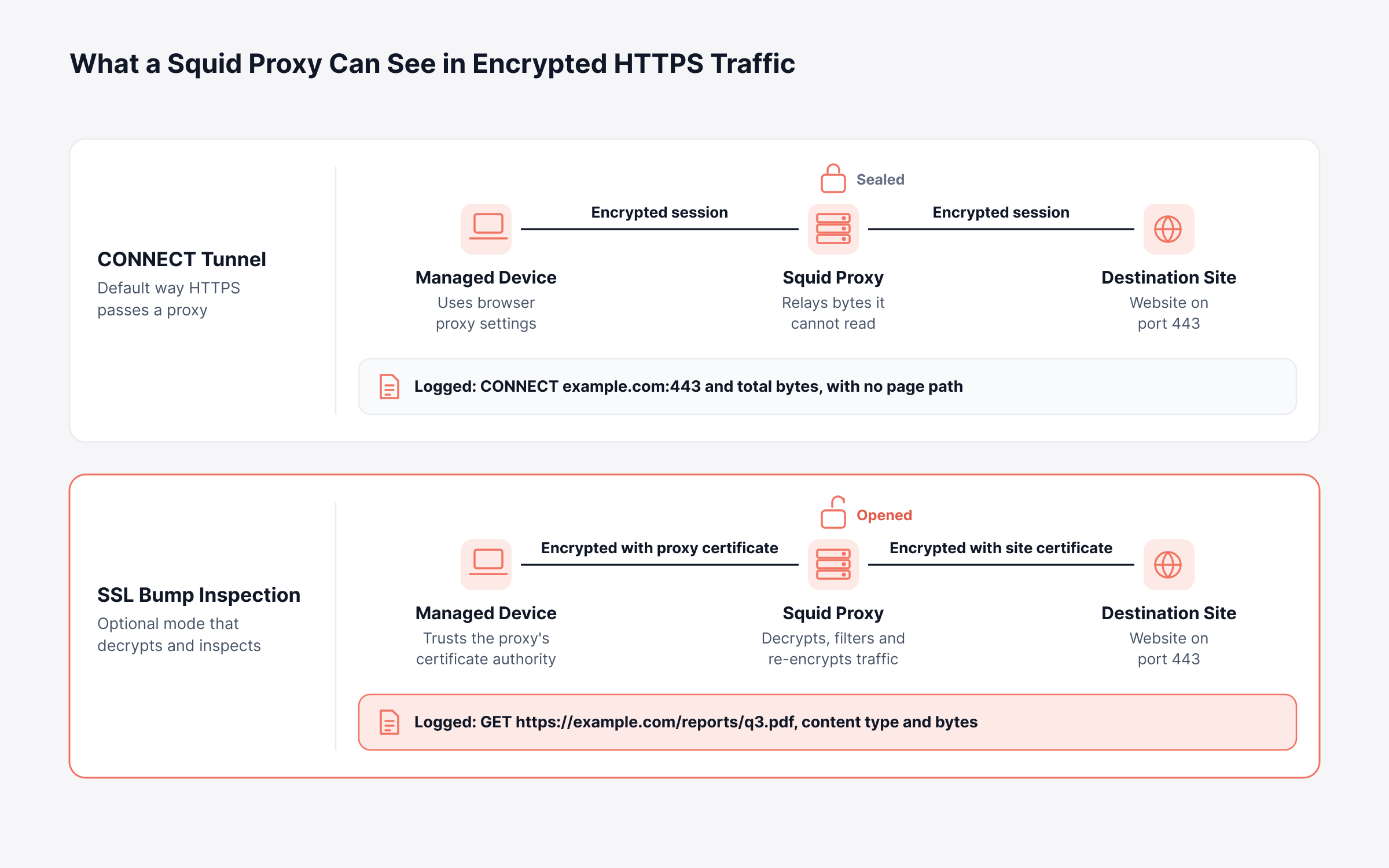
With HTTPS, Squid either tunnels or inspects, and that one choice sets how much your logs can ever reveal.
CONNECT tunneling: Squid opens a tunnel to port 443 and passes the encrypted stream along without looking inside. Logs show the destination host and the tunnel size, without page paths
SSL Bump: Here Squid opens the session up, inspects it and seals it again, using a certificate authority (CA) your devices already trust. Full URLs become visible, and filtering rules can act on them
SSL Bump comes with obligations. You need to distribute the proxy's CA certificate to every managed device, and many organizations exempt banking, healthcare and other sensitive categories through splice rules for privacy and legal reasons. Some applications also pin certificates and will break when inspected.
Decide which mode each traffic category gets before you write any filtering rules. Below, you can see where the encryption stops in each mode and what ends up logged.
What is the Purpose of a Proxy Server Like Squid?
The purpose of a proxy server like Squid is to send all outbound web traffic through one point you control.
What that's worth depends on the business. In practice, these are the jobs that keep Squid running:
Branch bandwidth savings: Shared caching of software updates and large downloads reduces bandwidth consumption on thin WAN links
Acceptable-use enforcement: Block gambling, known malware domains and whatever else your policy bans
Server egress control: Your database server only ever needs its update repository, so that's all it gets
Identity-aware access: With authentication on, the log names jsmith alongside 10.0.0.25, and the name is what investigators want
Compliance records: Months later, you can still show who visited which site, and when
A manufacturer with a dozen plants, each on a modest WAN link, makes a good example. Put Squid at every plant and a large OS update crosses each link once; after that, the plant's machines get it from the local cache. The same central policy keeps plant-floor systems off general websites.
What are the Advantages and Limitations of Squid Proxy?
Squid proxy wins on cost, policy depth and logging detail, and it gives ground on ease of setup, on caching encrypted traffic, and on analytics, which it doesn't offer at all.
Free to license doesn't mean free to run, and the points below decide what Squid actually costs you. The good news first:
No license fee: You pay for hardware and for the people who run it, nothing more
Flexible policy: A single rule can combine users, groups, networks, domains and schedules
Long track record: Decades of production use mean broad documentation and community knowledge
Portable deployment: It runs on bare metal, VMs, containers or cloud marketplace images
And the limits worth planning for:
Configuration by text file: Changes happen in squid.conf, and only people who know that file should make them
Smaller caching gains: Encrypted traffic can't be cached without SSL Bump, which adds certificate and privacy work
Community support by default: Paid support exists through independent firms; Squid itself has no vendor behind it
No native analytics: Charts, alerts and reports all need a separate tool
Two things should drive the decision for an IT leader. One is Linux know-how on staff; the other is a log analytics platform that will put Squid's logs in front of people.
How do You Install and Configure Squid Proxy?
Installing and configuring Squid proxy needs one package and one config file, /etc/squid/squid.conf, after which it listens on port 3128/tcp.
A Squid proxy GUI doesn't exist out of the box. People edit squid.conf in vim or nano, and a few use a third-party web console. We'd put the file in Git too, since then every policy change carries a name and a date.
How do You Install Squid Proxy on Linux?
Run the install line for your distribution; the systemctl line then starts Squid now and at every boot.
Distribution | Command |
Ubuntu or Debian | sudo apt install squid |
RHEL, Rocky Linux or AlmaLinux | sudo dnf install squid |
Any systemd-based distribution | sudo systemctl enable --now squid |
Each distribution ships its own cautious defaults. Review them before pointing any users at the proxy.
Which Squid Proxy Ports Should You Know?
Plenty of companies move the listener off 3128, often to 8080 or whatever their firewall policy expects; it's a one-line change. A few other ports appear in larger designs:
3128/tcp: Default listening port for clients configured to use the proxy explicitly
3129/tcp: Common choice for intercept, or transparent, mode, enabled with the intercept option on http_port
3130/udp: Internet Cache Protocol, used when sibling caches share objects with each other
Key Squid Configuration Directives in squid.conf
You can run a production proxy on little more than these ten lines. Between them they cover access, blocking, caching and logging, and the values shown are placeholders.
Directive | Sample value | Effect |
http_port | 3128 | The port browsers connect to |
acl localnet src | 10.0.0.0/8 | Names your internal network |
acl blocked_sites dstdomain | Names the domains you want blocked | |
http_access deny | blocked_sites | Blocks the listed domains for everyone |
http_access allow | localnet | Allows internal clients through |
http_access deny | all | Catch-all block for everything else |
cache_mem | 256 MB | RAM for the most requested objects |
cache_dir | ufs /var/spool/squid 10000 16 256 | Disk cache location and size |
maximum_object_size | 512 MB | Biggest file Squid will cache |
access_log | daemon:/var/log/squid/access.log squid | Where request logs go |
Of everything in this file, rule order causes the most trouble. Squid stops reading its access control lists at the first match. That’s why one “allow localnet” above “deny blocked_sites” quietly lets every internal user through; keep “deny all” at the bottom and run squid -k parse after each change.
Is Squid a Firewall?
Plenty of people search for a squid firewall and expect packet filtering. Squid doesn't filter packets at all. That's the firewall's job, and what Squid adds is a decision on each web request by user, domain, URL or content type.
Configure the firewall so only the proxy host can send traffic out on ports 80 and 443. That single rule is what forces traffic through Squid, as the topology below lays out.
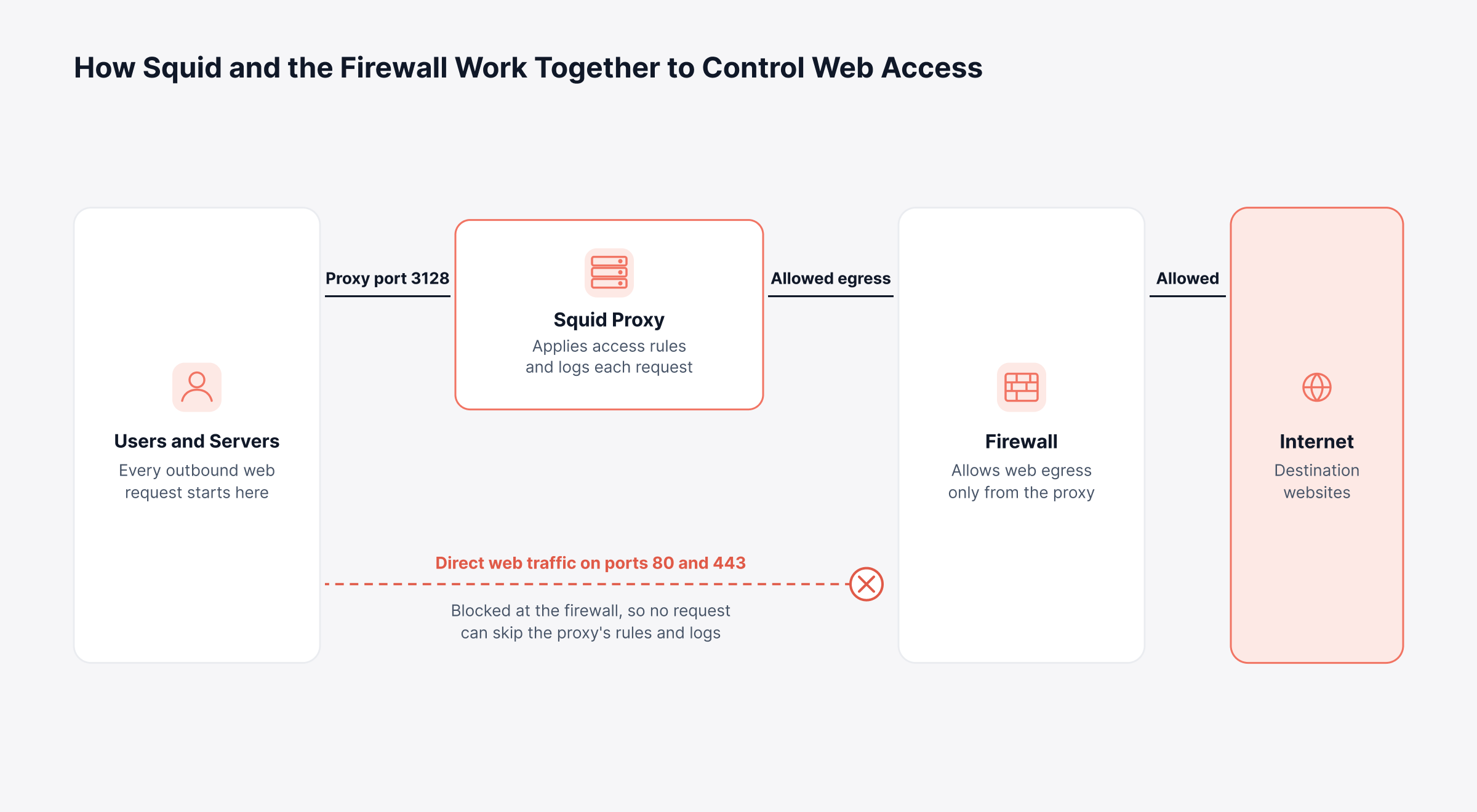
There's a logging benefit too. Anything that reaches the internet has passed Squid, and so it's in access.log.
Can You Run Squid Proxy on Windows?
Squid proxy on Windows does exist, through community and third-party builds that the Squid project wiki documents. They're fine for a lab or a small site. Expect updates to arrive later than they do for Linux, and some features to be missing.
We'd run production Squid on a Linux VM, even in a company that's Windows nearly everywhere else. On any platform, try it with a small pilot group before rolling it out widely.
How do You Check if Squid Proxy is Working?
Squid proxy is working once a test request goes through it and leaves a line in access.log.
All seven run on the proxy host itself; where you see 10.0.0.10, use its IP, and pick any permitted site for example.com.
Command | What it tells you |
systemctl status squid | Running or not, plus the time it last started |
ss -ltn sport = :3128 | Whether Squid is listening on its port |
squid -k parse | Syntax check for squid.conf |
curl -x http://10.0.0.10:3128 -I http://example.com | End-to-end test through the proxy |
tail -f /var/log/squid/access.log | Watch requests arrive |
sudo systemctl restart squid | Hard restart; open sessions drop |
squid -k reconfigure | Config reload, no downtime |
Sometimes curl succeeds while users still can't browse. Look up one affected user's IP in access.log and read the code. With TCP_DENIED/403 a rule is blocking them, with 407 the browser never authenticated, and if neither appears, broader network troubleshooting covering DNS, routing and the link is the next stop.
A config edit almost never means you have to restart Squid proxy. We'd use squid -k reconfigure, which reloads the file and leaves sessions alone.
Which is Better, Nginx or Squid?
Squid is built for outbound forward proxying and Nginx for hosting and load balancing your own applications, so the better one depends on which direction the traffic flows.
Here is how the two compare across five areas:
Area | Squid | Nginx |
Main job | Gets users and servers out to the web | Serves and balances your own sites |
HTTPS forward proxy | Yes, out of the box | Add-on module required |
Access control | Rules by user, group, time, domain and URL, with authentication helpers | Rules focused on inbound requests, client addresses and locations |
Caching focus | Shared cache for many external sites | Cache for responses from your own upstream servers |
Logging focus | Client, result code and cache status for each request | Request, status and upstream timing for each request |
Plenty of companies run both: Nginx in front of internal apps, Squid governing how people and servers get out. Either way, outbound questions get answered in Squid's logs.
What do Squid Proxy Logs Tell You?
Squid proxy logs hold a line for each request: client, destination, outcome, timing and size.
There are three log files, normally in /var/log/squid/:
access.log: A line per client request; this is the one you'll analyze
cache.log: Startup messages, warnings and errors from the daemon itself
store.log: Object storage activity, usually turned off because it grows quickly
First, learn the fields. A native-format line has ten:
# | Field | Example value | What it means |
1 | Timestamp | 1761475200.123 | Time of the request in Unix epoch seconds, with milliseconds |
2 | Elapsed | 245 | Milliseconds Squid spent on the request |
3 | Client address | 10.0.0.25 | IP of the device asking |
4 | Result code and status | TCP_MISS/200 | Squid's cache verdict and the HTTP status code |
5 | Bytes | 5120 | Size of the reply, in bytes |
6 | Method | GET | GET or POST usually; CONNECT for HTTPS |
7 | URL | Where the client wanted to go | |
8 | User | jsmith | Who authenticated; a dash if nobody did |
9 | Hierarchy and peer | HIER_DIRECT/203.0.113.10 | HIER_DIRECT means Squid went straight to the site |
10 | Content type | text/html | Page, image, script and so on |
Our guide to log parsing basics covers this kind of format in more detail.
Squid Result Codes Worth Watching
Field 4 is where you'll spend your time. These seven codes cover most of it:
Code | What happened | Why you'd care |
TCP_HIT or TCP_MEM_HIT | Served from Squid's own disk or RAM | Every hit is a download your WAN didn't carry |
TCP_MISS | Not in cache, fetched | Fine for dynamic pages |
TCP_REFRESH_UNMODIFIED | Copy checked, still valid | Caching is still earning its keep |
TCP_DENIED/403 | Rule said no | Expected, or a rule out of order |
TCP_DENIED/407 | Login needed | Normal in small numbers |
TCP_TUNNEL/200 | HTTPS passed through | You get the host, nothing more |
TCP_MISS/503 | Site unreachable | Usually DNS or the uplink |
Here's a detail that skews a lot of first analyses. On a CONNECT tunnel, elapsed time is how long the tunnel stayed open and bytes is everything that went through it, so a long HTTPS session looks like extreme latency. Filter out TCP_TUNNEL before you compute response times, and read those lines as traffic volume.
How Should You Approach Squid Proxy Observability in Production?
Squid proxy observability in production comes down to four signal groups (availability, performance, security and capacity), each tied to a business outcome it protects.
The log format is only the starting point. What follows is turning it into continuous visibility, mapped to things the business actually cares about:
Signal group | Business stake | Signal source | Look closer when |
Availability | Staff productivity and access to SaaS apps | Process state, a port check and a test request | Squid's process dies or port 3128 stops answering |
Performance | How browsing feels, and how many tickets it generates | Elapsed time on non-tunnel requests, plus cache.log warnings | Lots of clients slow down at the same time |
Security | Data exposure and policy compliance | Denial counts, CONNECT destinations and ports | One client builds up denials, or tunnels open to odd ports |
Capacity | Bandwidth spend and upgrade planning | Bytes per client and domain, cache hit share | One client dominates volume, or hit share falls after a change |
Two cache.log messages are worth their own alerts. File descriptor warnings mean Squid is running short of connections, while repeated DNS errors explain slow misses that otherwise get blamed on the origin.
Here's a sensible baseline for any Squid deployment:
Ship access.log and cache.log to a central platform; that way the evidence outlives any rebuild of the proxy host
Use a custom logformat with readable timestamps, and make sure the user field is populated
Rotate logs on the host, and set log retention centrally to match audit requirements
Track hit share and bytes per site, and review them next to your bandwidth monitoring data
Alert on denial spikes per client, authentication failure surges and service availability
Treat ACL edits like any other change, with a squid -k parse check before every reload
What to Look for in a Squid Proxy Log Analyzer
Judge a Squid proxy log analyzer on whether it understands all ten fields and can turn them into alerts and proxy reports without help from you.
Standalone tools that summarize access.log into static pages work well for a single server. Once you run several proxies, or need squid proxy log reporting tied to incidents, these checks carry more weight:
Field-level parsing: Each of the ten fields, including result code and hierarchy, becomes a filterable value through dynamic log parsing
Search across proxies: One query covers every Squid server and site
Real-time alerting: Thresholds on denials, errors and availability trigger notifications
Grouped reporting: Proxy reports break usage down by client, user, domain or result code
Correlation: Proxy events line up with network, server and flow data through telemetry correlation
How does Motadata ObserveOps Turn Squid Logs Into Proxy Insight?
Motadata ObserveOps turns Squid logs into proxy insight by collecting access.log and cache.log, parsing each field, and applying search, alerting and correlation alongside the rest of your infrastructure data.
We built ObserveOps so that a proxy log becomes one more signal in the same place as your metrics and flows. Squid shows why that matters, because most proxy questions start in the log and end somewhere else in the network.
Collect Squid Logs with an Agent or Syslog
There are two collection paths, and both rely on configuration you already control.
Agent-based: Put the agent on the proxy, give it /var/log/squid/ as the Log Directory, and name access.log and cache.log in Log Include
Syslog forwarding: If you'd prefer no agent, a line like access_log syslog:local4.info squid hands logs to rsyslog, which forwards them over UDP or TCP for syslog monitoring
Logs from a source ObserveOps hasn't classified yet land in an Other category and appear in the Log Inventory. We recommend assigning that source a type and a parser on day one, so its logs are parsed from then on.
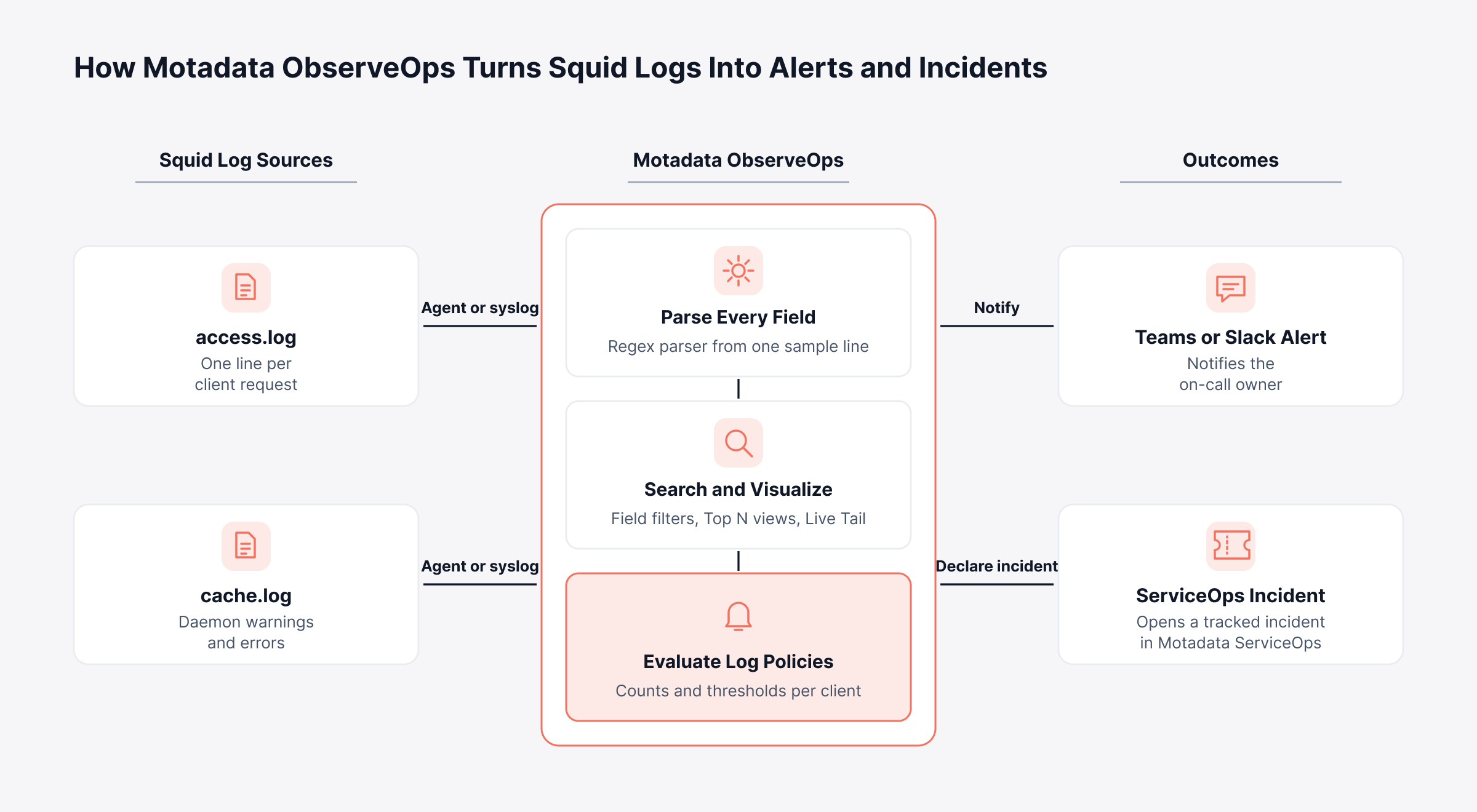
Name an owner for each alert type first, and set thresholds after. Below, one Squid log line ends up as either a Teams or Slack message or a ServiceOps ticket.
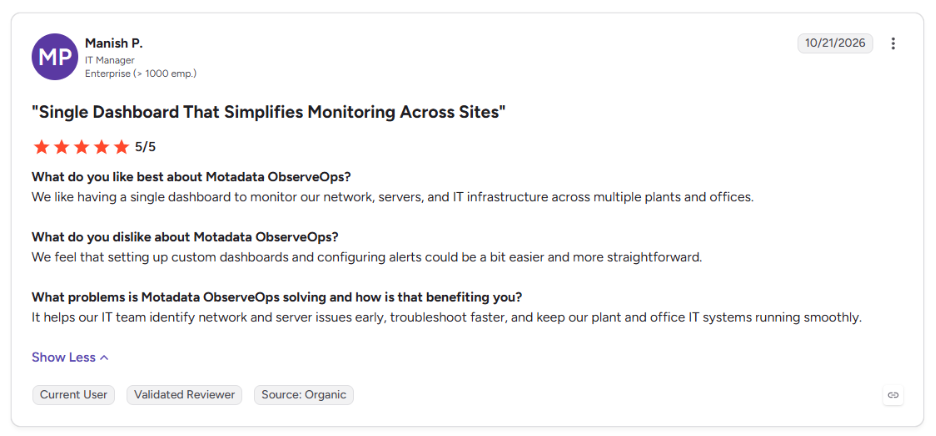
This is what an IT manager running plants and offices says about Motadata ObserveOps on G2:
Parse Every Squid Log Field Once
There's no Squid-specific connector to install. Paste one access.log line into the Log Parser Library, highlight the client IP, the result code and anything else useful, name each piece, and ObserveOps writes the regex.
A parser can be limited to certain lines with All or Any keyword filters; unmatched lines wait under Other. Squid stamps time in Unix epoch seconds, and if that field isn't recognized on its own, you tag it as the timestamp right there.
Search, Visualize and Live-Tail Squid Proxy Traffic
In Log Search, parsed fields are listed on the left. Selecting TCP_DENIED and 10.0.0.25 there returns one user's blocked requests. On a busy proxy, the Log Pattern tab replaces IPs and URLs with tokens, so thousands of lookalike lines collapse into one pattern.
Proxy reports come from the same screen. Group a Chart, Top N, Grid or Gauge view by any field, top domains by bytes for instance, and save it privately or share it with named users. Live Tail covers live log analytics during change windows, streaming fresh proxy events filtered by source and keyword.
Alert on the Squid Proxy Signals That Matter
Log policies in ObserveOps evaluate parsed fields in real time or on a schedule. One policy might count TCP_DENIED lines per client (that's the Result By setting) and raise a Warning, Major or Critical alert when the count passes your threshold.
Consider a finance laptop that starts hitting unfamiliar domains and piling up denials by the hundred. Once the policy fires, security on-call sees it in Teams or Slack and an integration profile opens a Motadata ServiceOps incident. A suppression window keeps that one laptop from flooding the channel, and a runbook can run too if you've set one up.
Confirm Squid Availability and Spot Proxy Bypass Traffic
Logs stop arriving when Squid stops, so availability needs checks of its own. A Port service check confirms that 3128 accepts connections, and process monitoring on the Linux host confirms the squid process is active.
Flow data covers what the proxy can't see. With flow analytics from your core switches or firewalls, hosts sending web traffic straight to the internet, outside the proxy, show up next to the proxy's own records.
Move from Raw Squid Logs to Real-Time Proxy Insight with Motadata ObserveOps
Squid remains a dependable way to control and record outbound web access, and its configuration rewards the care covered above. Its limit is everything after the log line is written, since Squid on its own can't alert you when denials spike or when traffic starts going around it.
In fairness to the category, a single proxy serving a small office can be run well with the tools Squid already provides. Centralized log analytics earns its place once you operate several proxies or need audit-ready records, and that's the work we built ObserveOps to do, so every request Squid handles becomes searchable evidence your operations staff can act on.
FAQs
What does a Squid proxy do?
A Squid proxy receives web requests from users or servers, checks them against access rules, and either serves a cached copy or fetches content from the destination. It also authenticates users when configured and logs every transaction, which makes it useful for performance, policy enforcement and auditing.
Is Squid proxy deprecated?
No. Squid is actively maintained, with regular releases and security fixes, and it ships in major Linux distributions and cloud marketplaces. Its role has shifted as HTTPS became the norm, so most deployments now focus on access control, egress restriction and logging more than bandwidth savings from caching.
How do I restart Squid proxy?
On most Linux systems, run sudo systemctl restart squid for a full restart, then confirm the result with systemctl status squid. After editing squid.conf, run squid -k parse to validate the file and squid -k reconfigure to reload the settings while the service keeps running.
What is the default Squid proxy port?
The default Squid proxy port is 3128 over TCP, set with the http_port directive in squid.conf. Many organizations change it to 8080 or another approved port. Observability platforms such as Motadata ObserveOps can run a port check against it to confirm the proxy keeps accepting connections.
How do you analyze Squid proxy logs at scale?
Forward access.log from every proxy to a central platform, parse each field once, and build searches, alerts and grouped reports on top. Motadata ObserveOps handles this with agent or syslog collection, a regex parser built from one sample line, log policies for alerting, and correlation with flow and infrastructure data.
Author
Poonam Lalani
Content Strategist
Poonam Lalani is a B2B content strategist and writer with a background in computer engineering and experience across enterprise technology domains, including AI, cloud, DevOps, data engineering, and IT operations. She specializes in creating research-driven content that simplifies complex ideas and supports product education, thought leadership, and business growth.