All Features
Network Observability
Wi-Fi Monitoring
Get a holistic view of all of your Wi-Fi networks and monitor the key performance metrics to boost the performance and maintain high availability. Troubleshoot network issues and proactively monitor Wi-Fi network with Motadata ObserveOps.
IT enterprises run on WiFi, an integral part of the organization, to scale across wired, wireless, and virtual environments to meet IT requirements. As wireless networks can be cost-effective, scalable, and simple, they are widely used to boost connectivity and availability.
Wireless network Monitoring is essential as it helps ensure the efficiency and continuity of networks. The amount of traffic handled by the network, bandwidth usage, and utilization can deteriorate the user experience if a WiFi monitor is not in place. Motadata ObserveOps helps analyze WiFi’s performance metrics and network components.
Wi-Fi Monitoring with Motadata ObserveOps
Motadata ObserveOps provides complete visibility into your network WiFi with comprehensive monitoring. It discovers wireless network elements such as Wireless LAN controllers, access points, and network devices. Then, Motadata ObserveOps categorizes these devices based on device type and acts as a WiFi usage monitor.
As Motadata ObserveOps comes with a range of capabilities, it helps ensure that your WiFi networks are always available and accessible. In addition, the built-in monitors and device templates allow you to track the key performance metrics and health of your WiFi network components.
Motadata ObserveOps monitors Cisco and Aruba wireless devices with the help of SNMP calls, while Ruckus components can be monitored via HTTP/HTTPS.
However, Motadata ObserveOps monitoring is not limited to these environments. You can always add a new environment from the device catalog and starts the Wi-Fi monitoring.
Better Wireless Coverage for the End User
The main objective of wireless infrastructure monitoring is to ensure that we are offering a better networking experience devoid of any kind of interference to the end client.
Motadata achieves this by identifying those clients that have low SNR (Signal to Noise Ratio). By identifying these clients, the network administrator can take the required course of action like channel tuning and many more.
Wireless LAN Controller
Wireless LAN network monitoring helps manages the access points across the network infrastructures. With the pre-defined configuration templates, add new network devices and monitor the key metrics efficiently.
The common SSID across the network architecture makes the wireless network perform seamlessly. The shared WiFi eases the network complexity and helps offer an efficient user experience.
Monitoring Wireless Controller
Motadata ObserveOps, a WiFi monitoring tool, lets you monitor the critical KPIs that impact the overall health and performance of the network. The access points, signal strength, and status help understand the WiFi network better and make strategic planning efficient.
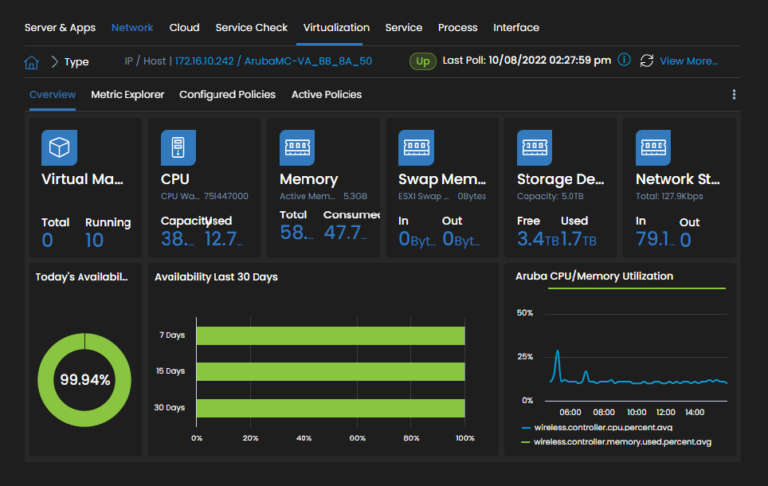
Mapping the clients with SSID makes it easy to locate the clients and provides complete visibility of their status and activities. In addition, client location monitoring helps find lost devices and know the client’s whereabouts.
Discover Rouged Devices
Identifying the network devices that disturb the overall network performance is vital. For example, discovering unauthorized wireless devices which can disrupt your network signals and make it challenging for the network devices to utilize the bandwidth properly.
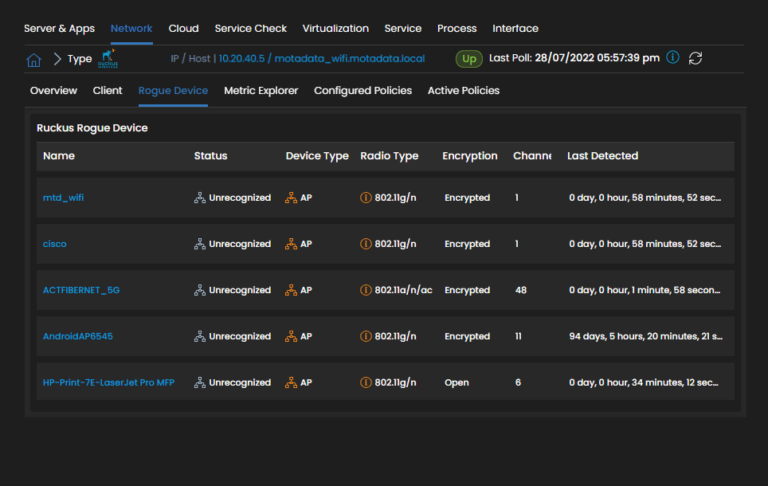
Motadata ObserveOps, a WiFi channel monitor, detects the rouge devices’ transmission channel and helps you tune your wireless devices’ channel for a seamless user experience. It lets you configure the perfect channel for your WiFi infrastructure, ensuring smooth network performance and providing a seamless user experience.
Visualize Signal Strength with Motadata ObserveOps
Motadata ObserveOps, built on Deep Leaning Framework for IT Operations, lets you analyze the SNR (Signal-to-Noise Ratio) in network transmissions and helps design your WiFi architecture with Heat Map facilities.
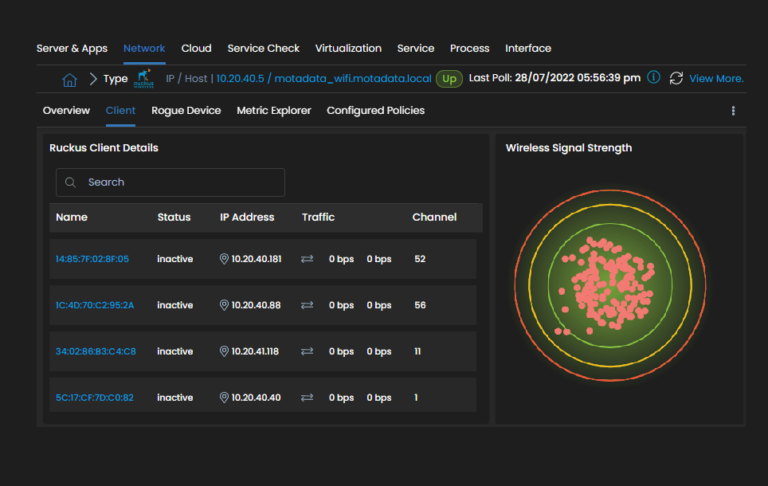
The Heat Map facility helps you finalize where you should configure your access points to get the best network performance, utilize bandwidth, and minimize downtime.
Motadata ObserveOps is much more than a simple WiFi network monitoring tool; it is a complete network monitoring solution with many facilities. Capacities that help you keep track of all of your network devices, such as servers, firewalls, routers, virtual machines, storage devices, and more. The analytics helps you maintain your network’s health and make confident decisions, enhancing your overall performance.
Ready to implement Wi-Fi Monitoring?
Discover how Motadata ObserveOps can help you monitor your infrastructure in real-time and respond to issues instantly.