High Cardinality Metrics: What They Are and How to Control Them
Metrics bills climb without anyone adding a dashboard. The cause usually sits in the code. A label picked up a customer ID, and a few hundred time series became a few hundred thousand.
High cardinality metrics do that. They rarely give warning before the queries start timing out. Teams meet the word cardinality in two places. Database cardinality measures how unique a column's values are. Your monitoring stack uses the same word for something that decides what you pay.
In this blog, you'll see:
The arithmetic that turns three labels into billions of time series.
Which labels are safe to ship, which are risky, and which never belong.
How to find your worst offenders and cut them without losing the detail.
By the end you'll be able to set a cardinality budget before a metric ships.
What Is High Cardinality?
Cardinality counts the unique time series a metric produces. High cardinality means that number runs large. One of the metric's labels is usually carrying far more values than anyone expected.
A time series is one unique combination of a metric name and its labels. Change any label value and you get a new series. It gets stored and indexed separately from the rest.
So a counter called http_requests_total becomes many separate series in storage. You get one series for every combination of method, status code and service.
Labels make a metric worth collecting (and they also multiply it). A counter with no labels answers one question, and the same counter with five answers hundreds.
Prometheus keeps an index of every active series in memory, so queries can resolve labels fast. Most systems built on the same model do too. That index is where the trouble starts. High cardinality stops being a design question there and becomes an operations problem.
How Cardinality Multiplies Into a Series Count
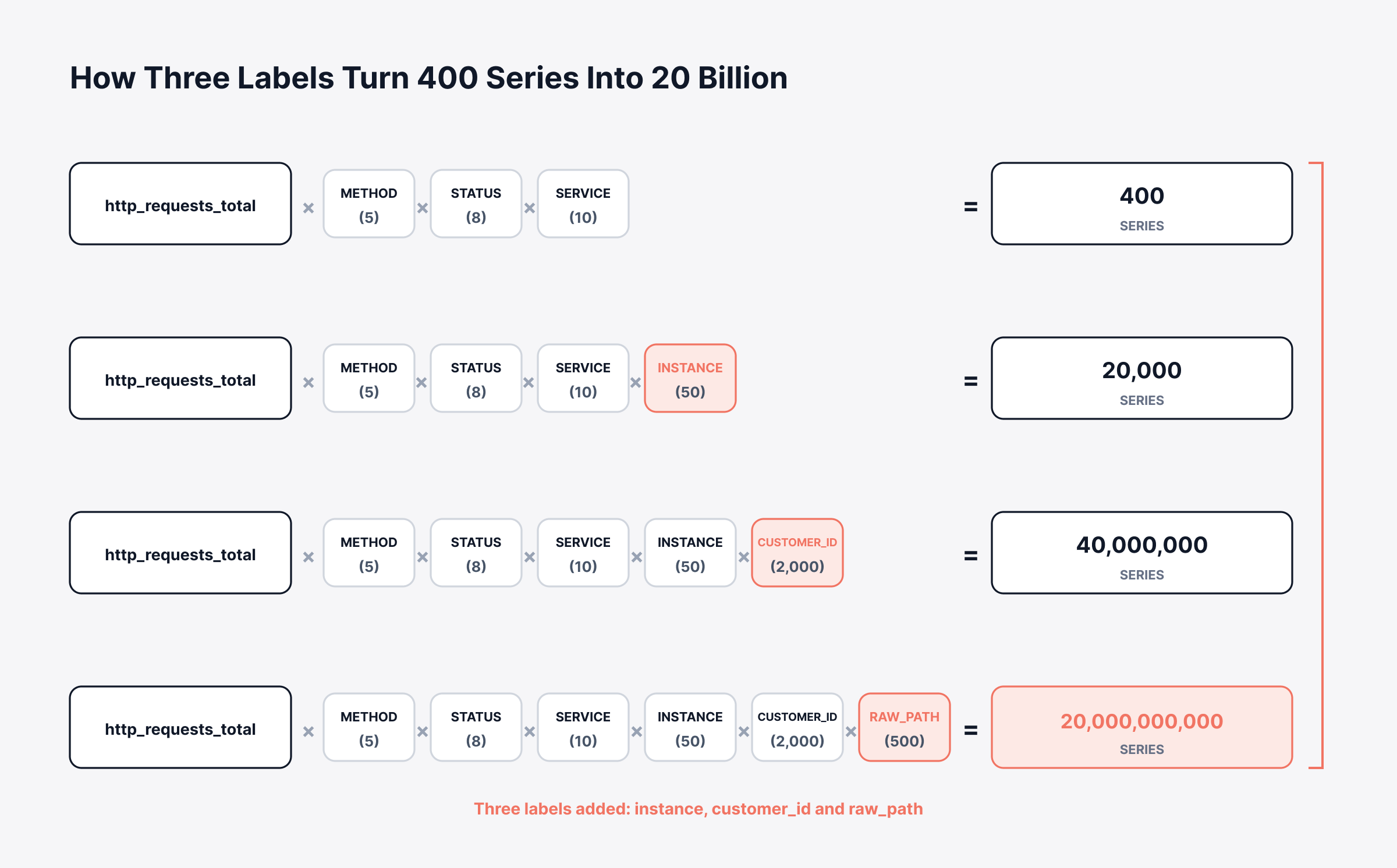
Each label multiplies the series count by the number of values it can take. The table below walks one HTTP counter through four versions of itself. Each version adds a single label.
What the metric tracks | Labels | Values each | Unique series |
Requests by method, status and service | 3 | 5, 8, 10 | 400 |
The same, plus the instance it ran on | 4 | plus 50 | 20,000 |
The same, plus the customer who called | 5 | plus 2,000 | 40,000,000 |
The same, plus the raw request path | 6 | plus 500 | 20,000,000,000 |
Two labels took that metric from 400 series to 40 million. The customer ID did most of the damage. Its value count grows every time sales closes a deal.
The raw request path finished the job. Query strings and record IDs make that label effectively unbounded, so the series count never hits a ceiling (20 billion is just where this example stopped counting).
Nobody plans this. A cardinality problem arrives one reasonable-looking label at a time. We've watched a single label take a dashboard from instant to unusable, and the developer who added it had a perfectly good reason.
The diagram below runs the same four steps as the table, with the multiplication made visible.
High Cardinality vs Cardinality Explosion: Which One Do You Have?
High cardinality describes a property of a metric. Cardinality explosion describes an event that hits your monitoring system. Telling them apart decides whether you're having a budget conversation or a rollback conversation.
A metric with high cardinality can stay perfectly healthy. Plenty of teams run millions of series deliberately and get real value from the detail. The observability 2.0 argument goes further, treating wide high-cardinality events as the better primitive altogether.
A cardinality explosion happens suddenly. One deploy ships one new label, and the series count jumps by an order of magnitude. Two scrape intervals is all it takes (there's no gradual climb to warn you).
One question sorts them. Did the series count grow with your business over months, or jump on the day of a release?
Growth over months means you buy capacity or start aggregating. A jump after a release means you go find the commit. The faster you tell those apart, the less time you spend arguing about storage.
What Breaks When the Series Count Climbs
Three things break as series counts climb. They break in a predictable order: memory first, then queries, then the invoice.
1. The Index Has to Live in Memory
Time series databases keep an index of active series in RAM. That's what lets a query resolve labels quickly. Every active series takes a share of that memory, queried or not (an abandoned dashboard still costs you RAM).
Prometheus will tell you where the memory goes. Its TSDB status endpoint reports memoryInBytesByLabelName, which attributes consumption to individual label names.
When the index outgrows available RAM, the failure isn't graceful. Scrapes start to queue and the process gets killed. You lose your monitoring at the exact moment you need it.
2. Every Query Scans Every Matching Series
A query that aggregates across a label has to touch every series matching it. Forty million series behind one metric name means forty million entries to resolve. The aggregation only starts once all of those are done.
Dashboards feel this before alerts do. Panels load slowly, then they time out. The timeout usually happens during the incident that made someone open the dashboard.
Alert rules run on the same engine. A rule that can't finish inside its evaluation interval stops producing results. The alert never fires, and nobody gets told why.
3. Your Meter Counts Series, Not Dashboards
Observability pricing meters one of two things. Some vendors count the custom metrics or series you keep. Others count the gigabytes you send. Cardinality drives both numbers upward.
That turns a label into a purchasing decision. A developer adding customer_id to a counter is committing budget. Almost nobody in that review sees it that way (the cost doesn't land for weeks).
Which Labels Are Safe, Risky or Never Worth Shipping
One question decides whether a label is safe. Can you write down every value it will ever take? According to the Prometheus instrumentation guidelines, you should keep the cardinality of your metrics below 10. Anything with the potential to pass 100 needs a different approach.
That number surprises teams who've been attaching pod names to everything. The table below sorts the labels that turn up most often in real instrumentation.
Label | Typical value count | Verdict | Why |
HTTP method | About 8 | Safe | Bounded by the spec itself |
Status code | Tens | Safe | Bounded, and you need it to find errors |
Service or job name | Tens to hundreds | Safe | Grows with the org chart, not with traffic |
Region or availability zone | Under 50 | Safe | Your provider sets the ceiling |
Environment | 3 to 5 | Safe | Fixed set that rarely changes |
Pod or instance name | Hundreds, churning | Risky | Every rollout mints a new batch of values |
Templated endpoint path | Tens to hundreds | Risky | Safe templated, fatal if the raw path leaks in |
Customer or tenant ID | Thousands | Risky | Fine at 50 tenants, ruinous at 50,000 |
Version or commit SHA | Unbounded over time | Risky | The value count never stops growing |
User ID, email or session ID | Unbounded | Never | One value per person or per visit |
Raw URL with query string | Unbounded | Never | Record IDs and parameters make it infinite |
Trace ID or request ID | Unbounded | Never | One new series for every single request |
The risky rows are the ones that need your judgment. A tenant ID works fine across 50 customers and breaks things across 50,000. The same label belongs in different columns at different companies.
The never rows carry no judgment at all. We've yet to hear a good argument for any of them. A trace ID produces one series per request by definition, so your series count tracks your traffic for as long as you keep the data.
Labels for the golden signals stay cheap, which is why that approach survives contact with scale. Latency, traffic, errors and saturation need service and status code. Both of those stay bounded.
Why Kubernetes Makes Cardinality Worse
Kubernetes multiplies cardinality in ways nobody configured on purpose. The platform mints and retires identifiers constantly. Your monitoring stack then labels metrics with them automatically.
Pod names change on every rollout. Take a deployment with 30 replicas that ships twice a week. It retires 60 pod names a week and creates 60 more. The old series stay queryable until retention clears them.
Container IDs are worse, because a restart changes them and that doesn't need a deploy. A crash-looping pod can generate thousands of label values on its own (and it does that while you watch).
Histograms are the multiplier most teams miss. A histogram with 12 buckets produces 14 series for every label combination. That's the 12 buckets plus the sum and count series. So every label you add gets multiplied by 14 before anything else happens.
On Kubernetes, we would not trust the defaults at scale. Collectors and service meshes inject labels before anyone reviews them. They land on every metric at once.
How Do You Find Your Worst Offenders?
Ask your own time series database which metrics hold the most series. Every major stack can answer that (most teams have simply never asked). Two or three metric names usually hold most of them.
The table below covers where to look on the platforms most teams run.
Where you look | What to run | What it gives you |
Prometheus HTTP API | GET /api/v1/status/tsdb | Series counts and label value counts, ranked |
Prometheus web UI | Status, then TSDB Status | The same statistics rendered, top 10 by default |
Prometheus API, wider view | /api/v1/status/tsdb?limit=100 | Raises the default 10 results, up to 10000 |
PromQL, ranked by metric | topk(10, count by (__name__)({__name__=~".+"})) | The ten metric names holding the most series |
OpenTelemetry Collector | The view and attribute processors | Where to drop attributes before they are exported |
Read labelValueCountByLabelName first. It names the label carrying the most distinct values. That's usually the one that caused the problem.
Then check seriesCountByMetricName to see which metric holds them. One metric name sitting on half your total series tells you where to spend the afternoon.
Run this on a schedule instead of during an incident. The teams we work with check weekly. That catches a bad label while the number is still small. An OpenTelemetry collector then gives you somewhere to fix it without an application release.
How to Cut Cardinality Without Losing the Detail
Cutting cardinality means moving detail somewhere cheaper. These five steps work in order. The first buys the most time for the least effort.
1. Drop the Label at the Collector
Fix the label at the collection layer, before it reaches storage. A collector rule takes effect across every service at once. That beats waiting on a release from each team that owns a metric.
This route is reversible too. A rule you regret can be removed in minutes. A code change has to go around the release cycle again.
2. Template the Path Before It Becomes a Label
Replace record IDs in a path with a placeholder, so the label stays bounded. The route /users/{id}/orders carries the same operational meaning as the raw path. It holds a few hundred values instead of millions.
Most web frameworks already expose the matched route. Using the raw URL is usually an oversight (nobody argues for it on purpose).
3. Move the Identifier to Logs or Traces
High-detail identifiers belong on the signals built to carry them. A customer ID sits on a log line as one field, costing you a single event. The same ID on a metric multiplies every series behind it.
The split between logs and metrics settles this for you. Metrics answer how many and how fast across a population. Traces answer what happened to one request.
Exemplars are worth knowing about here. They attach a trace ID to a metric sample without adding a label. A slow histogram bucket then links out to a real request.
4. Aggregate Before It Lands
Aggregate away the dimensions nobody queries, at ingest. A telemetry pipeline can roll a per-pod metric up to per-deployment before storage. You keep the number you chart and drop the ones you never opened.
Keep the raw signal for a short window if you need it. We see teams run a few days of full detail plus months of aggregated history. That costs a fraction of keeping everything at full resolution.
5. Put a Label Budget in Code Review
Make cardinality a review question, so the fix lands before the metric ships. The reviewer only has to answer one thing. Can they list every value the new label will take?
Teams who adopt this find the conversation takes about a minute. The developer either names the values or moves the field to a log line. Both outcomes beat a rollback three weeks later.
What Does High Cardinality Do to Your Observability Bill?
High cardinality raises your bill through whichever meter your vendor uses. The table below shows what each meter counts and where cardinality hits it.
Pricing meter | What it counts | What cardinality does to it |
Per custom metric or series | Unique time series retained | Every new label value adds a billable series |
Per gigabyte ingested | Samples written per scrape | More series means more samples at the same scrape rate |
Per source | How many things you watch | Nothing, because the source count does not move |
The first two meters punish the same mistake. Neither one tells you which label caused it. The invoice arrives as a single number, weeks after the deploy that moved it.
We price ObserveOps on that third row for the signals where volume runs wildest. Log and flow monitoring are licensed per source, so the meter tracks how many things you watch instead of how much data they emit.
That removes the worst surprise on the log side. A chatty application cannot increase your license cost on its own. It can still fill your storage, so retention policy still needs setting properly.
On the ingest side, the observability pipeline applies structure as data arrives. Logs, events, traps, flows and metrics all land as queryable fields, with policy-driven retention attached. The pipeline ships in the base edition, so controlling what gets stored isn't a capability you upgrade into.
It won't write your label schema for you, and no platform will. Only your team knows whether tenant ID means 50 values or 50,000. That judgment stays with the people who own the service.
Keeping monitoring and the service desk on one unified observability and ITSM platform helps with the follow-up. The alert, the metric behind it and the ticket it raises then live on a single record.
How Do You Set a Cardinality Budget?
A cardinality budget gives every metric a series ceiling before anyone adds a label to it. Four numbers produce that ceiling, and the table below works them out on a mid-sized estate.
Step | What you work out | Worked example |
1. Ceiling | The active series your platform and budget can carry | 2,000,000 series |
2. Keepers | The metric names you actually chart or alert on | 400 metrics |
3. Share | Ceiling divided by keepers | 5,000 series per metric |
4. Label test | New label values multiplied by the metric's current series | 400 times 2,000 tenants = 800,000, well over the share |
Step 4 does the real work. A label that pushes a metric past its share goes onto a log line or a span instead, and the data survives either way.
Start with the metrics you already have, before you write a single rule. Pull the top ten metric names by series count, then the top ten labels by distinct values. Two labels usually explain most of the total.
We'd fix those two at the collector first, because that change needs no application release. Then set the review question for new metrics, so the next one arrives inside the budget already.
Set log retention separately from the metrics work. The two bills move independently. Teams who tune only one of them tend to get surprised by the other.
Set the Label Budget Before the Next Metric Ships
Treat a label as a commitment. Every value it can take is a series you've agreed to store, index and pay for. That one shift catches most cardinality problems while they're still a line in a pull request.
The discipline itself stays small. Bounded labels on metrics, unbounded identifiers on logs and traces, and a review question that catches the difference.
None of it is free. Dropping a label costs you a slice of detail. That detail might be exactly what you want during the next incident, and log filtering decisions carry the same trade-off.
The teams we see get this right stop buying capacity to store questions nobody asks. The monitoring bill then tracks the size of your estate instead of one careless commit.
FAQs
What is the difference between cardinality and dimensionality?
Dimensionality counts how many labels a metric carries. Cardinality counts how many unique series those labels produce together. A metric with four labels has low dimensionality. It can still reach millions of series if one label runs unbounded.
Can a time series database handle high cardinality metrics?
Modern engines handle millions of series, though each has a limit and a cost curve. A different database buys headroom without removing the need for label discipline. ObserveOps keeps metrics, logs and flows on one backend, so the series count has fewer places to hide.
Does high cardinality affect logs and traces the same way it affects metrics?
Logs and traces handle identifiers very differently. They store them as fields on individual events, so a unique value adds one record instead of a whole new series. That's why moving a customer ID off a metric and onto a log line works.
Will dropping a label delete the history I already collected?
Existing series stay in storage until retention expires, so old dashboards keep working on historical data. New samples arrive without the label. Any query spanning the change will show a gap in that one dimension.
How often should you audit metric cardinality?
Monthly suits most teams, and weekly suits anyone deploying often or running Kubernetes. Pull the top metric names by series count and the top labels by distinct values. Compare against the last run to see what moved.
Author
Ramya Shah
Technical Writer
Ramya Shah is a technical content writer with a computer engineering background and roots in automotive journalism. He covers IT Service Management, observability, IT operations, and AI-driven automation. An early adopter of AI-assisted writing workflows, he turns complex IT processes into clear, engaging content optimized for search and answer engines (AEO), lifting content output and organic visibility.