What Is DNSSEC? How DNS Security Extensions Stop Spoofing
Why would a domain with correct records, healthy name servers and a valid certificate stop resolving for part of the internet? Often it's DNSSEC. Your records are fine; the signatures behind them are not, and any resolver that checks signatures now refuses to answer.
An expired signature: Signing job stopped, RRSIG records lapsed
A stale DS record: New DNS provider, old key still listed at the parent zone
A rushed key rollover: Old key pulled before resolver caches let go of it
DNSSEC was designed to stop spoofing and cache poisoning, and it works. The catch is operational. When signing breaks, the checks that block forged answers block your genuine ones too: customers see "site not found" while internal dashboards look healthy.
So DNSSEC needs the same observability as the rest of your DNS, and our guide to DNS monitoring covers that wider picture. In this blog, you will see how DNSSEC works record by record, what it means for the business, when and how to enable it, the six failure patterns that take signed domains offline, how to test a zone, and how we bring DNSSEC into view in Motadata ObserveOps.
What is DNSSEC?
DNSSEC (Domain Name System Security Extensions) adds digital signatures to DNS records. When a resolver asks, "where is example.com?", the signature shows the reply came from example.com's owner and was not altered on the way.
Plain DNS dates from the 1980s, when every network on it was trusted. A resolver takes the first matching answer and never asks who sent it. DNSSEC adds that check with public-key cryptography, and the DNSSEC meaning (some search for "DNS sec") comes down to three guarantees:
Origin authentication: The answer was signed with the zone owner's private key
Data integrity: Any edit after signing breaks the signature
Authenticated denial of existence: Signed proof that a name does not exist; a forged "no such domain" reply fails
Know the limits early. Queries and answers stay readable on the wire, and a traffic flood hits a signed zone just as hard. Encryption and DDoS defense belong to a wider network security program.
What does DNSSEC do About DNS Spoofing?
Spoofing is the core threat, and cache poisoning is its worst form. In 2008, researcher Dan Kaminsky showed it could work at scale; two years later, the root zone was signed. A poisoning attempt runs in three steps:
Race: The attacker floods a recursive resolver with forged replies for a target name
Accept: One forged reply matches the query before the genuine answer arrives
Spread: The resolver serves the false address from its DNS cache to every user until the entry expires
Take a regional bank whose customers use one ISP's resolvers. A poisoned entry for its login hostname would send those customers to a server the attacker controls, while the address bar still shows the bank's name. With the bank's zone signed and the ISP's resolvers validating, the forged answer fails its signature check and is thrown away.
How does DNSSEC Work?
DNSSEC works by signing DNS records. Each zone signs its records with a private key and publishes the public key next to them; the parent zone then vouches for that key. Follow the vouching upward and you reach the root.
DNSSEC signs records in groups called RRsets. An RRset is every record of one type for one name; if www.example.com points to two IP addresses through two A records, both share a single signature. Resolvers check that signature before they cache anything.
Which DNSSEC Records Does a Signed Zone Contain?
A signed zone carries a handful of extra record types alongside your normal DNS records. Each has one job, and each fails in its own way.
Record | What it holds | Published by | When it is wrong |
RRSIG | The signature over one RRset, with start and expiry times | Your zone | Answers turn bogus once the expiry passes |
DNSKEY | The zone's public keys, flagged as zone signing or key signing | Your zone | No signature can be checked |
DS | A hash of your key signing key | The parent zone, through your registrar | The chain of trust breaks at your domain |
NSEC or NSEC3 | Signed proof that a name or type does not exist | Your zone | Negative answers fail validation |
CDS and CDNSKEY | The DS data you want the parent to publish next | Your zone | Automated DS updates stall |
NSEC has a side effect. Each record names the next hostname, and a script can walk the zone that way to list every name in it. NSEC3 hashes the names to slow that down; RFC 9276 recommends zero extra iterations and no salt, because heavier settings cost resolvers CPU and add little.
Zone Signing Keys and Key Signing Keys
Most zones we look at run two key pairs. The zone signing key (ZSK) covers everyday records: A, MX, TXT and the rest. The key signing key (KSK) signs one thing only, the DNSKEY set.
Splitting them saves work. A ZSK change stays inside your zone. A KSK change means a new DS record at the registry; your registrar gets involved, and propagation takes time.
How is the DNSSEC Chain of Trust Built?
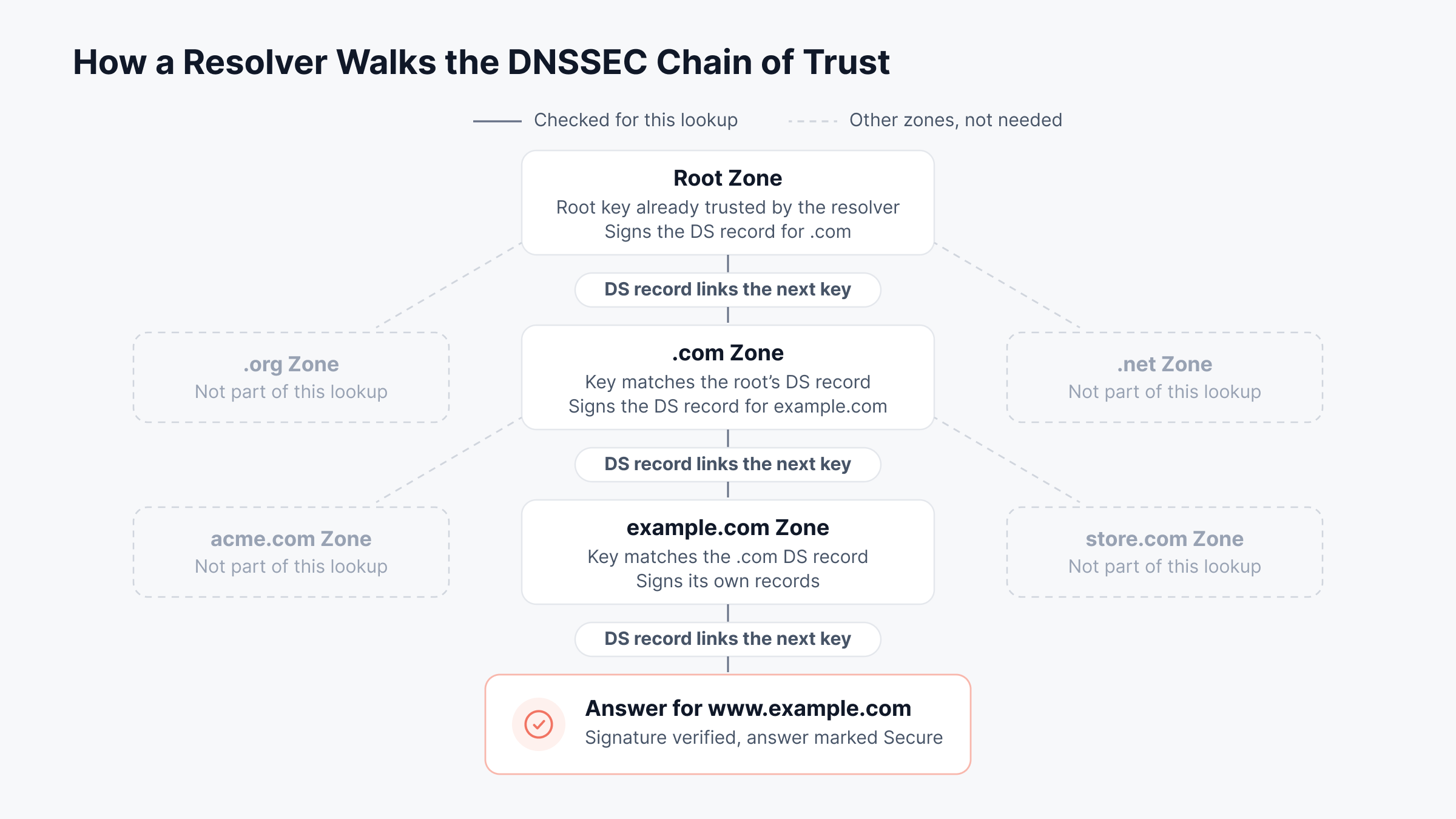
The chain of trust is the series of signed links that runs from the root zone to your record. A lookup for www.example.com passes through four checks:
Root trust anchor: The resolver already holds the root zone's key signing key in its configuration
Root to TLD: The root signs a DS record for .com
TLD to domain: .com does the same for example.com
Domain to answer: Your ZSK signs the A record, and the RRSIG must verify
One broken link fails everything under it. If .com has no DS record for example.com, resolvers treat the domain as unsigned and still answer. If the DS record points at the wrong key, they refuse.
Work down the chain from the top when a signed domain fails. Below, the solid path is the one a resolver walks for www.example.com; dashed zones are never consulted.
What Happens During DNSSEC Validation?
DNSSEC validation is done by the recursive resolver, your ISP's or your own, before it caches anything. First it sets the DO bit to ask for signatures. Then it pulls the RRSIG, DNSKEY and DS records and checks each link upward.
Each answer then gets one of four labels:
Secure: Every link verified; the resolver sets the AD (authenticated data) flag in its reply
Insecure: The zone is unsigned and the parent proves it, so the answer passes without protection
Bogus: A signature failed, expired or pointed at a missing key; the resolver returns SERVFAIL
Indeterminate: The resolver couldn't collect enough records to decide
Bogus is where outages come from. Say a customer reports "server not found" and the help desk tries from an office resolver that doesn't validate: the site loads, and the ticket gets closed as "can't reproduce". That is why DNSSEC belongs early on any network troubleshooting checklist.
What is the Difference Between DNS and DNSSEC?
The difference between DNS and DNSSEC comes down to proof. Plain DNS gives you an answer and nothing else. DNSSEC gives you the answer plus a signature, and the resolver checks it before use.
The rest of the DNS vs DNSSEC comparison follows from that, extra work included:
Area | Standard DNS | DNSSEC |
Answer authenticity | Accepted on trust | Verified against signatures |
Tampering in transit | Goes unnoticed | Breaks the signature |
"Does not exist" replies | Easy to forge | Backed by NSEC or NSEC3 proof |
Response size | Small | Larger, with signatures and keys |
Ongoing work | Record changes only | Signing, key rollovers, DS updates |
Typical failure | Wrong or missing record | Expired signature or broken chain |
Query privacy | Readable on the wire | Still readable on the wire |
DNSSEC also gets mixed up with encrypted DNS. DNS over HTTPS and DNS over TLS hide the query from anyone on the same Wi-Fi network; DNSSEC proves the answer is authentic. Once the page starts loading, TLS certificates take over, as our guide to the SSL handshake explains.
That is the technical side. The business side matters just as much.
Why does DNSSEC Matter to the Business?
DNSSEC matters to the business because DNS decides where people land when they type your name. Forge that answer and you have a fraud problem. Break it and you have a revenue problem.
Customer trust: Spoofed answers can route customers to lookalike login or payment pages
Email protection: DANE for SMTP, which some mail operators use to secure delivery, works only on DNSSEC-signed domains
Regulatory expectations: US federal agencies have been required to sign their .gov zones since OMB memorandum M-08-23 in 2008
Availability risk: A signing fault stops every validating customer from reaching you, with no error on your own servers
That last point makes DNSSEC a governance issue too. In many companies, procurement holds the registrar login, networking runs the DNS provider and security owns the keys. When something breaks, each group assumes another one has it.
Three questions cover most of the exposure for a CIO or IT director:
Ownership: Who controls the registrar account and approves DS record changes?
Change control: Who signs off on key rollovers and DNS provider moves?
Detection: How fast does the on-call engineer hear about a signing fault?
Clear answers here shrink your external attack surface. They also belong in any security observability practice.
Should You Enable DNSSEC?
DNSSEC is worth enabling on most public zones. The condition is automation: signing should run without manual steps, and someone should get an alert before a signature expires.
Here is how we would decide, zone by zone:
Situation | Recommendation | Reason |
Banking, healthcare, government or ecommerce sites | Sign, and validate on your resolvers | Spoofed answers lead straight to fraud |
Managed DNS with one-step signing and automatic DS updates | Sign | Most rollover work is automated |
Self-hosted authoritative servers with little automation | Automate key management first, then sign | Manual rollovers cause most outages |
Domain moving providers within weeks | Sign after the move | A stale DS record is the classic migration outage |
Internal-only zones | Start with resolver validation | Internal names rarely face outside spoofing |
Corporate recursive resolvers | Turn validation on | Users get protection for every signed domain |
Zones on private DNS can usually wait. For a wider frame, NIST's Secure DNS Deployment Guide (SP 800-81r3), revised in March 2026, places DNSSEC alongside other DNS controls in a layered defense.
What are the Downsides of DNSSEC?
The downsides of DNSSEC are mostly operational:
Outage risk: Expired signatures and broken chains fail closed for every validating user
Larger responses: More bandwidth, and more reflection potential on resolvers left open to the internet
Key management: Rollovers, algorithm changes and DS coordination with the registrar
Uneven tooling: Some registrars still expect manual DS updates
Why is DNSSEC Not Widely Used?
Adoption lags because the domain owner takes the risk while users get most of the benefit. If the zone breaks, everyone notices. If DNSSEC quietly stops a spoofing attempt, nobody does.
That is slowly changing. Registries increasingly pick up CDS and CDNSKEY records and update the DS record themselves. Managed DNS platforms, meanwhile, turn signing on with one setting.
How do You Enable DNSSEC on a Domain?
To enable DNSSEC on a domain, take five steps in order:
Confirm support at both ends: Can your DNS host sign zones, and will your registrar accept a DS record (or read CDS)?
Choose managed or self-hosted signing: Managed DNS handles keys; on self-hosted BIND, set a dnssec-policy
Sign the zone: DNSKEY and RRSIG records answering from every authoritative server
Publish the DS record: At your registrar, matching your KSK, and wait for the parent zone to serve it
Verify and set alerts: Run the tests later in this blog. Then alert on failed lookups and signatures close to expiry
Our advice: log the first rollout in change management with one owner, a maintenance window and a backout plan. Skipped planning is behind most of the outages in the next section.
Why do DNSSEC Signing Failures Take Domains Offline?
DNSSEC signing failures take domains offline because validating resolvers fail closed. A signature that doesn't check out gets the same treatment as a forgery: the answer is dropped and the user gets SERVFAIL, even though the record is correct.
Your authoritative servers keep answering, and your own checks may keep passing too. That combination is what makes these outages slow to diagnose.
Expect a DNSSEC outage to look patchy: only resolvers that validate will fail. Below, one expired signature produces two very different results.
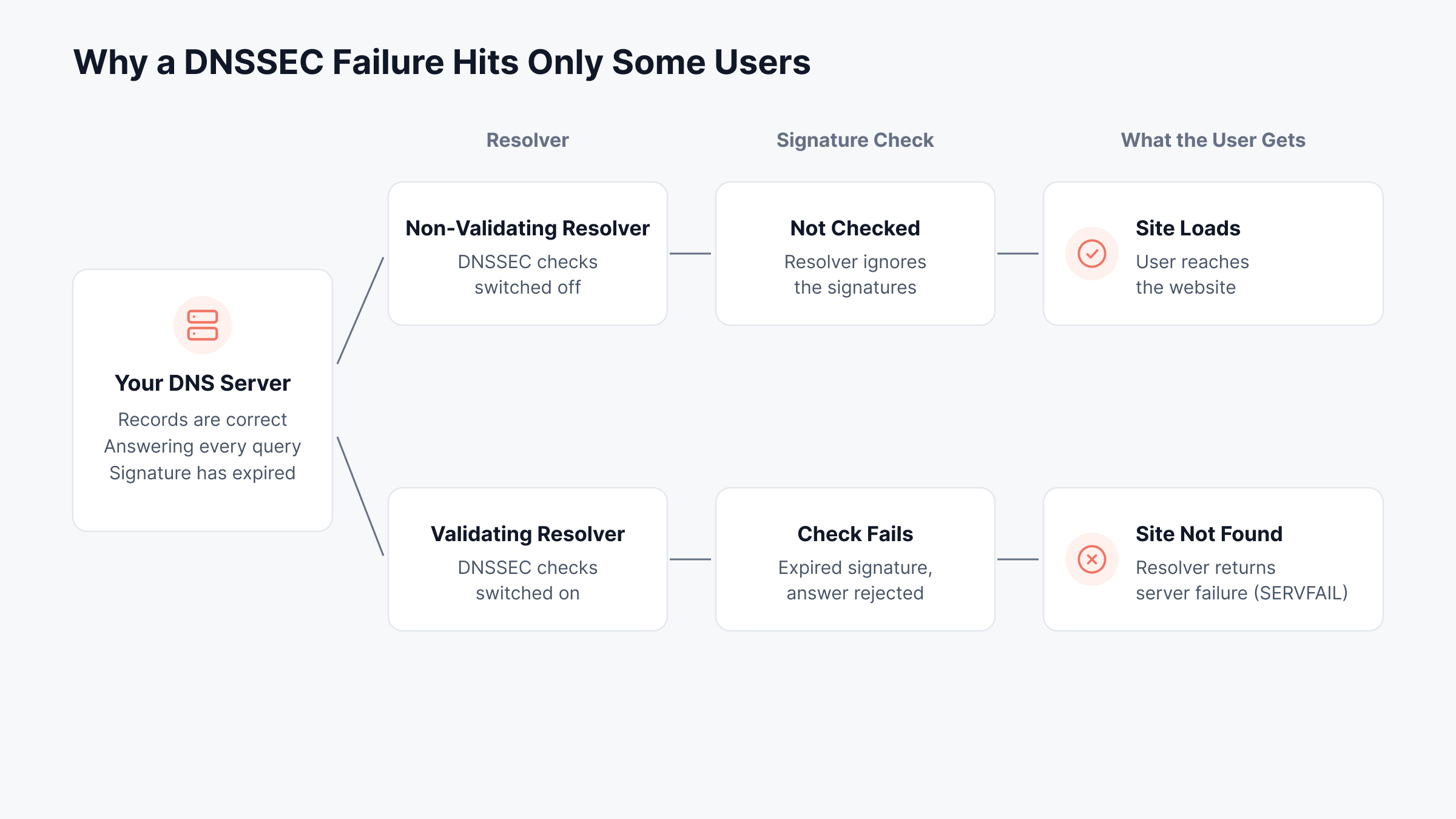
Six patterns account for most of these outages.
1. Expired RRSIG Signatures
Every RRSIG carries an expiry timestamp, usually days to a few weeks after signing. Automated signers refresh signatures well before that point, but only while the signing job keeps running.
Common causes: A signing server left offline, a broken hidden-primary sync, a lapsed license on the signer
What users see: Total resolution failure behind any validating resolver
Warning given: None, unless something tracks the expiry date
A zone can pass every check one day and fail the next with no change made by anyone. For an online business, that is a full outage for a share of customers, with nothing in the change log to explain it.
2. A Stale DS Record After a Provider Move
A move to a new DNS host is where many organizations first run into DNSSEC. The new provider signs with fresh keys. The registry, meanwhile, still lists a DS record for the old ones.
Consider a retailer that changes DNS providers in the middle of a website relaunch. Every record copies across and the cutover looks clean. Then validating resolvers start failing the storefront: the parent zone is vouching for a key that no longer exists.
Safe order: Old DS out first. Wait one TTL, migrate and re-sign, then publish the new DS
Alternative: Pre-publish the new provider's keys in the old zone, where both providers support it
The business cost is direct. The storefront fails for some customers and loads for others, with no error on your side to chase.
3. Key Rollovers Done Out of Order
A DNSSEC key rollover swaps out a ZSK or KSK, and each step depends on cache timing. Pull an old key while resolvers still hold data signed with it, and they reject that data.
The .nz registry ran into exactly this in May 2023. During a routine KSK rollover, the old key was retired before twice the DS record's TTL had passed; affected users saw failures for about 13 hours, with a peak near 5% of users.
Build every KSK rollover around cache lifetimes. In the timeline below, the old key's bar ends at the safe point, and the cross marks where .nz removed its key too soon.
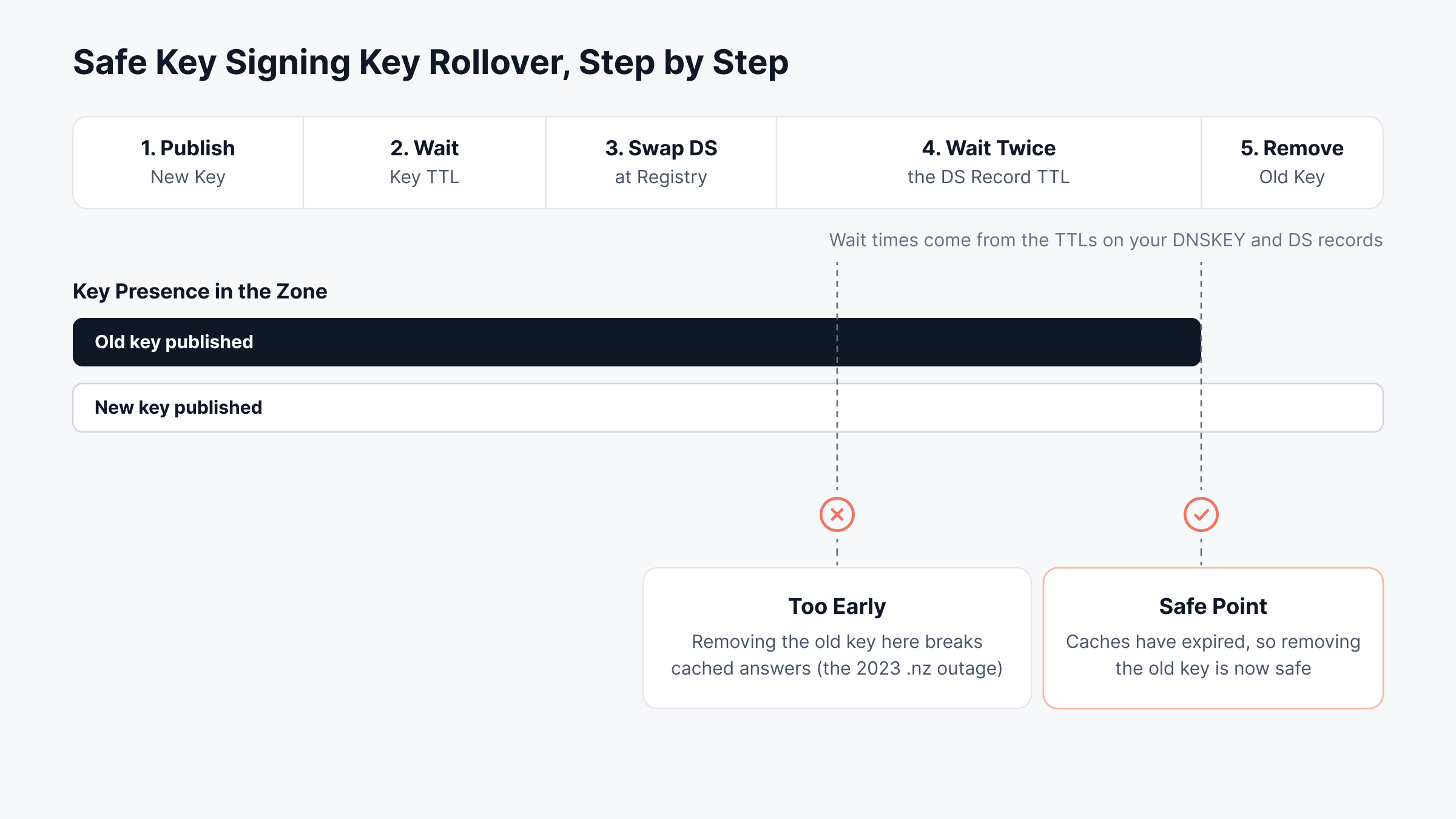
The InternetNZ incident report adds one detail worth remembering: the registry's own monitoring saw nothing. The failure lived in other people's resolver caches.
Timing rule: Keep a retired key published for at least twice the relevant TTL
Check before each step: Confirm the new DS or DNSKEY is visible from resolvers outside your network
Plan: Track each rollover as a scheduled change with a backout step
For a registry, the result was a national namespace partly unreachable. For an enterprise, the same mistake takes the customer portal and inbound email down with it.
4. Trust Anchor Drift on Your Own Resolvers
Validating resolvers start from a configured copy of the root KSK, called the trust anchor. If that copy goes stale, every signed answer looks bogus to that resolver.
Trust anchors made DNSSEC news this year. On October 11, 2026, the root zone switched to signing only with KSK-2024 (key tag 38696); ICANN's rollover guidance told operators to check for that tag in every resolver's trust anchor file. By ICANN's count, more than 95% of reporting resolvers had the new key before the cutover.
Where to check: bind.keys for BIND, root.key for Unbound and PowerDNS Recursor, root.keys for Knot Resolver
What to confirm: RFC 5011 automatic updates enabled, and write access to the key directory
Who is exposed: Resolvers rebuilt from old images, appliances that skip updates, air-gapped sites
An internal resolver with a stale anchor breaks name resolution for every user behind it. Few outages reach further across the business.
5. Clock Skew on Validating Resolvers
Every signature has a start time and an end time, checked against the resolver's own clock. Let that clock drift far enough and perfectly good signatures read as "not yet valid" or expired.
Typical setting: Virtual machines resumed from an old snapshot, branch appliances with no time source
Fix: NTP on every validating resolver, with an alert on drift
It is a small configuration item with an outsized impact. Branch users lose every signed site at once, and the ticket usually reads "the internet is down".
6. Oversized Responses Blocked on the Network
Signed answers are larger, and some DNSKEY responses exceed what fits in a single UDP packet. Resolvers then retry over TCP port 53 or depend on fragmented packets arriving intact.
Common blockers: Firewalls open to UDP 53 but closed to TCP 53; devices that discard IP fragments
Current guidance: EDNS buffer of 1232 bytes, per DNS Flag Day 2020. Keep TCP fallback open
Triage gets confusing here. A lookup works from head office and times out from a branch; firewall logs usually end the debate by showing dropped TCP 53 sessions.
How do You Test DNSSEC?
A DNSSEC test tells you whether your zone's signatures validate for the outside world. Two free tools do most of the work, dig and delv, run from any Linux or macOS terminal against a validating resolver.
Replace example.com with your domain and run these:
Command | What it tells you |
dig +dnssec example.com A | Look for an RRSIG next to the record, and the AD flag |
dig +dnssec example.com DNSKEY | The zone's public keys and their flags |
dig example.com DS @a.gtld-servers.net | The DS record the .com parent publishes |
dig +cd example.com A | Skips validation; success here points to DNSSEC |
delv example.com A | Validates locally and names the reason for failure |
dig example.com A @1.1.1.1 | The same lookup through a public validating resolver |
Read the results in pairs. If the plain query returns SERVFAIL and the +cd query returns an address, the record is fine and the signature chain is the problem.
Newer resolvers also attach an Extended DNS Error (EDE) code to a failed reply, defined in RFC 8914. Four codes come up most in DNSSEC work:
EDE 6, DNSSEC Bogus: A general validation failure
EDE 7, Signature Expired: An RRSIG past its expiry time
EDE 9, DNSKEY Missing: No key matching the parent's DS record
EDE 10, RRSIGs Missing: Signatures absent where the chain expects them
DNSViz and similar public analyzers draw the whole chain, which makes a broken link easy to spot. If the problem turns out to be plain reachability, our guide to DNS server errors picks up from there.
What are the DNSSEC Best Practices for IT Operations?
DNSSEC best practices are mostly about habits. We'd boil them down to automation, change control and checks from outside your own network; testing catches problems, and this checklist heads most of them off.
Pick a modern algorithm: We'd start with ECDSA P-256 (algorithm 13), since its responses stay small. Plan for crypto agility too, so a future algorithm change is routine
Automate signing: Let the signer renew RRSIGs long before they expire
Alert ahead of expiry: Seven days of warning on the earliest RRSIG expiry in each zone
Treat each DNSSEC key rollover as a change: KSK rollovers, algorithm changes and provider moves go through a formal change with a backout step
Watch from outside: Queries through several validating resolvers beyond your own network
Keep resolver clocks accurate: NTP on every validating resolver
Open the path for large answers: TCP 53 allowed, EDNS buffer at 1232 bytes
Remove DS before turning signing off: Then wait out the DS TTL
Use NSEC3 conservatively: Zero extra iterations, no salt
In zero trust terms, DNSSEC is a natural fit: nothing is trusted until verified. A checklist alone won't tell you when a signed zone stops resolving, though. Someone has to be watching.
How does Motadata ObserveOps Bring Observability to DNSSEC?
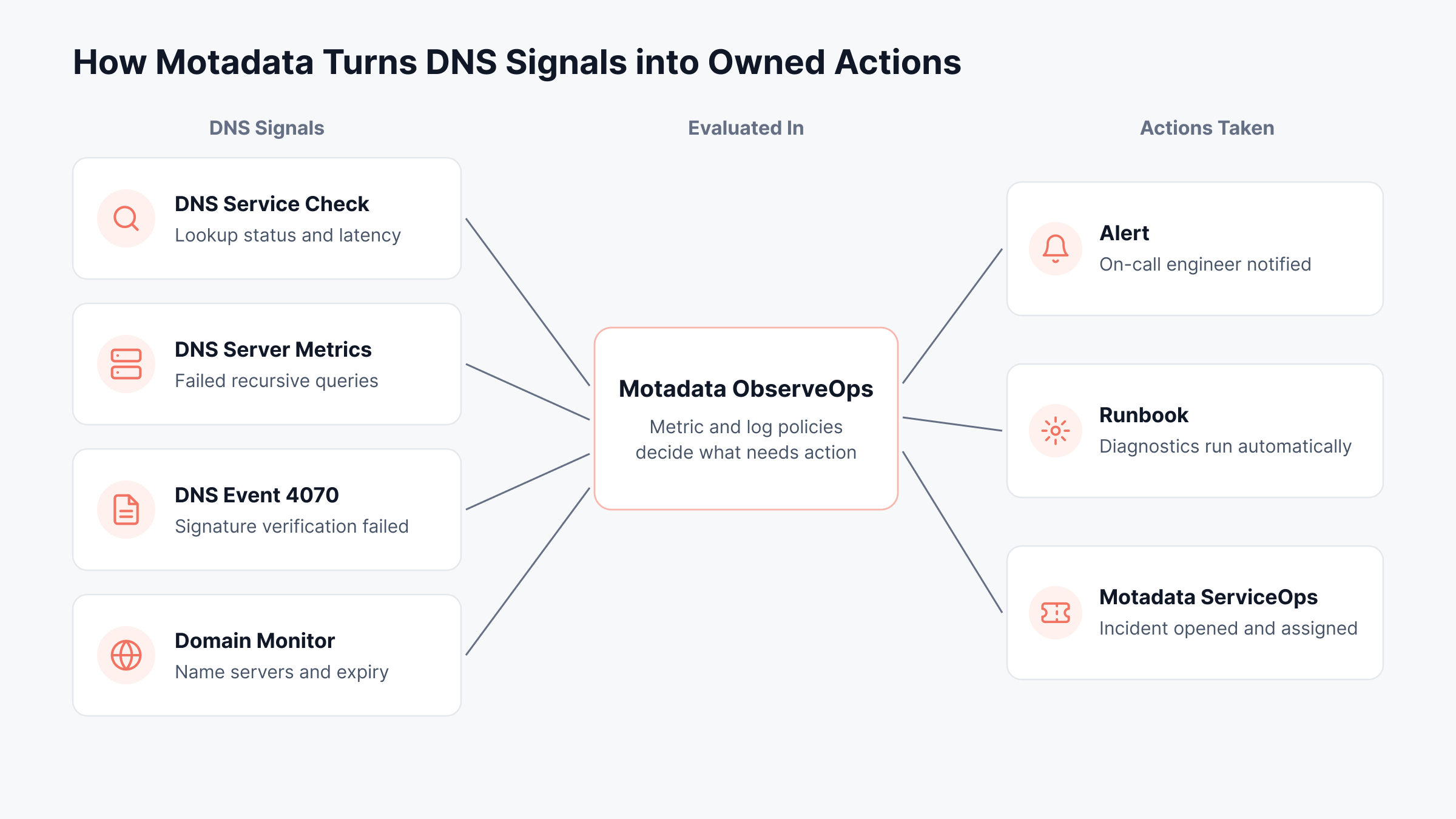
Motadata ObserveOps brings observability to DNSSEC by collecting DNS service checks, DNS server metrics, DNS log events and domain registration data in one platform, then routing problems through alerts, runbooks and ServiceOps incidents.
We built this around the lesson from the .nz incident: the server side alone rarely tells you a signed zone is failing. So we watch resolution the way clients experience it, and we watch the servers and registration data that usually explain why.
Resolution Checks from Inside Your Network
Our DNS service checks run from an ObserveOps Collector inside your network. On each poll we record status, DNS latency and lookup time. If a lookup stops resolving, the status changes and real-time alerts reach the on-call engineer, often before the first user ticket arrives.
These checks add DNS to the availability picture covered by our uptime assurance capability. During an incident, the DNS Resolver utility runs a forward or reverse lookup from the Collector's own point of view, which often differs from what an engineer's laptop returns.
DNS Server Metrics and DNSSEC Log Events
Our Windows DNS monitor tracks recursive query failures, secure update failures and zone transfer failures. Our BIND 9 monitor tracks failed queries alongside successful and failed zone transfers; a sharp rise in failed lookups right after a signing change is one of the clearest signals you can get.
On the log side, ObserveOps log management parses Windows DNS Server events, including event 4070, a DNSSEC signature verification failure listed as Critical in our event reference. A Log Policy can match that event and act on it in three ways:
Alert: At the severity you choose, with suppression to stop repeat notifications and an option to skip renotifying once someone acknowledges it
Take Action: A runbook that runs diagnostics as soon as the alert fires
Declare Incident: A ServiceOps incident raised through the integration profile
Fixed thresholds don't suit DNS well, since query volume during business hours looks nothing like volume overnight. Our Anomaly Policy learns a metric's usual range from at least eight hours of polling data. It then raises Warning, Major or Critical alerts depending on how many recent samples fall outside that range.
Registration Data That Predicts DS Problems
For each domain you add, our domain monitor pulls WHOIS data: registrar, name servers, server states and days to expiry. Watch the name servers closely. A change nobody planned is often the first hint that DNS moved while the DS record stayed behind.
Registration expiry is the other risk here; it takes signed and unsigned zones down alike. The domain monitor shows the days left, and renewal happens with time to spare.
Custom Checks for Signature Expiry
Some operators want a direct countdown on RRSIG expiry. The Plugin Library supports custom SSH metric plugins for this: you write the SSH script (a dig query against your zone, for example), and a Go or Python parsing script turns its output into a metric such as days until the earliest signature expires.
ObserveOps then polls, stores and alerts on that metric like any other counter. The seven-day warning from the checklist becomes a standing policy.
Rollovers and Incidents Tracked in ServiceOps
We treat a key rollover as a change, because most rollover outages come down to order. In ServiceOps it can run as a Normal change with CAB approval, and the Impact, Rollout Plan and Backout Plan are written down before anyone touches a key. Since rollovers recur, a change template (Fill From Template) prefills the risk, change type and assigned group.
Any incident ObserveOps declares shows up in that same ServiceOps instance, ready for incident resolution. From there, priority can track the alert's severity and a repeat alert can reopen the old ticket. Closing the request clears the alert back in ObserveOps.
Map each DNSSEC signal to an owner before your next rollover. The flow below traces four signals into ObserveOps and out to an alert, a runbook or a ServiceOps incident.
Spot Silent DNSSEC Failures Early with Motadata ObserveOps
On security, DNSSEC does what it promises. Signed zones and validating resolvers keep spoofed answers and poisoned caches out. The risk is operational: an expired signature, a stale DS record or a rushed rollover can cut off customers while your servers report nothing, and the business notices before IT does.
One limit is worth stating plainly. Signing and validation stay with your DNS provider and resolvers, and for inspecting a single chain, a public analyzer is still quickest. What ObserveOps adds is the continuous view: resolution checks, DNS server metrics, DNSSEC log events and registration data, wired to alerts, runbooks and ServiceOps incidents, so signing problems get caught early and fixed on the record.
FAQs
Does 1.1.1.1 use DNSSEC?
Yes. The 1.1.1.1 public resolver validates DNSSEC, as do 8.8.8.8 and 9.9.9.9. If a signed domain fails validation, these resolvers return SERVFAIL, which makes them useful for testing whether a problem is your zone or your local resolver.
Does DNSSEC encrypt DNS traffic?
No. DNSSEC signs DNS data so resolvers can verify it, but queries and answers stay readable on the network. To encrypt the path between a device and its resolver, use DNS over HTTPS or DNS over TLS alongside DNSSEC.
What happens when DNSSEC validation fails?
A validating resolver discards the answer and returns SERVFAIL, so users cannot reach the domain at all. Users behind non-validating resolvers still reach it, which is why these failures often look partial and confusing during triage.
How often should DNSSEC keys be rolled?
Zone signing keys are commonly rolled every few months, and key signing keys less often, sometimes yearly. Automation matters more than the exact interval, since most outages come from manual steps done out of order or too quickly.
Can Motadata ObserveOps alert on DNSSEC failures?
Yes. Motadata ObserveOps can alert on failed lookups through DNS service checks, on Windows DNS event 4070 for signature verification failures, and on custom signature-expiry metrics built with SSH plugins. Alerts can also open incidents in Motadata ServiceOps automatically.