Top 10 Incident Management Tools Compared
An IT incident costs the most in the minutes between the first alert and the first owner. Incident management tools exist to shrink that window.
However, choosing the best incident management tools is not as straightforward as we’d like it to be. The 2026 market has its own complications, Opsgenie is going away on April 5, 2027, and Squadcast has been folded into SolarWinds.
In this blog, you will see:
The comparison table: Ten tools, sorted by where the incident record lives.
Full reviews: Real limits for every tool.
What changes in 2026: Four vendor moves that affect your renewal.
What Are Incident Management Tools?
Incident management tools turn an alert (or a user complaint) into an incident that somebody owns. From there the tool routes it, chases the owner when nothing happens, and keeps a record you can look back on.
The category splits into two families.
ITSM platforms (ServiceNow, Jira Service Management, ServiceOps) see the incident as a ticket with an SLA attached and a problem record waiting behind it.
On-call platforms like PagerDuty and incident.io see it as a page, then a channel, then a postmortem.
Many IT teams generally end up needing both halves. The question is which half owns the record. That decides where your mean time to resolution numbers, your audit trail, and your problem management live.
How We Evaluated These Incident Management Tools
Every vendor in this category lists on-call schedules, escalation, and Slack support. So we ranked on five questions instead.
Where the incident record lives: In a service desk with SLA and CMDB links, in a chat channel, or in a pager tool. This decides what you can report on afterwards.
How alerts get in and get quieter: Good alert noise reduction turns 10,000 alerts into 100 incidents. Weak deduplication turns them into 10,000 pages, which overwhelmed your on-call engineer.
How deep on-call and escalation go: Schedules and overrides are table stakes. Round robin and phone routing are where the tiers (and the add-on invoices) start to separate.
What happens after the fix: Postmortems, problem records, and change links. A tool that ends at resolved leaves you the repeat incident next month.
What the meter counts: Technicians, seats, events, or workflow runs. Add-ons decide your real bill more than the headline rate.
Every price below was pulled from the vendor's own pricing page in September 2026. Two vendors publish nothing, and for those we say so rather than quote a rumor.
The Top 10 Incident Management Tools Compared
Here is how the ten tools line up on the columns that decide most incident management shortlists.
Tool | Best For | Incident Record Lives In | On-Call and Escalation | Deployment | Starting Price |
Motadata ServiceOps | IT teams running incidents in an ITIL service desk | Service desk, linked to problem, change, and CMDB | SLA-driven escalation, AI routing | SaaS, on-prem, private cloud | Quote-based, 30-day trial |
OnPage | IT Ops, NOCs, after-hours response | OnPage dashboard, and source platform | Deepest in the category | SaaS only | $13.99 per user per month |
PagerDuty | Large enterprises with many on-call teams | Pager platform, tickets via integration | Deepest in the category | SaaS only | $21 per user per month |
ServiceNow ITSM | Global enterprises on full ITIL governance | Service desk, full CMDB | Built in, lighter than a pager | SaaS (ServiceNow cloud) | Quote-based |
Jira Service Management | Atlassian shops and Opsgenie migrants | Service desk, linked to Jira issues | Opsgenie engine, Premium for full depth | SaaS, Data Center | Free for 3 agents, then about $20 per agent |
incident.io | Slack-first engineers | Slack or Teams channel | Paid add-on, $10 to $20 per user | SaaS only | Free tier, Team $15 per user |
Rootly | SRE teams that automate everything | Chat channel, workflow-driven | Separate product, $20 per user | SaaS only | $20 per user per month |
Datadog Incident Response | Teams already standardized on Datadog | Datadog platform, beside the telemetry | On-Call seat, $20 per month | SaaS only | $20 to $40 per seat per month |
ManageEngine ServiceDesk Plus | Mid-market IT wanting published ITSM pricing | Service desk, problem and change as add-ons | SLA escalation, no pager network | SaaS, on-prem | $13 per technician per month |
SolarWinds IT Incident Response | Small SRE teams on a budget | Pager platform with SLO tracking | Built in | SaaS only | $15 per user per month |
Read the third column first. It predicts what you can report on after the incident closes. It also predicts whether you will be buying a second tool next year.
Detailed Overview of the Top 10 Incident Management Tools in 2026
Here is a closer look at each tool, with the limits included.
1. Motadata ServiceOps
Best for: IT teams that want the incident to live in an ITIL service desk from the first alert, with monitoring opening the ticket for them.
Rating: 4.5/5 on G2, 4.2/5 on Gartner Peer Insights.
Pricing: Subscription, tiered by users and assets, on concurrent or named user licenses. ITSM, asset management, and patch management are licensed together or apart. Quotes are custom, and there is a free 30-day trial.
Motadata ServiceOps runs incident life cycle management as one of 12 ITIL 4 practices certified through the PeopleCert ATV program. Problem, change, service level, and monitoring and event management sit on the same certified list.
The handoffs between them are built into the product, so an incident becomes a problem record without a second tool.
Intake is the part we would test first. A ticket can come in through the portal, by email or phone, from the mobile app, or out of a chat window.
Routing then looks at three things (skills, current workload, and whether the person is actually available) before it picks a technician.
Most service desks go quiet during SLA enforcement, but not this one. Response and resolution timers escalate on separate rules. Each threshold can raise priority, reassign the technician, and send an escalation email before the breach lands.
Closed-loop incident management is the reason to pick this over a pager tool. ServiceOps and Motadata ObserveOps share one foundation. An anomaly caught in monitoring opens an incident with the affected asset already attached, and the CMDB shows which business services depend on it.
It helps to hear from a team that runs ServiceOps every day. Check out this review from Shashank about Motadata ServiceOps
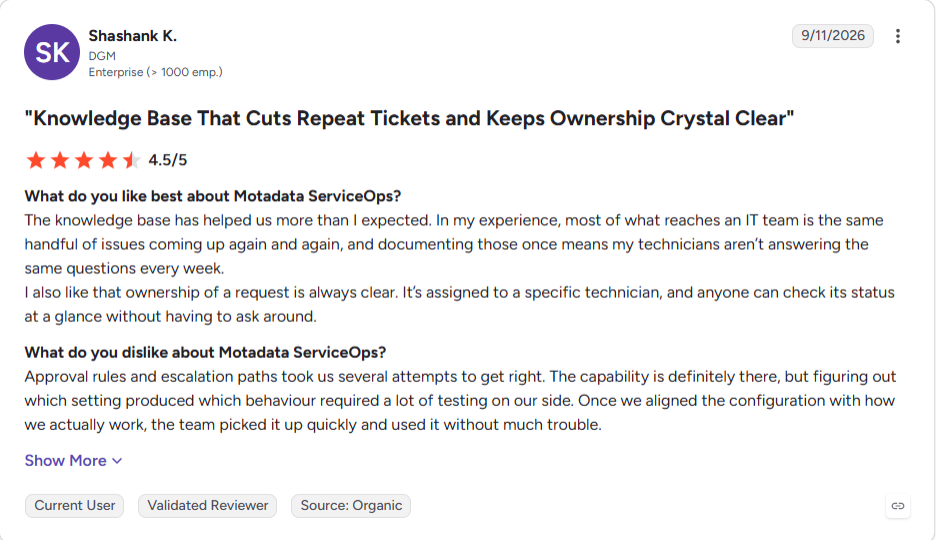
You can read more ServiceOps reviews on G2.
Pros
- Incident, problem, change, and asset are one record set. The monthly report is a saved filter rather than a spreadsheet somebody assembles.
- AI is in every module. There is no separate AI tier to buy later.
- Data residency rules do not cost you features, which is rare in this list.
- An MSP runs several customers from one instance, tenants kept apart.
- The UI is available in Arabic, English, French, Hindi, Portuguese, Spanish, and Thai, among others, and nobody pays extra for a language.
Cons
- Escalation is driven by SLA timers and notifications. There is no phone-tree paging network, so an SRE team that wants call routing will still keep a pager tool beside it.
- We publish the licensing model but not the prices, so you cannot size a bill from a web page.
- Our review count is smaller than ServiceNow's or PagerDuty's, so there is less peer feedback to read.
- Chat channels create and update tickets, but there is no channel-per-incident war room of the kind incident.io builds.
- A pure engineering team with no service desk is buying more platform than it needs.
2. OnPage
Best for: IT Ops, NOCs, and enterprise teams that need attention-grabbing incident alerting and dependable after-hours response orchestration.
Rating: 4.3/5 on G2, 4.4/5 on Gartner Peer Insights.
Pricing: OnPage starts at $13.99 per user per month, paid yearly. Enterprise Silver starts at $22.99 and Enterprise Gold at $28.99 per user per month, with additional options such as live call routing available as add-ons.
OnPage is built around the part of incident response where failure is most expensive: getting a critical alert to the right person and making sure it is acknowledged. High-priority Alert-Until-Read notifications can bypass silent and Do Not Disturb settings and remain persistent until the responder takes action. OnPage also supports multichannel alerting through push notifications, SMS, email, and voice calls, giving teams multiple ways to reach responders when an incident requires immediate attention.
The platform fits especially well alongside monitoring, ITSM, RMM, cybersecurity, and chat systems. Those tools can remain the system of record or collaboration layer, while OnPage handles attention-critical delivery, on-call assignment, escalation, and response accountability.
For noisy environments, OnPage also includes alert-noise controls such as deduplication and suppression so repeated events do not have to become repeated interruptions. Critical alerts remain persistent and escalation-backed, while multichannel delivery provides additional ways to reach the right responder when time-sensitive incidents occur.
Pros
- Persistent alerts are purpose-built for urgent events where a standard push notification is too easy to miss.
- Rule-based routing, on-call schedules, and structured escalation support NOCs, IT Ops, MSPs, and after-hours teams.
- Works alongside existing service desks, monitoring tools, and chat platforms rather than forcing teams to move the incident record.
- Transparent pricing makes it easier to estimate the cost of a rollout.
Cons
- OnPage is an incident alerting and on-call layer rather than a full ITSM suite, so problem, change, and CMDB records remain in the service desk.
- Teams that want the entire incident to live inside a Slack or Teams channel may prefer a chat-native response platform.
- Some telephony capabilities, including live call routing and dedicated lines, are add-ons.
3. PagerDuty
Best for: Large enterprises with dozens of on-call teams and a monitoring estate that nobody has fully inventoried.
Rating: 4.5/5 on G2, 4.7/5 on Gartner Peer Insights.
Pricing: Free for up to 5 users. Professional is $21 per user per month on an annual contract ($25 if you pay monthly), Business is $41 ($49 monthly), and Digital Operations is quoted.
AIOps is licensed per accepted event as an add-on. PagerDuty Advance, the generative AI layer, is another add-on.
PagerDuty has the most mature routing engine in the category. Escalation policies can notify several schedules at every level, and round robin spreads shifts fairly. With 750-plus integrations, almost nothing you monitor needs a custom webhook.
The Operations Cloud framing matters if you buy it. The pager is now the entry point to workflows, AI agents, and post-incident reviews, and each of those is licensed on its own.
The bill is the awkward part. Every person who receives a page is a paid user, and stakeholder licenses come in packs. Noise reduction sits in the AIOps add-on rather than the base plan. A 20-user Professional account is about $420 a month before you add any of that.
Pros
- Reviewers cite paging reliability more than any other strength.
- Business service mapping ties technical services to customer impact during an incident.
- The free plan covers 5 users, so a small team can pilot for nothing.
Cons
- PagerDuty Advance is not available to month-to-month customers.
- Historic data access is 3 months on Professional and 1 year on Business.
- The incident record has no problem, change, or CMDB layer, so ITSM reporting means a ServiceNow or Jira integration.
- The interface carries years of history and takes longer to configure than newer tools.
4. ServiceNow ITSM
Best for: Global enterprises that want incident management inside full ITIL governance, with a CMDB that other departments also run on.
Rating: 4.5/5 on G2, 4.4/5 on Gartner Peer Insights.
Pricing: Quote-based only, sold in Standard, Professional, and Enterprise packages. Third-party estimates put ServiceNow pricing for core ITSM between $90 and $150 per fulfiller per month.
ServiceNow is the reference model for ITIL incident management. Incident, problem, change, and the CMDB share one data model. The impact of a failing configuration item is visible before anyone opens a bridge.
The AI story changed in 2026. Now Assist, the generative layer for summaries and ticket sorting, now sits under the ServiceNow Otto brand alongside AI agents. That rename is cosmetic for existing customers, but it signals where the roadmap money is going.
Scale is the trade-off. Rollout runs through partners, and the on-call paging layer is lighter than a dedicated pager. Most ServiceNow shops we see still page through PagerDuty or xMatters and let the ticket live in ServiceNow.
Pros
- The CMDB and workflow engine can run HR, facilities, and security cases on the same platform.
- The partner ecosystem and review footprint are the largest in ITSM.
- Governance features such as audit, approvals, and segregation of duties are the deepest here.
Cons
- The per-fulfiller cost is the highest in this comparison.
- Releases land twice a year, and each one needs regression testing of your customizations.
- AI capability sits in the Professional and Enterprise tiers, not Standard.
- The platform is more than a 20-technician team needs, and it prices accordingly.
5. Jira Service Management
Best for: Teams already on Jira and Confluence, and the default landing spot for anyone leaving Opsgenie.
Rating: 4.3/5 on G2, 4.⅖ on Gartner Peer Insights.
Pricing: Free for up to 3 agents. Standard is about $20 per agent per month and Premium about $51, quoted on monthly billing at the default 75-agent size.
Jira Service Management pricing now sits inside Atlassian's Service Collection bundle with Customer Service Management and Assets.
JSM absorbed Opsgenie's alerting and on-call engine, which is why Atlassian can retire Opsgenie on April 5, 2027. Atlassian points every Opsgenie customer here first.
The Jira link is the reason to choose it. An incident can spawn a bug in Jira Software and a postmortem in Confluence without leaving the platform.
The friction we hear about most is that JSM is an ITSM product first. On-call configuration sits inside service management settings, several tiers down from the incident view, which slows engineers during a live page.
Pros
- Persistent alerts are purpose-built for urgent events where a standard push notification is too easy to miss.
- Rule-based routing, on-call schedules, and structured escalation support NOCs, IT Ops, MSPs, and after-hours teams.
- Works alongside existing service desks, monitoring tools, and chat platforms rather than forcing teams to move the incident record.
- Transparent pricing makes it easier to estimate the cost of a rollout.
Cons
- OnPage is an incident alerting and on-call layer rather than a full ITSM suite, so problem, change, and CMDB records remain in the service desk.
- Teams that want the entire incident to live inside a Slack or Teams channel may prefer a chat-native response platform.
- Some telephony capabilities, including live call routing and dedicated lines, are add-ons.
6. incident.io
Best for: Engineering teams that already run their day in Slack and want the incident to stay there from declaration to postmortem.
Rating: 4.8/5 on G2, 4.7/5 on Gartner Peer Insights.
Pricing: Basic is free. Team is $15 per user per month billed annually ($19 monthly), and Pro is $25. On-call adds $10 per user on Team and $20 on Pro, or $20 as a standalone product. Enterprise is quoted.
incident.io built the incident channel before it built anything else. Declaring an incident creates the Slack or Teams channel, assigns roles, and starts a timeline. The postmortem is drafted from that timeline rather than reconstructed afterwards.
On-call came later, and it is now a full product. An AI investigation agent pulls context from connected data sources while the channel is live, and Pro adds root cause analysis on top.
One thing to check before you buy. The incident record never becomes a ticket with a problem or change link, so ITSM reporting needs a service desk integration.
Pros
- Customers who raise requests are free and unlimited; only agents are licensed.
- The free tier and published Standard pricing make it easy to pilot.
- Data Center remains available for teams that cannot run in Atlassian cloud.
Cons
- The Opsgenie migration is cloud to cloud, so Data Center customers get no direct path.
- Premium is needed for the incident and on-call depth Opsgenie users are used to.
- Asset objects, Rovo AI credits, and Atlassian Guard for SAML SSO each add a line to the bill.
7. Rootly
Best for: SRE teams that want to script the whole incident process, from severity rules to retrospective, without writing code.
Rating: 4.8/5 on G2.
Pricing: Incident Response, On-Call, and AI SRE are three products, each from $20 per user per month. There is a two-week trial.
Rootly's workflow engine is the deepest in the chat-native group. Conditions, branches, and Liquid variables let one workflow read the incident's context and pass it through several automated steps. That is more than the trigger-and-action builders elsewhere manage.
The AI side shows its reasoning. Root cause suggestions arrive with confidence scores and a visible chain of evidence, so a responder can check the logic before acting on it.
Modular pricing is the catch. If you want incident response and paging, you are at $40 per user before any AI. That puts a 25-engineer team near the cost of PagerDuty Business.
Pros
- Automation depth means the process runs the same way as it does in a rehearsal.
- SOC 2, GDPR, CCPA, and BAA coverage suits healthcare and fintech buyers.
- Startup discounts apply to companies under 100 employees.
Cons
- AI SRE is a third product, so the AI most buyers want costs another $20 per user.
- The integration catalog is thinner than PagerDuty's.
- Value depends on chat, so email-driven IT teams get less from it.
- No ITSM record, so problem and change tracking live somewhere else.
8. Datadog Incident Response
Best for: Teams already standardized on Datadog that want the page, the graph, and the incident in one tab.
Rating: 4.4/5 on G2, 4.5/5 on Gartner Peer Insights.
Pricing: On-Call is $20 per seat per month billed annually. Incident Management is $30 per seat, and the Incident Response bundle of both is $40. Datadog pricing adds Event Management at $0.10 per correlated event and Workflow Automation at $10 per 100 runs.
Datadog's advantage is context at page time. The pager and the monitor are the same product. The page carries the metric graph and the service owner with it, so you never open a second tool to see what fired.
Bits Investigation is the 2026 story. Launched in December 2025 and expanded in March 2026, it investigates alerts on its own. Its triage actions include sending Slack or Teams messages and creating incidents.
Three meters run at once, and we would model all three before signing. Seats, correlated events, and workflow runs each bill on their own.
Pros
- Per-seat pricing is published, unlike several rivals here.
- Removes a separate on-call vendor for a Datadog-native team.
- Pages can be acknowledged from the same mobile app that shows the dashboards.
Cons
- Not sold standalone, so it only makes sense on top of an existing Datadog bill.
- On-demand billing is $29 per On-Call seat, 45 percent above the annual rate.
- SaaS only, with no on-premises option.
- No ITSM layer, so the incident never becomes a problem or change record.
9. ManageEngine ServiceDesk Plus
Best for: Mid-market IT teams that want ITIL incident management at a published per-technician price.
Rating: 4.2/5 on G2.
Pricing: Cloud editions start at $13 per technician per month on Standard, $27 on Professional, and $67 on Enterprise, billed annually. Standard is free for up to 5 technicians, and ManageEngine pricing adds a per-asset charge on the upper two editions.
ServiceDesk Plus is the most direct ITSM alternative to ServiceOps on this list. Incident, problem, change, and CMDB are all present, and the per-technician price is public, which is rare in this category.
The edition structure is where to read carefully. Standard is a help desk. Problem management is a $1,195 a year add-on below Enterprise, and change and release management is $2,395, so a team that wants the full incident-to-problem loop is usually on the $67 tier.
Monitoring is a separate product, OpManager, so alert-to-ticket runs through an integration rather than a shared platform. It works, but the asset and CI context has to be mapped rather than inherited.
Pros
- The lowest published entry price of the ITSM tools here.
- Technical support is included in the subscription at no extra charge.
- Instances can be upgraded, downgraded, or canceled at any time.
Cons
- The multilingual UI costs more than the English-only edition.
- Custom Functions runs $3,195 a year for a 21-to-100 technician team.
- Reviewers note the product improves more slowly than newer rivals.
10. SolarWinds IT Incident Response
Best for: Small SRE teams that want on-call, duplicate alert removal, and SLO tracking at the lowest per-user price here.
Rating: 4.4/5 on G2, listed as SolarWinds IT Incident Response (Squadcast).
Pricing: From $15 per user per month with unlimited users, and a 14-day trial. The rest of SolarWinds pricing is quoted per product.
This is Squadcast, which SolarWinds acquired in March 2025 and renamed. The product kept its shape, and existing customers kept their plans.
SLO tracking is an unusual inclusion at this price. Reliability targets are tracked per service, so an incident is judged against the error budget rather than only against MTTR.
The roadmap now points at SolarWinds Observability, and that is what we would weigh. Teams on another monitoring stack get a good pager at a good price. Teams on SolarWinds get something closer to what Datadog offers its own customers.
Pros
- The lowest entry price of the on-call tools here, with no user cap.
- A customer at Redis reports cutting incoming alerts from tens of thousands to hundreds by removing duplicates.
- Stakeholder updates and organizational reports are included rather than sold as a stakeholder license.
Cons
- No SCIM provisioning, which enterprise identity teams will notice.
- Mobile app usability with many rotations draws complaints in reviews.
- SLO tracking sits on the higher tier, not the $15 plan.
- No ITSM record, so SolarWinds Service Desk or another tool holds the ticket.
What Changes for Incident Management Tools in 2026?
The incident management market is consolidating. Four vendor moves in the last 18 months change how you should read every entry above.
Opsgenie ends on April 5, 2027: Atlassian stopped selling it on June 4, 2025. Unmigrated data will be deleted after end of support, so every Opsgenie customer is choosing a replacement this year.
Pagers are being bought by platforms: SolarWinds acquired Squadcast in March 2025. Freshworks closed its $88.7 million purchase of FireHydrant on January 1, 2026. Both pagers now sit inside a wider suite.
Open source on-call is shrinking: Grafana archived the OnCall open source project on March 24, 2026, leaving Grafana IRM as a cloud-only option.
Observability vendors bundle the pager: Datadog now sells On-Call and Incident Management as one Incident Response seat. That removes the reason to buy a separate pager on that stack.
The pattern behind all four is the same. The pager and the platform that detects the incident are merging. The standalone pager has fewer years left as a category.
We think that pushes your decision back to where the record lives. If detection and ticketing already share a platform, the pager is a feature. If they do not, you are buying three tools and an integration to hold them together.
What Should You Look for in Incident Management Tools?
Five checks settle most incident management evaluations. Run them during a trial, because a feature page answers none of them honestly.
Send it 1,000 alerts and count the pages: Replay a real noisy hour from your monitoring. The ratio of alerts in to incidents out tells you what the correlation engine is worth.
Miss an acknowledgment on purpose: Let the first responder ignore the page. Watch what happens at each escalation level, and time it.
Close an incident and try to report on it: Ask for the incident management metrics you actually review. MTTR by service, SLA compliance by priority, and repeat incidents by CI are the usual three. If the answer is an export, your record is in the wrong place.
Price every human, not every responder: Count stakeholders who only read updates, and check whether they need a license. On some tools they do.
Ask where the data can live: Most of the tools here are SaaS only. If a regulator or a customer contract says ticket data stays on-premises, that rules out more than half the list.
We would park the AI question while you compare. Every vendor here now drafts a postmortem, and the drafts are similar. The correlation engine and the escalation path are where the tools still differ.
Which Incident Management Tool Is Right for Your Team?
Most teams land in one of five situations. The table below maps each one to a sensible starting point.
Your Situation | Start With | Why |
You run an IT service desk and want alerts to become SLA-tracked tickets on their own | Motadata ServiceOps | ITIL 4 certified incident management with monitoring, problem, change, and CMDB on one platform, on-premises or SaaS |
You have 100-plus engineers on call across many teams and monitoring tools | PagerDuty | The deepest escalation engine and 750-plus integrations, with FedRAMP for public sector |
You need critical alerts to reliably reach the right on-call responder, especially after hours | OnPage | Persistent Alert-Until-Read notifications, role-based routing, digital on-call schedules, and structured escalation work alongside your existing ITSM, monitoring, and chat stack |
Your engineers live in Slack and the incident should stay there | incident.io | Channel-per-incident response with postmortems drafted from the timeline |
You are leaving Opsgenie and already pay for Jira | Jira Service Management | The Opsgenie engine is inside JSM, with a built-in migration wizard until April 2027 |
If two rows describe you, run both trials against the same alert stream in the same week. The first row is the real fork.
You either keep the incident in a service desk fed by a unified observability and service management platform, or you keep it in a pager. The pager route means building a ticket integration later.
Pick the Right Incident Management Tool for Your Business
Choosing among incident management tools comes down to two questions. Where does the incident record live, and what does the meter count once every add-on is switched on?
The first question has a deadline attached if you run Opsgenie. The second decides whether the $15 per user on the pricing page becomes $45 once you add paging, AI, and stakeholders.
A pager will always page faster than a service desk. That is a good reason to keep one if your engineers need phone trees. What it cannot tell you is that the same configuration item has failed four times this quarter.
Most IT teams we work with run incident management in the service desk and let monitoring open the ticket. In our experience that is where the repeat incidents get found.
FAQs
What are P1, P2, P3, and P4 incidents?
P1 is a critical outage affecting a whole service or many users. P2 is a major degradation with a workaround, P3 is a minor issue affecting a few users, and P4 is low impact. Good tools set priority from impact and urgency automatically, then apply the matching SLA.
What is the difference between incident management and incident response tools?
Incident management covers the full lifecycle: logging, prioritizing, escalating, resolving, and learning, usually inside a service desk. Incident response tools focus on the live phase: paging, the war room, and the postmortem. Many teams pair one of each, and a unified platform removes the integration between them.
Do you need a separate on-call tool if you already run a service desk?
Only if your responders need phone trees and shadow rotations. A service desk with SLA-driven escalation, mobile alerts, and automatic reassignment covers most IT teams. Engineers with follow-the-sun on-call usually add a pager and let the ticket stay in the service desk.
Can incident management tools run on-premises?
Yes, but fewer than you would expect. Most on-call platforms are SaaS only. ServiceOps, ServiceDesk Plus, and JSM Data Center offer self-hosted or private cloud deployment. That matters when a regulator or customer contract keeps ticket data inside your own network.
Is Motadata ServiceOps better than ServiceNow for incident management?
It depends on scale and budget. ServiceNow goes deeper on governance for a global enterprise with partner support. We fit better for a mid-sized or regulated IT team. You get ITIL 4 certified incident management, native monitoring, and an on-premises option without ServiceNow's price or rollout timeline.
Author
Ramya Shah
Technical Writer
Ramya Shah is a technical content writer with a computer engineering background and roots in automotive journalism. He covers IT Service Management, observability, IT operations, and AI-driven automation. An early adopter of AI-assisted writing workflows, he turns complex IT processes into clear, engaging content optimized for search and answer engines (AEO), lifting content output and organic visibility.