What Is Session Replay? How It Works, What It Records, and When It's Legal
A customer reports that checkout failed twice before they gave up, then stops replying to the support thread. What do you actually have to work with? A timestamp, a browser string, and a description written by someone who was not looking at the console.
Session replay answers the question that ticket cannot. It rebuilds that single visit in the browser and plays it back step by step, so the click that failed, the field that rejected input, and the script error that fired alongside it appear in sequence. Every day that sequence stays unknown is another day of abandoned carts, repeat support calls, and customers who quietly leave.
Most engineering groups reach for server logs first, then application traces, then a staging environment where the fault politely refuses to appear. Frontend failures often leave no server-side record at all, which is why they belong to real user monitoring rather than backend tooling.
In this blog, you will see what session replay records, how the recording is built and played back, what it is used for, where the legal line falls in 2026, and what to check before you sign for session replay software.
What Is Session Replay?
Session replay is a step-by-step reconstruction of one visitor's session in a web or mobile application, rebuilt from data captured in the browser and played back on a timeline. You watch the page as that person encounters it, including clicks, scrolls, form interactions, page transitions, and the errors that fire along the way.
The playback looks like a video. Underneath, it is closer to a time-lapse of the page's own structure, replayed from a written record of every change that structure went through.
That distinction matters more than it sounds. Because the replay is rebuilt from the page itself, you can pause on any frame and inspect the elements as live HTML, the way you would in browser developer tools, on a session that already happened in production. Replay is one input into digital experience work, and it is the one that operates at the level of a single person.
What Does Session Replay Actually Capture?
A session recording is a stream of timestamped events rather than a single artifact. Most implementations capture the following:
Page structure: The full state of the page at the start of the session, then every subsequent change to it
User interactions: Clicks, taps, scroll position, mouse movement, keystroke timing, and focus changes
Navigation: Page views, route changes in single-page applications, reloads, and back-button use
Frontend errors: Uncaught JavaScript exceptions, failed network calls, and console output
Performance signals: Long tasks that block the browser, resource timing, and page load performance measurements for each view
Session metadata: Browser, device, operating system, screen size, geography, network conditions, and application version
Two things are usually excluded by design. Password fields and payment inputs are masked before anything leaves the browser, and content inside cross-origin iframes stays outside the recording because the browser's own security model blocks access to it.
How Is Session Replay Different from Screen Recording and Heatmaps?
Screen recording produces a video file of a display. User session replay produces a structured event log that a player turns back into a page, which is why a five-minute session compresses into a few hundred kilobytes instead of tens of megabytes.
Heatmaps and session replay answer different questions from the same underlying data, and neither replaces the availability checks that website monitoring handles. The comparison below sets out where each one earns its place.
Method | What it shows | Best used for | Main limitation |
Session replay | One visitor's full session, step by step | Reproducing a specific fault or friction point | One session at a time, so patterns need aggregation |
Heatmaps | Click, scroll, and attention density across many visits | Spotting where attention concentrates on a page | No sequence, no cause, no error context |
Screen recording | Pixels from a display, as video | Support sessions and demos | Large files, no inspectable page structure |
Scripted journeys run on a schedule | Availability checks and pre-release baselines | Never captures an actual visitor's conditions |
How Does Session Replay Work?
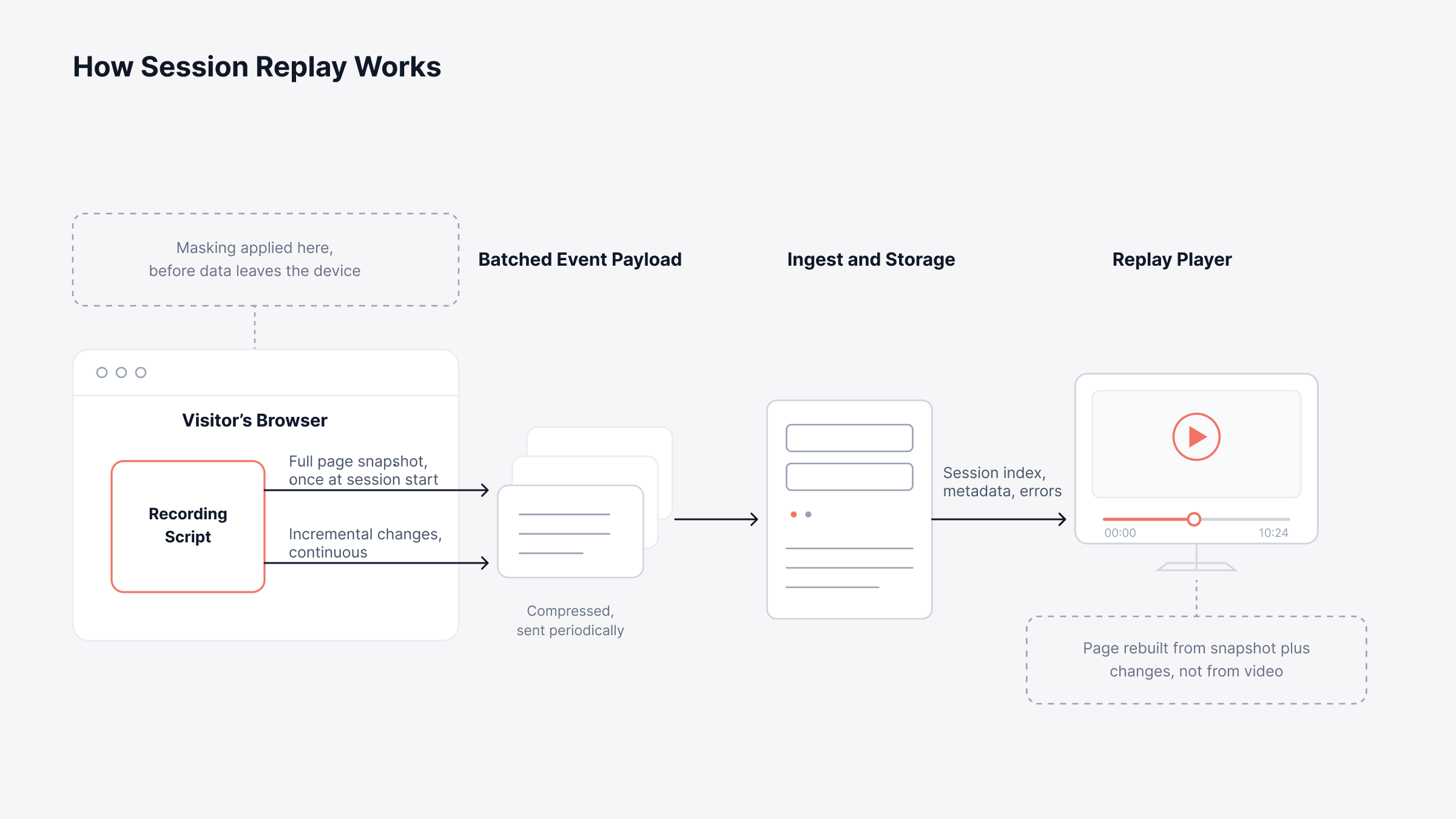
Session replay works by taking one complete snapshot of the page at the start of a visit, then recording every change to that page as a compact difference, and finally replaying the snapshot and the differences in order against a virtual clock. No video is ever encoded.
The pipeline runs in four stages, from the browser through to the player.
Initial snapshot: A lightweight script converts the page's structure and styles into a compact record the instant capture begins, giving the player a known starting state
Incremental capture: Browser APIs watch for changes to the page and to user input, emitting each one as a timestamped event, so a dropdown opening or a validation message appearing is recorded as a structural change rather than as a picture
Batching and transport: Events are buffered, compressed, and sent to the backend in batches, keeping network chatter and battery cost low on the visitor's device
Reconstruction: The player loads the initial snapshot into a sandboxed frame and applies the recorded changes in sequence, producing playback you can scrub, pause, and inspect
The mechanism explains one behavior that surprises people the first time they use a replay. Application JavaScript does not re-execute during playback, so anything the recorder failed to capture as a structural change will not reappear on its own.
Understanding where each stage runs tells you where cost, coverage, and privacy risk actually live. The diagram below traces a single session from the browser to the player and marks the point at which masking is applied.
Why Does a Recorded Session Take So Little Storage?
Because the recorder writes down changes rather than frames, the payload scales with how much the page actually moves. A form-heavy page with steady interaction produces more events than a long article a visitor scrolls once.
Sampling controls the rest. Recording a percentage of sessions, or recording only sessions that hit an error or a slow threshold, keeps volume predictable without losing the sessions worth watching. That is also what keeps the cost line steady in a month when traffic doubles.
What Is the Main Purpose of Session Replay?
The main purpose of session replay is to replace a described problem with an observed one, so that engineering and support work from evidence rather than from a reconstruction of someone else's memory. Five uses account for most of the value in an enterprise setting:
Reproducing bugs that will not reproduce: Watch the exact sequence, on the exact browser and device, that produced the failure
Diagnosing frontend errors in context: Pair a JavaScript error with the interaction that triggered it instead of reading a stack trace in isolation
Finding friction in multi-step flows: See where visitors hesitate, retry, or abandon inside signup, checkout, and onboarding, which pairs naturally with funnel tracking
Shortening support escalations: Attach the session to the ticket so the second-line engineer starts from the recording rather than from a phone call
Validating a release: Compare sessions before and after a deployment when a metric moves and nobody can explain why
Support and engineering tend to value different halves of that list. The recording is the shared artifact that stops the two groups arguing about what the customer meant.
Who Uses Session Replay, and What Do They Get from It?
Session replay serves four groups inside most organizations, and each one brings a different question to the same recording. Agreeing on those questions before you buy is what keeps the tool from becoming an engineering-only utility that nobody else opens.
Role | The question they bring | What the recording gives them |
Service desk and support | What did this customer actually see | A ticket closed without a second callback |
Engineering and SRE | Which interaction broke, and on which build | A reproducible fault in place of a guess |
Product and digital | Where do people give up in this flow | Evidence for which step to redesign first |
Revenue and CX owners | What is this friction costing the business | A line from a broken journey to lost conversions |
The last row is where budget conversations usually land. A replay that shows fifty customers failing the same payment step turns a vague complaint about site quality into a number someone can act on.
Where Does Session Replay Fit Within Real User Monitoring?
Session replay is one capability inside Real User Monitoring, which measures the browser experience across your whole visitor population. RUM gives you the aggregate view, and replay gives you the single case behind it.
That pairing is what makes replay useful at scale. A dashboard tells you that Largest Contentful Paint degraded for Android users in one region, and the replay tells you which third-party script was blocking the render.
Three RUM capabilities do most of the work alongside replay:
Web performance scoring: Core Web Vitals for load speed, responsiveness, and visual stability, plus an Apdex rating scoring user satisfaction from 0 to 1, so a replay carries a standard for whether the experience was genuinely poor
Journey context: User journey tracking showing the path into and out of the moment you are watching
Population context: Segmentation by geography, device, browser, and network, which tells you whether one session represents a widespread fault or an isolated one
Know how widespread a fault is before you decide how much engineering time it deserves. The diagram below places replay against the other layers of experience data and shows what each layer answers.
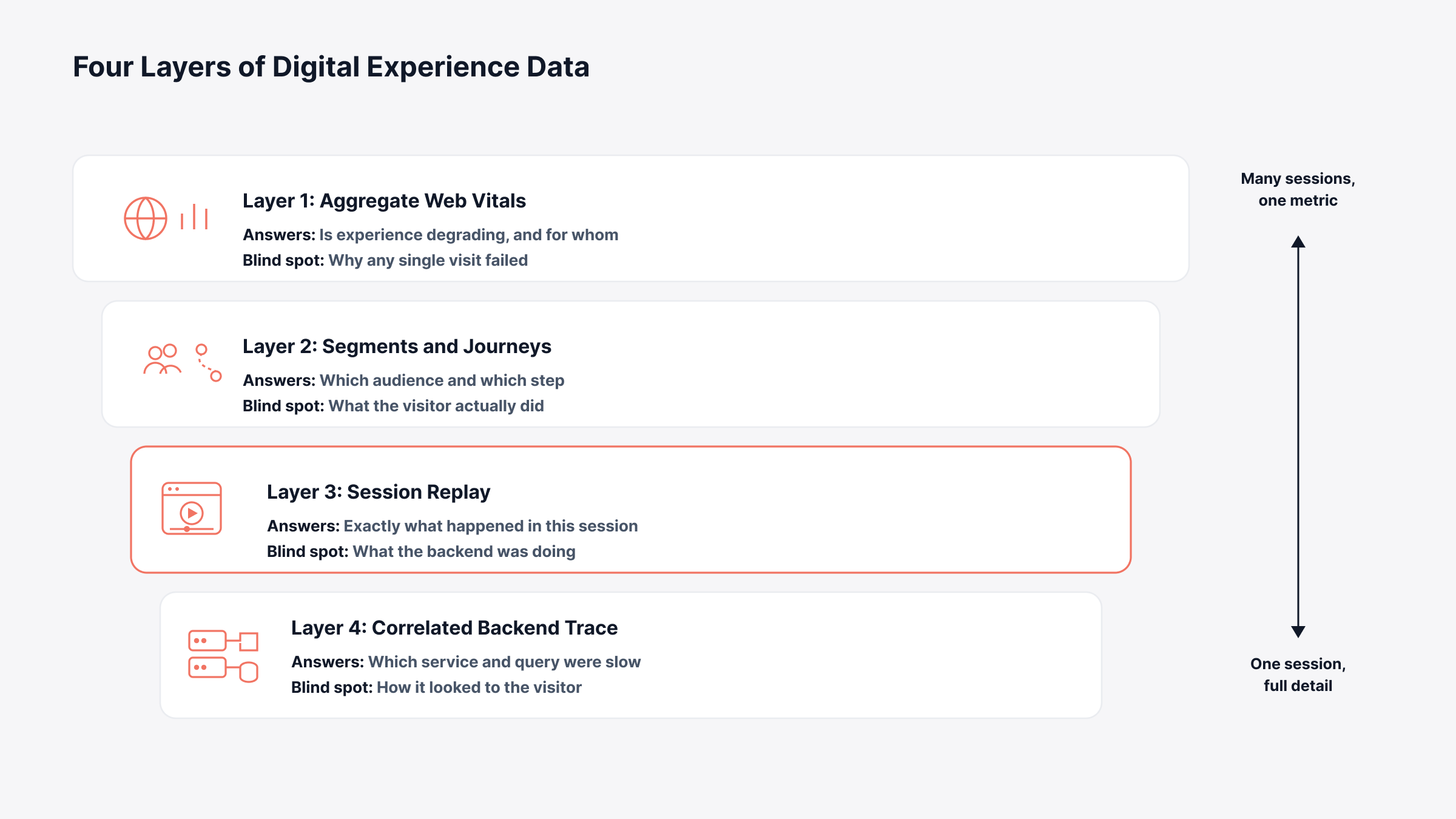
Replay answers the single case. The layers above and below it are what turn one recording into a decision about where engineering time should go.
How Do You Connect a Session Replay to the Backend?
You connect a replay to the backend by propagating a shared trace identifier from the browser into the server request, so the recorded session and the backend transaction point at the same operation. The W3C Trace Context standard defines the headers that carry it.
Without that identifier, a replay stops at the point of failure and explains nothing. You watch a spinner turn for eleven seconds and learn nothing about the query underneath it.
With it, one investigation runs end to end in three moves:
Start in the replay: Find the moment the interface froze, and read the slow or failed call attached to that session
Follow the correlation: Trace correlation carries you from the session into the backend request it triggered
Land on the cause: Distributed tracing names the service, the database query, or the third-party dependency responsible
Slow rendering has its own equivalent on the frontend. A flame chart breaks a page load into the tasks that consumed the browser's main thread, which is where blocking scripts and oversized resources appear.
Correlation settles the technical question. Whether you are permitted to record the session at all is a separate question, and for many organizations it has become the more expensive of the two.
Is Session Replay Legal?
Session replay is legal in most jurisdictions when it is disclosed and consented to properly, and it becomes a liability when it runs before consent, captures sensitive input, or shares data with a third party the visitor was never told about. The specifics vary enough by jurisdiction that this section is context for a conversation with your counsel rather than a substitute for one.
Two frameworks drive most of the exposure:
European Union: The ePrivacy Directive requires consent before a script stores or reads information on a visitor's device, and the GDPR governs everything the recording holds after that
United States: Pressure comes from state wiretapping statutes written decades before the web, with California's Invasion of Privacy Act, or CIPA, producing most of the filings
Courts have ruled in both directions on whether session replay counts as interception. Treat the position as unsettled and configure for the stricter reading.
Which Privacy Controls Keep Session Replay Defensible?
Session replay privacy comes down to six controls that limit what the recorder captures and where the recording goes. The disclosure language matters, and the configuration matters more.
Every control in the table below should be verifiable in a vendor's documentation before you deploy.
Control | What it does | Why it matters |
Input masking | Replaces field contents with placeholder characters before transmission | Keeps passwords, card numbers, and health data out of the recording entirely |
Element blocking | Excludes marked regions of the page from capture | Protects account balances, documents, and internal identifiers |
Consent gating | Starts recording only after the visitor has consented | Directly addresses the pre-consent argument behind most CIPA filings |
Sampling controls | Records a defined share of sessions rather than all of them | Reduces data volume and the size of any exposure |
Retention limits | Deletes recordings after a set period | Supports data minimization obligations under GDPR |
Deployment location | Keeps recordings on infrastructure you control | Removes the third-party disclosure argument and supports data residency rules |
That last row deserves attention in regulated sectors. A recording held on your own infrastructure never triggers the third-party sharing question that a large share of the litigation turns on.
What Are the Limits of Session Replay?
Session replay reconstructs what the page did, which means it inherits every gap in that reconstruction. Four limits show up consistently in production:
Rendering surfaces it cannot follow: Canvas elements, video players, cross-origin iframes, and shadow DOM components that hide their own markup from the rest of the page replay imperfectly or not at all
Sampling gaps: If you record ten percent of sessions to control cost, the session your largest customer complained about may simply not exist
Behavior without explanation: A replay shows hesitation, and it never tells you whether the visitor was confused, distracted, or on a phone call
Volume: Watching sessions does not scale as an analysis method, which is why replay belongs alongside aggregate metrics rather than in place of them
Masking creates a fifth constraint worth planning around. A properly masked session hides exactly the field you most want to see when the bug involves input validation, so the error and network detail attached to the session carry the diagnosis instead.
What Should You Look for in Session Replay Software?
The best session replay software for your organization is the one that covers your frontend frameworks, satisfies your compliance obligations, and connects to the backend telemetry you already collect. Most session replay tools converge on the same feature list, so evaluate on the questions vendors find awkward.
Ask each vendor to prove the following, with documentation rather than a slide:
Framework coverage: Does capture work across every framework in your application portfolio, including single-page applications and mobile app session replay?
Masking defaults: Is sensitive input masked by default, or does it require configuration you might forget on one page?
Deployment model: Can recordings stay on infrastructure you control, and can you specify the region?
Backend correlation: Does a replay link to the server-side trace behind a slow call, or does the investigation end at the browser?
Investigation workflow: Can filter combinations, searches, and time ranges be preserved as saved views so a recurring investigation takes one click?
Alerting integration: Do frontend policies raise incidents through the same workflow as your infrastructure alerts, or through a separate console?
Cost model: Is pricing driven by sessions, by seats, or by data volume, and what happens in a traffic spike?
Every vendor will answer yes to the first four. The distance between a demo answer and a documented answer is where evaluations are usually decided.
How Do You Get Started with Session Replay?
You get started with session replay by scoping it to a few high-value flows rather than switching it on across the whole site. A narrow first deployment gives you something to judge, and it limits what you have to defend if the configuration is wrong.
Four steps keep a first rollout useful:
Scope the flows first: Begin with signup, checkout, or whichever journey generates the most support volume, then widen once the data proves worth watching
Mask before you go live: Set every input to masked by default, then unmask only the fields someone has reviewed and signed off
Gate capture on consent: Wire the recorder to your consent banner so nothing is captured before the visitor agrees, which is the single control most litigation turns on
Propagate trace context from day one: Retrofitting backend correlation later means re-instrumenting applications that are already in production
Review the first two weeks of recordings with someone from legal or compliance in the room. Configuration errors are cheap to fix at that point and expensive to fix after a year of retained sessions.
Turn an Unreproducible Bug Report into a Recorded Session with Motadata ObserveOps
Session replay will not tell you why a visitor made a choice, and no recording replaces the judgment of someone who understands the application. What it removes is the part of an investigation spent arguing about what happened.
Motadata ObserveOps measures the browser experience through Real User Monitoring, with Core Web Vitals and Apdex scoring on every session, grouped JavaScript errors, user journey tracking, and framework support across Vue.js, Angular, React, and Next.js. W3C trace context carries each session through to the backend transaction behind it, so a frontend investigation continues into the service, query, or dependency responsible.
Because ObserveOps runs on-premises, in private cloud, or in hybrid deployments, this data stays on infrastructure you control, alongside the metrics, logs, flows, and traces from the rest of your environment. One platform, one datastore, one investigation path from the click to the query. Session replay is on the ObserveOps roadmap.
FAQs
What is session replay in simple terms?
Session replay is a step-by-step reconstruction of what one visitor did during a single visit to your website or app. It is rebuilt from a recording of how the page changed, so you can watch the session on a timeline and inspect the page at any moment.
Is session replay the same as recording a video of the screen?
No. Session replay captures the page's structure and every change to it as data, then rebuilds the page during playback. That makes the recordings far smaller than video and lets you inspect elements as live HTML during playback.
What is app session replay?
App session replay applies the same idea to mobile applications, capturing screen state, taps, gestures, and navigation instead of browser page structure. Coverage varies more than on the web, so confirm which platforms and SDK versions a vendor supports before committing.
Does session replay slow down my website?
A well-built recorder adds a small script and batches its data, so the effect on page performance is usually negligible. Pages with very heavy interaction generate more events, which is where sampling and element exclusion keep the overhead controlled. Motadata ObserveOps keeps its browser-side collection lightweight for this reason.
How long should session recordings be kept?
Most organizations retain recordings for 30 to 90 days, which covers typical support and debugging cycles. Shorter retention reduces both storage cost and regulatory exposure. Because Motadata ObserveOps can run on infrastructure you control, retention follows your own policy rather than a vendor default.
Author
Poonam Lalani
Content Strategist
Poonam Lalani is a B2B content strategist and writer with a background in computer engineering and experience across enterprise technology domains, including AI, cloud, DevOps, data engineering, and IT operations. She specializes in creating research-driven content that simplifies complex ideas and supports product education, thought leadership, and business growth.