What is AIOps? An End-to-End Guide for Quick Explanation
What if the biggest issue your IT team faces isn't a shortage of data, but too much of it?
Your monitoring tools run around the clock, and alerts keep coming in from every layer of your stack.
Dashboards stay active from one shift to the next, yet the one alert that actually matters often gets buried under the rest.
By the time someone notices it, the issue has already turned into downtime no one saw coming.
This is exactly where AIOps steps in. It uses machine learning and automation to read the data your infrastructure already produces, and then tells your team what to fix before a small issue becomes a bigger one.
In this guide, we'll walk you through what AIOps is, how it works, where it brings real value, and how you can tell if your team is ready for it.
Before we get into the technical side, let us start with the basics.
What is AIOps?
AIOps stands for Artificial Intelligence for IT Operations. It is a platform that uses machine learning, big data analytics, and automation to make sense of the data your IT setup produces every second.
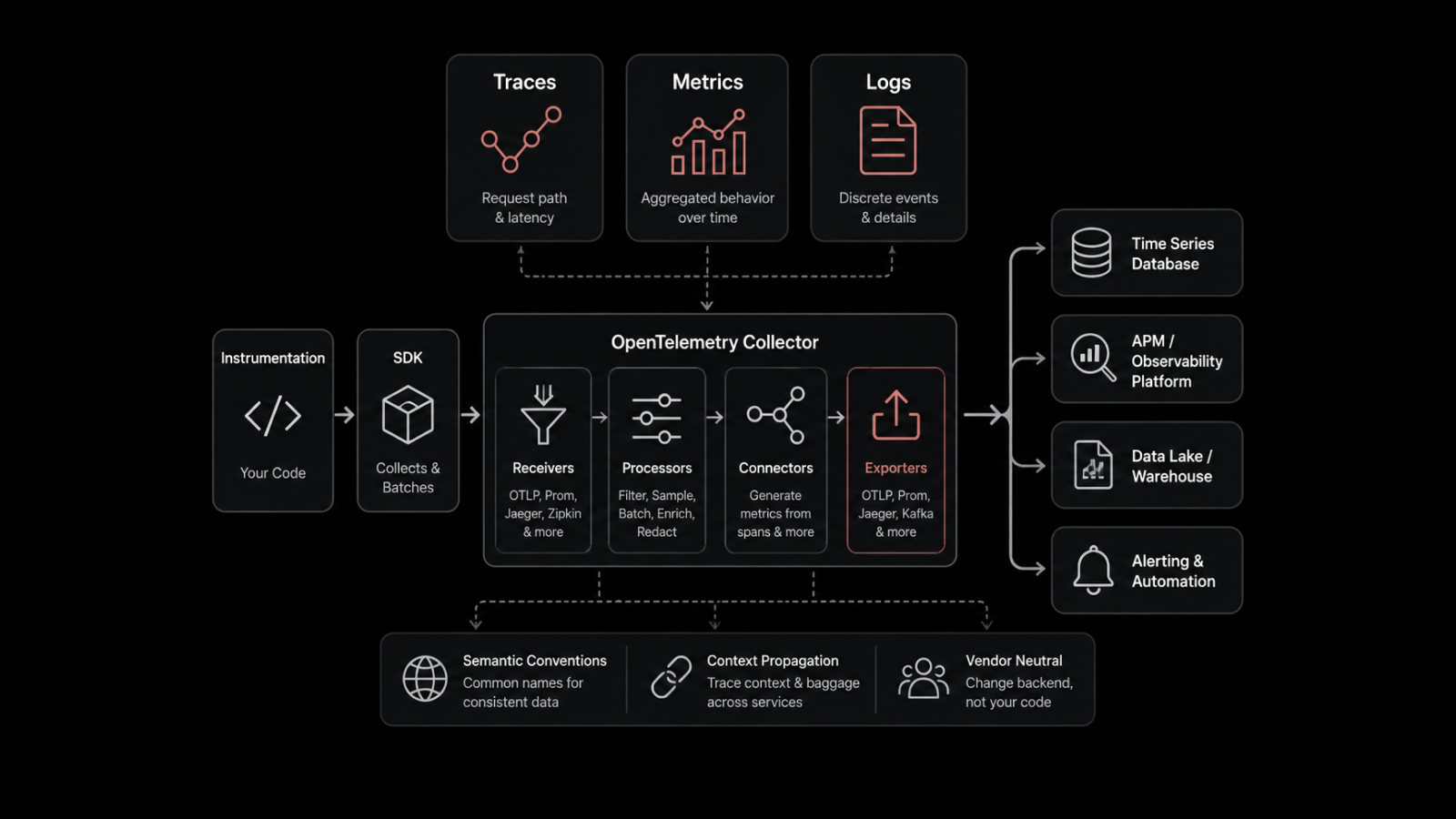
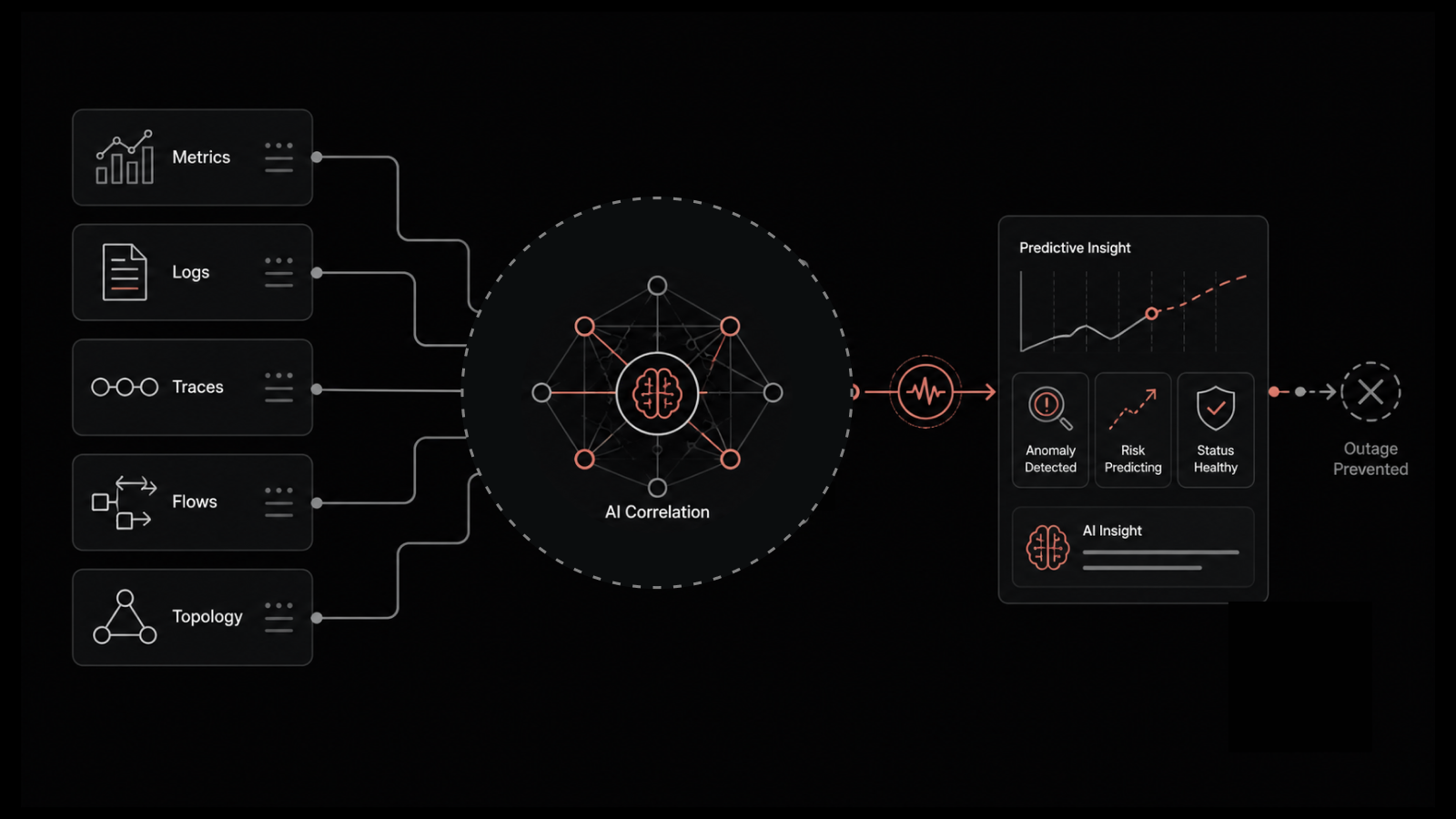
That data includes metrics, logs, traces, events, and network flows.
The job of an AIOps platform is to collect all of that, find patterns inside it, point out what matters, and group related events into one incident.
When possible, it also takes action on its own.
For most IT teams, that changes the daily flow of work. Instead of chasing every alert that comes through, your team focuses on the right problems from the start.
The Origin of AIOps
The term AIOps was coined by Gartner back in 2016.
It came out of a simple change in how businesses run their infrastructure. IT stopped being centralized. Workloads moved to the cloud, on-prem, edge, containers, and SaaS, often all at the same time.
As scale grew, the old approach of adding more engineers and writing more rules stopped keeping up. AIOps came in as a way to manage IT at a scale where human effort alone falls short.
Now that the definition is clear, let us look at what actually happens inside an AIOps platform.
How Does AIOps Work?
It runs on three core layers, and each one plays a specific role. When any of them is weak, the whole system loses value.
The Analytics Engine
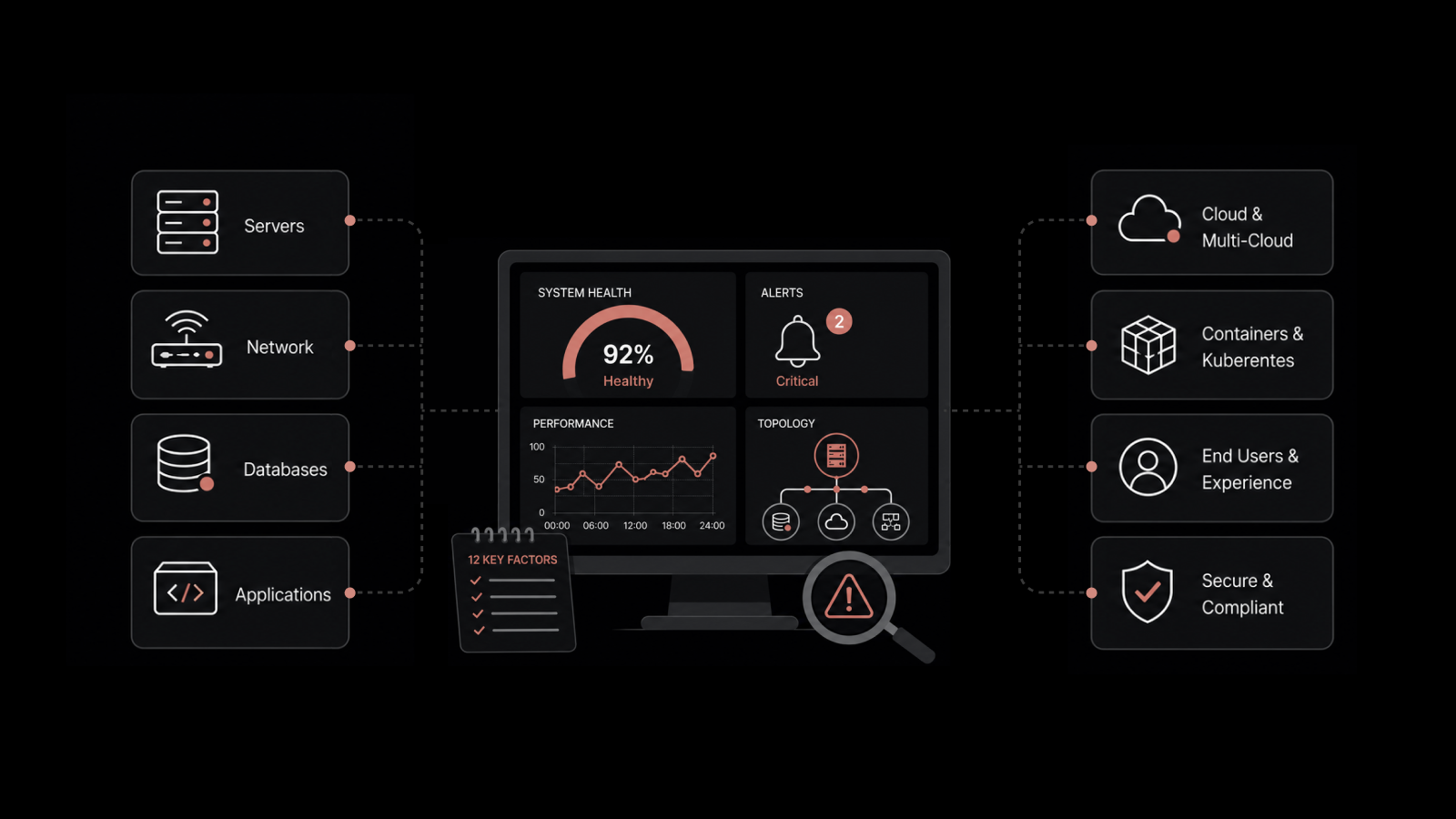
This is the data ingestion layer. It collects telemetry from across your infrastructure, including metrics from servers and cloud workloads, logs from applications, traces from APM tools, network flow data, SNMP traps, and packet captures.
Once the data comes in, the engine converts it into a common format so the next layer can process it without worrying about where each piece came from.
This layer does more work than most teams give it credit for. Without broad data ingestion, an AIOps platform ends up being just another monitoring tool with a new name on it.
The Machine Learning Layer
This is where raw data turns into something your team can act on.
ML models study your environment's past data and learn how your systems behave on a normal day.
Not a generic baseline from a vendor, but one that matches how your specific workloads operate.
From there, the ML layer handles a few important jobs:
Anomaly detection when something moves outside the learned baseline
Event correlation across different tools to group related incidents
Forecasting to catch capacity and performance trends early
Root cause analysis by tracing dependencies and timestamps
This is also where AIOps move past rule-based monitoring.
Rules need someone to predict every possible failure ahead of time, which is not possible in modern setups.
ML learns from what is happening right now and catches issues nobody thought to write a rule for.
The Automation Engine
Data and insights by themselves do not fix anything. The automation layer closes the gap between detection and action.
It runs scripts, triggers runbooks, restarts services, scales containers, and routes incidents to the right team with full context attached. When an engineer picks up a ticket, they start with what they need to solve it, not a blank slate.
The goal here is to remove the repetitive manual steps that slow down every incident response.
What are the Three AIOps Phrases of AIOps?
Once the layers are in place, AIOps move through a steady cycle.
Most platforms work in three phases that repeat over time: Observe, Engage, and Act.
This is the same framework that ServiceNow, AWS, and most analysts use to describe how AIOps runs from start to finish.
1. Observe
The Observe phase is about collecting and making sense of data.
The platform takes telemetry from every source in your stack and starts looking for patterns. It sets baselines, spots anomalies, connects related events, and builds context about your environment.
You can think of it as the platform learning how your infrastructure behaves on a normal day before it starts pointing out what is not normal.
2. Engage
Once the platform sees something that needs attention, the Engage phase decides who needs to see it and when.
Alerts are sorted based on business impacts. Related events are grouped into a single incident, so your ticket queue is not flooded with duplicates. The right team gets notified with the context attached, including affected services, recent changes, and a likely root cause.
3. Act
The Act phase is where AIOps close the loop.
For known issues with documented fixes, the platform can resolve them without human input. For more complex cases, it hands off the incident with the full picture attached, so your engineers start their work with a head start.
Why IT Teams Need AIOps Today
You might be wondering why AIOps have become so important now. The answer comes down to how much IT has changed over the last few years.
Modern IT has outgrown what human teams can handle through manual effort. Here is what is pushing that change.
1. Data Volume Has Outgrown Human Capacity
A mid-size enterprise running 500 VMs, a Kubernetes cluster, and a few cloud accounts can generate terabytes of telemetry data every day.
No team of five, and no team of fifty, can process that by hand.
AIOps handle the ingestion and analysis at machine speed, then points out what falls outside expected behavior.
2. Tool Sprawl Creates Blind Spots
Most enterprises use 10 to 15 different monitoring tools across their stack. Each one covers a slice of infrastructure, and most of them do not talk to each other well.
When an incident spans the network, application, and infrastructure layers at once, your team ends up piecing together data from different dashboards just to understand what happened.
AIOps pull from every source into one view, so you get a single timeline, one incident, and one root cause.
3. Reactive Operations No Longer Scale
Traditional monitoring waits for something to break. A metric crosses a threshold, an alert of fires, an engineer steps in, and the cycle repeats.
AIOps add a predictive layer to the top. It catches trends early, like a storage array moving toward 95% usage weeks before it hits the ceiling and gives your team time to fix the issue before users feel it.
That is the move from reacting to prevention.
4. Alert Fatigue is a Serious Problem
A lot of IT operations teams report alert fatigue as a major issue. When every alert looks the same, engineers start skipping them.
And the one alert that matters, the one that turns into a serious incident, is the one they miss.
AIOps handles this by grouping related alerts, removing duplicates, and turning thousands of low-value events into a small set of incidents that actually need attention.
5. Developer Velocity Adds Pressure on ITOps
Development teams ship code faster than ever and have more freedom to set up and change infrastructure on their own.
That is good for innovation, but it adds pressure on operations. IT accountability still sits with the ops team, even when the change that caused the incident came from a developer working on their own.
AIOps gives your ITOps team the visibility and automation they need to keep up without burning out.
AIOps vs Traditional Monitoring
So how is this different from the monitoring tools your team already uses?
That is where most buyers get confused. Plenty of tools claim to offer AIOps when, in practice, they have added a machine learning feature to standard monitoring.
The difference shows up in how each one approaches alerts, data, and action.
Capability | Traditional Monitoring | AIOps |
Alert Logic | Uses static thresholds and manual rules | Uses dynamic baselines built by machine learning |
Data Scope | Limited to each individual tool | Unified across all telemetry types |
Correlation | Done manually across multiple dashboards | Handled automatically across the full IT stack |
Root Cause Analysis | Engineer-driven and takes hours to days | ML-assisted and takes minutes to hours for root cause analysis |
Response | Requires human investigation and manual action | Runs automated triage and executes runbooks |
Capacity Planning | Based on periodic reports and manual reviews | Based on continuous, real-time forecasting |
Scalability | Starts to break down beyond 1,000 devices | Built for environments with 10,000 or more devices |
The main difference is not intelligence alone. It is an integration.
AIOps works because it pulls data from every source, connects it across the stack, and acts on the result. Take any one of those three away, and it stops being AIOps.
What are the Core Capabilities of AIOps?
Let us look at what AIOps actually does once it is in place. These are the capabilities that change how your team works day to day.
1. Alert Correlation and Event Grouping
AIOps groups related alerts into a single incident.
A server outage that would have triggered 200 downstream alerts becomes one incident with context attached, including affected services, a dependency map, and recent changes.
Your engineers spend more time working on the problem and less time sorting through repeated alerts. The outcome is a faster path from detection to resolution.
2. Root Cause Analysis
Traditional root cause analysis is a manual process.
An engineer walks through timelines, compares logs from different tools, and checks recent change tickets to figure out what happened.
AIOps does this work on its own. It maps dependencies, connects timestamps across tools, and points to the most likely cause based on past patterns. For known failure types, the time to find the root cause drops from hours to minutes.
3. Anomaly Detection
ML models learn what normal looks like for your environment, then point out anything that moves outside that range.
Instead of a generic "CPU is high" alert, you get something useful. For example, a workload running 30% above its usual CPU pattern for that time of day.
Static thresholds miss this kind of context because they treat every environment the same. Anomaly detection adapts to yours.
4. Predictive Analytics
Instead of responding to problems after they happen, your team gets early warnings.
AIOps uses past data along with current telemetry to forecast issues before they show up. Storage filling up, database response times creeping up, or a disk showing early signs of failure all get flagged before they turn into incidents.
5. Runbook Automation
For known issues with documented fixes, AIOps can run the fix on its own.
Restarting a service that stops responding
Clearing a log partition that is filling up
Scaling a container deployment during a traffic spike
Rotating a database connection showing errors
Running scheduled backups without manual oversight
Resolution for these cases happens in seconds. Your tier-1 team spends less time on repetitive fixes and more time on the work that needs engineering judgment.
6. Topology and Dependency Mapping
Modern infrastructure has too many moving parts for one person to hold the full dependency picture in their head.
AIOps builds that map and keeps it updated as things change.
When something breaks, you see the impact right away, including which services are affected, which users are impacted, and what is connected to what is.
What are the Top Use Cases for AIOps?
AIOps looks different depending on the team using it. Here is where it delivers the most value.
1. For NOC and Operations Teams
AIOps turns a NOC buried in alerts into one that manages by exception.
The platform handles routine alerts on its own. Your team steps in only when human judgment is needed, which is a big change from how operations teams spend their day today.
2. For DevOps and SRE Teams
AIOps connects SLO management with incident response.
It links deployments with performance changes, so your team can answer the question every SRE has asked at 2 AM: did the release we pushed cause this problem?
That kind of correlation, done across logs, metrics, and deployment events, saves hours of manual work during incidents.
3. For Hybrid and Multi-Cloud Environments
If your workloads run across AWS, Azure, GCP, and on-prem data centers, you need visibility that covers all of them at once.
AIOps pulls cloud metrics, on-prem network data, and application performance into a single view. That makes it possible to see the full picture of an incident, even when it spans multiple environments.
4. For Enterprises Managing Tool Sprawl
Most enterprises are not going to replace their entire monitoring stack overnight.
AIOps sits on top of what you already use, including tools for network monitoring, logging, and APM.
It adds correlation and automation across those sources and gives your team a single pane of glass without forcing a migration.
5. For Cloud Migration Projects
Cloud migrations rarely go as planned.
Dependencies change, new services come online, and older ones get retired as the project moves forward.
AIOps maps those dependencies as they change and reduces the risk of breaking something your team did not know was connected.
For large migrations, that visibility cuts operational risk in a meaningful way.
AIOps vs Related Concepts
AIOps often gets mixed up with other IT terms. Let us clear up the ones that come up most often.
AIOps vs Observability
Observability is about making your systems easy to understand from the outside.
It collects the metrics, logs, and traces your team needs to ask any question about system behavior after the fact.
AIOps builds on that foundation. It uses the same data but adds ML, correlation, and automation on top. Observability is the base. AIOps is what you do with that base at scale.
AIOps vs DevOps
DevOps is a practice that connects development and operations, so software ships faster and with fewer issues.
AIOps is a technology that keeps the infrastructure behind that software running smoothly.
The two are complements, not competitors. DevOps helps code get out the door. AIOps helps keep what the code depends on healthy.
AIOps vs MLOps
These two sound alike but solve different problems.
AIOps applies ML to IT operations data to improve infrastructure management.
MLOps applies engineering practices to building, deploying, and maintaining ML models in production. Different problem, different audience, and different tooling.
AIOps vs SRE
Site Reliability Engineering is a practice. AIOps is a technology.
They share goals, like lowering incident rates and improving availability, but they work in different ways.
SRE teams use AIOps platforms as part of their toolkit to cover more ground than they could by hand.
What are the Different Types of AIOps Platforms?
Not every AIOps platform works the same way. They fall into two main categories.
1. Domain-Centric AIOps
These platforms focus on one area, such as networks, cloud, applications, or security.
They go deep in that domain and give you detailed insights inside it. The trade-off is scope.
If your problem spans multiple domains, a single-domain tool will not show you the full picture.
2. Domain-Agnostic AIOps
These platforms work across your entire stack, including networks, servers, applications, logs, and cloud services.
They collect data from every source, connect it across domains, and give your team a unified view.
For most enterprises running hybrid or complex setups, domain-agnostic is the better fit. It is the only approach that offers true cross-stack correlation.
How to Evaluate an AIOps Platform
Not every tool that says "AI-powered" actually delivers AIOps. Use this checklist when you compare options:
Data breadth: Does it ingest metrics, logs, flows, traces, and events from your entire stack, or just a portion of it?
Correlation depth: Does it connect events across infrastructure, application, and network layers, or only inside one domain?
Alert reduction quality: Ask for concrete numbers on how much it cuts low-value alerts. Strong platforms tend to hit 90% or higher.
Automation capability: Can it trigger fixes, or does it only surface insights for humans to act on?
Time to value: How long before the ML models understand your environment? A few weeks is reasonable. Several months is a warning sign.
Integration ecosystem: Does it connect with your existing ITSM, ticketing, CI/CD, and communication tools?
Scalability: Can it handle your current device count and keep up as you grow?
Deployment flexibility: Can you run it on-prem, in a private cloud, or as SaaS, based on your compliance needs?
How to Implement AIOps in Your Organization in 5 Easy Steps
Once you have picked a platform, rolling it out the right way matters just as much as the choice itself.
AIOps is not a switch you turn on. It is a phased rollout, and here is how to do it well.
1. Start With One Clear Pain Point
Pick the problem that hurts the most, whether it is alert fatigue, slow incident resolution, or tool sprawl.
Focused wins build credibility and get your team the buy-in needed for a wider rollout.
2. Build the Business Case
Leadership approves AIOps when it is tied to outcomes they care about, such as less downtime, faster resolution, and lower operational cost.
Frame the conversation around business impact, not technical features.
3. Choose the Right Platform
Use the eight-point checklist above.
Shortlist two or three platforms, and run a proof of concept on a workload that matters. The right platform should show value inside the first 30 to 60 days.
4. Plan the Rollout
Roll out AIOps in phases:
Start with data ingestion from your existing monitoring and logging tools
Add correlation and anomaly detection once data quality is solid
Introduce automation last, once your team trusts what the platform sees
This staged approach builds confidence at every step.
5. Get Your Team On Board
AIOps struggles in organizations where engineers see it as a threat.
Frame it for what it actually is: a way to stop doing the repetitive work nobody enjoys.
Share early wins openly, and involve your strongest engineers in the setup.
How Motadata AIOps Helps Teams Cut Through Alert Fatigue
We built Motadata AIOps for the exact problem most IT teams are stuck in today.
As your IT teams manage too much data, get too many alerts, yet not enough context.
Our platform runs on DFIT (Deep Learning Framework for IT Operations) and brings your full stack into one place, including:
Metrics: Infrastructure monitoring across on-prem, cloud, and hybrid setups
Logs: Log analytics with pattern matching, live tailing, and dynamic parsing
Flows: Network observability with NetFlow, sFlow, and jFlow support
APM and RUM: Application performance and user experience monitoring through trace intelligence
SNMP traps: Capturing events from network devices as they happen
On top of that sits the AI and ML layer that does the heavy lifting. Correlation across thousands of data points. Anomaly detection that adapts to your environment without long training cycles.
The dependency and topology mapping that keeps up with change. Runbook automation for known issue types. Alert grouping that turns related events into a single incident.
Teams using Motadata AIOps typically see:
45% reduction in MTTD and MTTR
38% cost savings compared to running separate tools
25% increase in operational efficiency
90% or higher reduction in low-value alerts
And it works with what you already have, including ServiceOps, Jira, Slack, PagerDuty, AWS, Cisco, Palo Alto, and more. No rip-and-replace needed.
If your team is spending more time chasing alerts than solving real problems, that is exactly what we built this for. Request a demo to see it on your data, or start a 30-day free trial and try it yourself.
Final Thoughts
AIOps is not about adding another tool to your stack. It is about giving your team room to breathe.
When the routine work is handled, your engineers can focus on the work that actually needs them. And the problems that used to take up the day become background tasks the platform takes care of on its own.
The teams that get the most out of AIOps are the ones that start small, pick up a problem to solve, and build from there.
If that sounds like your team, now it is a good time to take the first step.
Frequently Asked Questions
What is AIOps and How Does It Work?
AIOps stands for Artificial Intelligence for IT Operations.
It uses machine learning and big data analytics to collect telemetry from your infrastructure, find patterns, connect related events into incidents, and automate fixes. It works through three layers: an analytics engine for data ingestion, an ML layer for pattern recognition, and an automation engine that takes action.
What are the Main Benefits of AIOps?
The main benefits include:
90% or higher reduction in low-value alerts in mature deployments
Faster root cause analysis, often reduction in MTTR by a large margin
Prediction of incidents before they happen
Lower operational costs
Better team collaboration because everyone works from a single view of what is happening
How is AIOps Different from Traditional IT Monitoring?
Traditional monitoring runs on static thresholds and manual rules.
AIOps uses ML-based baselines that adjust to your environment. It connects data across every layer of the stack and triggers automated actions instead of only sending alerts.
How Long Does It Take to Implement AIOps?
Initial data ingestion and setup usually take two to four weeks. ML models need another two to six weeks to learn your environment's baselines.
Full maturity, including automation and team-wide adoption, takes three to six months. Platforms with pre-built integrations and strong anomaly detection out of the box reach value faster.
Do I Need to Replace My Existing Monitoring Tools to Use AIOps?
No. Most AIOps platforms, including Motadata, work as an overlay.
You keep your existing monitoring, logging, and APM tools, and the AIOps platform pulls data from them, adds correlation and ML on top, and triggers automation. Consolidation can happen later, once you have proven the value.
What Is the Difference Between Domain-Centric and Domain-Agnostic AIOps?
Domain-centric platforms focus on one area, such as networks or clouds, and go deep in that area.
Domain-agnostic platforms cover the full stack and connect data across domains. For most enterprises with hybrid or complex setups, domain-agnostic is the right fit because incidents rarely stay inside one domain.
Does AIOps Replace IT Engineers?
No, and any vendor saying otherwise is overselling.
AIOps removes repetitive manual work, such as alert triage, log searching, ticket routing, and basic fixes. That frees your engineers to focus on architecture, capacity planning, and the problems that need human judgment. AIOps raises the value of your team's work, not the headcount you can cut.