Static IP vs Dynamic IP: DHCP vs Static Addressing and When to Use Each
Why does a printer suddenly drop out of the print queue, or a monitoring check mark a healthy server as down the morning after a lease renewal? The hardware is usually fine. The device came back on a different IP address, and nothing else knew.
The root cause is usually an addressing decision from an old rollout. Fixed addresses suit firewall rules, DNS records and VPN peers because they never move, but each one has to be typed in and tracked. DHCP removes that chore and, with it, any guarantee about tomorrow's address.
That makes static IP vs dynamic IP a bigger decision than it first appears. Your IP address management depends on it, especially as sites, VLANs and cloud subnets multiply. In this blog, you will see where each method fits and what it costs, how to check a device, and how observability flags trouble early.
How Do Static IP vs Dynamic IP Addresses Differ?
With static IP vs dynamic IP, the questions are who hands out the address and whether it can change. Static means an administrator typed it into the device and it won't move until someone edits it. Dynamic means a DHCP server leased it, and it may change when the lease ends.
There's also a question of ownership. A wrong static address means somebody mistyped it, while a misbehaving dynamic address points you at the DHCP server and its scope. The comparison below puts DHCP vs static IP side by side.
Factor | Dynamic IP (DHCP) | Static IP |
How it is assigned | Handed out automatically by a DHCP server or router | Typed into each device by an administrator |
Address stability | Changes when a lease lapses or the device moves | Holds until someone edits it |
Setup effort per device | Needs nothing once the scope exists | Needs every value entered and documented |
Scalability | Covers thousands of endpoints from one scope | Gets hard to track past a few dozen devices |
Conflict risk | Stays low; the server tracks every lease | Runs higher; nothing stops a duplicate |
Dependency | Needs a reachable DHCP server | Works with no DHCP server at all |
Best fit | Laptops, phones and guest devices | Routers, servers and DHCP or DNS hosts |
Most enterprise networks use both. DHCP covers laptops and phones. Fixed addresses go on the network infrastructure that everything else depends on, and in practice that split ends most of the dynamic IP vs static IP debate.
What Does the Static vs Dynamic IP Choice Mean for Cost, Risk and Growth?
Look at the static vs dynamic IP choice from the budget side and it becomes a question of effort versus risk. Static addressing costs engineer time per device. DHCP costs almost nothing to run (its weak point is that one service now carries every endpoint).
Labor: Setup, documentation and change work for every static device, growing with each new site, office move or acquisition
Outage exposure: One device down after a static typo, a whole floor after a DHCP failure or a full scope
Speed of growth: New sites and Wi-Fi networks online from day one; the scope does the work
Direct costs: ISPs usually charge monthly for static public IPs. Private addressing costs only admin time
Users never report a full DHCP scope. What they report is a frozen checkout, a login that keeps failing, or Wi-Fi that "doesn't work on the third floor." So the cost of downtime has to be part of this conversation.
Does Static vs Dynamic IP Refer to Your Public or Private Address?
Static vs dynamic IP can mean two different decisions. One is about the address your ISP assigns to the office connection. The other is about the private addresses inside your walls.
Public IP from your ISP: What the internet sees; the dynamic vs static IP choice comes with your plan
Private IP inside your network: The LAN address each device uses; static or dynamic IP is your choice here
You pay for a static public IP when outsiders need a fixed point to reach, like a hosted mail server, a VPN gateway, a remote desktop host or a partner's allowlist. Offices that work mostly in SaaS apps rarely bother.
The rest of this guide is about the private side. That's where DHCP vs static choices touch uptime, security and admin workload. Public addresses come back briefly in the security section.
What Are the Four Types of IP Addresses?
You'll usually see four types of IP addresses listed: public, private, static and dynamic. They behave as two pairs; any address is public or private, and static or dynamic.
Public: Reachable from the internet; issued by your ISP
Private: The 10.0.0.0/8, 172.16.0.0/12 and 192.168.0.0/16 blocks in CIDR notation, used inside networks only
Static: Fixed until an administrator changes it
Dynamic: Leased from a DHCP server, returned when no longer needed
Take the laptop you're reading this on, if you're in an office. On the LAN it most likely has a private dynamic address, and to the outside world it shares a single public static address with every colleague, courtesy of NAT. This guide compares the static vs dynamic IP address pair.
What Are the Pros and Cons of Static and Dynamic IP Addresses?
The pros and cons of static and dynamic IP addresses are close to mirror images. Fixed addresses cost effort and repay it in predictability. DHCP gives you automation, at the price of leaning on one central service.
Pros and Cons of a Static IP Address
Here is what a fixed address gives you, and what it costs:
Advantages | Disadvantages |
A fixed target for DNS records, firewall rules, VPN peers and monitoring checks | Manual setup and documentation on every device |
Keeps working when the DHCP server is down | More room for duplicate addresses and typos |
Easy to allowlist for partners, remote access and hosted services | Slow to change when a subnet is renumbered or a site moves |
Pros and Cons of a Dynamic IP Address
And the same view for addresses leased from DHCP:
Advantages | Disadvantages |
No per-device setup; new devices connect immediately | Addresses that can change under anything referencing them |
Every lease tracked by the server, and addresses back in the pool when devices leave | No network access for new devices while DHCP is down |
Gateway and DNS changes rolled out through one scope edit | New attack paths: rogue DHCP servers, scope starvation |
Most of these trade-offs trace back to the mechanics. DHCP first.
How Does DHCP Assign a Dynamic IP Address?
DHCP assigns a dynamic IP address over four quick messages, known by the acronym DORA. At the end the device holds a lease, and every lease has an expiry date.
It all happens over UDP on the standard DHCP ports, every time a device joins a network without a configured address:
Discover: A broadcast from the client looking for any DHCP server
Offer: A free address from the server's scope, plus a lease length
Request: The client's acceptance of one offer; other servers withdraw theirs
Acknowledge: The server's go-ahead, along with mask, gateway and DNS settings
Because of that last step, nobody types a subnet mask into a laptop anymore. The mask, gateway and DNS servers come with the lease. That's the plain dynamic IP address meaning: an address and its settings, borrowed from a central server until the lease runs out.
Then the timers start:
Halfway point: A renewal request to the original server
Seven-eighths point: A rebind request to any available server
End of lease: The address released if both attempts failed
Those timers are the reason a laptop can keep one address for months and then come back with a new one after a long power outage. The diagram below follows a single device from first broadcast to expiry.
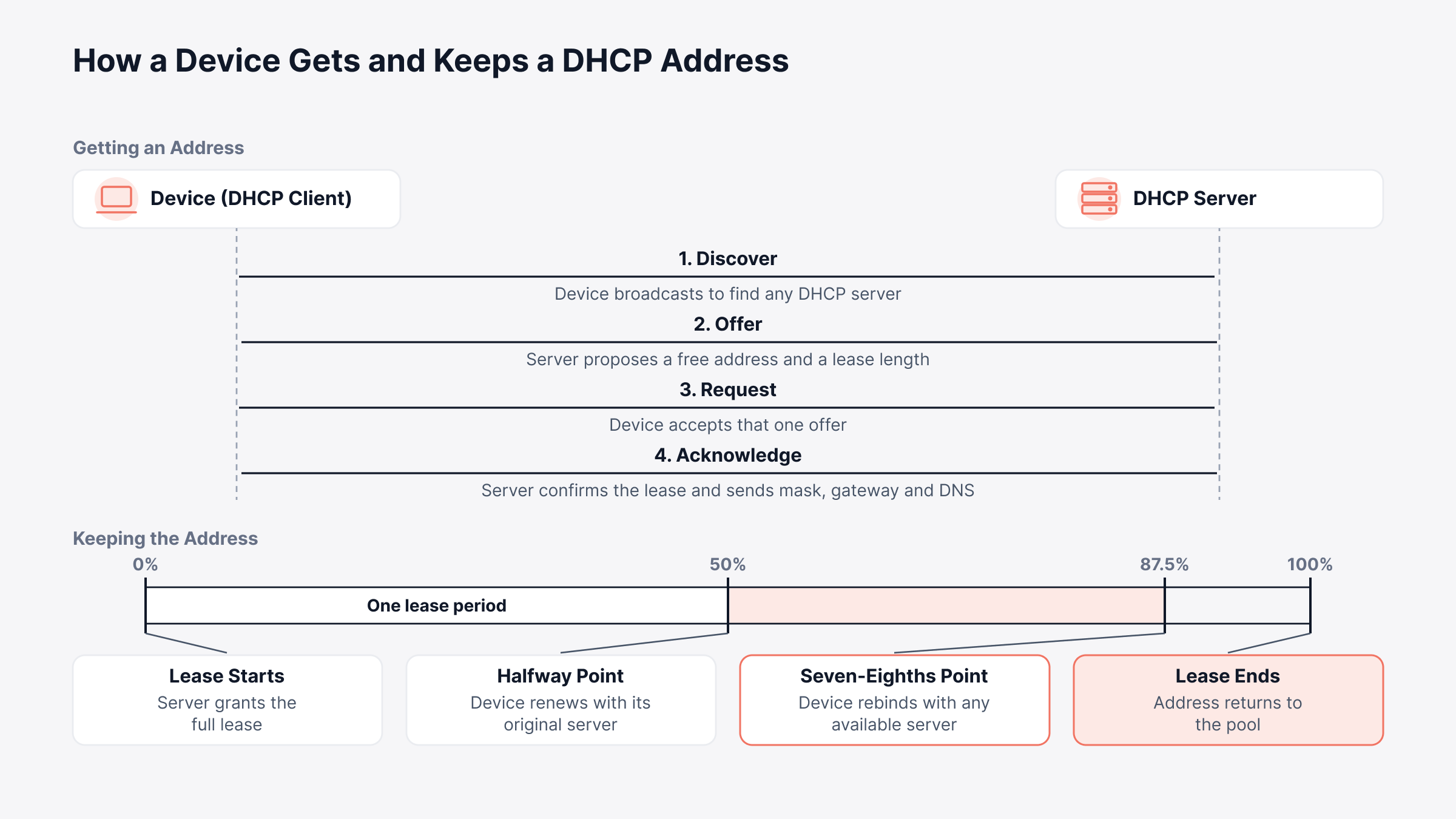
Renew successfully and the lease starts over. That's how a desktop on a stable network can hold one address for years without anyone realizing it was leased at all.
What Does DHCP Lease Time Control?
DHCP lease time is how long that loan lasts. In busy spaces short leases recycle addresses fast; on wired floors, longer ones mean fewer renewals and steadier addresses.
Short leases: Guest Wi-Fi and meeting rooms, where devices rarely stay long
Longer leases: Office desks with the same PC every day
Windows Server DHCP defaults to eight days. That suits wired segments; most organizations cut it well down for wireless and guest scopes.
How Does a Static IP Address Work?
A static IP address gets written into the device itself: a Windows adapter setting, a Linux config file, the management interface on a switch. Every boot, the device uses it; no DHCP server is consulted.
An administrator sets four values on each device:
IP address: The fixed host address, chosen from outside any DHCP scope
Subnet mask or prefix length: Which bits mark the network, for example /24
Default gateway: The router for traffic leaving the subnet
DNS servers: Where names get resolved
None of this is visible to the DHCP server. Unless an exclusion or a separate fixed block tells it otherwise, it may offer a static device's address to another client. Every static range needs one or the other.
A written subnet plan prevents most of these conflicts. In the example below, one /24 is carved into static, reserved, dynamic and spare ranges, and the classic mistake is marked.
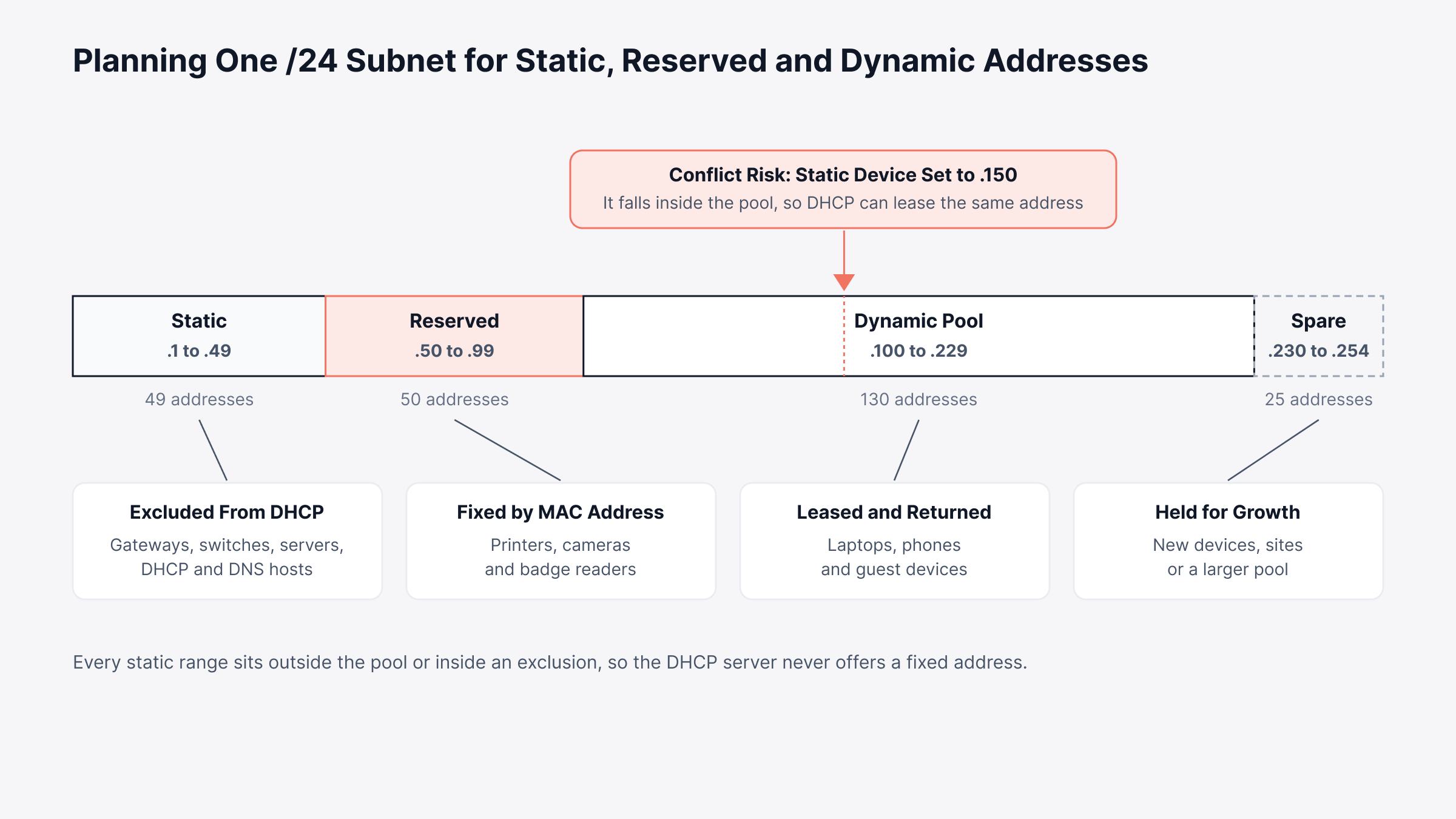
Skip that step and you get an IP address conflict, with two machines answering to the same address, say 10.20.30.150. Windows and macOS usually warn the user after a gratuitous ARP check, though by then the switch may already be sending traffic to the wrong MAC address from its ARP table. Reservations prevent this for many device types.
Is a DHCP Reservation a Third Option Between Static and Dynamic?
A DHCP reservation gives you a third option. The device asks for an address the normal way, and the server hands back the same one every time, matched to its MAC address. Nothing changes on the device; the scope remains the source of truth.
Badge readers, label printers and the camera over the loading dock are good candidates. Each needs a known address, and a DNS change still reaches all of them from one scope edit. Two caveats apply:
DHCP dependency: Still stuck without an address if the DHCP server is down at reboot
MAC stability: Private Wi-Fi addresses on phones, tablets and laptops, which change the MAC per network and break the reservation
That is the gap DDI fills. Run DNS, DHCP and IPAM as one system and a reservation can't drift away from its DNS record.
Which Is Better, Static IP vs Dynamic IP?
Static IP vs dynamic IP which is better comes down to the device's job. Something that other systems need to find at a known address should be fixed or reserved. Something that only consumes services can take whatever DHCP offers.
Three checks cover most devices:
Inbound dependencies: Firewall rules, DNS records, VPN peers, monitoring targets or app configs pointing at the address? Keep it fixed
Addressing role: A DHCP, DNS or directory server? Static, since it must be reachable before any lease exists
Mobility: A laptop, phone or guest device moving between networks? Keep it dynamic
Applied to a typical enterprise network, those checks look like this:
Device | Recommended Addressing | Reason |
Routers, firewalls and Layer 3 switches | Static | Act as gateways and routing peers for everything else |
Switch and access point management interfaces | Static or reservation | Receive backups, polling and controller traffic at a fixed address |
DHCP servers, DNS servers and domain controllers | Static | Must answer before any lease exists |
Application, database and file servers | Static | Appear in DNS records, load balancers and firewall rules |
Network printers, IP cameras and badge readers | Reservation | Need a known address; benefit from central changes |
Desktops and laptops | Dynamic | Connect from different floors, sites and VPNs |
Phones, tablets and guest devices | Dynamic with short leases | Come and go; free their addresses quickly |
IoT sensors and building systems | Reservation on a dedicated VLAN | Get predictable addresses, kept apart from user traffic |
Cloud instances | Provider-assigned; reserved public IP when exposed | Pick up addresses from the provider; exposed ones get a reserved IP |
The rule holds for a ten-person office and for a WAN across thirty countries. Fix what others depend on and lease everything else. Then spend your effort keeping that line clean.
Is a Static IP Address More Secure Than a Dynamic IP Address?
A static IP address isn't automatically more secure. Security depends on the firewall rules, segmentation and access controls around an address, and those work the same either way.
Where they do differ is exposure. Attackers can find a static public IP again and again; on the other hand, a fixed address lets you limit VPN and partner access to a short allowlist, and internal access rules are easier to audit when addresses don't change. DHCP has risks of its own on the LAN:
Rogue DHCP servers: Often a consumer router plugged in at a desk, handing out wrong gateways and DNS servers
Scope starvation: A flood of requests from one device until no addresses remain
Spoofed leases: A device pretending to be another client to steal its address
Most switches can block these with DHCP snooping, port security and 802.1X. Keeping infrastructure, users and IoT devices on separate subnets limits the damage further, and that's where network segmentation and the addressing plan meet.
What Goes Wrong With Static and Dynamic Addressing in Enterprise Networks?
Static and dynamic addressing fail differently. With static, the weak points are people and paperwork: typos, stale records. With DHCP, it's capacity, either the service itself or a scope that runs dry.
Where Do Static IP Addresses Cause Problems?
Duplicate addresses: The same "free" address handed out twice from an outdated spreadsheet
Typos in core settings: Wrong gateway, wrong DNS; reachable on the local subnet and nowhere else
Slow re-addressing: Every fixed device touched one at a time during a renumbering
Drifting records: Old devices still listed, new ones never added
Process discipline matters more than most expect. Uptime Institute found something similar in its 2025 outage analysis: 85% of human-error incidents came from staff not following procedures, or from procedures that were flawed to begin with. Manual addressing invites both.
Where Do Dynamic IP Addresses Cause Problems?
Scope exhaustion: Pool empty, so new laptops show a 169.254 address and can't reach anything
DHCP server outages: Nothing happens at first; then clients drop off as their leases run out
Address drift: A referenced device on a new lease; the rule or check aimed at the old address quietly broken
Duplicate asset records: A fresh inventory record every time an IP-keyed device changes address
Take a hypothetical branch office with a /24 scope of 200 usable addresses and 150 staff. The scope looks generous until a project brings in 40 contractors, each with a laptop and a phone; by midmorning, new joiners can't connect at all.
You rarely see these directly. They show up as app errors or slow logins, so a good network troubleshooting routine checks addressing early, and the first question is often just whether the address is static or dynamic.
Is My IP Static or Dynamic? How to Check on Any Device
To check whether your IP is static or dynamic, look at the DHCP setting on the network adapter. DHCP enabled means dynamic. Disabled means someone typed in a static IP.
You can also check with one quick command on Windows, macOS or Linux. On a laptop, run it on the Wi-Fi adapter; that also answers “is my Wi-Fi DHCP or static.”
Platform | Command | What it tells you |
Windows | ipconfig /all | Shows a "DHCP Enabled" line; Yes means dynamic |
Windows PowerShell | Get-NetIPAddress -AddressFamily IPv4 | PrefixOrigin column reads Dhcp or Manual |
macOS | ipconfig getpacket en0 | Prints lease details only for a DHCP address; en0 is usually Wi-Fi |
Linux | ip -4 addr show | Marks DHCP-learned addresses with a "dynamic" flag |
Linux with NetworkManager | nmcli -g ipv4.method connection show Office-WiFi | Prints "auto" for DHCP, "manual" for static |
For your public IP, the answer is in the ISP contract. If there’s no static IP on the bill, treat the router’s address as dynamic; it can change after a reboot or a lease renewal.
What Happens When You Change DHCP to Static?
When you change DHCP to static, the device stops asking for a lease and simply uses the address you typed. The DHCP server isn't told, and it keeps the old lease on file until it expires.
That leftover lease causes most conversion problems: in a hypothetical office, a file server moves to a static address inside the scope. A week later the old lease runs out, a new laptop gets that address and file shares start timing out. Use these six steps to convert a device safely:
Choose the address: One outside the DHCP scope, or an exclusion added first
Confirm it is free: A ping, a look at the gateway's ARP cache and a check of your IPAM records
Copy the current settings: Subnet mask, gateway and DNS servers from the active lease
Schedule the change: A maintenance window, since servers and network devices drop briefly
Update DNS: A and PTR DNS records pointed at the new address, old entries removed
Update every reference: Firewall rules, monitoring targets, backup jobs and documentation, then the old lease deleted from the DHCP server
The reverse move, static to DHCP, is lower risk with one common surprise. Anything still aimed at the old fixed address breaks the moment the device picks up a new lease. Reserving that same address first avoids the problem.
How Do Static and Dynamic Addressing Work in IPv6 and Cloud Networks?
Static and dynamic addressing follow the same principle in IPv6 and cloud networks. What changes is the mechanism that hands out dynamic addresses.
IPv6: Self-built addresses through stateless autoconfiguration, DHCPv6, or both; client addresses rotated by privacy extensions; infrastructure still on static IPv6 addresses
Cloud networks: Provider-run DHCP in each virtual network; private IPs that usually last the instance's lifetime; public IPs that can change on stop and start unless reserved
The planning rule doesn't change. Anything other systems must find at a fixed point gets a fixed address, on any protocol or platform; the remaining job is knowing when the plan stops holding.
How Does Network Observability Catch DHCP and Static IP Problems Early?
Network observability catches DHCP and static IP problems early by watching scope capacity, DHCP server health and address conflicts all the time. It then ties those signals to the devices and services they affect.
The signals worth watching are the same on every platform:
Scope utilization: How full each pool is, with warnings well before 100%
Offer and acknowledgment patterns: Rising NAKs, declines or pending offers; usually misconfigured clients, conflicts or an overloaded server
Conflict and rogue server events: Declined-address and unauthorized-server entries in the DHCP logs
Failover health: Partner servers still sharing the load after a link or server problem
Static device reachability: Every fixed-address router, switch and server answering where everything else expects it
Most organizations collect part of this already, spread across server consoles and spreadsheets. The hard part is one view, with thresholds that match each scope's normal behavior and enough context to act.
How We Built DHCP and Address Visibility Into Motadata ObserveOps
We built DHCP observability into our network observability platform so the people running the network see scope pressure, lease behavior and conflicts beside the routers, switches and servers those addresses serve.
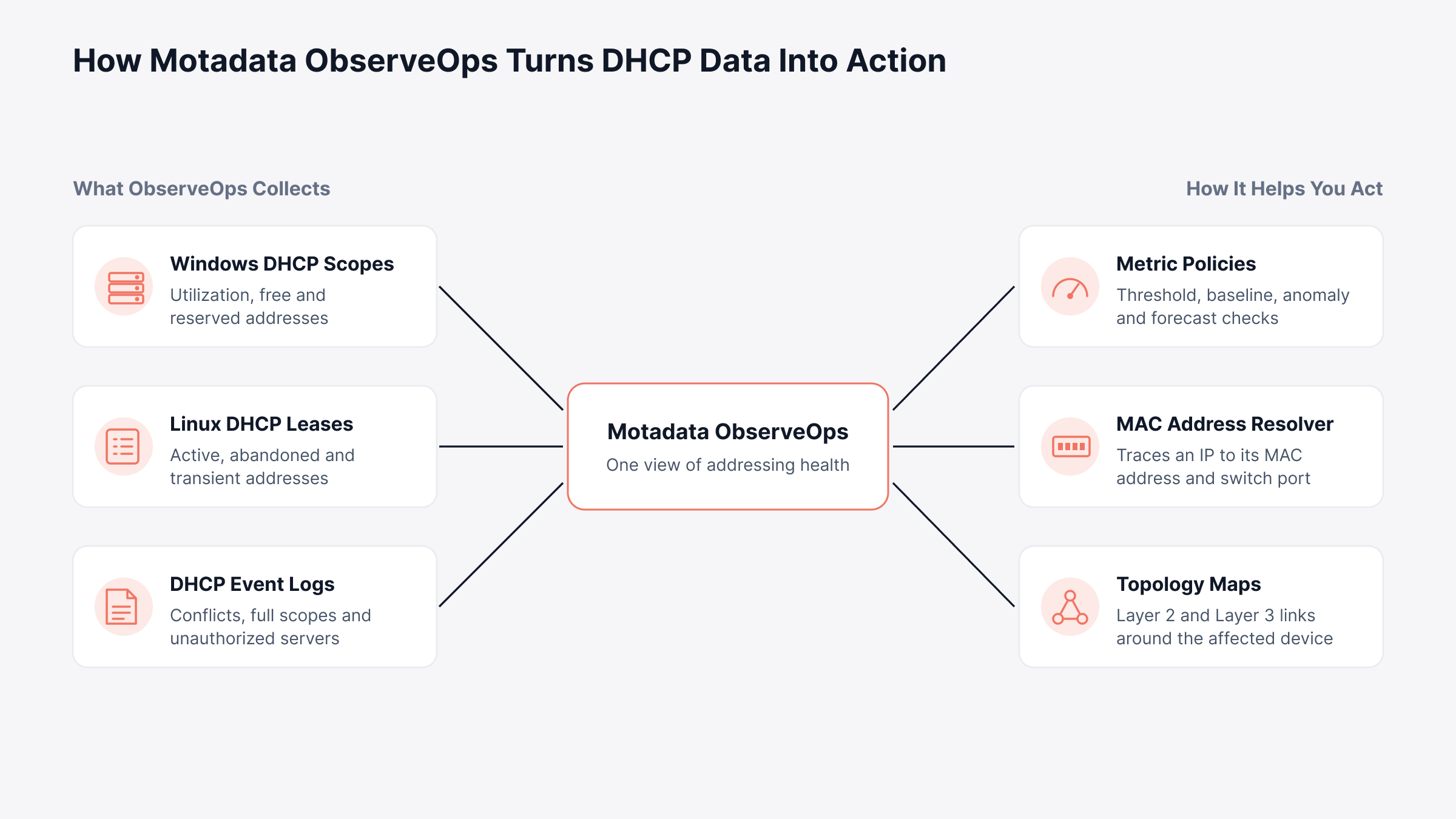
Collection and response work best in one place. The overview below maps what ObserveOps collects from DHCP servers to what you can do with it.
What each data source covers today:
Windows DHCP servers: Server and scope utilization, free, used and reserved addresses, lease duration, pending offers, every message type from Discover to Release, and the address split between failover partners
Linux DHCP servers: Active, abandoned and transient addresses per scope and pool, read from the configuration and lease files; binding state, hardware address and client hostname per lease
Windows DHCP event logs: Parsed entries for conflicts, full scopes, unauthorized servers, reservation mismatches and failover problems
Watch abandoned leases closely. On ISC-style Linux servers, an abandoned lease usually means the server probed an address before offering it and found a device already there, often a static device configured inside the scope.
Our metric policies support threshold, baseline, anomaly and forecast evaluation. A scope can raise a warning as it fills, and a forecast policy can project its utilization trend from recent history; a full scope becomes a planning item instead of a surprise. Once real-time alerts fire, three capabilities shorten the investigation:
Conflict tracing: Enter the disputed IP in the MAC Address Resolver; it queries a core switch's ARP and forwarding tables over SNMP and returns the MAC address and interface
Topology context: Layer 2 and Layer 3 maps from CDP, LLDP, OSPF, BGP and IS-IS data in our topology mapping, showing the neighbors of that switch port
Inventory that survives address changes: In Motadata ServiceOps, Windows and Linux machines found through agentless asset discovery can be matched on MAC address or hardware UUID; a new DHCP address updates the existing record and no duplicate appears
Replace Spreadsheet IP Tracking With Live DHCP Visibility in Motadata ObserveOps
Spreadsheets show how the network was addressed when someone last edited them. They don't show a scope filling up, a static device placed inside the pool or a rogue DHCP server at a branch. Keep the static IP vs dynamic IP rule simple, fixed or reserved for what others depend on and DHCP for the rest, and use ObserveOps to see whether the plan is holding at every site.
Deciding which devices get fixed addresses stays with your network architects, and no tool replaces a good addressing plan. What ObserveOps adds is early warning: scope trends, conflict events and device locations, next to the routers, switches and servers you already watch. For the full list of DHCP metrics, see our Windows DHCP integration documentation.
FAQs
Which is better, DHCP or static IP?
DHCP is better for most endpoints because it assigns addresses automatically and avoids conflicts, while static IP is better for routers, servers and anything other systems reach at a fixed address. Most enterprise networks use both, with reservations covering devices like printers that fall in between.
Does a static IP address make your internet faster?
No. Speed depends on your connection, your ISP plan and network congestion, and a static address changes none of those. A static public IP helps with hosting, remote access and partner allowlists, which is why businesses pay for one.
Can DHCP and static IP addresses share the same subnet?
Yes, as long as the static addresses fall outside the DHCP scope or inside an exclusion range. Without that separation, the DHCP server can lease an address that a static device already uses and cause a conflict.
What happens if the DHCP server goes down?
Devices with active leases keep working until those leases expire, but new devices and devices renewing after expiry cannot get an address. Running DHCP failover and watching server health, as Motadata ObserveOps does for Windows and Linux DHCP servers, keeps a single outage from spreading.
How do you prevent IP address conflicts on a mixed network?
Keep static assignments out of DHCP scopes, record every fixed address in an IPAM system and enable conflict detection on the DHCP server. Watching conflict events and abandoned leases in a platform like Motadata ObserveOps catches the duplicates that slip through.
Author
Poonam Lalani
Content Strategist
Poonam Lalani is a B2B content strategist and writer with a background in computer engineering and experience across enterprise technology domains, including AI, cloud, DevOps, data engineering, and IT operations. She specializes in creating research-driven content that simplifies complex ideas and supports product education, thought leadership, and business growth.