IP Address Management Guide to Choosing Top IPAM Software That Prevents Outages
How many IP addresses on your network can you account for right now, with the device, owner and purpose attached to each one? In many organizations, the answer depends on which spreadsheet, DHCP console or engineer gets the question. That uncertainty stays harmless until two devices claim the same address and a production service drops off the network.
Networks add addresses faster than most records are updated. New branches, cloud networks, wireless controllers, IoT sensors and virtual machines each pull addresses from pools someone planned years ago, and the records rarely keep pace. The warning signs tend to look like this:
Duplicate address alerts that take hours to trace back to a device
DHCP scopes that run out during a busy onboarding week
DNS records pointing to addresses that now belong to something else
Subnet requests that wait on whoever maintains the master spreadsheet
IP address management solves these problems by maintaining one accurate record of every address, updated through automated network discovery. In this blog, you will see what IPAM is, the business case for it, how it works with DHCP and DNS, what to look for in IP address management software, and how observability keeps IPAM records accurate after deployment.
What is IP Address Management (IPAM)?
IP address management (IPAM) is the practice, and the software behind it, of planning, allocating, tracking and auditing every IP address and subnet on a network from one authoritative record. An IP address management system replaces scattered spreadsheets and console exports with a single inventory that shows which addresses are in use, which are free and who owns each one.
A typical IPAM record for each address holds:
Address and subnet: The IPv4 or IPv6 address, its prefix length and the parent block it belongs to
Status: Used, free, reserved or transient, based on the latest scan or lease data
Device identity: Hostname, MAC address (the network card's hardware ID), vendor, and the switch port or VLAN where the device was last seen
Service links: The DHCP scope or reservation that assigns the address and the DNS records that name it
Ownership and history: The business unit or application owner, plus every change with a timestamp
When people ask "what is IPAM," the short answer is that it is the central record of every address on the network. Good IPAM software also scans each subnet to find connected devices, so the record stays correct as devices join and leave.
What Types of IP Addresses Does IPAM Track?
IPAM tracks four types of IP addresses, and each one needs different handling:
Public: Globally routable addresses assigned by an internet provider or regional registry, used for internet-facing services and scarce for IPv4
Private: Internal ranges set aside in RFC 1918, namely 10.0.0.0/8, 172.16.0.0/12 and 192.168.0.0/16, which reach the internet through NAT at the network edge
Static: Fixed addresses for servers, network equipment and appliances that must never change
Dynamic: Addresses that DHCP leases for a set period to laptops, phones and guest devices
A 192.168 address, which most home and small office networks use, is simply a private address. Thousands of networks reuse the same range, so IPAM's job is to keep each address unique inside your own network.
How is Address Space Organized Inside an IPAM System?
IPAM organizes address space as a hierarchy that starts with large private or public blocks and narrows down to individual addresses. Each block splits into subnets for sites or environments, each subnet into ranges for DHCP or static use, and each range into the addresses devices hold.
Plan each level of the hierarchy before assigning a single address, because every later decision inherits from it. The diagram below traces one private block down to a laptop and a database so each level is easy to tell apart.
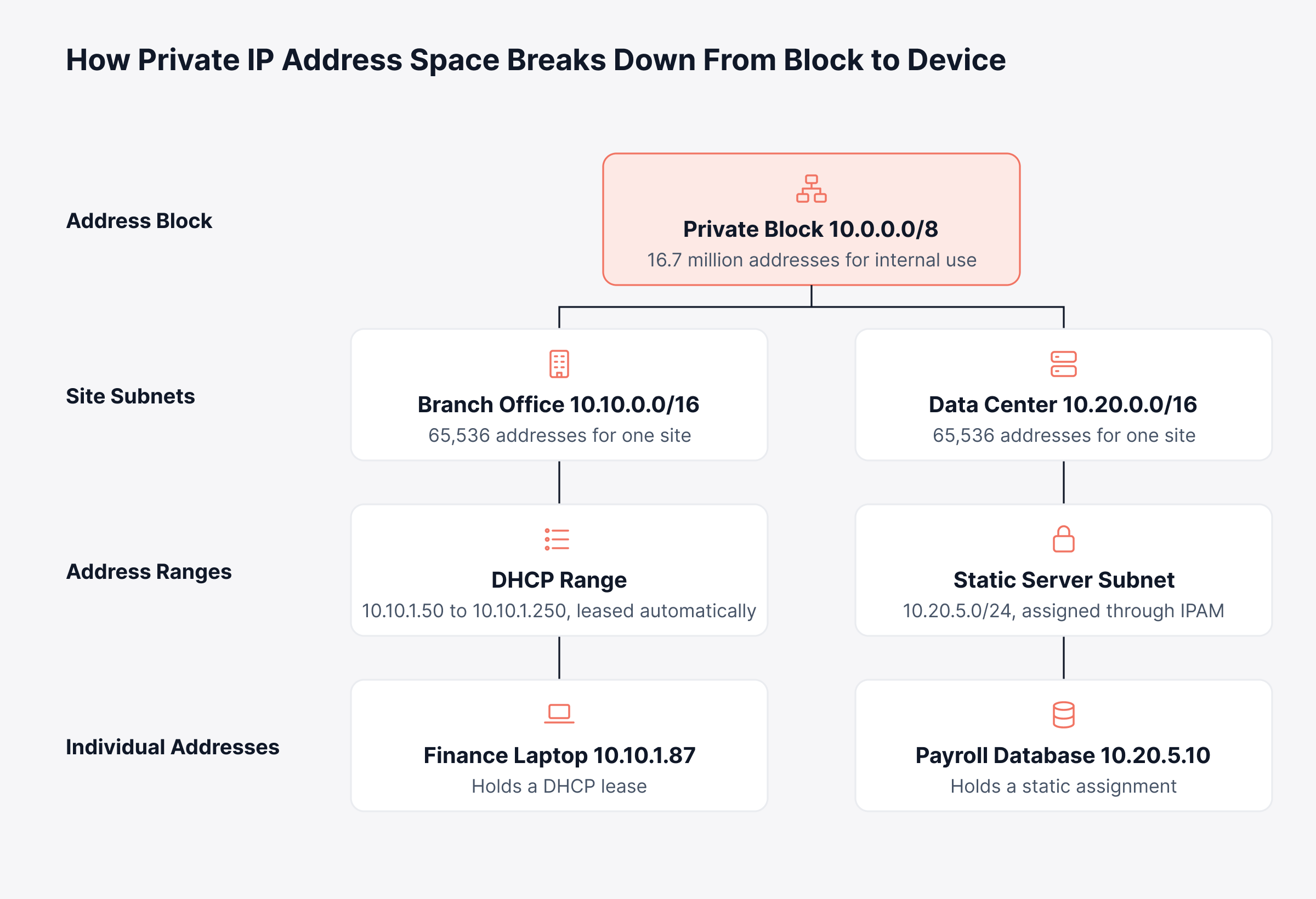
When an alert names an address, this hierarchy shows its site, subnet, scope and owner at once, which makes IP address tracking fast. The difficulty is keeping the hierarchy accurate as the network grows, especially when it lives in a spreadsheet.
Why do Organizations Outgrow Spreadsheets for IP Address Management?
Organizations outgrow spreadsheets for IP address management once more than one person assigns addresses, or once DHCP, DNS and cloud networks change faster than anyone updates the file. The tipping point usually arrives with one of these changes:
Multiple administrators: Two engineers edit copies of the same sheet and both claim the same address
Dynamic allocation: DHCP leases change throughout the day, but a spreadsheet only shows what was true at the last edit
Cloud and remote sites: New cloud networks and branch subnets appear without anyone updating the master file
Audits: An auditor asks who held an address on a given date, and the file keeps no history
Consider a regional retailer opening three stores in one quarter. A technician copies the last store's addressing plan, a new camera reuses an address from another store's VPN range, and point-of-sale terminals lose their path to the payment gateway during trading hours.
The cause is one wrong entry in a spreadsheet, but the business pays for it in lost sales, an escalation and hours of engineering time spent finding the fault. Without disciplined IP management, small IP address errors like this become network downtime with a direct cost, and dedicated IPAM software is built to prevent them.
What are the Benefits of IP Address Management Software?
IP address management software reduces conflict-driven outages, shortens provisioning and gives security and audit functions an accurate record of every device on the network. The benefits break down as follows:
Fewer outages: Conflict detection flags an IP address conflict, such as one address claimed by two devices, so it can be fixed before users feel it
Faster provisioning: Engineers find the next free address or subnet quickly, without an email chain or a spreadsheet hunt
Security visibility: Unknown and unauthorized devices surface during each scan
Audit readiness: A full audit log of who held which address, and when, supports investigations and compliance reviews
Capacity planning: Utilization trends show which subnets and scopes will run out, and roughly when
Cleaner segmentation: Accurate subnet records support network segmentation and firewall policy
For a CIO, the result is fewer escalations and faster site launches. For a security lead, it means being able to prove which device held an address during an incident.
How do You Build a Business Case for IPAM Software?
A business case for IPAM software rests on costs you can already measure in your own environment. Capture these baselines before you evaluate any tool:
Incident time: Hours spent each quarter on tickets traced to duplicate addresses or exhausted DHCP scopes
Provisioning time: Days between a subnet request and a working network for a new site, VLAN or cloud environment
Audit effort: Staff hours needed to show who held an address on a given date
Service risk: Revenue-critical services, such as payments or customer portals, that stop when their addresses conflict
Measure the same figures again during a trial, and leadership can see the difference in your own network. The results also show which capability matters most to you, which helps narrow the shortlist.
How does IP Address Management Work?
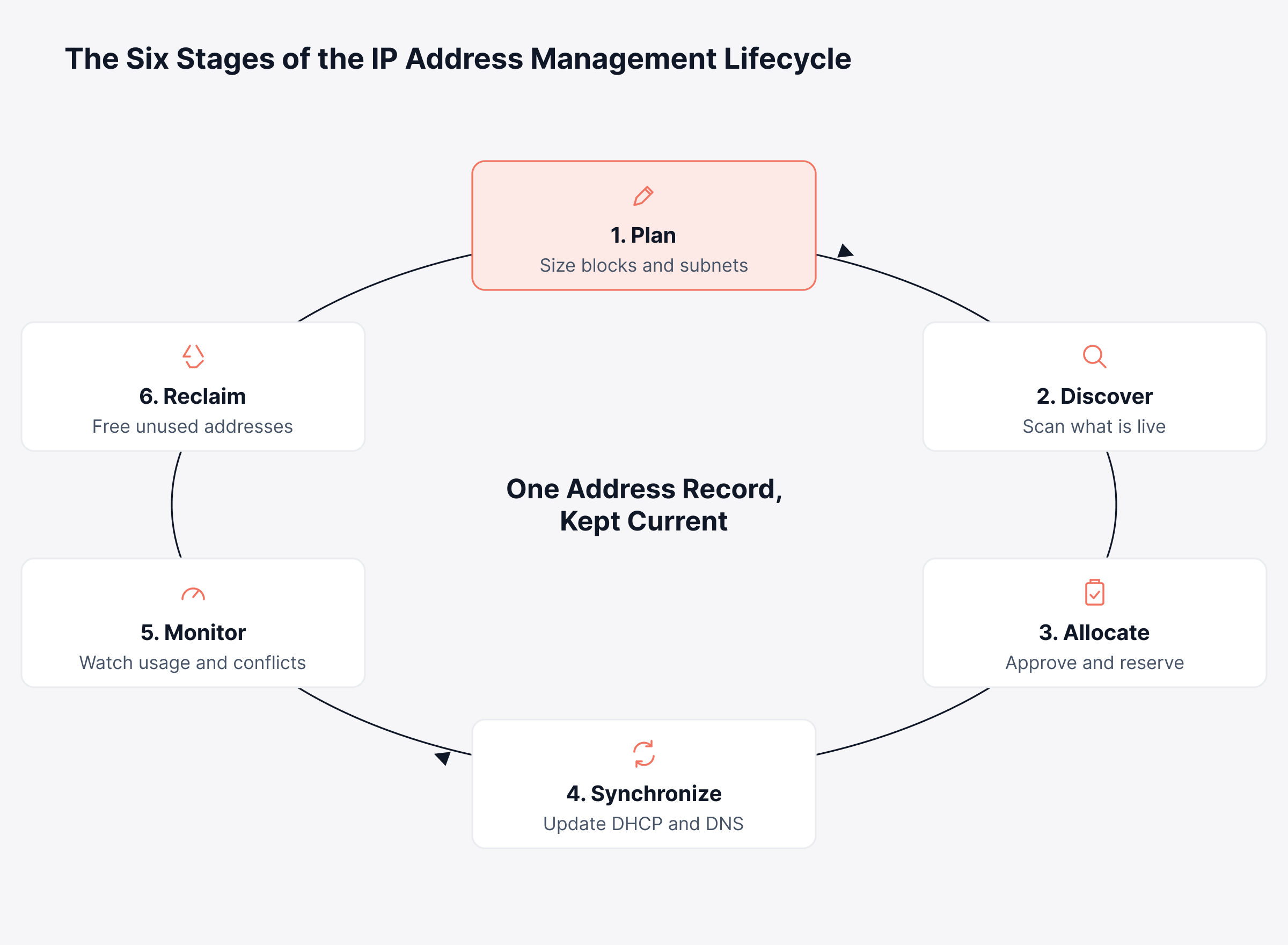
IP address management works as a repeating cycle that plans address space, discovers what is connected, allocates addresses, keeps DHCP and DNS in sync, watches utilization and reclaims what is no longer used. The six stages look like this in practice:
Plan: Define blocks and subnet sizes for each site, VLAN, environment and cloud account
Discover: Scan subnets with ping sweeps, SNMP polling of switches and routers, ARP tables and DHCP lease data to see what is live
Allocate: Assign addresses or subnets through requests and approvals, with reservations for fixed devices
Synchronize: Create the matching DHCP reservations and DNS forward and reverse records
Monitor: Track scope utilization, conflicts, unknown devices and failed lookups
Reclaim: Return stale leases and unused static addresses to the free pool
The cycle has to repeat because address records go out of date. A record that was correct on the day of allocation drifts every time a device moves, a lease expires or someone assigns a static address outside the process.
Treat discovery and reclamation as scheduled work, because stale records build up whenever a cycle is skipped. The cycle below shows how each stage hands its output to the next.
The synchronize stage is where IPAM connects to DHCP and DNS, the two services every device needs to get an address and be found by name.
How do IPAM, DHCP and DNS Work Together?
IPAM, DHCP and DNS work together as DDI, where IPAM holds the plan and the record, DHCP hands out addresses and DNS maps names to them. Each service answers a different operational question:
Service | What it does | Question it answers | What breaks when it drifts |
IPAM | Plans and records the address space | Which addresses are free, and who owns each one? | Duplicate assignments and overlapping subnets |
DHCP | Leases addresses to clients automatically | Which device holds this address right now? | Exhausted scopes and clients that cannot join |
DNS | Resolves names to addresses and back | Which address does this hostname point to? | Stale records that send traffic to the wrong host |
When the three are integrated, a DHCP lease updates the IPAM record and triggers a DNS update, so one change stays consistent everywhere. When they run separately, each console holds a slightly different version of the network, and every incident starts with working out which one is correct.
How do You Keep Always-On Devices on Static IPs Without Losing Central Control?
A DHCP reservation recorded in IPAM is the most reliable way to keep always-on devices on fixed addresses while DHCP stays centrally managed. The reservation binds a device's MAC address to one address in the scope, so a printer, badge reader or camera receives the same IP every time. Use each assignment type where it fits:
DHCP reservation: Printers, IP phones, cameras and appliances that need a predictable address
Static assignment outside the scope: Routers, switches, and the DHCP and DNS servers themselves, which must work before DHCP does
Dynamic lease: Laptops, phones and guest devices that come and go
Either way, the address goes into IPAM first. That one step prevents a common conflict where a technician picks a "free" address that DHCP later hands to another device. Where relay agents forward requests between clients and servers, the DHCP ports also need to be open on every hop.
How does CIDR Improve IP Address Management?
CIDR improves IP address management by letting you size each subnet to the number of hosts it needs and summarize many subnets as one route. Classless Inter-Domain Routing uses a prefix length to set how many addresses a subnet holds, such as 256 for a /24 and 64 for a /26.
Splitting one network into subnets of different sizes is called variable length subnet masking (VLSM), and it is the technique many IPAM tools apply when they suggest the next free subnet. Take a branch office allocated 10.10.0.0/22, which holds 1,024 addresses. VLSM carves it up by need:
Segment | Hosts needed | Subnet | Usable addresses |
Staff Wi-Fi and laptops | 400 | 10.10.0.0/23 | 510 |
Voice and printers | 100 | 10.10.2.0/25 | 126 |
Cameras and badge readers | 50 | 10.10.2.128/26 | 62 |
Network management | 10 | 10.10.2.192/28 | 14 |
The branch still keeps 304 addresses in reserve, from 10.10.2.208 through 10.10.3.255, and upstream routers see the whole site as a single /22 route. Fixed /24 subnets for each segment would have needed five networks, since the staff segment alone requires two, while leaving the camera and management networks mostly empty.
For the business, right-sized subnets mean new sites and cloud environments launch without disruptive re-addressing projects later. IPAM software that understands CIDR can also flag overlapping prefixes before they reach a router, which matters most when subnetting happens at different times by different people.
How do You Manage IP Addresses Across Hybrid and Cloud Networks?
Managing IP addresses across hybrid and cloud networks means treating every cloud network, data center and branch as part of one address plan, so private ranges never overlap where networks need to connect. Knowing how to manage IP addresses at this scale comes down to a few habits:
Reserve cloud ranges centrally: Carve cloud CIDR blocks from the same master plan used on premises
Plan for unavoidable overlap: Acquisitions and partner links often bring duplicate private ranges, which need address translation or separate routing domains
Track short-lived addresses: Containers and autoscaling groups create and release addresses within minutes, so discovery has to run through cloud APIs
Run IPv4 and IPv6 side by side: Dual-stack hosts carry both address types, which adds at least one more record per host
IPv6 address management focuses on consistent structure, such as a /48 per site and a /64 per segment. IPv6 offers far more addresses than any organization will use, so the priority shifts from saving space to keeping a predictable layout. Major cloud providers also offer native address management tools that work well inside their own platforms.
Hybrid organizations still need one view across providers and on-premises networks. Cloud IP address management and hybrid cloud monitoring work together here, because the address plan has to be checked against the traffic and services using those addresses.
How Can You Audit IP Address Usage With Built-In Commands?
You can audit IP address usage today with built-in Windows and Linux commands, which is a sensible first step before you compare tools. The commands below read leases, the ARP table and possible duplicates from a single host or DHCP server:
Platform | Command | What it tells you |
Windows | ipconfig /all | This host's address, DHCP server and lease expiry |
Windows | arp -a | IP-to-MAC pairs this host has seen recently |
Windows | Resolve-DnsName 10.0.0.10 | The DNS name registered for an address |
Windows Server | Get-DhcpServerv4ScopeStatistics | Used, free and percent in use per scope |
Windows Server | Get-DhcpServerv4Lease -ScopeId 10.0.0.0 | Active leases and hostnames in one scope |
Linux | ip -4 addr show | IPv4 addresses on this host's interfaces |
Linux | ip neigh show | Neighbor table of IP-to-MAC pairs |
Linux | arping -D -I eth0 10.0.0.10 | Whether another device already answers on that address |
The last command uses arping, a Linux utility that checks whether any device already answers on an address, so you can confirm an address is free before assigning it. Two of these tools need a component in place first: the DHCP cmdlets require the DhcpServer PowerShell module, included with the DHCP Server role or Remote Server Administration Tools, and arping comes from the iputils package found on most Linux distributions.
For IT leaders, a one-time audit like this gives a baseline of scope usage and conflicts to measure any tool against. None of these commands keep history or compare results across sites, which is what IPAM and observability platforms add.
What Should You Look for in IP Address Management Software?
The right IP address management software discovers addresses automatically, integrates with your DHCP and DNS servers and gives each stakeholder an accurate view without manual reconciliation. Use these criteria to compare IP address management tools, along with the question to put to each vendor:
Criterion | Why it matters to the business | Question to ask the vendor |
Automated discovery | Records stay accurate without staff time | Which methods do you use, such as ping, SNMP, ARP, DHCP leases and cloud APIs? |
DHCP and DNS integration | One change updates every system | Which DHCP and DNS servers can you read from and write to? |
Conflict and rogue detection | Fewer outages and faster security response | How do you detect duplicate IP-to-MAC pairs and unknown devices? |
IPv4 and IPv6 support | Dual-stack growth without a second tool | Can one view hold both, with separate scan schedules? |
Hybrid and cloud visibility | One plan across providers and sites | How do you import cloud network ranges and flag overlaps? |
Access control and history | Evidence for audits and investigations | Can roles be scoped by subnet, and is every change logged? |
API and automation | Provisioning fits change and ticket workflows | Can the API reserve the next free address during a build? |
Pricing model | Predictable cost as the network grows | Is licensing per address, subnet, device or server? |
Run each shortlisted IP address management tool against a copy of your own subnet list during evaluation, and cross-check its discovery results with your IT asset inventory. Import speed, discovery accuracy on your hardware and the effort to connect your DHCP servers tell you more than any feature sheet.
Which IPAM Approach Fits Your Organization's Size and Footprint?
The right IPAM approach depends on how many sites, administrators and cloud environments you run. Use this as a starting point for scoping:
Organization profile | What usually fits | What to prioritize first |
Single office or small business | A well-kept spreadsheet or an open source IPAM tool | An accurate inventory and DHCP reservations for fixed devices |
Mid-sized, multi-site organization | Dedicated IPAM software connected to existing DHCP and DNS servers | Automated discovery, conflict detection and role-based access |
Large or regulated enterprise | Enterprise IPAM or a full DDI platform with high availability | Change history, approval workflows and API automation |
Hybrid and multi-cloud organization | IPAM with cloud API discovery, paired with observability across providers | Overlap detection and one view of on-premises and cloud ranges |
Most organizations move down this table as they grow, so pick a tool that fits the next stage as well as the current one.
Is Open Source IP Address Management Enough?
Open source IP address management works well for smaller networks and for organizations with engineers who can host, patch and extend it. The trade-offs are predictable:
Where it fits: Labs, single-site networks and organizations that already run self-hosted tooling
What to budget for: Hosting, upgrades, backups, integration scripts and the engineer who owns them
When to move on: Multi-site DHCP and DNS integration, audit requirements or formal support commitments
Commercial IPAM software costs more to license but includes vendor support, prebuilt integrations and less engineering upkeep. The better choice depends on whether your budget is tighter for licenses or for engineering time.
Either way, an IPAM tool records how the network should look. You still need a way to see how it looks right now.
Why does IP Address Management Need Network Observability?
IP address management needs network observability because an IPAM record describes the intended state of the network, while observability shows what DHCP, DNS and connected devices are doing right now. IPAM scans run on a schedule, and between scans, scopes can fill, lookups can fail and new devices can appear.
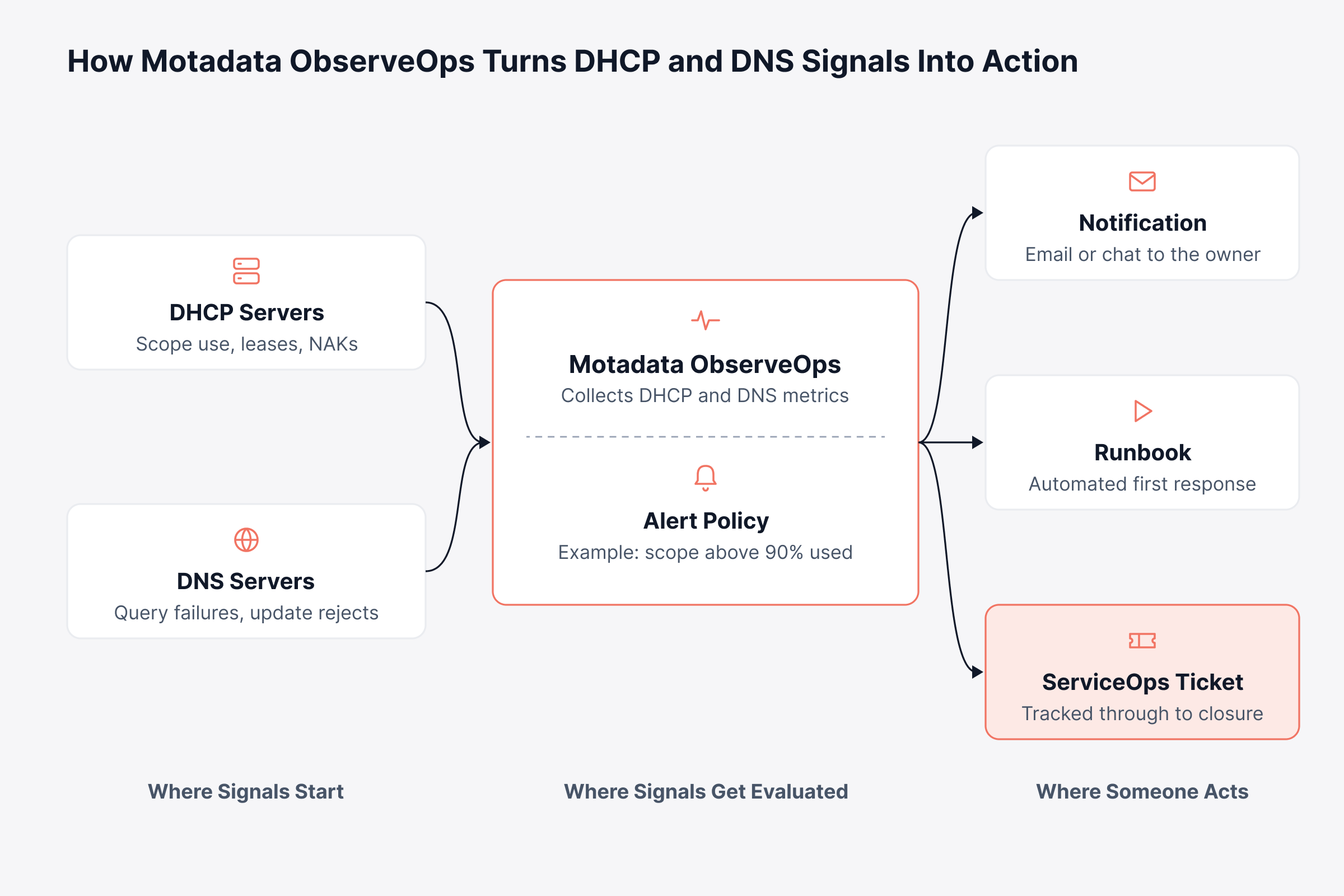
Observing DHCP and DNS servers continuously means these changes trigger alerts as they happen, and each alert reaches a named owner. Motadata ObserveOps works alongside your IPAM tool in these areas:
DHCP pool and scope utilization: ObserveOps tracks used, available and percent-utilized addresses per scope on Windows DHCP and Linux DHCP servers, so alert policies can warn before a scope runs out
DHCP request health: Counts of discover, offer, request and acknowledgment messages on Windows DHCP servers, plus refusals known as NAKs, reveal clients that fail to get or renew a lease
DNS service health: Windows DNS metrics cover recursive query failures, zone transfer failures and rejected dynamic updates, each an early sign that DNS records no longer match the network
Live topology: Dynamic topology mapping builds maps from CDP, LLDP and routing protocol data, so new devices and the switches or routers they connect to appear on the map without manual updates
Configuration change detection: Configuration drift detection flags edits to device configurations, such as a changed DHCP relay setting on a router interface
Alerts and response: Real-time alerts route to notifications, runbooks or ServiceOps tickets, so the right engineer receives and acts on them
For example, if a campus Wi-Fi scope climbs past 90% utilization during student intake, ObserveOps can raise an alert while there is still time to expand the scope or shorten lease times. The same alert can open a ticket, so the IPAM record and the scope are updated together as a planned change before users are affected.
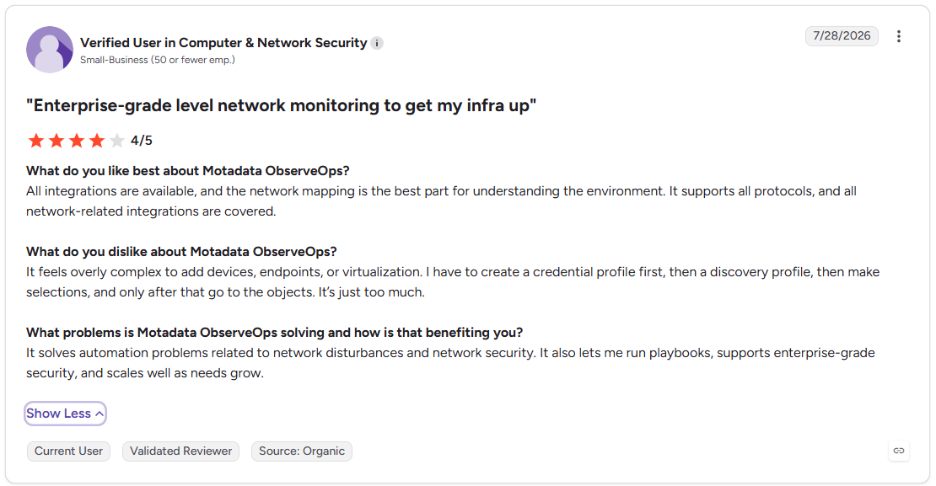
This is what one ObserveOps user says on G2 about seeing the network clearly:
Connect DHCP and DNS observability to the alert path your team already uses, so address problems reach an owner quickly. The flow below separates where signals start, where they get evaluated and where someone acts on them.
Observability shows what is happening on the network now. The practices below keep the plan and the records correct, so fewer problems reach the alert stage at all.
What are the IP Address Management Best Practices?
IP address management best practices come down to one plan, one source of truth and regular checks that the network still matches it. These six IPAM best practices hold up across on-premises, branch and cloud networks.
1. Build One IP Addressing Plan Before Allocating Subnets
Decide how blocks map to regions, sites, environments and cloud accounts before handing out the first subnet.
Reserve separate blocks for on-premises networks, each cloud provider and future acquisitions
Size subnets with CIDR to current host counts plus growth
Record the plan in IPAM so every allocation can reference it
2. Make IPAM the Single Source of Truth for Every Address
Every address change should start in IPAM, whatever system applies it afterward.
Retire parallel spreadsheets once data is imported and verified
Require every static assignment and DHCP reservation to begin as an IPAM entry
Tie address changes to your configuration management process
3. Automate IP Address Discovery and Reconciliation
Scheduled discovery keeps records accurate without relying on people to report changes.
Scan each subnet on a schedule that matches how often it changes
Pull DHCP lease and ARP data to catch devices that ignore ping
Review new and unknown MAC addresses after every scan
4. Standardize Hostnames and Subnet Metadata
Consistent names and tags make every record searchable and every report readable.
Use one hostname convention that encodes site, role and sequence number
Tag each subnet with owner, VLAN, environment and purpose
Keep custom fields few, short and mandatory
5. Observe DHCP Scope and DNS Health Continuously
Tracking DHCP scope usage and DNS health warns you about IP address problems before they reach users.
Alert on scope utilization well before exhaustion
Watch DHCP NAKs and DNS update failures as early signs of drift
Review the most utilized subnets in each capacity planning cycle
6. Audit and Reclaim Unused IP Addresses on a Fixed Cadence
Reclaiming unused addresses keeps DHCP pools from running out and keeps records accurate.
Reclaim addresses with no activity for a set period, after confirming with owners
Reconcile DNS records against live leases and remove stale entries
Keep change history long enough to satisfy audit and investigation needs
Move From Stale IP Records to Early Warnings With Motadata ObserveOps
IP address management gives you the plan and the record of every address. It works best alongside continuous observability of the DHCP and DNS services that carry out that plan, and a dedicated IPAM or DDI platform remains the right place for allocation, address requests and reservations.
ObserveOps is designed to work alongside that platform and adds live data from the network: DHCP scopes close to running out, clients failing to get leases, rejected DNS updates and new devices on the topology map. With both in place, address problems reach the right owner as alerts, often before users notice a service is down.
FAQs
What is an IP address management system?
An IP address management system is software that plans, assigns and tracks every IP address and subnet on a network from one central record. It shows which addresses are in use, which are free and which device or owner holds each one, and it usually integrates with DHCP and DNS servers.
Is IPAM the same as DHCP?
IPAM and DHCP are separate services that work best together. DHCP automatically leases addresses to devices, while IPAM plans and records the entire address space, including static and reserved addresses that DHCP never assigns. Most organizations connect them, along with DNS, as a combined DDI setup.
What is the best tool for managing IP addresses?
The best tool depends on network size, the number of sites and cloud accounts, and which DHCP and DNS servers you run. Look for automated discovery, DHCP and DNS integration, conflict detection and IPv6 support, then pair it with an observability platform such as Motadata ObserveOps to watch scope utilization and DNS health continuously.
How often should you audit IP addresses?
Automated discovery scans should run at least daily on busy subnets, with a formal review of utilization, stale records and unknown devices every quarter. Networks that change quickly, such as campuses, retail sites and cloud environments, benefit from a monthly review cycle as well.
Can a small business manage IP addresses with a spreadsheet?
A spreadsheet can work for a single site with a few dozen devices and one administrator. Once DHCP, several administrators, remote sites or cloud networks are involved, an IP address management tool combined with live DHCP visibility, such as the scope checks in Motadata ObserveOps, prevents conflicts that a spreadsheet cannot catch.
Author
Poonam Lalani
Content Strategist
Poonam Lalani is a B2B content strategist and writer with a background in computer engineering and experience across enterprise technology domains, including AI, cloud, DevOps, data engineering, and IT operations. She specializes in creating research-driven content that simplifies complex ideas and supports product education, thought leadership, and business growth.