PII Redaction in Logs: Mask, Redact, Hash, or Drop?
Sensitive values reach your logs without anyone deciding they should. A debug line prints a whole request object. An error message carries the query string. A customer email address is suddenly stored in three systems.
PII redaction in logs then gets treated as one setting to switch on. In practice it covers four separate treatments. The value is already inside the message before log ingestion finishes.
In this blog, you will:
Compare what masking, redaction, hashing, and dropping each keep.
Choose a treatment per field, using reversibility, investigation value, and risk.
See where the rule must run so the raw value never lands in storage.
Learn which fields to hunt, and the five failures that break a rule quietly.
By the end you can write a rule for each field and defend it.
Why Does Sensitive Data End Up in Logs?
Sensitive data ends up in logs because logging is written for debugging. Debugging wants everything it can reach. Nobody sets out to store a card number in a search index. The card number gets stored there anyway.
We see the same pattern in most estates. Data minimization gets decided everywhere except where the data lands. Each application team makes its own call, and the log platform inherits all of them.
Four ordinary habits account for most of the exposure.
1. The Freeform Message Field
Most sensitive values arrive through the freeform message field. A developer prints an object instead of a field.
The whole customer record lands as one string. Policing that string is the hard part, because its shape changes whenever the code does.
2. Error Paths
Error handling adds more sensitive values. A failure logs whatever input caused it. The stack trace then carries the exact value that broke the request. You rarely want that particular value stored anywhere.
3. Transport Metadata
Transport metadata contributes its own share. URLs carry query strings, requests carry headers, and sessions carry cookies. Most web tiers log all three by default.
4. Copies Sent Downstream
Copies multiply whatever slipped through the first three. One event rarely lives in one place. The same record gets forwarded to a security platform and an archive.
Sometimes it goes to a vendor as well. One missed field becomes a problem in several systems at once.
What Are the Four Ways to Handle a Sensitive Field?
A sensitive field has four possible fates in a log pipeline. It can be masked, redacted, hashed, or dropped. Each one keeps a different amount of the original.
All four work best once the value sits in a named field, which is what log parsing produces. On a freeform message, the rule has to match a pattern instead.
The table below sets the four side by side. Each row shows what that choice trades away.
Treatment | What Happens to the Value | Can You Recover It? | What You Can Still Do | Use It When |
Mask | Part of the value is replaced, and the format survives | No | Recognize the value type, confirm a partial match with a human | Support and triage need to check a value without reading it |
Redact | The whole value is replaced by a fixed placeholder | No | Prove the field was present | The field's presence matters and its content never does |
Hash | The value becomes a fixed-length digest | Not directly, and a small value space is guessable | Count, group, and join events that share the same value | You need to follow one user or session without knowing who it is |
Drop | The field or the event never reaches storage | No | Nothing | The value has no operational use worth the risk of keeping it |
1. Masking Keeps the Shape
Masking replaces part of a value and leaves the rest readable. A card number like 4111111111111111 becomes ************1111. The field still looks like a card number. Support teams can work from that on a call.
The risk sits in how much you leave behind. Four digits, one timestamp, and a store identifier can single out a person.
A mask that keeps too much is close to no mask at all. We have watched a support team ask for a wider mask, then never use the extra characters.
2. Redaction Keeps Only the Fact
Redaction replaces the entire value with a placeholder such as [REDACTED]. You keep the evidence that the field was there. You keep nothing about what it held.
Redaction is the right answer more often than teams expect. Most sensitive fields get read by a person once a year. The log needs to show that the order carried an email address, not which one.
3. Hashing Keeps the Link
Hashing turns the value into a digest. The same input always produces the same output. You can count how many events belong to one account. You can join those events across sources, without the account itself appearing anywhere.
Hashing carries one limit worth knowing. A hash of a phone number or an email address is guessable.
The set of possible inputs is small enough to test end to end. Salt the value and keep the salt out of the log estate. Then treat the field as pseudonymous, never as anonymous.
4. Dropping Keeps Nothing
Dropping removes the field, or the whole event, before anything is stored. No residual risk survives that, and teams still reach for it last.
Dropping also saves storage, and none of the other three do. A masked event costs what the original cost. The record is the same size with different characters in it.
One event makes the difference concrete. A checkout line arrives looking like this:
Aug 27 14:03:11 api-02 checkout: order=88412 user=priya.shah@example.com card=4111111111111111 ip=10.4.2.19
Here is the same line under each treatment, with the rest of the event unchanged:
Masked: user=p*********@example.com card=************1111
Redacted: user=[REDACTED] card=[REDACTED]
Hashed: user=9c1f4a2b7e3d (a digest, shortened here) card=[REDACTED]
Dropped: order=88412 ip=10.4.2.19
Few estates pick one treatment and apply it everywhere. A realistic rule set mixes all four. You might hash the identifier you group by, and drop the field nobody has ever queried.
How Do You Choose Between Masking, Redaction, Hashing, and Dropping?
Three questions decide the treatment for any field. Ask how reversible the field needs to be, how much investigation value it carries, and how much damage it does if it leaks. Working through them in order gives one answer per field.
Does anyone read this field during an incident? If the honest answer is no, drop it. Ask the people who run the searches, not the people who wrote the log line.
Do you need to match events without knowing the person? Counting sessions per account needs a stable value. So does following one user through a failure. Hashing keeps both of those possible.
Does a human need to confirm the value at a glance? A support agent checking the card on file needs the last few digits. Masking leaves exactly that much behind.
Does only the presence of the field matter? Then redact it and keep the field name.
Risk decides how early the rule runs. The more harm a value does outside your estate, the closer to the source it belongs. Every hop it survives is another copy to account for.
The diagram below turns those questions into one path you can follow per field.
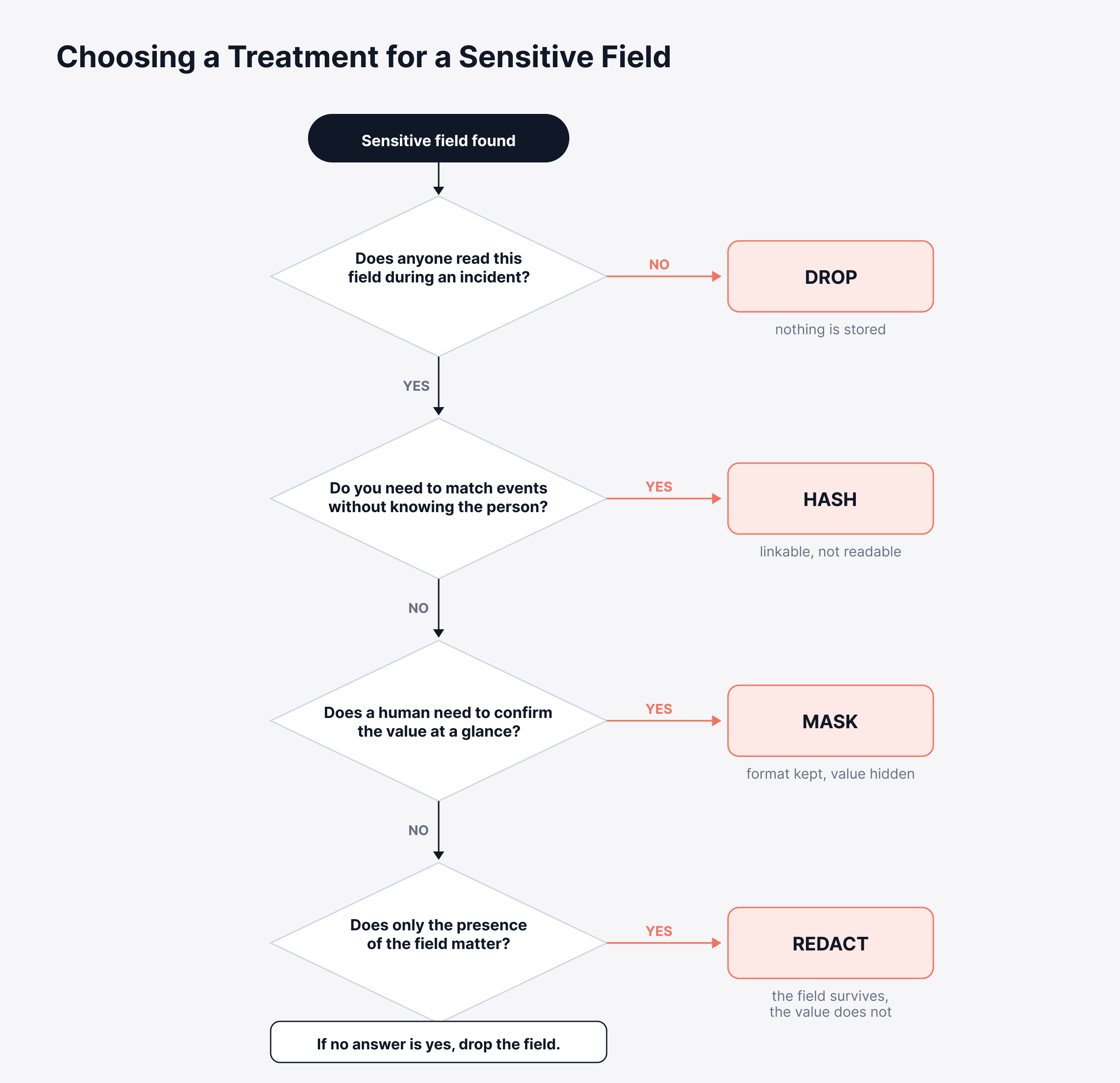
Two honest limits sit under that flow. A hash keeps records linkable, so it lowers exposure without making the data anonymous. A mask that preserves the format also leaves a slice of the value readable.
When two treatments both work, we pick the one that keeps less. The field you dropped is the only one that cannot leak later.
We lose that argument fairly often, usually to a team that wants the option of investigating later. Trading it away on purpose is reasonable, and letting it happen by default is not.
One thing needs saying plainly. Masking is a control, and control is not the same as compliance. What a regulation expects for a given field belongs to your legal or privacy team. No pipeline setting answers it for them.
Where in the Pipeline Should Redaction Happen?
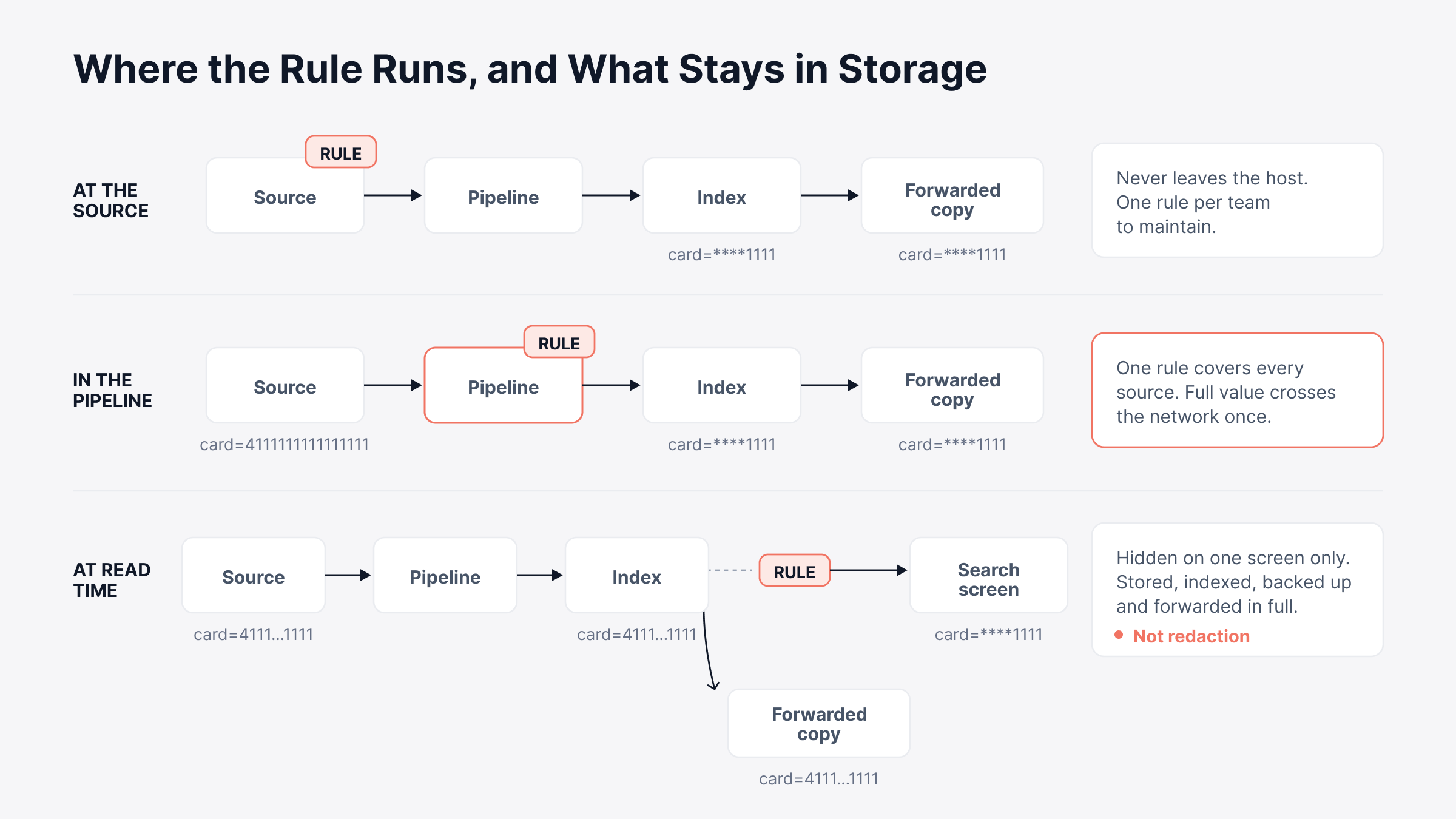
Redaction can run in three places. Only two of them keep the raw value out of storage, and that difference matters more than the treatment you picked.
At the Source
Handling the value in the application or the collector means it never crosses the network. On paper, nothing protects it better. Holding that line is the hard part, because every team owns its own rule and the next service ships without one.
In Flight, Inside the Pipeline
Central handling puts one rule in front of every source. The value crosses the network once and gets treated before anything is written. The same rule covers sources onboarded by people who never read the policy. Masking sits here as a processor transform, next to renaming a field or deriving a new one.
At Read Time
Hiding the value when someone runs a search is not redaction. The raw value was stored, indexed, backed up, and possibly forwarded. You have hidden it from one screen and left it in the store.
Anyone with an export, a restored backup, or a different query path still reaches it. We still meet teams who count this as redaction, and it is the most expensive of the three placements to correct later.
Order matters as much as placement. We have watched a masking rule run after routing, which sends the untreated copy out first. The treatment belongs ahead of log forwarding rather than beside it.
The diagram below compares the three placements by what each one leaves behind in storage.
Which Fields Should You Be Looking For?
Start with the fields that are sensitive in every estate, then work outward to the ones only your own applications produce. The published list is short and settled. The estate-specific half takes longer and matters more.
The Values That Should Never Be Logged
According to the OWASP Logging Cheat Sheet, some values do not belong in a log at any severity level. Its exclusion list covers five categories:
Authentication passwords and access tokens
Session identification values
Database connection strings and encryption keys
Payment card holder data
Sensitive personal data, such as health records or government identifiers
Sometimes you still need to track a session across events. Hashing the session value is what the same guidance suggests. You keep the tracking without keeping the identifier.
How to Find the Ones Specific to Your Estate
Your own list hides in the fields nobody documents, so sampling beats guessing every time. Five passes through real events usually surface it.
Read the message body first: Whole objects get printed there instead of single fields.
Check the fields that carry structure: A URL, a header, a cookie, or a serialized payload can each hold a value you never meant to store.
Grep for the obvious names: Look for email, phone, ssn, dob, address, and account, plus anything a vendor SDK writes on your behalf.
Scan the busiest message fields for patterns: An at sign, a long run of digits, or the strings password= and token= will surface most of the rest.
Ask the application owners what the object contains: They know what goes into it, and the log does not say.
Keep those sampled events as fixtures afterward. The next format change then gets tested against a rule you already trust. You can usually find the worst offenders in the first hour of reading real events.
What Goes Wrong When Teams Redact Logs?
A redaction failure rarely announces itself. The pipeline keeps running and the events keep arriving. The problem surfaces during an investigation or an audit, never in an alert. Five failure modes come up again and again.
1. Over-Redaction Removes the Evidence
Masking the source IP protects a field nobody worried about. It also breaks the search you kept the logs for. Security events are the usual casualty. The value under investigation is often the value someone masked.
2. The Mask Still Identifies
Last four digits, a precise timestamp, and a location narrow a population down fast. A partial mask reduces exposure without removing it.
3. The Hash Is Reversible in Practice
Phone numbers and email addresses come from a small enough set that an attacker can hash the whole list and compare. An unsalted digest of a known format is closer to an encoding than a protection.
4. The Rule Sits in the Wrong Place
A treatment applied after routing leaves the original in the index. Every copy that already went out keeps it too.
5. The Pattern Stops Matching
Most rules are patterns, and patterns break when a format changes. A new release wraps the email address in different punctuation. The rule misses it, and nothing reports the miss.
The Cheapest Defense Against All Five
A fixture set of sampled events catches all five before an auditor does. Run the samples through the rules on every change. Check the output field by field. We have seen a rule survive a year of format changes because nobody looked at it.
Where to Start With PII Redaction in Logs
Start with one source and one field before you write an estate-wide policy. Writing that policy gets easier once you have watched a rule behave on real traffic.
Pick a source you know well: An application tier is usually the right one, because that is where freeform messages live.
Sample a day of its events: Read the fields, list what is sensitive, and mark which fields anyone has ever searched.
Run each field through the four questions: Write the treatment next to the field name, so the decision is recorded rather than remembered.
Apply the rules in flight, then check the index: Search for the raw values afterward. A search that returns nothing is the only proof that counts.
Repeat per source, and keep the fixtures: Each new source takes less time than the one before it.
Where the Rules Should Live
Where the rules live decides how much of this survives a growing estate. Rules spread across application code, collector configuration, and a search setting break independently. The one that breaks is the one whose owner is on leave.
Running them as configured stages on one path is what an observability pipeline does. In ObserveOps Infinity, masking is a processor transform at the pipeline configuration stage, configured alongside rename, extract, and derive.
The pipeline sits in the base edition, so the stage where masking runs is not something you upgrade into. Three things follow from that:
The transform is configured once: Every event arriving after that gets the same treatment.
Everything downstream reads the treated value: Detection policies, index tiers, and forwarding all work from the masked event.
Lifetime rides along with placement: An index here doubles as a storage tier with its own retention period. Where a treated record lands also sets how long it lives.
One limit is worth being honest about. A pipeline applies the rules you define, and it does not decide which of your fields are sensitive.
Any vendor calling that discovery automatic is describing a starting point rather than an answer.
We would rather see a team read a day of its own events first, then hand the settled rules to whichever unified observability platform it runs.
Choose the Right Treatment for Every Sensitive Field
PII redaction in logs looks like a switch and behaves like a stack of small decisions. Each sensitive field gets its own answer. That answer depends on what somebody will need from the field at three in the morning, not on how sensitive the field sounds.
The timing makes this uncomfortable. You make these calls before you know which investigations are coming. Some fields get dropped and then wanted back, and a log line you never wrote cannot be recovered at any price.
So revisit the rules after every serious incident, and check them against your log retention tiers while you are there. Six months of treated events is worth more than an estate where nobody can say what got stored.
FAQs
Is hashing PII in logs the same as anonymizing it?
Hashing falls short of anonymization. Hashed records still link to each other. A value from a small set, such as an email address or a phone number, can be guessed by hashing candidates and comparing. Treat hashed fields as pseudonymous and salt them.
Can you remove sensitive data from logs that are already stored?
Removing it cleanly afterward is rarely possible. Most platforms apply rules on arrival, so fixing a rule today does not repair yesterday's records. You are left with restricting access, deleting the affected index tier, or waiting out its retention period.
Does redaction slow down a log pipeline?
It adds work in the hot path. Pattern matching over large message fields is the expensive part. That cost usually stays small next to parsing. Measure it on your busiest source anyway, before you roll a rule out widely.
Does redacting logs make you compliant with privacy regulations?
Redaction lowers exposure, and it settles nothing on its own. Whether a treatment satisfies a given regime depends on the regulation, the data, and the jurisdiction. That call belongs with your legal or privacy team rather than with a pipeline setting.
Who should decide which log fields get masked?
That decision needs three parties together. Application owners know what the message field contains, security and privacy own the risk classification, and whoever runs the log platform knows which fields get searched during real incidents.
Author
Ramya Shah
Technical Writer
Ramya Shah is a technical content writer with a computer engineering background and roots in automotive journalism. He covers IT Service Management, observability, IT operations, and AI-driven automation. An early adopter of AI-assisted writing workflows, he turns complex IT processes into clear, engaging content optimized for search and answer engines (AEO), lifting content output and organic visibility.