What Is Edge AI? Use Cases and What It Means for IT Operations
Edge AI means running artificial intelligence models on devices and servers close to where data is created, instead of sending it to a distant cloud for processing. A camera on a factory line, a sensor on a wind turbine or a server in a store's back room can analyze data and act on it within milliseconds.
It's a natural next step for the Internet of Things (IoT), where connected devices already collect huge amounts of data. For IT teams, edge AI also brings a new kind of estate to run, with hardware and models spread across sites that rarely have anyone on hand to fix them.
In this blog, you will:
Understand how edge AI works and how it differs from cloud AI.
See real edge AI examples and the hardware they run on.
Learn what edge AI changes for IT operations and which signals to watch across sites.
What Is Edge AI?
Edge AI is the practice of running trained AI models directly on edge devices, such as cameras, gateways, industrial controllers, phones and on-site servers, so that data can be analyzed where it's collected.
You'll also see it called AI at the edge or edge AI computing, and all three terms mean the same thing.
It builds on edge computing, which moves processing closer to the data source to cut down on latency and bandwidth use.
Edge computing on its own might only filter or store data locally, while edge AI adds a model that can make a prediction or decision about that data, like spotting a defect or recognizing a spoken command.
Most edge AI setups split the work between two places. Models are trained in the cloud or a data center, where there's enough compute and data to do it.
They're then compressed and deployed to edge hardware for inference, which is the step where a model applies what it learned to new data. Over time, results and samples flow back to the cloud so the model can be retrained and pushed out again.
How Does Edge AI Work?
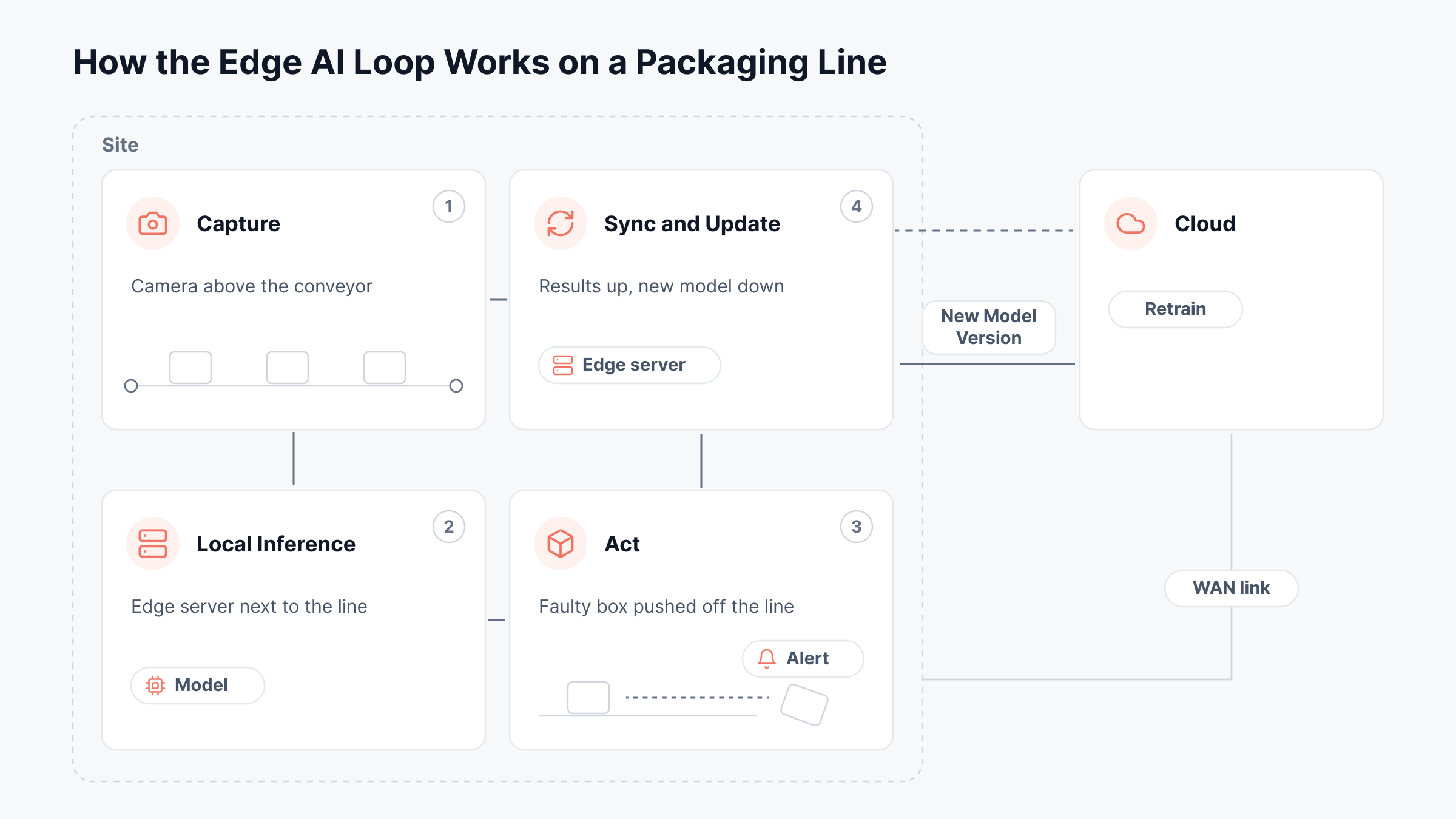
Every edge AI system follows roughly the same loop, from the moment data is captured to the moment the model gets an update. We'll use a quality-check camera on a packaging line as the example and walk through all four stages:
1. Capture
A sensor or camera collects raw data, which could be images, audio, vibration, temperature or motion readings. In our example, the camera takes a picture of every box as it passes, which can add up to several frames a second for the whole shift.
2. Local Inference
The model runs on hardware at the site, either inside the camera itself or on a small server nearby, and it checks each image for problems like a torn label or a crushed corner. Because the data doesn't leave the building, the result comes back in a few milliseconds and doesn't depend on the internet connection.
3. Act
Based on the model's output, the system takes action right away. It might push a faulty box off the line, alert a supervisor or log the defect, and all of this happens without waiting for a reply from the cloud.
4. Sync and Update
Only the results that matter, such as defect counts and a few sample images, get sent to the cloud. The data science team uses those samples to retrain the model, and the improved version is pushed back out to every site, which is the part of the loop that depends most on the network.
Edge AI vs Cloud AI
Edge AI and cloud AI aren't really competitors, since they're simply two places to run a model, and each one suits different jobs. Here's how they compare:
Area | Edge AI | Cloud AI |
Where the model runs | On or near the device | In a remote data center |
Response time | Milliseconds, with no network round trip | Depends on the connection, often tens to hundreds of milliseconds |
Data movement | Raw data stays on site, and only results are sent | Raw data travels to the cloud |
Works offline | Yes, for inference | No |
Compute available | Limited by power, heat and space at the site | Close to unlimited |
Model size | Small, compressed models | Large models of any size |
Best fit | Real-time decisions, private data and unreliable links | Training, heavy analysis and very large models |
In practice, most teams we talk to use both. The edge handles fast, routine decisions, while the cloud trains the models and takes over the harder cases the edge can't handle on its own, which makes edge AI one more piece of a hybrid cloud architecture.
What Are Some Edge AI Examples?
Edge AI shows up wherever a decision has to happen quickly, the data is sensitive or the connection can't be trusted. These seven examples cover the most common uses:
Retail shelves and checkout: Cameras in stores spot empty shelves and misplaced items, and some checkout systems use edge AI to flag items that weren't scanned, so staff can step in while the customer is still there.
Manufacturing quality control: Vision models on the production line inspect every product for defects, which is far more thorough than checking a few samples by hand at the end of a shift.
Predictive maintenance: Vibration and temperature sensors on motors, pumps and turbines feed models that learn what normal looks like, and they warn the team when a machine starts drifting toward failure. It's one of the most common uses of the industrial Internet of Things (IIoT).
Healthcare: Wearables can track heart rhythm and oxygen levels on the device itself, and imaging systems in hospitals can flag scans for review without sending patient data off site.
Vehicles and traffic: Driver-assist systems and self-driving cars process camera, radar and lidar data on board, because a car can't wait for a cloud server to decide whether to brake. Smart traffic lights do something similar at busy intersections.
Phones and laptops: Features like voice assistants, photo search and live transcription increasingly run on the device, using neural processing units built into the chip.
Telecom networks: Operators run models at cell sites and regional data centers to manage traffic and spot faults, which puts edge AI right inside the network.
Almost all of these depend on a fleet of connected devices, so we usually see the groundwork for edge AI start with dependable IoT monitoring.
In each case, the model is only one part of the system, since the cameras, servers and links around it all have to keep working too.
What Hardware Does Edge AI Run On?
The right hardware depends on the size of the model, how much power is available and how many models need to run at the same time. Most edge AI deployments use one of these five types:
Hardware | What It Is | Typical Use |
GPUs | Chips that run many calculations in parallel, such as NVIDIA's Jetson modules for embedded systems | Computer vision, video analytics and larger models on edge servers |
NPUs and TPUs | Chips designed only for neural network math, such as Google's Edge TPU | Low-power inference in cameras, phones and compact devices |
AI accelerators | Add-in cards or USB modules that take inference work off the main CPU | Giving existing hardware an AI boost without replacing it |
Edge servers | Compact servers with compute, storage and often GPUs, built for back rooms, factory floors and clinics | Running several models and business apps at one site |
Microcontrollers | Tiny, very low-power chips that run small models, an approach known as TinyML | Battery-powered sensors that detect simple patterns, like a sound or a vibration |
To fit on this hardware, models are usually compressed first. A common method is quantization, which stores a model's numbers as 8-bit integers instead of 32-bit floats and makes the model about four times smaller, usually with only a small loss in accuracy.
What Are the Benefits of Edge AI?
Most of the benefits come from one change, which is that data gets processed where it's created instead of traveling to the cloud first:
Faster decisions: Removing the network round trip lets systems react in milliseconds, which matters when a machine has to stop or a car has to brake.
Better data privacy: Raw video, patient readings and payment data can be analyzed on site, which makes it easier to meet data residency and privacy rules.
Lower bandwidth costs: Sending only results instead of continuous video or sensor streams cuts the traffic leaving each site, and the savings grow with every camera you add.
Keeps working when the link drops: Since inference happens locally, a store or factory can keep making AI-assisted decisions during an outage and sync its results once the connection comes back.
Room to scale: Once a hardware and model setup works at one site, you can repeat it at hundreds of others with fairly predictable results.
These benefits are real, but we've found they come with a set of challenges that are easy to underestimate during a pilot.
What Are the Challenges of Edge AI?
Most of the challenges show up after the pilot, when a single working site turns into dozens or hundreds of them:
Limited compute and power: Edge devices have far less processing power, memory and cooling than a data center, so models have to be compressed and sometimes lose some accuracy along the way.
Model updates across many sites: Every site needs the right model version at the right time, and without automation, rolling out an update or rolling back a bad one gets slow and error-prone.
Mixed hardware: Sites tend to collect different devices, chips and generations over the years, and supporting all of them with one model and one process takes real effort.
Security at every location: Each site adds devices to patch and protect, and many of them sit in places where someone could physically walk up and tamper with them.
No IT staff on site: Most edge locations don't have a technician on hand, so deployment, monitoring and recovery all have to work remotely.
Model drift: The real world changes, and a model trained on last year's products or lighting conditions slowly gets less accurate unless someone tracks its results and retrains it.
Several of these challenges aren't really AI problems at all, since they're about running hardware and networks across many sites, which is why we see edge AI end up on the IT team's desk so often.
What Edge AI Means for IT Operations
When edge AI moves past the pilot stage, IT teams inherit a new kind of estate. Instead of a few data centers, they're responsible for hundreds of small sites, each with its own servers, network links and models, and usually nobody there to restart anything when it breaks.
It's also worth separating edge AI from AIOps. AIOps uses AI to help run IT operations, while edge AI is a workload that IT operations has to run, and the two are easy to mix up because both have AI in the name.
In our experience, the biggest shift is that a model's performance now depends on infrastructure the data science team doesn't control. Here's what changes and what IT ends up having to watch:
What Changes | What IT Has to Watch |
Models run on servers in stores, plants and clinics | CPU, memory, disk and temperature on every edge server |
Models get updated over the WAN | Link latency, packet loss and tunnel health during each rollout |
Sites have no technician on hand | Remote alerts that say which site, which device and what failed |
Hard cases get sent to the cloud | Latency and errors on the cloud inference endpoints |
Hardware differs from site to site | An inventory of devices and versions at each location |
Monitoring data shares the same small link | Collectors and agents that keep data locally when the link drops |
Many of these sites already connect back to head office over SD-WAN, so the network team is often the first to notice when an edge AI rollout runs into trouble.
How Do You Monitor Edge AI Sites?
Monitoring an edge AI site means watching the whole path a prediction depends on, from the box running the model to the link that carries its updates. We split it into four layers:
The edge server: Track CPU, memory, disk and temperature, since a model that suddenly needs more memory after an update can slow down everything else on the box. Reliable server monitoring is the foundation for this layer.
The network link: Watch latency, packet loss and jitter on the connection back to the cloud or head office, because model updates and result syncs both depend on it.
The inference service: Check whether the app that runs the model is up, how long each prediction takes and whether it's logging errors.
The cloud side: If the edge sends hard cases to a cloud model, watch that endpoint's latency and error rates as well.
The network layer is often where the trouble starts, which is why WAN link monitoring matters so much at remote sites.
The cameras and sensors that feed each model depend on the network too, and network monitoring in edge computing and IoT environments is what tells you when their data stops arriving on time.
One thing we always point out is that infrastructure monitoring tells you whether the model can run, but not whether its answers are right. Accuracy and drift belong to your MLOps tools, so the IT and data science teams need to share alerts when a site starts acting up.
Watching Edge AI Sites From One Console
ObserveOps was built for estates spread across many locations, and its multi-site deployment model fits edge AI well. A central server at head office stores and displays the data, while collectors and agents at each site gather it locally.
This is how we'd set up remote monitoring for an edge AI rollout, along with the signals we'd check first.
Collectors at Every Site
In a multi-site deployment, each remote site gets a Motadata Collector that polls the local servers, network devices and applications and then sends the data securely to the central server.
Every collector appears on the Deployment Settings screen with its state, version, how long it has been running and a Used Count, which is the number of monitors sending data through it.
Those fields say a lot about a site's health. For example, if a store's collector keeps showing a short running time every morning, the site is probably losing power overnight.
If its version lags behind the others, it missed the last upgrade, and possibly whatever else was pushed to that site at the same time. A Used Count that drops from 40 to 12 usually means devices at the site have gone offline or been unplugged.
The Edge Server Running the Model
For the server that runs inference, we'd install MotaAgent, which supports Windows Server and common Linux distributions such as Ubuntu, RHEL and Debian.
The agent updates system.cpu.percent and system.memory.used.percent every second, so a short spike during inference doesn't get averaged away the way it would with five-minute polling.
Say a site gets a new model version and system.memory.used.percent jumps from 60% to 97% within an hour. The new model is probably larger than the old one, and the box has started running short on memory, which slows down every prediction it makes.
The agent also stores its data locally when the link to head office drops and sends it once the connection returns, which helps at sites where the WAN isn't reliable, and all traffic between the agent and the server is encrypted with AES-256.
The agent's metric list covers the host's CPU and memory but not accelerator chips, so GPU or NPU usage on the edge box itself has to come from the hardware vendor's own tools.
The Link Back to Head Office
For sites connected over Cisco Catalyst SD-WAN, ObserveOps collects metrics from vManage and from each vEdge router.
The ones we watch during a model rollout are cisco.vedge.tunnel.latency.ms, cisco.vedge.tunnel.lost.percent and cisco.vedge.tunnel.jitter.ms, plus the same three at the TLOC level, which is the transport circuit itself, such as a broadband or LTE line.
Imagine a 2 GB model update that's meant to reach 300 stores overnight, but 40 of them are still running the old version the next day. If those 40 stores all rely on an LTE TLOC showing 6% packet loss, the update failed on the link and not in the deployment tool.
cisco.vedge.tunnel.state and cisco.vedge.bfd.down.sessions tell you whether a tunnel dropped completely, and cisco.vedge.reachability.status shows whether the router can be reached at all.
Heat and Power in the Back Room
Edge servers often share a small, poorly cooled room with the site's router, which makes the router's own sensors a useful early warning.
cisco.vedge.hardware.temperature.sensor.celsius reports the temperature inside the vEdge, and cisco.vedge.hardware.voltage.sensor.milli.volts reports its supply voltage, and each comes with a state field for the sensor.
If the router's temperature climbs steadily through a summer afternoon, the GPU server sitting next to it is probably getting just as hot.
GPUs slow themselves down to protect against heat, so that can show up as slower predictions long before any hardware actually fails.
The Cloud Side of a Hybrid Setup
Many edge AI systems send the cases they're unsure about to a larger model in the cloud. When that model runs on Amazon SageMaker, ObserveOps collects endpoint and variant metrics through its AWS integration.
The pair we look at first is aws.sagemaker.endpoint.model.latency.ms and aws.sagemaker.endpoint.overhead.latency.ms. If model latency holds steady at 120 ms but overhead latency jumps from 10 ms to 300 ms, the model is fine and the delay is coming from SageMaker's own infrastructure.
aws.sagemaker.endpoint.invocation.model.errors counts the requests where the model itself returned an error, which is a different problem from 4xx and 5xx errors caused by bad requests or server faults.
At the variant level, aws.sagemaker.variant.gpu.memory.percent sitting close to 100% means the instance doesn't have enough GPU memory for the traffic it's getting.
If aws.sagemaker.endpoint.model.loading.ms rises while aws.sagemaker.endpoint.model.cache.hit.percent falls, the endpoint keeps loading models from storage instead of serving them from cache, which adds delay for every edge site that calls it.
If you're on call for an edge AI rollout, this table sums up where to look first:
Symptom | Metric to Check | Likely Cause |
A site stops sending any data | Collector state on the Deployment Settings screen, cisco.vedge.reachability.status | A power cut, or the site's link is down |
Predictions slow down after a model update | system.memory.used.percent | The new model is larger and the server is short on memory |
Some sites miss a model rollout | cisco.vedge.tunnel.lost.percent, cisco.vedge.tloc.lost.percent | Packet loss on a shared transport circuit |
A site's tunnels keep dropping | cisco.vedge.tunnel.state, cisco.vedge.bfd.down.sessions | An unstable circuit or a failing router |
Predictions slow down on hot days | cisco.vedge.hardware.temperature.sensor.celsius | Poor cooling in the room, which makes GPUs slow down |
The cloud fallback gets slow | aws.sagemaker.endpoint.overhead.latency.ms compared with model latency | Delay in SageMaker's infrastructure, not the model |
The cloud fallback returns errors | aws.sagemaker.endpoint.invocation.model.errors | The model failing on certain inputs |
Every call to the cloud model is slow | aws.sagemaker.endpoint.model.cache.hit.percent, aws.sagemaker.endpoint.model.loading.ms | Models being loaded from storage instead of cache |
Very few of these problems start in the model itself, which is why edge AI monitoring has to cover the servers, links and rooms around it.
Monitor Edge AI Sites and the Links Behind Them With Motadata ObserveOps
Edge AI puts models next to the data they analyze, which brings faster decisions, better privacy and lower bandwidth costs. It also spreads AI across hundreds of small sites, each with its own server, link and model version, and usually no one on site to fix things when they go wrong.
That makes edge AI as much an operations job as a data science one, because a model is only as reliable as the hardware it runs on and the network that keeps it updated.
We built ObserveOps to watch estates like this one. As part of our unified observability and ITSM platform, it brings edge servers, SD-WAN links, site collectors and cloud inference endpoints into one view, so your team can see which site is struggling and why without sending anyone out to check.
FAQs
What is the difference between edge AI and on-device AI?
On-device AI is one type of edge AI, where the model runs on the end device itself, like a phone, camera or wearable. Edge AI also covers models running on nearby gateways and on-site servers that serve many devices at once.
Can large language models run at the edge?
Smaller language models can, especially once they're compressed to a few billion parameters or fewer, and they now run on recent phones, laptops with NPUs and edge servers with GPUs. The largest models still need data center hardware to run at a usable speed.
How is edge AI related to federated learning?
Federated learning is a way to train models across many edge devices without collecting their raw data in one place. Each device trains on its own data and shares only model updates, which suits edge AI setups that handle private data.
How much does edge AI cost?
It depends on the hardware and the number of sites. Small accelerator modules can cost under a hundred dollars, while GPU edge servers can run into the thousands, and the ongoing cost of managing, updating and monitoring every site often outweighs the hardware.
Can ObserveOps monitor edge AI sites?
Yes, ObserveOps monitors the infrastructure around edge AI, including edge servers through MotaAgent, site collectors, Cisco SD-WAN links and Amazon SageMaker endpoints. Model accuracy and drift are outside its scope and belong to your MLOps tools.