All Features
Network Configuration & Compliance Management
Cisco Switch Management
Motadata ObserveOps keeps a versioned backup of every Cisco switch config and alerts you when one drifts from its approved baseline. Each switch also gets a compliance score, firmware status and, where vendor data exists, end-of-life dates on the same screen.
What Is Cisco Switch Management?
Cisco switch management covers everything a team does to keep its Cisco switches configured, backed up, patched and compliant. When someone asks "who changed the core switch last night?", this is the discipline that has the answer. In practice, it runs from one central platform rather than separate logins to each switch.
Scope: Managed switches only, the kind with a command line and SNMP access. Unmanaged switches have no configuration to back up or audit.
A dedicated Cisco switch management tool puts all of this in one place. Here is how each area maps to a question your team gets asked, and what ObserveOps does about it.
Area | Question it answers | How ObserveOps handles it |
Configuration backup | If a change breaks something, can we roll back? | Running and startup configs backed up on a schedule, on demand or in bulk |
Change tracking | Who changed what, and when? | Version history, side-by-side compare and syslog change detection |
Compliance | Does every switch meet security policy? | Rule-based benchmarks, compliance scores and remediation actions |
Firmware | Which switches need a new software image? | Template-driven upgrades, run now or on a schedule |
Lifecycle | Which models are reaching end of support? | End of Sale, End of Support and End of Life dates per switch |
Health | Is the switch performing well? | CPU, memory, interface, VLAN, spanning tree and sensor metrics |
For the wider discipline behind these tasks, read our guide to network configuration management.
Why Do Cisco Switches Need Configuration Management?
Every user, server and application depends on the switches in between. A mistyped access VLAN or a bad trunk setting is enough to cut off a floor, a branch or part of a data center. Configuration management is how teams prevent that and recover quickly when it happens.
Bigger networks carry more of this risk. Over months and years, local fixes and undocumented edits make switch configurations drift apart, and checking each device over Telnet or SSH is slow and leaves no shared record an auditor can review. Cisco switch central management addresses this in four ways:
Recovery: A known-good configuration is available to restore when a change fails
Accountability: Backups, restores and runbook runs are logged against the user who started them
Audit readiness: Compliance scores and reports show the policy status of each switch as of its last scan
Consistency: The same command set reaches every targeted switch in a single operation
Our post on switch management challenges covers these problems in more detail.
What Tools Are Available for Cisco Switch Management?
Cisco switches can be managed through Cisco's own interfaces or through a multi-vendor management platform. The common options are:
Command line (CLI): SSH or console sessions to one switch at a time, practical for small networks
Device web interface: A browser-based setup screen that many managed Cisco switches provide for single-device changes
Cisco Catalyst Center (formerly DNA Center): Cisco's controller for automating and assuring Cisco campus networks
Meraki dashboard: Cloud management for Meraki switches and for supported Catalyst models
Multi-vendor NCCM platforms: Cisco switch management software, Motadata ObserveOps among them, that backs up, audits and changes configs on Cisco gear and other vendors' devices from the same console
For a small, Cisco-only network, the CLI or Cisco's own tools are often enough. Add Juniper, HPE, Huawei or firewall gear to the mix and a multi-vendor platform makes more sense: every device then follows one backup, change and compliance process.
How Does Motadata ObserveOps Manage Cisco Switches?
ObserveOps adds Cisco switches to configuration management during regular network discovery. Each switch needs a reachable management IP address first (usually on a dedicated management VLAN or interface). Then onboarding takes four steps:
Discover the switch: Add it through a discovery profile with Enable NCCM turned on, or switch NCCM on later from the NCCM Device Inventory
Provide CLI access: SSH or Telnet credential profile, with privilege mode enabled
Map a device template: Picked by system OID (sysOID), the make-and-model ID every switch reports; it holds the commands for backup, restore, sync and hardware details
Take the first backup: Success here puts the switch in the NCCM Explorer for compare, restore, compliance and firmware actions
The NCCM Device Inventory then lists every switch with its template, credential status and backup schedule. Think of it as your Cisco switch inventory. Next comes the backup routine.
Back Up and Restore Cisco Switch Configurations
When a change fails or a switch is replaced, a Cisco switch config backup is what you restore from. ObserveOps saves two files for each switch: the running config (in use now) and the startup config (loaded at reboot).
We give you four ways to capture and keep them:
Scheduled backups: Chosen days, dates and hours, with an email or SMS after each run
On-demand and bulk backups: One switch right now, or Backup Now across many selected in the NCCM Explorer
Version history: Every successful backup creates a new version of the running and startup files
External copies: SFTP or FTP server through a storage profile; one folder per device, timestamped file names
This is the backup view for Cisco switch configurations in ObserveOps:
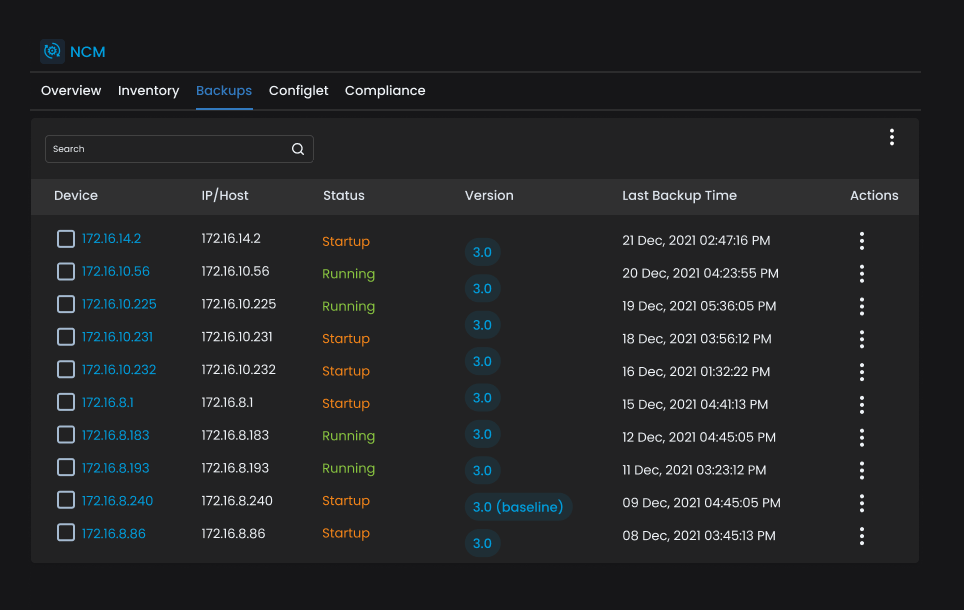
Restoring works per file and per version: pick running or startup, pick the version, apply it. For many switches at once, restore each one to its baseline or latest version; every restore is written to the switch's Action History for a traceable network backup record. Which version counts as the standard is the next decision.
Compare Cisco Switch Configurations Against a Golden Baseline
A golden configuration is the approved baseline a switch should match. Any running configuration can be marked with Set as Baseline. Data retention leaves it in place, even as older versions age out.
Compare opens two configuration files side by side: two versions from one switch, or configs from two different switches. Inserted, modified and deleted lines are highlighted; a missing ACL line or an extra command shows up before the next change window.
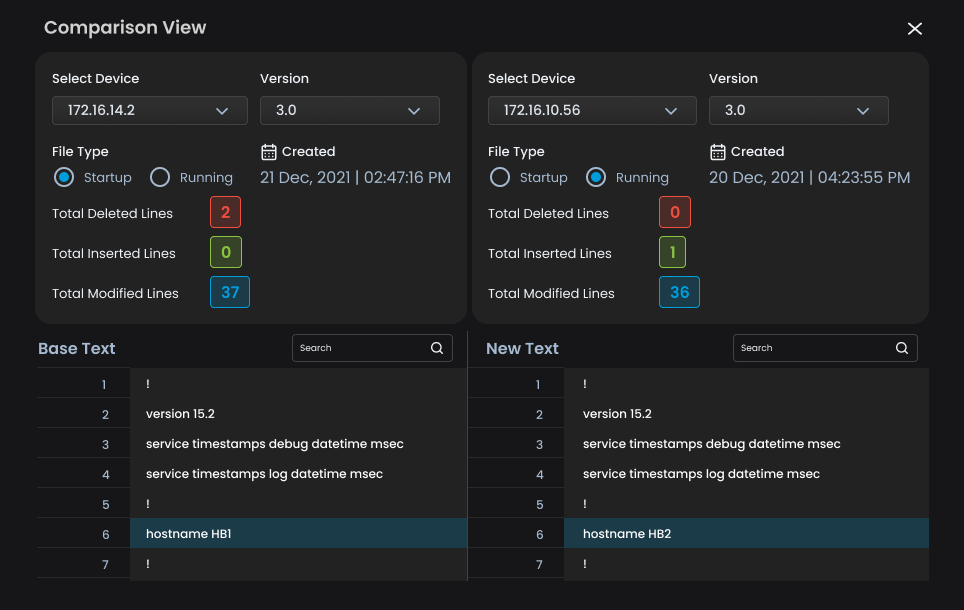
ObserveOps also flags two kinds of configuration conflict for each managed switch:
Conflict | What it means | Why it matters |
Baseline-running | The running configuration no longer matches the approved baseline | Shows drift away from your standard |
Startup-running | Changes in the running configuration have not been saved to startup | The switch can lose those changes on its next reload |
The Sync action saves the running configuration to startup in one step. For drift across larger networks, see how ObserveOps handles configuration drift.
Detect Unauthorized Cisco Configuration Changes
Change detection answers three questions: when did the config change, who changed it, and from where? Set up syslog change detection and ObserveOps picks up the log message the switch sends after a config change. It then backs up the new configuration automatically.
Each change gets a line in the Change Summary tab: timestamp, user, remote IP and session. Network Config Policies turn those signals into alerts:
What they watch: Baseline-running, startup-running, running and startup conflicts, plus failed actions such as a failed backup
Severity: Critical, Major or Warning, set per policy
Who gets notified: Email recipients, ObserveOps users and Microsoft Teams or Slack handles, with the option to forward the alert as a syslog message or SNMP trap
What happens next: Automatic remediation runbook; incident declaration through an integration profile
Alerts cover changes nobody planned. For the changes you do plan, templates and runbooks keep every switch in step.
Automate Bulk Cisco Switch Changes with Templates and Runbooks
A device template tells ObserveOps which commands to send to a Cisco switch, and in what order. Many common Cisco devices already have a pre-defined one. For the rest, we let you clone a default template or write a custom one with your own commands, prompts and macros.
Runbooks cover the repeat jobs. Updating interface descriptions, changing SNMP settings, assigning VLANs: an SSH or Telnet runbook pushes the same command set to one switch, a group or a CSV list in a single run. The view below shows the switch interface list these changes typically apply to.
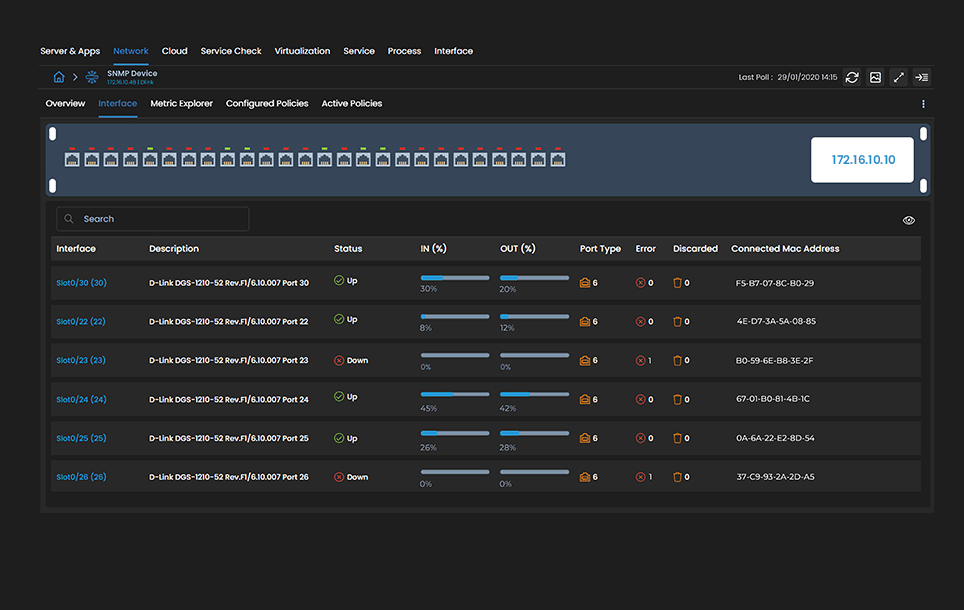
Before and after a runbook runs, ObserveOps can back up the running configuration, so every bulk change has a rollback point. The output of each run stays on record. Read more on runbook automation.
Upgrade Cisco Switch Firmware from the Console
Firmware upgrades use templates too. Every switch that shares a template gets the same upgrade sequence. New images bring security fixes and stability improvements; the NCCM Explorer shows each device's current firmware next to the latest available one.
The process has four steps:
Choose the image: Select an existing firmware file or upload a new one
Verify the file: ObserveOps shows its MD5 hash, a checksum you can match against the vendor's published value to confirm the file is intact
Run or schedule: Now, or later in a maintenance window
Check the result: Success or failure details in the Last Performed Action column
One prerequisite: the Firmware Upgrade option appears only after the device template includes the upgrade commands.
Require Approval Before High-Impact Cisco Switch Changes
Some changes deserve a second pair of eyes. The NCCM Approval Workflow adds maker-checker control (one person requests, another approves) to four actions that alter a switch:
Restore
Sync
Execute Runbook
Firmware Upgrade
Say an engineer with only the NCCM role queues a restore on a core switch. Nothing runs yet; an approver with the NCCM Approval role reviews the exact change, adds the mandatory note and approves or rejects it. Bulk requests can be cleared device by device.
What gets saved for each decision: approver, timestamp and execution output. Change reviews and audits can rely on that record much like an audit log, whether a request touched one switch or hundreds.
Check Cisco Switches Against Compliance Benchmarks
Compliance checks hold each switch configuration up against your security rules. Every policy gets a score. ObserveOps builds the checks in three layers:
Rules: Individual checks run against the running or startup configuration
Benchmarks: Rules grouped per technology; out-of-the-box sets for common technologies, plus your own
Compliance policies: A benchmark, the switches it covers, a schedule and who gets notified
CIS, HIPAA, SOX and GDPR are among the frameworks our rules and benchmarks align with. In the Compliance tab you see an overall compliance percentage, how it has trended and failed rules ranked by severity from Critical to Info. Fix the Critical ones first.
On each switch, the Rules tab lists every rule as Pass or Fail along with the remediation action for failures. Our network compliance management page explains the policy model in more detail.
Track Cisco Switch Configuration Health and Performance
The NCCM Overview summarizes configuration health across every managed switch in one screen. It brings together:
Device distribution by type and vendor
Backup success and failure
Baseline-running and startup-running conflicts
Firmware upgrade activity
The overview below shows how these summaries appear together.
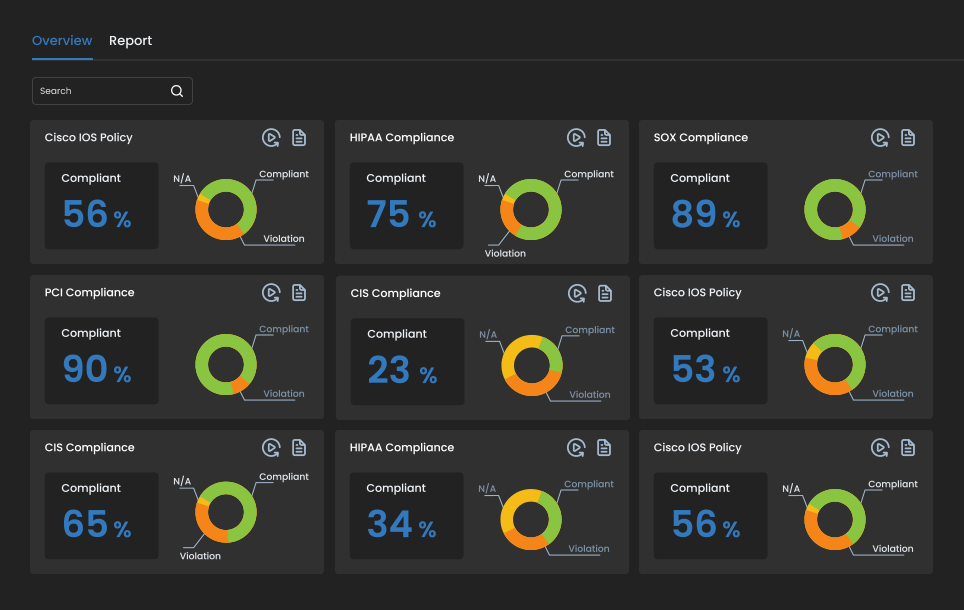
Because configuration management runs inside ObserveOps, Cisco switch monitoring runs alongside it on the same devices. Metrics include CPU and memory, port up or down status, interface errors and discards, VLAN status, spanning tree state, stack members, and temperature, voltage, fan and power supply sensors, as the switch dashboard below shows.
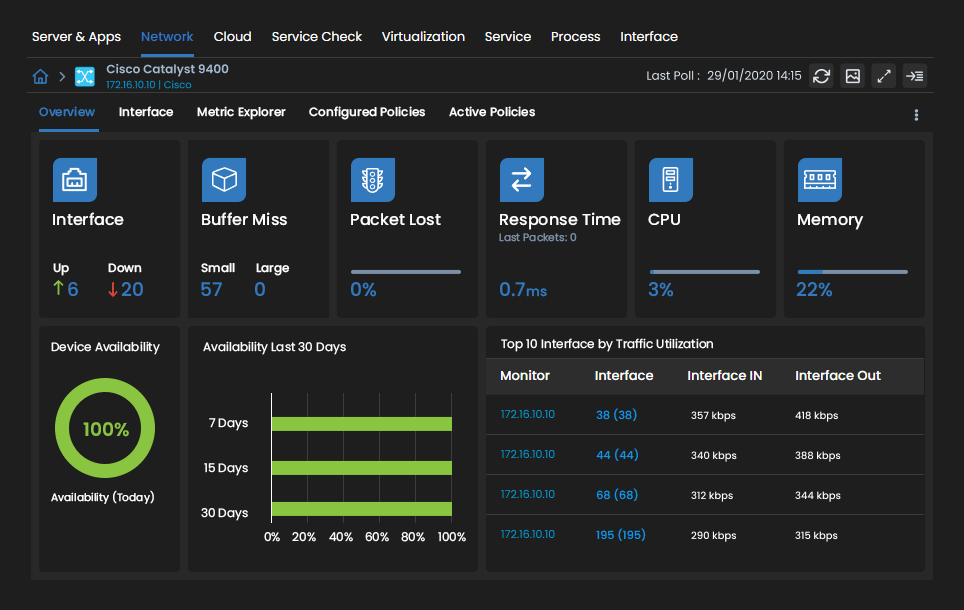
Preset dashboards show these metrics as soon as switches are added, you can build custom ones, and NOC View rotates dashboards on large screens in your network operations center. Port-level and Layer 2 detail is covered on our network switch monitoring page.
Report on Cisco Switch Compliance, Changes and Lifecycle
NCCM reports cover the questions auditors ask: which switches failed a compliance policy, how many violations each has and when its configuration last changed. Results group by device or by rule. Export them as CSV or PDF, or schedule an email.
Lifecycle data supports budget and upgrade planning. Where vendor lifecycle data maps to a switch model, its EoX tab lists the End of Sale, End of Support and End of Life dates with a calculated status:
Lifecycle status | What it means | Suggested action |
Active | None of the three dates has passed | Watch the next milestone |
End of Sale Reached | The vendor no longer sells the model | Start replacement planning |
End of Support Reached | Patches and security updates have stopped | Prioritize upgrade or replacement |
End of Life Reached | All vendor support has ended | Replace or isolate the switch |
Once Get Hardware Details runs, the Hardware Details tab adds serial number, OS version, running image and memory and flash sizes for each switch. Combined with audit reports, custom performance reports and compliance audit records, this gives you supporting evidence for both budget reviews and audits.
Bring Every Cisco Switch Configuration Under Control with Motadata ObserveOps
One caveat applies. How well network switch configuration management works depends on the device templates; a switch with unusual CLI behavior may need a cloned or custom template before every action works.
Get the templates right and each Cisco switch has versioned backups, a golden baseline, change alerts, approval gates and a compliance score in one console. That is Cisco switch configuration management you can audit, from the first backup to the next firmware upgrade. Explore the full NCCM capabilities in ObserveOps.
Ready to implement Cisco Switch Management?
Discover how Motadata ObserveOps can help you monitor your infrastructure in real-time and respond to issues instantly.