Types of Databases: 10 Models Explained With Examples
There are many types of databases, and each one stores and retrieves data in its own way. Some keep everything in neat, linked tables, while others store flexible JSON-style documents or treat the relationships between records as data in their own right.
Whichever one you go with, it runs on a database management system (DBMS), and that choice ends up shaping a lot of things down the line, including how fast your application responds, how easily it scales and how much it costs to run.
In this blog, you will:
Learn how the 10 main database types work, with real examples of each.
See how relational and NoSQL databases compare, and how to pick the right type.
Find out which metrics warn you first when each type of database runs into trouble.
What Are the Main Types of Databases?
There are ten main types of databases: relational, document, key-value, wide-column, graph, time-series, in-memory, vector, object-oriented, and hierarchical or network databases.
What sets each one apart is its data model, or in other words, the way it organizes data and the way you're expected to query it. If you just want the short version, the table below sums up all ten.
Type | How It Stores Data | Examples | Best For |
Relational | Tables of rows and columns linked by keys | Oracle, MySQL, SQL Server, PostgreSQL | Transactions and structured business data |
Document | JSON-style documents with flexible fields | MongoDB, Couchbase, Firestore | Product catalogs, user profiles and content |
Key-value | A unique key paired with a value | Redis, Amazon DynamoDB, Memcached | Caching, sessions and fast lookups |
Wide-column | Rows with flexible columns grouped into families | Apache Cassandra, HBase, Bigtable | Huge write volumes spread across many servers |
Graph | Nodes connected by relationships (edges) | Neo4j, Amazon Neptune | Fraud detection, recommendations and dependency maps |
Time-series | Timestamped data points | InfluxDB, TimescaleDB | Metrics, sensor data and events over time |
In-memory | Data held in RAM instead of on disk | Redis, SAP HANA | Real-time features and very fast reads |
Vector | Embeddings stored as lists of numbers | Pinecone, Milvus, pgvector | Semantic search and AI applications |
Object-oriented | Objects, the same way code represents them | ObjectDB | Complex engineering and scientific data |
Hierarchical and network | Trees or linked records with parent-child links | IBM IMS, IDMS | Legacy mainframe systems |
You'll notice that relational databases are the only ones built entirely around rows and columns, and they still run the majority of business applications today.
The other nine mostly came about to deal with data that didn't fit that shape very well, and most of them fall under the broad NoSQL label, which we'll get into a little later on.
10 Types of Databases Explained
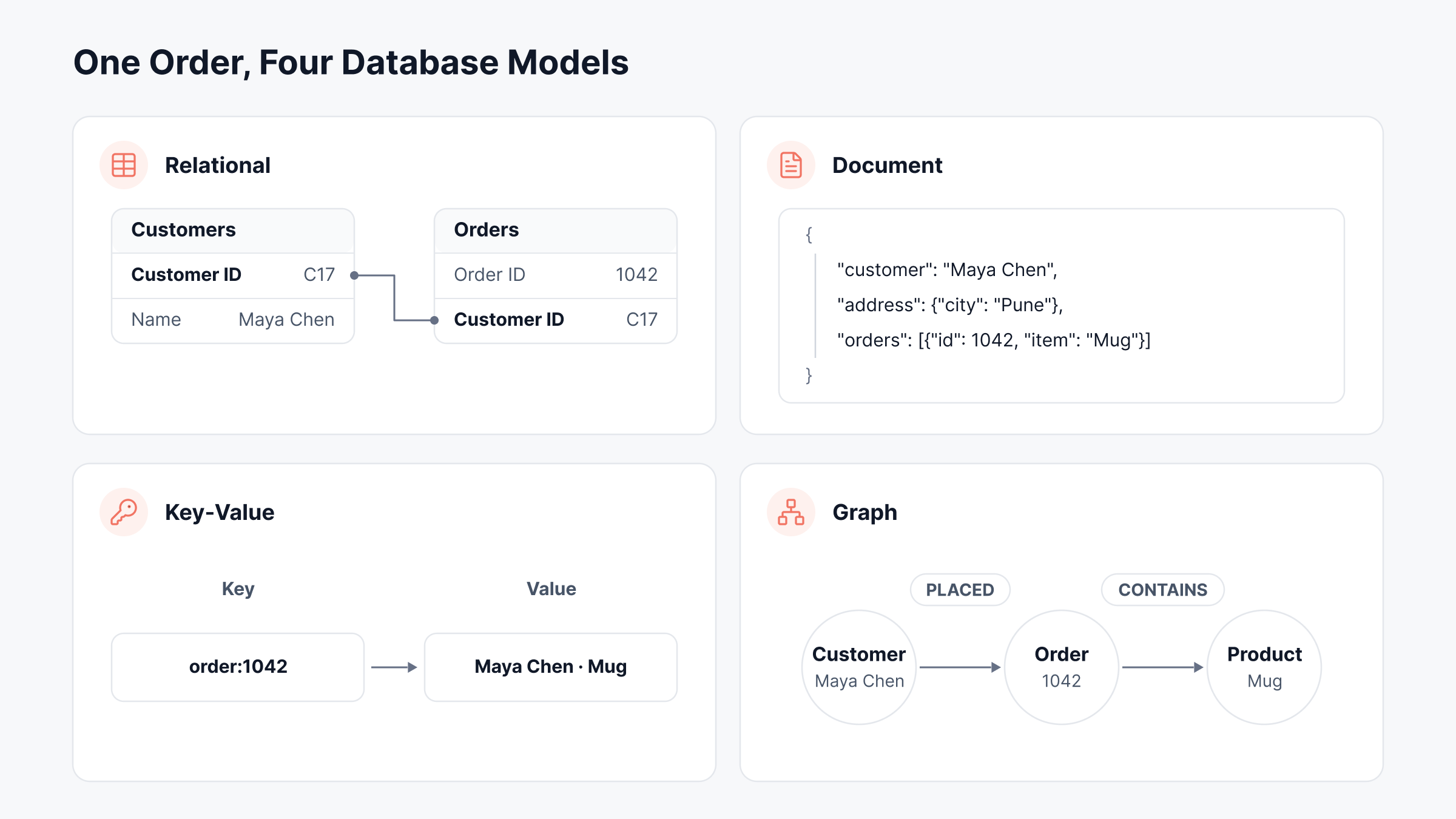
Before going through them one by one, it can help to see the same piece of data stored a few different ways. The image below shows a single customer order in four of these models.
1. Relational Databases
Relational databases are the type most people learn about first, and for good reason, as we'll see in a moment. A relational database organizes data into tables made up of rows and columns, and it connects those tables using keys.
For example, a customers table and an orders table might both include a customer ID, so each customer's details only need to be stored once, and every order simply refers back to them.
You work with the data using SQL, and the database enforces a fixed schema. In practice, that means every row in a table has the same columns and data types, which keeps things predictable but also means any change to the structure needs a bit of planning.
The other big reason they're so common is that relational databases follow ACID rules (atomicity, consistency, isolation and durability).
Put simply, a transaction either completes fully or doesn't happen at all, and that guarantee is exactly what banks, ERP systems and online checkouts depend on. You'll often hear these databases called SQL databases as well.
If you're looking into the different types of relational databases, they're usually grouped by how they're licensed and run, not by how they store data:
Open source: MySQL, PostgreSQL and MariaDB are free to run and backed by large communities.
Commercial: Oracle Database, Microsoft SQL Server and IBM Db2 come with vendor support and enterprise features.
Cloud-managed: With Amazon RDS, Azure SQL Database or Google Cloud SQL, the provider takes care of patching, backups and failover for you.
Distributed SQL: CockroachDB and Google Spanner spread a single relational database across many servers and regions.
2. Document Databases
If relational tables feel too rigid for your data, a document database is often the next place teams look.
Instead of splitting a record across several tables, it stores everything about that record in one document, usually written in JSON or a similar format like BSON.
So a single customer document could hold their name, their address and a list of every order they've placed, and your application can fetch all of it in one go.
Documents in the same collection also don't have to share the same fields, so you can add a new attribute without having to change the database schema first.
MongoDB is the best-known example by a wide margin, though Couchbase and Google Firestore are widely used too. You'll see document databases a lot in product catalogs, user profiles and content management systems, where the data tends to change shape over time.
3. Key-Value Databases
Think of a key-value database as a giant dictionary. Every item is stored as a unique key with a value attached to it, and the database doesn't really care what that value contains, whether it's a string, a number, a JSON blob or even an image.
When you ask for a key, it hands back the value, and it does that extremely quickly.
That speed is why Redis, Amazon DynamoDB and Memcached show up in so many architectures as caches, session stores, shopping carts and leaderboards.
The tradeoff, of course, is that you can't easily search on anything other than the key. So if your application needs complex queries, a key-value store probably shouldn't be the only database you run.
4. Wide-Column and Columnar Databases
This is where the naming starts to get a bit confusing, so we'll take it slowly. A wide-column database still uses rows and columns, but each row can have its own set of columns, and related columns are grouped into what are called column families.
It was designed to spread very large volumes of data across lots of servers and to keep accepting writes even if some of those servers go down.
Apache Cassandra is the best-known example, alongside Apache HBase and Google Bigtable, and it tends to show up in messaging platforms, IoT pipelines and activity logs.
Columnar databases, on the other hand, are something else entirely. They store all the values from a single column together on disk instead of storing complete rows together, so an analytics query only has to read the columns it actually needs.
Columns also compress really well this way, and that's why data warehouses like Amazon Redshift, Google BigQuery, Snowflake and ClickHouse use this layout.
So while both have column in the name, one is a NoSQL data model designed for heavy write loads, and the other is a storage layout designed to make analytics fast.
5. Graph Databases
Some data is really about connections. A fraud ring, for instance, usually shows up as a group of accounts that share phone numbers, devices or addresses, and those links often tell you more than any single account does.
Graph databases are designed for exactly this kind of data. They store information as nodes (the things themselves) and edges (the relationships between them), and both can have properties attached.
Because a query can follow those edges directly from one node to the next, graph databases are typically much faster than relational ones at answering questions about who or what is connected, and how.
That's why you'll find them behind recommendation engines, social networks, identity and access mapping and IT dependency maps. Neo4j is the most widely used option, and Amazon Neptune is a popular managed alternative.
6. Time-Series Databases
A time-series database is built for data where every point comes with a timestamp, such as CPU usage, sensor readings, stock prices or application metrics.
Systems like these tend to write data at a very high rate and read it back in time windows, so time-series databases are optimized for fast ingestion, heavy compression and queries over a specific range, like the last six hours.
They also make it simple to roll older data up into averages and delete it automatically after a set retention period.
InfluxDB and TimescaleDB (a PostgreSQL extension) are two popular examples, and Prometheus uses its own time-series storage under the hood.
7. In-Memory Databases
As the name suggests, an in-memory database keeps its data in RAM instead of on disk, and that alone can bring response times down to microseconds. That doesn't necessarily mean the data disappears when the server restarts, though.
Most in-memory databases periodically write snapshots or logs to disk, so they can recover their state afterward.
In-memory databases come in a couple of flavors. Redis and Memcached are key-value stores used mostly for caching and real-time features like rate limiting.
On the other hand, SAP HANA is a full relational database that holds its data in columns in memory, so it can handle transactions and analytics in the same system. The main drawback is cost, since RAM is a lot more expensive per gigabyte than disk storage.
8. Vector Databases
Vector databases are the newest entry on this list, and they've grown quickly alongside generative AI. They store embeddings, which are long lists of numbers that an AI model generates to represent the meaning of a piece of text, an image or an audio clip.
When you run a search, the database looks for the stored vectors that sit closest to your query vector instead of looking for exact keyword matches.
To give you an idea of what we mean, a search for ‘laptop won't charge’ could return a help article titled ‘troubleshooting battery issues’, even though the two don't share a single word.
This is what powers retrieval-augmented generation (RAG), semantic search and many recommendation features.
Pinecone, Milvus, Weaviate and Qdrant were built specifically for this job, but you don't always need a separate product, since PostgreSQL (through the pgvector extension), MongoDB Atlas and Elasticsearch all support vector search now as well.
9. Object-Oriented Databases
An object-oriented database stores data as objects, much like the way languages such as Java, C++ and C# represent data in code.
The idea was to remove the need to translate between objects in an application and rows in a table, and that can make a real difference for software with very complex data structures, like CAD and engineering tools.
That said, the model never became mainstream, largely because object-relational mapping (ORM) tools made it easy enough to keep using relational databases. ObjectDB is one example that's still around, and PostgreSQL borrows a few of these ideas, which is why it's often described as object-relational.
10. Hierarchical and Network Databases
Hierarchical and network databases are the oldest models here, and both were around well before relational databases became the norm in the 1980s. In a hierarchical database, records are arranged in a tree, and each child record has exactly one parent, a bit like folders on your computer.
IBM's Information Management System (IMS), first released in the 1960s, is the classic example, and if you've ever opened the Windows Registry, you've seen a hierarchical structure in action.
Network databases relaxed that one-parent rule so a record could have several parents, making it possible to model many-to-many relationships.
The model was standardized by the CODASYL committee, and IDMS is probably the best-known product built on it.
You won't see either model in new projects very often, but both still run on mainframes at plenty of banks, insurers and airlines.
What About Multi-Model Databases?
It's also worth mentioning that a lot of modern databases don't fit neatly into just one of these categories. Azure Cosmos DB, for example, offers document, key-value, wide-column and graph APIs, ArangoDB combines documents and graphs, and even PostgreSQL can store JSON documents alongside regular tables.
These are known as multi-model databases, and they let teams use more than one data model without having to run a separate system for each.
Relational vs NoSQL Databases
The four types of NoSQL databases are document, key-value, wide-column and graph databases, although you'll sometimes see time-series and vector databases counted as NoSQL as well.
The thing they all have in common is that they move away from the fixed tables and SQL queries of the relational model, and that's really the core idea behind any NoSQL database. At a high level, the two groups compare like this:
Area | Relational (SQL) | NoSQL |
Data model | Tables of rows and columns | Documents, key-value pairs, wide columns or graphs |
Schema | Fixed, defined before data is added | Flexible, can change record by record |
Query language | SQL | Varies by database, often an API or its own query language |
Scaling | Mostly vertical, with a bigger server, plus read replicas | Horizontal, by adding more servers |
Consistency | Strong ACID transactions by default | Often eventual consistency, with stronger options in many products |
Relationships | Joins across tables | Embedded data or graph traversals |
Best for | Structured data and transactions | Fast-changing, very large or highly connected data |
Keep in mind that this comparison is a lot less clear-cut than it used to be. PostgreSQL and MySQL can both store and query JSON documents now, MongoDB has supported multi-document ACID transactions since version 4.0, and distributed SQL databases like CockroachDB scale out horizontally while still using SQL.
So in most cases, it makes more sense to start from the workload you actually have and pick the model that fits it.
Database Types vs Deployment Models
If you've read other guides on this topic, you may have seen cloud, distributed or centralized databases listed as types, but we'd treat them as deployment models instead, since they describe where and how a database runs and say nothing about how it organizes data.
In fact, any of the ten types above could be deployed in any of these ways:
Centralized: One server in one location holds the whole database. It's simple to manage, but it's also a single point of failure.
Distributed: Data is split or copied across several servers or regions, so the database can scale out and keep running if one node fails. Cassandra, CockroachDB and Google Spanner all work this way.
Cloud: A provider runs the database for you as a managed service, usually called database as a service (DBaaS). Amazon RDS, Azure SQL Database, Google Cloud SQL and MongoDB Atlas are common examples.
On-premises: The database runs on servers in your own data center, giving you full control over hardware, configuration and where the data lives.
Hybrid: Some databases run on premises and others in the cloud, often because of data residency rules or a migration that's still underway.
For example, a PostgreSQL database is still relational whether it's running in your own data center or on Amazon RDS.
What does change is who manages the underlying infrastructure, and in our experience, that has a bigger effect on how you monitor the database than the data model does.
A managed cloud database usually exposes its metrics through the provider's API, whereas an on-premises database is typically polled directly.
Data warehouses and data lakes cause a similar kind of confusion. They're analytics architectures built on top of database types (usually columnar ones), so they aren't really types in their own right.
How to Choose the Right Database Type
There's no single best type of database, and the right choice really depends on what your data looks like, how you plan to query it and how much it needs to grow. As a starting point, we'd match your main workload against the situations below.
Situation | Start With | Why |
Payments, orders or anything that must never be half-saved | Relational | ACID transactions and mature tooling |
Records whose fields change often, like catalogs or profiles | Document | Flexible schema with no migrations |
Caching, sessions or reads that need sub-millisecond responses | Key-value or in-memory | Lookups by key are extremely fast |
Massive write volumes spread across regions | Wide-column | Scales out and tolerates node failures |
Reporting and analytics over billions of rows | Columnar | Reads only the columns a query needs |
Highly connected data, like fraud rings or service dependencies | Graph | Follows relationships without costly joins |
Metrics, sensor readings and events over time | Time-series | Fast ingest, compression and retention rules |
Semantic search or RAG for AI applications | Vector | Similarity search on embeddings |
If you're still not sure after that, a relational database is usually the safest bet. It handles most workloads well, and it's also the easiest type to find experienced people and tools for.
We'd generally only bring in a more specialized type once there's a clear reason for it, for example a query pattern the relational database keeps struggling with or a scale that a single server can't reach.
It's also worth remembering that every new database type you add is one more system your team has to back up, patch and monitor.
How Do You Monitor Different Types of Databases?
No matter which type of database you're running, monitoring it comes down to the same handful of areas, even if the specific metrics differ from one model to the next.
At a basic level, database monitoring means keeping track of the following across every instance:
Availability: Is the database up, accepting connections and reachable from the applications that depend on it?
Query performance: How long reads and writes take, how many run per second and which ones are the slowest.
Resource usage: CPU, memory, disk space and disk I/O on the database server or service.
Contention and capacity: Locks, waits, cache evictions and throttling, which is where the data models differ the most.
Replication: Whether replicas and secondary regions are keeping up with the primary.
Where things tend to get harder is the tooling. Teams that run several types of databases often end up with a different monitoring tool for each one, which is something we see quite a lot in larger IT teams.
When that happens, tracing a slow application back to the database that's actually causing it can take much longer than it should.
So if you're comparing database monitoring tools, it's worth checking how many of your database types each tool can cover out of the box.
What Each Database Type Looks Like When It Breaks
In our experience, each data model tends to fail in its own particular way, so the metric that warns you first really depends on the type of database. The database monitoring feature in ObserveOps supports a wide range of engines, including:
Relational databases: MySQL, MariaDB, SQL Server, Oracle, Oracle RAC, PostgreSQL, IBM Db2, Sybase and SAP HANA.
NoSQL databases: MongoDB, Redis, Amazon DynamoDB and Azure Cosmos DB.
Search: Elasticsearch.
Managed cloud databases: AWS RDS, plus managed databases on Azure and Google Cloud SQL.
Below are the metrics we usually check first for each type, along with what they tend to mean.
Relational Databases: Locks, Deadlocks and Memory
When a relational database slows down, there are usually two likely culprits. Either sessions are waiting on each other because of locks, or the working data has grown too large to fit in memory.
On SQL Server, you'll want to start with mssql.lock.waits.per.sec, mssql.blocked.processes and mssql.deadlocks.per.sec.
If the number of blocked processes starts climbing while CPU usage stays flat, that's usually a sign that one long-running transaction is holding locks and everything else is queuing up behind it. It can look like the server itself is slow, but more often than not, it's a locking problem.
Memory pressure, on the other hand, tends to show up in mssql.page.life.expectancy, which tells you how many seconds a data page stays in the buffer pool before it gets pushed out.
Let's say it normally sits around 4,000 seconds and drops to roughly 300 on the day a new report goes live. That's a drop of more than 90%, and it usually means the new report is scanning large tables and flushing the cache as it goes. You'll often see mssql.buffer.cache.hit.ratio.percent dip at the same time.
Other relational engines have their own versions of these metrics:
MySQL: Row-level contention shows up in mysql.innodb.row.lock.waits and table-level locks in mysql.table.lock.waits, while mysql.innodb.buffer.pool.free.waits counts the times InnoDB had to wait for a free page in memory.
PostgreSQL: Watch postgresql.deadlocks and postgresql.cache.hit.ratio.percent.
Oracle: Deadlocks appear in oracle.enqueue.deadlocks, and if sessions are fighting over the buffer cache, oracle.buffer.busy.waits and oracle.free.buffer.waits will tell you.
Document Databases: Evictions and Collection Scans
With MongoDB, the cache metrics are a good place to start. If mongodb.pages.evicted and mongodb.page.faults are both rising, the working set has most likely outgrown the cache.
The comparison we find most useful, though, is between mongodb.examined.documents and mongodb.returned.documents. Ideally, these two numbers should be fairly close to each other.
If your queries are examining 500,000 documents to return just 20, that's a ratio of 25,000 to 1, and it almost always points to a missing database index.
In that case, mongodb.colscan.queries will usually be rising as well, since those queries are scanning entire collections.
It's also easy to forget that document databases have locks too. If mongodb.global.write.lock.queue keeps growing, writes are piling up behind each other, and that's often down to a bulk import or a large update running during peak hours.
Key-Value and In-Memory Databases: Evictions, Fragmentation and Throttling
For Redis, we'd start by watching redis.evicted.keys together with the cache hit rate, which you can calculate from redis.keyspace.hits and redis.keyspace.misses.
For example, 9,000 hits and 1,000 misses gives you a hit rate of 90%. If that rate starts falling while evictions climb, the cache is simply too small for the data it's being asked to hold, and more requests end up going to the slower database behind it.
It's a good idea to keep an eye on redis.memory.fragmentation.ratio.percent as well. This metric compares the memory the operating system has allocated to Redis with the memory its data is actually using.
And when it climbs well above its usual level, typically after a lot of keys have been deleted or resized, Redis is holding on to memory it can't make use of. redis.blocked.clients is worth checking too, since it shows how many clients are waiting on blocking commands.
Amazon DynamoDB works a little differently. Since AWS enforces the read and write capacity you've provisioned, the metrics that matter most are aws.dynamodb.read.throttled.requests and aws.dynamodb.write.throttled.requests, which count the requests that went over that limit.
When we see account-level usage in aws.dynamodb.provisioned.read.used.percent looking comfortable while throttling keeps happening anyway, the cause is most likely a single busy table or a handful of hot partition keys.
SAP HANA: Memory, Locks and Replication
Because SAP HANA is relational, columnar and in-memory all at once, its warning signs are a mix of all three.
sap.hana.cache.hit.ratio.percent shows how well its caches are serving reads, and a rising sap.hana.blocked.transactions count means transactions are waiting on locks, much like they would in any other relational database.
If you run HANA with a standby site, you'll also want to watch sap.hana.replication.status, so you know replication is healthy well before you ever need to fail over.
Multi-Model and Search Databases: Request Units and Indexing
Azure Cosmos DB measures every operation in request units (RUs). The key metric here is azure.cosmos.db.normalized.ru.consumption.percent, which shows how close your busiest partition is to its provisioned throughput.
Once it reaches 100%, Cosmos DB starts rate-limiting requests, so spikes in this metric tend to line up with errors in your application.
We'd usually recommend alerting well before that point, somewhere around 80%, so there's still time to add throughput or rebalance the load. And if you're replicating across regions, azure.cosmos.db.replication.latency.ms tells you how far behind the secondary regions are.
Elasticsearch doesn't usually appear on lists of database types, but a lot of teams use it as a document store for search and log data.
If elasticsearch.node.indices.indexing.throttle.time.ms is going up, the node is deliberately slowing down indexing because background segment merges can't keep up.
Rising elasticsearch.node.cache.evictions, meanwhile, suggest the caches are too small for the queries being run against them.
One thing to note is that graph, time-series and vector databases aren't currently on the ObserveOps integration list.
If you're running Neo4j, InfluxDB or a dedicated vector database, you'd rely on the vendor's own monitoring for the database itself and use ObserveOps for the servers it runs on.
For all the other types, the table below is a quick reference for where to look first when something goes wrong.
Symptom | Metric to Check | Likely Cause |
SQL Server queries hang while CPU stays low | mssql.blocked.processes, mssql.lock.waits.per.sec | A long transaction holding locks |
SQL Server slows down after a new report goes live | mssql.page.life.expectancy | Large scans flushing the buffer pool |
MySQL writes slow down under load | mysql.innodb.row.lock.waits | Row-level contention on busy tables |
MongoDB queries get slower as data grows | mongodb.examined.documents vs mongodb.returned.documents | A missing index forcing collection scans |
The application database gets busier after a Redis change | redis.evicted.keys, redis.keyspace.misses | The cache is too small, so requests fall through |
DynamoDB returns throttling errors | aws.dynamodb.read.throttled.requests, aws.dynamodb.write.throttled.requests | Hot partition keys or too little provisioned capacity |
Cosmos DB requests fail during peaks | azure.cosmos.db.normalized.ru.consumption.percent | A partition hitting its RU limit |
Elasticsearch falls behind on new data | elasticsearch.node.indices.indexing.throttle.time.ms | Segment merges can't keep up with indexing |
If there's one pattern worth taking away from this table, it's that very few of these problems come down to a single badly written query. Most of them come from the locks, memory limits and capacity rules that each data model brings with it.
Monitor Relational and NoSQL Databases in One Place With Motadata ObserveOps
Each type of database exists because some kind of data didn't fit well into the models that came before it.
Relational databases are still the default for structured, transactional data, while document and key-value stores suit flexible, fast-changing data.
Wide-column and columnar databases handle scale and analytics, and graph, time-series and vector databases each solve a more specific problem.
In practice, most organizations end up running several of these at the same time, and each one fails in its own way, whether that's through locks, evictions or throttling.
That's a big part of why we built ObserveOps as part of our unified observability and ITSM platform. It lets you monitor relational, NoSQL and cloud databases from a single console, so your team can trace a slow application back to the right database without having to switch between tools.
FAQs
What is the most widely used type of database?
Relational databases are still the most widely used type. Oracle, MySQL, Microsoft SQL Server and PostgreSQL have led popularity rankings such as DB-Engines for years, and MongoDB usually comes out as the most popular non-relational option.
Is Excel a database?
Not really, because Excel is a spreadsheet, and while it can hold small sets of tabular data, it doesn't enforce data types or relationships, handles several people editing at once poorly and tops out at about a million rows per sheet.
What is polyglot persistence?
It's when a single application uses several database types, each for the job it does best. An online store, for example, might keep orders in PostgreSQL, sessions in Redis, product search in Elasticsearch and recommendations in a graph database.
What is the difference between a database and a DBMS?
A database is the organized collection of data itself, while a DBMS is the software that stores, queries, secures and backs up that data, such as MySQL, Oracle or MongoDB. In everyday conversation, though, people often use the two terms interchangeably.
Can ObserveOps monitor both relational and NoSQL databases?
Yes, ObserveOps monitors relational databases such as MySQL, SQL Server, Oracle, PostgreSQL, Db2 and SAP HANA, along with MongoDB, Redis, DynamoDB, Cosmos DB and Elasticsearch, as well as managed databases on AWS RDS, Azure and Google Cloud SQL.
Author
Ramya Shah
Technical Writer
Ramya Shah is a technical content writer with a computer engineering background and roots in automotive journalism. He covers IT Service Management, observability, IT operations, and AI-driven automation. An early adopter of AI-assisted writing workflows, he turns complex IT processes into clear, engaging content optimized for search and answer engines (AEO), lifting content output and organic visibility.