Digital Signature vs Electronic Signature and When ITSM Approvals Need Each
Would a single click on Approve in your service desk satisfy an auditor reviewing a high-risk change, a purchase order, or a vendor contract? Often the answer only becomes clear when someone requests a signed copy and the ticket has nothing to show.
Much of this traces back to terminology. Many organizations treat electronic signatures, digital signatures, and approvals as interchangeable, and ITSM tools tend to call every sign-off an approval.
Once a document travels beyond the service desk, those three forms of sign-off stop carrying equal weight. Picking the wrong one tends to surface months later as an audit finding, a disputed agreement, or vendor paperwork stuck in review, most often across service requests, change authorizations, procurement, and contracts.
In this blog, you will see:
How a digital signature differs from an electronic signature, technically and legally
When a standard ITIL approval gives you the evidence you need
Which requests call for a legally binding signature, with examples
How Motadata ServiceOps brings signing into the service record
What is the Difference Between a Digital and an Electronic Signature?
Digital signature vs electronic signature comes down to scope and proof: an electronic signature is any electronic mark that shows a person's intent to sign, and a digital signature is a specific type of electronic signature secured with cryptography and a certificate. Every digital signature is electronic, and only some electronic signatures are digital.
The electronic signature vs digital signature question has two parts. One asks what the law recognizes, and the other asks what the technology can prove. For a business, the answer decides how much proof you hold if a signed document is ever challenged.
What Counts as an Electronic Signature?
An electronic signature is any electronic action a person takes to show agreement to a document. It can take several shapes:
A typed name at the end of a form
A drawn or uploaded image of a handwritten signature
A checkbox or click-to-accept button
A confirmation tied to an authenticated account
Its strength depends on the evidence gathered around it, such as login checks, timestamps, and an audit trail. Inside an ITSM system, much of that evidence already exists in the ticket history.
How does a Digital Signature Work?
A digital signature works by attaching a cryptographic seal to the exact content of a document and linking that seal to a verified identity. Behind it is public key infrastructure, or PKI, a system of paired keys in which the signer holds a private key and a certificate authority, an organization that confirms identities, vouches for the matching public key.
The algorithms follow published standards such as NIST's Digital Signature Standard. What decision-makers get is proof that holds up outside the company. A regulator, auditor, or counterparty can confirm who signed and whether the content changed without access to your internal systems.
Verification by an outside party is where a digital signature proves its worth, and that check needs no help from the organization that sent the file. The path below traces how one edit made after signing becomes visible to anyone who checks the file.
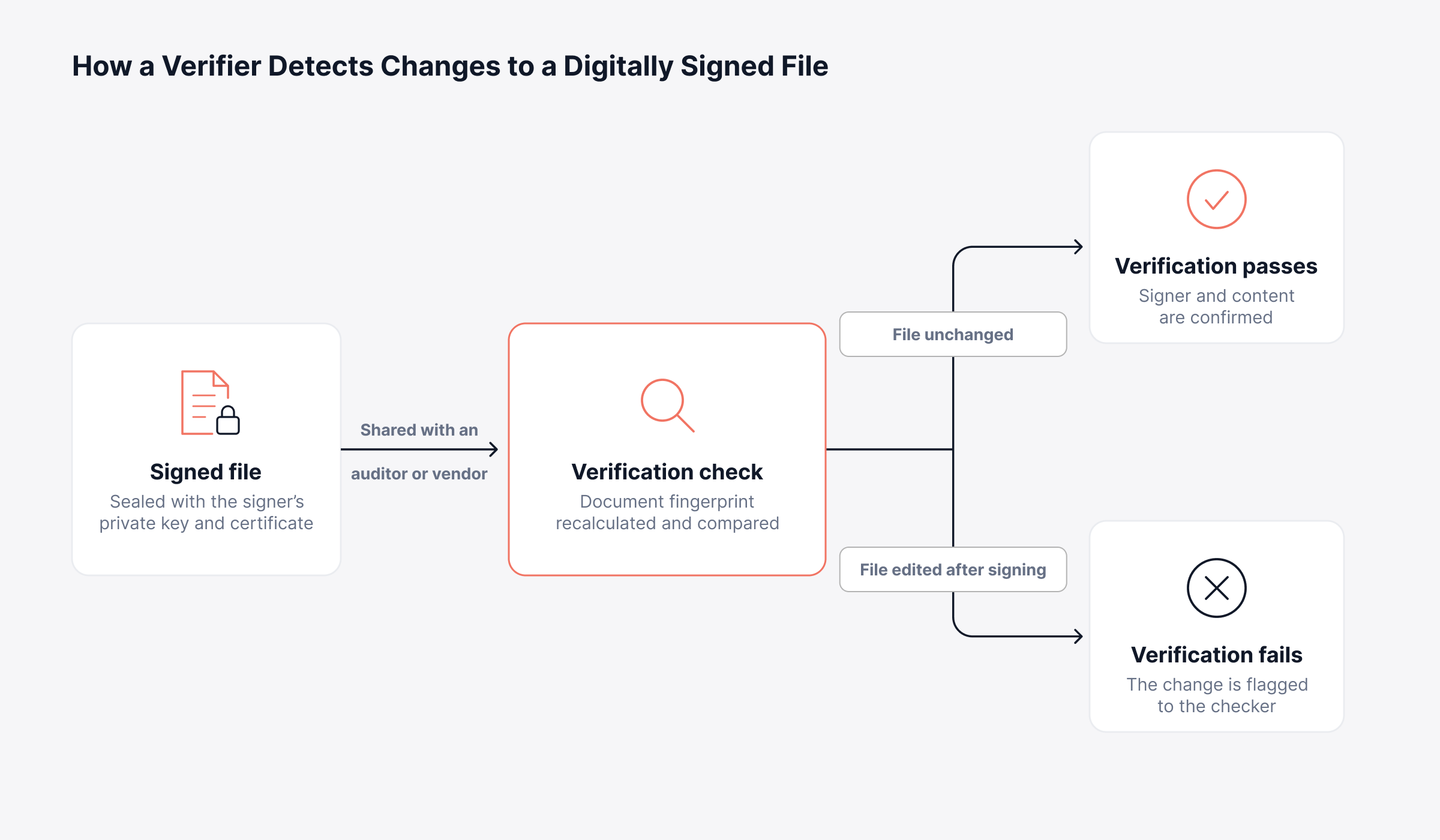
With the mechanics covered, the practical differences come down to proof, effort, and legal weight. The table below lays out the difference between electronic signature and digital signature, which answers the question however it is phrased, whether as electronic vs digital signature or digital vs electronic signature.
Criteria | Electronic Signature | Digital Signature |
What it is | Any electronic indication of intent to sign | A cryptographically sealed form of electronic signature |
How identity is shown | Login checks, email links, and the audit trail around the signature | A certificate from a trusted certificate authority |
Tamper evidence | Varies by platform | Any change after signing breaks verification |
Who can verify it | Usually the signing platform that holds the records | Anyone with the signer's public key |
Setup effort | Low, with most signing platforms ready to use | Higher, since certificates must be issued and managed |
Legal standing | Broadly recognized for everyday business agreements | Meets the higher tiers some laws define for sensitive documents |
Typical ITSM use | Policy acknowledgments, routine forms, internal sign-offs | Regulated contracts and documents where a specific signature standard applies |
Which Laws Recognize Electronic and Digital Signatures?
Electronic and digital signatures have legal standing in most major jurisdictions, and several laws add a stricter tier for documents with more at stake. The main frameworks IT and compliance leaders encounter include:
United States: The ESIGN Act and UETA give electronic signatures legal effect for most business transactions
European Union: eIDAS defines simple, advanced, and qualified electronic signatures, and qualified signatures carry the same legal effect as handwritten ones across member states
United Kingdom: The Electronic Communications Act 2000 and retained eIDAS rules allow electronic signatures as evidence
India: The IT Act 2000 recognizes electronic signatures and certificate-based digital signatures issued through licensed certifying authorities
Certain document types, such as wills, stay outside these rules in many regions. Legal counsel should confirm those edge cases, while IT decides where signatures fit into daily service workflows.
When is an ITIL Approval Enough?
An ITIL approval is enough when the decision stays inside your organization and the evidence you need is who approved what, and when. Standard approvals in an ITSM platform record the approver, the timestamp, and the outcome against the record, which suits most daily authorizations.
ITIL 4 leaves the form of evidence to each organization's change authority and governance policy. For internal reviews, the service record and its audit log usually carry all the proof anyone asks for, a pattern that also underpins ITIL change management.
Standard approvals typically cover:
Standard and normal changes: Low and medium-risk changes authorized by a manager or change authority
Routine service requests: Software installs, shared folder access, and hardware refreshes
Catalog and knowledge updates: Internal content that affects no outside party
For example, a request to give a new analyst access to a shared finance folder needs a manager's approval and nothing more. The approver, the decision, and its timing stay on the ticket, and routing that request for a formal signature would only add cost and delay. The situation changes once someone outside the service desk needs to rely on the decision.
When does a Request Need a Legally Binding Signature?
A request needs a legally binding signature when the document creates an obligation, commits the organization to a third party, or records a person's individual acknowledgment. At that point, the evidence has to exist as a signed document that others can keep and verify.
Four signals usually indicate the shift:
An external party is involved: Vendors, customers, and contractors need a signed copy they can retain
A person accepts individual responsibility: Acceptable use policies, asset handovers, and access authorization forms bind a named individual
Money or contract terms change: Purchase orders, quotation approvals, renewals, and service agreements
Policy or regulation names a signature: Internal control frameworks or sector rules ask for a signed, verifiable record of high-risk decisions
Consider a contractor who receives a company laptop for a six-month project. A signed asset handover form records what was issued and the contractor's agreement to return it, which gives the organization a clear position if the device goes missing after the engagement ends.
How Strong does an ITSM Signature Need to Be?
An ITSM signature needs to be as strong as the risk and the rules attached to the document. An electronic signature backed by authentication and a complete audit trail covers most commercial agreements.
When a regulator or a specific legal regime asks for a qualified or certified signature, certificate-based digital signatures are the safer option. Setting that threshold for each document type falls to legal and compliance, which gives the service desk one consistent rule to follow.
Which ITSM Processes Typically Require Signatures?
ITSM processes that typically require signatures include service requests, changes, purchases, and contracts, because each can turn a record into a commitment. All four already follow defined ITSM workflows, so a signing step can be added where the approval happens today.
1. Service Request Signatures for Onboarding and Access
Service requests need signatures when a person must formally accept a policy or take responsibility for an asset. Employee onboarding generates most of them, with HR and IT expecting signed acknowledgments on file before any access is granted.
Acceptable use policy and NDA acknowledgments
Access authorization forms
Asset issuance and return documents
2. Change Authorization Signatures for High-Risk Changes
High-risk changes call for a signature once the organization needs a durable record naming whoever accepted the risk. In change management, a signed document gives the change advisory board, or CAB, evidence that holds up long after the change closes.
High-risk change authorization
CAB approval documents
Implementation sign-off forms
3. Purchase Order Signatures for Spend Authority
Purchase orders need signatures because they commit budget to a supplier. A signature confirms the signer had authority to spend, which protects the organization in billing disputes.
Purchase orders
Quotation approvals
Vendor agreements and procurement authorization forms
4. Contract Signatures for Vendor and Customer Agreements
Contracts are the clearest case for a legally binding signature, because they bind both parties for months or years. Contract management depends on signed versions that match the terms both sides agreed to.
Customer and vendor contracts
Renewals
Service agreements
How does Motadata ServiceOps Handle Digital Signatures?
Motadata ServiceOps handles digital signatures through a native DocuSign integration, so technicians can send, track, and store signed documents from the same record that holds the request, change, purchase order, or contract. For business leaders, signed evidence stays with the decision it supports, which makes audit preparation simpler and keeps vendor paperwork moving. The capability arrived in a recent release, documented in the ServiceOps release notes.
Digital Signature is an add-on. It requires a Digital Signature add-on license for at least one supported module, and the supported modules are Service Request, Change, Purchase, and Contract.
What does the Signing Flow Look Like in ServiceOps?
The signing flow in ServiceOps starts and ends on the service record, with DocuSign handling the signature in between. This electronic signature workflow runs inside the ServiceOps platform: admins connect a DocuSign account and build templates per module, and technicians send requests straight from the record.
Each signer gets the request as an email link and can complete it without holding a DocuSign account, after which the status updates on the record automatically.
Store the signed file on the record that justified it, and the audit evidence keeps its context. Each step in the swimlane below shows which party acts and what returns to the record.
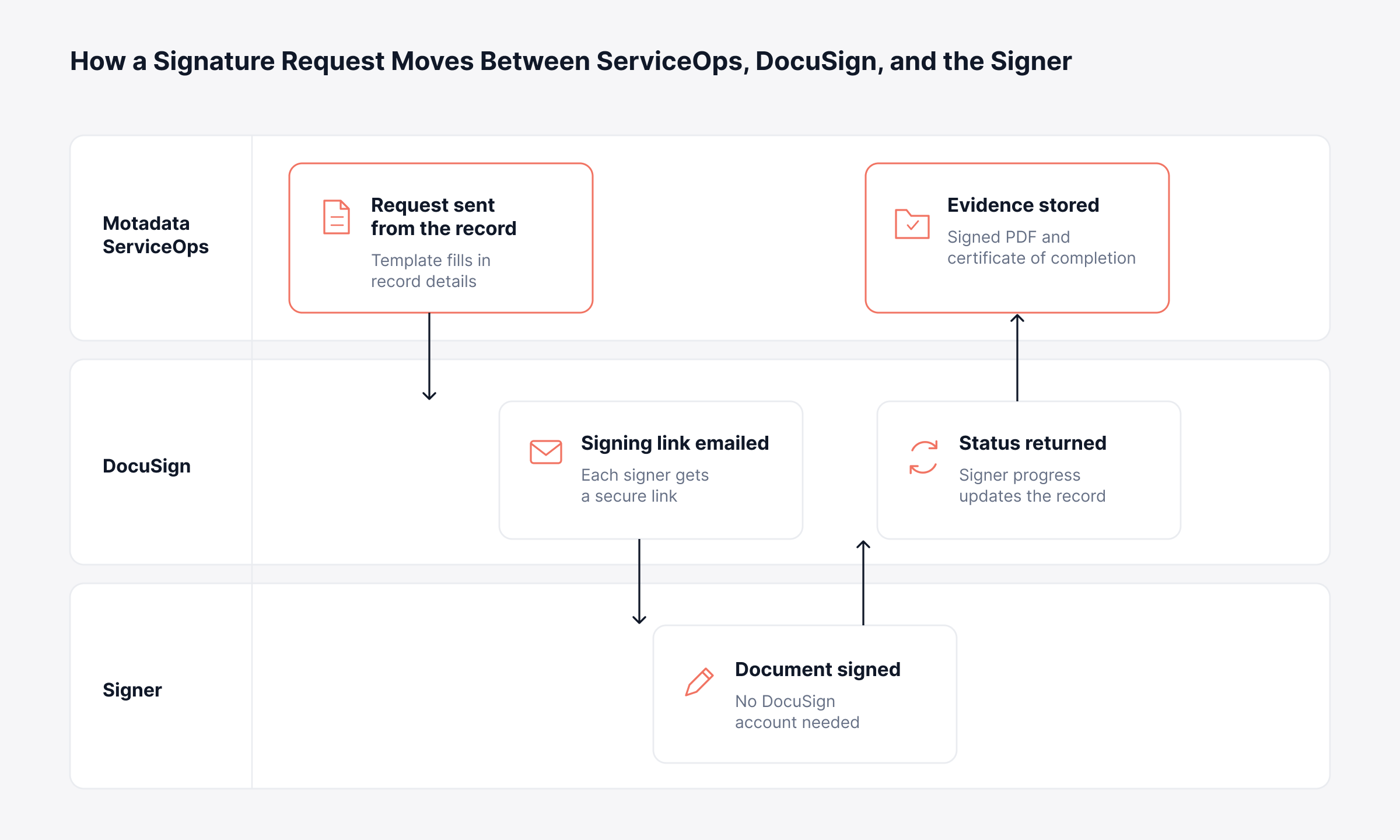
Beyond the basic flow, a set of controls decides how well the process holds up when auditors or counterparties ask questions.
Which ServiceOps Signature Controls Support Governance and Audit?
ServiceOps signature controls cover the areas governance and compliance roles typically review:
Reusable templates: Placeholders fill in record details such as requester name and record ID, and each template belongs to one module
Signer routing: Signers can be named individuals or resolved at send time as the requester, assignee, department head, or a manager
Sequential signing: Documents move from one signer to the next in a fixed order when the process requires it
Live status tracking: Signer status updates automatically from DocuSign, with options to remind, delete, or ignore a pending signer
Stored evidence: The signed PDF is saved automatically with the DocuSign Certificate of Completion merged in
Workflow triggers: A workflow can send a signature request automatically, for example when a change reaches Pending Approval
Reporting and portal visibility: Summary reports show signer and signing status, and requesters can follow progress on the Support Portal
On-premises deployments need one extra network step, because DocuSign can only deliver status updates when the ServiceOps server is reachable over public HTTPS.
Move Signed Approvals from Inboxes into the Service Record with Motadata ServiceOps
Standalone signing tools handle the signature itself, but the finished file frequently lands in an inbox or a shared drive, far from the change or request that gave it a reason to exist. That separation makes audits slower and leaves reviewers stitching evidence together across systems.
Which signature standard a given jurisdiction demands remains a decision for legal and compliance, whatever tool you choose. What Motadata ServiceOps adds is a single place where the approval, the signature request, the signer history, and the signed document all stay with the service record.
FAQs
Is an electronic signature the same as a digital signature?
A digital signature is one type of electronic signature. Electronic signatures include any electronic mark of intent, while digital signatures add cryptographic keys and a certificate that let anyone verify the signer and detect changes to the document.
Is DocuSign a digital or electronic signature?
DocuSign's standard eSignature product produces electronic signatures supported by an audit trail. DocuSign also offers certificate-based digital signature options for situations where a regulation or legal regime requires them.
Is electronic signature vs. digital signature a legal or a technical distinction?
It is both. Electronic signature is mainly a legal term describing consent given electronically, and digital signature describes the cryptographic technology that can implement that consent with stronger identity and integrity guarantees.
What does an electronic signature workflow look like in ITSM?
A technician selects a signature template on a service request, change, purchase order, or contract and sends it to the required signers. In platforms such as Motadata ServiceOps, each signer's status is tracked and the completed document is stored on the record for later audits.
How do you create a digital signature for IT approvals?
A certificate-based digital signature relies on a certificate from a trusted certificate authority, usually obtained through a signing platform. The signing step is then attached to the approval workflow, which Motadata ServiceOps handles through its DocuSign integration for service requests, changes, purchase orders, and contracts.
Author
Poonam Lalani
Content Strategist
Poonam Lalani is a B2B content strategist and writer with a background in computer engineering and experience across enterprise technology domains, including AI, cloud, DevOps, data engineering, and IT operations. She specializes in creating research-driven content that simplifies complex ideas and supports product education, thought leadership, and business growth.