CCPA Compliance for IT Teams: How to Handle Data Subject Requests on Time
How many privacy requests is your organization working on right now, and how many of them are still inside their legal deadline? The answer usually lives in several places at once. Shared mailboxes hold some, web forms hold others, and legal keeps a tracker of its own.
That scattering is the problem. A CCPA request carries a hard statutory deadline and a documentation duty behind it, yet privacy work is the one regulated workload in most organizations that never entered the service management system. Every other timed obligation, from incident response to change approval, already runs on tickets, owners, and SLAs.
The fix is structural. Handle each privacy request as you would any other piece of tracked, timed, auditable work: a service request carrying an owner, a due date, approval gates, and a permanent record. Building that workflow is what the rest of this article covers.
In this blog, you will see what CCPA compliance asks of IT, every consumer right and its deadline, and a seven-stage workflow for a data subject access request, or DSAR. The six CCPA compliance requirements, the 2026 rule changes, and a CCPA compliance checklist follow.
What Is CCPA Compliance and What Does It Require?
CCPA compliance means honoring the privacy rights California residents hold over their personal information, answering inside fixed deadlines, and holding evidence that both happened. The California Consumer Privacy Act took effect in 2020. Amendments under the California Privacy Rights Act later added rights and set up the California Privacy Protection Agency as a dedicated regulator.
The law reaches past California's borders. Do business in California and cross one of the thresholds below, and the obligations apply whether the head office is in Bengaluru, Manchester, or Chicago.
Who Has to Comply with the CCPA?
Three thresholds settle the question. Meeting any single one brings the business into scope:
Revenue: Annual gross revenue above $26,625,000 in the preceding calendar year, a figure the CPPA adjusts for inflation every odd-numbered year
Volume: Buying, selling, or sharing the personal information of 100,000 or more California residents or households in a year
Data-driven revenue: Deriving 50% or more of annual revenue from selling or sharing personal information
Penalties attach per violation, so exposure scales with the number of records involved. Administrative fines and civil penalties run to $2,663 for each violation and $7,988 for each intentional violation or violation involving the data of a consumer under 16. Data breaches involving unencrypted personal information carry a private right of action worth $107 to $799 per consumer per incident.
For anyone weighing this as a business question, that arithmetic is the point. A single mishandled dataset turns into a seven-figure number quickly, which is why CCPA compliance for businesses belongs on the IT risk management register alongside outage and breach exposure.
What Counts as Personal Information Under the CCPA?
Personal information under the CCPA is anything that identifies, relates to, describes, or could reasonably be linked with a particular consumer or household. The drafting is deliberately wide. Name and email address are the smallest part of it.
The categories most likely to live inside systems IT runs:
Identifiers: Name, postal address, IP address, email address, account name, government ID numbers
Commercial information: Purchase records, products considered, consuming histories
Internet activity: Browsing history, search history, interaction with a site or application
Geolocation data: Location derived from device, network, or application signals
Employment and education records: Application data, performance records, academic history
Inferences: Profiles drawn from any of the above to reflect preferences or behavior
A subset carries extra protection. Sensitive personal information takes in government ID numbers, account credentials, payment card details with security codes, precise geolocation, racial or ethnic origin, religious beliefs, union membership, message contents, genetic and biometric data, health information, and sexual orientation. Consumers may ask you to limit how it gets used.
Two exclusions matter. Deidentified data, aggregate consumer information, and lawfully available public records fall outside the definition entirely. Anything already governed by HIPAA, GLBA, FCRA, or the DPPA carries exemptions of its own.
One change still catches organizations off guard. Employee and B2B contact data lost its temporary exemption back in 2023. California staff, applicants, and contractors now hold the same rights as customers, which pulls HR systems and Active Directory records into scope alongside the customer database.
What Are the Consumer Rights an IT Team Has to Fulfill?
Consumer rights under the CCPA break into two groups: request-based rights that run on a 45-day clock, and preference-based rights that have to be applied within 15 business days. IT owns the mechanics of both, even when the privacy office owns the policy.
Right | What the consumer is asking for | Response deadline |
Right to know | Categories and specific pieces of personal information collected, sources, purposes, and recipients | 45 calendar days |
Right to delete | Erasure of personal information held by the business and its service providers | 45 calendar days |
Right to correct | Correction of inaccurate personal information | 45 calendar days |
Right to data portability | Access response delivered in a portable, readily usable format | With the access response |
Right to opt out of sale or sharing | Stop selling or sharing personal information, including via a Global Privacy Control signal | 15 business days |
Right to limit use of sensitive personal information | Restrict use of sensitive categories to permitted purposes | 15 business days |
Right to non-discrimination | No degraded service or pricing for exercising a right | Continuous |
ADMT access and opt-out | Explanation of, and opt-out from, automated decision-making technology used for significant decisions | Applies from 1 January 2027 |
Two deadlines govern the request-based rights. Receipt must be confirmed within 10 business days, with a general explanation of the verification process and when to expect an answer. The substantive response is due within 45 calendar days of arrival, extendable once by another 45 for a maximum of 90, provided you notify the consumer inside the first window.
The 45 days start on arrival, regardless of how long verification takes. Any service level agreement you build has to start its clock at intake.
Why Do CCPA Data Subject Requests Break Without a Service Workflow?
CCPA data subject requests break because they arrive through unstructured channels and get handled as correspondence instead of as work. Email has no due date and a shared inbox has no owner. A forwarded thread leaves no approval record.
The failure pattern is consistent across organizations:
No single intake point: Requests arrive by web form, email, phone, and support ticket, so nobody holds a complete count
No clock: The 10-business-day acknowledgment slips because nothing fires a reminder
No data map: Locating one person's records across CRM, billing, marketing automation, and log stores becomes a manual hunt
No approval trail: Deletions run without documented sign-off, the exact evidence a regulator asks for
An IT ticketing system already solves every one of those for incidents and service requests. The gap is that privacy requests were never modeled as tickets.
The cost of leaving it that way reaches past the regulator. A slow response produces a complaint. Complaints are what bring an investigation, and investigations ask for records nobody kept.
How Do You Turn a CCPA Data Subject Request into a Service Workflow?
You turn a CCPA data subject request into a service workflow by making it a request type in your service catalog, attaching a dedicated service level agreement to it, then splitting fulfillment into ordered tasks against named owners. Sequence matters here, so the stages below follow the order the regulations impose.
Configure the request type once and every later request inherits the same timing, routing, and evidence rules. The diagram sets out the seven stages and the deadline attached to each.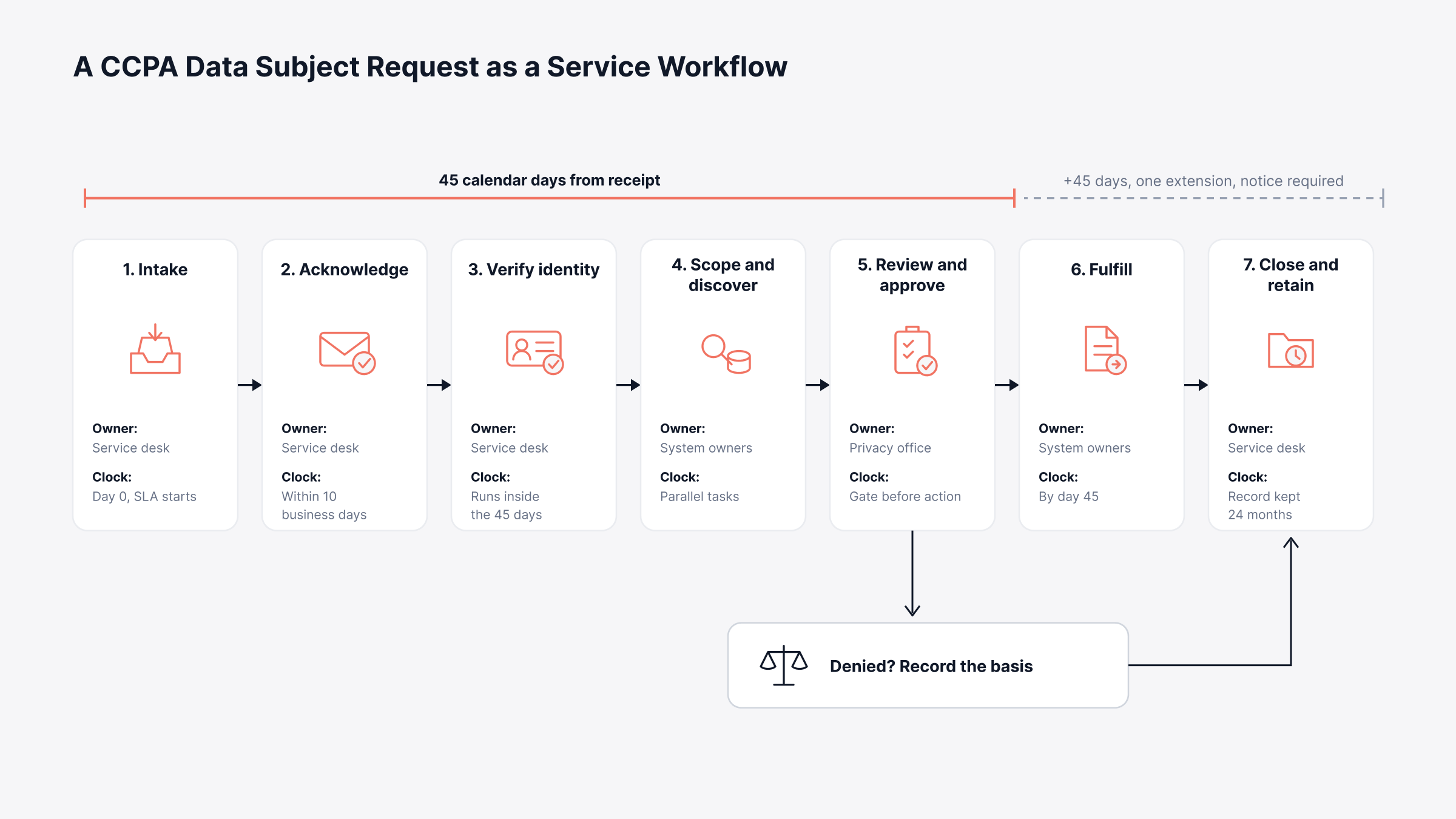
Stage 1: Intake
Publish at least two submission methods and route all of them into one queue. A business operating exclusively online with a direct consumer relationship may offer an email address alone, though most organizations need a web form plus a toll-free number. A self-service portal covers the web side and timestamps arrival without anyone rekeying it.
Capture request type, channel, receipt time, and claimed identity on the ticket. Those fields map directly to the record the regulations expect you to keep.
Stage 2: Acknowledgment
Automate the acknowledgment. A template firing on ticket creation covers the 10-business-day requirement, explains verification in general terms, and sets expectations on timing.
Stage 3: Identity Verification
Verification standards scale with the sensitivity of what is being asked for:
Reasonable degree of certainty: Match at least two data points against information you already hold, used for requests to know categories of personal information
Reasonably high degree of certainty: Match at least three reliable data points plus a signed declaration under penalty of perjury, used for requests to know specific pieces
Deletion and correction: Either standard applies, depending on data sensitivity and the risk of harm from a wrongful deletion
Opt-out and limit requests: No identity verification required, though you may ask for enough detail to apply the preference correctly
Signed declarations form part of your record-keeping obligation, so store them against the ticket. Restrict who can view them using role-based access control, since verification data attracts the same protection as the underlying records.
Stage 4: Scoping and Discovery
Fan the ticket out into child tasks, one per system that holds personal information. Each owner confirms whether records exist, extracts or flags them, and closes the task.
Backups and archives get special treatment. Where personal information lives in an archived or backup system, deletion can be deferred until that system is next accessed or used, provided the deferral is documented.
Stage 5: Review and Approval
Deletion and correction requests need an approval gate before anything is destroyed or changed. Multi-level approval with the privacy office as final approver produces the sign-off record a regulator will ask to see. Exemptions get applied here too, and where a record stays for tax, security, or legal-hold reasons, the basis belongs in the ticket.
Stage 6: Fulfillment
Deliver the response through a secure channel, in a portable format for access requests. Requests are free of charge and a consumer may make up to two in a 12-month period. For opt-outs, forward the signal to third parties that received the person's information, and honor Global Privacy Control browser signals.
Stage 7: Closure and Record Retention
Closure means logging the response date, the action taken, and the basis for any denial. Keep that record for 24 months at minimum. The regulations explicitly permit a ticket or log format, which makes a service management platform a natural home for it.
Route repeat questions from consumers and staff into a knowledge base so the same clarifications stop consuming analyst time every cycle.
What Does the CCPA Response Clock Look Like in Practice?
The CCPA response clock runs four separate timers. Miss any one and that is a violation in its own right, so set each as an SLA target on the request type with escalation to a named approver ahead of breach.
Managers tracking this at a portfolio level care about one number above the rest, which is how many requests are inside their window today. The chart pins each deadline to the event that starts it.
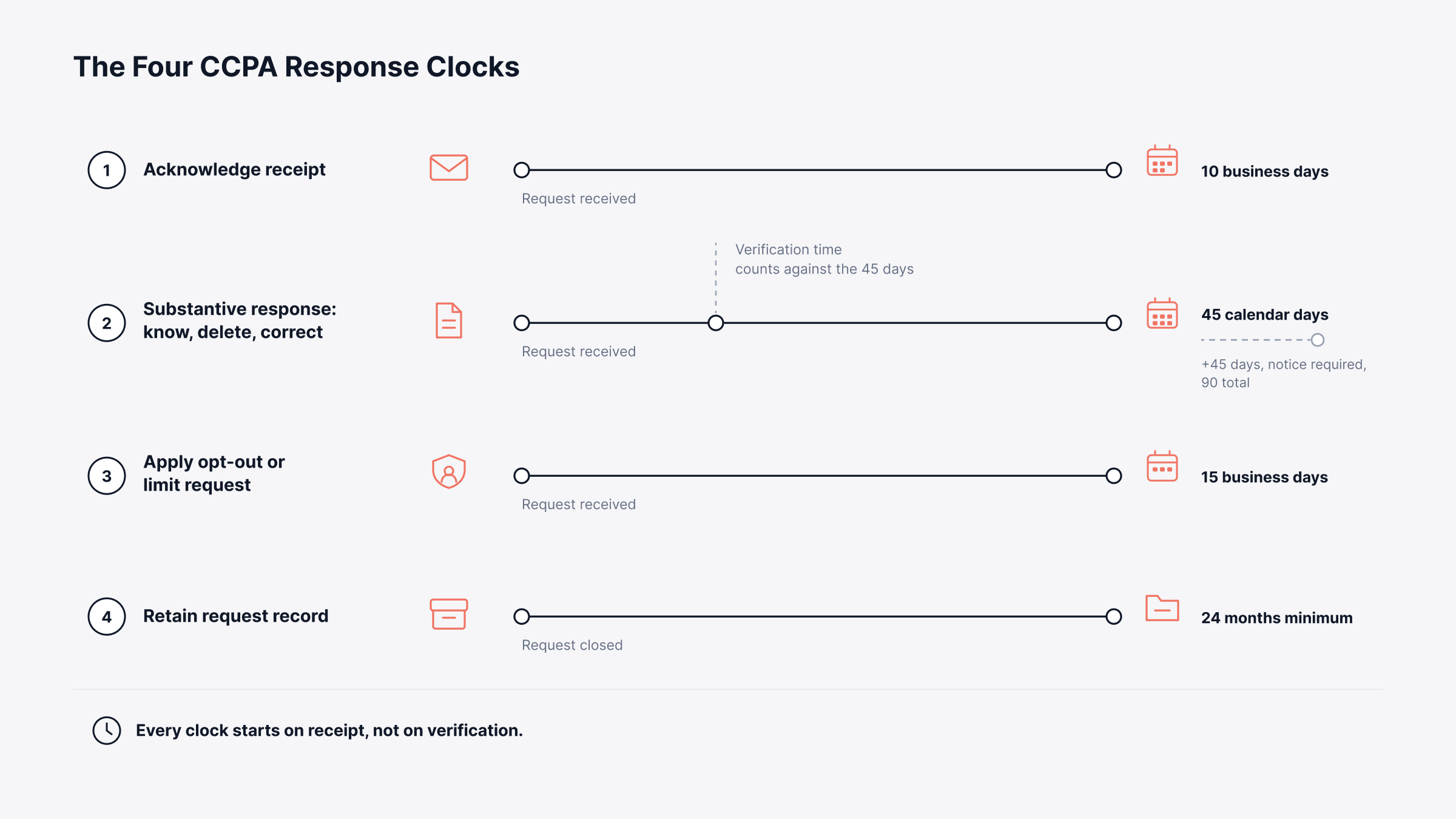
One obligation runs outside those four timers. Where a consumer's information was sold or shared after the opt-out arrived but before it took effect, the third parties that received it have to be told, and told to stop.
Meeting any of these depends on knowing where the data actually lives, which is where the asset record earns its keep.
Where Do IT Asset Records and the CMDB Fit into CCPA Compliance?
Asset and configuration data answers the question every DSAR depends on, which is where a person's information physically lives. Discovery turns into guesswork without a current inventory of applications and their owners, and the 45-day window vanishes into system-by-system searching.
A CMDB, the configuration management database recording every configuration item and how they relate to one another, supplies two things the workflow gets nowhere else. Coverage means scoping misses no data store, and a named technical owner on each item lets the work route itself rather than being chased.
Unmanaged applications are where personal information goes uncounted, and IT asset management with agent-based or agentless scanning finds them. Pairing it with software license management flags applications nobody remembers procuring.
Finding the data answers half the question. Proving what you did with it is the other half.
What Should the CCPA Audit Trail Contain?
The CCPA audit trail should record what was asked, when it arrived, who handled it, what was done, and the reason behind any refusal. Records of consumer requests and responses have to be kept for 24 months at minimum. Ticket or log format is explicitly permitted.
Six fields carry the evidentiary weight:
Date and nature of the request: Receipt timestamp and request type
Channel: How the consumer submitted it
Verification outcome: Standard applied and declaration on file where required
Date and nature of the response: What was disclosed, deleted, corrected, or applied
Basis for denial: The exemption or verification failure relied on
Approvals: Who authorized the action and when
An audit log capturing field-level changes on the ticket produces most of this automatically. One constraint deserves attention: information collected for record-keeping cannot be used for any other purpose.
Businesses handling the personal information of 10 million or more consumers in a calendar year carry an added duty. They must compile request counts, compliance and denial rates, and median or mean response times by type, then publish those figures annually.
Those record duties are the established baseline. What arrived in 2026 widened the obligation well beyond that.
What Changed Under the 2026 CCPA Regulations?
The 2026 CCPA regulations added three obligations that reach beyond request handling: rules on automated decision-making technology, mandatory risk assessments, and independent cybersecurity audits. Approval came on 22 September 2025 and the rules took effect on 1 January 2026. Compliance deadlines then phase in through 2030.
Requirement | What it covers | Key date |
ADMT | Pre-use notice, access explanations, and opt-out for automated technology used in significant decisions about finances, housing, education, employment, or health care | Compliance from 1 January 2027 |
Risk assessments | Documented assessment before processing that presents significant risk, including selling or sharing data and handling sensitive information | Pre-2026 activities assessed by 31 December 2027 |
Risk assessment reporting | Annual summary submitted to the CPPA | First submission 1 April 2028 |
Cybersecurity audits | Independent annual audit where processing presents significant risk to consumer security | 1 April 2028 for businesses above $100M revenue, phased to 2030 for smaller businesses |
For IT, the ADMT rules mean inventorying every automated tool that influences a significant decision, and the audit rules mean access controls, logging, and vulnerability handling now have to be evidenced under the same discipline as any cybersecurity compliance program. Risk assessments draw on the same data map the request workflow already needs.
Anyone running a European privacy program will recognize the shape of most of this, though the mechanics differ in ways that matter operationally.
What Is the Difference Between GDPR and CCPA Compliance?
The difference between GDPR and CCPA compliance is scope, timing, and legal basis. GDPR covers people in the EU and requires a lawful basis before processing begins. The CCPA covers California residents from an opt-out posture, permitting collection while handing consumers the right to stop the sale or sharing of what was gathered.
Dimension | GDPR | CCPA as amended by the CPRA |
Who it protects | Data subjects in the EU and EEA | California residents, including employees and B2B contacts |
Consent model | Lawful basis required before processing | Opt-out of sale and sharing, opt-in for consumers under 16 |
Response deadline | One month, extendable by two further months | 45 calendar days, extendable by 45 |
Acknowledgment | No separate acknowledgment deadline | 10 business days |
Regulator | National supervisory authorities | California Privacy Protection Agency and the state Attorney General |
Maximum penalty | Up to 4% of global annual turnover | $2,663 per violation, $7,988 per intentional violation |
Most of the workflow transfers if a GDPR request process already exists. Adjust the timers, add the acknowledgment step, and model opt-out handling as a separate request type. The same logic extends to other regional privacy regimes, including POPIA compliance in South Africa.
Whichever regime you are starting from, the build order stays the same.
How Do You Become CCPA Compliant? Six Requirements
Becoming CCPA compliant comes down to six requirements, and only the last two land mainly with IT. Working through the CCPA compliance requirements in order avoids building a request process before you know what data you hold.
Confirm scope: Test the business against the three thresholds, including revenue at group level where affiliates share branding
Map personal information: Inventory what you collect, why, where it is stored, how long it is kept, and who it is disclosed to
Publish notices: A notice at collection on every page that gathers data, plus a privacy policy refreshed at least once every 12 months
Offer choices: A Do Not Sell or Share My Personal Information link, a limit option for sensitive data, and support for Global Privacy Control signals
Build the request process: Two submission methods, documented verification, deadline tracking, approvals, and delivery
Contract and record: Written terms with service providers and contractors, request records held 24 months, and annual metrics where the volume threshold applies
Who Owns What Across the Business?
Ownership splits four ways, and the split is worth agreeing before the first request arrives:
Legal and privacy: Scope determination, notice wording, exemption calls, denial language
Marketing and digital: Opt-out link placement, consent and preference signals, third-party tag inventory
HR: Employee, applicant, and contractor records, plus the retention rules that apply to them
IT: Request intake, verification, discovery across systems, deadline tracking, and the evidence record
Most failures happen in the gaps between those four, which is why one shared queue matters more than any single control.
CCPA Compliance Checklist for IT Teams
This CCPA compliance checklist covers the controls IT owns, separate from the policy and notice work the privacy office handles:
Single queue: Every submission method routing into one request type, whatever channel it arrived on
Automation: Acknowledgment template firing on ticket creation, with SLA timers at 10 days, 45 days, and 15 business days
Verification: Documented method per request type, declarations stored against the ticket
Data map: Current inventory of systems holding personal information, each with a named owner
Task templates: Child tasks pre-built per system so scoping never starts from a blank page
Approvals: Mandatory sign-off before deletion or correction, captured in the ticket
Access control: Restricted visibility on privacy tickets and their attachments
Reporting: Dashboards for volume by type, median response time, denial reasons, and SLA breaches
Run this list quarterly with the same discipline you apply to ITAM compliance, and the annual reporting obligation becomes an export.
Where Motadata ServiceOps Fits in a CCPA Request Process
CCPA compliance fails at the operational layer more often than at the policy layer. The privacy notice is usually fine. What goes wrong is the request that waited three weeks in an inbox and the response date nobody can evidence 18 months later.
Motadata ServiceOps handles that operational layer. A data subject request becomes its own service catalog item, carrying a dedicated SLA and multi-level approvals. Workflow automation drives acknowledgment and escalation from there, while the CMDB names an owner for every system holding data so discovery routes itself.
Behind all of it, audit trails, role-based access control, and scheduled reporting carry the record you keep afterward.
One limit worth naming: no service management platform makes the legal calls for you. Whether a record falls under an exemption, whether a data flow counts as a sale, and how a denial is worded stay with counsel and the privacy office. What the platform does is capture those decisions, time them, and keep them retrievable.
That is the difference between believing you responded on time and proving it.
FAQs
Is CCPA compliance only for companies based in California?
No. CCPA compliance applies to any business that does business in California and meets one of the three thresholds, wherever it is headquartered. A company in India, the UK, or Singapore that markets to Californians and crosses the revenue or volume threshold carries the same obligations as a domestic one.
How long does a business have to respond to a CCPA data subject request?
Receipt must be confirmed within 10 business days, and the substantive response is due within 45 calendar days of the request arriving. That window can be extended once by another 45 days, for a maximum of 90, as long as the consumer is notified and given a reason inside the first 45 days.
What tools help with CCPA compliance?
Consent management and cookie preference signals call for dedicated CCPA compliance software. Request fulfillment itself is service desk work, so most organizations pair a privacy tool with an ITSM platform such as Motadata ServiceOps, which supplies the intake, SLA timers, approval gates, and audit trails a CCPA compliance solution needs on that side.
What is the difference between a CCPA request and a GDPR DSAR?
Both are requests from an individual to access, delete, or correct their personal information, and the fulfillment steps largely overlap. The CCPA adds a 10-business-day acknowledgment, uses a 45-day response window instead of one month, and treats opt-out of sale or sharing as a distinct right with its own 15-business-day deadline.
How long do we have to keep records of CCPA requests?
Records of consumer requests and how the business responded must be kept for at least 24 months. The regulations allow a ticket or log format, so a platform like Motadata ServiceOps that already stores request date, channel, response, approvals, and denial basis satisfies the requirement without a separate register.
Author
Poonam Lalani
Content Strategist
Poonam Lalani is a B2B content strategist and writer with a background in computer engineering and experience across enterprise technology domains, including AI, cloud, DevOps, data engineering, and IT operations. She specializes in creating research-driven content that simplifies complex ideas and supports product education, thought leadership, and business growth.