Infrastructure Monitoring for Network Performance: A Practitioner's Guide to Uptime and Visibility
What is infrastructure monitoring? Infrastructure monitoring is the practice of continuously tracking the health, performance, and availability of IT infrastructure components — servers, networks, storage, and cloud resources — to detect issues before they impact users and keep business-critical services running.
When your infrastructure goes down, everything goes down with it — applications, services, revenue, and user trust. A single hour of unplanned downtime costs the average enterprise over $300,000, according to industry benchmarks. And in most cases, the warning signs were there. Someone just wasn't watching the right metrics.
That's the core value of infrastructure monitoring. Not just knowing that something broke, but knowing it's about to break — and having the data to fix it before anyone notices.
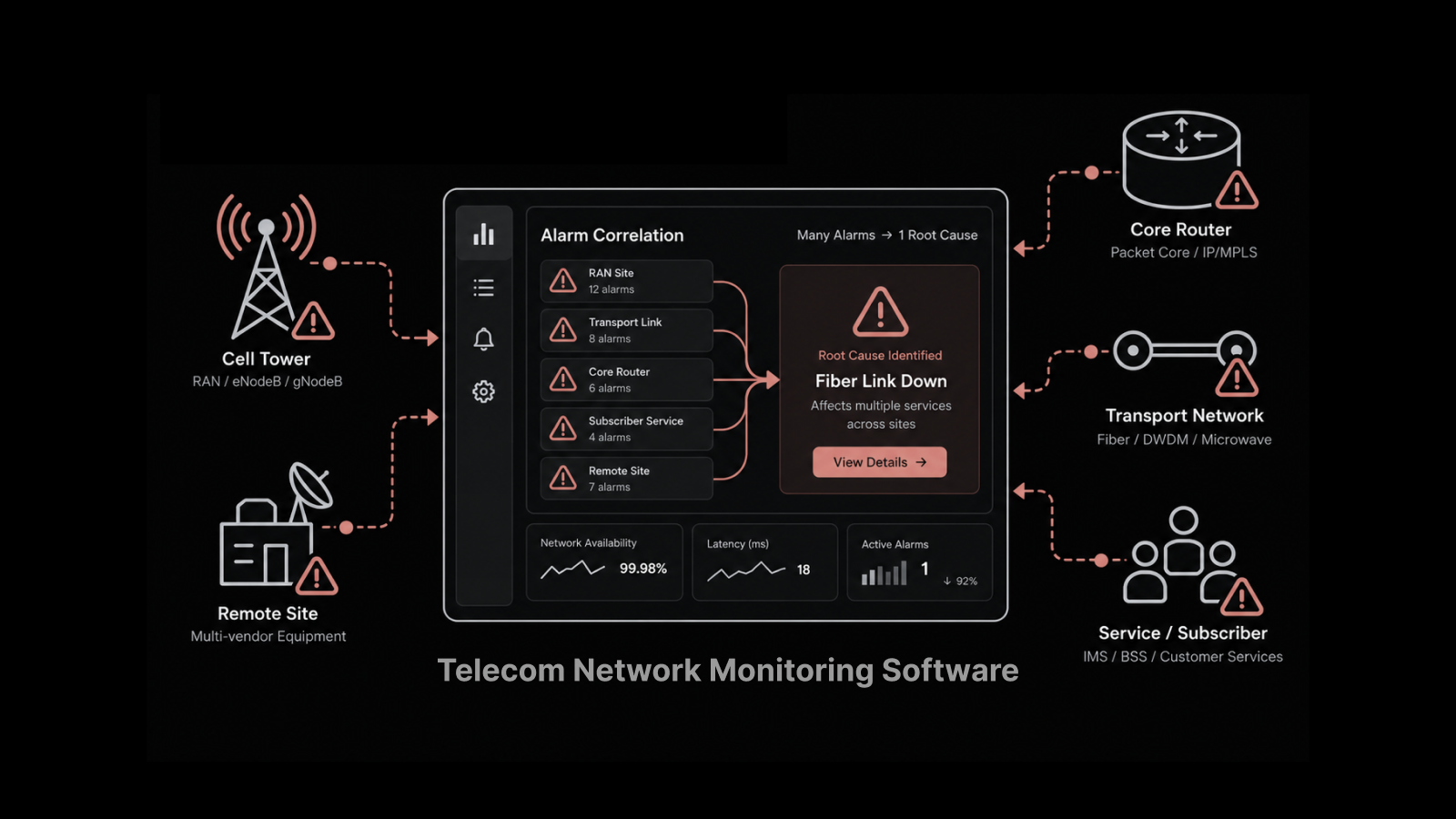
Modern infrastructure monitoring has evolved well beyond pinging servers to check if they're alive. Today's platforms track thousands of metrics across physical servers, virtual machines, containers, cloud services, and network devices. They use AI to spot anomalies, predict failures, and automate responses. And they give IT teams the unified visibility they need to manage environments that span data centers, cloud regions, and edge locations.
What Infrastructure Monitoring Actually Covers
Infrastructure monitoring spans every layer of your IT environment. Understanding the scope helps you avoid the blind spots that cause outages.
Server and Compute Monitoring
This is the foundation — tracking CPU utilization, memory usage, disk I/O, process health, and service status across physical servers, virtual machines, and containers. When a server's CPU is pinned at 98% or a disk partition hits 95% capacity, your monitoring system should flag it before the application running on that server starts failing.
Network Device Monitoring
Routers, switches, firewalls, load balancers, and wireless controllers all need continuous monitoring. Key metrics include interface utilization, error rates, packet loss, latency, and device availability. Network performance monitoring connects device health to the traffic flowing through your network, giving you both the "what" and the "why."
Cloud and Hybrid Infrastructure
If your organization runs workloads in AWS, Azure, or Google Cloud alongside on-prem data centers, your monitoring needs to cover both environments in a single view. Cloud monitoring tracks instance health, auto-scaling events, cloud service availability, and cross-environment connectivity.
Storage and Database Monitoring
Storage systems and databases are often the first components to bottleneck under load. Monitoring disk throughput, IOPS, queue depth, replication lag, query performance, and connection pool utilization prevents the slow degradations that silently erode application performance.
Application Infrastructure
This layer sits between your infrastructure and your end users. It includes web servers, application servers, middleware, message queues, and API gateways. Monitoring response times, error rates, and throughput at this layer helps you distinguish between infrastructure problems and application-level bugs.
Key Technologies Powering Infrastructure Monitoring
SNMP Monitoring
SNMP (Simple Network Management Protocol) remains the workhorse for device-level monitoring. It collects structured data — CPU usage, memory utilization, interface statistics, uptime — from virtually any network device. SNMP v3 adds encryption and authentication, making it suitable for production environments with security requirements.
NetFlow and Traffic Analysis
While SNMP tells you about device health, NetFlow tells you about traffic behavior. NetFlow monitoring reveals who's communicating with whom, which applications are consuming bandwidth, and whether traffic patterns look normal. Together, SNMP and NetFlow give you both device-level and traffic-level visibility.
Log Management and Analysis
Log data provides the narrative context that metrics alone can't deliver. When a server crashes, logs tell you why. When a security incident occurs, logs provide the forensic trail. Centralizing log collection and analysis is essential for troubleshooting, compliance, and security monitoring.
AI and Machine Learning
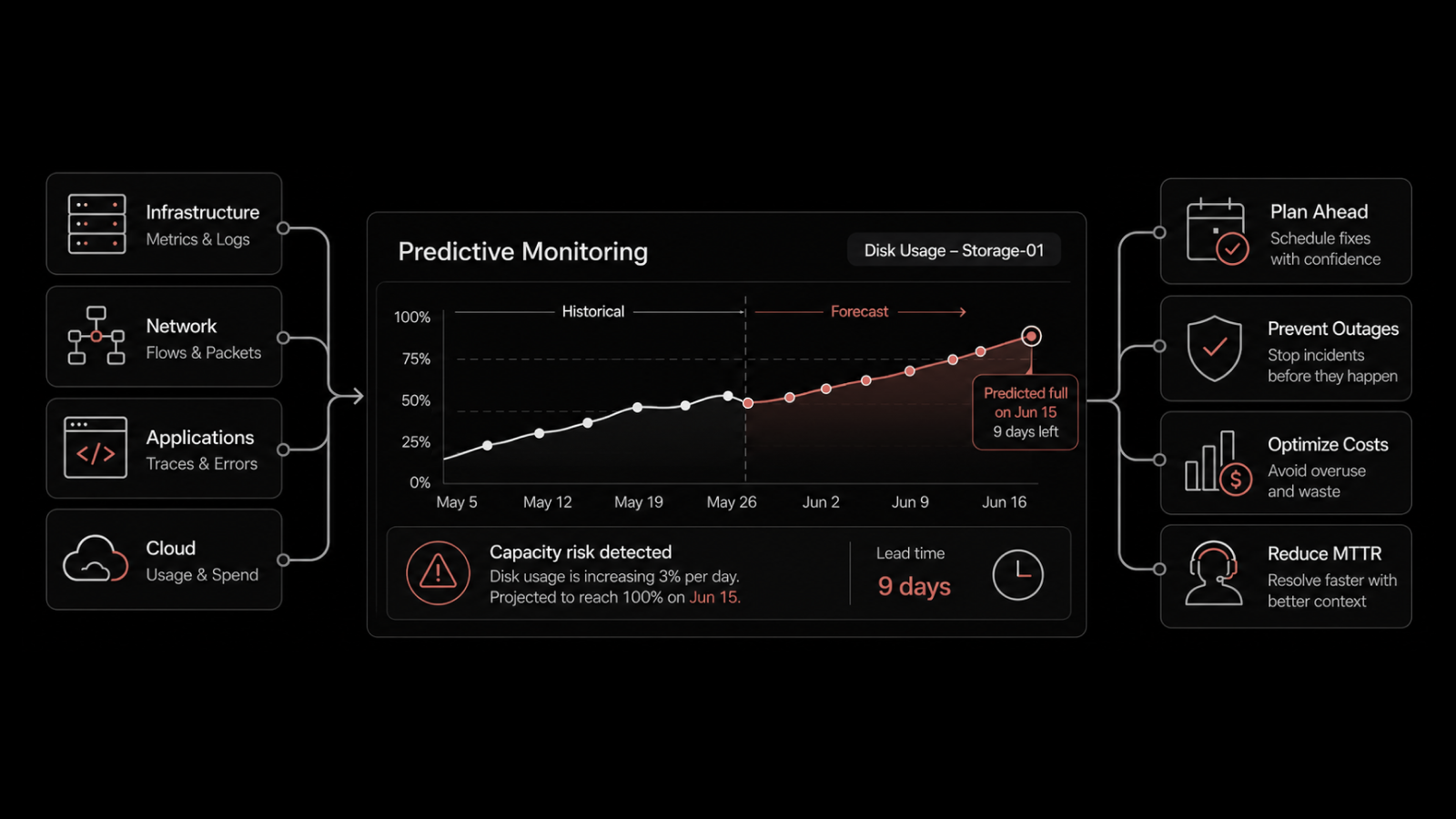
AI transforms monitoring from reactive to predictive. Instead of static thresholds that generate alerts when a metric crosses a fixed value, ML-based systems learn your environment's normal behavior patterns. They detect subtle anomalies — a gradual memory leak, a slow increase in response times, an unusual change in traffic patterns — that static rules miss entirely.
AI-powered monitoring also reduces alert noise. By correlating related events and suppressing duplicate notifications, AI-driven platforms help teams focus on real problems instead of drowning in false positives.
Infrastructure Monitoring vs Observability: What's the Difference
These terms get used interchangeably, but they describe different approaches.
Dimension | Infrastructure Monitoring | Observability |
|---|---|---|
Focus | Known metrics, known failure modes | Unknown questions, exploratory analysis |
Data types | Metrics, status checks, SNMP | Metrics, logs, traces, events |
Approach | Threshold-based alerts | Query-driven investigation |
Question it answers | "Is this thing healthy?" | "Why is this thing behaving unexpectedly?" |
Best for | Established infrastructure, known components | Complex distributed systems, microservices |
Tools | SNMP, ping, NetFlow, syslog | OpenTelemetry, distributed tracing, log analytics |
In practice, you need both. Infrastructure monitoring gives you the baseline health checks and alerting that prevent the obvious failures. Observability gives you the diagnostic depth to investigate the complex, multi-layered problems that monitoring alone can't explain.
Essential Metrics Every Infrastructure Team Should Track
Don't monitor everything. Monitor what matters. Here are the metrics that actually predict and prevent outages:
Metric | What It Tells You | Alert Threshold (Typical) |
|---|---|---|
CPU Utilization | Processing capacity headroom | > 85% sustained for 10+ min |
Memory Usage | Available RAM for applications | > 90% utilized |
Disk I/O | Storage read/write performance | Queue depth > 10, latency > 20ms |
Disk Space | Storage capacity remaining | < 15% free |
Network Interface Utilization | Bandwidth consumption per link | > 80% sustained |
Packet Loss | Network reliability | > 0.1% |
Latency | Network response time | > 50ms for LAN, varies for WAN |
Error Rates | Device or link quality | Any increase from baseline |
DNS Resolution Time | Name resolution performance | > 100ms |
Service Availability | Whether critical services are running | Any downtime |
Set these thresholds based on your environment's baselines, not industry defaults. A server that normally runs at 70% CPU isn't in trouble at 75%. But a server that normally runs at 30% is worth investigating at 60%.
Best Practices for Infrastructure Monitoring
Establish Performance Baselines First
You can't detect anomalies without knowing what normal looks like. Observe your infrastructure's behavior across different time periods — weekdays vs weekends, business hours vs off-hours, end-of-month processing spikes vs typical load. Build baselines that account for these patterns, then set alert thresholds relative to those baselines.
Design Smart Alerting Hierarchies
Not every alert needs to wake someone up at 3 AM. Build tiered alerting:
Critical: Service down, data loss risk, security breach — immediate notification via phone/SMS
Warning: Threshold approaching, degraded performance — notification via Slack/Teams/email
Informational: Trend changes, capacity projections — logged for review
Assign ownership for each alert category. When alerts route to specific owners based on the affected component, resolution happens faster because the right person gets the right context immediately.
Implement Proactive Monitoring and Automated Remediation
Proactive monitoring means catching problems during the "degrading" phase rather than the "failed" phase. Pair this with automated remediation for known issues — restart a service that's stopped, clear a log directory that's filling up, scale a resource that's approaching capacity.
Automation handles the repetitive fixes so your engineers can focus on the problems that actually require human judgment.
Optimize Network Traffic
Network congestion is one of the most common causes of application performance complaints. Use Quality of Service (QoS) policies to prioritize time-sensitive traffic like voice and video. Cache frequently accessed data at strategic points in the network. Monitor bandwidth consumption by application and department to identify optimization opportunities.
Maintain a Unified View Across Environments
As your infrastructure grows across data centers, cloud regions, and edge locations, your monitoring platform needs to provide a single-pane-of-glass view. Fragmented monitoring — one tool for on-prem, another for cloud, another for network — creates blind spots and slows troubleshooting.
Common Challenges in Infrastructure Monitoring
Scaling Monitoring for Distributed Systems
As organizations adopt microservices, containers, and multi-cloud architectures, their monitoring systems need to scale with them. Legacy monitoring tools designed for centralized data centers struggle with the dynamic, ephemeral nature of cloud-native infrastructure. Cloud-based monitoring solutions that auto-discover new resources and scale their collection capacity are better suited for these environments.
Managing High Data Volumes
Modern infrastructure generates massive amounts of telemetry. A single Kubernetes cluster can produce gigabytes of metrics and logs per day. Without intelligent data management — aggregation, sampling, retention policies — storage costs grow faster than monitoring budgets. Log management solutions with automated retention policies help control data volume without sacrificing visibility.
Integrating Cloud and On-Prem Monitoring
Most organizations run hybrid environments. The challenge is correlating data across cloud platforms and on-prem infrastructure to get a unified view. Your monitoring platform needs native integrations with major cloud providers (AWS, Azure, Google Cloud) alongside traditional SNMP and NetFlow support for on-prem devices.
Reducing Alert Noise
More monitoring means more alerts. Without intelligent alert correlation and suppression, teams experience alert fatigue — and start ignoring the notifications that actually matter. AI-driven platforms that group related alerts, suppress duplicates, and prioritize by business impact are essential for keeping alert-to-noise ratios manageable.
What IT Leaders Should Also Know
How does infrastructure monitoring reduce costs?
By catching problems early, monitoring prevents the expensive cascading failures that come from unplanned downtime. It also improves resource utilization — if monitoring shows that servers are consistently underutilized, you can consolidate workloads and reduce hardware or cloud spend. Teams with mature monitoring practices typically see 20-30% lower infrastructure costs.
What's the difference between infrastructure monitoring and application performance monitoring?
Infrastructure monitoring tracks the health of the components that applications run on — servers, networks, storage. Application performance monitoring (APM) tracks how the applications themselves behave — response times, error rates, transaction traces. You need both to get the full picture, and they work best when they share data.
Can small businesses benefit from infrastructure monitoring?
Yes. Even a 20-server environment benefits from automated alerting and performance baselining. Modern monitoring platforms offer scalable pricing models that make enterprise-grade monitoring accessible to smaller teams. The cost of a monitoring tool is always less than the cost of extended downtime you didn't see coming.
How long does it take to implement infrastructure monitoring?
Basic deployment — installing agents, configuring SNMP, setting up dashboards — takes 1-2 weeks for a mid-size environment. Building meaningful baselines takes 2-4 weeks of data collection. Full maturity, including automated remediation and predictive analytics, typically develops over 2-3 months as the platform learns your environment.
How Motadata Delivers End-to-End Infrastructure Monitoring
Motadata's IT infrastructure monitoring platform brings servers, networks, cloud resources, and applications into a single console with AI-powered anomaly detection and automated alerting. The platform supports SNMP, NetFlow, WMI, SSH, and REST API-based monitoring, so it works with whatever infrastructure you're running.
What sets it apart for network teams: automated device discovery that maps your infrastructure in minutes, customizable dashboards that show exactly the metrics your team cares about, and an AI engine that learns your environment's baselines and flags deviations before they become outages. Teams running Motadata typically reduce mean time to detect issues by 60% and cut unplanned downtime by 40%.
Want to see how it works for your environment? Start a free 30-day trial or schedule a demo.
Frequently Asked Questions
Q: What is infrastructure monitoring and why does it matter?
A: Infrastructure monitoring continuously tracks the health, performance, and availability of IT components — servers, network devices, storage, cloud resources, and applications. It matters because it turns reactive firefighting into proactive prevention. Instead of learning about problems from angry users, your team gets alerted when metrics deviate from normal baselines, giving them time to fix issues before they cause outages.
Q: How does infrastructure monitoring improve network performance?
A: By tracking metrics like interface utilization, packet loss, latency, and error rates in real time, infrastructure monitoring identifies network bottlenecks and degradation before they affect users. It also provides historical trend data for capacity planning, so you can upgrade links or adjust QoS policies before congestion becomes a chronic problem.
Q: What tools are used for infrastructure monitoring?
A: Modern infrastructure monitoring platforms combine multiple data collection methods: SNMP for device health, NetFlow for traffic analysis, log collection for event context, and synthetic monitoring for availability testing. Leading platforms like Motadata add AI-driven anomaly detection and automated remediation on top of these data sources.
Q: How does AI improve infrastructure monitoring?
A: AI learns your infrastructure's normal behavior patterns and flags deviations that static threshold rules would miss — like a gradual memory leak or a subtle change in traffic patterns. AI also reduces alert noise by correlating related events into single incidents, suppressing duplicates, and prioritizing alerts by business impact.
Q: What metrics should I track for infrastructure monitoring?
A: Focus on the metrics that predict outages: CPU utilization, memory usage, disk I/O and capacity, network interface utilization, packet loss, latency, error rates, DNS resolution time, and service availability. Set thresholds based on your environment's baselines rather than generic defaults.
Author
Arpit Sharma
Senior Content Marketer
Arpit Sharma is a Senior Content Marketer at Motadata with over 8 years of experience in content writing. Specializing in telecom, fintech, AIOps, and ServiceOps, Arpit crafts insightful and engaging content that resonates with industry professionals. Beyond his professional expertise, he is an avid reader, enjoys running, and loves exploring new places.