10 Best Employee Onboarding Software Compared
Most companies buy employee onboarding software to fix paperwork. Then day one arrives, the laptop is not ready and the email account does not exist. An HR tool cannot create either one, so both fall outside the employee onboarding process it automates.
Paperwork and provisioning live in different systems, often different budgets. Which half your tool covers is what matters.
In this blog, you will see:
The comparison table: HR paperwork and IT provisioning scored separately.
Full reviews: Real limits for every tool.
What changes in 2026: Why HR and IT platforms keep converging.
What Is Employee Onboarding Software?
Employee onboarding software carries a new hire from signed offer to a working first week. It collects forms and assigns tasks, shows who has finished what, and gives the new person one place to ask questions instead of three.
The category divides along a line most vendor pages blur. HR platforms own the employment record: offer letter, tax forms, benefits, policy sign-offs. Service management platforms own the request instead, which is how the laptop, the logins, the building pass, and the software licenses get issued.
A new hire never sees that line. They only notice whether everything works. Vendors on both sides know this, so each one keeps building into the other's territory. That is why the comparison below scores the two capabilities apart.
What Actually Happens When One Person Joins?
One new hire sets off about a dozen separate tasks, and they do not all belong to HR. The table below lists them, who owns each one, and which kind of platform can finish the job rather than just raise a request for it.
Onboarding Task | Owned By | Can Be Completed By |
Offer letter and e-signature | HR | HR platform |
Tax and payroll forms | HR | HR platform |
Benefits enrollment | HR | HR platform |
Background check | HR | HR platform |
Policy and NDA sign-off | HR or legal | Either |
Expense and procurement access | Finance | Either |
Email and directory account | IT | Service management platform |
Single sign-on and app access | IT | Service management platform |
Laptop or workstation issue | IT | Service management platform |
Software licenses and build | IT | Service management platform |
Mobile line or SIM | IT or finance | Service management platform |
Building access and desk | Facilities | Service management platform |
Six of those twelve tasks cannot be completed by an HR platform at all. It can flag them and email the right team, but something else has to do the work and record that it was done.
That is the number worth carrying into any demo. A tool that covers the first six and notifies on the rest is solving half your problem, and it is usually the cheaper half.
How We Evaluated These Employee Onboarding Tools
Automated checklists and a welcome portal are on every vendor page in this category. So we ranked on five questions that actually separate one tool from the next.
Does it provision, or only notify? Plenty of tools send IT an email and call it automation. Fewer create the account, attach the license, and record the asset handover. That gap is most of a new hire's first week.
Can one request drive several departments? A single hire touches HR, IT, finance, and whoever hands out desks. If somebody has to raise a ticket for each one by hand, you have bought a checklist rather than automation.
How much does the catalog bend? A developer, a field engineer, and a part-time contractor each need a different path. Conditional forms decide whether you build those yourself in an afternoon or raise a ticket with the vendor.
What happens on the way out? Offboarding is the same process in reverse, and it is the one that carries real risk. Orphaned accounts and unreturned laptops turn into audit findings.
What does the meter count? Per employee, per technician, per module, or per country. Past about 200 people, the unit shapes your bill far more than the headline rate does.
Every price below came off the vendor's own pricing page in October 2026. Several of those pages end at a quote form, so we use whatever starting rate they publish. Three vendors publish nothing at all, and we say so in their entries.
The 10 Best Employee Onboarding Software Tools Compared
Here is how the ten tools compare on the columns that settle most onboarding shortlists.
Tool | Best For | HR Paperwork | IT Provisioning | Deployment | Starting Price |
Motadata ServiceOps | Onboarding that crosses HR, IT, and facilities | Catalog forms and approvals | Full, with assets and access | SaaS, on-prem, private cloud | Quote-based, 30-day trial |
ManageEngine ServiceDesk Plus | Mid-market IT wanting published pricing | Catalog forms | Full, with asset handover | SaaS, on-prem | $13 per technician per month |
Jira Service Management | Atlassian shops running HR requests in JSM | Request forms | Full, linked to Jira | SaaS, Data Center | Free for 3 agents, then about $20 |
ServiceNow HR Service Delivery | Large enterprises already on ServiceNow | Employee Center and cases | Full, through ITSM | SaaS (ServiceNow cloud) | Quote-based |
Rippling | Companies wanting HR and IT on one platform | Full | Full, apps and devices | SaaS only | $8 per user per month plus base fee |
BambooHR | Small and mid-sized HR teams | Full | None, integrations only | SaaS only | $10.25 per employee per month |
Workday HCM | Global enterprises with complex compliance | Full | None, integrations only | SaaS only | Quote-based |
HiBob | Fast-growing mid-market people teams | Full | None, integrations only | SaaS only | Quote-based |
Gusto | Small businesses that start from payroll | Full | None | SaaS only | $49 per month plus $6 per person |
Deel | Hiring across borders | Full, country-specific | Limited, device add-on | SaaS only | Free HR tier, EOR from $599 |
Read the third and fourth columns side by side. Hardly any tool covers both properly, and the gap you leave open is the one your new hire runs into.
Detailed Overview of the 10 Best Employee Onboarding Software in 2026
Here is a closer look at each tool, with the limits included.
1. Motadata ServiceOps
Best for: Organizations where onboarding stalls between departments rather than inside HR, and where IT is what holds up day one.
Rating: 4.6/5 on G2, 4.2/5 on Gartner Peer Insights.
Pricing: Subscription, tiered by users and assets, on concurrent or named user licenses. Service management, asset management, and patch management can be licensed together or separately. Quotes are custom, with a free 30-day trial.
Motadata ServiceOps treats onboarding as a service request rather than an HR record. HR fills in one form. The IT service catalog reads it and opens every task it implies: the account, the hardware, the software build. Each task gets an owner and an SLA clock.
Conditional forms handle the branching, so picking field engineer instead of analyst adds a rugged laptop and a safety induction on its own.
Asset handover is where this pulls ahead of an HRIS. The laptop is tracked as a configuration item, assigned on day one and flagged again on the employee's last day.
Onboarding is also not a bolt-on module. Service request management is one of the 12 ITIL 4 practices listed for ServiceOps in the PeopleCert ATV directory.
The enterprise service management reach then covers the departments nobody plans for. Facilities, finance, and legal work from the same catalog, which is the half an HRIS cannot reach.
Pros
- Onboarding, the asset, and the access request sit on one record, so nothing needs reconciling across two systems later.
- The same catalog serves HR, finance, facilities, and legal without buying a module per department.
- Data residency rules cost you nothing in features, which is why banks and government buyers can shortlist us.
- AI routing and SLA automation are included rather than sold as a separate tier.
- The UI is available in Arabic, English, French, Hindi, Portuguese, Spanish, and Thai, among others, at no extra charge.
Cons
- This is not an HRIS. Payroll, benefits, and the employment record stay in your HR system, which we integrate with.
- We publish the licensing model but not the prices, so you cannot size a bill from a web page.
- There is no offer letter workflow or e-signature of the kind BambooHR ships, so the pre-hire stage stays with HR.
- Our review count is smaller than BambooHR's or Workday's, so there is less peer feedback to read.
- A ten-person company with nobody running IT is buying far more platform than it needs.
Ratings compress a lot into one number. This ServiceOps review on G2 unpacks what service requests look like once they are live.
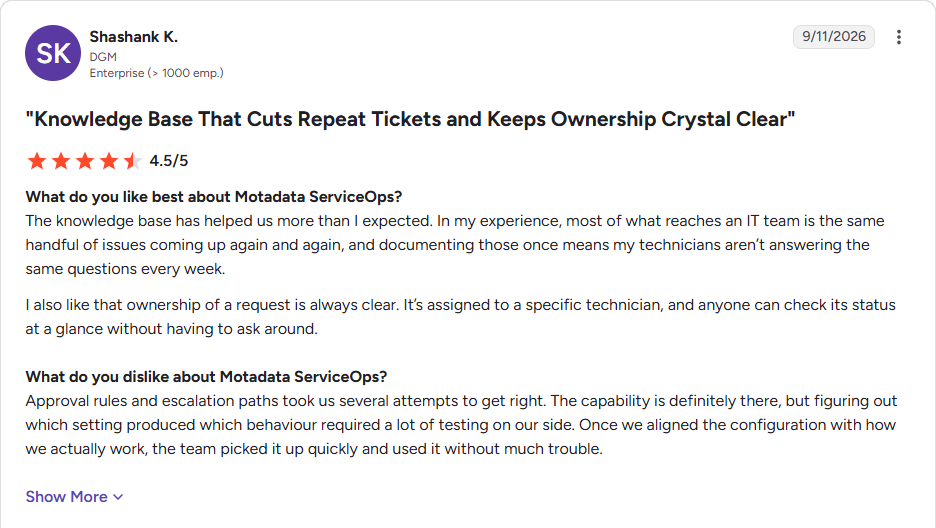
You can read the rest of the ServiceOps reviews on G2.
2. ManageEngine ServiceDesk Plus
Best for: Mid-market IT teams that want onboarding workflows inside a service desk with a public price list.
Rating: 4.2/5 on G2 across 249 reviews.
Pricing: Cloud editions start at $13 per technician per month on Standard, $27 on Professional, and $67 on Enterprise, billed annually. Standard is free for up to 5 technicians, and ManageEngine pricing adds a per-asset charge on the upper two editions.
ServiceDesk Plus takes the same route we do, treating onboarding as a catalog item whose tasks fan out to the teams involved. Its enterprise service management feature then lets HR and facilities run instances of their own under one directory, up to fifteen of them.
Published per-technician pricing is the real differentiator. Most of this category hides behind a quote form, so you can model this one yourself.
The edition structure is where to read carefully. Asset management only arrives on Professional. The ESM instances that make multi-department onboarding work sit on Enterprise, which puts the real price a long way from $13.
Pros
- The lowest published entry price of the service management tools here.
- Technical support is included in the subscription rather than sold as a plan.
- The free 5-technician Standard edition suits a small IT team testing the approach.
Cons
- Multi-department onboarding effectively needs the $67 Enterprise tier.
- The multilingual UI costs more than the English-only edition.
- No HR record, so the employment file stays in an HRIS.
- Reviewers note the product improves more slowly than newer rivals.
3. Jira Service Management
Best for: Companies already standardized on Atlassian that want HR and IT requests in the tool their engineers already open.
Rating: 4.3/5 on G2.
Pricing: Free for up to 3 agents. Standard runs about $20 per agent per month and Premium about $51 at the default 75-agent size, with annual billing cheaper. Jira Service Management pricing now sits inside Atlassian's Service Collection bundle.
Atlassian markets JSM for onboarding under its enterprise service management banner, and the logic holds up. An onboarding request becomes a Jira issue, which means it arrives with the workflow engine, the automation rules, and the board your teams already live in.
Assets covers the hardware side. Standard comes with 5,000 configuration objects, enough for a few thousand laptops before the meter starts charging $0.02 per object per month.
The honest limitation is that none of it is HR-shaped out of the box. Offer letters, e-signatures, and employment records simply are not in the product. What HR gets is a request portal, not an HR system.
Pros
- Engineering teams adopt it without training because it is already their tool.
- The free tier and published Standard pricing make a pilot easy to justify.
- Data Center remains available for organizations that cannot run in Atlassian cloud.
Cons
- No HR record, offer letters, or e-signature, so HR needs a second system regardless.
- Asset objects, Rovo AI credits, and Atlassian Guard for SAML each add to the bill.
- Configuring it for non-technical departments takes admin skill most HR teams do not have in house.
4. ServiceNow HR Service Delivery
Best for: Large enterprises already running ServiceNow for IT that want the same governance applied to employee services.
Rating: 4.3/5 on G2 across more than 400 reviews.
Pricing: Quote-based. HRSD is a separate SKU from ITSM, licensed per employee rather than per fulfiller. That means ServiceNow pricing here scales with headcount, not with the size of your HR team.
HRSD applies the same cross-department logic at enterprise scale. Lifecycle Events treat onboarding as a process that spans teams. ITSM runs on the same platform, so the access request and the asset record are already there.
Employee Center hands staff a single portal covering HR, IT, facilities, and legal. For a company with 20,000 employees and a dozen separate service desks, that consolidation is the entire pitch.
Cost and effort are the counterweights. Per-employee licensing means the bill grows with the company, not with the team using it. We mostly see HRSD where ServiceNow is already the standard, rarely as a first purchase.
Pros
- The deepest cross-department onboarding model available, with real dependency handling.
- Governance, audit, and access separation are built for regulated enterprises.
- The partner ecosystem is the largest in service management.
Cons
- Per-employee licensing makes it expensive for a company with a small HR team and a large headcount.
- Employee Center Pro and other add-ons are separate line items on the quote.
- Implementation needs partner time that a mid-sized organization rarely has.
- It makes little sense unless ServiceNow is already your IT platform.
5. Rippling
Best for: Companies that want HR, payroll, and IT provisioning from one vendor and are willing to consolidate to get it.
Rating: 4.8/5 on G2 across more than 16,000 reviews.
Pricing: Quote-based and built from modules. The required platform starts near $8 per user per month plus a monthly base fee around $40. Payroll, benefits, and device management are each priced on top of that.
Rippling is the only tool here built around both halves of onboarding from the start. Sign the offer and it creates the Google Workspace account, grants Slack and GitHub access, and orders the laptop.
The employee graph underneath is the useful part. Department, role, and location are stored as attributes, so access rules read as policy rather than a list of names.
Two things temper the enthusiasm. Getting full value means replacing your payroll provider as well as your IT provisioning, which is a far bigger project than an onboarding purchase implies. It is also SaaS only, so regulated buyers run out of road quickly.
Pros
- The strongest IT provisioning of any tool that also does payroll.
- Review volume is enormous, so there is real peer evidence to read before you buy.
- Offboarding is genuinely one click, which is rare and which auditors like.
Cons
- Modular pricing means the quote rarely resembles the $8 starting rate once payroll, benefits, and devices are added.
- The platform fee is mandatory, so there is no cheap single-module entry.
- SaaS only, with no self-hosted option.
- Getting full value means moving payroll, which turns an onboarding project into a finance project.
6. BambooHR
Best for: Small and mid-sized companies that want HR-led onboarding to look polished without a long implementation.
Rating: 4.4/5 on G2 across more than 5,600 reviews.
Pricing: Core starts at $10.25 per employee per month, Pro at $17.50, and Elite at $25, all quoted through the website. Companies with 25 employees or fewer are billed on a flat monthly rate instead.
BambooHR is the name the market reaches for first, and the onboarding experience explains why. Packets go out before day one, e-signatures collect the paperwork, and the new hire lands on a welcome page carrying their photo and their team.
Task templates handle the coordination. HR gives the manager one list and the new hire another, and anybody can see what is still outstanding without sending a chasing email.
What it will not do is touch your infrastructure. BambooHR can tell IT a laptop is needed, and that is where it stops. Creating the account, attaching the license, and tracking the asset all run somewhere else.
Pros
- Employees find it genuinely pleasant, which matters for a tool a new hire meets on day one.
- Implementation is short compared with enterprise HCM suites.
- Published per-employee rates make budgeting straightforward.
Cons
- No IT provisioning at all, so accounts and hardware need a second system.
- Payroll and benefits administration are US-focused, which limits international teams.
- Compliance training, benchmarking, and analytics sit on the Pro and Elite tiers.
- Reporting flexibility draws complaints once a company passes a few hundred people.
7. Workday HCM
Best for: Global enterprises that need onboarding tied to workforce planning, compliance, and payroll in dozens of countries.
Rating: 4.1/5 on G2.
Pricing: Quote-based, per employee, on annual contracts. Published analyst estimates put large deployments in the region of $400 to $500 per employee per year, with rates falling as headcount rises.
Workday is the system of record for a large slice of the Fortune 500, and onboarding inherits that depth. Business processes are configurable down to the individual approval step, country by country.
The 2026 change worth knowing is on the AI side. The Illuminate agents announced in 2025 were rebranded as Sana agents in early 2026, after Workday acquired Sana. Documentation and sales decks currently use both names.
For onboarding specifically, the limits are familiar. There is no IT provisioning, configuration is a specialist skill, and the platform is priced for organizations far larger than most buyers here.
Pros
- Nothing else here handles multi-country employment law at this depth.
- Onboarding connects to succession, learning, and headcount planning on one record.
- Enterprise security and audit capability are mature and well documented.
Cons
- Reviewers describe it as exceptionally complex, and configuration needs certified specialists.
- No IT provisioning, so accounts and devices are somebody else's project.
- Implementation timelines run in quarters, not weeks.
- The 4.1 G2 score is the lowest in this comparison, largely on usability.
8. HiBob
Best for: Fast-growing mid-market companies where onboarding is as much about culture and connection as paperwork.
Rating: 4.5/5 on G2 across more than 2,600 reviews.
Pricing: Quote-based per employee. Independent estimates put it roughly in the $16 to $25 per employee per month range, usually with a one-time implementation fee on top.
HiBob, usually called Bob, built its reputation on the parts of onboarding other HRIS vendors treat as decoration. Pre-boarding pages, team introductions, and buddy assignments are first-class features here.
Underneath the polish sits a capable workflow engine. Onboarding tasks route to managers, IT, and facilities with deadlines attached to each one. The sites and clubs model then handles companies running several offices or legal entities.
The gaps are the usual HRIS ones, plus one. There is no provisioning, and payroll depends on partners in several markets. The implementation fee is the addition, and it catches buyers who budgeted only for the subscription.
Pros
- The employee-facing experience is the best in this list at mid-market scale.
- Multi-entity structure is handled properly rather than bolted on.
- Reviewers consistently call out how little training rollout needed.
Cons
- No published pricing, and a one-time implementation fee is standard.
- No IT provisioning, so accounts and devices need a separate tool.
- Payroll depends on partners in several countries rather than being native.
- It is priced for mid-market, which makes it expensive for a team under 50.
9. Gusto
Best for: US small businesses where onboarding really means getting someone onto payroll and benefits correctly.
Rating: 4.6/5 on Software Advice across more than 4,100 reviews.
Pricing: Simple is $49 per month plus $6 per person, Plus is $80 plus $12, and Premium is $180 plus $22. Remote I-9 verification and E-Verify are add-ons, and there is no contract.
Gusto starts from payroll and works outward, which suits the companies buying it. A new hire gets an invitation, enters their own details, and signs their forms. They land in payroll and benefits without anyone in HR rekeying a thing.
Compliance is handled where it bites a small business hardest. Form W-4 and Form I-9 are built in, and registering for tax in a new state is an add-on rather than a project.
Scope is the honest limit. There is no IT provisioning, no asset tracking, and little of the people-ops depth a 500-person company expects. Per-person fees also rise sharply across tiers, so growth changes the arithmetic.
Pros
- Published, predictable pricing with no contract and month-to-month cancellation.
- Compliance paperwork most small businesses dread is handled by default.
- Setup is measured in days, which suits a company hiring its first few employees.
Cons
- No IT provisioning or asset tracking of any kind.
- Per-person costs climb steeply from Simple to Premium.
- US-centric, so international hiring needs another tool.
- Priority support is a $30 per month add-on plus $3 per person on the lower tiers.
10. Deel
Best for: Companies hiring employees and contractors across borders, where onboarding means local compliance.
Rating: 4.7/5 on G2 across more than 15,000 reviews.
Pricing: The HR platform has a free tier for smaller teams. Contractor management starts near $49 per contractor per month, global payroll around $29, and employer of record from $599 per employee per month.
Deel solves a problem the other nine barely acknowledge. Hiring someone in Portugal or Brazil drags in local contracts, local benefits, and local tax law. Deel's employer of record service absorbs all three on your behalf.
Onboarding reflects that. Contracts generate against the right jurisdiction, and the new hire is paid in their own currency without you opening a local entity.
Two caveats are worth pricing in. The $599 EOR headline covers the platform layer only, so employer taxes, benefits markup, and FX spread land on top. IT provisioning is the other one. Device management exists, but it does not approach what Rippling does.
Pros
- Unmatched for hiring in a country where you have no legal entity.
- The free HR tier makes it a cheap system of record for a distributed startup.
- Review volume across products is among the highest in HR software.
Cons
- The published EOR rate excludes employer taxes, benefits markup, and FX, so budgets need a margin.
- Withdrawal and payment fees draw complaints in reviews.
- IT provisioning is limited next to the platforms built for it.
- Most of the value disappears if everyone you hire is in one country.
What Changes for Employee Onboarding Software in 2026?
The split this guide opens with is closing, and it is closing from both ends. Three moves over the last two years show where the category is going.
HR platforms are buying their way into IT: Rippling built device and app management into an HR product, and buyers now ask about it first. The rest of the HRIS field answers with integrations rather than provisioning.
Service management vendors are courting HR: Atlassian files its onboarding guide under ITSM and ESM. ServiceNow sells HRSD as a separate per-employee product. Both are selling an IT platform to an HR budget.
AI agents arrived, then got renamed: Workday's Illuminate agents became Sana agents in early 2026, and ServiceNow moved Now Assist under its Otto brand. The capability is real. The branding is moving faster than the documentation.
The practical effect for a buyer is that category labels no longer tell you much. An HR tool might provision accounts, and a service desk might be handling your offer-letter approvals.
We would ignore what a vendor calls itself and test the two capabilities apart. Ask for a demo where a signed offer produces a completed form and a working login. Watch which half gets skipped.
What Should You Look for in Employee Onboarding Software?
Five checks settle most onboarding evaluations. Run every one of them inside a trial, because no feature page answers them honestly.
Onboard a fake hire end to end: Push one through from signed offer to working login. Count how many times a person has to nudge it along by hand.
Try a non-standard role: Onboard a part-time contractor in another country. Standard employees work in every demo, and the exceptions are what break in production.
Offboard them again: Terminate the test record and see what closes on its own. Open accounts and unreturned hardware are the two findings auditors write up.
Ask who the licensed users are: Per employee, per technician, and per module produce wildly different bills at identical headcount. Model yours at double your current size before signing.
Check where the data sits: Employment records carry personal data. If a regulator or a works council insists it stays in-country, most of this list is already eliminated.
We would park the welcome-experience question while you compare. Every tool here sends a tidy welcome email, and not one of them matters if the new hire cannot log in.
Which Employee Onboarding Tool Is Right for Your Team?
Most teams land in one of five situations. The table below maps each one to a sensible starting point.
Your Situation | Start With | Why |
Onboarding stalls between HR, IT, and facilities, and you already run a service desk | Motadata ServiceOps | One catalog request drives every department task, with assets and approvals on the same record, on-prem or SaaS |
You want one vendor for payroll, benefits, accounts, and laptops | Rippling | The only platform here that natively does both HR and IT provisioning |
You have under 200 employees and no dedicated IT team | BambooHR | Polished HR-led onboarding at a published per-employee rate with a short implementation |
ServiceNow is already your IT platform and headcount is in the thousands | ServiceNow HR Service Delivery | Lifecycle Events model cross-department onboarding on the platform you already run |
You hire in countries where you have no legal entity | Deel | Employer of record handles local contracts, benefits, and payroll without an entity |
If two rows describe you, run both trials against the same test hire in the same week. The first two rows are the real fork.
You either keep the employment record in HR and run the work through unified service management, or you consolidate it all into one HR and IT platform. The second route comes with a migration.
Paper comparisons flatter whoever writes the better docs. One real new hire settles it faster than we could.
Pick the Right Employee Onboarding Software for Your Business
Choosing employee onboarding software comes down to a single question asked twice. Who completes the paperwork, and who creates the access?
An HRIS answers the first question well and the second not at all. A service management platform answers the second and leaves the employment record alone. Only Rippling and ServiceNow seriously claim both, and each one asks you to consolidate more than you may want to.
The cheapest fix is usually smaller than a platform migration. Keep the HR system you have, then move the cross-department work into a workflow automation layer that reaches IT, facilities, and finance. In our experience that is where the lost first week gets recovered.
Author
Poonam Lalani
Content Strategist
Poonam Lalani is a B2B content strategist and writer with a background in computer engineering and experience across enterprise technology domains, including AI, cloud, DevOps, data engineering, and IT operations. She specializes in creating research-driven content that simplifies complex ideas and supports product education, thought leadership, and business growth.