Best BMC Helix Alternatives for 2026: 10 ITSM Tools Compared
BMC Helix is changing hands. That is why so many BMC Helix alternatives searches are happening right now. On 17 June 2026, the private equity firm Montagu agreed to buy a majority stake in BMC Helix.
The deal is a carve-out from BMC Software, which KKR owns. Helix becomes a standalone company. Its product pages have already moved to a new domain at helixops.ai.
So your next renewal goes to a different company than the one that sold you the platform. That ranks high among the reasons organizations replace their ITSM tools.
Nobody outside the deal knows yet what that does to pricing or the roadmap. In my experience that doubt is what finally gets a review scheduled.
In this blog, you will see:
A ranked list of ten alternatives: Compared on deployment, pricing model, and free trial. Shortlist before you read a single review.
A full review of every tool: Including the cons, with ratings from G2 and Capterra.
A module-by-module replacement map: BMC Helix is a suite. The map shows which category replaces ITSM, Discovery, CMDB, and Operations Management.
The licensing details that drive the cost: Named versus concurrent seats, license floors. The non-production rule quietly doubles some estimates.
By the end, you will know which two or three of these tools are worth a trial in your own setup.
How We Evaluated These 10 Tools
We scored each tool on what a BMC Helix or Remedy shop needs to keep when it moves.
Five factors carried the most weight.
CMDB and asset depth: Helix customers usually have years of data in the CMDB. In our reviews, a tool with a thin asset model is never a real replacement.
Deployment choice: Whether on-premises and private cloud are truly supported. That is often the reason a team is unhappy with the SaaS-only path.
Licensing clarity: Public rates, license minimums, and whether concurrent licensing is offered at all.
ITIL practice coverage: Change enablement, problem management, and service level management, measured against ticket handling alone.
Migration effort: How much of a custom Remedy or Helix build survives the move. Also how long a real rollout runs.
Prices below are public information at the time of writing and they shift often. Treat them as a starting point for a quote, not a final number. Ratings come from G2 and Capterra. One habit saves money on any of these.
Check what the vendor counts as a licensed user before you compare features. Named, concurrent, and fulfiller seats can differ threefold at the same headcount.
The 10 Best BMC Helix Alternatives Compared
Here is the shortlist of the top alternatives to BMC Helix, ranked in order.
Tool | Best For | Deployment | Pricing Model | Free Trial |
1. Motadata ServiceOps | Regulated and on-premises teams wanting accredited ITIL 4 coverage | On-premises, private cloud, public cloud, SaaS | Quote, named or concurrent, modular | 30 days |
2. ServiceNow ITSM | Large enterprises replacing Helix at full scale | SaaS | Quote, per fulfiller | Developer instance only |
3. Ivanti Neurons for ITSM | Teams pairing ITSM with endpoint and patch management | SaaS, on-premises | Quote, modular | On request |
4. Jira Service Management | Engineering-led IT teams already on Atlassian | Cloud, Data Center | Free tier, then per agent | Yes |
5. Freshservice | Mid-market teams that want a fast, simple rollout | SaaS | Published, per agent | 14 days |
6. ManageEngine ServiceDesk Plus | Value-conscious teams that still need on-premises | Cloud, on-premises | Published, per technician | 30 days |
7. SolarWinds Service Desk | Plain ITSM with asset management built in | SaaS | Published, per technician | 30 days |
8. TOPdesk | Service desks shared across IT, HR, and facilities | SaaS | Published, per agent | On request |
9. SysAid | Mid-market IT teams that want heavy automation | SaaS, on-premises | Quote, per admin | On request |
10. HaloITSM | Teams that want every module in one flat rate | Cloud, on-premises | Published, per agent, all inclusive | 30 days |
The deployment column rules out candidates fastest. If your data has to stay inside your own perimeter, four of these ten drop off. That is before you reach the reviews.
Detailed Overview of the 10 Best BMC Helix Alternatives in 2026
1. Motadata ServiceOps
Best for: Regulated teams that want accredited ITIL 4 service management with on-premises as a first-class option.
Rating: G2 4.5 | Capterra 4.5
Motadata ServiceOps puts the service desk, IT asset management, and patch management on one platform. They share a single CMDB. That scope matters against BMC Helix. Covering that same ground in Helix means three separate lines. You license ITSM, Discovery, and Client Management. ServiceOps is listed in the PeopleCert ATV directory as ITIL 4 compliant across 12 practices. The claim is accredited rather than asserted.
Deployment decides these reviews more often than any feature does. We see it settle the shortlist in the first meeting. BFSI, government, and telecom teams leaving Remedy often need data to stay inside their own perimeter, and the Helix upgrade path steers them toward SaaS. ServiceOps runs on-premises, in a private cloud, or in a public cloud. The PeopleCert ATV listing names all three as supported operating models.
Pros
- Deployment choice is real: On-premises and private cloud are supported operating models in the PeopleCert listing. Neither is a dead-end path.
- Modular licensing: ITSM, ITAM, and patch management can be bought on their own or together.
- Concurrent licensing: Shift-based desks license a pool instead of buying a seat per technician.
- Multi-tenant by design: MSPs and shared services groups run many entities from one instance.
Cons
- Smaller review footprint: Public review volume is a fraction of what ServiceNow or Freshservice carry. Peer proof takes more digging.
- Pricing is quote-based: There is no public per-seat rate. A like-for-like comparison needs a conversation first.
- Thin marketplace: Nothing close to the ServiceNow Store exists. A niche integration is more likely to need the REST API.
- The agentic AI module is new: AI Studio has a short public track record next to features that have shipped for years.
- Not a developer workflow tool: Teams that want the service desk inside Jira and Confluence will find the fit awkward.
Pricing: Subscription, tiered by users and assets, with annual and monthly terms. Named and concurrent licensing are both available. ITSM, ITAM, and patch management can be bought separately. A 30-day free trial is offered, and large deployments are custom quoted.
The IT team at Bellosonica Auto Component India credits the AI-driven recommendations and automated routing for how they now handle tickets.
A star rating compresses a lot of detail into a single number. This is how the platform reads to a team that runs it every day.
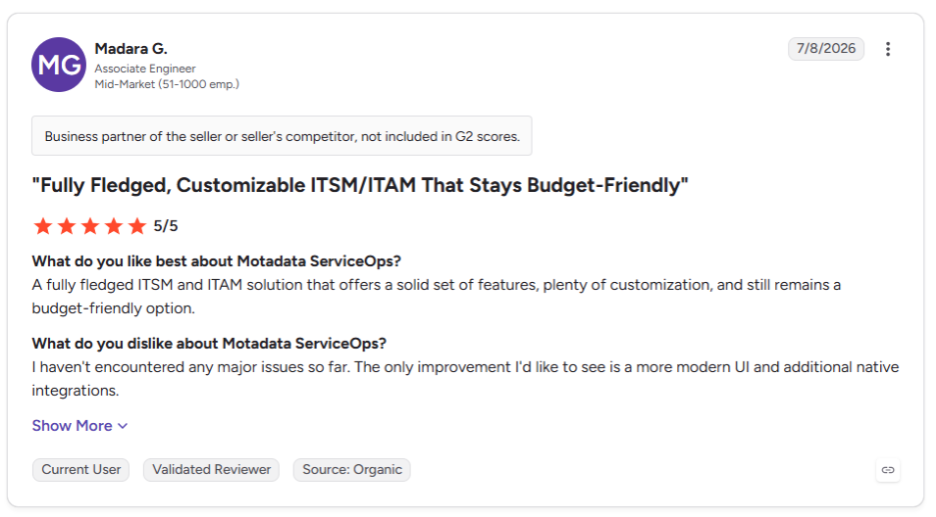
You can read the rest of the ServiceOps reviews on G2.
2. ServiceNow IT Service Management
Best for: Large enterprises that want the deepest platform available and can staff it.
Rating: G2 4.3 | Capterra 4.5
ServiceNow is the closest like-for-like swap for BMC Helix at enterprise scale. It is the destination named most often when a Helix or Remedy shop re-platforms. The data model, CMDB, and discovery depth all compare well.
The Now Platform also reaches past IT into HR, security operations, and customer workflows. The ecosystem advantage is real. The ServiceNow Store and partner network mean most integration problems are already solved.
The catch sits in what it repeats. ServiceNow brings back both of the complaints that push teams off Helix, cost and rollout length. Swapping Helix for ServiceNow answers the vendor question. It does not answer either of those. We see this swap work best above 5,000 seats.
Pros
- Deepest platform here: The broadest feature set and the largest partner network of any tool on this list.
- Reaches well past IT: HR, legal, facilities, and security operations run on the same data model.
- Roadmap certainty: A public company with a steady release cadence and no open ownership questions.
Cons
- Highest cost of the ten: Licensing plus rollout puts it beyond most mid-market budgets.
- Long rollouts: Six months or more is normal. That is the same complaint that drives teams off Helix.
- Needs dedicated admins: Running it well takes certified in-house skills or a retained partner.
Pricing: Quote only, priced per fulfiller. ITOM, discovery, and AI are separate subscriptions. ServiceNow pricing puts ITSM Standard at $90 to $100 per fulfiller per month. ITSM Professional with AI runs $150 and above.
3. Ivanti Neurons for ITSM
Best for: IT teams that want service management and device management under one vendor.
Rating: G2 4.2 | Capterra 4.2
Ivanti Neurons for ITSM competes with Helix on breadth rather than on simplicity. It covers the standard ITIL practices. It also connects the service desk to Ivanti's endpoint and patch tooling.
A ticket about a failing laptop reaches the device without a second product. For teams already running Ivanti on endpoints, the case for consolidating is strong.
The on-premises option matters to a Remedy audience more than most vendors realize. We watch that one requirement rule out otherwise strong candidates in regulated reviews. Ivanti survives that cut where SaaS-only platforms do not.
Pros
- Real on-premises path: One of the few enterprise ITSM tools that still treats self-hosting as a first-class option.
- Fewer vendors: Service desk and device management sit under one contract.
- Modular buying: Start with ITSM and add pieces later without re-platforming.
Cons
- No public pricing: Every figure in circulation is a third-party estimate, and the ranges disagree widely.
- Setup effort is high: Standing it up properly takes specialist time, so it will not fix a complexity complaint.
- Uneven interface: The suite grew by acquisition, and the modules do not all feel like one product.
Pricing: Quote only, priced per agent and split by module. Ask for the endpoint bundle price at the same time, because that pairing is where the value case usually sits.
4. Jira Service Management
Best for: IT teams whose developers already work in Jira and Confluence every day.
Rating: G2 4.3 | Capterra 4.5
Jira Service Management puts the service desk on the same work graph as software delivery. An incident, the bug behind it, and the change that fixes it all live in one system.
For an IT team that supports its own engineers, that removes a handoff Helix never solves. Rollout takes weeks rather than months.
The gap for a Helix shop is asset and configuration depth. It does not match the CMDB, discovery, and service mapping a mature Remedy setup has spent years building. If your configuration data is the crown jewel, this is a step down.
Pros
- Fastest rollout of the ten: Teams already on Atlassian can pilot it in days.
- Free tier for testing: Up to three agents at no cost, with no time limit.
- Strong developer uptake: Engineers use it without training because the interface is already familiar.
Cons
- Weakest CMDB of the enterprise options: Asset management is Premium-only and shallower than a Helix CMDB.
- Steep jump to Premium: Premium costs about two and a half times Standard, and that is where the asset features live.
- Less suited to non-IT work: HR and facilities workflows are possible, but they are not the natural fit.
Pricing: A free plan covers up to three agents. Jira Service Management pricing puts Standard at $20 per agent per month and Premium at $51.42. Enterprise is billed annually on a quote.
5. Freshservice
Best for: Mid-market IT teams that want a working service desk in weeks and public pricing to budget against.
Rating: G2 4.6 | Capterra 4.5
Freshservice is the cleanest answer if your main complaint about BMC Helix is admin weight. It ships a modern service catalog, assets, and workflow automation. Most agents learn the interface with no formal training.
Where it stops short is deep enterprise customization. A heavily customized Remedy build will have to give some of that up, including its custom forms and approval logic.
The AI tooling is a separate purchase too. We would budget that line from the start rather than meet it at renewal.
Pros
- Public pricing: Four tiers with visible rates, which makes budgeting simple.
- Short rollout: Most teams are live in weeks, not quarters.
- Full-feature trial: Fourteen days with unrestricted access to everything.
Cons
- AI is a paid add-on: Freddy AI Copilot costs $29 per agent per month on top of a Pro or Enterprise seat.
- SaaS only: No on-premises or private cloud option, which rules it out for many regulated buyers.
- Sharp tier jumps: Change and problem management sit in the Pro tier at $99, five times the Starter rate.
Pricing: Starter at $19 per agent per month, Growth at $49, and Pro at $99, all billed annually. Enterprise is custom quoted. The Freddy AI Copilot add-on costs $29 per agent per month.
6. ManageEngine ServiceDesk Plus
Best for: Cost-conscious teams that need real ITIL coverage and a genuine on-premises build.
Rating: G2 4.2 | Capterra 4.4
ManageEngine ServiceDesk Plus delivers incident, problem, change, and asset management at a fraction of what Helix costs. It does so in both cloud and on-premises editions at the same price structure.
For a Remedy shop that wants to keep self-hosting and cut spend, it is the most direct swap here. The compromise shows up in polish and in scope creep across the wider ManageEngine catalog. A full stack can mean several purchases and several consoles.
Pros
- Lowest entry price here: Standard starts at $13 per technician per month.
- On-premises is fully supported: Not a legacy tier, and priced the same as cloud.
- Thirty-day trial per instance: Enough time to test a real migration slice.
Cons
- Dated interface: Functional, but less refined than Freshservice or TOPdesk.
- Features split across products: Endpoint management and analytics are separate ManageEngine purchases.
- Large jump to Enterprise: Change and project management sit at $67 per technician per month, five times the Standard rate.
Pricing: Standard from $13 per technician per month, Professional from $27, and Enterprise from $67. Cloud and on-premises are priced the same way. Motadata ServiceOps vs ManageEngine SDP puts the two side by side.
7. SolarWinds Service Desk
Best for: Teams that want ITSM, assets, and employee service in one product without enterprise weight.
Rating: G2 4.3 | Capterra 4.6
SolarWinds Service Desk covers incident, problem, change, and release management. Asset discovery is included at every tier. It takes far less setup than Helix demands. Most teams reach production inside a quarter. It suits a team that wants ITIL structure with no platform group to maintain it.
Deployment is the limit. SaaS-only means it cannot answer a data residency requirement, which removes it from most Remedy shortlists before features matter. It fits mid-sized estates better than the biggest ones.
Pros
- Asset management is not an upsell: Discovery and inventory come with the base subscription.
- Fast to configure: Sensible defaults mean less setup work than Ivanti or ServiceNow.
- Unlimited end users: You license technicians, not the people raising tickets.
Cons
- SaaS only: No on-premises option, which removes it from most regulated shortlists.
- Steep tier jump: Advanced costs well over double Essentials, and several common features sit above the entry tier.
- Lighter at the top end: Automation depth trails the enterprise platforms on complex approval chains.
Pricing: Essentials at $39 per technician per month billed annually, Advanced at $99, and Premier at $124. A 30-day free trial is offered. Motadata vs SolarWinds compares the two directly, and SolarWinds alternatives covers the rest of the field.
8. TOPdesk
Best for: Organizations where IT, HR, and facilities all run service desks.
Rating: G2 4.1 | Capterra 4.4
TOPdesk is the strongest pick when service management is not only an IT concern. Facilities, HR, and IT each run their own desk on one platform. Staff see a single portal. That is the use case BMC Helix Digital Workplace serves inside the Helix suite.
For a pure IT swap it is less compelling, because it replaces the service management half of Helix and nothing else. Choose it for the shared services story, not for technical depth. We watch it win on facilities more often than on IT.
Pros
- Best non-IT coverage here: Facilities and HR are first-class use cases, not adaptations.
- Predictable bill: Unlimited tickets and assets mean cost tracks headcount only.
- Strong staff experience: The self-service portal is consistently the best-rated part of the product.
Cons
- Higher per-agent cost: Entry pricing runs above Freshservice and well above ManageEngine.
- No AIOps or monitoring: It replaces the service management half of Helix and nothing else.
- Lighter on deep IT customization: Complex change workflows are harder to model than in the enterprise platforms.
Pricing: Three tiers, Essential, Engaged, and Excellent, published per agent per month and starting near £51. All tiers include unlimited assets, end users, and tickets.
9. SysAid
Best for: Mid-market IT teams that want heavy automation without a platform group to run it.
Rating: G2 4.5 | Capterra 4.5
SysAid puts automation and AI at the center of the service desk rather than treating them as an upgrade. Ticket sorting, routing, and first-line replies are automated out of the box.
The platform also extends into enterprise service management for HR and other teams. It runs in the cloud or on-premises, which keeps it viable where hosting rules apply.
The friction is that you cannot price it on paper. Its asset and configuration model is lighter than what a large Remedy estate carries. Plan a data audit before you commit. We would get the quote first, well before it reaches a shortlist.
Pros
- Strong automation at mid-market scale: More works out of the box than in tools at a similar price.
- On-premises still offered: A real option rather than a legacy holdover.
- Steady review scores: Rated well on both G2 and Capterra across a large sample.
Cons
- No public pricing: Listings disagree by more than 50 percent, so only a quote tells you the real number.
- Lighter CMDB: Configuration modeling is less developed than in Helix, ServiceNow, or Motadata ServiceOps.
- Enterprise minimums apply: The top tier is reported to start at a set agent count, so confirm the floor early.
Pricing: Quote only. Public listings cluster between $79 and $108 per admin per month depending on tier. The spread across sources is wide, so treat those as rough context.
10. HaloITSM
Best for: Teams that want every module in one flat per-agent price with no tier decisions.
Rating: G2 4.8 | Capterra 4.7
HaloITSM takes the opposite approach to BMC Helix on licensing. There is one price per agent, and every feature is included. That covers ITSM, enterprise service management, asset management, project management, and the AI tooling. For a Helix shop tired of module-by-module quotes, that alone is worth a call.
Two things to weigh before you shortlist it. The flat rate only pays off at scale, so a small desk buys modules it will never open. Peer evidence is also thinner than the high scores suggest, so at enterprise size we would ask for references.
Pros
- Simplest licensing here: No tiers, no module upsells, and no premium AI charge.
- Concurrent costs the same as named: Shift-based desks get the benefit without paying extra for it.
- Thirty-day trial with no card: Every module is open during the evaluation.
Cons
- Small review sample: The high G2 score rests on a fraction of the reviews the incumbents carry.
- Flat rate suits larger teams: Small desks pay for modules they will not use.
- Branding is in transition: The product now sits under Halo branding on a new domain. Current documentation is harder to find.
Pricing: One published rate per agent per month billed annually, currently £66, with every module included. Named and concurrent licenses cost the same. A 30-day free trial runs without a credit card.
Which BMC Helix Product Are You Replacing?
BMC Helix is a suite, not a single product. So the right replacement depends on which parts of it you actually run. ITAM, ITSM, and ITOM are separate categories with separate vendors.
Here is how the Helix portfolio maps to replacement categories.
BMC Helix Product | What It Does | Replacement Category |
BMC Helix ITSM | Incident, problem, change, release, and service level management | ITSM, which is what the ten tools above cover |
BMC Helix CMDB | Configuration items and relationship mapping | ITSM platforms with a native CMDB, or one of the enterprise CMDB tools |
BMC Helix Discovery | Automated asset and dependency discovery | IT asset management, or IT asset discovery inside your ITSM platform |
BMC Helix Digital Workplace | Employee portal and service catalog | Self-service portals and an IT service catalog |
BMC Helix Business Workflows | Non-IT requests for HR, legal, and facilities | |
BMC Helix Operations Management with AIOps | Monitoring, event correlation, and operational intelligence | Observability and AIOps, handled by tools like Motadata ObserveOps |
BMC Helix Client Management | Endpoint and client device management | Unified endpoint management, a separate market from ITSM |
BMC HelixGPT | Generative and agentic AI across the suite | Native AI inside whichever platform you choose |
That map explains why a Helix replacement is often two purchases. The service management half has ten credible options.
The operations management half is a separate review entirely. A few vendors cover both halves, including our own unified observability and ITSM platform.
Why Do Teams Look for a BMC Helix Alternative?
Teams look for a BMC Helix alternative for three main reasons. Here they are in detail.
1. The Platform Is Being Carved Out Into a Separate Company
BMC Helix is becoming a standalone business. BMC announced the plan to create two independent companies in October 2024.
Then on 17 June 2026, Montagu agreed to buy a majority stake in BMC Helix, in a carve-out from KKR-owned BMC Software. BMC keeps a minority stake. The deal is subject to regulatory approval.
The split is already visible. Documentation and the company blog have moved to helixops.ai alongside the product pages, which makes this structural rather than a rebrand.
None of it makes the product worse tomorrow. It does mean your renewal counterparty, support organization, and roadmap owner all change at once. A new private equity owner also tends to revisit pricing and packaging within the first two years.
Buyer attention has already moved. The IT research site PeerSpot tracks its share of ITSM buyer interest at 5.2 percent as of August 2026. A year earlier it was 8.9 percent.
2. Non-Production Environments Consume Production License Capacity
BMC Helix licenses your development, test, and staging tenants at the same capacity as production.
The BMC Helix subscriber documentation states that non-production environments are configured with the same license capacity as the production environment.
For most teams that is the largest hidden number in a Helix quote. Say you license 200 named users in production and run a sandbox and a staging tenant. You are sizing all three at 200. Very few rival platforms work this way. Almost nobody models it in the first business case.
Two other licensing details are worth checking on your own contract.
There is a three-license floor: BMC's documentation requires a minimum of three named user licenses. That applies even to customers who mainly buy concurrent licensing.
Named users are sold in blocks: The BMC Helix ITSM listing on AWS Marketplace prices the suite license per ten named users. Seat counts round upward.
None of these are unusual on their own. Together they explain why the quoted seat count and the seat count you needed are often different numbers.
3. The Remedy Migration Is Already on Your Budget
If you still run Remedy on-premises, you are being asked to fund a re-platform whether you switch vendors or not. BMC's own materials describe Helix ITSM as the next generation of Remedy.
BMC also sells a dedicated Action Request System migration service to move custom on-premises Remedy applications onto Helix.
That changes the arithmetic on switching. The usual argument for staying is that migration is costly and disruptive. But when a migration is happening either way, you are no longer comparing moving against standing still. You are comparing two migrations, and the extra cost of a different destination is far smaller than it looks.
We have sat in these budget conversations, and the migration line is usually approved before anyone opens a vendor comparison. This is the moment we see teams reopen decisions they had treated as settled for a decade. Either way you face the usual ITSM implementation pitfalls, so the destination matters more than the act of moving.
None of this makes BMC Helix a weak platform. Its CMDB is mature, and it covers ITIL change management best practices as well as anything in the category. Its AIOps work is credible enough that Gartner named BMC Helix a Visionary in the 2026 Magic Quadrant for Observability Platforms.
Teams with deep BMC infrastructure get real continuity from staying. The question is whether that continuity is still worth what it now costs.
Is BMC Remedy the Same as BMC Helix?
BMC Remedy and BMC Helix are the same product line at different stages. Remedy is the older on-premises platform. BMC Helix ITSM is its successor, which BMC describes as the next generation of Remedy delivered on your choice of cloud.
The distinction matters for two reasons. Remedy customers who have not moved yet run a platform BMC is steering them away from. Their real choice is between a BMC-led migration and a move to a different vendor.
Helix customers who already moved are further along. Their question is about renewal terms and ownership instead.
The searches differ too. People looking for BMC Remedy alternatives are usually still on-premises and put self-hosting first.
People looking for BMC Helix alternatives more often compare SaaS platforms on cost. Both groups land on a similar shortlist. The deployment column decides it for the first group.
How Do You Choose the Right BMC Helix Alternative?
Start from the constraint that rules out the most options. That is almost always deployment or budget, not features. Match your situation to a starting point below, then trial two tools rather than five.
Your Situation | Start With | Why |
Data must stay in your own perimeter | Motadata ServiceOps | On-premises and private cloud are named as supported operating models in the PeopleCert ATV listing |
Replacing Helix at full enterprise scale | ServiceNow ITSM | The only tool here that matches Helix on CMDB depth and platform reach |
You already run Ivanti for endpoints | Ivanti Neurons for ITSM | Puts service management and device management under one contract |
Your IT team supports an engineering group | Jira Service Management | Puts service requests and development work in one system with no handoff |
Complexity is the main complaint | Freshservice | Public pricing and a rollout measured in weeks instead of quarters |
Budget is the binding constraint | ManageEngine ServiceDesk Plus | Starts at $13 per technician per month and keeps a real on-premises build |
You want ITSM and assets without a platform team | SolarWinds Service Desk | Asset discovery is included at every tier and setup is quick |
Facilities and HR share the service desk | TOPdesk | Multi-department desks behind one staff portal, with unlimited tickets and assets |
You want automation without heavy setup | SysAid | Sorting and routing are automated out of the box at mid-market pricing |
You want one price with everything included | HaloITSM | Every module ships in a single per-agent rate, and concurrent costs the same as named |
One check before you sign anything. Export a sample of your current configuration items. Run them through each finalist's import during the trial.
CMDB migration is where we watch these projects slip, and a demo environment will never show you that. The rest of the sequence for selecting the right ITSM solution follows one rule. Test the thing that is hardest to undo.
Replace BMC Helix With Motadata ServiceOps
BMC Helix earned its position. The CMDB is mature, and the change management model is one of the most complete in the category. Teams running BMC infrastructure alongside it get integration no other vendor can match. If your deployment works and your renewal terms hold, staying is defensible.
Motadata ServiceOps fits the teams where that stopped being true. It brings the service desk, IT asset management, CMDB, and patch management under one platform. Twelve ITIL 4 practices are accredited through PeopleCert.
It runs on-premises, in a private cloud, or as SaaS, with all three named as supported operating models. Running ITSM for BFSI usually means service data cannot move to a public cloud. Government and telecom teams hit the same wall. That pairing is why their review ends here.
We would not recommend it for everyone. If you need the largest integration marketplace in the industry, ServiceNow is the better answer. If your service desk is really an extension of your engineering backlog, pick Jira Service Management.
It will fit better than we will. You may also want to compare public per-seat rates on a spreadsheet this afternoon. Freshservice and ManageEngine publish theirs while we quote.
Here is what we would say instead. If you are weighing BMC Helix alternatives, the shape of the decision is usually the same. Your renewal is coming, the ownership is changing, and your data cannot leave your own building.
A 30-day trial against your real configuration items will tell you more than another month of vendor comparison pages.
FAQs
Who are BMC Helix's main competitors?
ServiceNow is BMC Helix's primary enterprise competitor. Ivanti Neurons for ITSM, Jira Service Management, ManageEngine ServiceDesk Plus, and Freshservice follow. Gartner also lists IBM, Atlassian, Microsoft, and SolarWinds among the vendors buyers compare against BMC Helix.
Is BMC Helix being sold?
Yes. On 17 June 2026, Montagu agreed to buy a majority stake in BMC Helix in a carve-out from BMC Software, which KKR owns. BMC keeps a minority stake, and Helix becomes a standalone company. The deal is subject to regulatory approval.
How much does BMC Helix ITSM cost?
BMC Helix publishes no list pricing, and every product page routes to a quote request. The model is public though. There are Standard and Advanced tiers. Licensing is named or concurrent SaaS, with a floor of three named licenses. Non-production tenants are sized at full production capacity.
Can you replace BMC Helix without losing your CMDB data?
Yes, but the import decides your timeline. Most platforms here accept CI records and relationships through CSV or API. Custom relationship types and heavily modified Remedy forms usually need remapping. Test the import with real data during your trial.
Is Motadata ServiceOps a good BMC Helix alternative?
It fits best when you need accredited ITIL 4 coverage plus on-premises or private cloud deployment. That is the combination Helix customers in regulated industries look for. ServiceOps carries 12 PeopleCert-certified practices. CMDB, asset lifecycle, and patch management ship in one platform.
Author
Ramya Shah
Technical Writer
Ramya Shah is a technical content writer with a computer engineering background and roots in automotive journalism. He covers IT Service Management, observability, IT operations, and AI-driven automation. An early adopter of AI-assisted writing workflows, he turns complex IT processes into clear, engaging content optimized for search and answer engines (AEO), lifting content output and organic visibility.