All Features
Platform Features
Regulatory Readiness Under SEBI LAMA with Motadata ObserveOps
Accelerate regulatory compliance under SEBI’s LAMA framework with Motadata ObserveOps. Automate reporting, ensure audit readiness, and meet governance mandates.
The recent high-frequency trading scenario works in a way that every second matters. Even the smallest technical glitch can lead to huge disruptions in transactions and cause severe financial and reputational losses. To overcome this, the Securities and Exchange Board of India (SEBI) requires stock exchanges to monitor stockbrokers' trading systems through the API based Logging and Monitoring Mechanism (LAMA), an initiative aimed to improve transparency, reliability, and accountability in digital trading infrastructure.
Motadata supports this vision by offering an out-of-the-box LAMA integration that enables you (i.e., if you are a stockbroker, exchanges, and related financial institution) to stay compliant with SEBI’s regulations effortlessly.
What is LAMA?
LAMA is the API based logging and monitoring mechanism that stock exchanges have deployed under SEBI's technical glitch framework. It is designed to:
Monitor real-time health of applications and infrastructure.
Collect and retain comprehensive log.
Enable secure log forwarding to a centralized system.
Support early detection of outages, anomalies, and performance bottlenecks.
Maintain accountability with secure audit trails and long-term storage.
According to SEBI’s definition, any malfunction happening in a stockbroker’s system, including issues in hardware, software, networks, or third-party services that results stoppage or degradation in system performance for five continuous minutes or more is a technical glitch.
Stock exchanges use LAMA to monitor the trading systems of stockbrokers, helping ensure system integrity, transparency, and quick incident response.
How Motadata Helps Implement LAMA
Motadata’s integrated LAMA module allows financial institutions to:
Create and manage LAMA profiles directly within the platform.
Automate token generation and lifecycle.
Collect all SEBI-mandated KPIs from multiple geographies (groups).
Send logs and metrics securely to the stock exchange's LAMA platform every 5 minutes.
Note: LAMA standards set a default data interval of 5 minutes, so it is suggested that you do not alter this input during configuration in Motadata.
Creating a LAMA Profile in Motadata
To integrate LAMA profile in Motadata ObserveOps, users must first create a LAMA Profile. This is where you (brokers and/ or financial firms) input their authentication details.
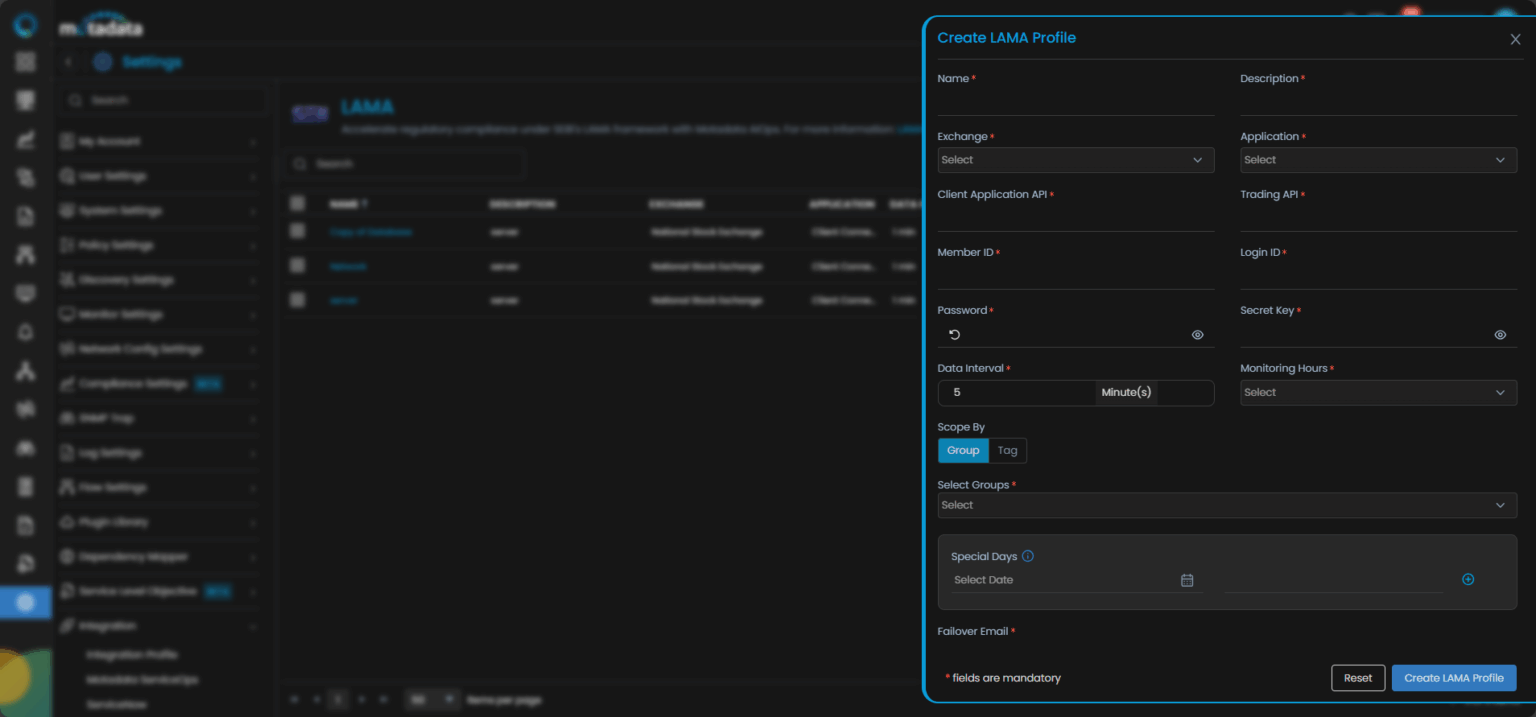
Field | Description |
Exchange | Select the exchange you’re reporting to (e.g., NSE, BSE, etc.). |
Application | Select the type of the trading application being monitored (client connectivity, OMS, RMS, etc.). |
Member ID | It is a unique ID assigned by the exchange to your trading entity. |
Login ID | It is a user login credential used to authenticate with the stock exchange's LAMA platform via the LAMA API. |
Client Authentication API | The endpoint used for generating the secure access token for LAMA API communication. |
Trading API | The API is used to send trading performance data to the stock exchange's LAMA platform. |
Password & Secret Key | These are the credentials needed to securely authenticate and generate access tokens. |
Data Interval (Default: 5 mins) | The frequency at which data is collected and reported. The default interval is set for 5 minutes as per LAMA standards. It is advised to not to update this interval. |
Monitoring Hours | Define the hours during which your system is monitored (e.g., trading hours from 9:00 AM – 4:00 PM). |
Scope by (Group or Tag based) | This selection allows you to filter your infrastructure application(s) and/ or devices for which you want to report your data with LAMA based on either by Group (location) or Tag (function). |
Special Days | Specify non-trading or holiday days when reports shouldn’t be sent. |
Failover Email | Provide email address to be notified if data transmission to LAMA fails. |
Motadata ObserveOps helps in a way that the data gets automatically packaged and forwarded to LAMA at the pre-set intervals, and no manual intervention is required.
Once the profile is created, users can view and monitor the health of each trading entity under the LAMA Integration.
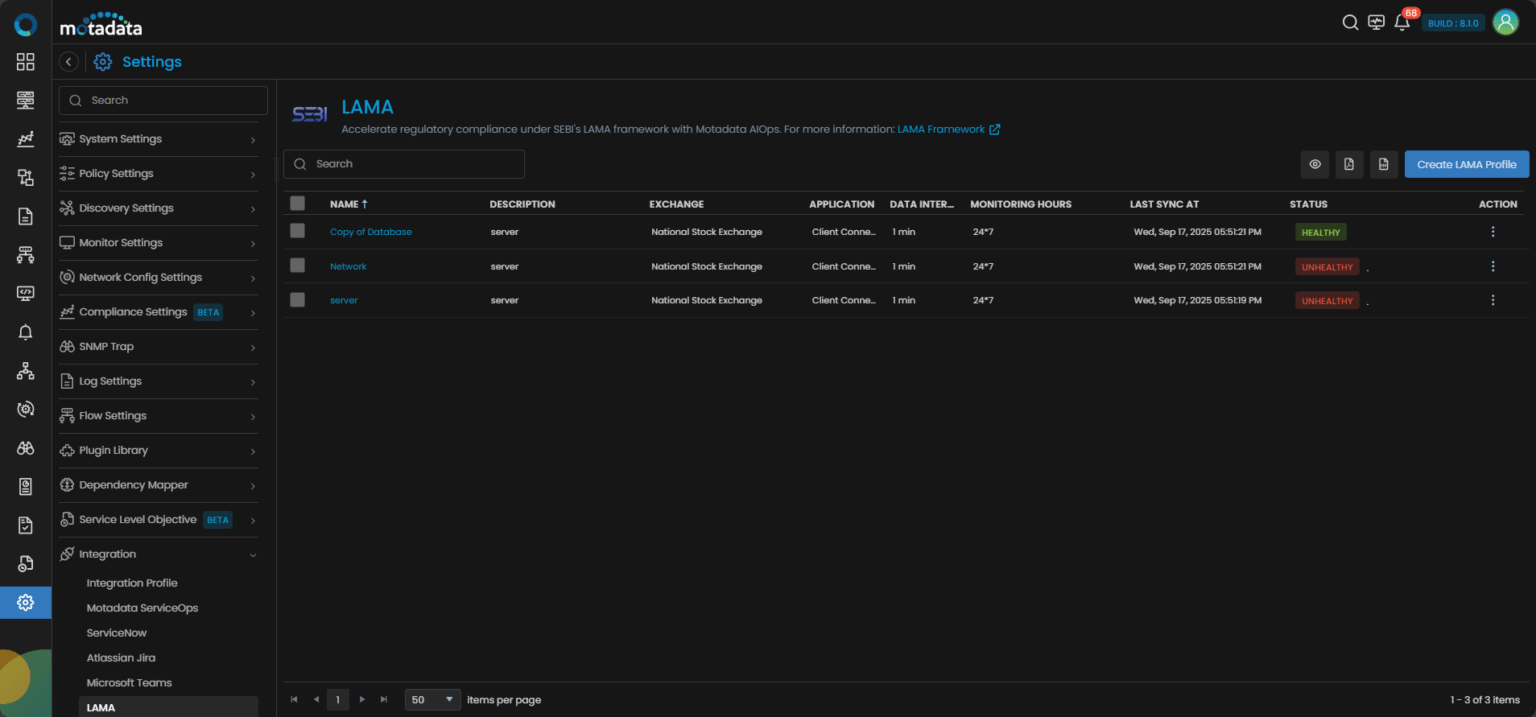
Each row represents a trading segment like NSE Equity, BSE Currency, or MCX Commodities, along with its metadata. You can find Status displaying Healthy/Unhealthy value. The action icon provides options to Edit, Clone and Delete the LAMA profiles.
Compliance Made Seamless
With Motadata, you can:
Define multiple LAMA profiles for different exchanges.
Automated data transfer and health status reporting.
Track sync failures and correct them immediately.
Stay audit-ready with minimal operational overhead.
Whether you’re monitoring NSE Derivatives or BSE Currency, the platform keeps your LAMA compliance on autopilot mode, while letting you focus on what matters most to you for trading and business continuity.
Embrace LAMA With Confidence
Motadata empowers institutions to move beyond compliance and adopt a proactive, resilient, and insightful approach to SEBI’s LAMA framework. With built-in KPIs, secure API integrations, and centralized dashboards, you gain full visibility and control without the complexity.
Ready to implement Regulatory Readiness Under SEBI LAMA with Motadata ObserveOps?
Discover how Motadata ObserveOps can help you monitor your infrastructure in real-time and respond to issues instantly.