10 Reasons You Need Network Monitoring Tools in 2026
Network monitoring tools are software solutions that continuously observe network infrastructure -- routers, switches, servers, firewalls, applications, and cloud resources -- to detect performance issues, security threats, and capacity constraints before they impact users and business operations.
Nothing's worse than learning your network is down from a user complaint. Too often, IT teams lack the visibility to catch performance issues before they escalate, leaving them reactive instead of proactive. And once an outage hits, every minute counts: industry research estimates that network downtime costs enterprises between $5,600 and $9,000 per minute in lost productivity, customer dissatisfaction, and operational disruption.
Network monitoring tools change this equation. They watch your routers, switches, servers, hypervisors, and applications in real time -- catching problems before users notice them and giving IT teams the data they need to resolve issues fast.
Here are ten reasons why network monitoring tools have become essential for every IT organization.
1. Automated Network Device Discovery
The foundation of effective monitoring starts with knowing what's on your network. In large environments with hundreds or thousands of network devices, manually tracking every IP address, switch, and endpoint is impractical and error-prone.
Network monitoring tools automate this process. With a single scan, they discover all devices across your infrastructure -- managed and unmanaged, wired and wireless, physical and virtual. Scheduled discovery scans also serve as a security function: they'll alert you whenever unauthorized devices appear on your network, giving you early warning of potential rogue access points or shadow IT.
For organizations managing dynamic environments where assets are constantly being added, moved, or decommissioned, automated discovery ensures your monitoring baseline stays current without manual audits.
2. Network Topology Visualization
Once you've discovered your network assets, monitoring tools map the connections between them -- creating visual topology diagrams that show how devices interconnect, where traffic flows, and which dependencies exist.
This bird's-eye view is invaluable for root cause analysis. When a downstream application fails, the topology map reveals which upstream device or connection is the actual culprit. Instead of troubleshooting in isolation, your team sees the full picture and resolves issues faster.
Topology visualization also supports change planning. Before modifying network configurations, teams can assess the impact on dependent devices and services -- reducing the risk of configuration-driven outages.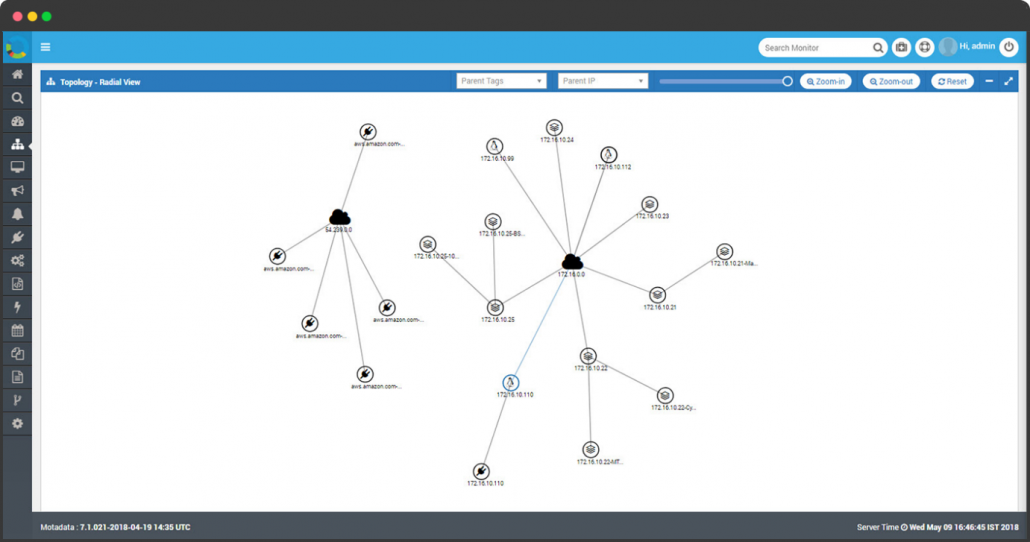
3. Real-Time Health Status Monitoring
Regardless of how many vendors supply your network equipment, monitoring tools provide unified health visibility. They determine whether each device is reachable, responding normally, degraded, or completely offline.
Health checks use protocols like ICMP (ping), SNMP polling, and port testing to assess device status continuously. Results feed into your topology map as color-coded status indicators -- green, yellow, red -- giving teams an instant visual assessment of network health.
When a device enters a warning state, automated alerts notify the responsible team before the problem cascades to dependent systems. This proactive approach transforms your team from firefighters into preventers.
4. Long-Term Hardware Trend Analysis
Monitoring tools don't just show current status -- they track performance over time. Graphical trend reports for bandwidth utilization, CPU load, memory consumption, and disk capacity give IT administrators the data they need for informed capacity planning.
For example, if a server's disk usage is growing at 5% per week, trend analysis projects when that server will hit capacity -- weeks before it actually happens. If CPU utilization on a database server spikes every quarter-end during financial reporting, historical trends help you plan resource scaling in advance.
This forward-looking capability turns monitoring from a reactive tool into a strategic planning asset. Instead of reacting to capacity emergencies, your team prevents them.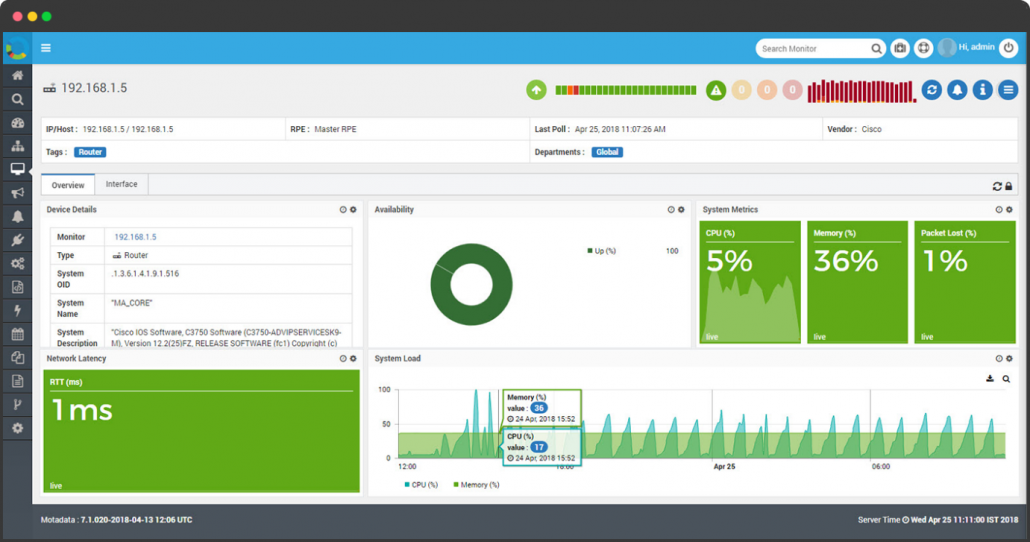
5. Bandwidth Utilization and Traffic Analysis
Bandwidth monitoring reveals what's actually consuming your network capacity. Using NetFlow, sFlow, jFlow, or IPFIX data from switches and routers, monitoring tools break down traffic by application, user, protocol, and destination.
This granularity answers critical questions: Which applications consume the most bandwidth? Which users are responsible for congestion? Is someone streaming video during business hours, or is a backup job competing with production traffic?
Traffic analysis also identifies overburdened devices and pinpoints root causes for performance degradation. When your team can see exactly where bottlenecks form and why, they can implement targeted fixes -- QoS policies, traffic shaping, or infrastructure upgrades -- rather than throwing bandwidth at a problem blindly.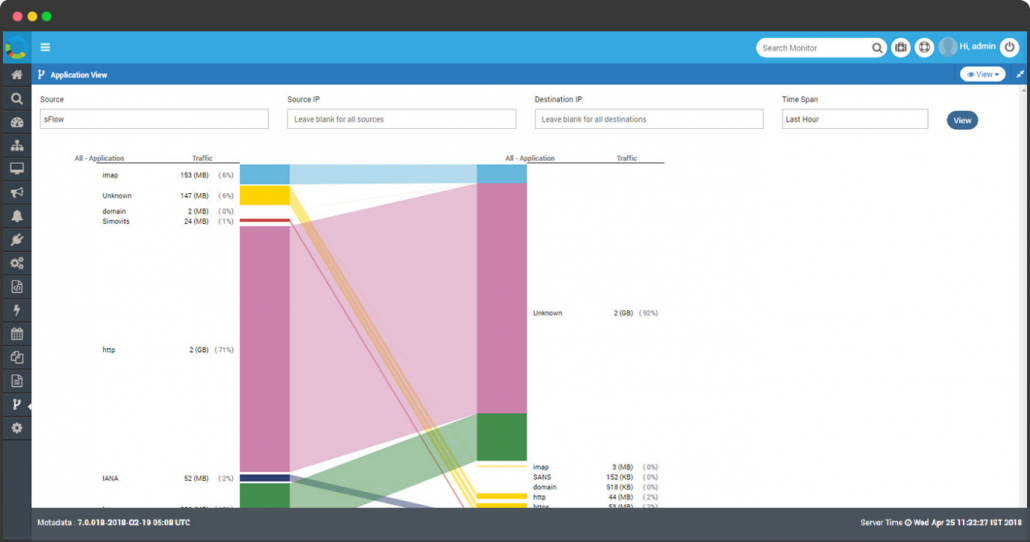
6. Intelligent Alerting and Faster MTTR
Knowing a device is offline is just the starting point. What matters is how quickly you can identify the root cause and resolve it. Modern network monitoring tools combine threshold-based alerting with AI-driven root cause analysis and event correlation to dramatically reduce mean time to resolution (MTTR).
Smart threshold configuration lets you catch problems before they become outages. If CPU utilization crosses 85% or memory consumption approaches capacity, alerts trigger investigation while there's still time to intervene. Event correlation groups related alerts into unified incidents, cutting through alert noise so your team focuses on the actual problem rather than its symptoms.
Integration with ticketing systems, collaboration platforms, and on-call schedules ensures that alerts reach the right people through the right channels -- email, SMS, webhooks, or chat notifications.
7. Network Configuration Management
Managing configurations across hundreds of network devices is one of the most error-prone tasks in IT operations. Network configuration management capabilities built into monitoring tools automate backup, change tracking, and restoration of device configurations.
When someone modifies a router's configuration and the network destabilizes, configuration management lets you identify exactly what changed, when, and by whom. Rolling back to a known-good configuration takes seconds instead of hours.
Centralized configuration backups also serve as disaster recovery insurance. If a device fails or needs replacement, you can restore its full configuration to the new hardware without manual reconstruction.
8. Cloud and Hybrid Environment Monitoring
Modern networks extend far beyond the on-premises data center. Monitoring tools now cover cloud platforms -- including AWS, Microsoft Azure, and Google Cloud -- alongside traditional infrastructure, providing unified visibility across hybrid environments.
Cloud monitoring tracks resource utilization, performance metrics, and cost consumption. It answers questions like: Why did this month's AWS bill jump 30%? Which cloud workloads are over-provisioned? Are cloud-hosted applications meeting their SLA targets?
For organizations adopting multi-cloud strategies, unified monitoring prevents the fragmentation that comes from using separate tools for each cloud provider. One platform, one view, complete visibility.
9. Business Service Management
IT infrastructure exists to support business services. Business service management capabilities map the connection between infrastructure components and the business services they power -- CRM, ERP, billing, e-commerce, and customer-facing applications.
This business-centric view transforms monitoring from a technical exercise into a business intelligence function. Instead of just knowing that a server is under load, you know that your customer-facing checkout system is at risk. Priorities become clearer, and resource allocation decisions align with business impact.
IT teams that monitor business services alongside infrastructure earn more credibility with leadership because they speak in business outcomes, not just technical metrics.
10. Automated Reporting and Performance Analytics
Manual report generation wastes skilled engineers' time on repetitive tasks. Network monitoring tools automate scheduled reports -- availability summaries, performance trends, SLA compliance, and capacity forecasts -- delivered in PDF or spreadsheet format to the right stakeholders at the right time.
Automated reporting also supports compliance requirements. When auditors request network availability data or security incident histories, the reports are already generated and waiting -- no scramble required.
Custom dashboards complement scheduled reports by providing real-time views tailored to different audiences: executives see business service health, network engineers see device-level details, and security teams see threat indicators.
See Your Entire Network in Real Time with Motadata
Motadata's AI-native network monitoring platform delivers automated discovery, intelligent alerting, real-time topology mapping, and AI-driven anomaly detection across your entire infrastructure -- on-premises, cloud, and hybrid. One platform for complete network visibility.
Ready to stop firefighting and start preventing? Explore Motadata Network Monitoring and see what proactive network operations look like.
FAQs
How do network monitoring tools detect problems before users notice?
They detect anomalous traffic patterns that may indicate intrusions, DDoS attacks, or data exfiltration. They identify unauthorized devices on the network, track configuration changes that could introduce vulnerabilities, and provide the forensic data needed for security incident investigation.
What's the difference between network monitoring and network management?
Network monitoring focuses on observing and alerting -- watching device health, performance metrics, and traffic patterns. Network management is broader, encompassing monitoring plus configuration management, provisioning, firmware updates, and policy enforcement. Most modern tools combine both capabilities.
Can network monitoring tools work across multi-vendor environments?
Yes. Modern monitoring tools use vendor-neutral protocols (SNMP, NetFlow, sFlow, REST APIs) to discover and monitor devices from any manufacturer. This multi-vendor support is essential for enterprise networks where routers, switches, firewalls, and servers come from different vendors.
How do network monitoring tools help with security?
They detect anomalous traffic patterns that may indicate intrusions, DDoS attacks, or data exfiltration. They identify unauthorized devices on the network, track configuration changes that could introduce vulnerabilities, and provide the forensic data needed for security incident investigation.