ITIL Service Desk Best Practices: A Practitioner's Guide to Productivity, Metrics, and Optimization
The ITIL service desk is the single point of contact between an IT organization and its users — responsible for handling incidents, service requests, and communications across the IT service lifecycle.
A service desk is only as good as the practices behind it
Here's a pattern most IT managers recognize: your service desk handles tickets, but response times are creeping up. Technicians spend half their day on repetitive password resets. The knowledge base exists, but nobody uses it. SLAs are technically being met, but users still complain. You've got a service desk — what you don't have is a well-run service desk.
The difference between a service desk that survives and one that actually drives business value comes down to practices. Not just any practices — the ones that move specific needles: faster first-contact resolution, lower ticket volume through self-service, better use of your team's time, and metrics that tell you something useful.
This guide covers 15+ ITIL service desk best practices organized by what they improve: productivity, metrics, optimization, and knowledge management.
What Is an ITIL Service Desk?
The ITIL service desk is a core component of the ITIL (Information Technology Infrastructure Library) framework. It serves as the centralized hub — the single point of contact — between your IT organization and everyone who uses IT services.
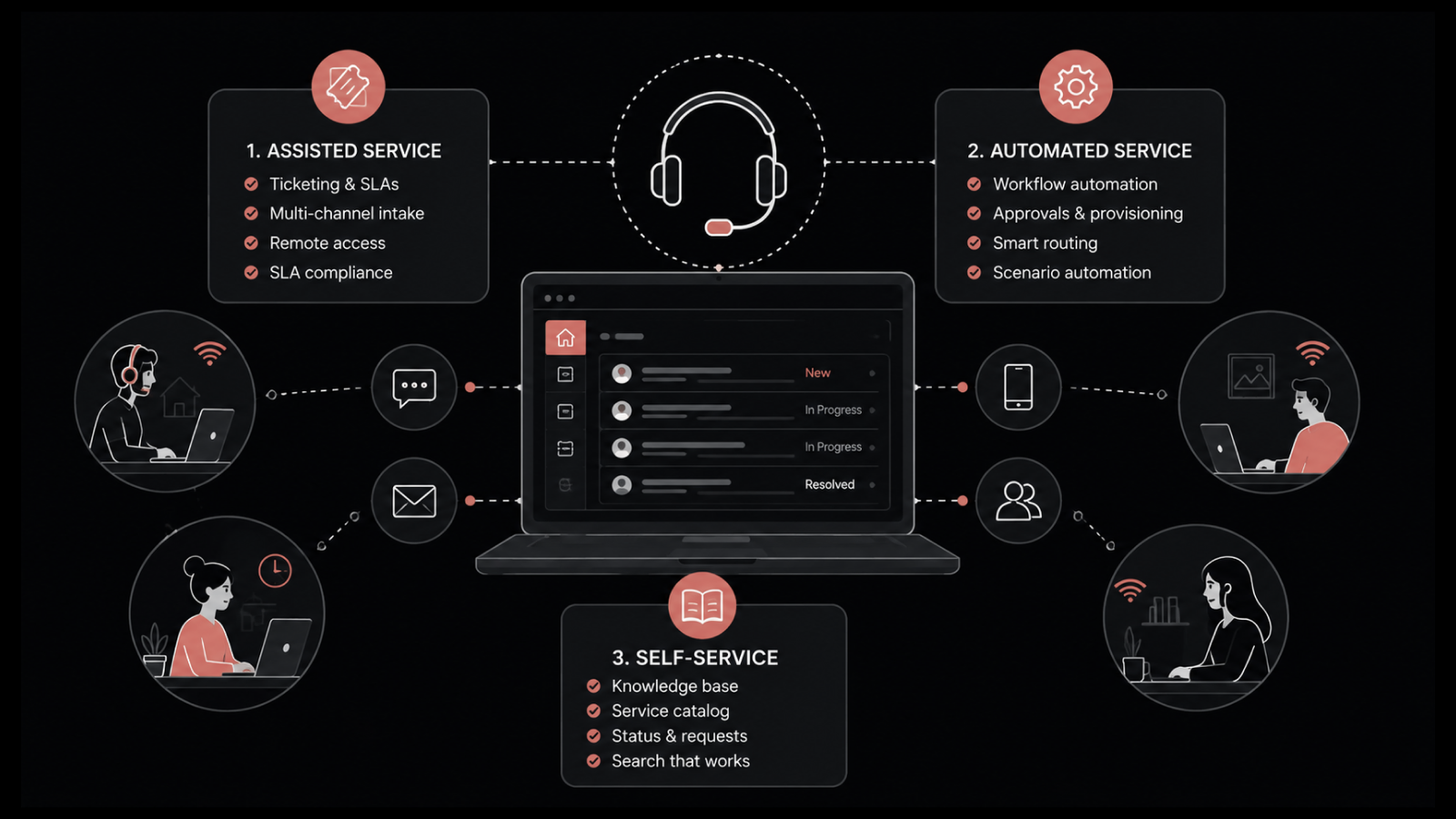
Think of it as the front door to IT. Every incident report, service request, question, and complaint flows through the service desk. Its job is to:
Log and categorize every incoming request
Prioritize based on business impact and urgency
Route to the right team or technician
Communicate status and updates to users
Track resolution against SLA targets
Document solutions for future reference
A service desk isn't the same as a help desk. A help desk is reactive — it fixes things when they break. A service desk is proactive — it manages the full lifecycle of IT service delivery, from request to resolution to continuous improvement.
Best Practices for Service Desk Productivity
Productivity at the service desk isn't about working faster — it's about working smarter. These practices help your team handle more with less friction.
1. Customize your ITSM tool to match your business
Out-of-the-box configurations rarely fit your actual workflows. Modern ITSM tools offer deep customization — custom forms, workflow builders, and configurable service catalogs. Take the time to align the tool with how your team actually works. Generic setups create workarounds. Workarounds create chaos.
2. Assign tickets dynamically based on workload
Static assignment rules (round-robin, first-come-first-served) ignore reality. Some tickets take 10 minutes; others take 3 hours. Workload-aware assignment distributes tickets based on each technician's current queue, skills, and availability. This keeps resolution times consistent and prevents burnout.
3. Train everyone to handle tickets — including managers
When a major incident hits and ticket volume spikes, your service desk needs all hands on deck. Managers and senior staff who can't process basic tickets become spectators in a war room instead of contributors. Cross-train your team so everyone can triage and handle common request types.
4. Make self-service the default first step
A well-built self-service portal with an intelligent search bar, organized knowledge base, and intuitive service catalog deflects 25–40% of incoming tickets. Users get faster answers, and your technicians focus on problems that actually need human expertise. The best self-service portals feel as natural as using a search engine.
5. Use templates for common request types
Password resets, software installations, access requests — these follow the same pattern every time. Create templates with predefined fields, auto-routing rules, and standard response scripts. Templates reduce handling time and ensure consistency across technicians.
Best Practices for Service Desk Metrics
Service Desk Metrics are how you know whether your practices are working. But measuring everything your tool can track is a fast way to drown in dashboards that nobody reads.
1. Start with questions, not metrics
Don't ask "What can we measure?" Ask "What do we need to know?" If you suspect technicians are spending too much time on certain ticket types, track average resolution time by category. If users complain about communication, measure response time and CSAT. Let your questions drive your metrics, not the other way around.
2. Track these core KPIs
These are the service desk KPIs that matter most:
KPI | What It Tells You | Target Range |
|---|---|---|
First-Contact Resolution (FCR) | % of tickets resolved without escalation | 70–80% |
Mean Time to Resolution (MTTR) | Average time from ticket creation to closure | Varies by priority (P1: <4hrs, P2: <8hrs) |
Customer Satisfaction (CSAT) | User satisfaction with support experience | >85% |
SLA Compliance | % of tickets resolved within SLA targets | >95% |
Ticket Backlog | Number of unresolved tickets at any point | Trending down or stable |
Technician Utilization | How effectively technician time is used | 70–85% (avoid burnout above 85%) |
3. Combine objective data with subjective feedback
Numbers tell you what happened. User feedback tells you how it felt. A ticket might be "resolved" in your system, but the user's actual problem might persist. Use post-resolution surveys, sentiment analysis, and periodic user interviews alongside your quantitative metrics.
4. Measure consistently over time
A single metric snapshot is meaningless. Track trends weekly and monthly. Look for patterns: Are resolution times improving? Is ticket volume shifting between categories? Is CSAT trending up after you launched the new knowledge base? Consistency in measurement reveals signals that snapshots miss.
5. Report metrics that drive action
A metrics report that nobody acts on is wasted effort. Present metrics with context ("MTTR increased 15% this month because of the ERP migration") and recommendations ("Staff two additional technicians during the next migration window"). Metrics should trigger decisions, not just fill slides.
Best Practices for Service Desk Optimization
Optimization is about removing friction from the ticket lifecycle. Every unnecessary step, manual handoff, or unclear process slows resolution and frustrates users.
1. Automate repetitive ticket handling
If a ticket type follows the same resolution steps every time, automate it. Password resets, standard software installations, access provisioning — these shouldn't require a technician. Workflow automation handles them instantly or routes them through an approval process without human triage.
2. Ensure every ticket has a clear owner
Unassigned tickets are the service desk equivalent of orphaned work — nobody's accountable, so nothing happens. Auto-assignment rules ensure every ticket gets an owner the moment it's created. If the assigned technician can't resolve it, built-in escalation paths move it to someone who can.
3. Group similar incidents for pattern resolution
When the same issue hits 50 users, you don't want 50 separate troubleshooting efforts. Incident grouping identifies related tickets, links them to a single problem record, and applies one fix across all affected users. This is core ITIL problem management — and it's one of the biggest time-savers available.
4. Build SLAs with real escalation paths
A Service Level Agreement without escalation is just a promise with no enforcement. Define what happens when an SLA is about to breach: automatic escalation to the next support tier, notification to the service desk manager, priority bump for the ticket. Make escalation automatic, not dependent on someone noticing a timer.
5. Implement a priority matrix
Not every P1 is actually P1. Define a clear matrix that maps urgency (how quickly does this need fixing?) against impact (how many users or business processes are affected?) to determine priority. This removes subjectivity and ensures critical issues get handled first.
High Impact | Medium Impact | Low Impact | |
|---|---|---|---|
High Urgency | P1 — Critical | P2 — High | P3 — Medium |
Medium Urgency | P2 — High | P3 — Medium | P4 — Low |
Low Urgency | P3 — Medium | P4 — Low | P5 — Planning |
Knowledge Management Best Practices for Service Desks
A service desk without good knowledge management is a service desk that solves the same problem over and over. Here's how to break that cycle.
1. Make knowledge creation part of the resolution workflow
The best time to document a solution is right after solving the problem. Build it into your process: before closing a ticket for a new issue type, the technician writes a knowledge article. This turns every resolved incident into a resource that saves time on future tickets.
2. Open the knowledge base to end users
A knowledge base locked behind the technician portal helps technicians. A knowledge base accessible through the self-service portal helps everyone. When users can search for answers before submitting a ticket, ticket volume drops and satisfaction goes up.
3. Use AI-suggested articles
Modern service desk platforms can surface relevant knowledge articles automatically — both to technicians working on tickets and to users searching the self-service portal. This means the right answer appears before anyone has to go looking for it.
4. Maintain and retire outdated articles
A knowledge base with stale, incorrect articles is worse than no knowledge base. Schedule regular reviews — quarterly at minimum — to update articles, archive obsolete content, and flag gaps where new articles are needed.
5. Use pre-drafted response templates
For common questions that don't warrant full knowledge articles, pre-drafted response templates let technicians reply consistently and quickly. Templates ensure the same quality of communication regardless of which technician handles the ticket.
Service Desk Automation: Where to Start
Automation sounds great in theory. In practice, it works best when you focus on high-volume, low-complexity tasks first.
Start here:
Ticket routing — Auto-assign based on category, priority, and technician skills
Status notifications — Automatic updates to users when ticket status changes
SLA escalation — Auto-escalate when resolution deadlines approach
Password resets — Self-service with identity verification
Standard change approvals — Workflow-driven approval chains for pre-approved changes
Knowledge article suggestions — AI-surfaced articles during ticket creation
Avoid automating:
Complex, multi-system troubleshooting
Sensitive security incidents requiring human judgment
Anything where the resolution path isn't standardized yet
The goal isn't to automate everything. It's to automate the right things so your team spends time on problems worth solving.
Transform Your Service Desk with Motadata ServiceOps
If your service desk is stuck in reactive mode — chasing SLAs instead of beating them, drowning in repetitive tickets, and running on tribal knowledge instead of a real knowledge base — Motadata ServiceOps is built to change that. It combines AI-powered ticket routing, workload-aware assignment, built-in SLA management with automatic escalation, and a self-service portal that users actually adopt. The result: your team spends less time on ticket tennis and more time on work that matters. Start a free trial and see what a well-equipped service desk looks like.
FAQs
What is an ITIL service desk?
The ITIL service desk is the centralized point of contact between an IT organization and its users, as defined by the ITIL framework. It handles incidents, service requests, and communications, and plays a key role in maintaining service quality and user satisfaction.
How many best practices should a service desk implement at once?
Start with 3–5 practices that address your biggest pain points. Trying to implement everything at once leads to change fatigue and poor adoption. Focus on quick wins first (self-service, ticket auto-assignment, SLA escalation), then expand as those practices mature.
How do you measure service desk performance?
Track core KPIs: first-contact resolution rate, mean time to resolution, SLA compliance, customer satisfaction scores, and ticket backlog trends. Review metrics weekly, report monthly, and use trends — not snapshots — to drive improvement decisions.
What is the role of automation in a service desk?
Automation handles high-volume, low-complexity tasks — ticket routing, status notifications, SLA escalation, password resets, and standard approvals. This frees technicians to focus on complex issues that require human expertise and judgment.
How does knowledge management improve service desk performance?
Good knowledge management reduces ticket volume (users find answers through self-service), speeds up resolution (technicians access documented solutions), and ensures consistency (everyone follows the same resolution steps). The key is making knowledge creation part of the ticket resolution workflow, not a separate activity.