Network Automation for Monitoring: How to Improve Performance and Reduce Downtime
Network automation is the practice of using software to automatically configure, manage, test, and operate network devices and services. When integrated with monitoring systems, it adds proactive detection, self-healing configurations, and real-time alerting — turning reactive network management into a continuous, automated process.
Your network doesn't stop growing just because your team stays the same size. New devices get added, configurations change, and one misconfigured switch can take down services across your entire organization. If your team is still managing all of this manually, they're spending their best hours on work that software should handle.
Network automation changes that equation. It takes the repetitive, error-prone tasks — configuration pushes, compliance checks, backup scheduling, device discovery — and runs them automatically. Your team gets time back. Your network gets more reliable. And when something does go wrong, you find out in seconds instead of hours.
What Network Automation Actually Does
Network automation isn't a single tool — it's a set of capabilities that work together to reduce manual effort across your entire network operations workflow.
At its core, it handles three things. First, it discovers and maps every device on your network automatically, so your inventory is always current. Second, it pushes configurations, updates, and patches to devices in bulk — consistently and without the typos that come with manual entry. Third, it monitors performance thresholds and triggers alerts or automated responses when something crosses a line.
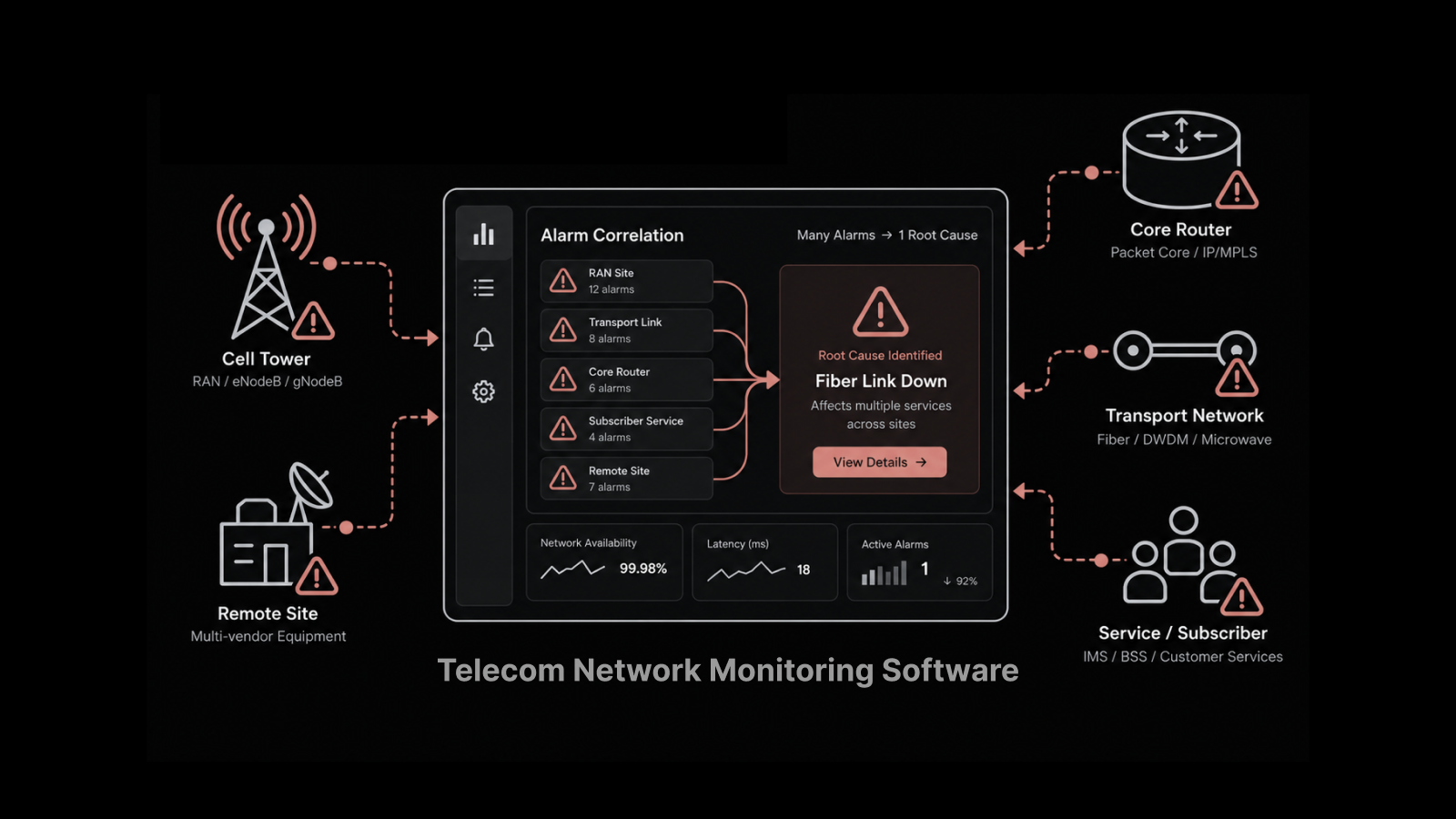
The result is a network monitoring system that doesn't just watch — it acts. Instead of waiting for a ticket to come in, your monitoring platform detects the issue, correlates it with device data, and either resolves it automatically or routes it to the right person with full context.
For NetOps teams managing hundreds or thousands of devices, this is the difference between staying ahead of problems and constantly reacting to them.
How Network Automation Improves Performance Across the Board
Network automation delivers value in two distinct areas, and both matter equally.
Automating IT Operations
Manual provisioning, configuration updates, and firmware upgrades consume enormous amounts of time. When a network admin has to touch each device individually — logging in, making changes, verifying the result — a simple update across 500 switches becomes a multi-day project.
Automation compresses that into minutes. A standardized change template pushes the update to every device simultaneously. The system verifies each change and flags any device that didn't apply correctly. No device gets missed. No configuration gets fat-fingered.
This matters most during high-pressure moments. When a security vulnerability needs an immediate configuration change across your entire network, automation is the difference between a 30-minute response and a 3-day scramble.
Expanding Network Visibility
Monitoring tools show you what's happening on your network right now. Network automation expands that visibility by uncovering dependencies, mapping relationships between devices, and tracking every configuration change over time.
When a performance issue appears, you don't just see the symptom — you see which configuration changed, when it changed, who changed it, and what other devices might be affected. This context turns troubleshooting from a guessing game into a directed investigation.
Network configuration management makes this possible by maintaining a complete history of every device's configuration state.
Five Features That Drive Operational Efficiency
1. Reliable Configuration Management, Upgrades, and Backups
A single misconfigured device can cascade into a network-wide outage. Automation prevents this by using standardized change templates that enforce consistency.
Modern network configuration management platforms let you define a configuration baseline, push it to thousands of devices at once, and verify that every device applied the change correctly. Firmware upgrades follow the same pattern — scheduled, automated, and verified.
Backup automation follows a 3-2-1 strategy: three copies of every configuration, on two different media types, with one stored off-site. If a device fails or a bad configuration gets pushed, you can roll back to a known-good state in minutes.
2. Automated Change Notifications and Rollback
Network administrators need to know about every configuration change the moment it happens. As networks scale and more operators have access, manually tracking changes becomes impossible.
Automated notifications solve this by alerting admins via syslog, SNMP traps, email, or SMS whenever a configuration changes. The alert includes who made the change, when they made it, and exactly what they changed.
If the change causes a problem, admins can roll it back immediately. There's no need to manually reconstruct the previous configuration — the system stores every version automatically.
3. Role-Based Access Control for Network Management
Alerts and backups are reactive measures. Role-based access control is preventive. By assigning permission levels — Super Admin, Operator, Read-Only — you control who can make changes in the first place.
This means junior operators can monitor and report without accidentally modifying a production router. Senior admins can push changes with full audit trails. And compliance teams can verify that only authorized personnel touched critical infrastructure.
4. Continuous Security and Compliance Monitoring
Vulnerability assessments run automatically against your device configurations, comparing them to security baselines and compliance frameworks. When a device drifts from its approved configuration, the system flags it immediately.
This proactive approach catches compliance violations before an auditor does. It also identifies security gaps — outdated firmware, weak encryption settings, open ports that shouldn't be — and either alerts your team or remediates automatically.
Compliance reports generate on schedule, giving leadership and auditors the documentation they need without pulling engineers off their regular work.
5. Complete Configuration History and Comparison
Every configuration change is logged with timestamps, user attribution, and before-and-after snapshots. This history serves three purposes.
First, it simplifies troubleshooting. When a problem starts at 3:47 PM, you can check exactly what changed at 3:45 PM. Second, it supports compliance by providing a complete audit trail. Third, it enables configuration drift detection — the system compares current configurations against approved baselines and highlights any unauthorized deviations.
Where AI-Driven Automation Takes Network Monitoring Further
Traditional network automation follows rules: if X happens, do Y. AI-driven network automation goes further by identifying patterns, predicting failures, and recommending optimizations that rule-based systems can't.
For example, an AI-powered monitoring system might notice that a specific switch's CPU utilization spikes every Tuesday at 2 PM, correlating it with a scheduled backup job on a connected server. It doesn't just alert — it recommends rescheduling the backup to avoid the resource contention.
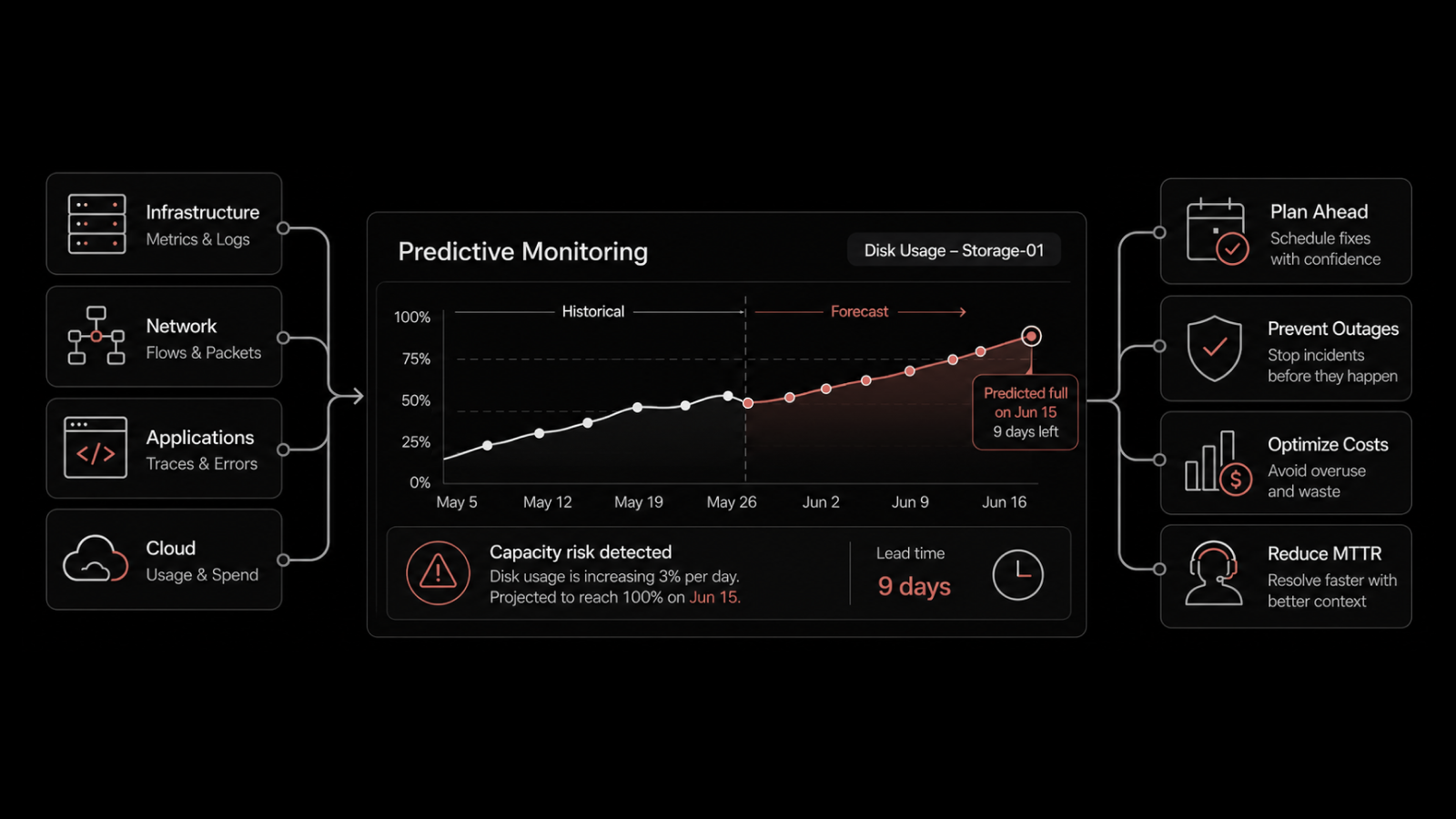
This predictive capability is where network automation and AIOps converge. Instead of reacting to problems after they affect users, you address them during planning — before they cause any impact.
AI-driven anomaly detection also catches subtle issues that static thresholds miss. A 5% increase in packet loss might not trigger a traditional alert, but an AI model that knows your normal baseline will flag it as unusual and worth investigating.
Building the Business Case for Network Automation
Network automation isn't just a technical upgrade — it directly impacts operational costs and service reliability.
Reduced Downtime: Automated configuration management and rollback capabilities mean faster recovery from incidents. Organizations using network automation typically see 40-60% reductions in mean time to repair (MTTR).
Lower Operating Costs: Tasks that used to require an engineer's time — configuration pushes, compliance checks, backup verification — run automatically. This doesn't eliminate the need for skilled engineers, but it frees them to work on projects that drive business value.
Fewer Human Errors: Manual configuration is the leading cause of network outages. Automation eliminates the typos, missed steps, and inconsistencies that come with managing devices one at a time.
Faster Scaling: When you add 100 new devices to your network, automation means they're discovered, configured, and monitored within hours, not weeks.
Consistent Compliance: Instead of preparing for audits reactively, your network maintains continuous compliance. Reports generate automatically, and drift gets corrected before it becomes a finding.
Manage Your Network Smarter with Motadata
Motadata's AI-native platform combines network monitoring, configuration management, and automation in a single system. With pre-built integrations for major vendors like Cisco, HP, Juniper, and D-Link, you can automate device discovery, configuration pushes, compliance checks, and performance alerting from day one. The platform gives your NetOps team complete visibility across physical, virtual, and cloud infrastructure — with AI-driven insights that predict problems before they affect your users. Explore Motadata's network automation capabilities or reach out to our team for a guided walkthrough of the platform.
FAQs
How does network automation handle multi-vendor environments?
Modern network automation platforms support multiple vendors through standardized protocols and vendor-specific adapters. Motadata, for example, comes pre-integrated with Cisco, HP, Juniper, D-Link, and other major vendors. The platform abstracts vendor-specific commands behind a unified interface, so you manage your entire network from one place regardless of the hardware mix.
What happens if an automated configuration change causes a problem?
Network automation platforms maintain version-controlled backups of every device configuration. If a change causes unexpected behavior, the system can roll back to the previous known-good configuration automatically or with a single click. Automated monitoring detects the impact of changes in real time, so problems are identified within minutes.
How does network automation improve compliance auditing?
The platform continuously compares device configurations against your compliance baselines and flags any deviations. Compliance reports generate automatically on your preferred schedule. When auditors request documentation, you can produce a complete history of every configuration change — who made it, when, and what was modified — without pulling your engineering team into a data-gathering exercise.
Can network automation work with cloud and hybrid infrastructure?
Yes. Modern automation platforms extend beyond on-premises devices to manage cloud-hosted network components, virtual switches, and containerized environments. This gives your team a single view of the entire network — physical, virtual, and cloud — with consistent automation policies applied across all environments.